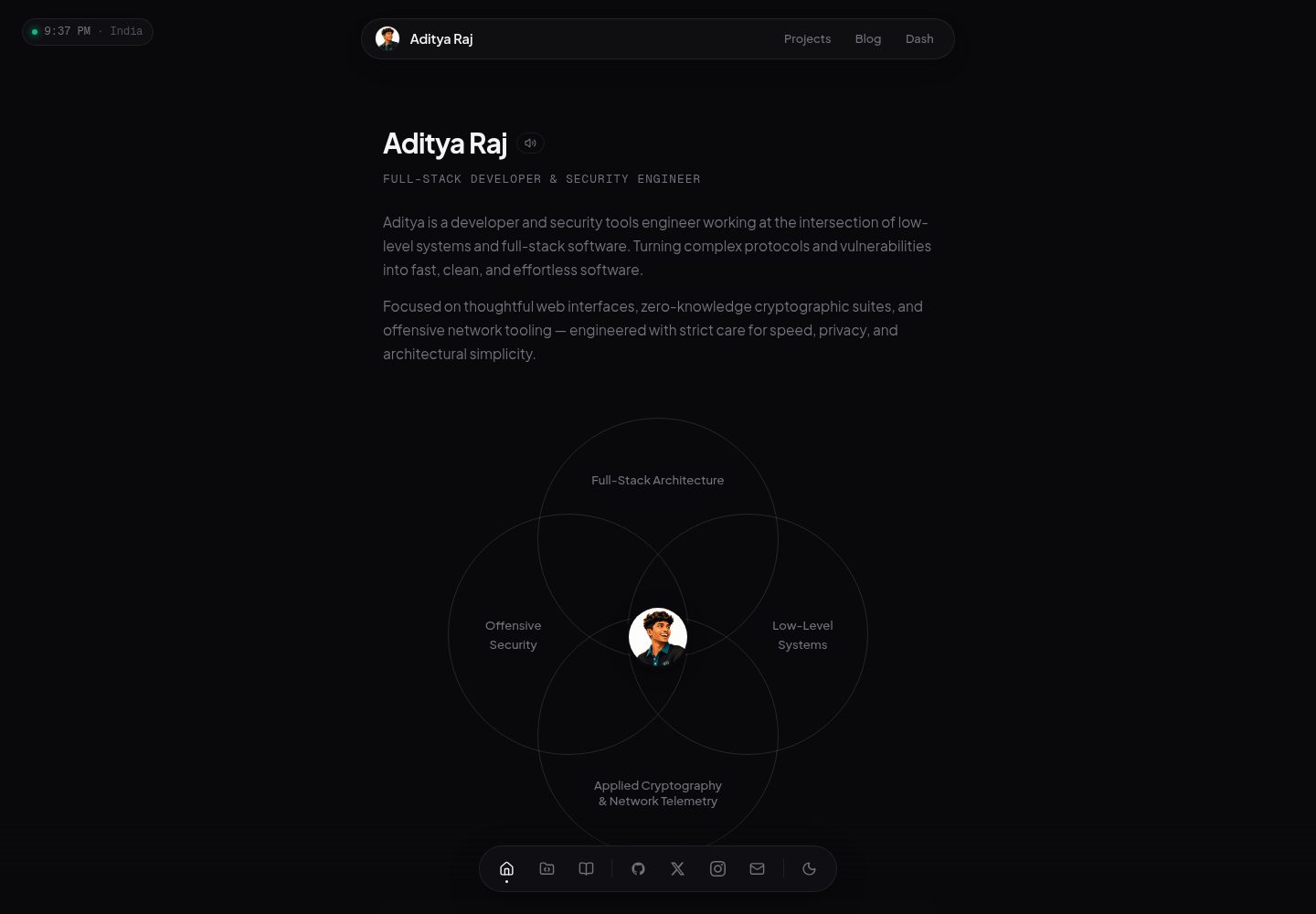
Implemented in vanilla HTML, CSS, and JavaScript; the README states no frameworks, build tools, or configuration are required
HTMLPortfolio
portfolio (rawenergon) — HTML Portfolio Template
By rawenergon
A personal portfolio template built with vanilla HTML, CSS, and JavaScript, with all content configured in data.js, requiring no frameworks or build tools.
Explore the design
Compare the page layouts and mobile experience. Open any screenshot for a closer look.
Desktop homepage1 / 3
Desktop captureTop of page
Actual screenshot captured by the server browser.
All pages & views 3
Screenshots show visual appearance; interactive behavior may differ.
Recorded 2026-10-13View source
What stands out
A quick read of the recorded project description.
All personal content is edited in the window.portfolioData object in data.js
The homepage shows only the first two projects and first two blog posts; the full lists are on the projects and blog pages and support search
Built-in dark/light theme, Ctrl+K command palette, mobile hamburger navigation, and Canvas noise effect
Optional integrations: Last.fm now playing, GitHub contributions graph, Gist status and bookmarks, CountAPI visitor counter
Provides Vercel deployment instructions; license is MIT
Template Details
This is a personal portfolio website template. The repository is rawenergon/portfolio, written in vanilla HTML, CSS, and JavaScript. The README explicitly states that no frameworks, build tools, or additional configuration are required; after cloning, you can open index.html directly to view it.
Content configuration is centralized in the window.portfolioData object in data.js, including fields for personal information (name, initials, job title, location, email, avatar, signature quote, bio paragraphs, social links), tech stack, work experience, education, projects, blog, and more. The homepage displays only the first two projects and the first two blog posts; the remaining content appears on the projects and blog pages, which support search.
The page structure includes index.html (homepage), projects.html, blog.html, and bookmarks.html. Styles are centralized in styles.css, logic in client.js, and there are icons and src directories for icons, images, and audio assets, plus an optional vercel.json deployment configuration.
Features listed in the README include dark/light theme switching with state persistence, a Ctrl+K command palette (for navigation and theme switching), a mobile hamburger navigation, a Last.fm now-playing component, a visitor counter, a GitHub contributions graph, real-time search for projects and blog posts, and a Canvas noise texture.
Optional integrations include Last.fm (requires filling in the API Key and username in client.js), GitHub contributions data (replace the username in the URL), daily status via a public GitHub Gist (status.txt, matched by local time ranges, showing Idle when no match), bookmark category data in JSON format via a public Gist, and CountAPI visitor counting (replace the username in the URL). The README does not describe the availability, quotas, or behavior upon failure of these external services, nor does it provide information on testing, browser compatibility, or accessibility.
For deployment, the README gives a Vercel workflow: push your fork to GitHub and import it into Vercel. The license is MIT.
HTMLPortfolio
Is it right for your project?
Use Cases
- Build a personal portfolio website to showcase bio, tech stack, work and education experience, projects, and blog
- Host content in a static environment or on Vercel and update information by editing data.js
- Maintain daily status and cross-device bookmark data using GitHub Gists
- Display the currently playing track from Last.fm and a GitHub contributions graph on the page
Suitable For
- Developers who want to build a portfolio with vanilla HTML/CSS/JS and do not want to introduce frameworks or a build process
- Users who can edit JavaScript data objects themselves to maintain website content
- Personal sites that need multi-page structures such as projects, blog, and bookmarks with search functionality
- Users willing to configure external services such as Last.fm, GitHub Gists, and CountAPI
Getting started & customization
Use these recorded setup notes alongside the repository instructions for your chosen version.
- 1
Fork the repository, clone your fork, and open index.html directly to view it; no build step is required
- 2
Fill in person, stack, experience, education, projects, blogs, and other content in data.js
- 3
Optional: replace lastFmApiKey and lastFmUser in client.js to enable the Last.fm component
- 4
Optional: replace the username in the GitHub contributions API URL and the username in the CountAPI URL, and configure the public Gist addresses for status and bookmarks
- 5
Deploy to Vercel: push your fork to GitHub and import the project in Vercel
License & source material
Usage conditions & limitations
Free to use · keep license noticeThis entry covers the free version under the MIT license in the public repository; the free scope is the code of this version and does not imply that external services or third-party assets are free.
Must comply with when using
- You are allowed to freely use, modify, commercially use, and distribute the code of this version.
- When distributing copies or substantial portions of the code, retain the original author's copyright notice and the full MIT license notice.
- The code is provided as is; warranties and limitations of liability are governed by the original license and applicable law.
Additional costs & items to verify
- Demo images, fonts, icons, and other third-party assets must be checked against their respective licenses; they cannot be judged solely by the code's MIT license.
- External services such as domains, hosting, databases, payments, or AI may incur additional charges.
- Enabling the Last.fm now-playing component requires filling in your own Last.fm API Key and username in client.js, which is an external service account requirement.
- The GitHub contributions graph depends on the third-party API github-contributions-api.jogruber.de; you need to replace the username in the URL with your own GitHub username.
- The homepage status badge depends on a GitHub Gist: you need to create a public Gist named status.txt and fill in daily status in a time-range format.
- The bookmarks page depends on a GitHub Gist: you need to create a public Gist and maintain bookmark category data in the specified JSON format.
- The visitor counter depends on the external CountAPI service; you need to replace yourname in the URL with your own namespace.
View Original Text Basis
Permission is hereby granted, free of charge
Original License Text
const lastFmApiKey = "YOUR_LASTFM_API_KEY";
Original README
fetch("https://github-contributions-api.jogruber.de/v4/YOUR_USERNAME?y=2026")
Original README
2. Create a new **public** gist named `status.txt`
Original README
2. Create a new **public** gist (name doesn't matter)
Original README
https://github.com/rawenergon/portfolio/blob/main/LICENSEhttps://github.com/rawenergon/portfolio/blob/main/README.mdconst res = await fetch(`https://api.countapi.xyz/${ep}/yourname/portfolio`);
Original README
Compiled by DeepSeek based on repository license and README ·2026-10-13. Results only cover the materials read; dependencies, images, fonts, and subsequent term changes are subject to their respective original texts.
Project checks & description sources
Template Information
- Source platforms
- GitHub
- Documentation and maintenance reference score
- More documented · 83 / 100
- Technologies
- HTML
- Website type
- Portfolio
How this score is calculated
Our heuristic uses license records (up to 30), a demo link (12), a preview (10), stars (15), recorded maintenance (15), description completeness (8), feature records (5) and classification data (5). It is not a code, security or performance test, or a Google score. A link does not establish tested functionality.
What to verify for this project
- Repository update recorded
- 2026-07-18
- Screenshot last checked
- 2026-10-13
A demo link is listed. Check it with your own content and viewport sizes; its presence does not confirm that forms, authentication or payments work.
The catalog identifies HTML as the primary stack. Check the actual dependency manifest and lockfile for versions and hosting requirements. These notes use recorded metadata, not a code audit or a deployment test.
Use a selection guide →How this description was prepared
AI-assisted description based on catalog records and repository material. Repository authors are not automatically the reviewers of this description.
Review declaration: codex-user-requested-batch-review-20261015 · 2026-10-15
Inspect the recorded source material
SHA-256: 7509105cbdfefde063b855b84c574454e8a83d4ef7e2d089323dc484ab78e094
2026-10-13T16:08:02.322Z
Source file / repository<div align="center">
<img src="https://capsule-render.vercel.app/api?type=waving&color=0D1117&height=200§ion=header&text=PORTFOLIO&fontSize=60&fontColor=FFFFFF&animation=fadeIn" width="100%"/>
</div>
<h3 align="center">✨ A minimal, customizable portfolio template ✨</h3>
<p align="center">
<img src="https://img.shields.io/badge/HTML5-000?style=for-the-badge&logo=html5&logoColor=white"/>
<img src="https://img.shields.io/badge/CSS3-000?style=for-the-badge&logo=css3&logoColor=white"/>
<img src="https://img.shields.io/badge/JavaScript-000?style=for-the-badge&logo=javascript&logoColor=white"/>
<img src="https://img.shields.io/badge/GSAP-000?style=for-the-badge&logo=greensock&logoColor=white"/>
<img src="https://img.shields.io/badge/License-MIT-000?style=for-the-badge"/>
</p>
<p align="center">
Zero frameworks. Zero build tools. Zero config.<br>
Just vanilla HTML, CSS, and JS — <b>fork and go</b>.
</p>
---
## 🚀 Quick Start
```bash
# Fork the repo
# Then clone YOUR fork
git clone https://github.com/YOUR_USERNAME/portfolio.git
cd portfolio
# Open it — that's it
open index.html
# or
start index.html # Windows
```
---
## ✏️ Customize
All content lives in one file — **`data.js`**:
```js
window.portfolioData = {
person: {
name: "Your Name",
initials: "YN",
role: "Full Stack Developer",
location: "Your Location",
email: "[email protected]",
avatar: "https://example.com/avatar.png",
quote: { text: "Your favorite quote", author: "You" },
about: [
"Write a short bio about yourself here.",
"Add another paragraph about your skills and experience."
],
links: [
{ label: "GitHub", href: "https://github.com/yourhandle",
card: { name: "GitHub", cardImage: "src/github.png" } },
{ label: "Twitter", href: "https://twitter.com/yourhandle",
card: { name: "Twitter", cardImage: "src/x.png" } }
]
},
stack: [
{ name: "React", icon: "icons/react.svg" },
{ name: "Node.js", icon: "icons/nodejs.svg" }
],
experience: [
{
org: "Company Name",
title: "Job Title",
type: "Full-time",
period: "Jan 2020 – Present",
tags: ["React", "Node.js"],
points: ["Describe your key achievement here."]
}
],
education: [
{
org: "University Name",
title: "Degree",
field: "Major",
period: "2018 – 2022",
icon: "https://cdn.jsdelivr.net/npm/lucide-static@latest/icons/graduation-cap.svg"
}
],
projects: [
{
title: "Project One",
subtitle: "Short subtitle",
status: "Live",
date: "2025",
image: "https://example.com/project.png",
description: "A short description of your project.",
tags: ["React", "API"],
links: [
{ label: "Live link", href: "https://example.com" },
{ label: "GitHub", href: "https://github.com/yourhandle/project" }
]
}
],
blogs: [
{
title: "Getting Started",
description: "Write about your first blog post topic.",
date: "01/01/2025",
tags: ["development", "thoughts"],
image: "https://example.com/blog.png",
href: "https://medium.com/@yourhandle/post"
}
]
};
```
| Field | Description |
|---|---|
| `person.name` | Your display name |
| `person.initials` | Logo text (2-3 chars) |
| `person.avatar` | Profile image URL |
| `person.links` | Social links with hover cards |
| `stack` | Tech stack icons (name + svg path) |
| `projects` | Project cards with links and tags |
| `blogs` | Blog post cards |
| `experience` | Work history accordion |
| `education` | Education entries |
Home page shows the **first 2 projects & blogs**. Add more — they appear on `/projects` and `/blog` pages with search.
---
## 🧩 Features
| | |
|---|---|
| 🌗 **Dark/Light theme** | Persists, no flash |
| 🔍 **Command palette** | `Ctrl+K` to navigate & toggle theme |
| 📱 **Responsive** | Hamburger nav on mobile |
| 🎵 **Last.fm widget** | Shows currently playing track |
| 📊 **Visitor counter** | CountAPI + fallback |
| 🐍 **GitHub graph** | Contribution grid |
| 🔎 **Search** | Real-time project & blog search |
| 🎨 **Canvas noise** | Subtle grain overlay |
---
## ⚙️ Optional Integrations
### Last.fm
In `client.js`, replace:
```js
const lastFmApiKey = "YOUR_LASTFM_API_KEY";
const lastFmUser = "YOUR_LASTFM_USERNAME";
```
### GitHub Contributions
```js
// Replace with your GitHub username
fetch("https://github-contributions-api.jogruber.de/v4/YOUR_USERNAME?y=2026")
```
### Live Status (via GitHub Gist)
The status badge on the home page pulls from a **GitHub Gist**.
**Setup:**
1. Go to [gist.github.com](https://gist.github.com)
2. Create a new **public** gist named `status.txt`
3. Add your daily schedule — each line is a time range:
```
08:00-12:00 | 💼 | Working on projects
12:00-13:00 | 🍽️ | Lunch break
13:00-17:00 | 💻 | Coding
17:00-22:00 | 🎮 | Gaming / Free
```
4. Click "Create public gist"
5. Click the **Raw** button and copy the URL
6. In `client.js`, replace:
```js
const STATUS_GIST = "https://gist.githubusercontent.com/YOUR_USER/YOUR_GIST_ID/raw/status.txt";
```
> ⏰ The status automatically switches based on your local time. If no range matches, it shows "Idle".
### Bookmarks (via GitHub Gist)
The bookmarks page loads from a **GitHub Gist** — perfect for syncing across devices.
**Setup:**
1. Go to [gist.github.com](https://gist.github.com)
2. Create a new **public** gist (name doesn't matter)
3. Add your bookmarks in this JSON format:
```json
{
"categories": [
{
"title": "Design Tools",
"links": [
{ "name": "Figma", "url": "https://figma.com" },
{ "name": "Unsplash", "url": "https://unsplash.com" }
]
},
{
"title": "Developer",
"links": [
{ "name": "GitHub", "url": "https://github.com" },
{ "name": "MDN", "url": "https://developer.mozilla.org" }
]
}
]
}
```
4. Click "Create public gist"
5. Copy the **gist ID** from the URL (`https://gist.github.com/youruser/`**THIS_PART**)
6. In `client.js`, update:
```js
const BOOKMARKS_GIST = "YOUR_GIST_ID";
```
### View Counter
Replace `yourname` in the CountAPI URL in `client.js`:
```js
const res = await fetch(`https://api.countapi.xyz/${ep}/yourname/portfolio`);
```
---
## 🗂️ Structure
```
portfolio/
├── index.html # Home page
├── projects.html # Projects page
├── blog.html # Blog page
├── bookmarks.html # Bookmarks page
├── styles.css # All styles
├── client.js # All logic
├── data.js # Your content — edit this!
├── icons/ # SVG icons
├── src/ # Images, audio
└── vercel.json # Deploy config (optional)
```
---
## 🌐 Deploy on Vercel
[](https://vercel.com/new/clone?repository-url=https://github.com/YOUR_USERNAME/portfolio)
1. Push your fork to GitHub
2. Import to [Vercel](https://vercel.com/new)
3. Done — your portfolio is live
---
## 📄 License
MIT — free to use, modify, and share.
---
<div align="center">
<img src="https://capsule-render.vercel.app/api?type=waving&color=0D1117&height=120§ion=footer"/>
<br>
<sub>Built with 🖤 for the open source community</sub>
</div>
Explore similar templates
Compare previews and descriptions within the same stack and category.

simplefolio
Simplefolio is a minimal single-page portfolio template for developers, built with HTML, Bootstrap, SCSS, and Parcel under the MIT license. It includes Hero, About, Projects, Contact, and Footer sections, with content edited in /src/index.html and theme colors controlled by two SCSS variables.
HTML · Portfolio

Freelancer
A bright, single-page Bootstrap portfolio template for freelancers, designers, and small studios. It includes a responsive portfolio grid with modal detail windows and an SB Forms contact form that requires an API token.
HTML · Portfolio

Resume
A single-page resume and CV template from Start Bootstrap, built on Bootstrap with a fixed sidebar and content sections.
HTML · Portfolio

Creative
A single-page marketing template by Start Bootstrap for creative agencies and product services, built on Bootstrap with SCSS, featuring a portfolio grid and call-to-action sections. It includes pre-set SB Forms markers for form integration and npm build scripts for source customization.
HTML · Corporate Website

Grayscale
A dark single-page Bootstrap template from Start Bootstrap for photography, events and brand storytelling, with a large hero and clearly separated sections.
HTML · Corporate Website

startbootstrap-stylish-portfolio
A one-page Bootstrap portfolio theme from Start Bootstrap with multiple content sections and an off-canvas navigation menu. Basic use means editing HTML/CSS under dist and opening index.html; advanced use relies on npm with Pug and SCSS build scripts.
HTML · Portfolio