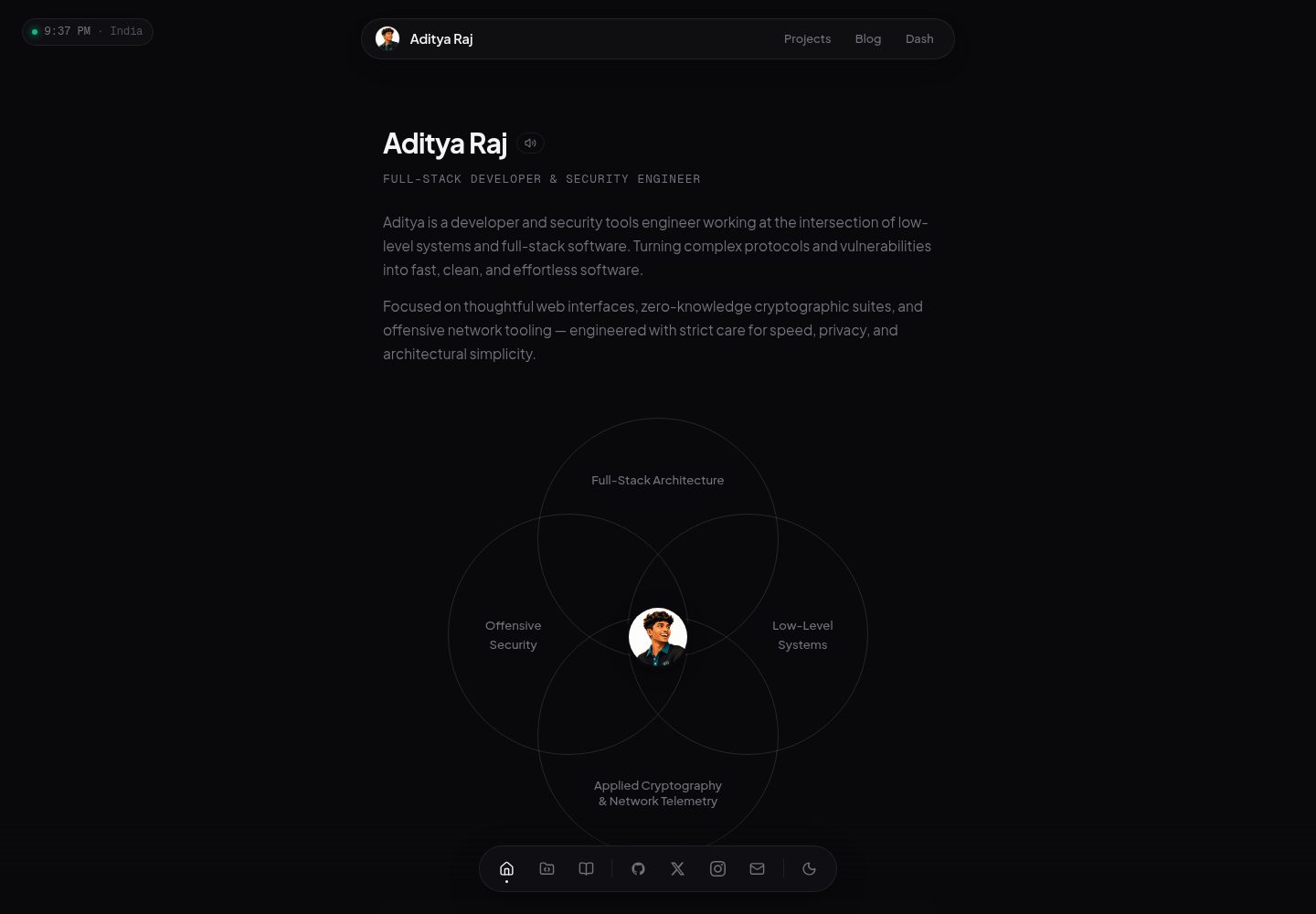
原生 HTML、CSS、JavaScript 实现,README 说明无需框架、构建工具和配置
HTML作品集
portfolio (rawenergon) — HTML 作品集模板
作者 rawenergon
基于原生 HTML、CSS 和 JavaScript 的个人作品集模板,所有内容集中在 data.js 中配置,无需框架与构建工具。
看看你的网站会是什么样
浏览真实页面截图,比较内容排版与手机效果。点击下方缩略图切换,放大查看整页细节。
全部页面与视图 3
截图用于了解视觉与布局,交互效果请以实际项目为准。
采集于 2026-10-13查看来源
值得关注的模板亮点
从已有项目资料中,快速了解它的特点。
所有个人内容集中在 data.js 的 window.portfolioData 对象中编辑
首页仅展示前两个项目与前两篇博客,完整列表位于 projects 和 blog 页面并支持搜索
内置深色/浅色主题、Ctrl+K 命令面板、移动端汉堡导航和 Canvas 噪点效果
可选集成 Last.fm 正在播放、GitHub 贡献图、Gist 状态与书签、CountAPI 访客计数
提供 Vercel 部署说明,许可证为 MIT
模板详细介绍
这是一个个人作品集网站模板,仓库为 rawenergon/portfolio,采用原生 HTML、CSS 和 JavaScript 编写,README 明确说明不使用框架、不需要构建工具和额外配置,克隆后直接打开 index.html 即可查看。
内容配置集中在 data.js 的 window.portfolioData 对象中,包含个人信息(姓名、缩写、职位、所在地、邮箱、头像、签名引语、简介段落、社交链接)、技术栈、工作经历、教育经历、项目、博客等字段。首页只展示前两个项目和前两篇博客,其余内容出现在 projects 和 blog 页面,并支持搜索。
页面结构包括 index.html(首页)、projects.html、blog.html、bookmarks.html,样式集中在 styles.css,逻辑集中在 client.js,另有 icons 与 src 目录存放图标和图片、音频资源,以及可选的 vercel.json 部署配置。
README 列出的功能包括深色/浅色主题切换并保持状态、Ctrl+K 命令面板(用于导航和切换主题)、移动端汉堡导航、Last.fm 正在播放组件、访客计数器、GitHub 贡献图、项目与博客实时搜索以及 Canvas 噪点纹理。
可选的集成包括 Last.fm(需在 client.js 中填写 API Key 与用户名)、GitHub 贡献数据(替换 URL 中的用户名)、通过公开 GitHub Gist 提供每日状态(status.txt,按本地时间匹配时间段,无匹配时显示 Idle)、通过公开 Gist 提供 JSON 格式的书签分类数据,以及 CountAPI 访客计数(需替换 URL 中的用户名)。README 未说明这些外部服务的可用性、配额或失效后的表现,也未提供测试、浏览器兼容性或无障碍方面的信息。
部署方面,README 给出 Vercel 流程:将 fork 推送到 GitHub,导入 Vercel 即可;许可证为 MIT。
HTML作品集
适合你的项目吗?
适用场景
- 制作个人作品集网站,展示简介、技术栈、工作与教育经历、项目和博客
- 将内容托管在静态环境或 Vercel 上,通过修改 data.js 更新信息
- 用 GitHub Gist 维护每日状态和跨设备书签数据
- 在页面中展示 Last.fm 正在播放曲目与 GitHub 贡献图
适合人群
- 希望用原生 HTML/CSS/JS 搭建作品集、不想引入框架或构建流程的开发者
- 能自行编辑 JavaScript 数据对象来维护网站内容的用户
- 需要项目、博客、书签等多页面结构并带搜索功能的个人站点
- 愿意配置 Last.fm、GitHub Gist、CountAPI 等外部服务的用户
上手与定制指南
结合仓库当前版本的说明,按下面的资料检查内容、配置与运行要求。
- 1
Fork 仓库后克隆自己的 fork,直接打开 index.html 即可查看,无需构建步骤
- 2
在 data.js 中填写 person、stack、experience、education、projects、blogs 等内容
- 3
可选:在 client.js 中替换 lastFmApiKey 与 lastFmUser 以启用 Last.fm 组件
- 4
可选:替换 GitHub 贡献接口 URL 中的用户名、CountAPI URL 中的用户名,并配置状态与书签的公开 Gist 地址
- 5
部署到 Vercel:将 fork 推送到 GitHub 后在 Vercel 导入项目
授权与来源资料
使用条件与限制
免费使用 · 保留许可声明本次收录的是公开仓库中采用 MIT 许可的免费版本;免费范围为该版本代码,不代表外部服务或第三方素材免费。
使用时需要遵守
- 允许免费使用、修改、商用和分发该版本代码。
- 分发代码副本或实质性部分时,保留原作者版权声明和完整 MIT 许可声明。
- 代码按现状提供;担保与责任限制以原许可证及适用法律为准。
额外费用与待核对事项
- 演示图片、字体、图标及其他第三方素材需按各自许可核对,不能仅凭代码的 MIT 许可判断。
- 域名、托管、数据库、支付或 AI 等外部服务可能另外收费。
- 启用 Last.fm 正在播放组件需要在 client.js 中填写自己的 Last.fm API Key 与用户名,属于外部服务账号要求。
- GitHub 贡献图依赖第三方接口 github-contributions-api.jogruber.de,需替换 URL 中的用户名为自己的 GitHub 用户名。
- 首页状态徽章依赖 GitHub Gist:需创建名为 status.txt 的公开 Gist 并按时间范围格式填写每日状态。
- 书签页面依赖 GitHub Gist:需创建公开 Gist 并以指定 JSON 格式维护书签分类数据。
- 访客计数器依赖 CountAPI 外部服务,需替换 URL 中的 yourname 为自己的命名空间。
查看原文依据
Permission is hereby granted, free of charge
许可证原文
const lastFmApiKey = "YOUR_LASTFM_API_KEY";
README 原文
fetch("https://github-contributions-api.jogruber.de/v4/YOUR_USERNAME?y=2026")
README 原文
2. Create a new **public** gist named `status.txt`
README 原文
2. Create a new **public** gist (name doesn't matter)
README 原文
https://github.com/rawenergon/portfolio/blob/main/LICENSEhttps://github.com/rawenergon/portfolio/blob/main/README.mdconst res = await fetch(`https://api.countapi.xyz/${ep}/yourname/portfolio`);
README 原文
DeepSeek 根据仓库许可证和 README 整理 ·2026-10-13。结果仅覆盖已读取资料,依赖、图片、字体及后续条款变更以各自原文为准。
项目核对记录与介绍依据
模板资料
- 来源平台
- GitHub
- 资料与维护参考分
- 资料较完整 · 83 / 100
- 技术栈
- HTML
- 网站类型
- 作品集
这个分数如何计算
本站按许可资料(最高30分)、演示链接(12分)、预览图(10分)、Star数(15分)、记录的维护时间(15分)、描述完整度(8分)、功能记录(5分)和分类资料(5分)计算。它不是代码、安全或性能测试,也不是 Google 评分;有链接不代表已实测可用。
这个项目需要核对什么
- 记录的仓库更新时间
- 2026-07-18
- 截图检查日期
- 2026-10-13
已收录演示链接。请用你的内容与屏幕尺寸检查;有演示不代表表单、认证或支付已经可用。
目录记录的主要技术栈是 HTML。请通过依赖清单和锁文件核对实际版本与托管要求。这些说明基于收录资料,不代表代码审计或部署实测。
查看具体选型方法 →介绍的制作与核对状态
介绍由 AI 辅助整理目录与仓库资料。仓库作者不等于这篇介绍的审核者。
审核声明: codex-user-requested-batch-review-20261015 · 2026-10-15
查看当时使用的来源资料
SHA-256: 7509105cbdfefde063b855b84c574454e8a83d4ef7e2d089323dc484ab78e094
2026-10-13T16:08:02.322Z
来源文件 / 仓库<div align="center">
<img src="https://capsule-render.vercel.app/api?type=waving&color=0D1117&height=200§ion=header&text=PORTFOLIO&fontSize=60&fontColor=FFFFFF&animation=fadeIn" width="100%"/>
</div>
<h3 align="center">✨ A minimal, customizable portfolio template ✨</h3>
<p align="center">
<img src="https://img.shields.io/badge/HTML5-000?style=for-the-badge&logo=html5&logoColor=white"/>
<img src="https://img.shields.io/badge/CSS3-000?style=for-the-badge&logo=css3&logoColor=white"/>
<img src="https://img.shields.io/badge/JavaScript-000?style=for-the-badge&logo=javascript&logoColor=white"/>
<img src="https://img.shields.io/badge/GSAP-000?style=for-the-badge&logo=greensock&logoColor=white"/>
<img src="https://img.shields.io/badge/License-MIT-000?style=for-the-badge"/>
</p>
<p align="center">
Zero frameworks. Zero build tools. Zero config.<br>
Just vanilla HTML, CSS, and JS — <b>fork and go</b>.
</p>
---
## 🚀 Quick Start
```bash
# Fork the repo
# Then clone YOUR fork
git clone https://github.com/YOUR_USERNAME/portfolio.git
cd portfolio
# Open it — that's it
open index.html
# or
start index.html # Windows
```
---
## ✏️ Customize
All content lives in one file — **`data.js`**:
```js
window.portfolioData = {
person: {
name: "Your Name",
initials: "YN",
role: "Full Stack Developer",
location: "Your Location",
email: "[email protected]",
avatar: "https://example.com/avatar.png",
quote: { text: "Your favorite quote", author: "You" },
about: [
"Write a short bio about yourself here.",
"Add another paragraph about your skills and experience."
],
links: [
{ label: "GitHub", href: "https://github.com/yourhandle",
card: { name: "GitHub", cardImage: "src/github.png" } },
{ label: "Twitter", href: "https://twitter.com/yourhandle",
card: { name: "Twitter", cardImage: "src/x.png" } }
]
},
stack: [
{ name: "React", icon: "icons/react.svg" },
{ name: "Node.js", icon: "icons/nodejs.svg" }
],
experience: [
{
org: "Company Name",
title: "Job Title",
type: "Full-time",
period: "Jan 2020 – Present",
tags: ["React", "Node.js"],
points: ["Describe your key achievement here."]
}
],
education: [
{
org: "University Name",
title: "Degree",
field: "Major",
period: "2018 – 2022",
icon: "https://cdn.jsdelivr.net/npm/lucide-static@latest/icons/graduation-cap.svg"
}
],
projects: [
{
title: "Project One",
subtitle: "Short subtitle",
status: "Live",
date: "2025",
image: "https://example.com/project.png",
description: "A short description of your project.",
tags: ["React", "API"],
links: [
{ label: "Live link", href: "https://example.com" },
{ label: "GitHub", href: "https://github.com/yourhandle/project" }
]
}
],
blogs: [
{
title: "Getting Started",
description: "Write about your first blog post topic.",
date: "01/01/2025",
tags: ["development", "thoughts"],
image: "https://example.com/blog.png",
href: "https://medium.com/@yourhandle/post"
}
]
};
```
| Field | Description |
|---|---|
| `person.name` | Your display name |
| `person.initials` | Logo text (2-3 chars) |
| `person.avatar` | Profile image URL |
| `person.links` | Social links with hover cards |
| `stack` | Tech stack icons (name + svg path) |
| `projects` | Project cards with links and tags |
| `blogs` | Blog post cards |
| `experience` | Work history accordion |
| `education` | Education entries |
Home page shows the **first 2 projects & blogs**. Add more — they appear on `/projects` and `/blog` pages with search.
---
## 🧩 Features
| | |
|---|---|
| 🌗 **Dark/Light theme** | Persists, no flash |
| 🔍 **Command palette** | `Ctrl+K` to navigate & toggle theme |
| 📱 **Responsive** | Hamburger nav on mobile |
| 🎵 **Last.fm widget** | Shows currently playing track |
| 📊 **Visitor counter** | CountAPI + fallback |
| 🐍 **GitHub graph** | Contribution grid |
| 🔎 **Search** | Real-time project & blog search |
| 🎨 **Canvas noise** | Subtle grain overlay |
---
## ⚙️ Optional Integrations
### Last.fm
In `client.js`, replace:
```js
const lastFmApiKey = "YOUR_LASTFM_API_KEY";
const lastFmUser = "YOUR_LASTFM_USERNAME";
```
### GitHub Contributions
```js
// Replace with your GitHub username
fetch("https://github-contributions-api.jogruber.de/v4/YOUR_USERNAME?y=2026")
```
### Live Status (via GitHub Gist)
The status badge on the home page pulls from a **GitHub Gist**.
**Setup:**
1. Go to [gist.github.com](https://gist.github.com)
2. Create a new **public** gist named `status.txt`
3. Add your daily schedule — each line is a time range:
```
08:00-12:00 | 💼 | Working on projects
12:00-13:00 | 🍽️ | Lunch break
13:00-17:00 | 💻 | Coding
17:00-22:00 | 🎮 | Gaming / Free
```
4. Click "Create public gist"
5. Click the **Raw** button and copy the URL
6. In `client.js`, replace:
```js
const STATUS_GIST = "https://gist.githubusercontent.com/YOUR_USER/YOUR_GIST_ID/raw/status.txt";
```
> ⏰ The status automatically switches based on your local time. If no range matches, it shows "Idle".
### Bookmarks (via GitHub Gist)
The bookmarks page loads from a **GitHub Gist** — perfect for syncing across devices.
**Setup:**
1. Go to [gist.github.com](https://gist.github.com)
2. Create a new **public** gist (name doesn't matter)
3. Add your bookmarks in this JSON format:
```json
{
"categories": [
{
"title": "Design Tools",
"links": [
{ "name": "Figma", "url": "https://figma.com" },
{ "name": "Unsplash", "url": "https://unsplash.com" }
]
},
{
"title": "Developer",
"links": [
{ "name": "GitHub", "url": "https://github.com" },
{ "name": "MDN", "url": "https://developer.mozilla.org" }
]
}
]
}
```
4. Click "Create public gist"
5. Copy the **gist ID** from the URL (`https://gist.github.com/youruser/`**THIS_PART**)
6. In `client.js`, update:
```js
const BOOKMARKS_GIST = "YOUR_GIST_ID";
```
### View Counter
Replace `yourname` in the CountAPI URL in `client.js`:
```js
const res = await fetch(`https://api.countapi.xyz/${ep}/yourname/portfolio`);
```
---
## 🗂️ Structure
```
portfolio/
├── index.html # Home page
├── projects.html # Projects page
├── blog.html # Blog page
├── bookmarks.html # Bookmarks page
├── styles.css # All styles
├── client.js # All logic
├── data.js # Your content — edit this!
├── icons/ # SVG icons
├── src/ # Images, audio
└── vercel.json # Deploy config (optional)
```
---
## 🌐 Deploy on Vercel
[](https://vercel.com/new/clone?repository-url=https://github.com/YOUR_USERNAME/portfolio)
1. Push your fork to GitHub
2. Import to [Vercel](https://vercel.com/new)
3. Done — your portfolio is live
---
## 📄 License
MIT — free to use, modify, and share.
---
<div align="center">
<img src="https://capsule-render.vercel.app/api?type=waving&color=0D1117&height=120§ion=footer"/>
<br>
<sub>Built with 🖤 for the open source community</sub>
</div>
看看同类模板
对比同技术栈与用途的模板,找到更适合的视觉与内容结构。

simplefolio
⚡️ A minimal portfolio template for Developers
HTML · 作品集

Freelancer
Freelancer 是 Start Bootstrap 出品的单页作品集模板,专为自由职业者、设计师和小型工作室设计。 页面结构清晰,包含多个内容区块、响应式作品集网格,每个作品项目配有模态窗口展示详情。
HTML · 作品集

Resume
Resume 是 Start Bootstrap 推出的简历与 CV 主题,基于 Bootstrap 构建,采用固定侧边栏加内容区块的结构。
HTML · 作品集

Creative
Creative 是 Start Bootstrap 团队维护的一款单页营销模板,定位明确:为创意机构或产品服务提供一个以作品展示和行动号召为核心的落地页。
HTML · 企业官网

Grayscale
Grayscale 是 Start Bootstrap 出品的深色系单页 HTML 模板,基于 Bootstrap 构建。 它的视觉重心放在大尺寸首屏和清晰的内容分区上,整体氛围偏暗,适合摄影、活动或品牌叙事类网站。
HTML · 企业官网

startbootstrap-stylish-portfolio
Stylish Portfolio 是 Start Bootstrap 维护的单页作品集主题,基于 Bootstrap 构建,采用多个内容区块加离屏导航菜单的结构。
HTML · 作品集