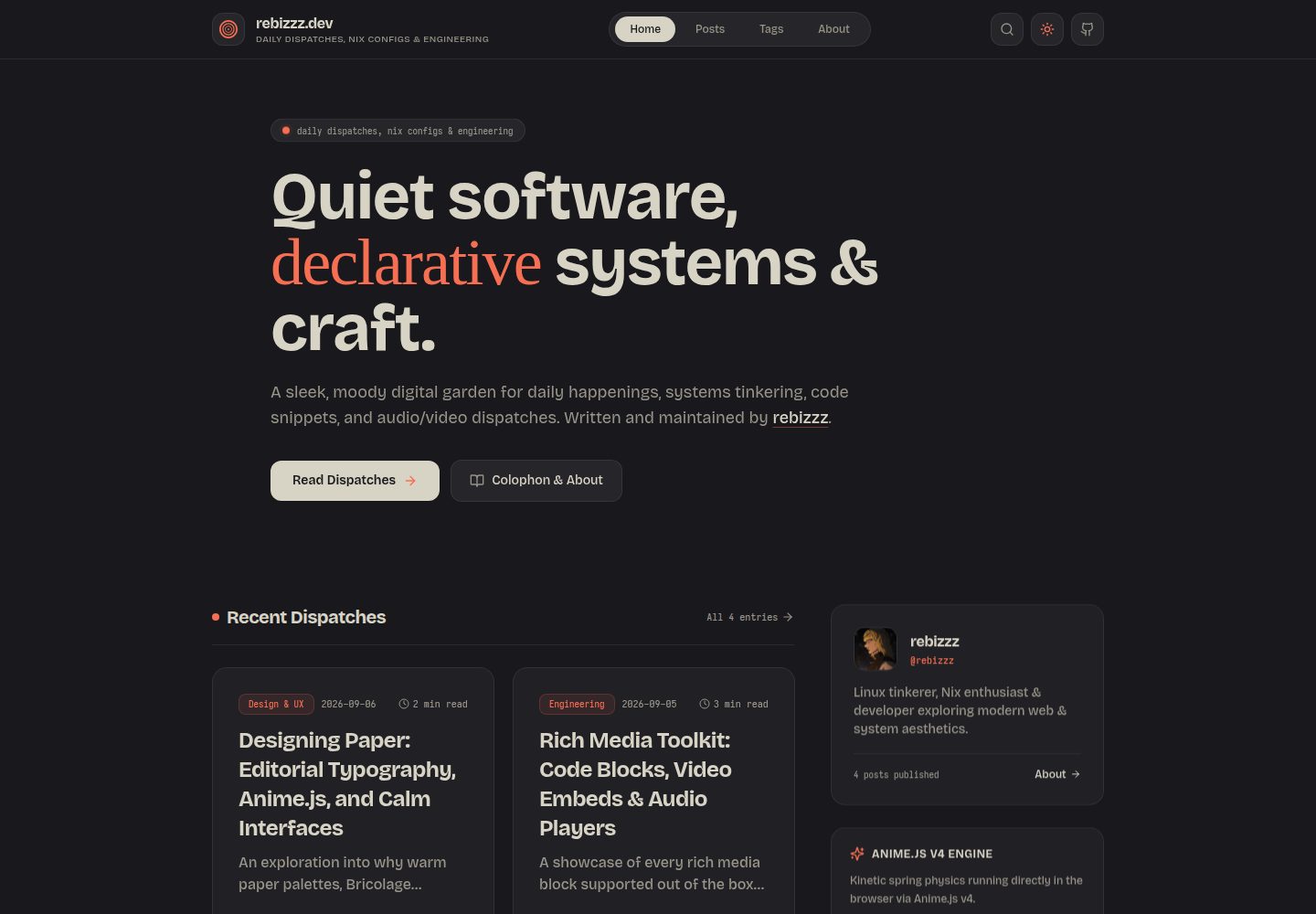
Warm paper palette with editorial fonts: deep charcoal paper, cream light paper paired with Bricolage Grotesque, Junicode, and Iosevka/JetBrains Mono code fonts
Next.jsReactPortfolioBlog
paper-dispatch — Next.js Portfolio Template
By rebizzz
Paper Dispatch is a personal publishing template built on Next.js 14, featuring paper-textured colors, editorial typography, and Anime.js v4 motion effects. It configures the site through a single site.config.ts file and supports Markdown/MDX articles and self-hosted media components.
Explore the design
Compare the page layouts and mobile experience. Open any screenshot for a closer look.
Desktop homepage1 / 3
Desktop captureTop of page
Actual screenshot captured by the server browser.
All pages & views 3
Screenshots show visual appearance; interactive behavior may differ.
Recorded 2026-10-14View source
What stands out
A quick read of the recorded project description.
Anime.js v4 motion system: spring logo animation, hero typography reveal, staggered article list transitions, reading progress dock, and Kinetic Studio interactive demos
Single site.config.ts to configure site title, bio, social links, theme accent color, light/dark mode, and animation toggles
MDX articles support self-hosted media components: VideoPlayer, AudioPlayer, ZoomableImage, Bookmark, and Callout
Code blocks with macOS traffic light controls, automatic language badges, one-click copy, and line wrap toggle
Giscus comments integrated with GitHub Discussions, automatically switching light/dark styles with the theme
Template Details
Paper Dispatch is a Next.js 14 publishing template for personal writing, described in the README as a "calm, typography-first" digital journal. It uses a warm paper palette (deep charcoal paper #19191d, cream light paper #f2f0e3) with accent colors such as Paper Coral, Electric Blue, and Emerald. Headings and interface use Bricolage Grotesque, italics and emphasis use a locally subset WOFF2 of Junicode, and code blocks use Iosevka and JetBrains Mono with programming ligatures. Motion is driven by Anime.js v4, including a spring-driven logo animation, timeline-style hero typography reveal, staggered transitions for article lists, a floating reading progress dock with a circular SVG progress meter, and a Kinetic Studio containing draggable chips, SVG path drawing and morphing, character wave text scrambling, and a 2D grid ripple matrix.
Site configuration is centralized in site.config.ts at the project root, where you can set the title, subtitle, description, author, bio, avatar, URL, language, keywords, theme accent color (coral/blue/green/amber/purple), default light/dark mode, Dark Reader lock, and animation toggles, as well as profile and social links. Articles are placed as Markdown or MDX files in the content/posts/ directory, with frontmatter supporting title, description, date, category, tags, image, featured, and draft fields. The template provides self-hosted media and content components: VideoPlayer (MP4/WebM with custom poster), AudioPlayer (timeline and volume controls), ZoomableImage (fullscreen lightbox with Escape key support), Bookmark (link card with domain favicon), and Callout (note/tip/warning/caution). Code blocks include macOS traffic light controls, automatic language badges, one-click copy, and line wrap toggle. Comments use Giscus integrated with GitHub Discussions and automatically switch between light and dark themes.
The README does not provide information on performance, accessibility, browser compatibility, testing, or production readiness, nor does it list specific version numbers in the dependency list. For deployment, the README recommends Vercel (auto-detects the Next.js preset), or static export/self-hosting via bun run build and bun run start -p 3000. The development environment can use Bun or Node.js, and optionally a Nix development shell with flakes enabled (providing Bun, Node.js 22, Git, and GitHub CLI).
Next.jsPortfolioBlog
Is it right for your project?
Use Cases
- Building a personal digital journal or writing blog, publishing articles with Markdown/MDX
- Embedding self-hosted video, audio, zoomable images, and link cards in articles
- Adding comments based on GitHub Discussions to articles via Giscus
- Quickly starting a local development environment using Nix flake or Bun/Node.js
- Deploying to Vercel or self-hosting a static site via build commands
Suitable For
- Individual writers who want to manage site information with a single configuration file
- Developers who prefer typography-first, paper-textured visual styles
- Next.js users who need to embed self-hosted media and interactive components in articles
- Developers using Nix, Bun, or Node.js workflows
Getting started & customization
Use these recorded setup notes alongside the repository instructions for your chosen version.
- 1
After cloning the repository, run bun install (or npm install / pnpm install), then run bun dev (or npm run dev), and visit http://localhost:3000
- 2
When using Nix, first run nix develop, then run bun install and bun dev
- 3
Edit site.config.ts at the project root to configure site title, bio, social links, theme accent color, and animation toggles
- 4
Create Markdown or MDX files in content/posts/; frontmatter supports title, description, date, category, tags, image, featured, draft
- 5
When deploying to Vercel, import the project and it will auto-detect the Next.js preset; for self-hosting, run bun run build then bun run start -p 3000
License & source material
Usage conditions & limitations
Free to use · keep license noticeThis entry covers the free version under the MIT license in the public repository; the free scope is the code of this version and does not imply that external services or third-party assets are free.
Must comply with when using
- Free use, modification, commercial use, and distribution of this version's code are permitted.
- When distributing copies or substantial portions of the code, retain the original author's copyright notice and the full MIT license notice.
- The code is provided as-is; warranties and limitations of liability are governed by the original license and applicable law.
Additional costs & items to verify
- Demo images, fonts, icons, and other third-party assets must be checked against their respective licenses and cannot be judged solely by the code's MIT license.
- External services such as domains, hosting, databases, payments, or AI may incur additional charges.
- The comment feature relies on Giscus integrated with GitHub Discussions, requiring a GitHub repository with Discussions enabled to use comments.
- Using the Nix Flake development environment requires Nix installed locally with flakes enabled.
- The Nix development method is only available when using Nix locally with flakes enabled.
- Deployment to Vercel is recommended, requiring a Vercel account and importing the project.
View Original Text Basis
Permission is hereby granted, free of charge
Original License Text
- 💬 **Giscus Comments**: GitHub Discussions integration with automatic dark/light theme switching.
Original README
- ❄️ **Hermetic Nix Flake**: Zero-setup development shell providing Bun, Node.js 22, Git, and GitHub CLI.
Original README
If you use Nix with flakes enabled:
Original README
https://github.com/rebizzz/paper-dispatch/blob/main/LICENSEhttps://github.com/rebizzz/paper-dispatch/blob/main/README.md2. Import the project into [Vercel](https://vercel.com).
Original README
Compiled by DeepSeek based on repository license and README ·2026-10-15. Results only cover the materials read; dependencies, images, fonts, and subsequent term changes are subject to their respective original texts.
Project checks & description sources
Template Information
- Source platforms
- GitHub
- Documentation and maintenance reference score
- More documented · 85 / 100
- Technologies
- Next.js · React
- Website type
- Portfolio · Blog
How this score is calculated
Our heuristic uses license records (up to 30), a demo link (12), a preview (10), stars (15), recorded maintenance (15), description completeness (8), feature records (5) and classification data (5). It is not a code, security or performance test, or a Google score. A link does not establish tested functionality.
What to verify for this project
- Repository update recorded
- 2026-09-06
- Screenshot last checked
- 2026-10-15
A demo link is listed. Check it with your own content and viewport sizes; its presence does not confirm that forms, authentication or payments work.
The catalog identifies Next.js as the primary stack. Check the actual dependency manifest and lockfile for versions and hosting requirements. These notes use recorded metadata, not a code audit or a deployment test.
Use a selection guide →How this description was prepared
AI-assisted description based on catalog records and repository material. Repository authors are not automatically the reviewers of this description.
Review declaration: codex-user-requested-batch-review-20261015 · 2026-10-15
Inspect the recorded source material
SHA-256: 30ca789439a7a6d94307cf68fcc9642c74f5007f01084761d679532525e328b1
2026-10-15T00:00:49.011Z
Source file / repository# 📄 Paper Dispatch
A calm, typography-first personal publishing template for [Next.js 14](https://nextjs.org), engineered with warm paper palettes, editorial serifs, Iosevka code blocks, and spring-physics kinetics powered by [Anime.js v4](https://animejs.com).
Inspired by physical print layouts and modular architectures like [Fuwari](https://github.com/saicaca/fuwari), Paper Dispatch lets you run a fast, distraction-free digital journal configured entirely from a single typed configuration file.
---
## Features
- 📜 **Warm Paper Aesthetics**: Balanced dark charcoal paper (`#19191d`) and cream light paper (`#f2f0e3`), paired with signature Paper Coral (`#f76f53`), Electric Blue (`#6287f5`), and Emerald (`#63f78b`).
- ✒️ **Editorial Typography**:
- **Headings & UI**: [Bricolage Grotesque](https://fontsource.org/fonts/bricolage-grotesque)
- **Accents & Italics**: [Junicode](https://github.com/psb1558/Junicode-font) (local WOFF2 subset)
- **Code Blocks**: [Iosevka](https://fontsource.org/fonts/iosevka) + [JetBrains Mono](https://fontsource.org/fonts/jetbrains-mono) with programming ligatures.
- ⚡ **Anime.js v4 Kinetic Engine**:
- Spring-driven logo animation with staggered concentric rings
- Timeline-based hero typography reveals with optical blur
- Staggered post list transitions with spring physics
- Floating kinetic reading progress dock with circular SVG progress meter and smooth back-to-top inertia
- Full interactive **Kinetic Studio** featuring draggable chips (`createDraggable`), SVG path drawing & morphing (`createDrawable`, `morphTo`), character wave text scrambler (`scrambleText`), and 2D grid ripple matrices.
- 💻 **Syntax Highlighted Code Blocks**:
- macOS traffic light controls
- Automatic language badge detection
- Dedicated obsidian editor canvas (`#0f0f13`)
- One-click copy with feedback checkmark
- Word wrap toggle button
- 🎥 **Self-Hosted Rich Media Blocks**:
- `<VideoPlayer />`: Native 60fps MP4/WebM screencasts with custom poster frames
- `<AudioPlayer />`: Full playback deck with time scrubbers and volume control
- `<ZoomableImage />`: Full-screen lightbox zoom modal with escape key support
- `<Bookmark />`: Rich URL cards with domain favicon, title, and link indicators
- `<Callout />`: Note, tip, warning, and caution callout boxes
- 🧩 **Modular Single-File Configuration**: Customize title, bio, avatar, socials, theme accents, navigation, and comments in `site.config.ts` without touching template code.
- 💬 **Giscus Comments**: GitHub Discussions integration with automatic dark/light theme switching.
- 🛡️ **Dark Reader Lock**: Native `<meta name="darkreader-lock">` and `color-scheme: light dark` to prevent third-party extensions from inverting custom paper colors.
- ❄️ **Hermetic Nix Flake**: Zero-setup development shell providing Bun, Node.js 22, Git, and GitHub CLI.
---
## Quickstart
### Option A: Using Bun or Node.js
```bash
# Clone the template
git clone https://github.com/rebizzz/paper-dispatch.git
cd paper-dispatch
# Install dependencies
bun install # or: npm install / pnpm install
# Start local dev server
bun dev # or: npm run dev
```
Visit `http://localhost:3000` in your browser.
### Option B: Using Nix Flake
If you use Nix with flakes enabled:
```bash
nix develop
bun install
bun dev
```
---
## Configuration
Customize your entire site by editing **`site.config.ts`** in the project root:
```typescript
// site.config.ts
export const siteConfig: SiteConfig = {
title: 'Your Name',
subtitle: 'notes on software, systems & craft',
description: 'A personal digital journal.',
author: 'Your Name',
bio: 'Systems engineer & developer exploring quiet digital craft.',
avatar: '/avatar.png',
url: 'https://yourdomain.com',
lang: 'en',
keywords: ['Next.js', 'TypeScript', 'Paper Theme'],
};
export const themeConfig: ThemeConfig = {
accent: 'coral', // 'coral' | 'blue' | 'green' | 'amber' | 'purple'
defaultMode: 'dark', // 'light' | 'dark'
darkReaderLock: true,
animations: true,
};
export const profileConfig: ProfileConfig = {
name: 'Your Name',
handle: 'yourhandle',
bio: 'Systems engineer exploring quiet interfaces.',
avatar: '/avatar.png',
socialLinks: [
{ name: 'GitHub', url: 'https://github.com/yourhandle', icon: 'github' },
{ name: 'Twitter / X', url: 'https://twitter.com/yourhandle', icon: 'twitter' },
{ name: 'RSS Feed', url: '/rss.xml', icon: 'rss' },
],
};
```
---
## Writing Posts
Create new Markdown or MDX files in `content/posts/`:
```markdown
---
title: "Your Post Title"
description: "A short summary of your dispatch."
date: "2026-09-06"
category: "Engineering"
tags: ["nextjs", "typescript", "architecture"]
image: "/media/your-cover.webp"
featured: true
draft: false
---
Your content here. Standard Markdown is fully supported.
### Interactive Components
```tsx
<Callout type="tip" title="Pro Tip">
Callouts render with distinct borders and subtle background fills.
</Callout>
<VideoPlayer
src="/media/demo.mp4"
poster="/media/demo-poster.webp"
caption="Demo screencast in action"
/>
<AudioPlayer
src="/audio/dispatch.wav"
title="Field Note #01"
artist="Voice Memo"
/>
<Bookmark
url="https://nextjs.org"
title="Next.js"
description="The React Framework for the Web."
/>
```
```
---
## Project Structure
```text
├── content/
│ └── posts/ # MDX article files
├── docs/
│ └── screenshots/ # Preview images for documentation
├── public/
│ ├── audio/ # Local audio files
│ ├── fonts/ # Junicode font subsets
│ └── media/ # Local video screencasts and posters
├── src/
│ ├── app/ # Next.js 14 App Router routes
│ │ ├── globals.css # Paper theme variables & typography
│ │ └── layout.tsx # Root layout with Dark Reader lock
│ ├── components/
│ │ ├── animations/ # Anime.js kinetic logo, dock & studio
│ │ ├── mdx/ # CodeBlock, VideoPlayer, AudioPlayer, Lightbox
│ │ └── Navbar.tsx # Kinetic navigation header
│ ├── lib/ # MDX parser, post loader, reading time
│ ├── site.config.ts # Modular site configuration
│ └── types/ # TypeScript definitions
├── tailwind.config.ts # Tailwind theme extensions
└── flake.nix # Hermetic Nix development environment
```
---
## Deployment
### Vercel (Recommended)
1. Push your repository to GitHub.
2. Import the project into [Vercel](https://vercel.com).
3. Framework preset will automatically detect **Next.js**.
4. Click **Deploy**.
### Static Export / Self-Hosted
Run `bun run build` followed by `bun run start -p 3000`.
---
## License
MIT License. Designed with care by [rebizzz](https://github.com/rebizzz).
Explore similar templates
Compare previews and descriptions within the same stack and category.

tailwind-nextjs-starter-blog
A Next.js and Tailwind CSS blog starter template using Contentlayer for Markdown/MDX, with built-in SEO, code highlighting, and tags. It targets personal technical blogs and migration from Jekyll/Hugo to React, and supports one-click Vercel deployment.
Next.js · Blog

react-resume-template
A personal resume website template for software developers, built with Next.js, React, and TypeScript and styled with Tailwind CSS. Site content is driven by a single data file at /src/data/data.tsx, with types in dataDef.ts and images in src/images/.
Next.js · Portfolio

Nextjs-tailwindcss-blog-template
A Next.js blog styled with Tailwind CSS. The current branch processes Markdown with Velite; the earlier Contentlayer setup is retained in a separate historical branch.
Next.js · Blog

Next-js-Blog-Boilerplate
A blog starter built on Next.js 12 and Tailwind CSS 3, integrating TypeScript, ESLint, Prettier, and PostCSS.
Next.js · Blog

nextjs-blog-theme
A Next.js 15 and Tailwind CSS 4.x blog starter by Netlify, designed by Bejamas, with MDX support, dark/light theme switching, and environment-variable configuration. It includes a visual setup wizard for deploying to Netlify and manages content via local .mdx files.
Next.js · Blog

blog
A personal blog forked from Timlrx's tailwind-nextjs-starter-blog, built with Next.js, React, and Tailwind CSS. Content is stored as Markdown/MDX under data/, with site, author, navigation, and project data in separate files.
Next.js · Blog