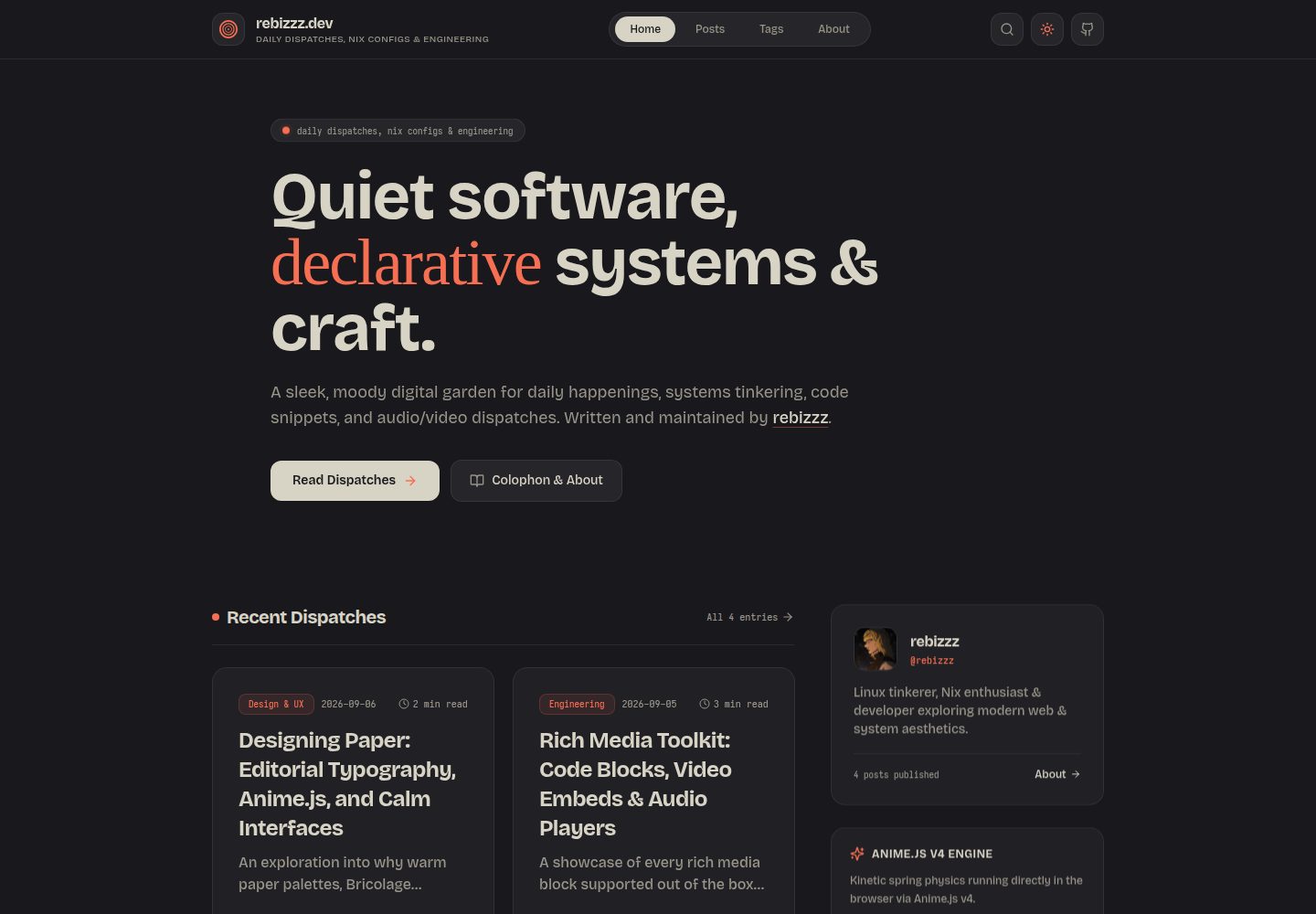
暖色纸张调色板与编辑字体:深炭纸、奶油浅纸搭配 Bricolage Grotesque、Junicode 和 Iosevka/JetBrains Mono 代码字体
Next.jsReact作品集博客
paper-dispatch — Next.js 作品集模板
作者 rebizzz
Paper Dispatch 是一个基于 Next.js 14 的个人发布模板,以纸张质感配色、编辑字体和 Anime.js v4 动效为特色,通过单一 site.config.ts 文件配置站点,支持 Markdown/MDX 文章与自托管媒体组件。
看看你的网站会是什么样
浏览真实页面截图,比较内容排版与手机效果。点击下方缩略图切换,放大查看整页细节。
全部页面与视图 3
截图用于了解视觉与布局,交互效果请以实际项目为准。
采集于 2026-10-14查看来源
值得关注的模板亮点
从已有项目资料中,快速了解它的特点。
Anime.js v4 动效系统:弹簧标志动画、首屏排版揭示、文章列表交错过渡、阅读进度坞与 Kinetic Studio 交互演示
单一 site.config.ts 配置站点标题、简介、社交链接、主题强调色、明暗模式与动画开关
MDX 文章支持自托管媒体组件:VideoPlayer、AudioPlayer、ZoomableImage、Bookmark 和 Callout
代码块带 macOS 交通灯控件、自动语言徽章、一键复制和换行切换
Giscus 评论集成 GitHub Discussions,并随主题自动切换明暗样式
模板详细介绍
Paper Dispatch 是一个面向个人写作的 Next.js 14 发布模板,README 将其描述为“平静、排版优先”的数字日志。它使用暖色纸张调色板(深炭纸 #19191d、奶油浅纸 #f2f0e3)与 Paper Coral、Electric Blue、Emerald 等强调色,标题与界面使用 Bricolage Grotesque,斜体与强调使用本地 WOFF2 子集的 Junicode,代码块使用 Iosevka 与 JetBrains Mono 并支持编程连字。动效由 Anime.js v4 驱动,包括弹簧驱动的标志动画、时间线式首屏排版揭示、文章列表交错过渡、带圆形 SVG 进度计的浮动阅读进度坞,以及包含可拖拽芯片、SVG 路径绘制与变形、字符波浪文本扰乱和 2D 网格涟漪矩阵的 Kinetic Studio。
站点配置集中在项目根目录的 site.config.ts 中,可设置标题、副标题、描述、作者、简介、头像、URL、语言、关键词、主题强调色(coral/blue/green/amber/purple)、默认明暗模式、Dark Reader 锁和动画开关,以及个人资料与社交链接。文章以 Markdown 或 MDX 文件放在 content/posts/ 目录,frontmatter 支持 title、description、date、category、tags、image、featured、draft 字段。模板提供自托管媒体与内容组件:VideoPlayer(MP4/WebM 与自定义海报)、AudioPlayer(时间轴与音量控制)、ZoomableImage(支持 Escape 键的全屏灯箱)、Bookmark(带域名 favicon 的链接卡片)和 Callout(note/tip/warning/caution)。代码块包含 macOS 交通灯控件、自动语言徽章、一键复制与换行切换。评论使用 Giscus 集成 GitHub Discussions,并自动切换明暗主题。
README 未提供关于性能、可访问性、浏览器兼容性、测试或生产就绪程度的说明,也未列出依赖清单中的具体版本号。部署方面,README 推荐 Vercel(自动检测 Next.js 预设),或通过 bun run build 与 bun run start -p 3000 进行静态导出/自托管。开发环境可使用 Bun 或 Node.js,也可选择启用 flakes 的 Nix 开发 shell(提供 Bun、Node.js 22、Git 和 GitHub CLI)。
Next.js作品集博客
适合你的项目吗?
适用场景
- 搭建个人数字日志或写作博客,使用 Markdown/MDX 发布文章
- 在文章中嵌入自托管的视频、音频、可缩放图片和链接卡片
- 通过 Giscus 为文章添加基于 GitHub Discussions 的评论
- 使用 Nix flake 或 Bun/Node.js 快速启动本地开发环境
- 部署到 Vercel 或通过构建命令自托管静态站点
适合人群
- 希望用单一配置文件管理站点信息的个人写作者
- 偏好排版优先、纸张质感视觉风格的开发者
- 需要在文章中嵌入自托管媒体与交互组件的 Next.js 用户
- 使用 Nix、Bun 或 Node.js 工作流的开发者
上手与定制指南
结合仓库当前版本的说明,按下面的资料检查内容、配置与运行要求。
- 1
克隆仓库后运行 bun install(或 npm install / pnpm install),再运行 bun dev(或 npm run dev),访问 http://localhost:3000
- 2
使用 Nix 时先执行 nix develop,再运行 bun install 和 bun dev
- 3
编辑项目根目录的 site.config.ts 配置站点标题、简介、社交链接、主题强调色与动画开关
- 4
在 content/posts/ 中创建 Markdown 或 MDX 文件,frontmatter 支持 title、description、date、category、tags、image、featured、draft
- 5
部署到 Vercel 时导入项目并自动检测 Next.js 预设;自托管可运行 bun run build 后执行 bun run start -p 3000
授权与来源资料
使用条件与限制
免费使用 · 保留许可声明本次收录的是公开仓库中采用 MIT 许可的免费版本;免费范围为该版本代码,不代表外部服务或第三方素材免费。
使用时需要遵守
- 允许免费使用、修改、商用和分发该版本代码。
- 分发代码副本或实质性部分时,保留原作者版权声明和完整 MIT 许可声明。
- 代码按现状提供;担保与责任限制以原许可证及适用法律为准。
额外费用与待核对事项
- 演示图片、字体、图标及其他第三方素材需按各自许可核对,不能仅凭代码的 MIT 许可判断。
- 域名、托管、数据库、支付或 AI 等外部服务可能另外收费。
- 评论功能依赖 Giscus 与 GitHub Discussions 集成,需要 GitHub 仓库并启用 Discussions 才能使用评论。
- 使用 Nix Flake 开发环境需要本地已安装并启用 flakes 的 Nix。
- Nix 开发方式仅在本地使用 Nix 且启用 flakes 时可用。
- 推荐部署到 Vercel,需要 Vercel 账号并导入项目。
查看原文依据
Permission is hereby granted, free of charge
许可证原文
- 💬 **Giscus Comments**: GitHub Discussions integration with automatic dark/light theme switching.
README 原文
- ❄️ **Hermetic Nix Flake**: Zero-setup development shell providing Bun, Node.js 22, Git, and GitHub CLI.
README 原文
If you use Nix with flakes enabled:
README 原文
https://github.com/rebizzz/paper-dispatch/blob/main/LICENSEhttps://github.com/rebizzz/paper-dispatch/blob/main/README.md2. Import the project into [Vercel](https://vercel.com).
README 原文
DeepSeek 根据仓库许可证和 README 整理 ·2026-10-15。结果仅覆盖已读取资料,依赖、图片、字体及后续条款变更以各自原文为准。
项目核对记录与介绍依据
模板资料
- 来源平台
- GitHub
- 资料与维护参考分
- 资料较完整 · 85 / 100
- 技术栈
- Next.js · React
- 网站类型
- 作品集 · 博客
这个分数如何计算
本站按许可资料(最高30分)、演示链接(12分)、预览图(10分)、Star数(15分)、记录的维护时间(15分)、描述完整度(8分)、功能记录(5分)和分类资料(5分)计算。它不是代码、安全或性能测试,也不是 Google 评分;有链接不代表已实测可用。
这个项目需要核对什么
- 记录的仓库更新时间
- 2026-09-06
- 截图检查日期
- 2026-10-15
已收录演示链接。请用你的内容与屏幕尺寸检查;有演示不代表表单、认证或支付已经可用。
目录记录的主要技术栈是 Next.js。请通过依赖清单和锁文件核对实际版本与托管要求。这些说明基于收录资料,不代表代码审计或部署实测。
查看具体选型方法 →介绍的制作与核对状态
介绍由 AI 辅助整理目录与仓库资料。仓库作者不等于这篇介绍的审核者。
审核声明: codex-user-requested-batch-review-20261015 · 2026-10-15
查看当时使用的来源资料
SHA-256: 30ca789439a7a6d94307cf68fcc9642c74f5007f01084761d679532525e328b1
2026-10-15T00:00:49.011Z
来源文件 / 仓库# 📄 Paper Dispatch
A calm, typography-first personal publishing template for [Next.js 14](https://nextjs.org), engineered with warm paper palettes, editorial serifs, Iosevka code blocks, and spring-physics kinetics powered by [Anime.js v4](https://animejs.com).
Inspired by physical print layouts and modular architectures like [Fuwari](https://github.com/saicaca/fuwari), Paper Dispatch lets you run a fast, distraction-free digital journal configured entirely from a single typed configuration file.
---
## Features
- 📜 **Warm Paper Aesthetics**: Balanced dark charcoal paper (`#19191d`) and cream light paper (`#f2f0e3`), paired with signature Paper Coral (`#f76f53`), Electric Blue (`#6287f5`), and Emerald (`#63f78b`).
- ✒️ **Editorial Typography**:
- **Headings & UI**: [Bricolage Grotesque](https://fontsource.org/fonts/bricolage-grotesque)
- **Accents & Italics**: [Junicode](https://github.com/psb1558/Junicode-font) (local WOFF2 subset)
- **Code Blocks**: [Iosevka](https://fontsource.org/fonts/iosevka) + [JetBrains Mono](https://fontsource.org/fonts/jetbrains-mono) with programming ligatures.
- ⚡ **Anime.js v4 Kinetic Engine**:
- Spring-driven logo animation with staggered concentric rings
- Timeline-based hero typography reveals with optical blur
- Staggered post list transitions with spring physics
- Floating kinetic reading progress dock with circular SVG progress meter and smooth back-to-top inertia
- Full interactive **Kinetic Studio** featuring draggable chips (`createDraggable`), SVG path drawing & morphing (`createDrawable`, `morphTo`), character wave text scrambler (`scrambleText`), and 2D grid ripple matrices.
- 💻 **Syntax Highlighted Code Blocks**:
- macOS traffic light controls
- Automatic language badge detection
- Dedicated obsidian editor canvas (`#0f0f13`)
- One-click copy with feedback checkmark
- Word wrap toggle button
- 🎥 **Self-Hosted Rich Media Blocks**:
- `<VideoPlayer />`: Native 60fps MP4/WebM screencasts with custom poster frames
- `<AudioPlayer />`: Full playback deck with time scrubbers and volume control
- `<ZoomableImage />`: Full-screen lightbox zoom modal with escape key support
- `<Bookmark />`: Rich URL cards with domain favicon, title, and link indicators
- `<Callout />`: Note, tip, warning, and caution callout boxes
- 🧩 **Modular Single-File Configuration**: Customize title, bio, avatar, socials, theme accents, navigation, and comments in `site.config.ts` without touching template code.
- 💬 **Giscus Comments**: GitHub Discussions integration with automatic dark/light theme switching.
- 🛡️ **Dark Reader Lock**: Native `<meta name="darkreader-lock">` and `color-scheme: light dark` to prevent third-party extensions from inverting custom paper colors.
- ❄️ **Hermetic Nix Flake**: Zero-setup development shell providing Bun, Node.js 22, Git, and GitHub CLI.
---
## Quickstart
### Option A: Using Bun or Node.js
```bash
# Clone the template
git clone https://github.com/rebizzz/paper-dispatch.git
cd paper-dispatch
# Install dependencies
bun install # or: npm install / pnpm install
# Start local dev server
bun dev # or: npm run dev
```
Visit `http://localhost:3000` in your browser.
### Option B: Using Nix Flake
If you use Nix with flakes enabled:
```bash
nix develop
bun install
bun dev
```
---
## Configuration
Customize your entire site by editing **`site.config.ts`** in the project root:
```typescript
// site.config.ts
export const siteConfig: SiteConfig = {
title: 'Your Name',
subtitle: 'notes on software, systems & craft',
description: 'A personal digital journal.',
author: 'Your Name',
bio: 'Systems engineer & developer exploring quiet digital craft.',
avatar: '/avatar.png',
url: 'https://yourdomain.com',
lang: 'en',
keywords: ['Next.js', 'TypeScript', 'Paper Theme'],
};
export const themeConfig: ThemeConfig = {
accent: 'coral', // 'coral' | 'blue' | 'green' | 'amber' | 'purple'
defaultMode: 'dark', // 'light' | 'dark'
darkReaderLock: true,
animations: true,
};
export const profileConfig: ProfileConfig = {
name: 'Your Name',
handle: 'yourhandle',
bio: 'Systems engineer exploring quiet interfaces.',
avatar: '/avatar.png',
socialLinks: [
{ name: 'GitHub', url: 'https://github.com/yourhandle', icon: 'github' },
{ name: 'Twitter / X', url: 'https://twitter.com/yourhandle', icon: 'twitter' },
{ name: 'RSS Feed', url: '/rss.xml', icon: 'rss' },
],
};
```
---
## Writing Posts
Create new Markdown or MDX files in `content/posts/`:
```markdown
---
title: "Your Post Title"
description: "A short summary of your dispatch."
date: "2026-09-06"
category: "Engineering"
tags: ["nextjs", "typescript", "architecture"]
image: "/media/your-cover.webp"
featured: true
draft: false
---
Your content here. Standard Markdown is fully supported.
### Interactive Components
```tsx
<Callout type="tip" title="Pro Tip">
Callouts render with distinct borders and subtle background fills.
</Callout>
<VideoPlayer
src="/media/demo.mp4"
poster="/media/demo-poster.webp"
caption="Demo screencast in action"
/>
<AudioPlayer
src="/audio/dispatch.wav"
title="Field Note #01"
artist="Voice Memo"
/>
<Bookmark
url="https://nextjs.org"
title="Next.js"
description="The React Framework for the Web."
/>
```
```
---
## Project Structure
```text
├── content/
│ └── posts/ # MDX article files
├── docs/
│ └── screenshots/ # Preview images for documentation
├── public/
│ ├── audio/ # Local audio files
│ ├── fonts/ # Junicode font subsets
│ └── media/ # Local video screencasts and posters
├── src/
│ ├── app/ # Next.js 14 App Router routes
│ │ ├── globals.css # Paper theme variables & typography
│ │ └── layout.tsx # Root layout with Dark Reader lock
│ ├── components/
│ │ ├── animations/ # Anime.js kinetic logo, dock & studio
│ │ ├── mdx/ # CodeBlock, VideoPlayer, AudioPlayer, Lightbox
│ │ └── Navbar.tsx # Kinetic navigation header
│ ├── lib/ # MDX parser, post loader, reading time
│ ├── site.config.ts # Modular site configuration
│ └── types/ # TypeScript definitions
├── tailwind.config.ts # Tailwind theme extensions
└── flake.nix # Hermetic Nix development environment
```
---
## Deployment
### Vercel (Recommended)
1. Push your repository to GitHub.
2. Import the project into [Vercel](https://vercel.com).
3. Framework preset will automatically detect **Next.js**.
4. Click **Deploy**.
### Static Export / Self-Hosted
Run `bun run build` followed by `bun run start -p 3000`.
---
## License
MIT License. Designed with care by [rebizzz](https://github.com/rebizzz).
看看同类模板
对比同技术栈与用途的模板,找到更适合的视觉与内容结构。

tailwind-nextjs-starter-blog
tailwind-nextjs-starter-blog 是一个面向个人技术博客的 Next.js 与 Tailwind CSS 启动模板,其 v2 版本基于 App Router 与 React Server Comp…
Next.js · 博客

react-resume-template
A personal resume website template built with React.js, Typescript, Next.js, and styled with Tailwind css
Next.js · 作品集

Nextjs-tailwindcss-blog-template
使用 Tailwind CSS 的 Next.js 博客。当前分支通过 Velite 处理 Markdown,早期 Contentlayer 实现保留在单独的历史分支中。
Next.js · 博客

Next-js-Blog-Boilerplate
Next-js-Blog-Boilerplate 是一套面向个人与技术博客的启动代码,基于 Next.js 12 与 Tailwind CSS 3 构建,同时集成了 TypeScript、ESLint、Prettier …
Next.js · 博客

nextjs-blog-theme
nextjs-blog-theme 是 Netlify 团队维护的一个博客启动模板,基于 Next.js 15(Pages Router)和 Tailwind CSS 4.x 构建,设计由 Bejamas 机构完成。
Next.js · 博客

blog
🚀 My personal blog made with Tailwind CSS and NextJS. Template from Timlrx. Feel free to fork, follow and use…
Next.js · 博客