Built-in authentication flow covering login, registration, and password reset
LaravelAdmin dashboardBlogStarter
rewire — Laravel Admin dashboard Template
By Recodex-ID
Rewire is a reusable Laravel starter kit with built-in authentication, role permissions, a blog, and admin management, suitable as a foundation for internal or client projects.
Explore the design
Compare the page layouts and mobile experience. Open any screenshot for a closer look.
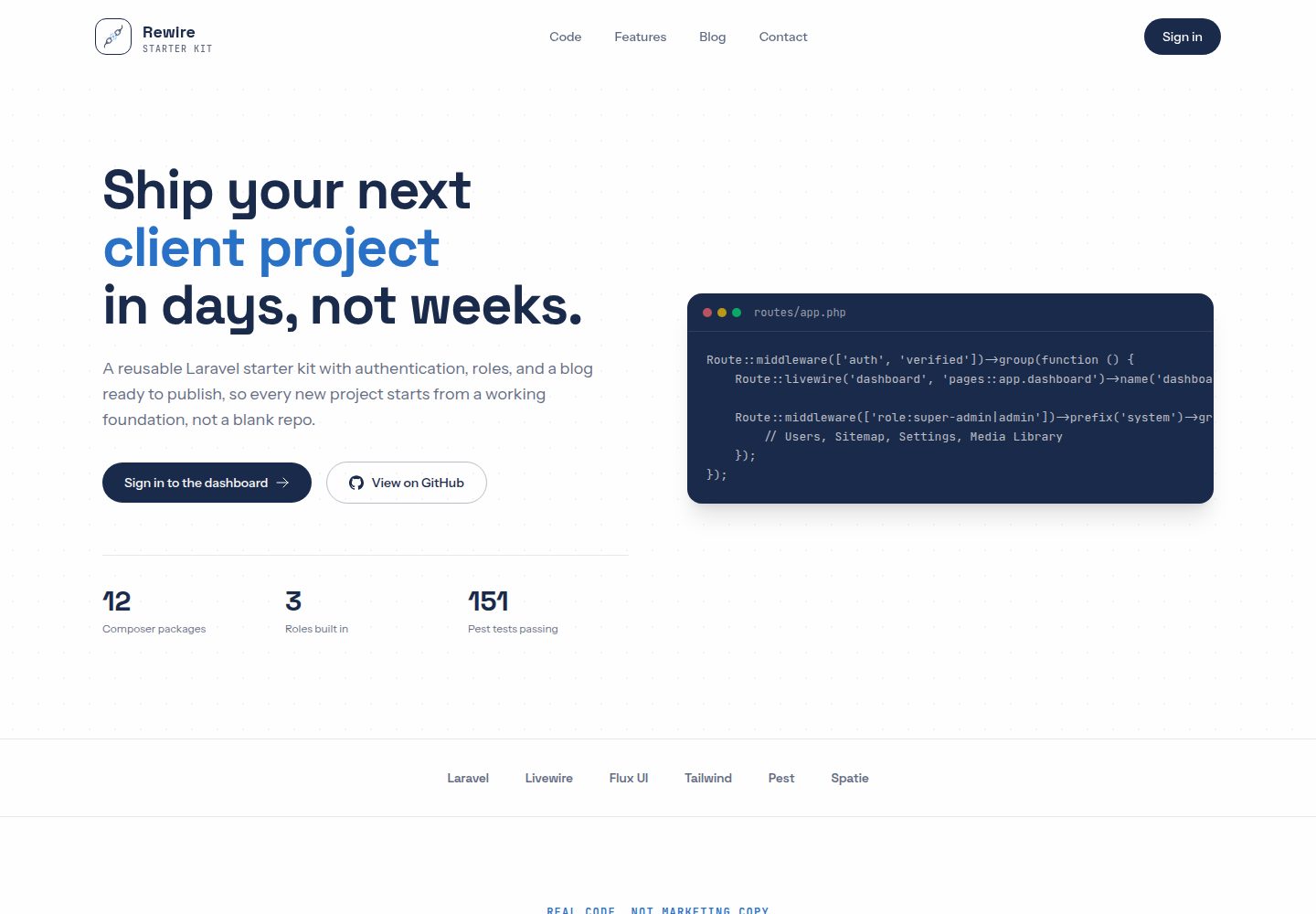
Desktop homepage1 / 3
Desktop captureTop of page
Actual screenshot captured by the server browser.
All pages & views 3
Screenshots show visual appearance; interactive behavior may differ.
Recorded 2026-10-08View source
What stands out
A quick read of the recorded project description.
Role permissions based on Spatie Permission, with new users automatically receiving the staff role
Publishable blog with featured images and automatically generated thumbnail conversions
Admin system panel including user management, media library, sitemap, and site settings
Role-specific dashboard components, with super-admin able to view administrative action audits
Built-in launch checks such as privacy and terms pages, cookie consent, sitemap, and basic security response headers
Template Details
Rewire is a Laravel starter kit positioned as a reusable foundation for internal and client projects. It pre-builds authentication, role permissions, a blog, and admin management so new projects start from a working base rather than an empty repository.
Functionally, authentication covers login, registration, and password reset; roles are based on Spatie Permission, new users automatically receive the staff role, and admin and super-admin can access additional back-office areas. The blog is the only public content editable without redeployment, supporting title, excerpt, body, featured image, and a publish toggle; featured images are managed by Spatie Media Library with automatic thumb/card/hero conversions. The system panel is aimed at admin and super-admin, including user management, sitemap viewing, media library, and site settings; super-admin additionally has access to administrative action audit records. Each role has its own dashboard components.
The project also includes built-in launch checks, such as privacy policy and terms pages, a cookie consent banner, page-level meta and Open Graph tags, a sitemap, dynamic robots.txt, honeypot and rate limiting on registration and forgot-password forms, basic security response headers, and HTTPS enforcement in production. For testing, it uses Pest feature tests, Pint formatting, and Larastan static analysis, integrated with CI.
Usage limitations: roles and permissions have no in-app management interface and must be created via tinker or seeders; security response headers do not include Content-Security-Policy because Livewire, Alpine, and analytics scripts use inline scripts; WebP conversion only applies to images uploaded after the change, and older images require running media-library:regenerate. Legal pages must be rewritten for the actual business and cannot be used as-is.
LaravelAdmin back officeBlogStarter kit
Is it right for your project?
Use Cases
- Quickly starting a Laravel internal project with authentication and a back office
- Building a reusable foundation skeleton for client projects to reduce repeated configuration
- Needing a blog as editable public content while retaining admin management capabilities
- Wanting a project that ships with testing, formatting, and static analysis configured and integrated with CI
Suitable For
- Developers familiar with Laravel who want to accelerate project initialization with a starter kit
- Teams that need role permissions and admin management but do not want to build from scratch
- Maintainers who accept managing roles and permissions via tinker or seeders
- Projects planning to replace branding, legal pages, and seed accounts on top of the starter kit
Getting started & customization
Use these recorded setup notes alongside the repository instructions for your chosen version.
- 1
Uses SQLite by default, so no separate database server needs to be configured first
- 2
Can be used via the laravel new command, or by cloning the repository and running composer install, npm install, migrations, and seeding
- 3
Seed account passwords are all password and must be replaced before launch
- 4
Production requires APP_ENV=production, APP_DEBUG=false, and configuring FORCE_HTTPS and TRUSTED_PROXIES as needed
- 5
Add schedule:run to cron to run the daily audit log cleanup, which retains logs for 365 days
License & source material
Usage conditions & limitations
Free to use · keep license noticeThis entry covers the free version in the public repository under the MIT license; the free scope is that version's code and does not mean external services or third-party assets are free.
Must comply with when using
- Free use, modification, commercial use, and distribution of this version's code are permitted.
- When distributing copies or substantial portions of the code, retain the original author's copyright notice and the full MIT license notice.
- The code is provided as-is; warranties and limitations of liability are governed by the original license and applicable law.
Additional costs & items to verify
- Demo images, fonts, icons, and other third-party assets must be checked against their respective licenses and cannot be judged solely by the code's MIT license.
- External services such as domains, hosting, databases, payments, or AI may incur separate charges.
- Roles and permissions have no in-app management interface and must be created via tinker or seeders; they cannot be maintained directly in the back office.
- Default security response headers do not include Content-Security-Policy; because Livewire, Alpine, and analytics scripts use inline scripts, a CSP must be written yourself if needed.
- WebP conversion only applies to images uploaded after the change; older images require running media-library:regenerate to be converted.
- The privacy policy and terms pages describe the original deployer and name PT Reka Mitra Teknologi; they must be rewritten for your own business and reviewed by a lawyer, and cannot be used as-is.
- Seed accounts (including the default password password) and landing page copy must be replaced before use in a production project.
- Google Analytics is an optional external service; a G-XXXXXXXXXX measurement ID must be entered in system settings, and it only loads after visitors accept the cookie banner.
- Production requires configuring cron to run schedule:run, which runs activitylog:clean daily to maintain the 365-day audit log retention period promised in the privacy policy.
- If deployed behind a proxy or load balancer, TRUSTED_PROXIES must be configured; otherwise the original protocol cannot be identified and HTTPS redirects will fail.
View Original Text Basis
Permission is hereby granted, free of charge
Original License Text
new roles/permissions are created via tinker or a seeder, there's no in-app UI for it
Original README
The security headers do not include a `Content-Security-Policy`, because Livewire, Alpine and the analytics snippet use inline scripts, so write one for your own deployment if you need it.
Original README
the `WebP` conversions only apply to images uploaded after this change; run `php artisan media-library:regenerate` to convert older ones.
Original README
**Rewrite the legal pages for your own business.**
Original README
Replace the seeded accounts (`database/seeders/UserSeeder.php`) and the landing page copy
Original README
Google Analytics | Optional. Enter a `G-XXXXXXXXXX` measurement ID in **System → Settings**.
Original README
Add `* * * * * php /path/to/artisan schedule:run` to cron. It runs `activitylog:clean` daily, which enforces the 365 day audit-log retention the privacy policy promises.
Original README
https://github.com/Recodex-ID/rewire/blob/main/LICENSEhttps://github.com/Recodex-ID/rewire/blob/main/README.mdSet to your load balancer's IPs (comma separated), or `*` if a proxy you control terminates TLS.
Original README
Compiled by DeepSeek based on repository license and README ·2026-10-08. Results only cover the materials read; dependencies, images, fonts, and subsequent term changes are subject to their respective original texts.
Project checks & description sources
Template Information
- Source platforms
- GitHub
- Documentation and maintenance reference score
- More documented · 88 / 100
- Technologies
- Laravel
- Website type
- Admin dashboard · Blog · Starter
How this score is calculated
Our heuristic uses license records (up to 30), a demo link (12), a preview (10), stars (15), recorded maintenance (15), description completeness (8), feature records (5) and classification data (5). It is not a code, security or performance test, or a Google score. A link does not establish tested functionality.
What to verify for this project
- Repository update recorded
- 2026-09-20
- Screenshot last checked
- 2026-10-08
A demo link is listed. Check it with your own content and viewport sizes; its presence does not confirm that forms, authentication or payments work.
The catalog identifies Laravel as the primary stack. Check the actual dependency manifest and lockfile for versions and hosting requirements. These notes use recorded metadata, not a code audit or a deployment test.
Use a selection guide →How this description was prepared
AI-assisted description based on catalog records and repository material. Repository authors are not automatically the reviewers of this description.
Review declaration: [email protected] · 2026-10-08
Inspect the recorded source material
SHA-256: 1908c3d3d47ecfe53c37493647c7d58e1bd20b2745cf9ef16d9e88b393c1da06
2026-10-08T05:53:33.591Z
Source file / repository# Rewire Starter Kit A reusable Laravel starter kit for internal and client projects — authentication, roles, a blog, and a back office ready to go, so every new engagement starts from a working foundation instead of a blank repo. ## Stack | | | |---|---| | PHP | 8.4 | | Laravel | 13 | | Auth | Fortify (login, registration, password reset — no 2FA/passkeys) | | Frontend | Livewire 4 + Flux UI | | Styling | Tailwind CSS v4 | | Roles | Spatie Permission | | Media | Spatie Media Library | | Quality | Pest 4, Pint, Larastan | ## Features - **Authentication** — login, registration, password reset out of the box; logging out always lands back on the login page. - **Roles & permissions** — every new user gets `staff` automatically; `admin` and `super-admin` unlock more of the back office. Built on `spatie/laravel-permission`; new roles/permissions are created via tinker or a seeder, there's no in-app UI for it. - **Blog** — the one piece of public content that's editable without a redeploy: title, excerpt, body, featured image, publish toggle, auto-generated slugs that never change on edit. The featured image runs on Spatie Media Library, with `thumb`/`card`/`hero` conversions generated automatically and a reusable `<x-media-upload>` component ready for other models. - **System panel** (`admin`/`super-admin`) — user management (list, create, change role, delete), a sitemap viewer, a media library (browse and delete any uploaded file across models), and site settings (SEO description, Google Analytics, social links, contact info). Super admins alone additionally get the audit trail of admin actions. - **Per-role dashboard** — a thin dashboard shell dispatches to a self-contained Livewire component per role (super-admin, admin, staff), each showing the stats relevant to that role. - **Branded system pages** — error pages (404, 500, ...) and transactional emails match the app's look, not the framework defaults. - **In-app docs** — a docs page inside the app with project-specific setup and architecture notes. - **Launch checklist built in** — Privacy Policy and Terms of Service pages (`/privacy`, `/terms`), a cookie consent banner that keeps Google Analytics off until the visitor accepts, per-page meta titles and descriptions with canonical URLs and Open Graph/X preview tags (a default 1200×630 preview image ships in `public/images/og-default.png`), a sitemap and a dynamic `robots.txt`, `noindex` on every signed-in and auth screen, honeypot plus rate limiting on the register and forgot-password forms, baseline security headers, and HTTPS enforcement in production. Chart.js loads only on the dashboards, and blog images are converted to WebP. - **Tests from day one** — Pest feature tests, Pint formatting, and Larastan static analysis wired into CI. ## Getting started Uses SQLite by default — no separate database server to set up first. Starting a brand new project, via the [Laravel installer](https://packagist.org/packages/recodex-id/rewire): ```bash laravel new my-app --using=recodex-id/rewire ``` Or clone it directly: ```bash git clone https://github.com/Recodex-ID/rewire.git cd rewire composer install npm install cp .env.example .env touch database/database.sqlite php artisan key:generate php artisan storage:link php artisan migrate --seed composer run dev ``` Visit `http://localhost:8000`. `composer run dev` runs the app server, queue listener, and Vite together. ### Default accounts Seeded by `database/seeders/DatabaseSeeder.php`, password `password` for all three: | Email | Role | |---|---| | `[email protected]` | super-admin | | `[email protected]` | admin | | `[email protected]` | staff | ## Quality checks ```bash php artisan test --compact vendor/bin/pint --dirty vendor/bin/phpstan analyse ``` Or `composer test`, which runs formatting, static analysis, and the full suite together — the same thing CI runs on every push. ## Reusing this for a new project 1. Update `APP_NAME` and other `.env` values for the new project. 2. Swap the brand palette in `resources/css/app.css` (`--color-brand-*`) and the logo mark in `public/images/logo.png` (256×256 is plenty; it is shown at 36 to 44 px). Regenerate `public/images/og-default.png` (1200×630) and the `public/favicon*` files to match. 3. Replace the seeded accounts (`database/seeders/UserSeeder.php`) and the landing page copy, which lives directly in `resources/views/pages/main/index.blade.php` and `resources/views/layouts/main.blade.php` (no separate landing components). 4. **Rewrite the legal pages for your own business.** `resources/views/pages/main/privacy.blade.php` and `terms.blade.php` describe this deployment, name PT Reka Mitra Teknologi as the responsible party, and carry the date they were last reviewed. Change the company details, check every statement against what your fork actually collects, and have a lawyer review them (add a governing-law clause if you need one). The footer credit line ("Built by Recodex ID") is in `layouts/main.blade.php`. 5. Update `composer.json`'s `name`/`description` if the repo is being renamed too. ### Going to production | Setting | What it does | |---|---| | `APP_ENV=production`, `APP_DEBUG=false` | Turns on HTTPS enforcement and keeps stack traces off the public site. | | `FORCE_HTTPS` | Defaults to `true` in production. Redirects http to https, generates https URLs, sends the HSTS header and marks the session cookie secure. The `/up` health check is exempt. | | `TRUSTED_PROXIES` | Set to your load balancer's IPs (comma separated), or `*` if a proxy you control terminates TLS. Without it, the redirect cannot see the original scheme behind a proxy. | | Scheduler | Add `* * * * * php /path/to/artisan schedule:run` to cron. It runs `activitylog:clean` daily, which enforces the 365 day audit-log retention the privacy policy promises. | | Contact details | Fill in the contact address, email and phone in **System → Settings**. Empty fields are hidden on the site instead of showing placeholders. | | Google Analytics | Optional. Enter a `G-XXXXXXXXXX` measurement ID in **System → Settings**. The script only loads after a visitor accepts the cookie banner. | Nothing sensitive reaches the browser: the only `VITE_` variable is the app name, and the GA measurement ID is public by design. The security headers do not include a `Content-Security-Policy`, because Livewire, Alpine and the analytics snippet use inline scripts, so write one for your own deployment if you need it. Also remember that the `WebP` conversions only apply to images uploaded after this change; run `php artisan media-library:regenerate` to convert older ones. More detail — architecture notes, where each feature lives, how to extend the landing page — is in the in-app docs at `/docs` once you're logged in. ## Contributing Commits to `main` must follow [Conventional Commits](https://www.conventionalcommits.org/) (`feat:`, `fix:`, `chore:`, ...) — [release-please](https://github.com/googleapis/release-please) reads them to version and publish [GitHub Releases](https://github.com/Recodex-ID/rewire/releases) automatically, so every merge shows up in a changelog users can actually read. `feat:` bumps a minor version, `fix:` a patch, and `feat!:`/a `BREAKING CHANGE:` footer bumps major. ## License MIT.
Explore similar templates
Compare previews and descriptions within the same stack and category.

sage
Sage is a WordPress starter theme maintained by Roots, using Laravel Blade components and templates, Vite builds, Tailwind CSS, and built-in block editor support.
Laravel · Starter

wave
Wave is an open-source SaaS starter kit built on Laravel and released under the MIT license.
Laravel · SaaS

coreui-free-laravel-admin-template
A free MIT-licensed Laravel admin template using CoreUI Bootstrap styles, with a sample login account and management examples for users, menus, roles, media, BREAD, and email templates.
Laravel · Admin dashboard

sneat-bootstrap-html-laravel-admin-template-free
Sneat Free is a Laravel admin template with a Bootstrap 5 frontend, MIT-licensed, offering a dashboard, multiple layouts, authentication pages, forms, and tables.
Laravel · Admin dashboard

filament-starter
A Laravel TALL stack starter template maintained by Log1x, with a preconfigured Filament admin panel and plugins including Curator, Gravatar, Exceptions, Jobs Monitor, Breezy, Peek, and Logger.
Laravel · Starter

electrik
Electrik is a Laravel SaaS starter kit installed as a Composer package, with authentication, teams, Stripe subscription billing, and the Slate 3 interface under the Electrik\ namespace rather than copied into App\.
Laravel · SaaS