Admin interface template styled with Tailwind CSS
HTMLAdmin dashboard
dashboard-tailwindCSS — HTML Admin dashboard Template
By risaltte
A responsive admin dashboard template built with Tailwind CSS and AlpineJS, supporting dark mode and using Vite as the build tool.
Explore the design
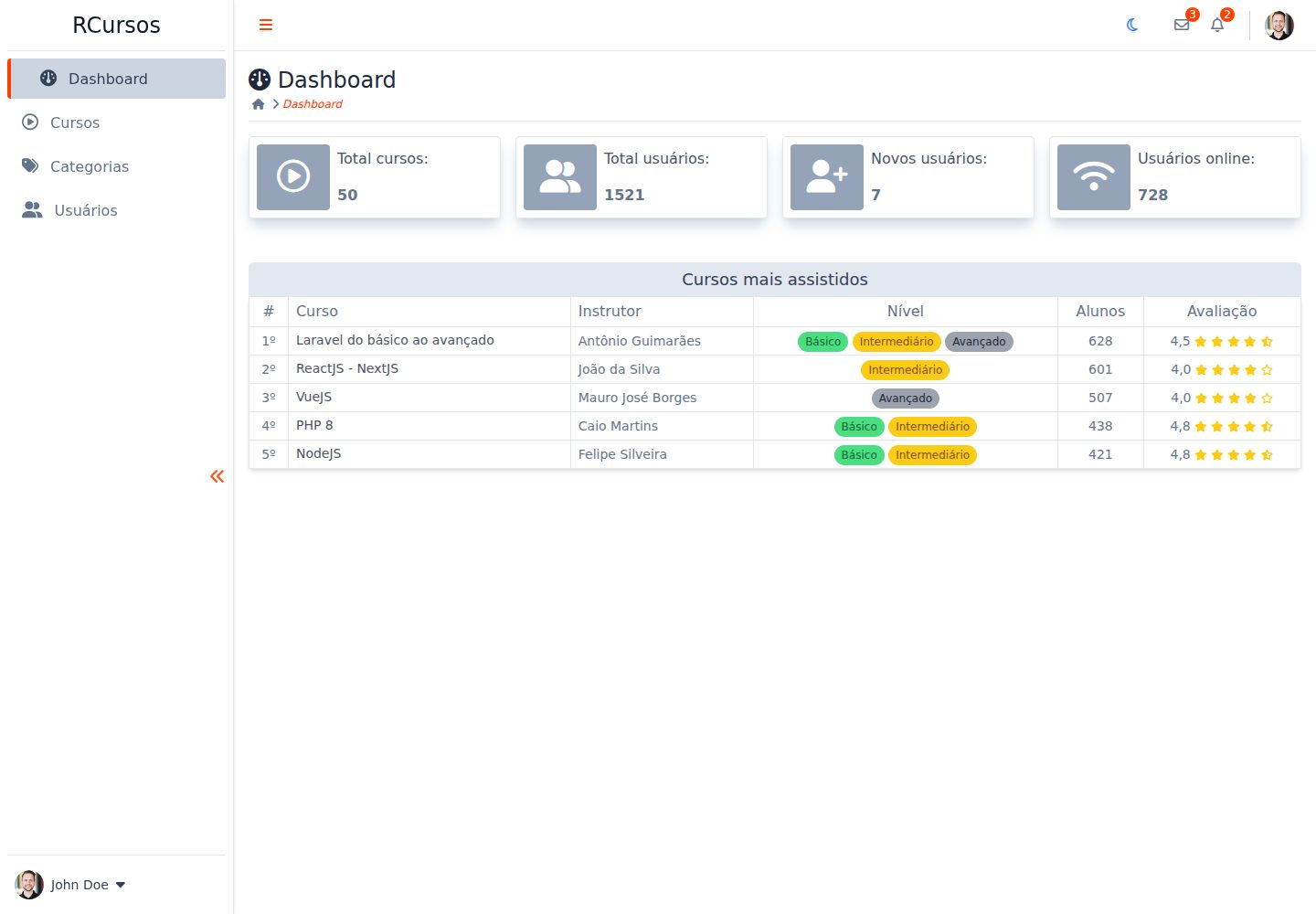
Compare the page layouts and mobile experience. Open any screenshot for a closer look.
Desktop homepage1 / 2
Desktop captureTop of page
Actual screenshot captured by the server browser.
All pages & views 2
Screenshots show visual appearance; interactive behavior may differ.
Recorded 2026-10-03View source
What stands out
A quick read of the recorded project description.
Page interaction logic implemented with AlpineJS
Provides both light and dark appearances
Responsive layout with desktop and mobile views
Integrates supporting libraries including TippyJS, JS-Cookie, and Fontawesome
Uses Vite as the development and build tool
Template Details
This is an admin dashboard template for practicing Tailwind CSS and AlpineJS. In the README, the author explicitly calls it a dummy admin template, and the layout draws inspiration from other dashboard templates on the internet. The template is responsive and offers both light and dark appearances.
In terms of technical composition, the project uses Tailwind CSS for styling, AlpineJS for interactions, and Vite as the build tool; supporting libraries include TippyJS (tooltips and popovers), JS-Cookie (cookie management), and Fontawesome (icons). The repository language is primarily HTML, and the repository status badge in the README is marked as unsupported.
To run it, clone the repository, install dependencies, and start the development server; by default it previews on local port 5173. The project is released under the MIT license, allowing free use, modification, commercial use, and distribution of the code, but third-party assets such as demo images, fonts, and icons require separate license verification.
HTMLAdmin panel
Is it right for your project?
Use Cases
- As a practice project for learning how to use Tailwind CSS and AlpineJS together
- As a reference for dashboard layout and light/dark mode switching in admin page development
- As a starting structure for personal or internal project admin interfaces to modify further
Suitable For
- Front-end developers who want to understand how Tailwind CSS and AlpineJS work together to build admin interfaces
- Developers who need a freely modifiable MIT-licensed admin template as a starting point
- Learners who want to reference responsive dashboard layouts and dark mode implementations
Getting started & customization
Use these recorded setup notes alongside the repository instructions for your chosen version.
- 1
Requires Git and Node.js or Yarn to be installed in advance
- 2
After cloning the repository, enter the project directory and run npm install to install dependencies
- 3
Run npm run dev to start development mode, accessible by default at http://localhost:5173
- 4
The repository status in the README is marked as unsupported; it is advisable to verify the current state of the code before use
- 5
The code is under the MIT license, but third-party assets such as demo images, fonts, and icons require separate license verification
License & source material
Usage conditions & limitations
Free to use · keep license noticeThis entry covers the free version under the MIT license in the public repository; the free scope applies to that version's code and does not mean external services or third-party assets are free.
Must comply with when using
- Free use, modification, commercial use, and distribution of this version's code are permitted.
- When distributing copies or substantial portions of the code, retain the original author's copyright notice and the full MIT license notice.
- The code is provided as is; warranties and limitations of liability are governed by the original license and applicable law.
Additional costs & items to verify
- Demo images, fonts, icons, and other third-party assets require verification under their respective licenses and cannot be judged solely by the code's MIT license.
- External services such as domains, hosting, databases, payments, or AI may incur separate charges.
View Original Text Basis
https://github.com/risaltte/dashboard-tailwindCSS/blob/main/LICENSEhttps://github.com/risaltte/dashboard-tailwindCSS/blob/main/README.mdPermission is hereby granted, free of charge
Original License Text
Compiled by DeepSeek based on repository license and README ·2026-10-03. Results only cover the materials read; dependencies, images, fonts, and subsequent term changes are subject to their respective original texts.
Project checks & description sources
Template Information
- Source platforms
- GitHub
- Documentation and maintenance reference score
- Partly documented · 68 / 100
- Technologies
- HTML
- Website type
- Admin dashboard
How this score is calculated
Our heuristic uses license records (up to 30), a demo link (12), a preview (10), stars (15), recorded maintenance (15), description completeness (8), feature records (5) and classification data (5). It is not a code, security or performance test, or a Google score. A link does not establish tested functionality.
What to verify for this project
- Repository update recorded
- 2024-05-15
- Screenshot last checked
- 2026-10-03
A demo link is listed. Check it with your own content and viewport sizes; its presence does not confirm that forms, authentication or payments work.
The catalog identifies HTML as the primary stack. Check the actual dependency manifest and lockfile for versions and hosting requirements. These notes use recorded metadata, not a code audit or a deployment test.
Use a selection guide →How this description was prepared
AI-assisted description based on catalog records and repository material. Repository authors are not automatically the reviewers of this description.
Review declaration: [email protected] · 2026-10-04
Inspect the recorded source material
SHA-256: 631686f675d1fcddebc4bfb91020411cc1cf23bb17a572fcc34861cbcfc9e334
2026-10-03T23:15:51.623Z
Source file / repository<h1 align="center" id="project_name">
<br />
<img height="120" width="120" src="https://cdn.jsdelivr.net/gh/devicons/devicon/icons/html5/html5-original.svg" />
<img height="120" width="120" src="https://cdn.jsdelivr.net/gh/devicons/devicon/icons/tailwindcss/tailwindcss-original.svg" />
<img height="120" width="120" src="https://cdn.jsdelivr.net/gh/devicons/devicon/icons/javascript/javascript-original.svg" />
<br />
</h1>
<p align="center">
Admin Template Dashboard with Tailwind CSS.
</p>
<p align="center">
<!-- GitHub last commit -->
<a href="https://github.com/risaltte/dashboard-tailwindCSS/commits/master">
<img alt="GitHub last commit" src="https://img.shields.io/github/last-commit/risaltte/dashboard-tailwindCSS?color=81D8F7">
</a>
<!-- GitHub language count -->
<img alt="GitHub language count" src="https://img.shields.io/github/languages/count/risaltte/dashboard-tailwindCSS?color=81D8F7">
<!-- GitHub top language -->
<img alt="GitHub top language" src="https://img.shields.io/github/languages/top/risaltte/dashboard-tailwindCSS?color=81D8F7">
<!-- Repository size -->
<img alt="Repository size" src="https://img.shields.io/github/repo-size/risaltte/dashboard-tailwindCSS?color=81D8F7">
<!-- Repository status -->
<img src="https://www.repostatus.org/badges/latest/unsupported.svg">
<!-- Link repo -->
<a href="https://github.com/risaltte/dashboard-tailwindCSS/blob/master/LICENSE">
<img src="https://img.shields.io/github/license/risaltte/dashboard-tailwindCSS?color=81D8F7" alt="License">
</a>
</p>
<p align="center">
<a href="#about">About</a> •
<a href="#layout">Layout</a> •
<a href="#technologies">Technologies</a> •
<a href="#prerequisites">Prerequisites</a> •
<a href="#demo">Demo</a> •
<a href="#author">Autor</a> •
<a href="#license">License</a>
</p>
<p align="center">
<img src=".github/img/desktop.png" alt="Layout">
</p>
<h4 align="center">
🚧 Admin Template Dashboard with Tailwind CSS | Done 🚧
</h4>
<h2 id="about">
💻 About
</h2>
Dashboard Template with Tailwind CSS is a dummy admin template created to apply knowledge of [Tailwindcss](https://tailwindcss.com/) and [AlpineJS](https://alpinejs.dev/). The Template is responsive and has dark mode support.
<h2 id="layout">🎨 Layout</h2>
<p>
The layout was made from some inspirations in other dashboard templates available on the internet.
</p>
<p align="center">
<img src=".github/img/desktop-light-1.png" alt="Layout Light">
</p>
<p align="center">
<img src=".github/img/desktop-dark-1.png" alt="Layout Light">
</p>
<p align="center" style="display: flex; align-items: flex-start; justify-content: center; flex-direction: column; gap: 16px;">
<img src=".github/img/mobile-light-1.png" width="400px" alt="Desktop Layout">
<img src=".github/img/mobile-dark-1.png" width="400px" alt="Mobile Layout">
</p>
<p align="center" style="display: flex; align-items: flex-start; justify-content: center; flex-direction: column; gap: 16px;">
<img src=".github/img/mobile-light-2.png" width="400px" alt="Desktop Layout">
<img src=".github/img/mobile-dark-2.png" width="400px" alt="Mobile Layout">
</p>
<br />
<h2 id="technologies">🛠 Technologies</h2>
The following tools were used in the construction of the project:
- **[Tailwind](https://tailwindcss.com/)**
- **[AlpineJS](https://alpinejs.dev/)**
- **[Vite](https://vitejs.dev/)**
> See more [package.json](package.json)
**Utilities**
- Tooltips | Popover: **[TippyJS](https://tippyjs.bootcss.com/)**
- Cookie management: **[JS-Cookie](https://www.npmjs.com/package/js-cookie)**
- Icons: **[Fontawesome](https://fontawesome.com/)**
<h2 id="prerequisites">💿 How to run the project</h2>
### 🧰 Prerequisites
Before you start, you will need to have the following tools installed on your machine:
> [Git](https://git-scm.com), [Node.js](https://nodejs.org/en/) or [Yarn](https://yarnpkg.com/) if you prefer.
> In addition it is good to have an editor to work with the code as [VSCode](https://code.visualstudio.com/)
### 🧭 Running the Project
```bash
# Clone repo
$ git clone https://github.com/risaltte/dashboard-tailwindCSS.git
# Access the project folder in the terminal/cmd
$ cd dashboard-tailwindCSS
# Install the dependencies (npm or yarn)
$ npm install
# Run the application in development mode
$ npm run dev
# see on http://localhost:5173
```
<h2 id="demo">🧪 Demo</h2>
<a href="https://dashboard-tailwind-css.vercel.app" target="_blank">
<!-- Link externo ou local(.github). -->
<img src=".github/img/vercel_button.png">
</a>
<h2 id="author">🦸 Autor</h2>
<a href="https://github.com/risaltte">
<img style="border-radius: 50%;" src="https://avatars.githubusercontent.com/u/38223948?v=4" width="100px;" alt="Rafael Risalte"/>
<br />
<sub><b>Rafael Risalte</b></sub></a>
[](https://www.linkedin.com/in/rafaelrisalte/)
[](mailto:[email protected])
<h2 id="license">📝 License</h2>
Distributed under MIT license. See [LICENSE](LICENSE) for more information.
Made with ❤️ by Rafael Risalte 👋🏽 [Contact!](https://www.linkedin.com/in/rafaelrisalte/)
[⬆ Back to top](#project_name)<br />
Explore similar templates
Compare previews and descriptions within the same stack and category.

gentelella
Gentelella v4 is a free, open-source admin dashboard template maintained by Colorlib, built with vanilla JavaScript, SCSS, and Vite 8 without Bootstrap or jQuery.
HTML · Admin dashboard

coreui-free-bootstrap-admin-template
A free Bootstrap admin template maintained by CoreUI, built on CoreUI's own UI component library. It provides compiled HTML pages and Pug template source code, covering dashboards, authentication, forms, components, icons, and error pages.
HTML · Admin dashboard

dashboards
A collection of responsive dashboard HTML templates open-sourced by Keen IO, built on CSS Grid, offering multiple prebuilt admin data interface layouts.
HTML · Admin dashboard

SB Admin 2
SB Admin 2 is a classic Bootstrap admin template from Start Bootstrap, offering dashboards, charts, tables, and common management pages.
HTML · Admin dashboard

Adminator-admin-dashboard
Adminator 4 is a vanilla HTML, CSS and JavaScript admin dashboard template with a CSS-variable token design system, built-in light and dark themes, no jQuery or Bootstrap dependency, and 18 pages covering dashboards, mail, calendar, charts, forms, tables and error pages.
HTML · Admin dashboard

SB Admin
SB Admin is a lightweight, open-source Bootstrap admin template from Start Bootstrap. It offers a sidebar-and-top-bar layout with data tables, forms, and stat cards, plus responsive design.
HTML · Admin dashboard