使用 Tailwind CSS 编写样式的后台管理界面模板
HTML后台
dashboard-tailwindCSS — HTML 后台模板
作者 risaltte
基于 Tailwind CSS 与 AlpineJS 的响应式后台管理模板,支持深色模式,使用 Vite 构建。
看看你的网站会是什么样
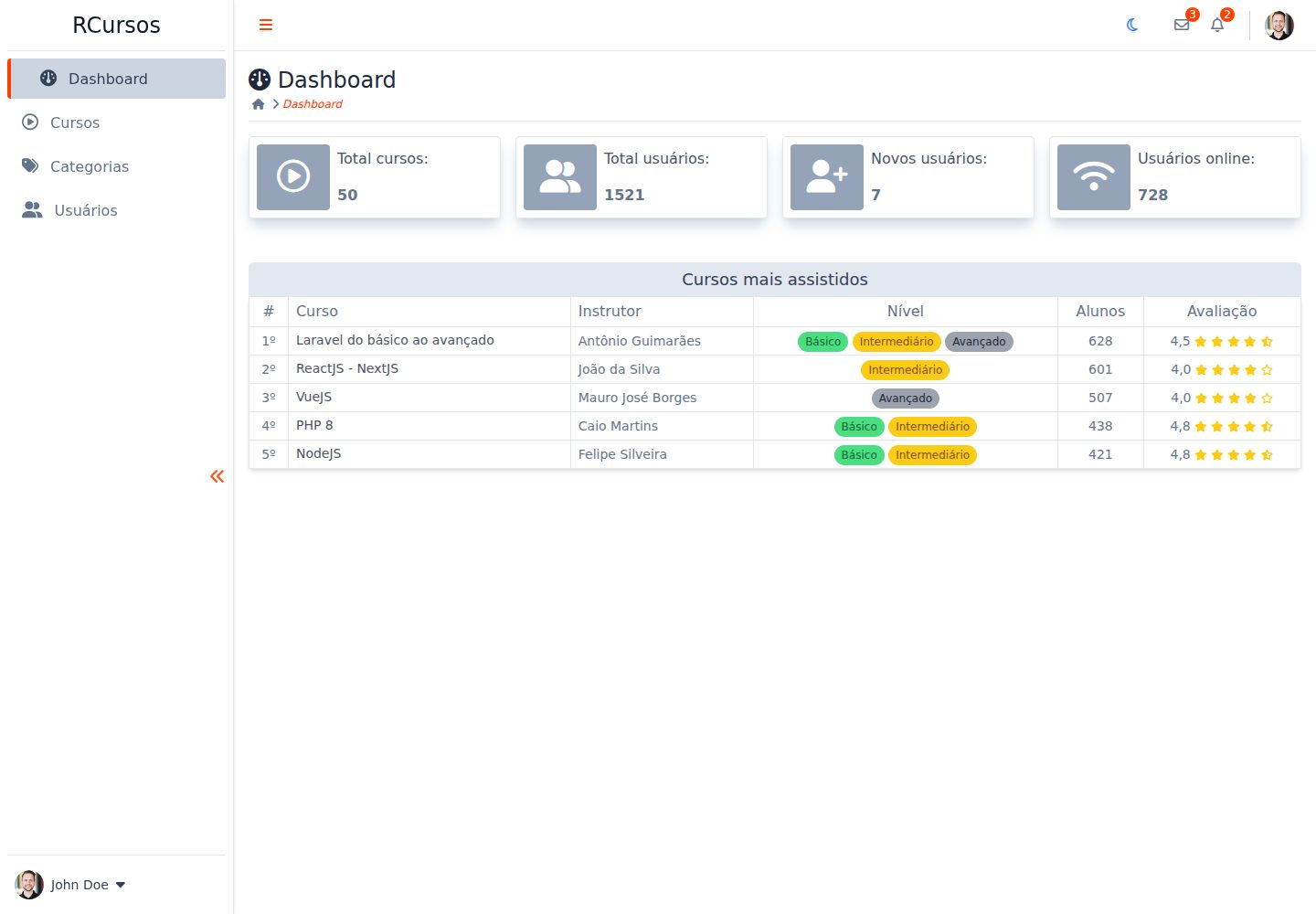
浏览真实页面截图,比较内容排版与手机效果。点击下方缩略图切换,放大查看整页细节。
全部页面与视图 2
截图用于了解视觉与布局,交互效果请以实际项目为准。
采集于 2026-10-03查看来源
值得关注的模板亮点
从已有项目资料中,快速了解它的特点。
通过 AlpineJS 实现页面交互逻辑
同时提供浅色与深色两种外观
响应式布局,包含桌面端与移动端视图
集成 TippyJS、JS-Cookie 与 Fontawesome 等辅助库
使用 Vite 作为开发与构建工具
模板详细介绍
这是一个用于练习 Tailwind CSS 与 AlpineJS 的后台管理模板,作者在 README 中明确称其为 dummy admin template(演示用后台模板),布局参考了互联网上其他仪表盘模板的灵感。模板为响应式设计,并提供浅色与深色两套外观。
技术构成方面,项目使用 Tailwind CSS 负责样式,AlpineJS 处理交互,Vite 作为构建工具;辅助库包括 TippyJS(提示与弹出层)、JS-Cookie(Cookie 管理)和 Fontawesome(图标)。仓库语言以 HTML 为主,README 中的仓库状态徽章标注为 unsupported。
运行方式为克隆仓库后安装依赖并启动开发服务器,默认在本地 5173 端口预览。项目采用 MIT 许可发布,可免费使用、修改、商用和分发代码,但演示图片、字体、图标等第三方素材需单独核对其许可。
HTML后台
适合你的项目吗?
适用场景
- 作为学习 Tailwind CSS 与 AlpineJS 组合使用的练习项目
- 在后台管理类页面开发中参考其仪表盘布局与深浅色切换实现
- 作为个人或内部项目后台界面的起始结构进行二次修改
适合人群
- 希望了解 Tailwind CSS 与 AlpineJS 如何配合搭建后台界面的前端开发者
- 需要一份可自由修改的 MIT 许可后台模板作为起点的开发者
- 想参考响应式仪表盘布局与深色模式实现方式的学习者
上手与定制指南
结合仓库当前版本的说明,按下面的资料检查内容、配置与运行要求。
- 1
需要预先安装 Git 以及 Node.js 或 Yarn
- 2
克隆仓库后进入项目目录执行 npm install 安装依赖
- 3
执行 npm run dev 启动开发模式,默认访问 http://localhost:5173
- 4
README 中仓库状态标注为 unsupported,使用前建议自行核对代码现状
- 5
代码采用 MIT 许可,但演示图片、字体、图标等第三方素材需单独核对许可
授权与来源资料
使用条件与限制
免费使用 · 保留许可声明本次收录的是公开仓库中采用 MIT 许可的免费版本;免费范围为该版本代码,不代表外部服务或第三方素材免费。
使用时需要遵守
- 允许免费使用、修改、商用和分发该版本代码。
- 分发代码副本或实质性部分时,保留原作者版权声明和完整 MIT 许可声明。
- 代码按现状提供;担保与责任限制以原许可证及适用法律为准。
额外费用与待核对事项
- 演示图片、字体、图标及其他第三方素材需按各自许可核对,不能仅凭代码的 MIT 许可判断。
- 域名、托管、数据库、支付或 AI 等外部服务可能另外收费。
查看原文依据
https://github.com/risaltte/dashboard-tailwindCSS/blob/main/LICENSEhttps://github.com/risaltte/dashboard-tailwindCSS/blob/main/README.mdPermission is hereby granted, free of charge
许可证原文
DeepSeek 根据仓库许可证和 README 整理 ·2026-10-03。结果仅覆盖已读取资料,依赖、图片、字体及后续条款变更以各自原文为准。
项目核对记录与介绍依据
模板资料
- 来源平台
- GitHub
- 资料与维护参考分
- 资料一般 · 68 / 100
- 技术栈
- HTML
- 网站类型
- 后台
这个分数如何计算
本站按许可资料(最高30分)、演示链接(12分)、预览图(10分)、Star数(15分)、记录的维护时间(15分)、描述完整度(8分)、功能记录(5分)和分类资料(5分)计算。它不是代码、安全或性能测试,也不是 Google 评分;有链接不代表已实测可用。
这个项目需要核对什么
- 记录的仓库更新时间
- 2024-05-15
- 截图检查日期
- 2026-10-03
已收录演示链接。请用你的内容与屏幕尺寸检查;有演示不代表表单、认证或支付已经可用。
目录记录的主要技术栈是 HTML。请通过依赖清单和锁文件核对实际版本与托管要求。这些说明基于收录资料,不代表代码审计或部署实测。
查看具体选型方法 →介绍的制作与核对状态
介绍由 AI 辅助整理目录与仓库资料。仓库作者不等于这篇介绍的审核者。
审核声明: [email protected] · 2026-10-04
查看当时使用的来源资料
SHA-256: 631686f675d1fcddebc4bfb91020411cc1cf23bb17a572fcc34861cbcfc9e334
2026-10-03T23:15:51.623Z
来源文件 / 仓库<h1 align="center" id="project_name">
<br />
<img height="120" width="120" src="https://cdn.jsdelivr.net/gh/devicons/devicon/icons/html5/html5-original.svg" />
<img height="120" width="120" src="https://cdn.jsdelivr.net/gh/devicons/devicon/icons/tailwindcss/tailwindcss-original.svg" />
<img height="120" width="120" src="https://cdn.jsdelivr.net/gh/devicons/devicon/icons/javascript/javascript-original.svg" />
<br />
</h1>
<p align="center">
Admin Template Dashboard with Tailwind CSS.
</p>
<p align="center">
<!-- GitHub last commit -->
<a href="https://github.com/risaltte/dashboard-tailwindCSS/commits/master">
<img alt="GitHub last commit" src="https://img.shields.io/github/last-commit/risaltte/dashboard-tailwindCSS?color=81D8F7">
</a>
<!-- GitHub language count -->
<img alt="GitHub language count" src="https://img.shields.io/github/languages/count/risaltte/dashboard-tailwindCSS?color=81D8F7">
<!-- GitHub top language -->
<img alt="GitHub top language" src="https://img.shields.io/github/languages/top/risaltte/dashboard-tailwindCSS?color=81D8F7">
<!-- Repository size -->
<img alt="Repository size" src="https://img.shields.io/github/repo-size/risaltte/dashboard-tailwindCSS?color=81D8F7">
<!-- Repository status -->
<img src="https://www.repostatus.org/badges/latest/unsupported.svg">
<!-- Link repo -->
<a href="https://github.com/risaltte/dashboard-tailwindCSS/blob/master/LICENSE">
<img src="https://img.shields.io/github/license/risaltte/dashboard-tailwindCSS?color=81D8F7" alt="License">
</a>
</p>
<p align="center">
<a href="#about">About</a> •
<a href="#layout">Layout</a> •
<a href="#technologies">Technologies</a> •
<a href="#prerequisites">Prerequisites</a> •
<a href="#demo">Demo</a> •
<a href="#author">Autor</a> •
<a href="#license">License</a>
</p>
<p align="center">
<img src=".github/img/desktop.png" alt="Layout">
</p>
<h4 align="center">
🚧 Admin Template Dashboard with Tailwind CSS | Done 🚧
</h4>
<h2 id="about">
💻 About
</h2>
Dashboard Template with Tailwind CSS is a dummy admin template created to apply knowledge of [Tailwindcss](https://tailwindcss.com/) and [AlpineJS](https://alpinejs.dev/). The Template is responsive and has dark mode support.
<h2 id="layout">🎨 Layout</h2>
<p>
The layout was made from some inspirations in other dashboard templates available on the internet.
</p>
<p align="center">
<img src=".github/img/desktop-light-1.png" alt="Layout Light">
</p>
<p align="center">
<img src=".github/img/desktop-dark-1.png" alt="Layout Light">
</p>
<p align="center" style="display: flex; align-items: flex-start; justify-content: center; flex-direction: column; gap: 16px;">
<img src=".github/img/mobile-light-1.png" width="400px" alt="Desktop Layout">
<img src=".github/img/mobile-dark-1.png" width="400px" alt="Mobile Layout">
</p>
<p align="center" style="display: flex; align-items: flex-start; justify-content: center; flex-direction: column; gap: 16px;">
<img src=".github/img/mobile-light-2.png" width="400px" alt="Desktop Layout">
<img src=".github/img/mobile-dark-2.png" width="400px" alt="Mobile Layout">
</p>
<br />
<h2 id="technologies">🛠 Technologies</h2>
The following tools were used in the construction of the project:
- **[Tailwind](https://tailwindcss.com/)**
- **[AlpineJS](https://alpinejs.dev/)**
- **[Vite](https://vitejs.dev/)**
> See more [package.json](package.json)
**Utilities**
- Tooltips | Popover: **[TippyJS](https://tippyjs.bootcss.com/)**
- Cookie management: **[JS-Cookie](https://www.npmjs.com/package/js-cookie)**
- Icons: **[Fontawesome](https://fontawesome.com/)**
<h2 id="prerequisites">💿 How to run the project</h2>
### 🧰 Prerequisites
Before you start, you will need to have the following tools installed on your machine:
> [Git](https://git-scm.com), [Node.js](https://nodejs.org/en/) or [Yarn](https://yarnpkg.com/) if you prefer.
> In addition it is good to have an editor to work with the code as [VSCode](https://code.visualstudio.com/)
### 🧭 Running the Project
```bash
# Clone repo
$ git clone https://github.com/risaltte/dashboard-tailwindCSS.git
# Access the project folder in the terminal/cmd
$ cd dashboard-tailwindCSS
# Install the dependencies (npm or yarn)
$ npm install
# Run the application in development mode
$ npm run dev
# see on http://localhost:5173
```
<h2 id="demo">🧪 Demo</h2>
<a href="https://dashboard-tailwind-css.vercel.app" target="_blank">
<!-- Link externo ou local(.github). -->
<img src=".github/img/vercel_button.png">
</a>
<h2 id="author">🦸 Autor</h2>
<a href="https://github.com/risaltte">
<img style="border-radius: 50%;" src="https://avatars.githubusercontent.com/u/38223948?v=4" width="100px;" alt="Rafael Risalte"/>
<br />
<sub><b>Rafael Risalte</b></sub></a>
[](https://www.linkedin.com/in/rafaelrisalte/)
[](mailto:[email protected])
<h2 id="license">📝 License</h2>
Distributed under MIT license. See [LICENSE](LICENSE) for more information.
Made with ❤️ by Rafael Risalte 👋🏽 [Contact!](https://www.linkedin.com/in/rafaelrisalte/)
[⬆ Back to top](#project_name)<br />
看看同类模板
对比同技术栈与用途的模板,找到更适合的视觉与内容结构。

gentelella
Free admin dashboard template — vanilla JS, SCSS, Vite 8. No Bootstrap, no jQuery.
HTML · 后台

coreui-free-bootstrap-admin-template
Free Bootstrap Admin & Dashboard Template Built for AI-Assisted Development
HTML · 后台

dashboards
Responsive dashboard templates 📊✨
HTML · 后台

SB Admin 2
SB Admin 2 是 Start Bootstrap 推出的开源后台模板,基于 Bootstrap 构建,整体风格偏向经典管理界面。
HTML · 后台

Adminator-admin-dashboard
Adminator is easy to use and well design admin dashboard template with dark mode for web apps, websites, servi…
HTML · 后台

SB Admin
SB Admin 是 Start Bootstrap 推出的开源后台管理模板,基于 Bootstrap 构建,定位是简洁、实用的管理界面。
HTML · 后台