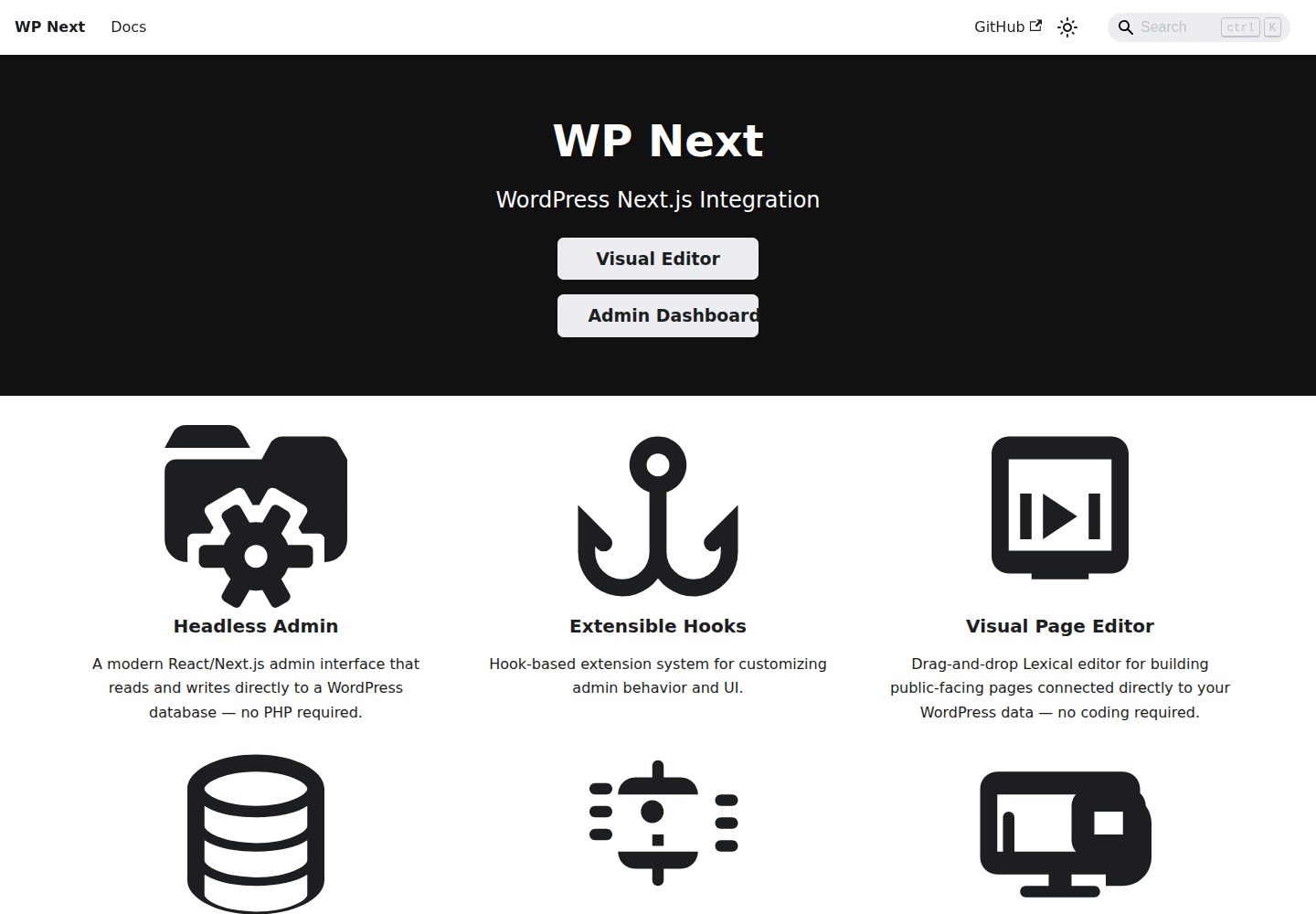
Two independently usable products: a visual editor and a React admin dashboard, which can be combined or used as admin only
Next.jsWordPressReactAdmin dashboard
wp-next — Next.js Admin dashboard Template
By rnaga
WP-Next is a Next.js toolkit built with TypeScript and React for WordPress, comprising a visual drag-and-drop editor and a React admin dashboard as two independently usable products.
Explore the design
Compare the page layouts and mobile experience. Open any screenshot for a closer look.
Desktop homepage1 / 2
Desktop captureTop of page
Actual screenshot captured by the server browser.
All pages & views 2
Screenshots show visual appearance; interactive behavior may differ.
Recorded 2026-10-02View source
What stands out
A quick read of the recorded project description.
Templates and pages are stored in the WordPress database as Lexical JSON, enabling version control and programmatic processing
Drag-and-drop canvas supports live preview, element selection/scaling/nesting/animation, plus desktop, tablet, and mobile breakpoints and CSS states
Dynamic data binding can directly read WordPress posts, users, taxonomies, and options without building custom API endpoints
Built-in Agent Skill supports natural-language creation and updating of templates, or converting HTML/CSS into Lexical JSON templates
The admin covers posts, pages, media, comments, users and roles, and revisions; multisite mode additionally supports sites and per-site content
Template Details
WP-Next targets WordPress projects that want to replace traditional PHP themes and admin with Next.js. The repository provides two products: WP-Next Editor and WP-Next Admin, which can be used together or Admin alone.
WP-Next Editor is a visual drag-and-drop site builder that connects directly to the WordPress database to generate front-end pages. Templates and pages are stored in the WordPress database as Lexical JSON, so they can be version-controlled, processed programmatically, and easily read or written by AI. The editor offers live preview, desktop/tablet/mobile breakpoints and CSS states such as hover and focus, dynamic data binding (posts, users, taxonomies, options), nestable and reusable widgets, template-level CSS variables, CSS keyframe animations (including Animate.css presets), a code editor for directly editing Lexical JSON, and save history with preview and restore.
The editor includes an Agent Skill (/wp-next-editor-template) supporting four modes: create, update, convert, and help. It can generate templates from natural language, modify existing templates, convert HTML/CSS into Lexical JSON templates, or query available nodes and styles. This skill follows the Agent Skills open standard and can be used in coding agents that support it.
WP-Next Admin is a React admin dashboard that serves as an alternative interface to the traditional WordPress admin and can also be adopted independently of the editor. By default it includes posts and pages, media, categories and tags, comments, profile and settings, users and roles, and revisions; in multisite mode it also supports sites and per-site content (posts, media, comments). It supports custom pages and provides filter and action hooks inspired by WordPress hooks, oriented toward TypeScript and Node.js: front-end hooks extend the admin interface in the browser, while back-end hooks handle server-side concerns such as authentication, media uploads, and integrations.
Prerequisites include a running WordPress database; if WordPress is not yet installed, the README points to the WP-Node installation guide. An official Docker demo image is available, containing both the editor and admin, with default credentials wp/wp. Initialization can be done via CLI: initEditor installs the editor and the bundled admin, while initAdmin installs only the admin. The repository is MIT-licensed; third-party assets and external services require separate verification.
Next.jsWordPressReactAdmin dashboard
Is it right for your project?
Use Cases
- Replace a traditional WordPress PHP theme with a Next.js front end while reading directly from an existing WordPress database
- Build front-end pages such as marketing pages and landing pages by dragging and dropping in the browser, adjusting styles and animations per device breakpoint
- Let a coding agent generate templates from natural-language descriptions, or convert existing HTML/CSS into Lexical JSON templates
- Use the React admin dashboard instead of wp-admin for daily content management, extending functionality through custom pages and hooks
- Manage sites and their posts, media, and comments uniformly in a multisite WordPress environment
Suitable For
- Teams that already have a WordPress database and want to build the front end and admin with TypeScript/React
- Developers who need visual site building and require templates to be version-controlled and processable by programs or AI
- Projects that only want to replace the WordPress admin interface and do not yet need the visual editor
- Developers using coding agents that support Agent Skills for template authoring
Getting started & customization
Use these recorded setup notes alongside the repository instructions for your chosen version.
- 1
A running WordPress database is required first; if WordPress is not installed, refer to the WP-Node installation guide
- 2
For a quick trial, run the official Docker image rnagat/wp-next-editor-example:latest, map port 3000, and use the default credentials wp/wp
- 3
For a full installation, run npx @rnaga/wp-next-cli -- initEditor; to install only the admin, run npx @rnaga/wp-next-cli -- initAdmin
- 4
To enable AI template authoring, install the skill: npx @rnaga/wp-next-cli -- editor agentSkills add
- 5
The code is MIT-licensed, but third-party assets such as demo images, fonts, and icons, as well as external services like domains, hosting, databases, and AI, require separate verification of licensing and costs
License & source material
Usage conditions & limitations
Free to use · keep license noticeThis listing covers the free version under the MIT license in the public repository; the free scope applies to that version's code and does not imply that external services or third-party assets are free.
Must comply with when using
- The code of this version may be used, modified, used commercially, and distributed free of charge.
- When distributing copies or substantial portions of the code, retain the original author's copyright notice and the full MIT license notice.
- The code is provided as is; warranties and limitations of liability are governed by the original license and applicable law.
Additional costs & items to verify
- Prerequisite: a running WordPress database is required; otherwise the editor or admin cannot run.
- Full installation requires running the official CLI command initEditor via npx, depending on the npm ecosystem and network downloads.
- Installing only the admin requires running the official CLI command initAdmin, also depending on npm and network.
- Quick trial depends on Docker to run the official image, requiring a local Docker environment.
- Enabling AI template authoring requires additionally installing the Agent Skill and using it with a coding agent that supports the standard.
- Demo images, fonts, icons, and other third-party assets must be verified under their respective licenses and cannot be judged solely by the code's MIT license.
- External services such as domains, hosting, databases, payments, or AI may incur separate charges.
View Original Text Basis
Permission is hereby granted, free of charge
Original License Text
Both products require a running WordPress database.
Original README
npx @rnaga/wp-next-cli -- initEditor
Original README
npx @rnaga/wp-next-cli -- initAdmin
Original README
docker run --rm --init -it --name wp-next-editor-example
Original README
https://github.com/rnaga/wp-next/blob/main/LICENSEhttps://github.com/rnaga/wp-next/blob/main/README.mdnpx @rnaga/wp-next-cli -- editor agentSkills add
Original README
Compiled by DeepSeek based on repository license and README ·2026-10-02. Results only cover the materials read; dependencies, images, fonts, and subsequent term changes are subject to their respective original texts.
Project checks & description sources
Template Information
- Source platforms
- GitHub
- Documentation and maintenance reference score
- More documented · 92 / 100
- Technologies
- Next.js · WordPress · React
- Website type
- Admin dashboard
How this score is calculated
Our heuristic uses license records (up to 30), a demo link (12), a preview (10), stars (15), recorded maintenance (15), description completeness (8), feature records (5) and classification data (5). It is not a code, security or performance test, or a Google score. A link does not establish tested functionality.
What to verify for this project
- Repository update recorded
- 2026-07-26
- Screenshot last checked
- 2026-10-02
A demo link is listed. Check it with your own content and viewport sizes; its presence does not confirm that forms, authentication or payments work.
The catalog identifies Next.js as the primary stack. Check the actual dependency manifest and lockfile for versions and hosting requirements. These notes use recorded metadata, not a code audit or a deployment test.
Use a selection guide →How this description was prepared
AI-assisted description based on catalog records and repository material. Repository authors are not automatically the reviewers of this description.
Automatically checked against source and license rules; no manual editorial review.
Inspect the recorded source material
SHA-256: 0f1064e925829d80ebfb2f5d01833756d31fcd28f7ab1afe3a3766259aedb0c8
2026-10-02T10:02:20.285Z
Source file / repository# WP-Next ## 📖 [Full Documentation → rnaga.github.io/wp-next](https://rnaga.github.io/wp-next/) > For guides, concepts, and examples, the documentation site is the best starting point. **WP-Next** is a **TypeScript-first** toolkit for building **WordPress-powered Next.js applications** — with a visual drag-and-drop editor, a modern React admin dashboard, and **first-class AI support** built in from day one. <a href="https://vimeo.com/1185738064?share=copy#t=0" target="_blank" rel="noopener"> <img width="1200" height="699" alt="WP-Next Editor canvas demo" src="https://rnaga.github.io/wp-next/assets/editor/canvas/drag-drop-0.gif" /> </a> <a href="https://vimeo.com/1112693769?share=copy#t=0" target="_blank" rel="noopener"> <img width="1200" height="699" alt="WP-Next Admin dashboard demo" src="https://rnaga.github.io/wp-next/images/dashboard-vimeo.png" /> </a> --- ## Two Products, One Stack WP-Next ships as two products you can use together or independently: - **WP-Next Editor** — visual site builder with live preview, responsive breakpoints, dynamic WordPress data binding, and AI-powered template authoring. Includes Admin automatically. - **WP-Next Admin** — standalone React admin dashboard you can adopt without the editor. Use both as one stack, or start with Admin alone. --- ## Quick Demo Run a ready-made WP-Next Editor example using Docker. This is the recommended demo because it includes the editor and the admin dashboard in one setup: ```bash docker run --rm --init -it --name wp-next-editor-example -p 3000:3000 \ -v wp-next-editor_public:/app/editor/public \ -v wp-next-editor_db:/var/lib/mysql \ rnagat/wp-next-editor-example:latest ``` Log in with: ```text Username: wp Password: wp ``` - Editor: [http://localhost:3000/admin/1/editor](http://localhost:3000/admin/1/editor) - Admin Dashboard: [http://localhost:3000/admin](http://localhost:3000/admin) To stop the container: ```bash docker stop wp-next-editor-example ``` ## Prerequisites Both products require a running WordPress database. If you don't already have WordPress installed, see the [WP-Node installation guide](https://rnaga.github.io/wp-node/docs/getting-started/installation#prerequisites). ## Getting Started Choose the setup that matches what you want to build: ### Build WP-Next Editor + Admin Use this if you want the full WP-Next experience. This installs both packages, with WP-Next Admin included as part of the editor setup. ```bash npx @rnaga/wp-next-cli -- initEditor ``` See the [Editor Installation guide](https://rnaga.github.io/wp-next/docs/editor/installation) for the full setup walkthrough. ### Build WP-Next Admin Only Run this only if you want to start up **WP-Next Admin** without the visual editor: ```bash npx @rnaga/wp-next-cli -- initAdmin ``` See the [Admin Getting Started guide](https://rnaga.github.io/wp-next/docs/admin/getting-started) for the full setup walkthrough. ## WP-Next Editor WP-Next Editor is a visual, drag-and-drop website builder for building public-facing WordPress sites directly connected to your WordPress database. Templates and pages are stored as structured [Lexical](https://lexical.dev/docs/intro) JSON in the WordPress database — making them version-controllable, programmatically manipulable, and AI-ready. ### Key Features - **Drag-and-drop canvas** — build pages visually with a live preview. Select, resize, nest, and animate elements directly on the canvas. - **Responsive design** — set per-device breakpoints (desktop, tablet, mobile) and CSS states (hover, focus, etc.). Each device gets its own `@media` query at render time. - **Dynamic data binding** — pull posts, users, taxonomies, and options directly from the WordPress database into any element. No custom API endpoints required. - **Widget system** — embed sub-templates (widgets) inside other templates for reusable headers, footers, and components. Widget variants let the same widget render different content per embedding. - **CSS variables** — define design tokens at the template level and reference them across all elements for consistent theming. - **Animations** — attach CSS keyframe animations (98 Animate.css presets) to any element, triggered by hover, click, scroll, and more. - **JSON editor** — edit the raw Lexical JSON directly in a built-in code editor for precise control over template structure. - **Save history** — create and manage template save points with preview and restore support. ### AI-Powered Template Authoring — Built-in Agent Skills WP-Next Editor ships with a built-in **[Agent Skill](https://agentskills.io/home)** (`/wp-next-editor-template`) that lets you build and modify templates using natural-language prompts. All templates are stored as Lexical JSON, so AI agents can read, write, and transform them directly. [Agent Skills](https://agentskills.io/home) is an open standard supported by Claude Code, OpenAI Codex, GitHub Copilot, Cursor, Gemini CLI, VS Code, and more. Install the skill once and use it with whichever coding agent you prefer. The skill supports four modes: | Mode | What it does | | --------- | ----------------------------------------------------------- | | `create` | Scaffold a new template from a natural-language description | | `update` | Modify an existing template based on a prompt | | `convert` | Convert HTML/CSS into a Lexical JSON template | | `help` | Describe available nodes, styles, and patterns | Install the skill with: ```bash npx @rnaga/wp-next-cli -- editor agentSkills add ``` Example prompt: ``` /wp-next-editor-template create src/templates/home.json "A hero section with a full-width background image, centered headline, subtitle, and a CTA button" ``` See [Using AI](https://rnaga.github.io/wp-next/docs/editor/concepts-features/using-ai) for installation details and more examples. --- ## WP-Next Admin WP-Next Admin is a **React-based Admin Dashboard** that serves as a modern alternative to the traditional WordPress Admin Dashboard. It can be used on its own, and it is also the admin layer that ships with WP-Next Editor. ### Key Features Out of the box, it includes: - Posts & Pages - Media - Terms (Categories, Tags) - Comments - Profile & Settings - Users and Roles - Revisions In **multisite mode**, it also supports: - Sites - Blogs (per-site content such as posts, media, comments) ### Extensibility WP-Next Admin supports **custom pages** and a **hook system** (filters and actions) inspired by WordPress hooks but built for TypeScript and Node.js. Frontend hooks extend the Admin UI in the browser; backend hooks handle server-side concerns such as authentication, media uploads, and integrations. See [Hooks](https://rnaga.github.io/wp-next/docs/admin/concepts-features/hooks) and [Custom Admin Pages](https://rnaga.github.io/wp-next/docs/admin/concepts-features/custom-pages) in the documentation. --- ## License MIT
Explore similar templates
Compare previews and descriptions within the same stack and category.

next-shadcn-dashboard-starter
An MIT-licensed admin dashboard starter built with Next.js 16, shadcn/ui, Tailwind CSS v4, and TypeScript.
Next.js · Admin dashboard

Studio Admin · Radix UI
Studio Admin is an admin dashboard template built with Next.js 16, TypeScript, Tailwind CSS v4, and Shadcn UI.
Next.js · Admin dashboard

free-nextjs-admin-dashboard
A free, open-source admin dashboard template built on Next.js 16, React 19, TypeScript, and Tailwind CSS v4. It provides a collapsible sidebar, charts, tables, authentication forms, modals, dropdowns, and dark mode, with internationalization and RTL support since version 2.4.0.
Next.js · Admin dashboard

materio-mui-nextjs-admin-template-free
Materio Free is a Next.js admin dashboard template based on App Router and MUI, integrating Tailwind CSS and available in TypeScript and JavaScript versions.
Next.js · Admin dashboard
nextjs-postgres-nextauth-tailwindcss-template
A Vercel-maintained Next.js App Router admin dashboard starter with Auth.js GitHub OAuth, Postgres, Tailwind CSS, and Shadcn UI, plus a sample products table, seed endpoint, and CRUD interface.
Next.js · Admin dashboard

shadcn-dashboard-landing-template
An open-source admin dashboard and marketing landing page template built on shadcn/ui and Tailwind CSS, with both Vite + React and Next.js versions in one repository.
Next.js · Admin dashboard