Astro 7 pure static generation with no runtime server overhead
AstroBlog
minrock — Astro Blog Template
By rnt-rez
A pure static Astro 7 blog theme for technical writers and Obsidian users, with typography-first design and build-time feature toggles.
Explore the design
Compare the page layouts and mobile experience. Open any screenshot for a closer look.
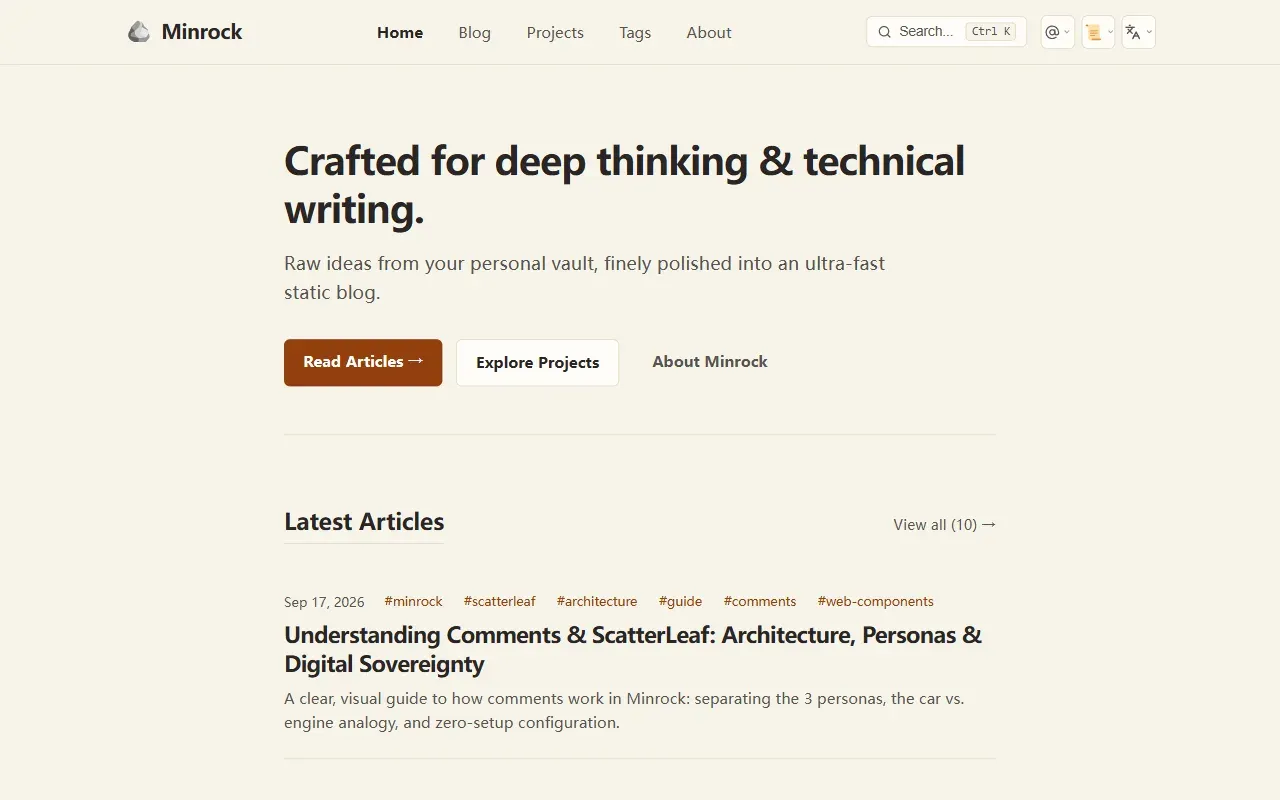
Desktop homepage1 / 4
Desktop capture
The actual desktop layout captured from the demo homepage.
All pages & views 4
Screenshots show visual appearance; interactive behavior may differ.
Recorded 2026-09-27View source
What stands out
A quick read of the recorded project description.
Ten feature toggles take effect at build time; disabling one produces no corresponding HTML/CSS/JS
Native compatibility with Obsidian Vault Markdown page bundles and local image pasting
Four calibrated color schemes, including the OLED true-black Midnight theme
Comments default to a Showcase sandbox mode; connecting real GitHub Discussions requires self-deploying a Cloudflare Worker
Built-in npm scripts for astro check, WCAG, Google Search, and security scanning
Template Details
Minrock is an Astro 7 static blog theme with a clear positioning: a typography-first, pure SSG publishing outlet for technical writers and people who take notes in Obsidian. Content lives as Markdown page bundles under src/content/blog/, frontmatter only needs title, description, pubDate, and tags, and the site title, author, social links, navigation, and feature toggles are centralized in a single file, src/config/site.ts. The project structure follows the usual components / layouts / pages / styles layering, with no additional CMS or database.
What stands out is its feature-toggle design. Search, table of contents, reading time, TTS narration, tags, sharing, theme switching, back-to-top, image zoom, and comments—ten items in total—can each be set to false in site.ts. Because the toggles are evaluated at Astro build time, turning one off keeps its corresponding HTML, CSS, and client-side JS out of the output. When the table of contents is disabled, the article layout automatically changes from a sidebar column to a centered single column at 780px. The theme ships with four color schemes—Clean White, Warm Paper, Slate Navy, and Midnight—and code blocks have consistent light/dark syntax highlighting, line numbers, and a copy button.
One thing to note about comments: the default is Showcase mode, where comments run in browser memory and are not actually written to GitHub Discussions. To connect real discussions, you need to enable Discussions in the repository, deploy ScatterLeaf's Cloudflare Worker yourself, and pass the broker URL through an environment variable. The README also notes that Comments.astro can be replaced with Giscus, Cusdis, Utterances, or similar solutions. On accessibility, the project claims to be built to WCAG 2.1/2.2 AA and provides scripts such as audit:wcag, audit:google, and audit:security, but these are the project's own check commands; it is worth running them against your own content before judging actual compliance.
AstroBlog
Is it right for your project?
Use Cases
- Publishing Obsidian notes directly as a personal technical blog after organizing them
- A static writing site that needs to be extremely lean and have features trimmed as needed
- Developers who want content to remain self-owned in open Markdown and deployed on Vercel or Cloudflare Pages
Suitable For
- Technical writers who are used to writing in Obsidian and accept a Markdown workflow
- Developers familiar with Astro and npm scripts who are willing to edit TypeScript configuration files
- Personal sites with requirements for page size and typographic reading experience that do not need an admin interface
Getting started & customization
Use these recorded setup notes alongside the repository instructions for your chosen version.
- 1
Initialize with npx create-astro@latest --template rnt-rez/minrock, or clone and run npm install && npm run dev
- 2
Site information, default theme, and feature toggles are all modified in src/config/site.ts
- 3
Comments are not written to a real repository by default; enabling online discussions requires enabling GitHub Discussions, deploying the ScatterLeaf Cloudflare Worker, and configuring the broker URL
- 4
The README does not state Node version requirements, multilingual content support, or deployment platform limitations; verify these yourself before going live
License & source material
Usage conditions & limitations
Free to use · keep license noticeThis entry covers the free MIT version in the public repository; the free scope is that version's code and does not mean external services or third-party assets are free.
Must comply with when using
- When using, modifying, or distributing the code, retain the original author's copyright notice and the complete MIT license.
- Free use, modification, and commercial use are allowed, as is distribution of the code; distribution must still include the copyright and license notice.
- The code is provided as is, without warranties; the MIT license also disclaims author and copyright-holder liability.
Additional costs & items to verify
- Demo images, fonts, icons, and other third-party assets must be checked against their respective licenses; the code's MIT license alone is not sufficient to judge them.
- External services such as domains, hosting, databases, payments, or AI may incur separate charges.
View Original Text Basis
https://github.com/rnt-rez/minrock/blob/main/LICENSEhttps://github.com/rnt-rez/minrock/blob/main/README.mdPermission is hereby granted, free of charge
Original License Text
Based on the full MIT license and the repository README · 2026-09-27. Results only cover the materials read; dependencies, images, fonts, and subsequent term changes are subject to their respective original texts.
Project checks & description sources
Template Information
- Source platforms
- Astro Themes
- Documentation and maintenance reference score
- More documented · 80 / 100
- Technologies
- Astro
- Website type
- Blog
How this score is calculated
Our heuristic uses license records (up to 30), a demo link (12), a preview (10), stars (15), recorded maintenance (15), description completeness (8), feature records (5) and classification data (5). It is not a code, security or performance test, or a Google score. A link does not establish tested functionality.
What to verify for this project
- Repository update recorded
- 2026-09-26
- Screenshot last checked
- 2026-09-27
A demo link is listed. Check it with your own content and viewport sizes; its presence does not confirm that forms, authentication or payments work.
The catalog identifies Astro as the primary stack. Check the actual dependency manifest and lockfile for versions and hosting requirements. These notes use recorded metadata, not a code audit or a deployment test.
Use a selection guide →How this description was prepared
AI-assisted description based on catalog records and repository material. Repository authors are not automatically the reviewers of this description.
Review declaration: Codex(本次来源核对) · 2026-09-27
Inspect the recorded source material
SHA-256: b09aa24551498ceef6983a388f61539025eac473b8b93171c5ac631340373f3f
2026-09-27T12:04:30.056Z
Source file / repository# 🪨 Minrock — Minimalist Theme for Astro & Obsidian
> **"Raw ideas from your personal vault, finely polished into an ultra-fast static blog."**
> *"Minrock is the solid bedrock where knowledge rests; ScatterLeaf is the gentle breeze where ideas and conversations drift."*
[](https://astro.build)
[](https://github.com/rnt-rez/minrock/releases)
[](https://minrock.vercel.app)
[](LICENSE)
[](https://obsidian.md)
[](https://github.com/rnt-rez/minrock/pulls)
[](README.pt-BR.md)
**Minrock** is an opinionated, typography-first static blog theme for [Astro 7](https://astro.build), crafted specifically for technical writers, software engineers, and developers who take notes in [Obsidian](https://obsidian.md). Built on the principle of **digital sovereignty**, it empowers thinkers and builders to claim a space to truly call their own on the open web—free from corporate walled gardens, algorithmic feeds, and hosting costs.
> *"The project exists to foster and democratize access and personal positioning on the open web, guaranteeing a sovereign space to call your own: free from interference, without steep hurdles, and at zero cost."*
> — **Renato Rezende**, Creator of Minrock
[🌐 View Live Demo](https://minrock.vercel.app) • [🇧🇷 Leia esta documentação em Português](README.pt-BR.md)
---
## ✨ Key Features
* **💎 Pure Static Site Generation (SSG):** Pre-rendered HTML for maximum delivery speed and zero runtime server overhead.
* **🌐 Digital Sovereignty & Personal Positioning:** Total ownership of your content in open Markdown, hosted wherever you choose at zero financial cost.
* **✍️ Typography-First Architecture:** Tailored vertical rhythm, optimal line heights, and elegant type hierarchy designed for deep reading.
* **🎨 4 Calibrated Color Themes:**
* ☀️ **Clean White:** Crisp, modern editorial look.
* 📜 **Warm Paper (Cream):** Eye-friendly soft palette for extended reading sessions.
* ⚓ **Slate Navy:** Deep, focused dark mode inspired by Linear and Vercel.
* 🌌 **Midnight:** Pure OLED black with subtle reactive neon card accents.
* **🗃️ Obsidian Vault CMS Friendly:** Native Markdown page bundles support with effortless copy-pasting of local images.
* **🍃 ScatterLeaf Ready:** Native, iframe-free comments powered by GitHub Discussions via `<scatter-leaf>` with Cloudflare Edge Broker and Chameleon auto-theming.
* **💻 Code Blocks with Style:** Syntax highlighting with dual dark/light parity, line numbers, and clean copy triggers.
* **♿ Universal Accessibility:** Built with WCAG 2.1/2.2 AA standards, visible keyboard focus rings (`:focus-visible`), and zero layout shifts.
---
## 🚀 Quick Start
Initialize your blog in seconds using the official Astro CLI:
```bash
npx create-astro@latest --template rnt-rez/minrock
```
Or clone the repository locally:
```bash
git clone https://github.com/rnt-rez/minrock.git my-blog
cd my-blog
npm install
npm run dev
```
Visit `http://localhost:4321` in your browser to view your live blog.
---
## 📂 Project Structure
```text
minrock/
├── src/
│ ├── config/
│ │ └── site.ts # Site title, author bio, social links, and navigation
│ ├── content/
│ │ └── blog/ # Your Markdown articles (Obsidian Vault compatible)
│ ├── components/ # Header, Footer, ThemeToggle, ArticleCard
│ ├── layouts/ # BaseLayout, PostLayout
│ ├── pages/ # index, blog, about, 404
│ └── styles/ # Global CSS tokens and 4 color palettes
├── astro.config.mjs # Astro 7 configuration
├── package.json
└── tsconfig.json
```
---
## 🛠️ Configuration & Content
### 1. Site Metadata & Feature Flags (`src/config/site.ts`)
Easily customize your blog settings and toggle components in a single configuration file:
```typescript
export const siteConfig = {
title: 'Minrock',
description: 'Minimalist, typography-first Astro 7 theme for technical writers.',
author: 'Renato Rezende',
siteUrl: 'https://minrock.vercel.app', // Or via env: SITE_URL=https://yourdomain.com
defaultTheme: 'cream', // Default theme: 'white' | 'cream' | 'slate' | 'midnight'
// Granular Feature Flags — "Complete by default, minimalist on demand"
// Toggle any flag to false to completely eliminate markup, styles, and scripts during SSG build.
features: {
search: true, // Lunr full-text search modal & shortcuts (Ctrl/Cmd+K)
tableOfContents: true, // Sticky sidebar TOC in posts (auto-centers to 780px when disabled)
readingTime: true, // "X min read" badge in post headers
audioPlayer: true, // Accessible text-to-speech audio reader in posts and projects
tags: true, // Tag badges in headers, article cards, and tag clouds
socialShare: true, // Notion-style share modal and trigger bar in blog posts
themeSwitcher: true, // Palette dropdown switcher in header
backToTop: true, // Floating smooth-scroll back-to-top button
imageZoom: true, // Medium-style smooth image zoom modal
comments: true // Interactive blog comments powered by ScatterLeaf
},
comments: {
enabled: true,
provider: 'scatterleaf',
repo: 'rnt-rez/minrock',
category: 'General',
theme: 'auto', // Chameleon mode: dynamic contrast detection
lang: 'auto',
clientId: 'Iv23liZHApvnx6e6wtMJ',
broker: '', // Leave empty ('') for zero-setup mode, or provide your Cloudflare Worker URL
features: {
images: true // Toggle image insertion modal in comment composer
}
}
};
```
### 2. Granular Feature Flags ("Complete by Default, Minimalist on Demand")
Minrock is built to impress out of the box with a complete suite of modern features, while giving purist technical writers the freedom to strip down the experience to an ultra-minimalist, Obsidian-like reading environment.
Because flags are evaluated at Astro build time (**Pure SSG**), turning any feature to `false` guarantees **zero bundle overhead**: no HTML markup, CSS rules, or client-side JavaScript for that component will be included in the final static output.
* **Adaptive TOC Layout:** When `tableOfContents` is set to `false`, the article grid automatically adapts from a split sidebar layout to a centered, single-column reading column (`max-width: 780px; margin: 0 auto;`).
### 3. Publishing from Obsidian
Drop your Obsidian Markdown notes directly into `src/content/blog/` using the frontmatter format:
```markdown
---
title: "Building Resilient Systems"
description: "A deep dive into distributed systems architecture."
pubDate: 2026-09-15
tags: ["engineering", "architecture", "devops"]
---
Your content goes here...
```
### 4. Comments System (Modular & Optional)
Minrock respects your digital sovereignty: comments are 100% optional, zero-bloat, and cleanly encapsulated inside [`src/components/Comments.astro`](src/components/Comments.astro).
> [!NOTE]
> **🍃 Zero-Setup Showcase Mode (Default):**
> Out of the box, Minrock runs in **Showcase Mode**. It renders a realistic, interactive playground in browser memory with sound TTS, language translation, code blocks, and reactions. Visitors can fully experience the comments interface **safely in memory without posting spam or creating discussions in your GitHub repository**.
| Mode | Configuration in `site.ts` | What Readers Experience |
| :--- | :--- | :--- |
| **1. Showcase / Demo (Default)** | `broker: ''` | **Interactive Sandbox:** Full simulated comments in browser memory. Zero external setup, zero risk of spam. |
| **2. Live Production** | `broker: 'https://...'` | **Live Sync:** Real-time reader discussions backed by GitHub Discussions via Cloudflare Edge Broker. |
| **3. Completely Disabled** | `comments.enabled = false` | **Zero Overhead:** Astro completely eliminates all comment HTML, CSS, and scripts at build time (0 KB JS). |
#### 🚀 How to Enable Live Discussions (When You Are Ready)
To connect your own real-time GitHub Discussions:
1. **Enable GitHub Discussions** on your public GitHub repository under `Settings > Features > Discussions`.
2. **Set your repository** in [`src/config/site.ts`](src/config/site.ts):
```ts
comments: {
repo: 'your-username/your-repo',
// ...
}
```
3. **Connect your Broker:** Deploy the lightweight Cloudflare Worker from [ScatterLeaf](https://github.com/rnt-rez/scatterleaf) and provide your broker URL via the `PUBLIC_SCATTERLEAF_BROKER` environment variable (e.g. in your Vercel or Cloudflare Pages project settings).
#### 🕊️ Total Freedom & Alternative Solutions
Prefer a different provider (Giscus, Cusdis, Utterances) or a custom guestbook? Open [`src/components/Comments.astro`](src/components/Comments.astro) and replace the component slot. Zero vendor lock-in.
---
## 📜 Available Scripts
| Command | Action |
| :--- | :--- |
| `npm run dev` | Starts local dev server at `http://localhost:4321` |
| `npm run check` | Runs Astro and TypeScript static type diagnostics |
| `npm run build` | Compiles production-ready static pages into `dist/` |
| `npm run preview` | Previews the production build locally |
| `npm run qa` | Baseline verification suite (`astro check && astro build`) |
| `npm run audit:google` | Google Search audit (SERP Snippets, Schema.org and Discovery) |
| `npm run audit:wcag` | Structural WCAG 2.1/2.2 AA accessibility and semantic audit |
| `npm run audit:security` | DevSecOps Sentinel security and credential scanner |
---
## 🤝 Contributing
Contributions, feature requests, and bug reports are warmly welcome! Feel free to open an issue or submit a Pull Request.
---
## 📄 License
This project is licensed under the [MIT License](LICENSE).
---
<p align="center">
<em>Crafted with precision by the <a href="https://github.com/rnt-rez/minrock">Minrock Project</a>. Engineered for the open web.</em>
</p>
Explore similar templates
Compare previews and descriptions within the same stack and category.

astrowind
AstroWind is a free, open-source Astro starter theme using Astro and Tailwind CSS, released under the MIT license.
Astro · Blog

astro-paper
AstroPaper is a minimal, responsive, accessible, and SEO-friendly Astro blog theme. Articles are stored as Markdown/MDX in src/content/posts/, with subdirectories affecting URLs.
Astro · Blog

fuwari
Fuwari is a static blog template built with Astro and Tailwind CSS for personal blogs. It manages posts as Markdown files in src/content/posts/, with frontmatter for title, date, description, cover, tags, categories, draft status, and language.
Astro · Blog

Firefly
Firefly is a clean personal blog theme forked from Astro and Fuwari, offering four background modes, single/double sidebar and list/grid layouts, Pagefind client-side full-text search, and a six-language UI.
Astro · Blog

astro-theme-cactus
Astro Cactus is an Astro-based blog and portfolio theme that uses Markdown/MDX content collections to manage posts, notes, and tags, with frontmatter type-checked by a schema.
Astro · Portfolio

astrofy
Astrofy is a free and open-source personal portfolio website template built with Astro and TailwindCSS, with built-in blog, CV timeline, project showcase, store, and RSS feed modules.
Astro · Portfolio