Astro 7 纯静态生成,无运行时服务端开销
Astro博客
minrock — Astro 博客模板
作者 rnt-rez
面向技术写作者与 Obsidian 用户的 Astro 7 纯静态博客主题,排版优先,功能可按构建期开关裁剪。
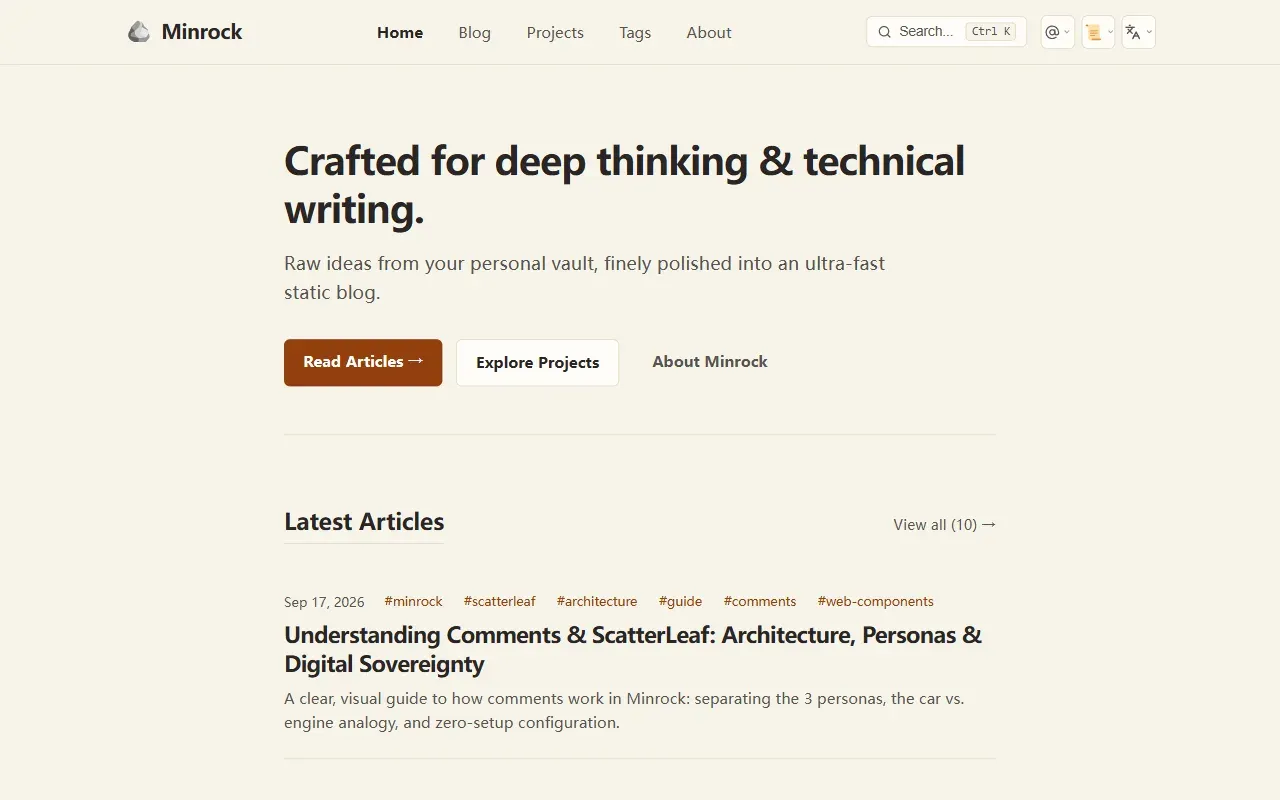
看看你的网站会是什么样
浏览真实页面截图,比较内容排版与手机效果。点击下方缩略图切换,放大查看整页细节。
全部页面与视图 4
截图用于了解视觉与布局,交互效果请以实际项目为准。
采集于 2026-09-27查看来源
值得关注的模板亮点
从已有项目资料中,快速了解它的特点。
十项功能开关在构建期生效,关闭后不产出对应 HTML/CSS/JS
原生兼容 Obsidian Vault 的 Markdown 页面包与本地图片粘贴
四套校准配色,含 OLED 纯黑 Midnight 主题
评论默认 Showcase 沙箱模式,接入真实 GitHub Discussions 需自部署 Cloudflare Worker
内置 astro check、WCAG、Google Search、安全扫描等 npm 脚本
模板详细介绍
Minrock 是一个 Astro 7 静态博客主题,定位很明确:给技术写作者和用 Obsidian 记笔记的人提供一个排版优先、纯 SSG 的发布出口。内容以 Markdown 页面包形式放在 src/content/blog/,frontmatter 只需 title、description、pubDate、tags 几个字段,站点标题、作者、社交链接、导航和功能开关集中在 src/config/site.ts 一个文件里。项目结构是常规的 components / layouts / pages / styles 分层,没有引入额外的 CMS 或数据库。
比较有辨识度的是它的功能开关设计。搜索、目录、阅读时长、TTS 朗读、标签、分享、主题切换、返回顶部、图片缩放、评论这十项都可以在 site.ts 里单独设为 false,因为开关在 Astro 构建期求值,关掉后对应的 HTML、CSS 和客户端 JS 都不会进入产物。目录关闭时文章布局会从侧栏分栏自动变成 780px 居中单栏。主题自带 Clean White、Warm Paper、Slate Navy、Midnight 四套配色,代码块有明暗一致的语法高亮、行号和复制按钮。
评论部分需要留意:默认是 Showcase 模式,评论在浏览器内存中模拟运行,不会真的写入 GitHub Discussions。要接入真实讨论,需要先在仓库开启 Discussions,再自行部署 ScatterLeaf 的 Cloudflare Worker 并把 broker URL 通过环境变量传入。README 也说明可以替换 Comments.astro 改用 Giscus、Cusdis、Utterances 等方案。无障碍方面项目声称按 WCAG 2.1/2.2 AA 构建,并提供了 audit:wcag、audit:google、audit:security 等脚本,但这些是项目自带的检查命令,实际达标情况建议在自己的内容上跑一遍再判断。
Astro博客
适合你的项目吗?
适用场景
- 把 Obsidian 笔记整理后直接发布为个人技术博客
- 需要极致精简、可按需裁剪功能的静态写作站点
- 希望内容以开放 Markdown 形式自持、部署在 Vercel 或 Cloudflare Pages 的开发者
适合人群
- 习惯用 Obsidian 写作、接受 Markdown 工作流的技术写作者
- 熟悉 Astro 与 npm 脚本、愿意改 TypeScript 配置文件的开发者
- 对页面体积和排版阅读体验有要求、不需要后台管理界面的个人站点
上手与定制指南
结合仓库当前版本的说明,按下面的资料检查内容、配置与运行要求。
- 1
用 npx create-astro@latest --template rnt-rez/minrock 初始化,或克隆后 npm install && npm run dev
- 2
站点信息、默认主题和功能开关都在 src/config/site.ts 中修改
- 3
评论默认不写入真实仓库;启用线上讨论需开启 GitHub Discussions、部署 ScatterLeaf Cloudflare Worker 并配置 broker URL
- 4
README 未说明 Node 版本要求、多语言内容支持和部署平台限制,上线前需自行核对
授权与来源资料
使用条件与限制
免费使用 · 保留许可声明本次收录的是公开仓库中的免费 MIT 版本;免费范围为该版本代码,不代表外部服务或第三方素材免费。
使用时需要遵守
- 使用、修改或分发代码时,保留原作者版权声明和完整 MIT 许可证。
- 允许免费使用、修改及商用,也允许分发代码;分发时仍需随附版权与许可声明。
- 代码按现状提供,作者不承诺担保或承担使用责任。
额外费用与待核对事项
- 演示图片、字体、图标及其他第三方素材需按各自许可核对,不能仅凭代码的 MIT 许可判断。
- 域名、托管、数据库、支付或 AI 等外部服务可能另外收费。
查看原文依据
https://github.com/rnt-rez/minrock/blob/main/LICENSEhttps://github.com/rnt-rez/minrock/blob/main/README.mdPermission is hereby granted, free of charge
许可证原文
依据完整 MIT 许可证与仓库 README 核对 · 2026-09-27。结果仅覆盖已读取资料,依赖、图片、字体及后续条款变更以各自原文为准。
项目核对记录与介绍依据
模板资料
- 来源平台
- Astro Themes
- 资料与维护参考分
- 资料较完整 · 80 / 100
- 技术栈
- Astro
- 网站类型
- 博客
这个分数如何计算
本站按许可资料(最高30分)、演示链接(12分)、预览图(10分)、Star数(15分)、记录的维护时间(15分)、描述完整度(8分)、功能记录(5分)和分类资料(5分)计算。它不是代码、安全或性能测试,也不是 Google 评分;有链接不代表已实测可用。
这个项目需要核对什么
- 记录的仓库更新时间
- 2026-09-26
- 截图检查日期
- 2026-09-27
已收录演示链接。请用你的内容与屏幕尺寸检查;有演示不代表表单、认证或支付已经可用。
目录记录的主要技术栈是 Astro。请通过依赖清单和锁文件核对实际版本与托管要求。这些说明基于收录资料,不代表代码审计或部署实测。
查看具体选型方法 →介绍的制作与核对状态
介绍由 AI 辅助整理目录与仓库资料。仓库作者不等于这篇介绍的审核者。
审核声明: Codex(本次来源核对) · 2026-09-27
查看当时使用的来源资料
SHA-256: b09aa24551498ceef6983a388f61539025eac473b8b93171c5ac631340373f3f
2026-09-27T12:04:30.056Z
来源文件 / 仓库# 🪨 Minrock — Minimalist Theme for Astro & Obsidian
> **"Raw ideas from your personal vault, finely polished into an ultra-fast static blog."**
> *"Minrock is the solid bedrock where knowledge rests; ScatterLeaf is the gentle breeze where ideas and conversations drift."*
[](https://astro.build)
[](https://github.com/rnt-rez/minrock/releases)
[](https://minrock.vercel.app)
[](LICENSE)
[](https://obsidian.md)
[](https://github.com/rnt-rez/minrock/pulls)
[](README.pt-BR.md)
**Minrock** is an opinionated, typography-first static blog theme for [Astro 7](https://astro.build), crafted specifically for technical writers, software engineers, and developers who take notes in [Obsidian](https://obsidian.md). Built on the principle of **digital sovereignty**, it empowers thinkers and builders to claim a space to truly call their own on the open web—free from corporate walled gardens, algorithmic feeds, and hosting costs.
> *"The project exists to foster and democratize access and personal positioning on the open web, guaranteeing a sovereign space to call your own: free from interference, without steep hurdles, and at zero cost."*
> — **Renato Rezende**, Creator of Minrock
[🌐 View Live Demo](https://minrock.vercel.app) • [🇧🇷 Leia esta documentação em Português](README.pt-BR.md)
---
## ✨ Key Features
* **💎 Pure Static Site Generation (SSG):** Pre-rendered HTML for maximum delivery speed and zero runtime server overhead.
* **🌐 Digital Sovereignty & Personal Positioning:** Total ownership of your content in open Markdown, hosted wherever you choose at zero financial cost.
* **✍️ Typography-First Architecture:** Tailored vertical rhythm, optimal line heights, and elegant type hierarchy designed for deep reading.
* **🎨 4 Calibrated Color Themes:**
* ☀️ **Clean White:** Crisp, modern editorial look.
* 📜 **Warm Paper (Cream):** Eye-friendly soft palette for extended reading sessions.
* ⚓ **Slate Navy:** Deep, focused dark mode inspired by Linear and Vercel.
* 🌌 **Midnight:** Pure OLED black with subtle reactive neon card accents.
* **🗃️ Obsidian Vault CMS Friendly:** Native Markdown page bundles support with effortless copy-pasting of local images.
* **🍃 ScatterLeaf Ready:** Native, iframe-free comments powered by GitHub Discussions via `<scatter-leaf>` with Cloudflare Edge Broker and Chameleon auto-theming.
* **💻 Code Blocks with Style:** Syntax highlighting with dual dark/light parity, line numbers, and clean copy triggers.
* **♿ Universal Accessibility:** Built with WCAG 2.1/2.2 AA standards, visible keyboard focus rings (`:focus-visible`), and zero layout shifts.
---
## 🚀 Quick Start
Initialize your blog in seconds using the official Astro CLI:
```bash
npx create-astro@latest --template rnt-rez/minrock
```
Or clone the repository locally:
```bash
git clone https://github.com/rnt-rez/minrock.git my-blog
cd my-blog
npm install
npm run dev
```
Visit `http://localhost:4321` in your browser to view your live blog.
---
## 📂 Project Structure
```text
minrock/
├── src/
│ ├── config/
│ │ └── site.ts # Site title, author bio, social links, and navigation
│ ├── content/
│ │ └── blog/ # Your Markdown articles (Obsidian Vault compatible)
│ ├── components/ # Header, Footer, ThemeToggle, ArticleCard
│ ├── layouts/ # BaseLayout, PostLayout
│ ├── pages/ # index, blog, about, 404
│ └── styles/ # Global CSS tokens and 4 color palettes
├── astro.config.mjs # Astro 7 configuration
├── package.json
└── tsconfig.json
```
---
## 🛠️ Configuration & Content
### 1. Site Metadata & Feature Flags (`src/config/site.ts`)
Easily customize your blog settings and toggle components in a single configuration file:
```typescript
export const siteConfig = {
title: 'Minrock',
description: 'Minimalist, typography-first Astro 7 theme for technical writers.',
author: 'Renato Rezende',
siteUrl: 'https://minrock.vercel.app', // Or via env: SITE_URL=https://yourdomain.com
defaultTheme: 'cream', // Default theme: 'white' | 'cream' | 'slate' | 'midnight'
// Granular Feature Flags — "Complete by default, minimalist on demand"
// Toggle any flag to false to completely eliminate markup, styles, and scripts during SSG build.
features: {
search: true, // Lunr full-text search modal & shortcuts (Ctrl/Cmd+K)
tableOfContents: true, // Sticky sidebar TOC in posts (auto-centers to 780px when disabled)
readingTime: true, // "X min read" badge in post headers
audioPlayer: true, // Accessible text-to-speech audio reader in posts and projects
tags: true, // Tag badges in headers, article cards, and tag clouds
socialShare: true, // Notion-style share modal and trigger bar in blog posts
themeSwitcher: true, // Palette dropdown switcher in header
backToTop: true, // Floating smooth-scroll back-to-top button
imageZoom: true, // Medium-style smooth image zoom modal
comments: true // Interactive blog comments powered by ScatterLeaf
},
comments: {
enabled: true,
provider: 'scatterleaf',
repo: 'rnt-rez/minrock',
category: 'General',
theme: 'auto', // Chameleon mode: dynamic contrast detection
lang: 'auto',
clientId: 'Iv23liZHApvnx6e6wtMJ',
broker: '', // Leave empty ('') for zero-setup mode, or provide your Cloudflare Worker URL
features: {
images: true // Toggle image insertion modal in comment composer
}
}
};
```
### 2. Granular Feature Flags ("Complete by Default, Minimalist on Demand")
Minrock is built to impress out of the box with a complete suite of modern features, while giving purist technical writers the freedom to strip down the experience to an ultra-minimalist, Obsidian-like reading environment.
Because flags are evaluated at Astro build time (**Pure SSG**), turning any feature to `false` guarantees **zero bundle overhead**: no HTML markup, CSS rules, or client-side JavaScript for that component will be included in the final static output.
* **Adaptive TOC Layout:** When `tableOfContents` is set to `false`, the article grid automatically adapts from a split sidebar layout to a centered, single-column reading column (`max-width: 780px; margin: 0 auto;`).
### 3. Publishing from Obsidian
Drop your Obsidian Markdown notes directly into `src/content/blog/` using the frontmatter format:
```markdown
---
title: "Building Resilient Systems"
description: "A deep dive into distributed systems architecture."
pubDate: 2026-09-15
tags: ["engineering", "architecture", "devops"]
---
Your content goes here...
```
### 4. Comments System (Modular & Optional)
Minrock respects your digital sovereignty: comments are 100% optional, zero-bloat, and cleanly encapsulated inside [`src/components/Comments.astro`](src/components/Comments.astro).
> [!NOTE]
> **🍃 Zero-Setup Showcase Mode (Default):**
> Out of the box, Minrock runs in **Showcase Mode**. It renders a realistic, interactive playground in browser memory with sound TTS, language translation, code blocks, and reactions. Visitors can fully experience the comments interface **safely in memory without posting spam or creating discussions in your GitHub repository**.
| Mode | Configuration in `site.ts` | What Readers Experience |
| :--- | :--- | :--- |
| **1. Showcase / Demo (Default)** | `broker: ''` | **Interactive Sandbox:** Full simulated comments in browser memory. Zero external setup, zero risk of spam. |
| **2. Live Production** | `broker: 'https://...'` | **Live Sync:** Real-time reader discussions backed by GitHub Discussions via Cloudflare Edge Broker. |
| **3. Completely Disabled** | `comments.enabled = false` | **Zero Overhead:** Astro completely eliminates all comment HTML, CSS, and scripts at build time (0 KB JS). |
#### 🚀 How to Enable Live Discussions (When You Are Ready)
To connect your own real-time GitHub Discussions:
1. **Enable GitHub Discussions** on your public GitHub repository under `Settings > Features > Discussions`.
2. **Set your repository** in [`src/config/site.ts`](src/config/site.ts):
```ts
comments: {
repo: 'your-username/your-repo',
// ...
}
```
3. **Connect your Broker:** Deploy the lightweight Cloudflare Worker from [ScatterLeaf](https://github.com/rnt-rez/scatterleaf) and provide your broker URL via the `PUBLIC_SCATTERLEAF_BROKER` environment variable (e.g. in your Vercel or Cloudflare Pages project settings).
#### 🕊️ Total Freedom & Alternative Solutions
Prefer a different provider (Giscus, Cusdis, Utterances) or a custom guestbook? Open [`src/components/Comments.astro`](src/components/Comments.astro) and replace the component slot. Zero vendor lock-in.
---
## 📜 Available Scripts
| Command | Action |
| :--- | :--- |
| `npm run dev` | Starts local dev server at `http://localhost:4321` |
| `npm run check` | Runs Astro and TypeScript static type diagnostics |
| `npm run build` | Compiles production-ready static pages into `dist/` |
| `npm run preview` | Previews the production build locally |
| `npm run qa` | Baseline verification suite (`astro check && astro build`) |
| `npm run audit:google` | Google Search audit (SERP Snippets, Schema.org and Discovery) |
| `npm run audit:wcag` | Structural WCAG 2.1/2.2 AA accessibility and semantic audit |
| `npm run audit:security` | DevSecOps Sentinel security and credential scanner |
---
## 🤝 Contributing
Contributions, feature requests, and bug reports are warmly welcome! Feel free to open an issue or submit a Pull Request.
---
## 📄 License
This project is licensed under the [MIT License](LICENSE).
---
<p align="center">
<em>Crafted with precision by the <a href="https://github.com/rnt-rez/minrock">Minrock Project</a>. Engineered for the open web.</em>
</p>
看看同类模板
对比同技术栈与用途的模板,找到更适合的视觉与内容结构。

astrowind
⭕️ AstroWind: A free template using Astro v7 and Tailwind CSS v4. Astro starter theme.
Astro · 博客

astro-paper
A minimal, accessible and SEO-friendly Astro blog theme.
Astro · 博客

fuwari
✨A static blog template built with Astro.
Astro · 博客

Firefly
Firefly 是一款基于 Astro 的静态博客主题,由 CuteLeaf 在 saicaca 的 Fuwari 模板基础上二次开发,主打清新美观的视觉风格。
Astro · 博客

astro-theme-cactus
A simple Astro theme. Use it to create your blog or website.
Astro · 作品集

astrofy
Astrofy is a free and open-source template for your Personal Portfolio Website built with Astro and TailwindCS…
Astro · 作品集