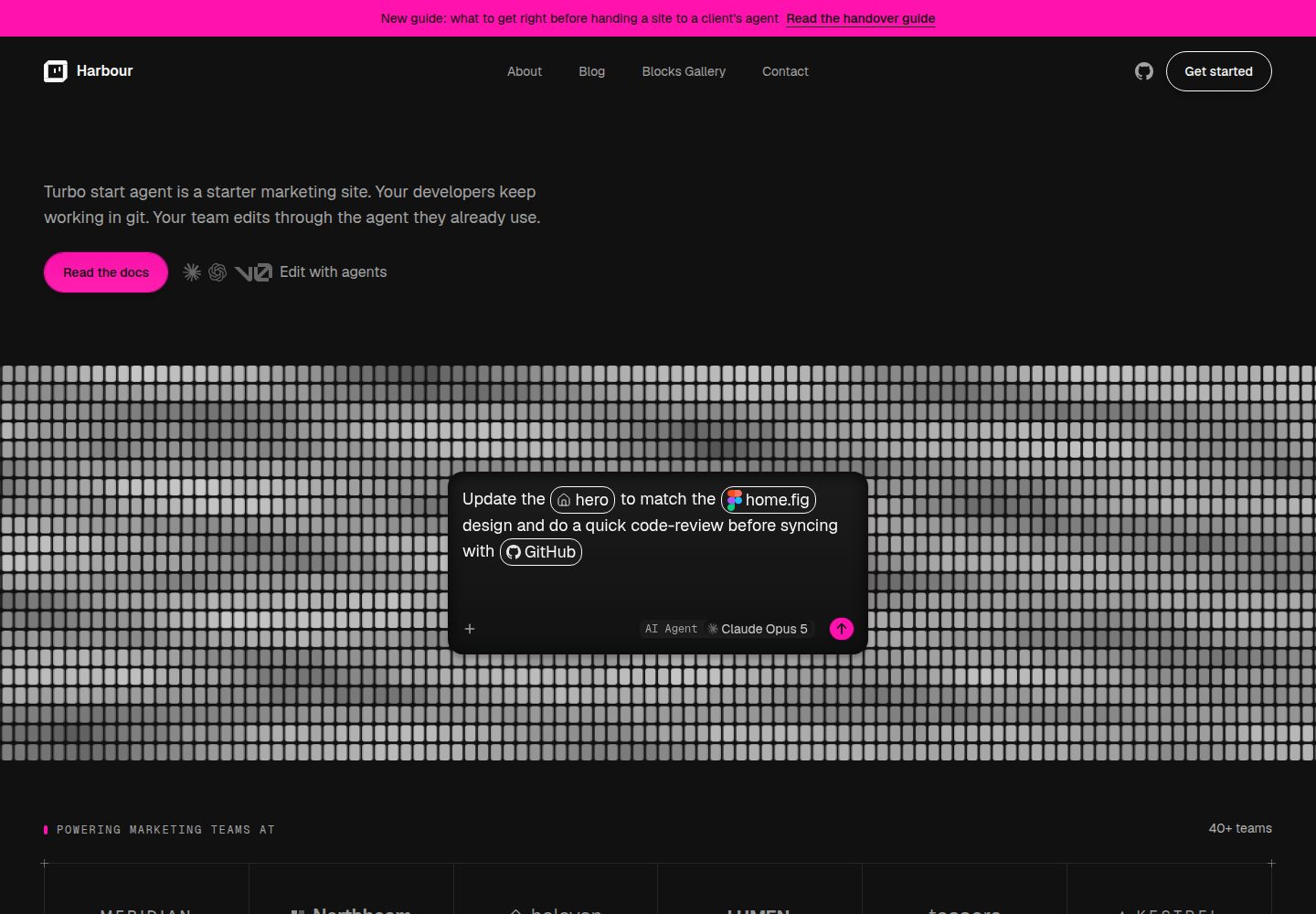
Content is stored as MDX in the repository, with no CMS or database, and pages are composed from Blocks with literal values passed as parameters
Next.jsReactCorporate Website
turbo-start-web-agent — Next.js Business Template
By robotostudio
A starter template for marketing sites where content lives as MDX in the repository, pages are composed through a Block system, and build-time content locking and an AI-agent rulebook are built in.
Explore the design
Compare the page layouts and mobile experience. Open any screenshot for a closer look.
Desktop homepage1 / 3
Desktop captureTop of page
Actual screenshot captured by the server browser.
All pages & views 3
Screenshots show visual appearance; interactive behavior may differ.
Recorded 2026-10-14View source
What stands out
A quick read of the recorded project description.
A build-time locking mechanism rejects MDX carrying executable code, making agent content-only editing a build-level guarantee
The Block registry currently contains 19 blocks validated by Zod schema, and the /blocks-gallery page displays each Block's props
Every change lands as a branch and pull request, preserving a human review step
AGENTS.md serves as the agent rulebook, with CLAUDE.md and .claude/skills/ generated by pnpm harness to bridge Claude Code
Platform connection manuals for v0, Claude Code and Codex, plus a preflight session check script
Template Details
turbo-start-web-agent is a marketing site starter template whose goal is to let clients edit content through any AI agent while developers continue working locally with git. Content is stored as MDX in the repository, with no CMS or database; pages are treated as data rather than code, authors compose pages by combining preset Blocks and passing literal values, and a build-time locking mechanism rejects any MDX carrying executable code. Every change lands as a branch and pull request, still requiring human review.
Site content and configuration are centralized under artifacts/web/content: settings/site.yml sets the site name and description, settings/footer.yml sets the footer, settings/navigation.yml sets the header menu, pages/*.mdx holds page copy, and blog/ holds articles. Design tokens live in artifacts/web/src/app/globals.css, and the icon is artifacts/web/src/app/icon.svg. The README states that brand names should not appear under src/, and that needing to change the company name in a .tsx file is considered a template defect.
The Block system provides preset blocks validated by schema; the registry currently contains 19 Blocks, fully defined in src/lib/blocks/schemas.ts, and the /blocks-gallery page displays each Block and its required props. Adding a Block requires adding a Zod schema, registering the component, and running pnpm catalog to regenerate catalog.json and the gallery stub; catalog:check and gallery:check run in CI, and failing to regenerate causes the build to fail.
The content pipeline uses Velite to validate frontmatter. draft: true keeps an entry out of production builds; on Vercel, VERCEL_ENV distinguishes production from preview deployments, while other hosting environments rely on NODE_ENV === "production", and PREVIEW_DRAFTS=true can be used to render drafts in a production-mode build. noindex: true publishes an entry but excludes it from the sitemap and requests that search engines not index it. Header navigation and footer are not MDX content but are edited as YAML and validated through the same Velite/Zod pipeline.
The template provides an AI-agent rulebook: AGENTS.md at the repository root is the canonical rulebook, bridged for Claude Code through CLAUDE.md and .claude/skills/, and these files are generated by pnpm harness from AGENTS.md, harness.config.json and .agents/skills/ and should not be edited manually. docs/platforms/ provides connection manuals for v0, Claude Code and Codex, and scripts/preflight.sh reports at the start of a session what the agent can do. The README provides no information about performance, production readiness, or integrations beyond the platforms above.
Next.jsCorporate Website
Is it right for your project?
Use Cases
- Building a marketing site for a client who wants to edit page copy and articles directly through an AI agent
- Development teams that want content and code managed in the same repository, reviewing every content change via git branches and pull requests
- Composing page structure from preset Blocks without introducing a CMS or database
- Constraining content format and Block usage through build-time validation and CI checks
- Preparing reference steps for connection and permission configuration across different AI agent platforms
Suitable For
- Development teams that need non-technical clients to edit marketing site content through AI agents
- Projects that prefer managing content as MDX in the repository and reviewing changes with a git workflow
- Sites that want to compose pages from preset Blocks and avoid hardcoding brand information in components
- Teams that need to configure agent editing workflows for v0, Claude Code or Codex
Getting started & customization
Use these recorded setup notes alongside the repository instructions for your chosen version.
- 1
Run pnpm install to install dependencies, then pnpm dev to start the development server and visit http://localhost:3000
- 2
Copy .env.example to .env.local and set NEXT_PUBLIC_SITE_URL to the deployment origin, otherwise the sitemap falls back to https://example.com
- 3
Edit site.yml, footer.yml, navigation.yml under artifacts/web/content/settings as needed, along with pages/*.mdx and blog/ content
- 4
After modifying harness.config.json, run pnpm harness to regenerate CLAUDE.md and .claude/skills/; do not edit generated files manually
- 5
Before committing, run pnpm run checks to execute the content, catalog, claims, skills, gallery, test, type-check and build gates in sequence
License & source material
Usage conditions & limitations
Free to use · keep license noticeThis entry covers the free version under the MIT license in the public repository; the free scope is that version's code and does not mean external services or third-party assets are free.
Must comply with when using
- Free use, modification, commercial use and distribution of that version's code are permitted.
- When distributing copies or substantial portions of the code, retain the original author's copyright notice and the full MIT license notice.
- The code is provided as is; warranties and limitations of liability are governed by the original license and applicable law.
Additional costs & items to verify
- Demo images, fonts, icons and other third-party assets must be checked against their respective licenses and cannot be judged solely by the code's MIT license.
- External services such as domains, hosting, databases, payments or AI may incur separate charges.
- Before deployment, copy .env.example to .env.local and set NEXT_PUBLIC_SITE_URL, otherwise the sitemap falls back to https://example.com.
- On Vercel, VERCEL_ENV is relied upon to distinguish production from preview deployments; other hosting environments lack that signal and must rely on NODE_ENV === "production" to exclude drafts.
- To render drafts in a production-mode build, PREVIEW_DRAFTS=true must be set explicitly.
- Under the Claude Code and Codex platforms, clients can only see diffs, and their only result view is the hosted preview URL, which most hosts require login for by default and needs additional configuration.
- Claude Code and Codex previews exist only in desktop applications and require a local installation and checkout, i.e. the developer environment this template is meant to spare clients.
- CLAUDE.md and .claude/skills/ are generated files and must not be edited manually; change the inputs and regenerate.
- After modifying harness.config.json, run pnpm harness to regenerate the agent rule files.
View Original Text Basis
Permission is hereby granted, free of charge
Original License Text
Copy `.env.example` to `.env.local` and set `NEXT_PUBLIC_SITE_URL` to your
Original README
production build, on Vercel or anywhere else. On Vercel, `VERCEL_ENV`
Original README
is what excludes drafts there. Set `PREVIEW_DRAFTS=true` to deliberately
Original README
hosting preview URL — which is behind a login by default on most hosts, so
Original README
have a preview, but only in their desktop apps, which need a local install
Original README
`.agents/skills/`. Never hand-edit a generated
Original README
https://github.com/robotostudio/turbo-start-web-agent/blob/main/LICENSEhttps://github.com/robotostudio/turbo-start-web-agent/blob/main/README.md| `harness.config.json` | Project name and host for the agent harness; run `pnpm harness` after |
Original README
Compiled by DeepSeek based on repository license and README ·2026-10-14. Results only cover the materials read; dependencies, images, fonts, and subsequent term changes are subject to their respective original texts.
Project checks & description sources
Template Information
- Source platforms
- GitHub
- Documentation and maintenance reference score
- More documented · 83 / 100
- Technologies
- Next.js · React
- Website type
- Corporate Website
How this score is calculated
Our heuristic uses license records (up to 30), a demo link (12), a preview (10), stars (15), recorded maintenance (15), description completeness (8), feature records (5) and classification data (5). It is not a code, security or performance test, or a Google score. A link does not establish tested functionality.
What to verify for this project
- Repository update recorded
- 2026-10-09
- Screenshot last checked
- 2026-10-14
A demo link is listed. Check it with your own content and viewport sizes; its presence does not confirm that forms, authentication or payments work.
The catalog identifies Next.js as the primary stack. Check the actual dependency manifest and lockfile for versions and hosting requirements. These notes use recorded metadata, not a code audit or a deployment test.
Use a selection guide →How this description was prepared
AI-assisted description based on catalog records and repository material. Repository authors are not automatically the reviewers of this description.
Review declaration: codex-user-requested-batch-review-20261015 · 2026-10-15
Inspect the recorded source material
SHA-256: 935712cd5601db769ca0cdd645dafb09d3fcb6a81eba57e8101ae25d8386002f
2026-10-14T20:54:23.449Z
Source file / repository<img width="1200" height="630" alt="image" src="https://github.com/user-attachments/assets/3db6a4cb-eb74-4e93-a8a6-9e4128973383" />
# turbo-start-web-agent
A starter for marketing sites your client can edit through **any AI agent**,
while your developers keep working locally in git.
Content is MDX in the repository — no CMS, no database. Pages are *data*, not
code: an author composes Blocks and passes them literal values, and a build-time
lockdown rejects any MDX carrying executable code. That is what makes "the agent
may only change content" a guarantee rather than a request. Every change lands
as a branch and a pull request, so a human still reviews what ships.
## Quickstart
```sh
pnpm install
pnpm dev
```
Open http://localhost:3000.
## Make it yours
Everything below is content or config. **Nothing under `src/` names the
brand** — if you find yourself editing a company name inside a `.tsx` file,
that is a bug in this template, not a step in the process.
| File | What it sets |
|---|---|
| `artifacts/web/content/settings/site.yml` | Site name and description — header, browser tab, blog index |
| `artifacts/web/content/settings/footer.yml` | Footer wordmark, columns, social and legal links |
| `artifacts/web/content/settings/navigation.yml` | Header menu |
| `artifacts/web/content/pages/*.mdx` | Page copy |
| `artifacts/web/src/app/globals.css` | Design tokens — colours, type, radius |
| `harness.config.json` | Project name and host for the agent harness; run `pnpm harness` after |
| `artifacts/web/src/app/icon.svg` | Favicon. An SVG cannot live in YAML, so this one is edited directly |
Then delete the demo content you do not want: the five starter posts under
`content/blog/`, and `content/pages/style-guide.mdx` and `blocks-gallery.mdx`
if the client should not see them.
`pnpm test` does not assert on any of this copy, so renaming things will not
turn the suite red. That was a real failure mode, found by walking this path
on 2026-08-21 and fixed rather than documented.
## The Block system
Pages are composed from **Blocks** — pre-built, schema-validated sections such
as `Hero`, `FeatureGrid`, `Testimonial`, and `CTA`. The registry currently
ships **19 Blocks**; the full set lives at `src/lib/blocks/schemas.ts` and
renders live, with the exact props each one expects, at
[`/blocks-gallery`](http://localhost:3000/blocks-gallery).
Compose a page by dropping named tags into its MDX body — no imports, no
wiring:
```mdx
<Hero title="…" primary={{ label: "…", href: "/…" }} />
```
Props must be literal values. Arrays and objects are expression attributes
(`primary={{ label: "…", href: "/…" }}`), never quoted strings. Markdown
outside a Block tag (headings, paragraphs, lists) renders too — it's styled
automatically through Tailwind Typography, not through a "Prose Block"; there
is no such Block in the registry.
### Adding a Block
1. Add a Zod schema to `src/lib/blocks/schemas.ts` and register it in
`blockSchemas`.
2. Add the matching component to `src/components/blocks/` and register it in
`blockComponents` (`src/components/blocks/index.ts`).
3. Run `pnpm catalog` — this regenerates `src/lib/blocks/catalog.json` (the
machine-readable prop reference an authoring agent reads) and adds a stub
section for the new Block to `content/pages/blocks-gallery.mdx`.
`pnpm catalog:check` and `pnpm catalog` diverging is exactly the drift CI
catches: `catalog:check` and `gallery:check` both run in CI, so a Block added
without regenerating fails the build.
## How content works
- Pages live in `artifacts/web/content/pages/*.mdx`; posts live in
`content/blog/` and are served at `/blog` and `/blog/[slug]`.
- Frontmatter is validated by Velite. `draft: true` keeps an entry out of any
production build, on Vercel or anywhere else. On Vercel, `VERCEL_ENV`
disambiguates a production deployment from a preview one (both build with
`NODE_ENV=production`), so drafts stay visible on preview URLs and are
excluded only from production. Off Vercel — Netlify, Cloudflare, Docker, any
self-hosted build — there is no such signal, so `NODE_ENV === "production"`
is what excludes drafts there. Set `PREVIEW_DRAFTS=true` to deliberately
render drafts on a production-mode build anyway (e.g. a staging environment
that runs `next build`/`next start` the same as prod). `noindex: true`
publishes an entry but keeps it out of the sitemap and asks search engines
not to index it.
- Site chrome — the header nav and the footer — is **not** MDX content. It's
edited as YAML in `content/settings/navigation.yml` and
`content/settings/footer.yml`, validated by the same Velite/Zod pipeline
(every `href` is checked against the same safe-URL rule Block links use).
## Environment variables
Copy `.env.example` to `.env.local` and set `NEXT_PUBLIC_SITE_URL` to your
deployed origin — without it, `sitemap.ts` silently falls back to
`https://example.com` and ships a sitemap of example.com URLs on your first
production deploy.
## The build is the gate
```sh
pnpm run checks # every gate below, in order, stopping at the first failure
pnpm content:check # frontmatter, MDX syntax, and the content lockdown
pnpm catalog:check # catalog.json is in sync with src/lib/blocks/schemas.ts
pnpm claims:check # the docs do not misstate how many Blocks exist, or which
pnpm skills:check # third-party skills are pinned, and still hash to what was reviewed
pnpm gallery:check # blocks-gallery.mdx has a section for every registered Block
pnpm test # lockdown, loader, and Block-prop unit tests
pnpm typecheck
pnpm build # renders every page; bad Block props fail here
```
If these pass, the content is valid. Fix the content, not the schema. A green
build is necessary but not sufficient — always click through the built site
(nav, footer, and every page it links to) before calling a change done.
## The agent harness
This template is agent-native: **`AGENTS.md`** at the repo root is the
canonical rulebook — the content model, Block composition, the
build-is-the-gate rule, git discipline — read natively by Codex, Cursor,
GitHub Copilot/VS Code, Zed, and most of the rest of the ecosystem.
Claude Code doesn't read `AGENTS.md` on its own, so **`CLAUDE.md` and the
`.claude/skills/` mirror bridge that gap — and both are generated**, by
`pnpm harness`, from `AGENTS.md`, `harness.config.json`, and
`.agents/skills/`. Never hand-edit a generated
file (each one says so at the top); edit the inputs and regenerate.
`pnpm harness:check` is the read-only drift gate CI runs — it fails,
naming exactly which generated file is stale, instead of writing anything.
`docs/platforms/` holds a connection runbook per supported platform
(v0, Claude Code, Codex): scoping a client repo to one
platform, a write-only push identity, turning off platform-side automation
that would fight this template's review-before-publish model, and a smoke
test.
`scripts/preflight.sh` reports what an agent session can actually do —
git remote reachability, `gh`/`pnpm`/`node` presence, manifest capability
probes — at session start (wired to Claude Code's `SessionStart` hook in
cloud sessions; run it by hand elsewhere).
### Which platform for which client
The platforms are not interchangeable. All three have taken a real
client-style content change through to a merged pull request. The last column
names them by number, so the claim can be checked rather than taken on trust:
| Platform | Reads the rulebook | Shows the client the site | Opens the PR | Run live |
|---|---|---|---|---|
| **v0** | `AGENTS.md` + `.agents/skills/` | **Yes**, in-chat preview | Itself | #25, #34, #38, #47, #51, #54 |
| **Claude Code** | `CLAUDE.md` (imports `AGENTS.md`) | No — diff only | Button in the UI | #2, #13, #17, #23 |
| **Codex** | `AGENTS.md` | No — diff only | Button in the UI | #4, #18, #22 |
The column that decides it for a non-technical client is **shows the
client the site**. On v0 they watch the site change as they ask for it; on Claude
Code and Codex they get a diff, and their only view of the result is the
hosting preview URL — which is behind a login by default on most hosts, so
it needs configuring rather than assuming. Both of those platforms *do*
have a preview, but only in their desktop apps, which need a local install
and a checkout: the developer setup this template exists to spare the
client.
Pick the platform for whoever is actually driving. `docs/platforms/README.md`
covers preview access; each runbook covers that platform's specific traps —
and every one of them has some.
### What live testing changed
Testing moved this from documented to verified, and corrected the docs in
about a dozen places. One finding is worth knowing before you connect
anything:
- **On an agent-authored pull request, the file list is the truth and the
prose is a claim.** One platform committed a dev-server side effect as
its own commit and titled the PR after it, never mentioning the change
that had been requested. Every automated check passed, because none of
them read English.
`AGENTS.md` §6 records these and the rest, with dates.
## Licence
MIT.
Explore similar templates
Compare previews and descriptions within the same stack and category.

SaaS-Boilerplate
SaaS-Boilerplate is an open-source SaaS starter template built with Next.js App Router, React 19, TypeScript, Tailwind CSS, and Shadcn UI.
Next.js · SaaS

Next-JS-Landing-Page-Starter-Template
A free Next.js landing page starter template written in Tailwind CSS and TypeScript, featuring built-in navbar, hero, features, CTA banner, and footer sections.
Next.js · Corporate Website

next-saas-starter
A free Next.js SaaS marketing landing page template from Blazity, using static generation and styled-components with no extra UI library.
Next.js · SaaS

startup-nextjs
Startup is a free, MIT-licensed Next.js template from NextJSTemplates for SaaS startups and corporate landing pages.
Next.js · SaaS

shadcn-landing-page
A Next.js landing page template built with Shadcn, TypeScript, and Tailwind, converted from a Shadcn-Vue version. It includes sections such as Navbar, mobile Sidebar, Hero, Pricing, FAQ, and Footer, and highlights responsive design, navigation, and dark mode.
Next.js · Corporate Website

shadcn-dashboard-landing-template
An open-source admin dashboard and marketing landing page template built on shadcn/ui and Tailwind CSS, with both Vite + React and Next.js versions in one repository.
Next.js · Admin dashboard