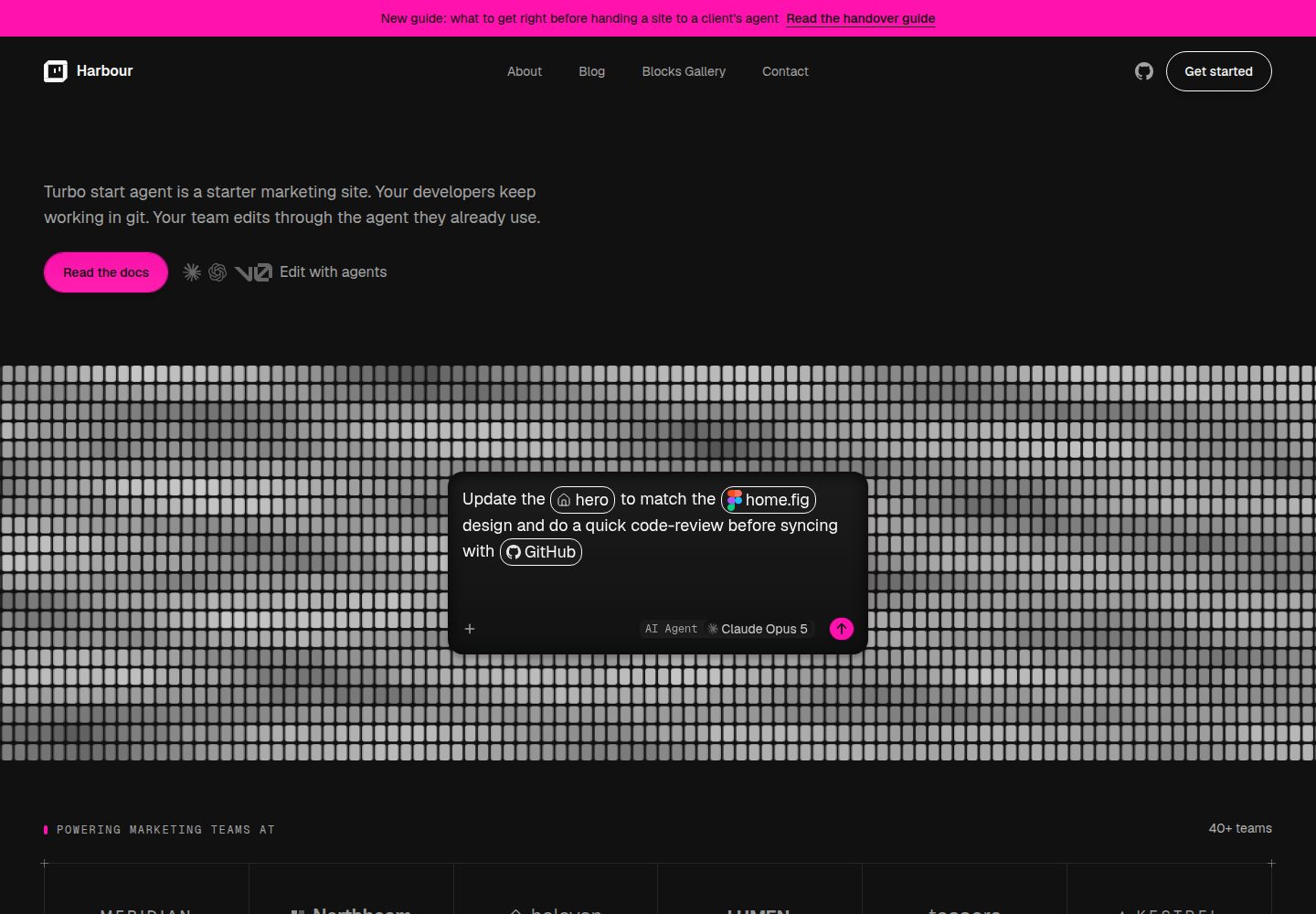
内容以 MDX 存放在仓库中,不使用 CMS 或数据库,页面由 Block 组合并以字面量值传参
Next.jsReact企业官网
turbo-start-web-agent — Next.js 企业官网模板
作者 robotostudio
一个面向营销站点的启动模板,内容以 MDX 存放在仓库中,通过 Block 系统组合页面,并内置构建时内容锁定与面向 AI 代理的规则手册。
看看你的网站会是什么样
浏览真实页面截图,比较内容排版与手机效果。点击下方缩略图切换,放大查看整页细节。
全部页面与视图 3
截图用于了解视觉与布局,交互效果请以实际项目为准。
采集于 2026-10-14查看来源
值得关注的模板亮点
从已有项目资料中,快速了解它的特点。
构建时锁定机制拒绝携带可执行代码的 MDX,使代理只能修改内容成为构建层面的保证
Block 注册表当前包含 19 个经过 Zod schema 校验的区块,并在 /blocks-gallery 页面展示每个 Block 的 props
每次变更以分支和拉取请求落地,保留人工审核环节
AGENTS.md 作为代理规则手册,CLAUDE.md 与 .claude/skills/ 由 pnpm harness 生成以桥接 Claude Code
提供 v0、Claude Code、Codex 的平台连接手册与 preflight 会话检查脚本
模板详细介绍
turbo-start-web-agent 是一个营销站点启动模板,目标是让客户通过任意 AI 代理编辑内容,同时开发者继续在本地用 git 工作。内容以 MDX 形式存放在仓库里,不使用 CMS 或数据库;页面被当作数据而非代码,作者通过组合预置的 Block 并传入字面量值来编写页面,构建时的锁定机制会拒绝任何携带可执行代码的 MDX。每次变更以分支和拉取请求的形式落地,仍需人工审核。
站点内容与配置集中在 artifacts/web/content 下:settings/site.yml 设置站点名称与描述,settings/footer.yml 设置页脚,settings/navigation.yml 设置页头菜单,pages/*.mdx 存放页面文案,blog/ 存放文章。设计令牌位于 artifacts/web/src/app/globals.css,图标为 artifacts/web/src/app/icon.svg。README 说明 src/ 下不应出现品牌名称,若需在 .tsx 中修改公司名则视为模板缺陷。
Block 系统提供经过 schema 校验的预置区块,注册表当前包含 19 个 Block,完整定义在 src/lib/blocks/schemas.ts,并在 /blocks-gallery 页面展示每个 Block 及其所需 props。新增 Block 需要添加 Zod schema、注册组件并运行 pnpm catalog 重新生成 catalog.json 与 gallery 存根;catalog:check 和 gallery:check 在 CI 中运行,未重新生成会导致构建失败。
内容管线使用 Velite 校验 frontmatter。draft: true 使条目不进入生产构建;在 Vercel 上通过 VERCEL_ENV 区分生产与预览部署,其他托管环境则依赖 NODE_ENV === "production",也可用 PREVIEW_DRAFTS=true 在 production 模式构建中渲染草稿。noindex: true 会发布条目但不加入 sitemap 并请求搜索引擎不索引。页头导航与页脚不是 MDX 内容,而是以 YAML 编辑并经同一 Velite/Zod 管线校验。
模板提供面向 AI 代理的规则手册:仓库根目录的 AGENTS.md 是规范规则书,Claude Code 通过 CLAUDE.md 和 .claude/skills/ 桥接,这些文件由 pnpm harness 从 AGENTS.md、harness.config.json 和 .agents/skills/ 生成,不应手动编辑。docs/platforms/ 为 v0、Claude Code、Codex 提供连接手册,scripts/preflight.sh 在会话开始时报告代理可执行的操作。README 未提供关于性能、生产就绪程度或除上述平台外的集成说明。
Next.js企业官网
适合你的项目吗?
适用场景
- 为客户搭建营销站点,并希望客户通过 AI 代理直接修改页面文案与文章
- 开发团队希望内容与代码同仓库管理,用 git 分支和拉取请求审查每次内容变更
- 需要在不引入 CMS 或数据库的前提下,用预置 Block 组合页面结构
- 希望用构建时校验和 CI 检查约束内容格式与 Block 使用方式
- 需要为不同 AI 代理平台准备连接与权限配置的参考步骤
适合人群
- 需要让非技术客户通过 AI 代理编辑营销站点内容的开发团队
- 偏好将内容作为仓库内 MDX 管理、并用 git 工作流审核变更的项目
- 希望使用预置 Block 组合页面、避免在组件中硬编码品牌信息的站点
- 需要为 v0、Claude Code 或 Codex 配置代理编辑流程的团队
上手与定制指南
结合仓库当前版本的说明,按下面的资料检查内容、配置与运行要求。
- 1
运行 pnpm install 安装依赖,然后 pnpm dev 启动开发服务器并访问 http://localhost:3000
- 2
复制 .env.example 为 .env.local,并将 NEXT_PUBLIC_SITE_URL 设置为部署源,否则 sitemap 会回退到 https://example.com
- 3
按需编辑 artifacts/web/content/settings 下的 site.yml、footer.yml、navigation.yml 以及 pages/*.mdx 和 blog/ 内容
- 4
修改 harness.config.json 后运行 pnpm harness 重新生成 CLAUDE.md 与 .claude/skills/,不要手动编辑生成文件
- 5
提交前运行 pnpm run checks 依次执行内容、catalog、claims、skills、gallery、测试、类型检查与构建等门禁
授权与来源资料
使用条件与限制
免费使用 · 保留许可声明本次收录的是公开仓库中采用 MIT 许可的免费版本;免费范围为该版本代码,不代表外部服务或第三方素材免费。
使用时需要遵守
- 允许免费使用、修改、商用和分发该版本代码。
- 分发代码副本或实质性部分时,保留原作者版权声明和完整 MIT 许可声明。
- 代码按现状提供;担保与责任限制以原许可证及适用法律为准。
额外费用与待核对事项
- 演示图片、字体、图标及其他第三方素材需按各自许可核对,不能仅凭代码的 MIT 许可判断。
- 域名、托管、数据库、支付或 AI 等外部服务可能另外收费。
- 部署前需将 .env.example 复制为 .env.local 并设置 NEXT_PUBLIC_SITE_URL,否则 sitemap 会回退到 https://example.com。
- 在 Vercel 上依赖 VERCEL_ENV 区分生产与预览部署;其他托管环境没有该信号,需依赖 NODE_ENV === "production" 来排除草稿。
- 如需在 production 模式构建中渲染草稿,必须显式设置 PREVIEW_DRAFTS=true。
- Claude Code 与 Codex 平台下客户只能看到 diff,其唯一结果视图是托管预览 URL,而多数主机默认要求登录,需要额外配置。
- Claude Code 与 Codex 的预览仅存在于桌面应用中,需要本地安装与检出,即本模板本意要为客户免除的开发者环境。
- CLAUDE.md 与 .claude/skills/ 为生成文件,不得手动编辑,需修改输入后重新生成。
- 修改 harness.config.json 后需运行 pnpm harness 重新生成代理规则文件。
查看原文依据
Permission is hereby granted, free of charge
许可证原文
Copy `.env.example` to `.env.local` and set `NEXT_PUBLIC_SITE_URL` to your
README 原文
production build, on Vercel or anywhere else. On Vercel, `VERCEL_ENV`
README 原文
is what excludes drafts there. Set `PREVIEW_DRAFTS=true` to deliberately
README 原文
hosting preview URL — which is behind a login by default on most hosts, so
README 原文
have a preview, but only in their desktop apps, which need a local install
README 原文
`.agents/skills/`. Never hand-edit a generated
README 原文
https://github.com/robotostudio/turbo-start-web-agent/blob/main/LICENSEhttps://github.com/robotostudio/turbo-start-web-agent/blob/main/README.md| `harness.config.json` | Project name and host for the agent harness; run `pnpm harness` after |
README 原文
DeepSeek 根据仓库许可证和 README 整理 ·2026-10-14。结果仅覆盖已读取资料,依赖、图片、字体及后续条款变更以各自原文为准。
项目核对记录与介绍依据
模板资料
- 来源平台
- GitHub
- 资料与维护参考分
- 资料较完整 · 83 / 100
- 技术栈
- Next.js · React
- 网站类型
- 企业官网
这个分数如何计算
本站按许可资料(最高30分)、演示链接(12分)、预览图(10分)、Star数(15分)、记录的维护时间(15分)、描述完整度(8分)、功能记录(5分)和分类资料(5分)计算。它不是代码、安全或性能测试,也不是 Google 评分;有链接不代表已实测可用。
这个项目需要核对什么
- 记录的仓库更新时间
- 2026-10-09
- 截图检查日期
- 2026-10-14
已收录演示链接。请用你的内容与屏幕尺寸检查;有演示不代表表单、认证或支付已经可用。
目录记录的主要技术栈是 Next.js。请通过依赖清单和锁文件核对实际版本与托管要求。这些说明基于收录资料,不代表代码审计或部署实测。
查看具体选型方法 →介绍的制作与核对状态
介绍由 AI 辅助整理目录与仓库资料。仓库作者不等于这篇介绍的审核者。
审核声明: codex-user-requested-batch-review-20261015 · 2026-10-15
查看当时使用的来源资料
SHA-256: 935712cd5601db769ca0cdd645dafb09d3fcb6a81eba57e8101ae25d8386002f
2026-10-14T20:54:23.449Z
来源文件 / 仓库<img width="1200" height="630" alt="image" src="https://github.com/user-attachments/assets/3db6a4cb-eb74-4e93-a8a6-9e4128973383" />
# turbo-start-web-agent
A starter for marketing sites your client can edit through **any AI agent**,
while your developers keep working locally in git.
Content is MDX in the repository — no CMS, no database. Pages are *data*, not
code: an author composes Blocks and passes them literal values, and a build-time
lockdown rejects any MDX carrying executable code. That is what makes "the agent
may only change content" a guarantee rather than a request. Every change lands
as a branch and a pull request, so a human still reviews what ships.
## Quickstart
```sh
pnpm install
pnpm dev
```
Open http://localhost:3000.
## Make it yours
Everything below is content or config. **Nothing under `src/` names the
brand** — if you find yourself editing a company name inside a `.tsx` file,
that is a bug in this template, not a step in the process.
| File | What it sets |
|---|---|
| `artifacts/web/content/settings/site.yml` | Site name and description — header, browser tab, blog index |
| `artifacts/web/content/settings/footer.yml` | Footer wordmark, columns, social and legal links |
| `artifacts/web/content/settings/navigation.yml` | Header menu |
| `artifacts/web/content/pages/*.mdx` | Page copy |
| `artifacts/web/src/app/globals.css` | Design tokens — colours, type, radius |
| `harness.config.json` | Project name and host for the agent harness; run `pnpm harness` after |
| `artifacts/web/src/app/icon.svg` | Favicon. An SVG cannot live in YAML, so this one is edited directly |
Then delete the demo content you do not want: the five starter posts under
`content/blog/`, and `content/pages/style-guide.mdx` and `blocks-gallery.mdx`
if the client should not see them.
`pnpm test` does not assert on any of this copy, so renaming things will not
turn the suite red. That was a real failure mode, found by walking this path
on 2026-08-21 and fixed rather than documented.
## The Block system
Pages are composed from **Blocks** — pre-built, schema-validated sections such
as `Hero`, `FeatureGrid`, `Testimonial`, and `CTA`. The registry currently
ships **19 Blocks**; the full set lives at `src/lib/blocks/schemas.ts` and
renders live, with the exact props each one expects, at
[`/blocks-gallery`](http://localhost:3000/blocks-gallery).
Compose a page by dropping named tags into its MDX body — no imports, no
wiring:
```mdx
<Hero title="…" primary={{ label: "…", href: "/…" }} />
```
Props must be literal values. Arrays and objects are expression attributes
(`primary={{ label: "…", href: "/…" }}`), never quoted strings. Markdown
outside a Block tag (headings, paragraphs, lists) renders too — it's styled
automatically through Tailwind Typography, not through a "Prose Block"; there
is no such Block in the registry.
### Adding a Block
1. Add a Zod schema to `src/lib/blocks/schemas.ts` and register it in
`blockSchemas`.
2. Add the matching component to `src/components/blocks/` and register it in
`blockComponents` (`src/components/blocks/index.ts`).
3. Run `pnpm catalog` — this regenerates `src/lib/blocks/catalog.json` (the
machine-readable prop reference an authoring agent reads) and adds a stub
section for the new Block to `content/pages/blocks-gallery.mdx`.
`pnpm catalog:check` and `pnpm catalog` diverging is exactly the drift CI
catches: `catalog:check` and `gallery:check` both run in CI, so a Block added
without regenerating fails the build.
## How content works
- Pages live in `artifacts/web/content/pages/*.mdx`; posts live in
`content/blog/` and are served at `/blog` and `/blog/[slug]`.
- Frontmatter is validated by Velite. `draft: true` keeps an entry out of any
production build, on Vercel or anywhere else. On Vercel, `VERCEL_ENV`
disambiguates a production deployment from a preview one (both build with
`NODE_ENV=production`), so drafts stay visible on preview URLs and are
excluded only from production. Off Vercel — Netlify, Cloudflare, Docker, any
self-hosted build — there is no such signal, so `NODE_ENV === "production"`
is what excludes drafts there. Set `PREVIEW_DRAFTS=true` to deliberately
render drafts on a production-mode build anyway (e.g. a staging environment
that runs `next build`/`next start` the same as prod). `noindex: true`
publishes an entry but keeps it out of the sitemap and asks search engines
not to index it.
- Site chrome — the header nav and the footer — is **not** MDX content. It's
edited as YAML in `content/settings/navigation.yml` and
`content/settings/footer.yml`, validated by the same Velite/Zod pipeline
(every `href` is checked against the same safe-URL rule Block links use).
## Environment variables
Copy `.env.example` to `.env.local` and set `NEXT_PUBLIC_SITE_URL` to your
deployed origin — without it, `sitemap.ts` silently falls back to
`https://example.com` and ships a sitemap of example.com URLs on your first
production deploy.
## The build is the gate
```sh
pnpm run checks # every gate below, in order, stopping at the first failure
pnpm content:check # frontmatter, MDX syntax, and the content lockdown
pnpm catalog:check # catalog.json is in sync with src/lib/blocks/schemas.ts
pnpm claims:check # the docs do not misstate how many Blocks exist, or which
pnpm skills:check # third-party skills are pinned, and still hash to what was reviewed
pnpm gallery:check # blocks-gallery.mdx has a section for every registered Block
pnpm test # lockdown, loader, and Block-prop unit tests
pnpm typecheck
pnpm build # renders every page; bad Block props fail here
```
If these pass, the content is valid. Fix the content, not the schema. A green
build is necessary but not sufficient — always click through the built site
(nav, footer, and every page it links to) before calling a change done.
## The agent harness
This template is agent-native: **`AGENTS.md`** at the repo root is the
canonical rulebook — the content model, Block composition, the
build-is-the-gate rule, git discipline — read natively by Codex, Cursor,
GitHub Copilot/VS Code, Zed, and most of the rest of the ecosystem.
Claude Code doesn't read `AGENTS.md` on its own, so **`CLAUDE.md` and the
`.claude/skills/` mirror bridge that gap — and both are generated**, by
`pnpm harness`, from `AGENTS.md`, `harness.config.json`, and
`.agents/skills/`. Never hand-edit a generated
file (each one says so at the top); edit the inputs and regenerate.
`pnpm harness:check` is the read-only drift gate CI runs — it fails,
naming exactly which generated file is stale, instead of writing anything.
`docs/platforms/` holds a connection runbook per supported platform
(v0, Claude Code, Codex): scoping a client repo to one
platform, a write-only push identity, turning off platform-side automation
that would fight this template's review-before-publish model, and a smoke
test.
`scripts/preflight.sh` reports what an agent session can actually do —
git remote reachability, `gh`/`pnpm`/`node` presence, manifest capability
probes — at session start (wired to Claude Code's `SessionStart` hook in
cloud sessions; run it by hand elsewhere).
### Which platform for which client
The platforms are not interchangeable. All three have taken a real
client-style content change through to a merged pull request. The last column
names them by number, so the claim can be checked rather than taken on trust:
| Platform | Reads the rulebook | Shows the client the site | Opens the PR | Run live |
|---|---|---|---|---|
| **v0** | `AGENTS.md` + `.agents/skills/` | **Yes**, in-chat preview | Itself | #25, #34, #38, #47, #51, #54 |
| **Claude Code** | `CLAUDE.md` (imports `AGENTS.md`) | No — diff only | Button in the UI | #2, #13, #17, #23 |
| **Codex** | `AGENTS.md` | No — diff only | Button in the UI | #4, #18, #22 |
The column that decides it for a non-technical client is **shows the
client the site**. On v0 they watch the site change as they ask for it; on Claude
Code and Codex they get a diff, and their only view of the result is the
hosting preview URL — which is behind a login by default on most hosts, so
it needs configuring rather than assuming. Both of those platforms *do*
have a preview, but only in their desktop apps, which need a local install
and a checkout: the developer setup this template exists to spare the
client.
Pick the platform for whoever is actually driving. `docs/platforms/README.md`
covers preview access; each runbook covers that platform's specific traps —
and every one of them has some.
### What live testing changed
Testing moved this from documented to verified, and corrected the docs in
about a dozen places. One finding is worth knowing before you connect
anything:
- **On an agent-authored pull request, the file list is the truth and the
prose is a claim.** One platform committed a dev-server side effect as
its own commit and titled the PR after it, never mentioning the change
that had been requested. Every automated check passed, because none of
them read English.
`AGENTS.md` §6 records these and the rest, with dates.
## Licence
MIT.
看看同类模板
对比同技术栈与用途的模板,找到更适合的视觉与内容结构。

SaaS-Boilerplate
🚀🎉📚 SaaS Boilerplate built with Next.js + Tailwind CSS + Shadcn UI + TypeScript. ⚡️ Full-stack React applic…
Next.js · SaaS

Next-JS-Landing-Page-Starter-Template
🚀 Free NextJS Landing Page Template written in Tailwind CSS 3 and TypeScript ⚡️ Made with developer experienc…
Next.js · 企业官网

next-saas-starter
⚡️ Free Next.js responsive landing page template for SaaS products made using JAMStack architecture.
Next.js · SaaS

startup-nextjs
Startup is free Next.js template for SaaS startups comes with all the essential pages, components, and section…
Next.js · SaaS

shadcn-landing-page
New design 🎉 Nextjs + Shadcn + TypeScript + Tailwind. Landing page template ease-to-use
Next.js · 企业官网

shadcn-dashboard-landing-template
Accelerate your development with a sleek, open-source admin dashboard and landing page built on Vite-React, Ne…
Next.js · 后台