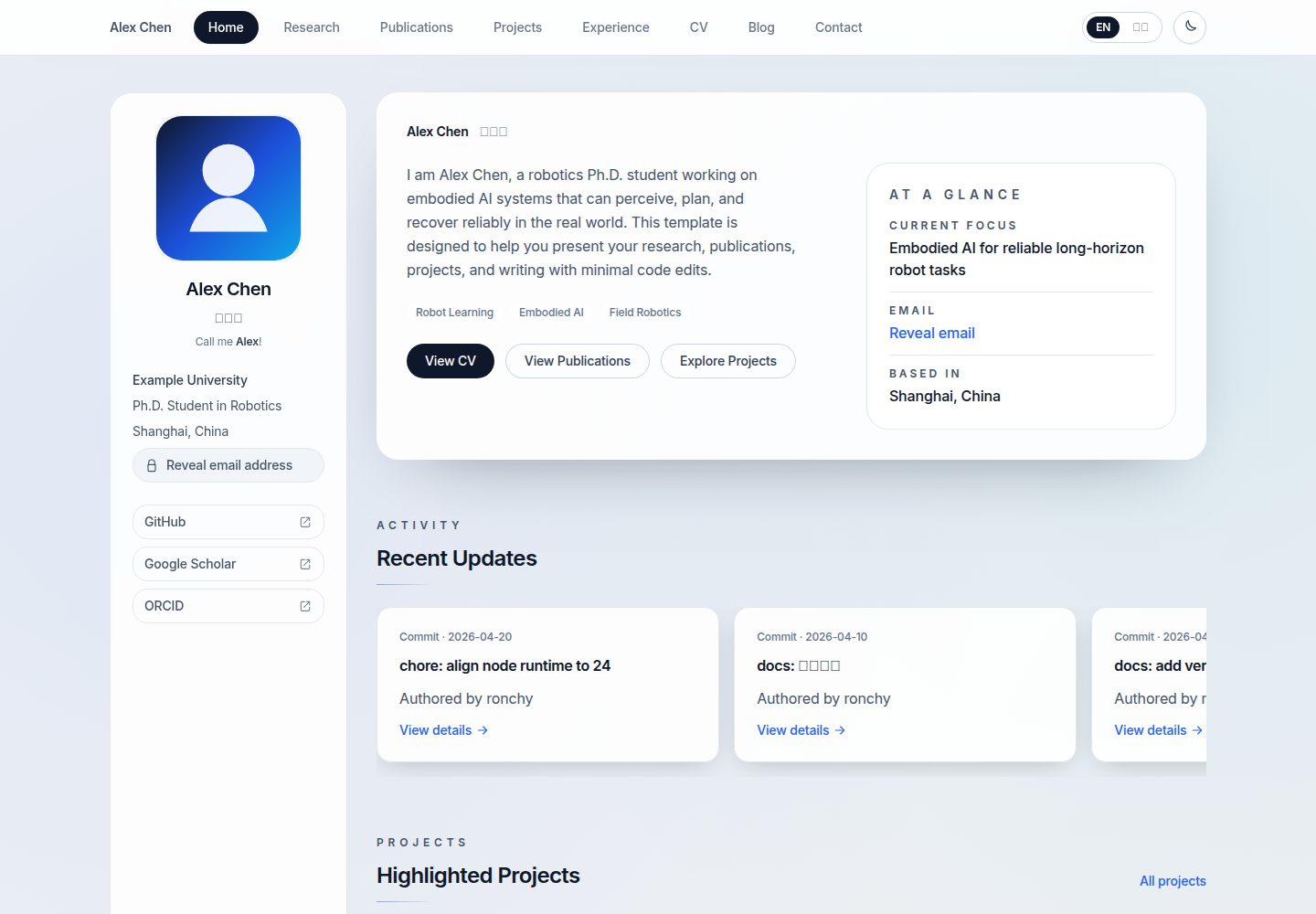
Content and code are separated; homepage information is mainly modified through JSON files in the content directory
Next.jsReactPortfolio
Academic-Homepage-Template — Next.js Portfolio Template
By Ronchy2000
A Next.js-based academic homepage template. Configure your personal homepage content by editing JSON files in the content directory. Supports bilingual Chinese and English and Vercel deployment.
Explore the design
Compare the page layouts and mobile experience. Open any screenshot for a closer look.
Desktop homepage1 / 3
Desktop captureTop of page
Actual screenshot captured by the server browser.
All pages & views 3
Screenshots show visual appearance; interactive behavior may differ.
Recorded 2026-10-14View source
What stands out
A quick read of the recorded project description.
Supports three language modes: bilingual, English-only, and Chinese-only, with configurable first-visit language strategy
The README provides the fastest launch workflow from GitHub Use this template to Vercel import and deployment
The contact page email uses a Base64-encoded environment variable to avoid plaintext appearing in code
Supports light/dark theme following the system by default and remembers the user's choice after manual switching
Provides documentation entry points for deployment, content maintenance, installation, GitHub template workflow, and release checklist
Template Details
This is a reusable personal homepage template. The README states it is suitable for personal homepages, academic homepages, lab homepages, project introduction pages, and portfolio sites. The template separates content from code. Most users do not need to modify code or compile locally first. The workflow is: click Use this template on GitHub to create a repository, edit content files, import the repository in Vercel, and deploy.
Content configuration is centralized in the content directory: site.json controls bilingual or monolingual mode and the default language strategy; profile.json controls name, affiliation, location, keywords, social links, avatar, and CV path; pages/home.json controls the homepage self-introduction and button text; research.json, publications.json, projects.json, timeline.json, awards.json, and updates.json control research, publications, projects, education and experience, awards, and homepage updates respectively. Blog content is located in content/blog/en and content/blog/zh.
For language, i18n.mode can be bilingual, en-only, or zh-only; i18n.primaryLocale can be en, zh, or left empty. When left empty, the first visit is detected by browser language, falling back to English if detection fails. After a user manually switches, the choice is remembered with priority. The contact page email is provided via the environment variable NEXT_PUBLIC_CONTACT_EMAIL_B64 in Base64 encoding. There are also two optional variables: email subject and footer repository link. The template supports light/dark theme following the system by default and remembers the user's choice after manual switching.
The README mentions that local preview is optional. It is recommended only when you need to preview in advance, make extensive content changes, add blog posts, modify components or styles, or troubleshoot build errors. The commands are nvm install, nvm use, npm ci, npm run dev. The README does not specify the template's exact page count, component structure, accessibility support, or deployment platform details beyond Vercel and EdgeOne.
Next.jsReactPortfolio
Is it right for your project?
Use Cases
- Build a personal academic homepage and showcase research interests, publications, projects, and experience
- Create an introduction page for a lab or research group
- Use as a project introduction page or portfolio site
- Academic or personal sites that need bilingual Chinese and English display
- Users unfamiliar with frontend builds who want to edit content via GitHub web interface and deploy to Vercel
Suitable For
- Users who want to quickly launch a personal homepage without modifying code or compiling locally first
- Researchers who need to maintain lists of academic publications, projects, education experience, awards, and updates
- Individuals or labs that need bilingual Chinese and English pages
- Users willing to maintain site content by editing JSON files
- Users planning to deploy with Vercel and accept the GitHub template workflow
Getting started & customization
Use these recorded setup notes alongside the repository instructions for your chosen version.
- 1
Click Use this template on GitHub to create your own repository
- 2
Prioritize modifying content/site.json, content/profile.json, content/pages/home.json, and .env.example
- 3
The contact page email requires converting the real email to Base64 and filling it into NEXT_PUBLIC_CONTACT_EMAIL_B64. You can generate it with echo -n "[email protected]" | base64
- 4
Import the repository in Vercel, keep Framework as Next.js, fill in environment variables, and click Deploy
- 5
Local preview is optional. The commands are nvm install, nvm use, npm ci, npm run dev. Before release, it is recommended to run npm ci, npm run lint, npm run build and check against the release checklist
License & source material
Usage conditions & limitations
Free to use · keep license noticeThis entry covers the free version under the MIT license in a public repository; the free scope is the code of this version and does not mean external services or third-party assets are free.
Must comply with when using
- Free use, modification, commercial use, and distribution of this version's code are permitted.
- When distributing copies or substantial portions of the code, retain the original author's copyright notice and the full MIT license notice.
- The code is provided as is; warranties and limitations of liability are governed by the original license and applicable law.
Additional costs & items to verify
- Demo images, fonts, icons, and other third-party assets must be checked against their respective licenses and cannot be judged solely by the code's MIT license.
- External services such as domains, hosting, databases, payments, or AI may incur additional charges.
- The contact page email is a required environment variable. The real email must be Base64-encoded and filled into NEXT_PUBLIC_CONTACT_EMAIL_B64. If not configured, the contact page email feature is unavailable.
- The recommended launch workflow in the README relies on importing the repository and deploying on the Vercel platform. Using this hosting service requires registering a Vercel account.
- The deployment steps require registering and logging into a Vercel account to create a project, which is an external service account requirement.
View Original Text Basis
Permission is hereby granted, free of charge
Original License Text
| `NEXT_PUBLIC_CONTACT_EMAIL_B64` | 必填 | 联系页真实邮箱,使用 Base64 编码保存 |
Original README
3. 在 Vercel 导入你的仓库
Original README
https://github.com/Ronchy2000/Academic-Homepage-Template/blob/master/LICENSEhttps://github.com/Ronchy2000/Academic-Homepage-Template/blob/master/README.md1. 打开 [Vercel](https://vercel.com/)
Original README
Compiled by DeepSeek based on repository license and README ·2026-10-14. Results only cover the materials read; dependencies, images, fonts, and subsequent term changes are subject to their respective original texts.
Project checks & description sources
Template Information
- Source platforms
- GitHub
- Documentation and maintenance reference score
- More documented · 88 / 100
- Technologies
- Next.js · React
- Website type
- Portfolio
How this score is calculated
Our heuristic uses license records (up to 30), a demo link (12), a preview (10), stars (15), recorded maintenance (15), description completeness (8), feature records (5) and classification data (5). It is not a code, security or performance test, or a Google score. A link does not establish tested functionality.
What to verify for this project
- Repository update recorded
- 2026-04-21
- Screenshot last checked
- 2026-10-14
A demo link is listed. Check it with your own content and viewport sizes; its presence does not confirm that forms, authentication or payments work.
The catalog identifies Next.js as the primary stack. Check the actual dependency manifest and lockfile for versions and hosting requirements. These notes use recorded metadata, not a code audit or a deployment test.
Use a selection guide →How this description was prepared
AI-assisted description based on catalog records and repository material. Repository authors are not automatically the reviewers of this description.
Review declaration: codex-user-requested-batch-review-20261015 · 2026-10-15
Inspect the recorded source material
SHA-256: 6d82be0bd7de5af7eaa40c034740adf20a31d295cfedd75d53af6d769c770e1f
2026-10-14T17:11:23.920Z
Source file / repository# 学术主页模板 Academic Homepage Template
[🇺🇸 English](./README_en.md) | 🇨🇳 中文
    
在线预览: [https://academic-homepage-template-orpin.vercel.app/](https://academic-homepage-template-orpin.vercel.app/)
这个仓库是一个可直接复用的主页模板,适合:
- 个人主页
- 学术主页
- 实验室主页
- 项目介绍页
- 作品集站点
你不需要先改代码,也不需要先在本地编译。大多数用户只需要:
1. 在 GitHub 点击 `Use this template`
2. 修改内容文件
3. 在 Vercel 导入你的仓库
4. 部署上线
## 最快上线流程
如果你的目标是“尽快把网站上线”,按下面做即可:
### 第 1 步:创建你自己的仓库
在 GitHub 页面点击 `Use this template`,创建你自己的仓库。
详细说明:
- [GitHub 使用方式与模板流程](./docs/GITHUB-TEMPLATE.md)
### 第 2 步:先改这 4 处
先打开并修改:
1. [content/site.json](./content/site.json)
2. [content/profile.json](./content/profile.json)
3. [content/pages/home.json](./content/pages/home.json)
4. [.env.example](./.env.example)
这 4 处分别控制:
- 网站是双语还是单语
- 你的姓名、单位、社交链接、头像、CV
- 首页自我介绍和按钮文案
- 联系页邮箱和页脚仓库链接
下一步该改什么,见:
- [内容维护指南](./docs/CONTENT-MANAGEMENT.md)
### 第 3 步:把改动推送到你自己的 GitHub 仓库
如果你直接在 GitHub 网页上编辑文件,保存后就已经完成这一步。
如果你在本地编辑,再执行:
```bash
git add .
git commit -m "Customize homepage content"
git push
```
### 第 4 步:在 Vercel 导入仓库并部署
1. 打开 [Vercel](https://vercel.com/)
2. 点击 `Add New Project`
3. 选择你的 GitHub 仓库
4. Framework 保持 `Next.js`
5. 在环境变量里填写邮箱等信息
6. 点击 `Deploy`
详细步骤:
- [部署指南](./docs/DEPLOYMENT.md)
## 最重要的配置:`content/site.json`
文件:
- [content/site.json](./content/site.json)
默认配置:
```json
{
"i18n": {
"mode": "bilingual",
"primaryLocale": ""
}
}
```
这两个参数决定了你的站点如何显示语言。
### `i18n.mode`
可选值:
- `bilingual`
- `en-only`
- `zh-only`
含义:
- `bilingual`:同时生成中英文页面
- `en-only`:只生成英文页面
- `zh-only`:只生成中文页面
### `i18n.primaryLocale`
可选值:
- `"en"`
- `"zh"`
- `""`
这个参数一定要理解清楚:
- `primaryLocale: "en"`:首次访问固定进入英文,不启用浏览器语言识别
- `primaryLocale: "zh"`:首次访问固定进入中文,不启用浏览器语言识别
- `primaryLocale: ""`:只有留空时,首次访问才按浏览器语言识别;识别不到时回退到英文
当前模板默认值就是:
```json
"primaryLocale": ""
```
也就是:
- 默认按浏览器语言决定首屏语言
- 用户手动切换语言后,会优先记住用户自己的选择
语言判断顺序是:
1. 先看 `locale` cookie
2. 如果没有 cookie,并且 `primaryLocale` 留空,再读浏览器语言
3. 如果仍然无法判断,则回退到英文
完整说明与示例:
- [内容维护指南中的语言配置部分](./docs/CONTENT-MANAGEMENT.md)
## 你最可能会改的文件
下面这些文件,基本涵盖了大多数用户第一次使用模板时需要修改的内容。
### 站点级配置
- [content/site.json](./content/site.json)
控制双语/单语、默认语言策略
### 个人信息
- [content/profile.json](./content/profile.json)
控制姓名、单位、地点、关键词、社交链接、头像路径、CV 路径
### 首页文案
- [content/pages/home.json](./content/pages/home.json)
控制首页自我介绍、按钮文字、首页各区块标题
### 研究内容
- [content/research.json](./content/research.json)
控制研究兴趣和研究经历
### 成果列表
- [content/publications.json](./content/publications.json)
控制论文、专利、投稿中稿件等条目
### 项目列表
- [content/projects.json](./content/projects.json)
控制项目分组、项目简介、链接、指标
### 教育与经历
- [content/timeline.json](./content/timeline.json)
控制教育背景和实习/工作经历
### 奖项
- [content/awards.json](./content/awards.json)
### 首页动态
- [content/updates.json](./content/updates.json)
### 博客
- [content/blog/en](./content/blog/en)
- [content/blog/zh](./content/blog/zh)
### 页面文案
- [content/pages](./content/pages)
### 资源文件
- [public/images/avatar-placeholder.svg](./public/images/avatar-placeholder.svg)
- [public/files/sample-cv.pdf](./public/files/sample-cv.pdf)
## 联系页环境变量
模板示例文件:
- [.env.example](./.env.example)
你最需要关心的是:
| 变量名 | 是否必填 | 作用 |
| --- | --- | --- |
| `NEXT_PUBLIC_CONTACT_EMAIL_B64` | 必填 | 联系页真实邮箱,使用 Base64 编码保存 |
| `NEXT_PUBLIC_CONTACT_MAILTO_SUBJECT` | 选填 | 打开邮件客户端时的默认标题 |
| `NEXT_PUBLIC_REPOSITORY_URL` | 选填 | 页脚显示的仓库链接 |
邮箱转 Base64 示例:
```bash
echo -n "[email protected]" | base64
```
更多说明:
- [安装与环境变量说明](./docs/INSTALLATION.md)
- [部署时如何填写环境变量](./docs/DEPLOYMENT.md)
## 本地预览是可选的
很多用户并不需要本地运行,只需要:
- 用 GitHub 网页改文件
- 在 Vercel 导入仓库
- 在线看部署结果
只有在你想做这些事情时,才建议本地运行:
- 提前预览页面
- 大量修改内容
- 增加博客文章
- 改组件或样式
- 排查构建报错
本地预览命令:
```bash
nvm install
nvm use
npm ci
npm run dev
```
打开:
- `http://localhost:3000`
如果你遇到 `npm ci`、`package-lock.json`、Node 版本等问题,直接看:
- [安装指南](./docs/INSTALLATION.md)
## 默认主题行为
模板默认支持浅色 / 深色主题自动跟随系统设置。
也就是说:
- 用户第一次访问时,会跟随操作系统或浏览器当前的深浅色偏好
- 用户手动切换后,会记住自己的选择
这部分不需要你额外配置,直接可用。
## 文档入口
按任务来找文档:
- 我想最快上线: [部署指南](./docs/DEPLOYMENT.md)
- 我想知道每个内容文件改什么: [内容维护指南](./docs/CONTENT-MANAGEMENT.md)
- 我想本地运行: [安装指南](./docs/INSTALLATION.md)
- 我想把仓库作为 GitHub 模板使用: [GitHub 使用方式与模板流程](./docs/GITHUB-TEMPLATE.md)
- 我想上线前逐项检查: [发布检查清单](./docs/PUBLISH-CHECKLIST.md)
- 我想让 Recent Updates / stars 自动更新: [可选自动化指南](./docs/WORKFLOW-OPTIMIZATION.md)
- 我接手的是一个已经上线的网站: [维护手册](./docs/maintenance-guide.md)
## 上线前建议至少做一次检查
如果你使用了本地环境,建议在正式发布前执行:
```bash
npm ci
npm run lint
npm run build
```
然后对照:
- [发布检查清单](./docs/PUBLISH-CHECKLIST.md)
## License
- [MIT](./LICENSE)
Explore similar templates
Compare previews and descriptions within the same stack and category.

react-resume-template
A personal resume website template for software developers, built with Next.js, React, and TypeScript and styled with Tailwind CSS. Site content is driven by a single data file at /src/data/data.tsx, with types in dataDef.ts and images in src/images/.
Next.js · Portfolio

nxt-lnk
nxt-lnk is a Next.js-based bio link page template that manages personal information and links via BioData.js and LinksData.js, positioned as a self-hosted alternative to Linktree. It groups links by type, supports enabling/disabling individual links, and offers hexagonal or oval avatars.
Next.js · Portfolio

sylph
Sylph is a minimal portfolio and blog template built on Next.js, supporting MDX/Markdown writing, light/dark themes, and automatic OG image generation. It includes sitemap, robots.txt, metadata, and syntax highlighting, with automatic blog timestamps.
Next.js · Portfolio

sleek-portfolio
A modern, responsive portfolio template built with Next.js 15, TypeScript, Tailwind CSS, and Shadcn UI. It includes an MDX blog, project showcase, work experience timeline, and a contact form that receives messages via Telegram Bot.
Next.js · Portfolio

research-website-template
A React + Next.js template for research personal websites, aimed at PhD students and researchers. It centralizes publications, projects, and other content in src/data as arrays of objects, with optional fields automatically generating UI components.
Next.js · Portfolio

shadcn-portfolio
A developer portfolio template built with Next.js 15, shadcn/ui, Tailwind CSS, and Framer Motion, featuring an MDX blog, light and dark modes, responsive design, and SEO meta tags.
Next.js · Portfolio