Pure HTML, CSS, and JavaScript implementation, no build tools required
HTMLPortfolio
Personal-Website-Template — HTML Portfolio Template
By RosaCodes2021
A personal portfolio website template built with HTML, CSS, and JavaScript, featuring sections for a splash screen, current projects, completed projects, hobbies, languages, and contact details, with modals and carousels for displaying details.
Explore the design
Compare the page layouts and mobile experience. Open any screenshot for a closer look.
Desktop homepage1 / 2
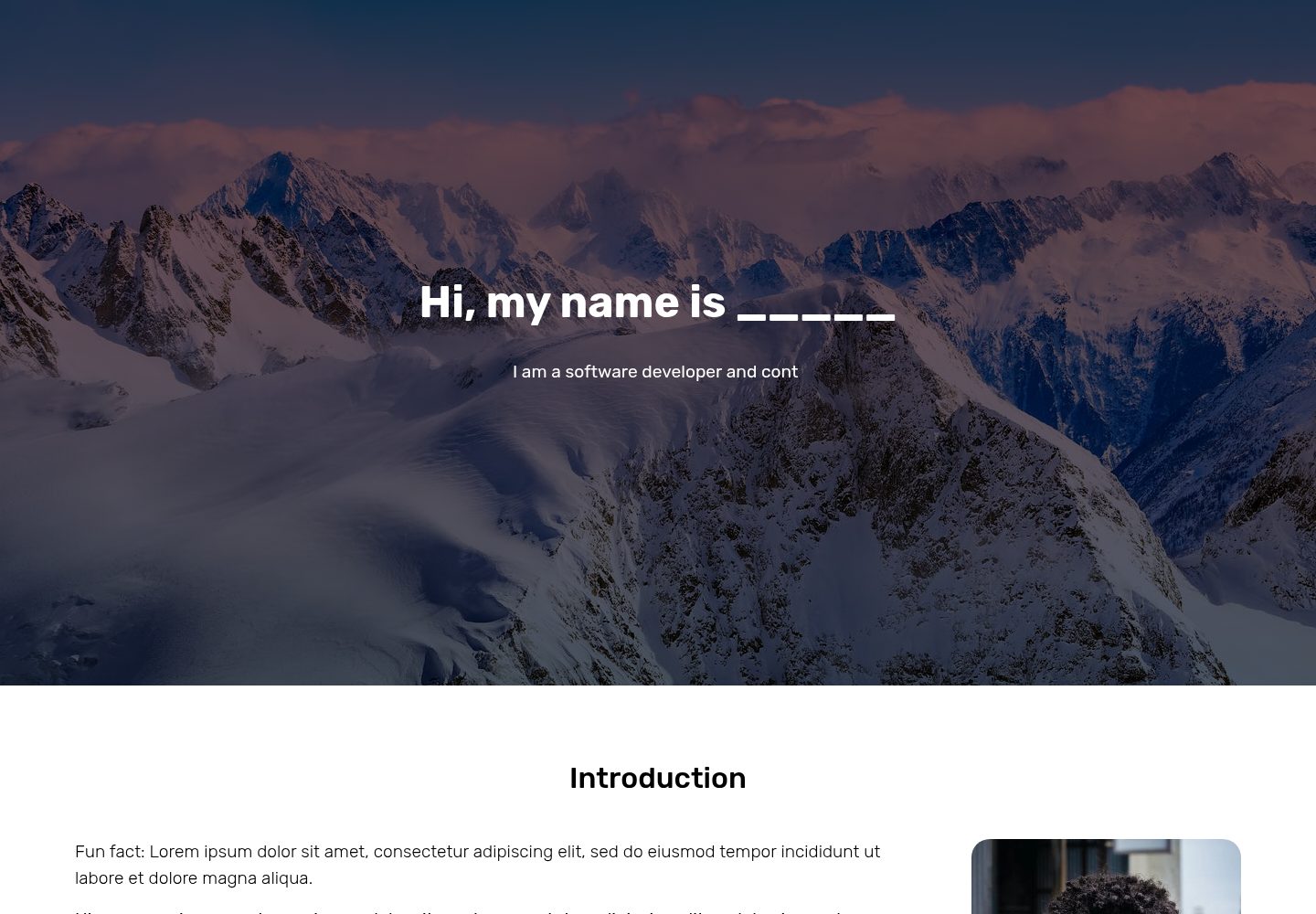
Desktop captureTop of page
Actual screenshot captured by the server browser.
All pages & views 2
Screenshots show visual appearance; interactive behavior may differ.
Recorded 2026-10-02View source
What stands out
A quick read of the recorded project description.
Includes complete sections for splash screen, current projects, completed projects, hobbies, languages, and contact details
Projects and hobbies display details through modals and image carousels
Languages section uses progress bars and audio files to showcase language proficiency
Integrates granim.js, TypewriterJS, Bootstrap, Font Awesome, and Google Fonts
Provides GitHub Pages hosting steps
Template Details
This template is a personal website written in HTML, CSS, and JavaScript, primarily intended for portfolio display. The page structure includes sections for a splash screen, current projects, completed projects, hobbies, languages, and contact details. Projects and hobbies use modals to show more information, while the languages section uses progress bars and audio files. The template uses granim.js for the splash screen gradient animation, TypewriterJS for the tagline typing effect, Bootstrap for some modals and image carousels, Font Awesome for icons, and fonts from Google Fonts.
Before use, you need to manually clean up the sample images in the assets folder, keeping only snow.jpg for the splash screen gradient animation, and then replace them with your own images. Project titles, text, images, modal content, language percentages and audio files, contact links, and other elements all need to be manually modified in index.html, index.js, and styles.css. Button ids are bound to the logic in index.js and should not be changed arbitrarily.
The README states that the audio files are currently not connected, so the audio in the demo cannot play. The template does not provide build tools or dependency management configuration; simply open index.html directly in a browser to view the effect. GitHub Pages is recommended for hosting, though other methods can also be used.
HTMLPortfolio
Is it right for your project?
Use Cases
- Personal portfolio website to showcase current and completed projects
- Introduce hobbies, language proficiency, and contact details on a personal homepage
- A static website practice project for HTML/CSS/JavaScript learners
- Publish a personal website for free via GitHub Pages
Suitable For
- Developers or designers who need to quickly build a personal portfolio page
- People who want to customise the website by directly modifying HTML, CSS, and JavaScript files
- Users familiar with or willing to learn GitHub Pages for deploying static websites
- Those looking for a static website template that includes modals, carousels, and animation effects
Getting started & customization
Use these recorded setup notes alongside the repository instructions for your chosen version.
- 1
After downloading the project, open index.html with a code editor to preview it in the browser
- 2
Clean up the sample images in the assets folder, keeping only snow.jpg for the splash screen gradient animation
- 3
Modify projects, hobbies, languages, contact details, and other content in index.html, index.js, and styles.css
- 4
Do not change button ids unless you also update them in index.js accordingly
- 5
Audio files for the languages section must be placed in the assets folder and their filenames adjusted, otherwise they will not play
License & source material
Usage conditions & limitations
Free to use · keep license noticeThis entry covers the free version in a public repository under the Apache-2.0 license; the free scope applies to that version's code and does not imply that external services or third-party assets are free.
Must comply with when using
- Free use, modification, commercial use, and distribution are permitted; the Apache-2.0 license must be included when distributing.
- Modified files must carry prominent notices of changes, and relevant copyright, patent, trademark, and attribution notices must be retained.
- If the original project includes a NOTICE file, applicable attribution notices from it must be retained when distributing derivative works.
- The license includes an applicable contributor patent grant; initiating patent litigation as described in the license terminates that patent grant, and no trademark rights are granted.
- The code is provided as-is; warranties and limitations of liability are governed by the original license and applicable law.
Additional costs & items to verify
- The audio files in the demo copy are not connected, so the audio playback feature in the languages section is unavailable in the demo; you must place them in the assets folder and adjust filenames before use.
- Before use, you must clean up the sample images in the assets folder, keeping only snow.jpg for the splash screen gradient animation; otherwise, replace them with your own images.
- Button ids are bound to the logic in index.js and should not be changed; if you must change them, you must also update the corresponding button ids in index.js.
- Audio files for the languages section must be placed in the assets folder and adjusted by name, otherwise the audio will not play.
- The author does not provide bug-fix support; the template is delivered in a 'fully functional' state, and you must resolve any issues encountered during use yourself.
- Demo images, fonts, icons, and other third-party assets must be checked against their respective licenses; they cannot be judged solely based on the code's Apache-2.0 license.
- External services such as domains, hosting, databases, payments, or AI may incur additional charges.
View Original Text Basis
no-charge, royalty-free, irrevocable copyright license
Original License Text
the audio files are not currently connected, so those will not work
Original README
Clear the assets folder from all stock demo images, but keep **one file: snow.jpg**
Original README
**Do not** change the id's for any buttons, since those are used in index.js to make the buttons work.
Original README
Be sure to put the audio files in the assets folder and adjust the name accordingly, otherwise they will not work.
Original README
https://github.com/RosaCodes2021/Personal-Website-Template/blob/main/LICENSEhttps://github.com/RosaCodes2021/Personal-Website-Template/blob/main/README.mdI won't be bug solving for anybody.
Original README
Compiled by DeepSeek based on repository license and README ·2026-10-03. Results only cover the materials read; dependencies, images, fonts, and subsequent term changes are subject to their respective original texts.
Project checks & description sources
Template Information
- Source platforms
- GitHub
- Documentation and maintenance reference score
- Partly documented · 72 / 100
- Technologies
- HTML
- Website type
- Portfolio
How this score is calculated
Our heuristic uses license records (up to 30), a demo link (12), a preview (10), stars (15), recorded maintenance (15), description completeness (8), feature records (5) and classification data (5). It is not a code, security or performance test, or a Google score. A link does not establish tested functionality.
What to verify for this project
- Repository update recorded
- 2024-07-24
- Screenshot last checked
- 2026-10-03
A demo link is listed. Check it with your own content and viewport sizes; its presence does not confirm that forms, authentication or payments work.
The catalog identifies HTML as the primary stack. Check the actual dependency manifest and lockfile for versions and hosting requirements. These notes use recorded metadata, not a code audit or a deployment test.
Use a selection guide →How this description was prepared
AI-assisted description based on catalog records and repository material. Repository authors are not automatically the reviewers of this description.
Review declaration: [email protected] · 2026-10-04
Inspect the recorded source material
SHA-256: 908dd169707bed10ff5d5c4da5cfe02ca3c994629ce08c347b363968682dd468
2026-10-03T09:16:01.986Z
Source file / repository# Personal-Website-Template **A professional, fully functioning, and highly customizable personal website template.** <br> #### An entire description of the project can be found on [Gumroad](https://rosacodes.gumroad.com/l/personal-website-template) <img src="Template Cover.png" width="100%"> #### Here is a one-minute demo of the website: [<img src="markdownVideo.png" width="60%">](https://www.youtube.com/watch?v=IA-k9k-eh9E) <br> ### Demo Copy Want to see the website for yourself? Go to the [Demo Copy](https://rosacodes2021.github.io/Personal-Website-Template-Demo/). <br> Note: the audio files are not currently connected, so those will not work. ### Project Files Walkthrough | File/folder name | Description | | ----------- | ----------- | | index.html | the main file -- all the main components of the website are in there | | styles.css | contains all of the styling | | index.js | contains all the code to make animations & modals work | | granim.min.js | contains code from the granim.js library -- do not change | | assets | a folder for all the images & videos that you want to use on your website | ### Installation Instructions #### 1. Download the project Download the project. I would recommend you download it from [Gumroad](https://rosacodes.gumroad.com/l/personal-website-template) since that folder does not contain extra files such as this README file. However, you can also download the code from this repo. The website should **work completely**. I would recommend that you open it up in a code editor such as VSCode or Atom, and test it out by opening up index.html in any browser. You should then see the entire working demo copy. #### 2. Clean up the assets folder Clear the assets folder from all stock demo images, but keep **one file: snow.jpg**. This image is used for the launch screen gradient animation. Want a different image there? Go ahead and delete the image then, and upload your own image. You can specify that you want to use a different image for the gradient animation on line 20 of index.js Then, start adding your own images. Just drag and drop them in there, and you should be able to use them on the website. #### 3. Modify the launch screen Go into index.js, and change your tagline on line 10 of index.js #### 4. Modify current projects Find the current projects section, and go ahead and change the title, text, and image for each one of them. Then, scroll down to the modals section, and change the information in the first two modals. Note: the third current project is not connected to a modal -- instead it is a link to visit a website. Therefore, you should specify the website link under the BUTTON 3 heading in index.js **Do not** change the id's for any buttons, since those are used in index.js to make the buttons work. If you do really want to change these id's, change them in index.js for each button as well. This accounts for the whole project. #### 5. Modify completed projects This section is very similar to the previous section. Find the completed projects section, and change the title, text, and image for each project. Then, scroll down to the modals section, and change the next two modals. Just like for the current projects section, the third completed project is not connected to a modal, and instead visits a website. Again specify the link in index.js for BUTTON 6. #### 6. Modify hobbies section Find the hobbies section, and for each hobby card, change the title and image. Then, scroll down to the bottom and find the MODALS FOR HOBBIES comment, and change the title, images, and descriptions of the modals underneath. Be sure to not change any naming for properties of the carousel, and not change the id of the modal. #### 7. Modify languages section In the languages section, change the titles, percentages, audio files, and descriptions to match with the languages you speak. Be sure to put the audio files in the assets folder and adjust the name accordingly, otherwise they will not work. Also, go into styles.css, and find a "styling for the progress bars" section. Underneath, change the names & percentages for the languages you speak. Copy and paste these code blocks to delete or add any languages you speak. #### 8. Modify contact me section The last part before the code of the modals is the code for the contact me section. Be sure to change the image shown there, and change the links to your own email address, instagram account, and github account. #### 9. Optional: add password protection If you want to add password protection to yours, visit this Github repository: [Protected Github Pages](https://github.com/chrissy-dev/protected-github-pages). It uses SHA1 hashes to protect your website. However, if you want to have anyone visit this website, definitely skip this step. ##### Your website should be completely done at this point! #### 10. Host To host your new personal website, create an account at [Github](https://www.github.com). Then, create a new repository and call it "Personal Website". Either upload the code by committing it from your code editor, or simply upload the files. Now that your project is online, go to the "Settings" tab and then the "Pages" tab. Finally, switch the Source from "none" to "main", and click "save". Wait a couple of minutes while it says "Your site is ready to be published", and refresh the page. Once the above box turns green and indicates that your site has been published, you are 100% done. Congrats on your new personal website! If you want to host the website using a **different method**, that is completely fine. However, if you have never done so, I would suggest Github pages since it is easy and free. ### Future updates Go follow [Rosacodes](https://www.instagram.com/rosacodes) on Instagram in order to see any future updates. New sections will be added in the future, so tag along for that! ### Closing I hope that you find this project useful. Please let me know if you have any questions. You can find me at @rosacodes on Instagram, or by sending an email to [email protected]. Also, please let me know if you actually do end up using this project, I would love to see your new website! Just a little note, I won't be bug solving for anybody. You are getting the website in a fully working state, so as long as you follow the above instructions you should be just fine. ### Credits The entire project was written by [Rosacodes](https://www.instagram.com/rosacodes), with the exception of the use of some packages and libraries. Here are those packages and libraries: - granim.js was used for the launch screen gradient animation - TypewriterJS was used for the animation of the tagline on the launch screen - Google Fonts was used for the fonts of the website - Bootstrap was used for some the modals and image carousels - Font Awesome was used for some of the icons ### License This code is released under the Apache 2.0 license. Have a nice day!
Explore similar templates
Compare previews and descriptions within the same stack and category.

simplefolio
Simplefolio is a minimal single-page portfolio template for developers, built with HTML, Bootstrap, SCSS, and Parcel under the MIT license. It includes Hero, About, Projects, Contact, and Footer sections, with content edited in /src/index.html and theme colors controlled by two SCSS variables.
HTML · Portfolio

Freelancer
A bright, single-page Bootstrap portfolio template for freelancers, designers, and small studios. It includes a responsive portfolio grid with modal detail windows and an SB Forms contact form that requires an API token.
HTML · Portfolio

Resume
A single-page resume and CV template from Start Bootstrap, built on Bootstrap with a fixed sidebar and content sections.
HTML · Portfolio

Creative
A single-page marketing template by Start Bootstrap for creative agencies and product services, built on Bootstrap with SCSS, featuring a portfolio grid and call-to-action sections. It includes pre-set SB Forms markers for form integration and npm build scripts for source customization.
HTML · Corporate Website

Grayscale
A dark single-page Bootstrap template from Start Bootstrap for photography, events and brand storytelling, with a large hero and clearly separated sections.
HTML · Corporate Website

startbootstrap-stylish-portfolio
A one-page Bootstrap portfolio theme from Start Bootstrap with multiple content sections and an off-canvas navigation menu. Basic use means editing HTML/CSS under dist and opening index.html; advanced use relies on npm with Pug and SCSS build scripts.
HTML · Portfolio