纯 HTML、CSS 和 JavaScript 实现,无需构建工具
HTML作品集
Personal-Website-Template — HTML 作品集模板
作者 RosaCodes2021
一个基于 HTML、CSS 和 JavaScript 的个人作品集网站模板,包含启动屏、当前项目、已完成项目、爱好、语言和联系方式等板块,通过弹窗与轮播展示细节。
看看你的网站会是什么样
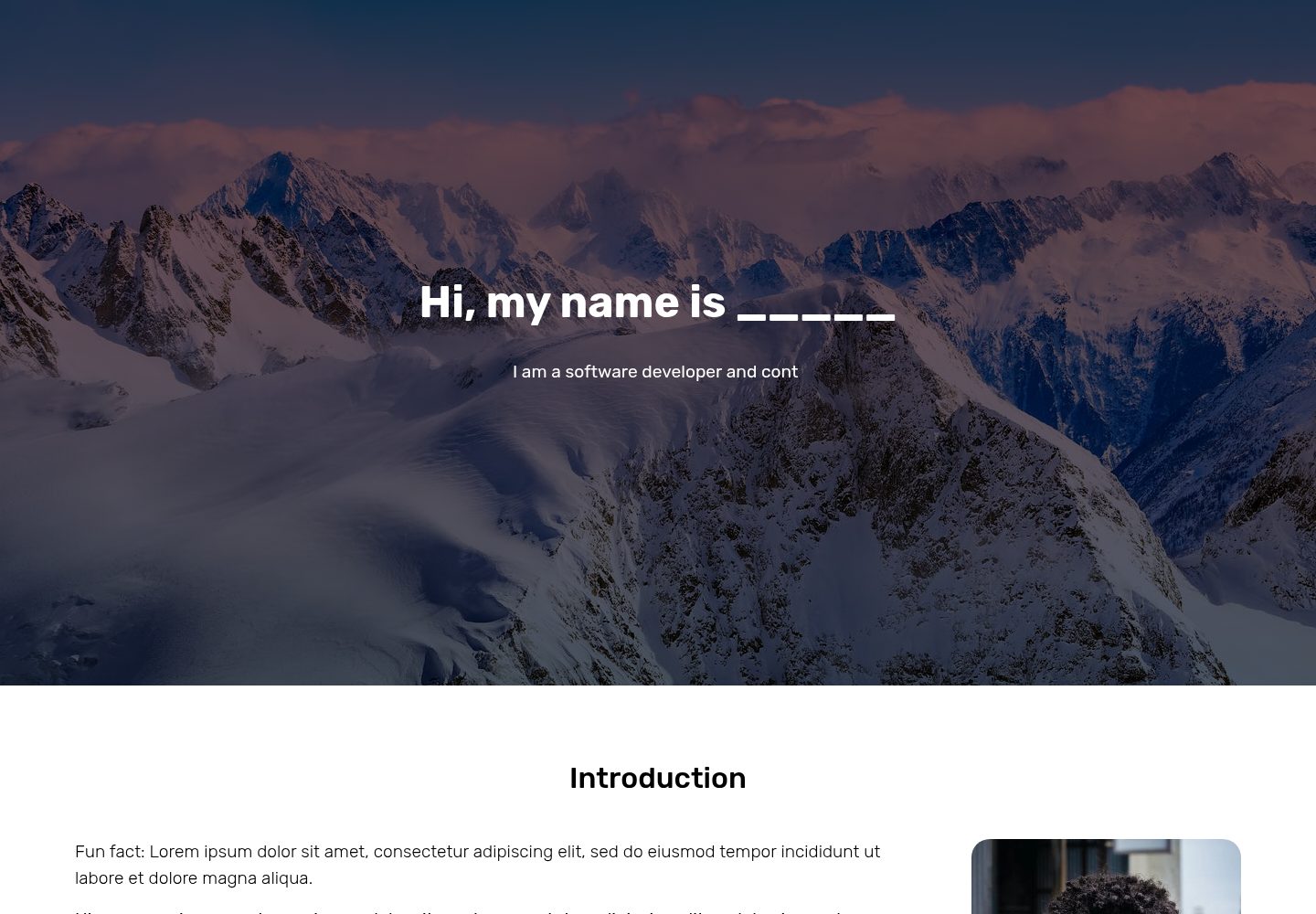
浏览真实页面截图,比较内容排版与手机效果。点击下方缩略图切换,放大查看整页细节。
全部页面与视图 2
截图用于了解视觉与布局,交互效果请以实际项目为准。
采集于 2026-10-02查看来源
值得关注的模板亮点
从已有项目资料中,快速了解它的特点。
包含启动屏、当前项目、已完成项目、爱好、语言、联系方式等完整板块
项目与爱好通过弹窗和图片轮播展示细节
语言板块使用进度条和音频文件展示语言能力
集成 granim.js、TypewriterJS、Bootstrap、Font Awesome 和 Google Fonts
提供 GitHub Pages 托管步骤
模板详细介绍
该模板是一个用 HTML、CSS 和 JavaScript 编写的个人网站,主要面向作品集展示。页面结构包含启动屏、当前项目、已完成项目、爱好、语言和联系方式等板块,项目与爱好通过弹窗展示更多信息,语言板块使用进度条与音频文件。模板使用 granim.js 实现启动屏渐变动画,TypewriterJS 实现标语打字效果,Bootstrap 用于部分弹窗和图片轮播,Font Awesome 提供图标,字体来自 Google Fonts。
使用前需要手动清理 assets 文件夹中的示例图片,仅保留 snow.jpg 用于启动屏渐变动画,然后替换为自己的图片。项目标题、文本、图片、弹窗内容、语言百分比与音频文件、联系方式链接等都需要在 index.html、index.js 和 styles.css 中手动修改。按钮的 id 与 index.js 中的逻辑绑定,不应随意更改。
README 说明音频文件目前未连接,因此演示中的音频无法播放。模板未提供构建工具或依赖管理配置,直接打开 index.html 即可在浏览器中查看效果。托管方式推荐 GitHub Pages,也可使用其他方式。
HTML作品集
适合你的项目吗?
适用场景
- 个人作品集网站,展示当前与已完成项目
- 在个人主页中介绍爱好、语言能力和联系方式
- 作为 HTML/CSS/JavaScript 学习者的静态网站练习项目
- 通过 GitHub Pages 免费发布个人网站
适合人群
- 需要快速搭建个人作品集页面的开发者或设计师
- 希望直接修改 HTML、CSS 和 JavaScript 文件来定制网站的人
- 熟悉或愿意学习 GitHub Pages 部署静态网站的用户
- 寻找包含弹窗、轮播和动画效果的静态网站模板的人
上手与定制指南
结合仓库当前版本的说明,按下面的资料检查内容、配置与运行要求。
- 1
下载项目后,用代码编辑器打开 index.html 即可在浏览器中预览
- 2
清理 assets 文件夹中的示例图片,仅保留 snow.jpg 用于启动屏渐变动画
- 3
在 index.html、index.js 和 styles.css 中修改项目、爱好、语言、联系方式等内容
- 4
不要更改按钮的 id,除非同时在 index.js 中同步修改
- 5
语言板块的音频文件需放入 assets 文件夹并调整文件名,否则无法播放
授权与来源资料
使用条件与限制
免费使用 · 保留许可声明本次收录的是公开仓库中采用 Apache-2.0 许可的免费版本;免费范围为该版本代码,不代表外部服务或第三方素材免费。
使用时需要遵守
- 允许免费使用、修改、商用和分发;分发时需随附 Apache-2.0 许可证。
- 修改过的文件需显著标明改动,并保留相关版权、专利、商标及归属声明。
- 若原项目附有 NOTICE 文件,分发衍生作品时需保留其中适用的归属声明。
- 许可包含适用的贡献者专利授权;发起许可所述专利诉讼会终止该专利授权,且不授予商标使用权。
- 代码按现状提供;担保与责任限制以原许可证及适用法律为准。
额外费用与待核对事项
- 演示副本中的音频文件未连接,语言板块的音频播放功能在演示中不可用,需自行放入 assets 文件夹并调整文件名后才能使用。
- 使用前必须清理 assets 文件夹中的示例图片,仅保留 snow.jpg 用于启动屏渐变动画,否则需替换为自己的图片。
- 按钮的 id 与 index.js 逻辑绑定,不应更改;若确需更改,必须同步修改 index.js 中对应按钮的 id。
- 语言板块的音频文件必须放入 assets 文件夹并按名称调整,否则音频无法播放。
- 作者不提供缺陷修复支持,模板按“完全可用”状态交付,需自行解决使用中遇到的问题。
- 演示图片、字体、图标及其他第三方素材需按各自许可核对,不能仅凭代码的 Apache-2.0 许可判断。
- 域名、托管、数据库、支付或 AI 等外部服务可能另外收费。
查看原文依据
no-charge, royalty-free, irrevocable copyright license
许可证原文
the audio files are not currently connected, so those will not work
README 原文
Clear the assets folder from all stock demo images, but keep **one file: snow.jpg**
README 原文
**Do not** change the id's for any buttons, since those are used in index.js to make the buttons work.
README 原文
Be sure to put the audio files in the assets folder and adjust the name accordingly, otherwise they will not work.
README 原文
https://github.com/RosaCodes2021/Personal-Website-Template/blob/main/LICENSEhttps://github.com/RosaCodes2021/Personal-Website-Template/blob/main/README.mdI won't be bug solving for anybody.
README 原文
DeepSeek 根据仓库许可证和 README 整理 ·2026-10-03。结果仅覆盖已读取资料,依赖、图片、字体及后续条款变更以各自原文为准。
项目核对记录与介绍依据
模板资料
- 来源平台
- GitHub
- 资料与维护参考分
- 资料一般 · 72 / 100
- 技术栈
- HTML
- 网站类型
- 作品集
这个分数如何计算
本站按许可资料(最高30分)、演示链接(12分)、预览图(10分)、Star数(15分)、记录的维护时间(15分)、描述完整度(8分)、功能记录(5分)和分类资料(5分)计算。它不是代码、安全或性能测试,也不是 Google 评分;有链接不代表已实测可用。
这个项目需要核对什么
- 记录的仓库更新时间
- 2024-07-24
- 截图检查日期
- 2026-10-03
已收录演示链接。请用你的内容与屏幕尺寸检查;有演示不代表表单、认证或支付已经可用。
目录记录的主要技术栈是 HTML。请通过依赖清单和锁文件核对实际版本与托管要求。这些说明基于收录资料,不代表代码审计或部署实测。
查看具体选型方法 →介绍的制作与核对状态
介绍由 AI 辅助整理目录与仓库资料。仓库作者不等于这篇介绍的审核者。
审核声明: [email protected] · 2026-10-04
查看当时使用的来源资料
SHA-256: 908dd169707bed10ff5d5c4da5cfe02ca3c994629ce08c347b363968682dd468
2026-10-03T09:16:01.986Z
来源文件 / 仓库# Personal-Website-Template **A professional, fully functioning, and highly customizable personal website template.** <br> #### An entire description of the project can be found on [Gumroad](https://rosacodes.gumroad.com/l/personal-website-template) <img src="Template Cover.png" width="100%"> #### Here is a one-minute demo of the website: [<img src="markdownVideo.png" width="60%">](https://www.youtube.com/watch?v=IA-k9k-eh9E) <br> ### Demo Copy Want to see the website for yourself? Go to the [Demo Copy](https://rosacodes2021.github.io/Personal-Website-Template-Demo/). <br> Note: the audio files are not currently connected, so those will not work. ### Project Files Walkthrough | File/folder name | Description | | ----------- | ----------- | | index.html | the main file -- all the main components of the website are in there | | styles.css | contains all of the styling | | index.js | contains all the code to make animations & modals work | | granim.min.js | contains code from the granim.js library -- do not change | | assets | a folder for all the images & videos that you want to use on your website | ### Installation Instructions #### 1. Download the project Download the project. I would recommend you download it from [Gumroad](https://rosacodes.gumroad.com/l/personal-website-template) since that folder does not contain extra files such as this README file. However, you can also download the code from this repo. The website should **work completely**. I would recommend that you open it up in a code editor such as VSCode or Atom, and test it out by opening up index.html in any browser. You should then see the entire working demo copy. #### 2. Clean up the assets folder Clear the assets folder from all stock demo images, but keep **one file: snow.jpg**. This image is used for the launch screen gradient animation. Want a different image there? Go ahead and delete the image then, and upload your own image. You can specify that you want to use a different image for the gradient animation on line 20 of index.js Then, start adding your own images. Just drag and drop them in there, and you should be able to use them on the website. #### 3. Modify the launch screen Go into index.js, and change your tagline on line 10 of index.js #### 4. Modify current projects Find the current projects section, and go ahead and change the title, text, and image for each one of them. Then, scroll down to the modals section, and change the information in the first two modals. Note: the third current project is not connected to a modal -- instead it is a link to visit a website. Therefore, you should specify the website link under the BUTTON 3 heading in index.js **Do not** change the id's for any buttons, since those are used in index.js to make the buttons work. If you do really want to change these id's, change them in index.js for each button as well. This accounts for the whole project. #### 5. Modify completed projects This section is very similar to the previous section. Find the completed projects section, and change the title, text, and image for each project. Then, scroll down to the modals section, and change the next two modals. Just like for the current projects section, the third completed project is not connected to a modal, and instead visits a website. Again specify the link in index.js for BUTTON 6. #### 6. Modify hobbies section Find the hobbies section, and for each hobby card, change the title and image. Then, scroll down to the bottom and find the MODALS FOR HOBBIES comment, and change the title, images, and descriptions of the modals underneath. Be sure to not change any naming for properties of the carousel, and not change the id of the modal. #### 7. Modify languages section In the languages section, change the titles, percentages, audio files, and descriptions to match with the languages you speak. Be sure to put the audio files in the assets folder and adjust the name accordingly, otherwise they will not work. Also, go into styles.css, and find a "styling for the progress bars" section. Underneath, change the names & percentages for the languages you speak. Copy and paste these code blocks to delete or add any languages you speak. #### 8. Modify contact me section The last part before the code of the modals is the code for the contact me section. Be sure to change the image shown there, and change the links to your own email address, instagram account, and github account. #### 9. Optional: add password protection If you want to add password protection to yours, visit this Github repository: [Protected Github Pages](https://github.com/chrissy-dev/protected-github-pages). It uses SHA1 hashes to protect your website. However, if you want to have anyone visit this website, definitely skip this step. ##### Your website should be completely done at this point! #### 10. Host To host your new personal website, create an account at [Github](https://www.github.com). Then, create a new repository and call it "Personal Website". Either upload the code by committing it from your code editor, or simply upload the files. Now that your project is online, go to the "Settings" tab and then the "Pages" tab. Finally, switch the Source from "none" to "main", and click "save". Wait a couple of minutes while it says "Your site is ready to be published", and refresh the page. Once the above box turns green and indicates that your site has been published, you are 100% done. Congrats on your new personal website! If you want to host the website using a **different method**, that is completely fine. However, if you have never done so, I would suggest Github pages since it is easy and free. ### Future updates Go follow [Rosacodes](https://www.instagram.com/rosacodes) on Instagram in order to see any future updates. New sections will be added in the future, so tag along for that! ### Closing I hope that you find this project useful. Please let me know if you have any questions. You can find me at @rosacodes on Instagram, or by sending an email to [email protected]. Also, please let me know if you actually do end up using this project, I would love to see your new website! Just a little note, I won't be bug solving for anybody. You are getting the website in a fully working state, so as long as you follow the above instructions you should be just fine. ### Credits The entire project was written by [Rosacodes](https://www.instagram.com/rosacodes), with the exception of the use of some packages and libraries. Here are those packages and libraries: - granim.js was used for the launch screen gradient animation - TypewriterJS was used for the animation of the tagline on the launch screen - Google Fonts was used for the fonts of the website - Bootstrap was used for some the modals and image carousels - Font Awesome was used for some of the icons ### License This code is released under the Apache 2.0 license. Have a nice day!
看看同类模板
对比同技术栈与用途的模板,找到更适合的视觉与内容结构。

simplefolio
⚡️ A minimal portfolio template for Developers
HTML · 作品集

Freelancer
Freelancer 是 Start Bootstrap 出品的单页作品集模板,专为自由职业者、设计师和小型工作室设计。 页面结构清晰,包含多个内容区块、响应式作品集网格,每个作品项目配有模态窗口展示详情。
HTML · 作品集

Resume
Resume 是 Start Bootstrap 推出的简历与 CV 主题,基于 Bootstrap 构建,采用固定侧边栏加内容区块的结构。
HTML · 作品集

Creative
Creative 是 Start Bootstrap 团队维护的一款单页营销模板,定位明确:为创意机构或产品服务提供一个以作品展示和行动号召为核心的落地页。
HTML · 企业官网

Grayscale
Grayscale 是 Start Bootstrap 出品的深色系单页 HTML 模板,基于 Bootstrap 构建。 它的视觉重心放在大尺寸首屏和清晰的内容分区上,整体氛围偏暗,适合摄影、活动或品牌叙事类网站。
HTML · 企业官网

startbootstrap-stylish-portfolio
Stylish Portfolio 是 Start Bootstrap 维护的单页作品集主题,基于 Bootstrap 构建,采用多个内容区块加离屏导航菜单的结构。
HTML · 作品集