
Single-page template built on the Next.js App Router, React and TypeScript
Next.jsReactStarter
nocturne-ember — Next.js Starter Template
By Rucs0
Ember is a free single-page starter template from Nocturne, built on the Next.js App Router, React, TypeScript and Tailwind v4, with a dark-first design, built-in scroll reveal, number counting, marquee and cursor-following spotlight card motion, and a switchable light/dark theme.
Explore the design
Compare the page layouts and mobile experience. Open any screenshot for a closer look.
Desktop homepage1 / 2
Desktop captureTop of page
Actual screenshot captured by the server browser.
All pages & views 2
Screenshots show visual appearance; interactive behavior may differ.
Recorded 2026-10-14View source
What stands out
A quick read of the recorded project description.
Tailwind v4 with a CSS-first token system, with the palette centralized in oklch() values in app/theme.css
Built-in motion primitives including scroll reveal, staggered entrance, number counting, a CSS marquee and a cursor-following spotlight card
Uses next-themes for dark/light switching, and the README claims no flash on load
The status board mock is built entirely from CSS and data, and the template contains no image assets
Accessible accordion and button implemented with Radix
Template Details
Ember is a free single-page starter template from Nocturne, positioned as a readable, editable starting point rather than a complete product. The README states it uses the Next.js 16 App Router, React 19, TypeScript and Tailwind v4, with a CSS-first token system; motion primitives include scroll reveal, staggered entrance, number counting, a CSS marquee and a spotlight card that follows the cursor. For theming it uses next-themes to implement dark/light switching and claims no flash on load. The status board mock on the page is built entirely from CSS and data, and the template contains no image assets; the accessible accordion and button are based on Radix.
The customization path is described fairly concretely in the README: lib/site.ts centrally manages the product name, tagline, description, navigation, footer links and CTA; app/theme.css defines the entire palette with oklch() values, and changing three --brand hues makes gradients, glows and accent colors follow along; app/layout.tsx configures fonts via next/font, with CSS variables passed to --font-sans and --font-display. Each section lives in components/sections/, is independent, and can be deleted individually. The README also notes that the company and client names and the status board numbers in the demo content are fictional and should not be published directly as real social proof.
For running it, the README gives the commands npm install and npm run dev, opening http://localhost:3000 by default, and states there are no environment variables and that it builds and runs with zero configuration; it also provides npm run build, npm run start and npm run lint. The license is MIT, allowing commercial use without attribution, and the footer attribution is optional. The README does not provide browser compatibility ranges, deployment platform steps or performance data, and these cannot be confirmed from the available material.
Next.jsReactStarter
Is it right for your project?
Use Cases
- Needing a single-page product starter template that can be read and modified quickly
- Wanting a dark-first page with scroll motion as a project starting point
- Wanting to quickly swap brand colors and fonts through a centralized token file
- Needing a front-end template with zero environment variables that can be run and built directly
Suitable For
- Front-end developers familiar with Next.js, React and TypeScript
- Individuals or teams needing a starting point for a single-page marketing or product showcase page
- Users who want to freely modify and use it commercially under the MIT license
Getting started & customization
Use these recorded setup notes alongside the repository instructions for your chosen version.
- 1
The README's startup method is to git clone the repository, then run npm install and npm run dev, with http://localhost:3000 by default
- 2
The README explicitly states there are no environment variables and that it builds and runs with zero configuration
- 3
npm run build can be used for a production build, npm run start to launch the production build, and npm run lint to run eslint
- 4
To change brand information, edit lib/site.ts first; to change colors, edit app/theme.css; to change fonts, edit app/layout.tsx
- 5
The README notes that the company and client names and the status board numbers in the demo are fictional and should be replaced or removed before publishing
License & source material
Usage conditions & limitations
Free to use · keep license noticeThis entry covers the free version under the MIT license in the public repository; the free scope is the code of this version and does not mean external services or third-party assets are free.
Must comply with when using
- You may use, modify, use commercially and distribute the code of this version for free.
- When distributing copies or substantial portions of the code, retain the original author's copyright notice and the complete MIT license notice.
- The code is provided as is; warranties and limitations of liability are governed by the original license and applicable law.
Additional costs & items to verify
- Demo images, fonts, icons and other third-party assets must be checked against their respective licenses and cannot be judged solely by the code's MIT license.
- External services such as domains, hosting, databases, payments or AI may incur separate charges.
- The company and client names and the status board numbers in the demo content are fictional; before publishing, replace them with real content or remove the relevant sections, and do not publish fictional content as real social proof.
View Original Text Basis
Permission is hereby granted, free of charge
Original License Text
https://github.com/Rucs0/nocturne-ember/blob/main/LICENSEhttps://github.com/Rucs0/nocturne-ember/blob/main/README.mdThe company on this page is fictional, and so are the customer names in the logo marquee and the numbers on the status board. Swap them for real ones or delete the sections — please don't ship invented social proof.
Original README
Compiled by DeepSeek based on repository license and README ·2026-10-14. Results only cover the materials read; dependencies, images, fonts, and subsequent term changes are subject to their respective original texts.
Project checks & description sources
Template Information
- Source platforms
- GitHub
- Documentation and maintenance reference score
- More documented · 85 / 100
- Technologies
- Next.js · React
- Website type
- Starter
How this score is calculated
Our heuristic uses license records (up to 30), a demo link (12), a preview (10), stars (15), recorded maintenance (15), description completeness (8), feature records (5) and classification data (5). It is not a code, security or performance test, or a Google score. A link does not establish tested functionality.
What to verify for this project
- Repository update recorded
- 2026-09-28
- Screenshot last checked
- 2026-10-14
A demo link is listed. Check it with your own content and viewport sizes; its presence does not confirm that forms, authentication or payments work.
The catalog identifies Next.js as the primary stack. Check the actual dependency manifest and lockfile for versions and hosting requirements. These notes use recorded metadata, not a code audit or a deployment test.
Use a selection guide →How this description was prepared
AI-assisted description based on catalog records and repository material. Repository authors are not automatically the reviewers of this description.
Review declaration: codex-user-requested-batch-review-20261015 · 2026-10-15
Inspect the recorded source material
SHA-256: f1a0a7a238254b19628e646fdf1f6cf9699abf43895a6dc8046db50900f11ea8
2026-10-14T22:39:38.923Z
Source file / repository# Ember A free single-page starter from [Nocturne](https://nocturneui.com/?utm_source=ember&utm_medium=readme&utm_campaign=free-starter) — dark-first, animation-heavy, and production-shaped rather than demo-shaped. **[▶ Live demo — ember.nocturneui.com](https://ember.nocturneui.com)** 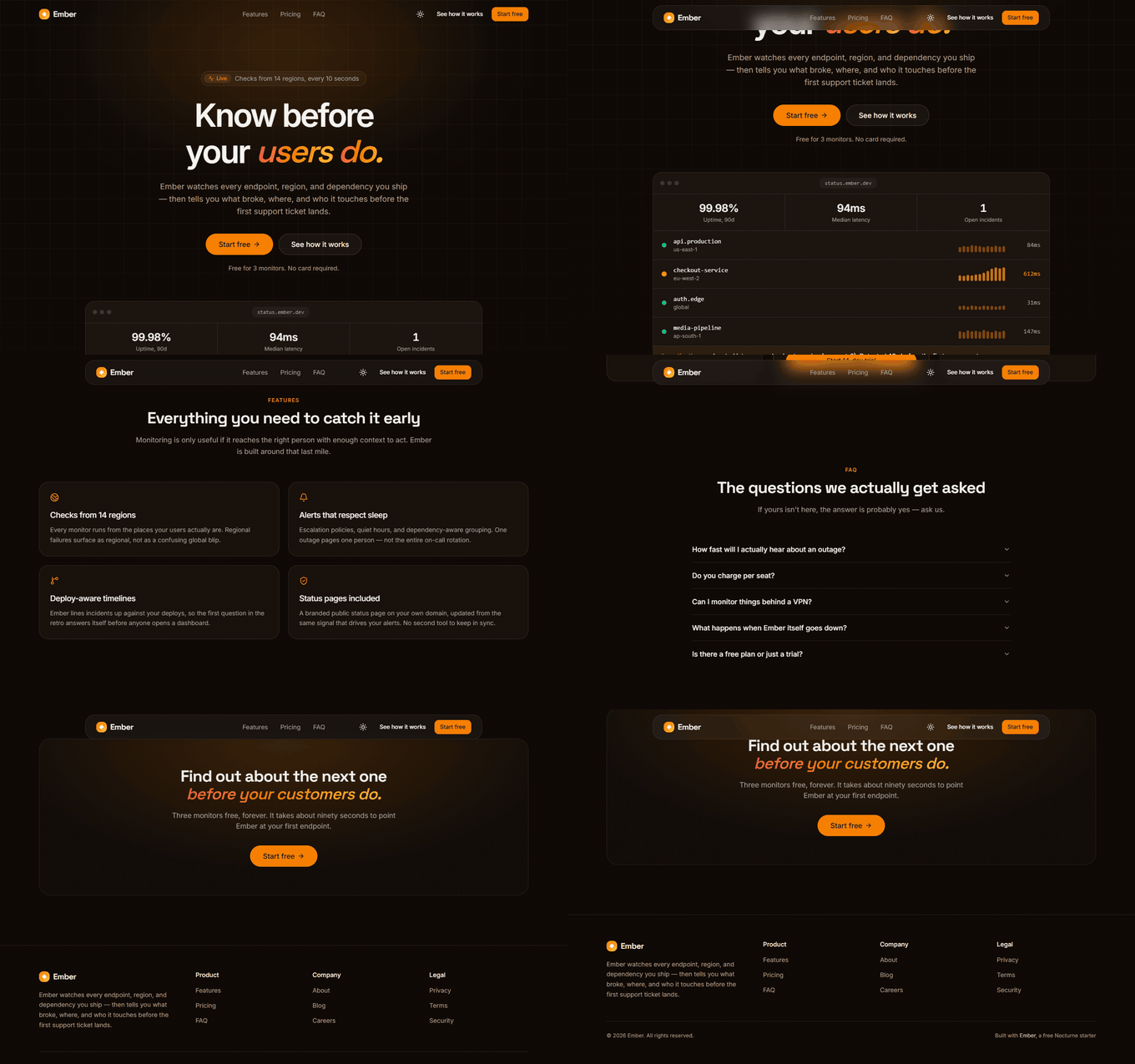 It ships the same design-system machinery and motion primitives as the paid Nocturne templates, cut down to one page so you can read the whole thing in an afternoon. MIT licensed — use it for anything, no attribution required. ```bash git clone https://github.com/Rucs0/nocturne-ember.git cd nocturne-ember && npm install && npm run dev ``` ## What's in it - **Next.js 16** (App Router) + **React 19** + **TypeScript** - **Tailwind v4** with a CSS-first token system — one file to rebrand - **Motion** primitives: scroll reveals, staggered entrances, count-up numbers, a CSS marquee, and a cursor-following spotlight card - **next-themes** dark/light with a one-click toggle, no flash on load - An animated status-board mock built entirely from CSS and data — **no image assets anywhere in this template** - Accessible accordion and button built on Radix ## Quick start ```bash npm install npm run dev ``` Open http://localhost:3000. There are **no environment variables** — it builds and runs with zero configuration. ```bash npm run build # production build npm run start # serve the production build npm run lint # eslint ``` ## Making it yours Three files, in order of impact: 1. **`lib/site.ts`** — product name, tagline, description, nav, footer links, CTAs. Everything on the page reads from here. 2. **`app/theme.css`** — the entire palette as `oklch()` values. Change the three `--brand*` hues and every gradient, glow, and accent follows. The hue cheat sheet is in the file. 3. **`app/layout.tsx`** — fonts, via `next/font`. The CSS variables feed `--font-sans` and `--font-display`, so swapping a font propagates automatically. Then edit the section content in `components/sections/`. Each section is self-contained and safe to delete — `app/page.tsx` is just a list of them. ### A note on the demo content The company on this page is fictional, and so are the customer names in the logo marquee and the numbers on the status board. Swap them for real ones or delete the sections — please don't ship invented social proof. ## Structure ``` app/ layout.tsx root layout, fonts, metadata page.tsx the page — a list of sections theme.css all design tokens (edit this to rebrand) globals.css design-system machinery and utilities components/ motion/ reveal, marquee, count-up, spotlight-card sections/ hero, logos, features, pricing, faq, cta mock/ the animated status board site/ navbar, footer, logo, theme toggle ui/ accordion, badge, button, input, switch lib/ site.ts site-wide copy and config utils.ts cn() class merger ``` ## Gotchas worth knowing - **Gradient text must use `background-image:` longhand.** Tailwind v4's minifier merges a `background:` shorthand and resets `background-clip: text`, silently turning gradient headlines into solid bars. See `.text-gradient-brand` in `globals.css`. - **All motion respects `prefers-reduced-motion`.** CSS animations are disabled at the bottom of `globals.css`; Motion components read the preference via `useReducedMotion`. ## License MIT — use it for anything, commercial or not, no attribution required. The footer credit is a courtesy, not an obligation; delete it freely. --- If this is useful, the paid templates go a lot further: [nocturneui.com](https://nocturneui.com/?utm_source=ember&utm_medium=readme&utm_campaign=free-starter)
Explore similar templates
Compare previews and descriptions within the same stack and category.

Next.js SaaS Starter
The official Next.js SaaS starter template, integrating email/password authentication, Stripe Checkout subscriptions, a dashboard with user/team CRUD, basic Owner/Member RBAC, and activity logging.
Next.js · SaaS

Next.js Commerce
Vercel's officially maintained Next.js App Router ecommerce starter with deep Shopify integration, offering a complete product catalog, cart, and checkout flow. Core logic is modular for swapping backends, and community provider versions exist for BigCommerce, Medusa, and Saleor.
Next.js · E-commerce

Next-js-Boilerplate
A developer-first Next.js 16 starter with Tailwind CSS 4 and TypeScript, supporting both App Router and Page Router.
Next.js · Starter

tailwind-nextjs-starter-blog
A Next.js and Tailwind CSS blog starter template using Contentlayer for Markdown/MDX, with built-in SEO, code highlighting, and tags. It targets personal technical blogs and migration from Jekyll/Hugo to React, and supports one-click Vercel deployment.
Next.js · Blog

next-forge
next-forge is a Turborepo-based Next.js template maintained by Vercel, positioned as a starting point for SaaS products.
Next.js · Starter

SaaS-Boilerplate
SaaS-Boilerplate is an open-source SaaS starter template built with Next.js App Router, React 19, TypeScript, Tailwind CSS, and Shadcn UI.
Next.js · SaaS