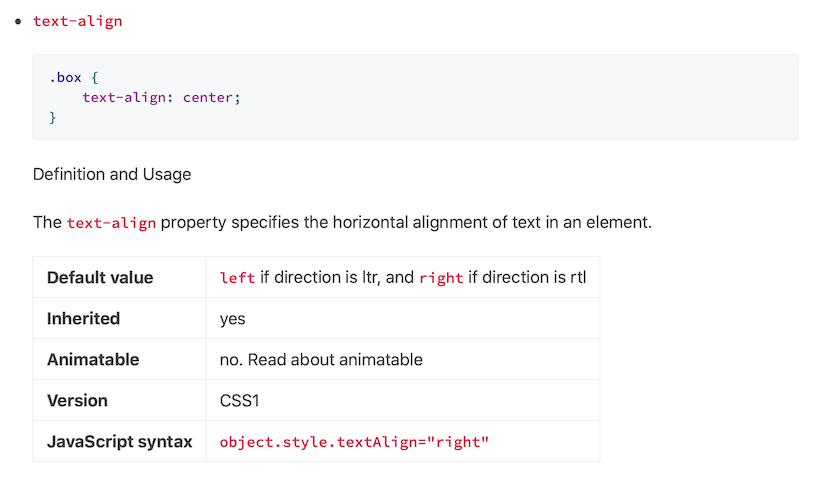
Hugo blog theme, a fork of Notepadium with updates, requiring Hugo 0.60.0 or later
HugoBlog
notelogger — Hugo Blog Template
By s0xzwasd
notelogger is a Hugo-based blog theme, a fork of the Notepadium theme, focused on page rendering that does not rely on JavaScript.
Explore the design
Compare the page layouts and mobile experience. Open any screenshot for a closer look.
Author preview
Author-provided preview
Preview provided in the project README.
One original preview is available. Open the full image to inspect the design.
Screenshots show visual appearance; interactive behavior may differ.
Recorded 2026-10-11View source
What stands out
A quick read of the recorded project description.
Page rendering does not rely on JavaScript, while still supporting custom JS via params.assets
Supports light and dark modes, syntax highlighting, mathematical formulas (KaTeX or MathJax), and Disqus comments
Provides custom CSS/SASS/SCSS, custom header right-side entries, and custom footer copyright layout
Built-in plist shortcode for API documentation, supports post covers, post sharing, and Twitter Card
Can display an author bio at the bottom of posts and supports per-page robots meta tags
Template Details
notelogger is a Hugo blog theme that the author describes in the README as "101% JavaScript-free" and notes is a fork of the Notepadium theme with updates. The theme requires Hugo 0.60.0 or later.
In terms of features, the theme provides a logo and tagline, navigation items, syntax highlighting, mathematical formulas, Disqus comments, CC license, pagination, light and dark modes, Google Analytics, custom CSS/SASS/SCSS, custom JS, custom header right-side entries, a built-in plist shortcode, post covers, post sharing, Twitter Card, a built-in icon font, and an author bio displayed at the bottom of posts. Configuration is centralized in config.toml, where params can control the style mode, date format, global toggles for comments and mathematical formulas, syntax highlighting scheme, sharing parameters, navigation display items, filing information, and more.
For usage, the quick start command given in the README actually adds cntrump/hugo-notepadium as a submodule, and the theme in the example configuration is also written as hugo-notepadium, which is inconsistent with the repository name notelogger; when integrating, adjust according to the actual theme directory name. The repository's preview image comes from the Notepadium project's README.
Regarding licensing, the repository contains the standard MIT license text, allowing free use, modification, commercial use, and distribution of this version of the code, provided the copyright and license notice are retained when distributing; third-party assets such as demo images, fonts, and icons need to be checked separately for their licenses, and external services such as domains and hosting may incur separate charges.
HugoBlog
Is it right for your project?
Use Cases
- Building a personal blog focused on article reading with Hugo
- Notes or technical articles that need mathematical formulas, code highlighting, and API documentation-style layout
- Sites that want pages to not rely on JavaScript by default
- Blogs that need light and dark modes, custom styles, and custom navigation
Suitable For
- Blog authors using Hugo 0.60.0 or later and familiar with config.toml configuration
- Site maintainers who prefer JavaScript-free rendering and content-reading-focused sites
- Technical writing scenarios that need mathematical formulas, syntax highlighting, post covers, and author bios
- Users who accept the MIT license terms and will independently verify third-party asset licenses
Getting started & customization
Use these recorded setup notes alongside the repository instructions for your chosen version.
- 1
The README's quick start command adds the cntrump/hugo-notepadium submodule, and the theme in the example configuration is also written as hugo-notepadium, which is inconsistent with the repository name notelogger; when integrating, adjust according to the actual theme directory name
- 2
The theme requires Hugo 0.60.0 or later
- 3
Comments, mathematical formulas, sharing, author bio, and similar features are disabled by default and must be explicitly enabled in config.toml or page front matter
- 4
Custom CSS/JS is placed in the site's assets directory and included via the css and js arrays in params.assets
- 5
The repository preview image comes from the Notepadium project's README; third-party asset licenses need to be checked separately
License & source material
Usage conditions & limitations
Free to use · keep license noticeThis entry covers the free version under the MIT license in the public repository; the free scope is this version of the code and does not mean external services or third-party assets are free.
Must comply with when using
- Free use, modification, commercial use, and distribution of this version of the code are permitted.
- When distributing copies or substantial portions of the code, retain the original author's copyright notice and the complete MIT license notice.
- The code is provided as is; warranties and limitations of liability are governed by the original license and applicable law.
Additional costs & items to verify
- Demo images, fonts, icons, and other third-party assets must be checked under their respective licenses and cannot be judged solely by the code's MIT license.
- External services such as domains, hosting, databases, payments, or AI may incur separate charges.
- The comment feature relies on the third-party Disqus service and requires configuring disqusShortname in config.toml to enable, which is an external service requirement.
- Google Analytics support requires configuring a googleAnalytics tracking ID, which is an external service dependency.
- Using the comment feature requires first setting the Disqus shortname in config.toml, meaning an external Disqus account must be registered and configured.
- The post sharing feature requires configuring an AddThis ID and depends on the third-party AddThis service.
- Using this theme requires Hugo version 0.60.0 or later, which is a runtime environment version limitation.
View Original Text Basis
Permission is hereby granted, free of charge
Original License Text
Comments powered by Disqus
Original README
Google analytics supporting
Original README
Setup Disqus [shortname](https://help.disqus.com/en/articles/1717111-what-s-a-shortname) in config.toml:
Original README
addThisId = "ra-1234567890"
Original README
https://github.com/s0xzwasd/notelogger/blob/master/LICENSEhttps://github.com/s0xzwasd/notelogger/blob/master/README.mdHugo version [0.60.0+](https://github.com/gohugoio/hugo/releases/) is required.
Original README
Compiled by DeepSeek based on repository license and README ·2026-10-11. Results only cover the materials read; dependencies, images, fonts, and subsequent term changes are subject to their respective original texts.
Project checks & description sources
Template Information
- Source platforms
- GitHub
- Documentation and maintenance reference score
- Partly documented · 56 / 100
- Technologies
- Hugo
- Website type
- Blog
How this score is calculated
Our heuristic uses license records (up to 30), a demo link (12), a preview (10), stars (15), recorded maintenance (15), description completeness (8), feature records (5) and classification data (5). It is not a code, security or performance test, or a Google score. A link does not establish tested functionality.
What to verify for this project
- Repository update recorded
- 2021-10-23
- Screenshot last checked
- 2026-10-11
No demo link is recorded. Use the repository instructions to evaluate the project locally; the screenshot alone cannot establish interactive behavior.
The catalog identifies Hugo as the primary stack. Check the actual dependency manifest and lockfile for versions and hosting requirements. These notes use recorded metadata, not a code audit or a deployment test.
Use a selection guide →How this description was prepared
AI-assisted description based on catalog records and repository material. Repository authors are not automatically the reviewers of this description.
Review declaration: [email protected] · 2026-10-13
Inspect the recorded source material
SHA-256: cbf06c78802724452786b45b6ba28e1305f6b1e116fc5e3ecd6c58d07944cd61
2026-10-11T18:11:31.521Z
Source file / repository# notelogger
101% JavaScript-free Hugo theme. It is a fork of [Notepadium](https://github.com/cntrump/hugo-notepadium) theme with updates. Hugo version [0.60.0+](https://github.com/gohugoio/hugo/releases/) is required.
## Key Features
- Logo and slogan
- Navigation items
- Syntax highlighting
- Math supporting
- Comments powered by Disqus
- CC License
- Pagination with a large number of pages supporting
- Light & Dark Mode
- Google analytics supporting
- Custom CSS/SASS/SCSS supporting
- Custom JS supporting
- Custom header right items supporting
- Builtin `plist` shortcode for API document
- Custom article cover supporting
- Article share supporting (thanks [@jianyuanzh](https://github.com/jianyuanzh))
- [Twitter Card](https://developer.twitter.com/en/docs/tweets/optimize-with-cards/overview/summary) supporting
- Builtin iconfont (3KB)
- Display author profile at article bottom
## Quick Start
```shell
git submodule add https://github.com/cntrump/hugo-notepadium.git themes/hugo-notepadium
```
Example `config.toml`:
```toml
baseURL = "https://example.com"
title = "Notepadium"
theme = "hugo-notepadium"
copyright = "©2019 Notepadium."
languageCode = "zh-cn"
hasCJKLanguage = true
enableRobotsTXT = true
# Enable Disqus
#disqusShortname = "XXX"
# Google Analytics
#googleAnalytics = "UA-123-45"
[markup.highlight]
codeFences = true
noClasses = false
[markup.goldmark.renderer]
unsafe = true # enable raw HTML in Markdown
[params]
style = "auto" # default: auto. light: light theme, dark: dark theme, auto: based on system.
dateFormat = "Monday, January 2, 2006" # if unset, default is "2006-01-02"
logo = "" # if you have a logo png
slogan = "100% JavaScript-free"
license = "" # CC License
fullRss = false # Puts entire HTML post into rss 'description' tag. If unset, default is false.
ipv6ready = true # Show IPV6Ready logo on footer.
[params.comments]
enable = false # En/Disable comments globally, default: false. You can always enable comments on per page.
[params.math]
enable = false # optional: true, false. Enable globally, default: false. You can always enable math on per page.
use = "katex" # option: "katex", "mathjax". default: "katex"
[params.syntax]
use = "none" # builtin: "prismjs", "hljs". "none" means Chroma
theme = "xcode"
darkTheme = "xcode-dark" # apply this theme in dark mode
[params.share]
enable = false
addThisId = ""
inlineToolId = ""
[params.nav]
showCategories = true # /categories/
showTags = true # /tags/
# custom navigation items
[[params.nav.custom]]
title = "About"
url = "/about"
[[params.nav.custom]]
title = "Hugo"
url = "https://gohugo.io/"
# for chinese
[params.beian]
icp = "" # example: 粤ICP备20056596号-1
gongan = "" # example: 粤公网安备 44030502005645号
code = "" # example: 44030502005645
```
### Logo and Slogan
```toml
[params]
logo = "/img/logo.png"
slogan = "code my life ~"
```
### Light and Dark Mode
```toml
[params]
style = "auto" # default: "auto", based on system. "light": light theme, "dark": dark theme.
logo = "/img/logo.png"
slogan = "code my life ~"
```
### Navigation items
```toml
[params.nav]
showCategories = true # /categories/
showTags = true # /tags/
# custom items
[[params.nav.custom]]
title = "iOS"
url = "/tags/ios"
[[params.nav.custom]]
title = "Hugo"
url = "https://gohugo.io/"
```
### Syntax highlighting
```toml
# enable JS highlight
[params.syntax]
use = "hljs" # 1. prismjs 2. hljs 3. none
theme = "dracula"
darkTheme = "xcode-dark" # apply this theme in dark mode
```
### Article share
```toml
[params.share]
enable = true
addThisId = "ra-1234567890"
inlineToolId = ""
```
### Math
```toml
[params.math]
enable = true # true means globally, or on a per page set "math = true"
use = "katex" # "mathjax" or "katex"
```
Example
```
When $a \ne 0$, there are two solutions to \(ax^2 + bx + c = 0\) and they are
$$x = {-b \pm \sqrt{b^2-4ac} \over 2a}.$$
```
### Comments
Setup Disqus [shortname](https://help.disqus.com/en/articles/1717111-what-s-a-shortname) in config.toml:
```toml
# disqus
disqusShortname = "XXX" # your short name
[params.comments]
enable = false # En/Disable comments globally, default: false. You can always enable comments on per page.
```
You can enable comments on per page:
```md
+++
title = "..."
date = 2019-12-08
...
comments = true
+++
...
```
### Pagination
Support large number of pages

### Custom footer copyright layout
Thanks [@Benjamin-Lee](https://github.com/Benjamin-Lee)'s good idea!
Create an user-side partial: `copyright.html`
```
.
└── layouts
└── partials
└── copyright.html
```
You can relayout copyright like this:
```html
{{- $copyright := . -}}
<div style="display:flex; flex-direction:row; flex-wrap:wrap; justify-content:space-between;">
<p style="flex-shrink: 0;">{{- $copyright -}}</p>
<p><span>Powered by </span><a
href="https://gohugo.io" target="_blank">Hugo</a><span> and the </span><a
href="https://themes.gohugo.io/hugo-notepadium/" target="_blank">Notepadium</a></p>
</div>
```
### Custom CSS
```toml
[params.assets]
css = ["css/font.css", "css/color.css", "css/layout.scss"] # *.css/scss/sass
```
On user-side:
```
.
└── assets
└── css
├── color.css
└── font.css
```
`color.css` and `font.css` will be bundled into `core.css`.
_Note:_ You can use Hugo templating in these CSS assets.
### Custom JS
```toml
[params.assets]
js = ["js/font.js", "js/color.js"]
```
On user-side:
```
.
└── assets
└── js
├── color.js
└── font.js
```
`color.js` and `font.js` will be bundled into `core.js`.
### Custom header right items
Create an user-side partial: `navigation-items.html`
```
.
└── layouts
└── partials
└── navigation-items.html
```
An example navigation-items.html:
```html
{{- $nav := . -}}
{{- if or $nav.showCategories $nav.showTags $nav.custom -}}
<div class="nav wrap"><nav class="nav">
{{- if $nav.showCategories -}}
<a class="nav item" href="{{- `/categories/` | relLangURL -}}">Categories</a>
{{- end -}}
{{- if $nav.showTags -}}
<a class="nav item" href="{{- `/tags/` | relLangURL -}}">Tags</a>
{{- end -}}
{{- range $nav.custom -}}
{{- $url := .url | safeURL -}}
{{- if strings.HasPrefix $url "/" -}}{{- $url = $url | relLangURL -}}{{- end -}}
<a class="nav item" href="{{- $url -}}"
{{- if strings.HasPrefix $url "http" -}}target="_blank"
{{- end -}}>{{- .title -}}</a>
{{- end -}}
</nav></div>
{{- end -}}
```
Or, you can rewrite it:
```html
<a class="nav item" href="{{- `/pages/about/` | relURL -}}"><span class="iconfont icon-aboutus"></span> About</a>
<a class="nav item" href="https://github.com/cntrump" target="_blank"><span class="iconfont icon-logo_github"></span> Github</a>
```
`iconfont`, `icon-*` classes are my custom CSS.

### `plist` shortcode
Syntax:
```md
{{< plist
"key1: value1"
"key2: value2"
"key3: value3"
...
"keyN: valueN"
>}}
```
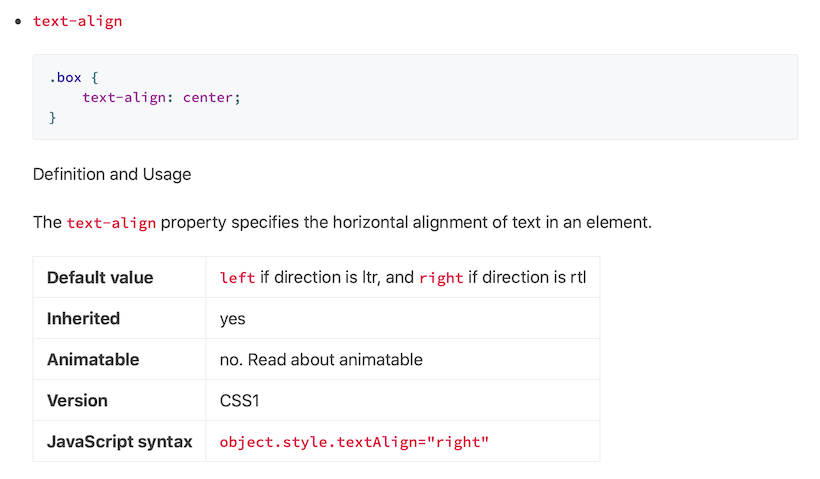
Example:
```md
- `text-align`
```css
.box {
text-align: center;
}
```
Definition and Usage
The `text-align` property specifies the horizontal alignment of text in an element.
{{< plist
"Default value: `left` if direction is ltr, and `right` if direction is rtl"
"Inherited: yes"
"Animatable: no. Read about animatable"
"Version: CSS1"
"JavaScript syntax: `object.style.textAlign=\"right\"`"
>}}
```
### Custom article cover
Set `01.png` as cover, example:
```toml
+++
title = "..."
cover = "01.png"
+++
```
### Display author profile at article bottom
Global settings, Edit `config.toml`
```toml
[params.profile]
enable = true
avatar = "/img/avatar.jpg"
name = "XXX"
bio = "XXX" # support markdown syntax
twitter = "XXX" # https://twitter.com/XXX
github = "XXX" # https://github.com/XXX
docker = "XXX" # https://hub.docker.com/u/XXX
email = "[email protected]" # mailto:[email protected]
```
Or page-by-page, on front matter:
```toml
+++
title = "..."
date = 2020-05-01T22:20:36+08:00
[profile]
enable = true
avatar = "/img/avatar.jpg"
name = "XXX"
bio = "XXX" # support markdown syntax
twitter = "XXX" # https://twitter.com/XXX
github = "XXX" # https://github.com/XXX
docker = "XXX" # https://hub.docker.com/u/XXX
email = "[email protected]" # mailto:[email protected]
+++
```
### Set robots meta tag
In the front matter of any page, you can selectively enable the `robots` meta tag
and define its content:
```toml
robots = "noindex,nofollow"
```
If `noindex` is included, that page will also be hidden in `sitemap.xml`.
Explore similar templates
Compare previews and descriptions within the same stack and category.

hugo-PaperMod
A fast, clean, responsive Hugo theme for blogs and lightweight portfolios, with three layout modes (Regular, Home-Info, Profile), automatic and manual light/dark themes, Fuse.js client-side search, multilingual support, and built-in Open Graph, Twitter Cards, and Schema.org data.
Hugo · Portfolio

LoveIt
LoveIt is a clean, elegant, and feature-rich Hugo blog theme derived from LeaveIt and KeepIt, MIT-licensed. It offers light/dark modes, responsive layout, multilingual support, and search via Lunr.js or Algolia.
Hugo · Blog

hugo-coder
hugo-coder is a minimalist Hugo blog theme maintained by luizdepra under the MIT license. It provides a clean, text-focused blog appearance, configuration documentation in the docs directory, and a complete exampleSite with hugo.toml.
Hugo · Blog

blowfish
Blowfish is a Hugo personal website and blog theme built with Tailwind CSS 4, focused on lightness, simplicity, and content-first presentation.
Hugo · Blog

hugo-paper
hugo-paper is a simple, clean, and customizable Hugo blog theme configured through config.toml or hugo.toml.
Hugo · Blog

hextra
Hextra is a Hugo theme for documentation and blog sites, built on Hugo and Tailwind CSS with design referencing Nextra.
Hugo · Documentation