Hugo 博客主题,为 Notepadium 的分支并做了更新,要求 Hugo 0.60.0 及以上版本
Hugo博客
notelogger — Hugo 博客模板
作者 s0xzwasd
notelogger 是一个基于 Hugo 的博客主题,是 Notepadium 主题的分支,主打不依赖 JavaScript 的页面呈现。
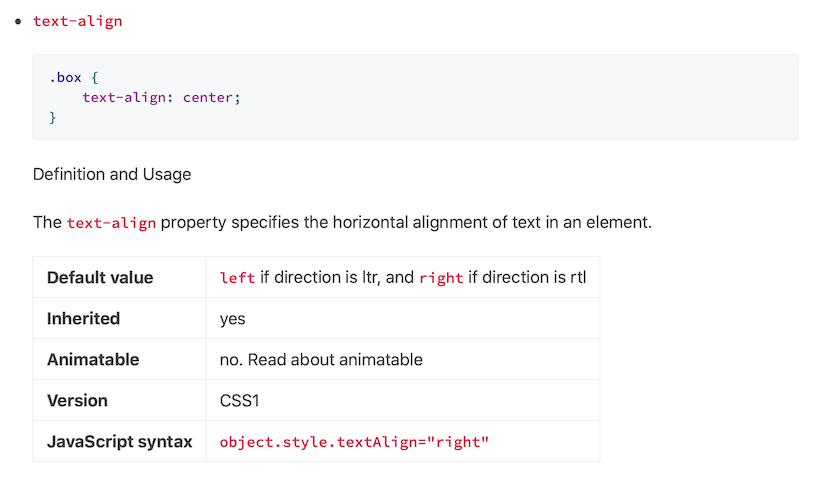
看看你的网站会是什么样
浏览真实页面截图,比较内容排版与手机效果。点击下方缩略图切换,放大查看整页细节。
目前有 1 张原始预览,可打开完整图片查看设计细节。
截图用于了解视觉与布局,交互效果请以实际项目为准。
采集于 2026-10-11查看来源
值得关注的模板亮点
从已有项目资料中,快速了解它的特点。
页面呈现不依赖 JavaScript,同时支持通过 params.assets 引入自定义 JS
支持明暗模式、语法高亮、数学公式(KaTeX 或 MathJax)与 Disqus 评论
提供自定义 CSS/SASS/SCSS、自定义头部右侧条目和自定义页脚版权布局
内置 plist 短代码用于 API 文档,支持文章封面、文章分享与 Twitter Card
可在文章底部展示作者简介,并支持按页面设置 robots meta 标签
模板详细介绍
notelogger 是一个 Hugo 博客主题,作者在 README 中将其描述为「101% JavaScript-free」,并说明它是 Notepadium 主题的分支并做了更新。主题要求 Hugo 0.60.0 及以上版本。
功能方面,主题提供 Logo 与标语、导航项、语法高亮、数学公式、Disqus 评论、CC 许可、分页、明暗模式、Google Analytics、自定义 CSS/SASS/SCSS、自定义 JS、自定义头部右侧条目、内置 plist 短代码、文章封面、文章分享、Twitter Card、内置图标字体以及在文章底部展示作者简介等能力。配置集中在 config.toml,可通过 params 控制样式模式、日期格式、评论与数学公式的全局开关、语法高亮方案、分享参数、导航显示项、备案信息等。
使用上,README 给出的快速开始命令实际是添加 cntrump/hugo-notepadium 作为子模块,示例配置中的 theme 也写为 hugo-notepadium,与仓库名 notelogger 不一致,接入时需按实际主题目录名调整。仓库的预览图来自 Notepadium 项目的 README。
许可方面,仓库包含标准 MIT 许可文本,允许免费使用、修改、商用和分发该版本代码,分发时需保留版权与许可声明;演示图片、字体、图标等第三方素材需单独核对许可,域名、托管等外部服务可能另行收费。
Hugo博客
适合你的项目吗?
适用场景
- 用 Hugo 搭建以文章阅读为主的个人博客
- 需要数学公式、代码高亮与 API 文档式排版的笔记或技术文章
- 希望页面在默认情况下不依赖 JavaScript 的站点
- 需要明暗模式、自定义样式与自定义导航的博客
适合人群
- 使用 Hugo 0.60.0 及以上版本、熟悉 config.toml 配置的博客作者
- 偏好无 JavaScript 渲染、以内容阅读为主的站点维护者
- 需要数学公式、语法高亮、文章封面与作者简介等技术写作场景
- 接受 MIT 许可条款并会自行核对第三方素材许可的使用者
上手与定制指南
结合仓库当前版本的说明,按下面的资料检查内容、配置与运行要求。
- 1
README 的快速开始命令添加的是 cntrump/hugo-notepadium 子模块,示例配置中 theme 也写为 hugo-notepadium,与仓库名 notelogger 不一致,接入时需按实际主题目录名调整
- 2
主题要求 Hugo 0.60.0 及以上版本
- 3
评论、数学公式、分享、作者简介等默认关闭,需在 config.toml 或页面 front matter 中显式开启
- 4
自定义 CSS/JS 放在站点 assets 目录下,通过 params.assets 的 css、js 数组引入
- 5
仓库预览图来自 Notepadium 项目的 README,第三方素材许可需单独核对
授权与来源资料
使用条件与限制
免费使用 · 保留许可声明本次收录的是公开仓库中采用 MIT 许可的免费版本;免费范围为该版本代码,不代表外部服务或第三方素材免费。
使用时需要遵守
- 允许免费使用、修改、商用和分发该版本代码。
- 分发代码副本或实质性部分时,保留原作者版权声明和完整 MIT 许可声明。
- 代码按现状提供;担保与责任限制以原许可证及适用法律为准。
额外费用与待核对事项
- 演示图片、字体、图标及其他第三方素材需按各自许可核对,不能仅凭代码的 MIT 许可判断。
- 域名、托管、数据库、支付或 AI 等外部服务可能另外收费。
- 评论功能依赖第三方 Disqus 服务,需在 config.toml 中配置 disqusShortname 才能启用,属于外部服务要求。
- Google Analytics 支持需要配置 googleAnalytics 跟踪 ID,属于外部服务依赖。
- 使用评论功能需先在 config.toml 中设置 Disqus shortname,即需要注册并配置外部 Disqus 账户。
- 文章分享功能需配置 AddThis 的 ID,依赖第三方 AddThis 服务。
- 使用该主题要求 Hugo 版本不低于 0.60.0,属于运行环境版本限制。
查看原文依据
Permission is hereby granted, free of charge
许可证原文
Comments powered by Disqus
README 原文
Google analytics supporting
README 原文
Setup Disqus [shortname](https://help.disqus.com/en/articles/1717111-what-s-a-shortname) in config.toml:
README 原文
addThisId = "ra-1234567890"
README 原文
https://github.com/s0xzwasd/notelogger/blob/master/LICENSEhttps://github.com/s0xzwasd/notelogger/blob/master/README.mdHugo version [0.60.0+](https://github.com/gohugoio/hugo/releases/) is required.
README 原文
DeepSeek 根据仓库许可证和 README 整理 ·2026-10-11。结果仅覆盖已读取资料,依赖、图片、字体及后续条款变更以各自原文为准。
项目核对记录与介绍依据
模板资料
- 来源平台
- GitHub
- 资料与维护参考分
- 资料一般 · 56 / 100
- 技术栈
- Hugo
- 网站类型
- 博客
这个分数如何计算
本站按许可资料(最高30分)、演示链接(12分)、预览图(10分)、Star数(15分)、记录的维护时间(15分)、描述完整度(8分)、功能记录(5分)和分类资料(5分)计算。它不是代码、安全或性能测试,也不是 Google 评分;有链接不代表已实测可用。
这个项目需要核对什么
- 记录的仓库更新时间
- 2021-10-23
- 截图检查日期
- 2026-10-11
目前没有记录演示链接。请依据仓库说明在本地评估;仅凭截图无法确认交互行为。
目录记录的主要技术栈是 Hugo。请通过依赖清单和锁文件核对实际版本与托管要求。这些说明基于收录资料,不代表代码审计或部署实测。
查看具体选型方法 →介绍的制作与核对状态
介绍由 AI 辅助整理目录与仓库资料。仓库作者不等于这篇介绍的审核者。
审核声明: [email protected] · 2026-10-13
查看当时使用的来源资料
SHA-256: cbf06c78802724452786b45b6ba28e1305f6b1e116fc5e3ecd6c58d07944cd61
2026-10-11T18:11:31.521Z
来源文件 / 仓库# notelogger
101% JavaScript-free Hugo theme. It is a fork of [Notepadium](https://github.com/cntrump/hugo-notepadium) theme with updates. Hugo version [0.60.0+](https://github.com/gohugoio/hugo/releases/) is required.
## Key Features
- Logo and slogan
- Navigation items
- Syntax highlighting
- Math supporting
- Comments powered by Disqus
- CC License
- Pagination with a large number of pages supporting
- Light & Dark Mode
- Google analytics supporting
- Custom CSS/SASS/SCSS supporting
- Custom JS supporting
- Custom header right items supporting
- Builtin `plist` shortcode for API document
- Custom article cover supporting
- Article share supporting (thanks [@jianyuanzh](https://github.com/jianyuanzh))
- [Twitter Card](https://developer.twitter.com/en/docs/tweets/optimize-with-cards/overview/summary) supporting
- Builtin iconfont (3KB)
- Display author profile at article bottom
## Quick Start
```shell
git submodule add https://github.com/cntrump/hugo-notepadium.git themes/hugo-notepadium
```
Example `config.toml`:
```toml
baseURL = "https://example.com"
title = "Notepadium"
theme = "hugo-notepadium"
copyright = "©2019 Notepadium."
languageCode = "zh-cn"
hasCJKLanguage = true
enableRobotsTXT = true
# Enable Disqus
#disqusShortname = "XXX"
# Google Analytics
#googleAnalytics = "UA-123-45"
[markup.highlight]
codeFences = true
noClasses = false
[markup.goldmark.renderer]
unsafe = true # enable raw HTML in Markdown
[params]
style = "auto" # default: auto. light: light theme, dark: dark theme, auto: based on system.
dateFormat = "Monday, January 2, 2006" # if unset, default is "2006-01-02"
logo = "" # if you have a logo png
slogan = "100% JavaScript-free"
license = "" # CC License
fullRss = false # Puts entire HTML post into rss 'description' tag. If unset, default is false.
ipv6ready = true # Show IPV6Ready logo on footer.
[params.comments]
enable = false # En/Disable comments globally, default: false. You can always enable comments on per page.
[params.math]
enable = false # optional: true, false. Enable globally, default: false. You can always enable math on per page.
use = "katex" # option: "katex", "mathjax". default: "katex"
[params.syntax]
use = "none" # builtin: "prismjs", "hljs". "none" means Chroma
theme = "xcode"
darkTheme = "xcode-dark" # apply this theme in dark mode
[params.share]
enable = false
addThisId = ""
inlineToolId = ""
[params.nav]
showCategories = true # /categories/
showTags = true # /tags/
# custom navigation items
[[params.nav.custom]]
title = "About"
url = "/about"
[[params.nav.custom]]
title = "Hugo"
url = "https://gohugo.io/"
# for chinese
[params.beian]
icp = "" # example: 粤ICP备20056596号-1
gongan = "" # example: 粤公网安备 44030502005645号
code = "" # example: 44030502005645
```
### Logo and Slogan
```toml
[params]
logo = "/img/logo.png"
slogan = "code my life ~"
```
### Light and Dark Mode
```toml
[params]
style = "auto" # default: "auto", based on system. "light": light theme, "dark": dark theme.
logo = "/img/logo.png"
slogan = "code my life ~"
```
### Navigation items
```toml
[params.nav]
showCategories = true # /categories/
showTags = true # /tags/
# custom items
[[params.nav.custom]]
title = "iOS"
url = "/tags/ios"
[[params.nav.custom]]
title = "Hugo"
url = "https://gohugo.io/"
```
### Syntax highlighting
```toml
# enable JS highlight
[params.syntax]
use = "hljs" # 1. prismjs 2. hljs 3. none
theme = "dracula"
darkTheme = "xcode-dark" # apply this theme in dark mode
```
### Article share
```toml
[params.share]
enable = true
addThisId = "ra-1234567890"
inlineToolId = ""
```
### Math
```toml
[params.math]
enable = true # true means globally, or on a per page set "math = true"
use = "katex" # "mathjax" or "katex"
```
Example
```
When $a \ne 0$, there are two solutions to \(ax^2 + bx + c = 0\) and they are
$$x = {-b \pm \sqrt{b^2-4ac} \over 2a}.$$
```
### Comments
Setup Disqus [shortname](https://help.disqus.com/en/articles/1717111-what-s-a-shortname) in config.toml:
```toml
# disqus
disqusShortname = "XXX" # your short name
[params.comments]
enable = false # En/Disable comments globally, default: false. You can always enable comments on per page.
```
You can enable comments on per page:
```md
+++
title = "..."
date = 2019-12-08
...
comments = true
+++
...
```
### Pagination
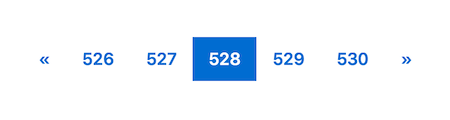
Support large number of pages
### Custom footer copyright layout
Thanks [@Benjamin-Lee](https://github.com/Benjamin-Lee)'s good idea!
Create an user-side partial: `copyright.html`
```
.
└── layouts
└── partials
└── copyright.html
```
You can relayout copyright like this:
```html
{{- $copyright := . -}}
<div style="display:flex; flex-direction:row; flex-wrap:wrap; justify-content:space-between;">
<p style="flex-shrink: 0;">{{- $copyright -}}</p>
<p><span>Powered by </span><a
href="https://gohugo.io" target="_blank">Hugo</a><span> and the </span><a
href="https://themes.gohugo.io/hugo-notepadium/" target="_blank">Notepadium</a></p>
</div>
```
### Custom CSS
```toml
[params.assets]
css = ["css/font.css", "css/color.css", "css/layout.scss"] # *.css/scss/sass
```
On user-side:
```
.
└── assets
└── css
├── color.css
└── font.css
```
`color.css` and `font.css` will be bundled into `core.css`.
_Note:_ You can use Hugo templating in these CSS assets.
### Custom JS
```toml
[params.assets]
js = ["js/font.js", "js/color.js"]
```
On user-side:
```
.
└── assets
└── js
├── color.js
└── font.js
```
`color.js` and `font.js` will be bundled into `core.js`.
### Custom header right items
Create an user-side partial: `navigation-items.html`
```
.
└── layouts
└── partials
└── navigation-items.html
```
An example navigation-items.html:
```html
{{- $nav := . -}}
{{- if or $nav.showCategories $nav.showTags $nav.custom -}}
<div class="nav wrap"><nav class="nav">
{{- if $nav.showCategories -}}
<a class="nav item" href="{{- `/categories/` | relLangURL -}}">Categories</a>
{{- end -}}
{{- if $nav.showTags -}}
<a class="nav item" href="{{- `/tags/` | relLangURL -}}">Tags</a>
{{- end -}}
{{- range $nav.custom -}}
{{- $url := .url | safeURL -}}
{{- if strings.HasPrefix $url "/" -}}{{- $url = $url | relLangURL -}}{{- end -}}
<a class="nav item" href="{{- $url -}}"
{{- if strings.HasPrefix $url "http" -}}target="_blank"
{{- end -}}>{{- .title -}}</a>
{{- end -}}
</nav></div>
{{- end -}}
```
Or, you can rewrite it:
```html
<a class="nav item" href="{{- `/pages/about/` | relURL -}}"><span class="iconfont icon-aboutus"></span> About</a>
<a class="nav item" href="https://github.com/cntrump" target="_blank"><span class="iconfont icon-logo_github"></span> Github</a>
```
`iconfont`, `icon-*` classes are my custom CSS.

### `plist` shortcode
Syntax:
```md
{{< plist
"key1: value1"
"key2: value2"
"key3: value3"
...
"keyN: valueN"
>}}
```
Example:
```md
- `text-align`
```css
.box {
text-align: center;
}
```
Definition and Usage
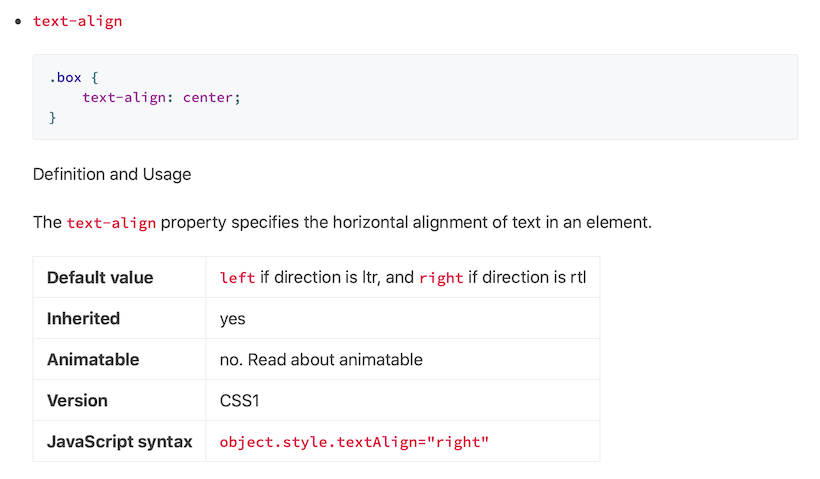
The `text-align` property specifies the horizontal alignment of text in an element.
{{< plist
"Default value: `left` if direction is ltr, and `right` if direction is rtl"
"Inherited: yes"
"Animatable: no. Read about animatable"
"Version: CSS1"
"JavaScript syntax: `object.style.textAlign=\"right\"`"
>}}
```
### Custom article cover
Set `01.png` as cover, example:
```toml
+++
title = "..."
cover = "01.png"
+++
```
### Display author profile at article bottom
Global settings, Edit `config.toml`
```toml
[params.profile]
enable = true
avatar = "/img/avatar.jpg"
name = "XXX"
bio = "XXX" # support markdown syntax
twitter = "XXX" # https://twitter.com/XXX
github = "XXX" # https://github.com/XXX
docker = "XXX" # https://hub.docker.com/u/XXX
email = "[email protected]" # mailto:[email protected]
```
Or page-by-page, on front matter:
```toml
+++
title = "..."
date = 2020-05-01T22:20:36+08:00
[profile]
enable = true
avatar = "/img/avatar.jpg"
name = "XXX"
bio = "XXX" # support markdown syntax
twitter = "XXX" # https://twitter.com/XXX
github = "XXX" # https://github.com/XXX
docker = "XXX" # https://hub.docker.com/u/XXX
email = "[email protected]" # mailto:[email protected]
+++
```
### Set robots meta tag
In the front matter of any page, you can selectively enable the `robots` meta tag
and define its content:
```toml
robots = "noindex,nofollow"
```
If `noindex` is included, that page will also be hidden in `sitemap.xml`.
看看同类模板
对比同技术栈与用途的模板,找到更适合的视觉与内容结构。

hugo-PaperMod
PaperMod 是 Hugo 生态里知名度较高的主题之一,定位很明确:给博客和轻量作品集站点提供一套干净、响应式的阅读界面。
Hugo · 作品集

LoveIt
❤️A clean, elegant but advanced blog theme for Hugo 一个简洁、优雅且高效的 Hugo 主题
Hugo · 博客

hugo-coder
A minimalist blog theme for hugo.
Hugo · 博客

blowfish
Personal Website & Blog Theme for Hugo
Hugo · 博客

hugo-paper
🪺 A simple, clean, customizable Hugo theme
Hugo · 博客

hextra
Hextra 是一个 Hugo 主题,定位在文档站与博客之间:既提供侧边栏导航、目录、面包屑、分页这类文档站结构,也能承载博客内容。
Hugo · 文档