Responsive design that adapts to different screen sizes
HugoPortfolio
hugo-developer-portfolio — Hugo Portfolio Template
By samrobbins85
A Hugo-based developer portfolio theme with a homepage skills showcase, blog and portfolio sections, configured through YAML files in the data directory.
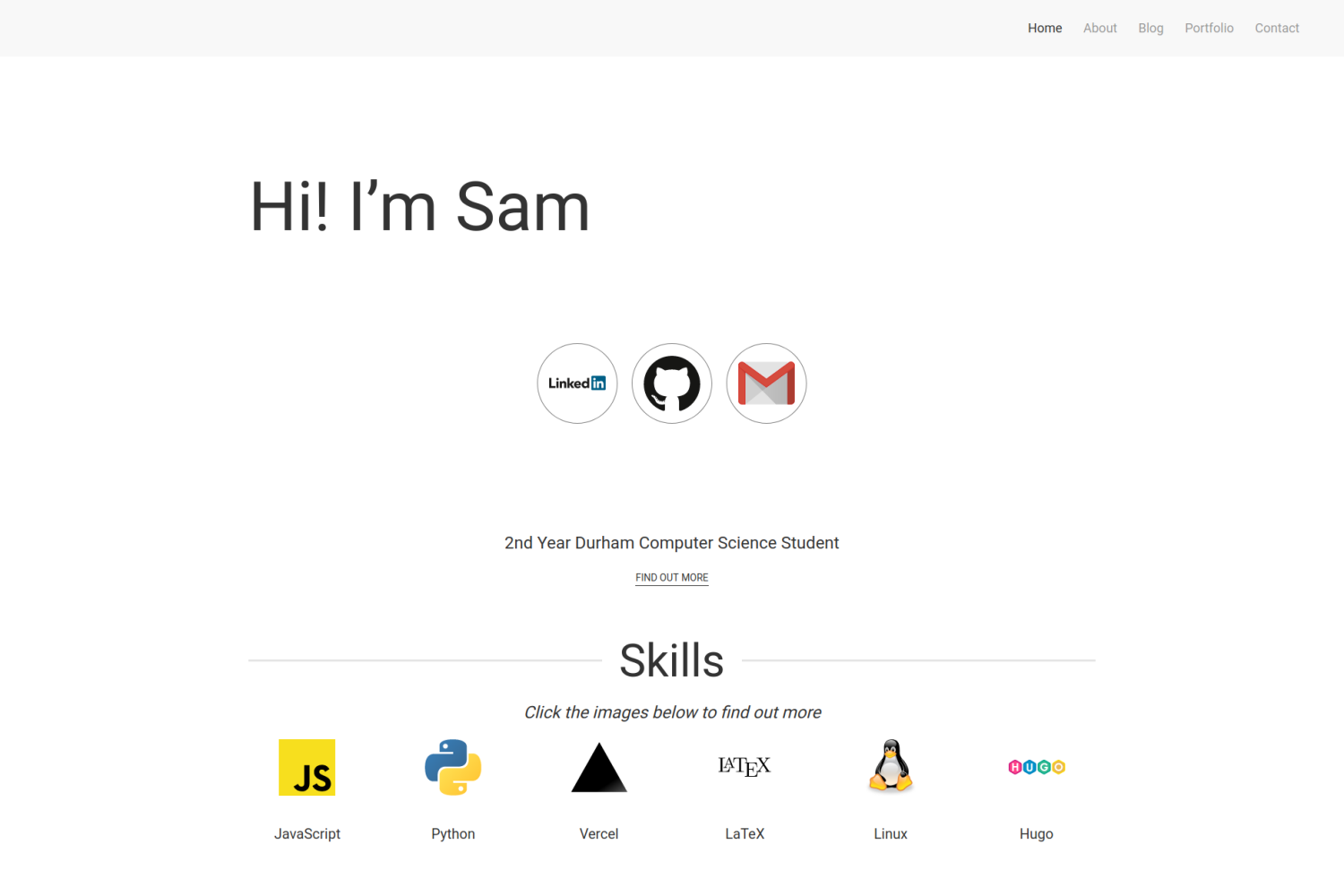
Explore the design
Compare the page layouts and mobile experience. Open any screenshot for a closer look.
Author preview
Author-provided previewTop of page
Preview provided in the project README.
One original preview is available. Open the full image to inspect the design.
Screenshots show visual appearance; interactive behavior may differ.
Recorded 2026-10-01View source
What stands out
A quick read of the recorded project description.
Homepage centrally displays modules such as skills, experience, education, awards, certifications and publications
Includes two content sections: blog and portfolio
Portfolio supports category filtering and can label the technology stack icons used
Homepage and about page content is configured through YAML files in the data directory
Uses Hugo Modules to manage theme dependencies
Template Details
This is a Hugo theme designed for developer portfolios, and the repository is MIT licensed. The theme provides a responsive layout and includes homepage, blog, portfolio and contact pages; the homepage can display skills, experience, education, awards, publications and other information.
Content is mainly configured through YAML files such as homepage.yml, about.yml and portfolio.yml in the data directory, while basic site information, navigation menus, plugins and the contact form are set in config.toml. Blog and portfolio pages share the same set of front matter fields; portfolio pages additionally support categories, collaborators, GitHub links and technology stack icons.
The theme relies on Hugo Modules, so when using exampleSite to create a new site you need to install Go and adjust the module configuration in config.toml. The contact form uses Formspree, and you need to provide your own form endpoint. The README states that the theme is highly configurable and may not be easy to apply directly to an existing site.
HugoPortfolio
Is it right for your project?
Use Cases
- Build a personal portfolio website for a developer to showcase projects, skills and work experience
- Include a blog section alongside the portfolio to publish technical articles
- Quickly adjust the enabled state and content of homepage display modules through YAML configuration
- Browse portfolio projects with category filtering and display the technologies used by each project
Suitable For
- Developers building static sites with Hugo
- Personal portfolio scenarios that need to showcase projects, skills, experience and a blog
- Users willing to configure the site by editing YAML and TOML files
- Users who can prepare images, icons and other assets themselves and configure an external form service
Getting started & customization
Use these recorded setup notes alongside the repository instructions for your chosen version.
- 1
Create a themes folder in the site directory and place the theme there via git clone or git submodule
- 2
Set theme = "hugo-developer-portfolio" in config.toml
- 3
When using exampleSite to create a new site, install Go and remove the lines in config.toml marked for deletion in normal use, and uncomment the [module] related lines
- 4
For the contact form, enter your own Formspree endpoint in params.contact.formAction in config.toml
- 5
The CSS and JS plugins the theme depends on are configured through params.plugins in config.toml and can be added or removed as needed
License & source material
Usage conditions & limitations
Free to use · keep license noticeThis entry covers the free version in the public repository under the MIT license; the free scope is the code of this version and does not mean external services or third-party assets are free.
Must comply with when using
- You are allowed to use, modify, commercialize and distribute the code of this version for free.
- When distributing copies or substantial portions of the code, retain the original author's copyright notice and the full MIT license notice.
- The code is provided as is; warranties and limitations of liability are governed by the original license and applicable law.
Additional costs & items to verify
- Creating a new site with exampleSite depends on Hugo Modules and requires a local Go environment; otherwise the site cannot be initialized that way.
- The contact form depends on the third-party service Formspree; you must register and enter a form endpoint yourself, otherwise emails cannot be received.
- The theme's CSS and JS plugins are loaded via external CDNs (UIkit on jsdelivr), so the site depends on these external resources being accessible.
- The footer map uses a Google Maps embed and requires a Google Maps API key, which is an external service dependency.
- The theme is highly configurable, and the README explicitly states that it is unlikely to be applied directly to an existing site; migrating or integrating it into an existing site requires considerable adjustment.
- The README mentions the Formspree form service; actual submissions require configuring a service endpoint, and its usage quotas and fees must be checked separately.
- Demo images, fonts, icons and other third-party assets must be checked against their respective licenses and cannot be judged solely by the code's MIT license.
- External services such as domains, hosting, databases, payments or AI may incur additional charges.
View Original Text Basis
Permission is hereby granted, free of charge
Original License Text
You need to have golang installed as it uses [hugo modules](https://gohugo.io/hugo-modules/use-modules/).
Original README
formAction = "https://formspree.io/<Insert code>" # Add your formspree URL here to get emails
Original README
URL = "https://cdn.jsdelivr.net/npm/[email protected]/dist/css/uikit.min.css"
Original README
googlemaps = "https://www.google.com/maps/embed/v1/place?q=place_id:ChIJwbHYJaUqfEgRK0Ui9dVGimc&key=AIzaSyAE_4rVAKux_DSPcb_OdSRDaovtPOSk_3U"
Original README
https://github.com/samrobbins85/hugo-developer-portfolio/blob/master/LICENSEhttps://github.com/samrobbins85/hugo-developer-portfolio/blob/master/README.mdThis is a highly configurable site, and as such, it will be unlikely that it will work with your existing site.
Original README
Compiled by DeepSeek based on repository license and README ·2026-10-01. Results only cover the materials read; dependencies, images, fonts, and subsequent term changes are subject to their respective original texts.
Project checks & description sources
Template Information
- Source platforms
- GitHub
- Documentation and maintenance reference score
- More documented · 75 / 100
- Technologies
- Hugo
- Website type
- Portfolio
How this score is calculated
Our heuristic uses license records (up to 30), a demo link (12), a preview (10), stars (15), recorded maintenance (15), description completeness (8), feature records (5) and classification data (5). It is not a code, security or performance test, or a Google score. A link does not establish tested functionality.
What to verify for this project
- Repository update recorded
- 2025-10-15
- Screenshot last checked
- 2026-10-01
No demo link is recorded. Use the repository instructions to evaluate the project locally; the screenshot alone cannot establish interactive behavior.
The catalog identifies Hugo as the primary stack. Check the actual dependency manifest and lockfile for versions and hosting requirements. These notes use recorded metadata, not a code audit or a deployment test.
Use a selection guide →How this description was prepared
AI-assisted description based on catalog records and repository material. Repository authors are not automatically the reviewers of this description.
Automatically checked against source and license rules; no manual editorial review.
Inspect the recorded source material
SHA-256: 3ee263febedbc32e42386c1dcc2cd0cf8404da9f729172fcc2164a9259788228
2026-10-01T00:51:02.288Z
Source file / repository # Developer Portfolio 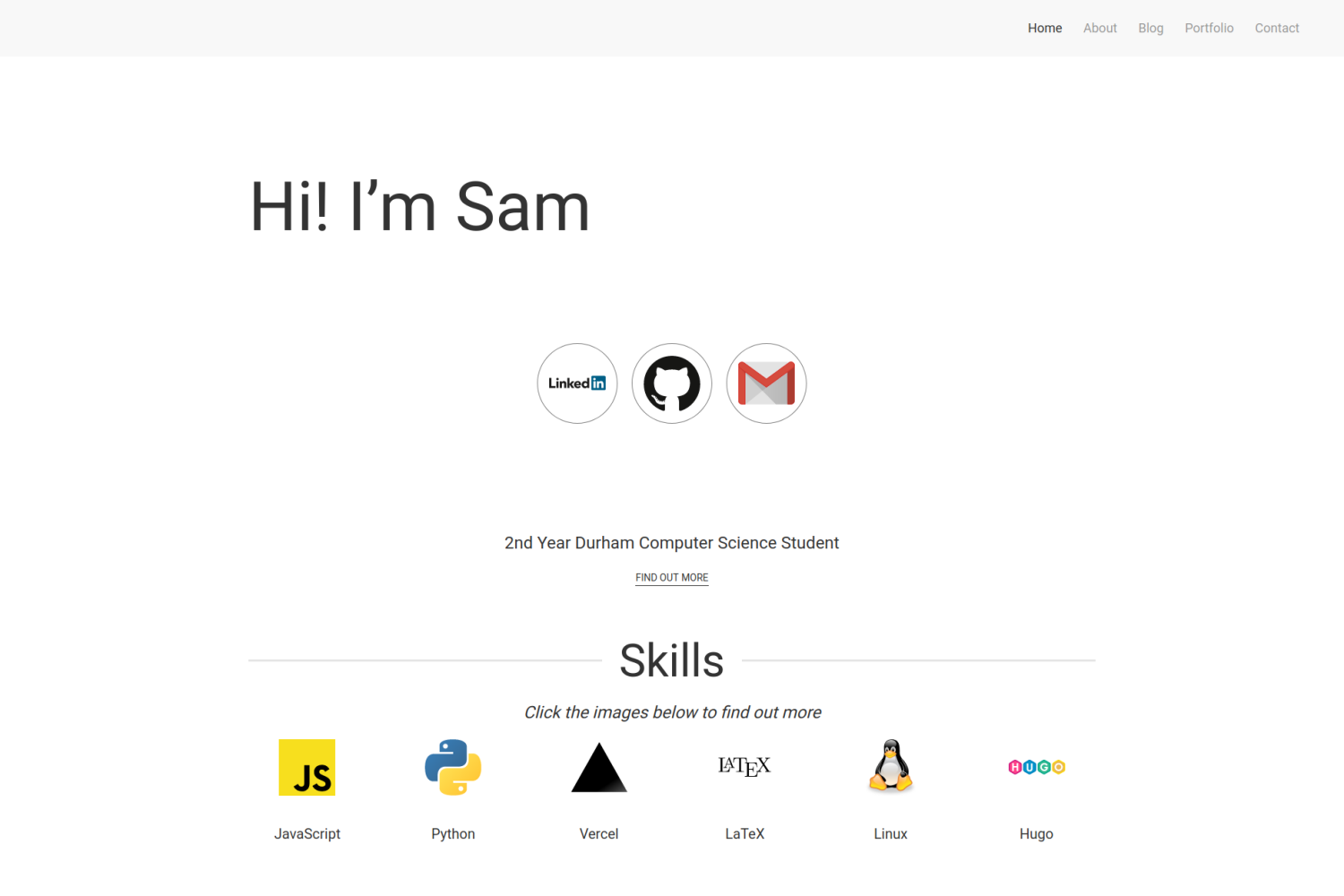 ## Features - Responsive Design - Blog Section - Portfolio Section - Homepage to show off skills ## Installation ### Integrating into your site To install this theme, first create a themes folder in your site with ```bash mkdir themes ``` Then move into this directory with ```bash cd themes ``` The repository can then be added either by cloning or adding as a submodule ```bash # Cloning git clone https://github.com/samrobbins85/hugo-developer-portfolio hugo-developer-portfolio # Submodule git submodule add https://github.com/samrobbins85/hugo-developer-portfolio hugo-developer-portfolio ``` In the `config.toml` file in your site directory add ```toml theme="hugo-developer-portfolio" ``` ### Creating a new site The exampleSite folder is almost set up to work as a site, if you copy it out of the Git Repo and remove the lines in `config.toml` under "Remove this when using normally" and uncomment the lines starting at "[module]" it should work. You need to have golang installed as it uses [hugo modules](https://gohugo.io/hugo-modules/use-modules/). ## Configuration This is a highly configurable site, and as such, it will be unlikely that it will work with your existing site. ### `Config.toml` `Config.toml` provides the basic structure of the site, it contains a range of sections #### Base information In the example site, the base information looks as follows ```toml baseURL = "http://example.com" # The URL of your site languageCode = "en-gb" # The language you want to display the site in title = "Sam Robbins" # The title you want to appear in the address bar theme = "hugo-developer-portfolio" # The theme, don't change this ``` #### Plugins These are the essential plugins required to run the site, but you can add more if you need ```toml [params.plugins] # CSS Plugins [[params.plugins.css]] URL = "https://cdn.jsdelivr.net/npm/[email protected]/dist/css/uikit.min.css" # JS Plugins [[params.plugins.js]] URL = "https://cdn.jsdelivr.net/npm/[email protected]/dist/js/uikit.min.js" [[params.plugins.js]] URL = "https://cdn.jsdelivr.net/npm/[email protected]/dist/js/uikit-icons.min.js" ``` #### Navigation This specifies the titles for the entries in the taskbar. `name` can be changed to show a different name. `URL` should not be changed in most situations as the pages will exist at the old URLs rather than the new ones, so this will result in dead links. ```toml # navigation [menu] [[menu.main]] name = "About" URL = "about" [[menu.main]] name = "Blog" URL = "blog" [[menu.main]] name = "Portfolio" URL = "portfolio" [[menu.main]] name = "Contact" URL = "contact" ``` #### Params This contains the other configuration information ```toml [params] home = "Home" # What you want the homepage to show up as in the menu bar # Meta data description = "The website of Sam Robbins, 2nd Year Computer Science Student at Durham University" author = "Sam Robbins" [params.contact] formAction = "https://formspree.io/<Insert code>" # Add your formspree URL here to get emails # This contains the contact information for the footer [params.footer] email = "[email protected]" address = "Durham, UK" googlemaps = "https://www.google.com/maps/embed/v1/place?q=place_id:ChIJwbHYJaUqfEgRK0Ui9dVGimc&key=AIzaSyAE_4rVAKux_DSPcb_OdSRDaovtPOSk_3U" ``` ### `homepage.yml` This file is stored in `data/homepage.yml`. It determines the content of the homepage and contains many sections #### banner This is the text in the hero section, change it to whatever you want ```yml banner: title: Hi! I’m Sam ``` #### social Put all of your social links here and they will appear in the social section ```yml social: twitter: "" linkedin: sam-robbins-gb bitbucket: "" github: samrobbins85 gitlab: "" facebook: "" instagram: "" gmail: samrobbinsgb hotmail: "" telegram: "" whatsapp: "" ``` #### about - `enable` can be used to hide this section - `content` determines what text is shown here - `btnText` changes the text on the button - `URL` changes the URL the button directs to ```yml about: enable: true content: 2nd Year Durham Computer Science Student button: btnText: Find out more URL: "/about" ``` #### skill - `enable` can be used to hide this section - `title` determines the text both under the image and in the modal - `logo` determines the image that shows up - `description` is the text that appears inside the modal ```yml skill: enable: true item: - title: JavaScript logo: https://res.cloudinary.com/samrobbins/image/upload/v1591793272/logos/logos_javascript_adj1dx.svg description: Details coming soon, contact me if you want to know more ``` #### portfolio This is used to highlight specific portfolio projects you want to show - `enable` can be used to hide this section - `title` is the text at the top each item - `image` is the image for each item - `description` goes underneath the image for each item - `link` directs to the main portfolio page - `tools` indicates what technologies you used, it uses the icons from https://simpleicons.org/ ```yml portfolio: enable: true item: - title: Easy DMARC image: https://res.cloudinary.com/samrobbins/image/upload/v1597159067/Easy_DMARC_hkcgif.webp description: A website to make it easy to add DMARC to a Vercel website link: "/portfolio/easy-dmarc" tools: - next-dot-js - tailwindcss - vercel - react ``` #### experience - `enable` can be used to hide this section - `logo` determines the image that shows up - `title` is the main text that appears in the card - `company` is the secondary text in the card - `duration` is the tertiary text in the card ```yml experience: enable: true item: - logo: https://res.cloudinary.com/samrobbins/image/upload/f_auto,q_auto/v1591793271/logos/logos_google_id6v9a.svg title: init.g company: Google duration: November 2019 ``` #### hackathons By placing none in the URL field, the image will be rendered without any links ```yml hackathons: enable: true item: - title: Hack Cambridge 2019 description: Climate change simulator image: https://res.cloudinary.com/samrobbins/image/upload/f_auto,q_auto/v1591793405/stickers/Hack_Cambridge_101_ozoq5d.png url: none ``` #### certifications This allows you to list your certifications in the following format ```yml certifications: enable: true item: - title: Microsoft Azure Fundamentals image: https://res.cloudinary.com/samrobbins/image/upload/v1592501459/microsoft-certified-fundamentals-badge_cpcgyn.svg url: https://www.youracclaim.com/badges/b4cf7a86-eb83-478e-bfd0-9f427c3474a0/public_url ``` #### Awards and Achievements This allows you to list your awards and achievements in the following format ```yml awards: enable: true item: - title: Phase 1 Winner event: GNOME Community Engagement Challenge image: https://res.cloudinary.com/samrobbins/image/upload/v1595701167/CEChallenge-P1Winner2_iyjvyu.png ``` #### education This section allows you to showcase your education history, the fields are self explanatory. ```yml education: enable: true item: - title: BSc Computer Science year: 2018 - Present academy: Durham University image: https://res.cloudinary.com/samrobbins/image/upload/f_auto,q_auto/v1591793268/logos/logos_Durham_fc2sae.svg ``` #### publications This section allows you to showcase your publications history, the fields are self explanatory. ```yml publications: enable: true item: - image: /path/to/img title: Title of the publication description: details about the publication code_link: link/to/the/repository pdf_link: link/to/the/pdf ``` ### `about.yml` This file configures the about page, and follows the format below: ```yml leadership: enable: true item: - logo: https://res.cloudinary.com/samrobbins/image/upload/f_auto,q_auto/v1591793280/logos/logos_yl_qozav6.webp title: Young Leader company: The Scout Association duration: September 2014 - July 2018 ``` ### `porfolio.yml` This file configures the portfolio page, allowing you to specify the filters you want to use. ```yml filter: - label: Web Dev value: web-dev ``` ### Blogs When submitting a blog, you can supply the following fields in the front matter ```yml title: "Making a new Website" date: 2019-12-31T12:14:34+06:00 description: "My first blog, introducing my new website" author: "Sam Robbins" ``` ### Portfolio pages The portfolio page and blog page use the same configuration, so you can use these new fields if you want, but they are more suited to portfolio pages ```toml categories = ["hackathon", "web-dev"] coders = ["samrobbins85", "karina-talibzhanova"] date = 2020-05-30T23:00:00Z description = "A Firefox Browser Extension" github = ["https://github.com/karina-talibzhanova/oxfordhack2020"] image = "https://res.cloudinary.com/samrobbins/image/upload/q_auto/v1593352345/twoo-home_k7molq.png" title = "Oxford Digithon" [[tech]] logo = "https://res.cloudinary.com/samrobbins/image/upload/q_auto/v1591793272/logos/logos_javascript_adj1dx.svg" name = "JavaScript" url = "https://www.ecma-international.org/memento/tc39.htm" [[tech]] logo = "https://res.cloudinary.com/samrobbins/image/upload/q_auto/v1593368547/firefox-ar21_cps6me.svg" name = "Firefox WebExtensions" url = "https://www.mozilla.org/en-GB/firefox/" ``` The [[tech]] item can be repeated as many times as you desire.
Explore similar templates
Compare previews and descriptions within the same stack and category.

hugo-PaperMod
A fast, clean, responsive Hugo theme for blogs and lightweight portfolios, with three layout modes (Regular, Home-Info, Profile), automatic and manual light/dark themes, Fuse.js client-side search, multilingual support, and built-in Open Graph, Twitter Cards, and Schema.org data.
Hugo · Portfolio

Congo
Congo is a minimal Hugo content theme built on Tailwind CSS 3.0, designed for blogs, portfolios, and lightweight content sites. It offers multiple homepage layouts, customizable dark mode, multilingual support including RTL, and built-in client-side search, Mermaid, Chart.js, and KaTeX.
Hugo · Blog

toha
Toha is a Hugo theme for personal portfolios, featuring a minimalist, responsive design with configurable homepage sections such as about, experience timeline, and achievements gallery.
Hugo · Portfolio

hugo-profile
hugo-profile is a mobile-first Hugo theme for personal portfolios and blogs, with multilingual support, light/dark themes, categories and tags, Google Analytics, Disqus comments, and Formspree contact forms.
Hugo · Portfolio

hugo-theme-introduction
Introduction is a minimal Hugo theme that can be configured as a single-page site or a full site with multiple sections. Homepage sections are generated from Markdown files under content/home/, with weight sorting and optional images.
Hugo · Portfolio

hugo-theme-console
A minimalist, responsive Hugo theme inspired by the system terminal and built on Terminal CSS. It includes blog posts, photo galleries, and custom pages, with light/dark theming and style overrides via CSS variables.
Hugo · Portfolio