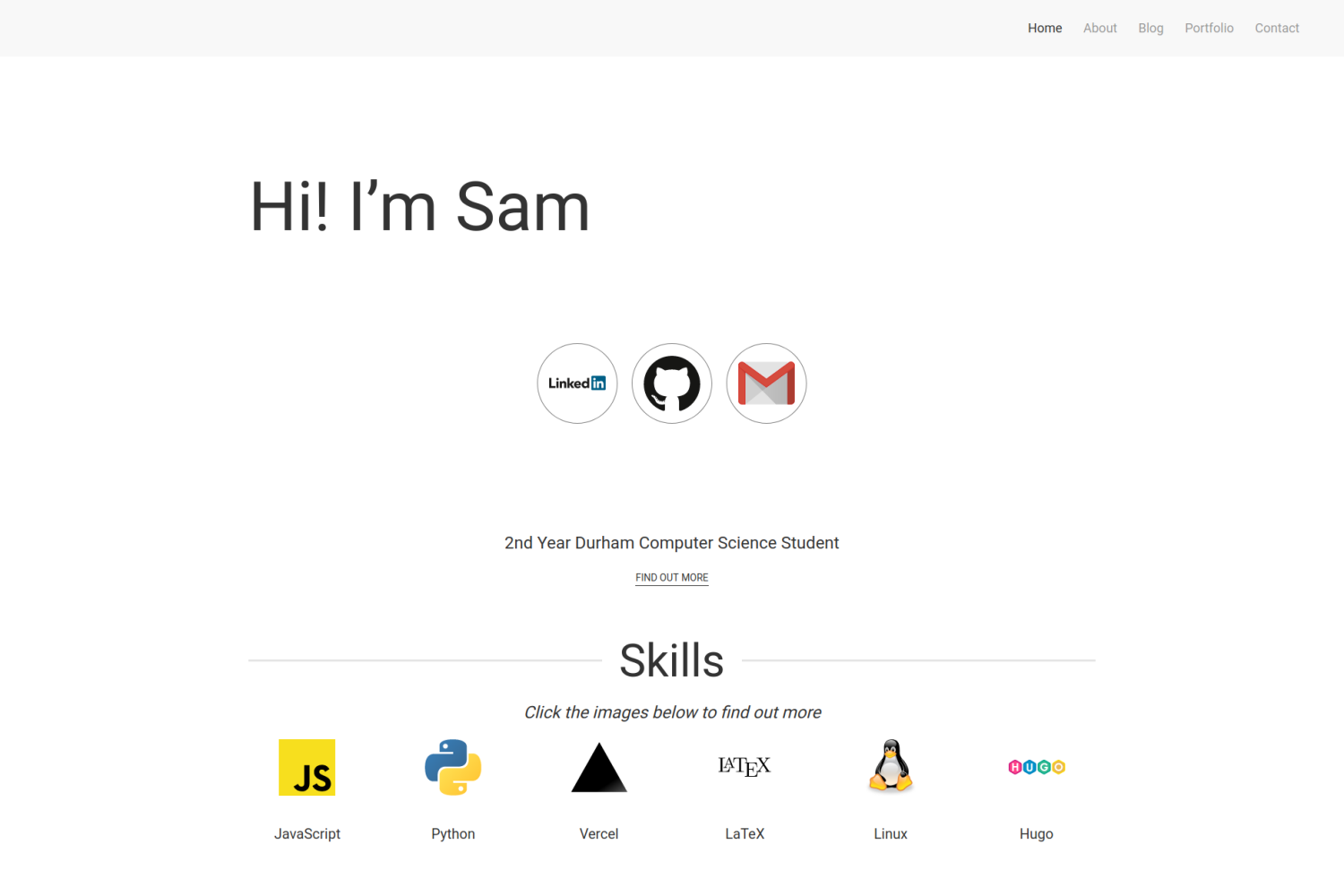
响应式设计,适配不同屏幕尺寸
Hugo作品集
hugo-developer-portfolio — Hugo 作品集模板
作者 samrobbins85
基于 Hugo 的开发者作品集主题,包含首页技能展示、博客与作品集板块,通过 data 目录下的 YAML 文件配置内容。
看看你的网站会是什么样
浏览真实页面截图,比较内容排版与手机效果。点击下方缩略图切换,放大查看整页细节。
目前有 1 张原始预览,可打开完整图片查看设计细节。
截图用于了解视觉与布局,交互效果请以实际项目为准。
采集于 2026-10-01查看来源
值得关注的模板亮点
从已有项目资料中,快速了解它的特点。
首页集中展示技能、经历、教育、奖项、认证和出版物等模块
包含博客与作品集两个内容板块
作品集支持分类筛选,并可标注使用的技术栈图标
通过 data 目录下的 YAML 文件配置首页与关于页内容
使用 Hugo 模块管理主题依赖
模板详细介绍
这是一个为开发者作品集设计的 Hugo 主题,仓库采用 MIT 许可。主题提供响应式布局,包含首页、博客、作品集和联系页面,首页可展示技能、经历、教育、奖项、出版物等信息。
内容主要通过 data 目录下的 homepage.yml、about.yml 和 portfolio.yml 等 YAML 文件配置,站点基础信息、导航菜单、插件和联系表单等则在 config.toml 中设置。博客和作品集页面共用同一套 front matter 字段,作品集页面额外支持分类、协作者、GitHub 链接和技术栈图标。
主题依赖 Hugo 模块,使用 exampleSite 创建新站点时需要安装 Go 并调整 config.toml 中的模块配置。联系表单使用 Formspree,需要自行填写表单端点。README 说明该主题可配置程度高,可能不易直接套用到已有站点。
Hugo作品集
适合你的项目吗?
适用场景
- 为开发者搭建个人作品集网站,展示项目、技能与工作经历
- 在作品集之外附带博客板块,发布技术文章
- 通过 YAML 配置快速调整首页各展示模块的启用状态与内容
- 使用分类筛选浏览作品集项目,并展示每个项目使用的技术
适合人群
- 使用 Hugo 构建静态站点的开发者
- 需要展示项目、技能、经历和博客的个人作品集场景
- 愿意通过编辑 YAML 和 TOML 文件来配置站点的用户
- 能够自行准备图片、图标等素材并配置外部表单服务的用户
上手与定制指南
结合仓库当前版本的说明,按下面的资料检查内容、配置与运行要求。
- 1
在站点目录下创建 themes 文件夹,通过 git clone 或 git submodule 将主题放入其中
- 2
在 config.toml 中设置 theme = "hugo-developer-portfolio"
- 3
使用 exampleSite 创建新站点时需安装 Go,并移除 config.toml 中标注为正常使用时删除的行,取消 [module] 相关行的注释
- 4
联系表单需在 config.toml 的 params.contact.formAction 中填入自己的 Formspree 端点
- 5
主题依赖的 CSS 与 JS 插件通过 config.toml 中的 params.plugins 配置,可按需增删
授权与来源资料
使用条件与限制
免费使用 · 保留许可声明本次收录的是公开仓库中采用 MIT 许可的免费版本;免费范围为该版本代码,不代表外部服务或第三方素材免费。
使用时需要遵守
- 允许免费使用、修改、商用和分发该版本代码。
- 分发代码副本或实质性部分时,保留原作者版权声明和完整 MIT 许可声明。
- 代码按现状提供;担保与责任限制以原许可证及适用法律为准。
额外费用与待核对事项
- 使用 exampleSite 创建新站点时依赖 Hugo 模块,需要在本机安装 Go 语言环境,否则无法按该方式初始化站点。
- 联系表单依赖第三方服务 Formspree,需自行注册并填入表单端点,否则无法接收邮件。
- 主题的 CSS 与 JS 插件通过外部 CDN(jsdelivr 上的 UIkit)加载,站点运行依赖这些外部资源可访问。
- 页脚地图使用 Google Maps 嵌入,需要配置 Google Maps API 密钥,属于外部服务依赖。
- 主题可配置程度高,README 明确说明它不太可能直接套用到已有站点,迁移或集成到现有站点需要较多调整。
- README 提及 Formspree 表单服务;真实提交需配置服务端点,其使用额度与费用需单独核对。
- 演示图片、字体、图标及其他第三方素材需按各自许可核对,不能仅凭代码的 MIT 许可判断。
- 域名、托管、数据库、支付或 AI 等外部服务可能另外收费。
查看原文依据
Permission is hereby granted, free of charge
许可证原文
You need to have golang installed as it uses [hugo modules](https://gohugo.io/hugo-modules/use-modules/).
README 原文
formAction = "https://formspree.io/<Insert code>" # Add your formspree URL here to get emails
README 原文
URL = "https://cdn.jsdelivr.net/npm/[email protected]/dist/css/uikit.min.css"
README 原文
googlemaps = "https://www.google.com/maps/embed/v1/place?q=place_id:ChIJwbHYJaUqfEgRK0Ui9dVGimc&key=AIzaSyAE_4rVAKux_DSPcb_OdSRDaovtPOSk_3U"
README 原文
https://github.com/samrobbins85/hugo-developer-portfolio/blob/master/LICENSEhttps://github.com/samrobbins85/hugo-developer-portfolio/blob/master/README.mdThis is a highly configurable site, and as such, it will be unlikely that it will work with your existing site.
README 原文
DeepSeek 根据仓库许可证和 README 整理 ·2026-10-01。结果仅覆盖已读取资料,依赖、图片、字体及后续条款变更以各自原文为准。
项目核对记录与介绍依据
模板资料
- 来源平台
- GitHub
- 资料与维护参考分
- 资料较完整 · 75 / 100
- 技术栈
- Hugo
- 网站类型
- 作品集
这个分数如何计算
本站按许可资料(最高30分)、演示链接(12分)、预览图(10分)、Star数(15分)、记录的维护时间(15分)、描述完整度(8分)、功能记录(5分)和分类资料(5分)计算。它不是代码、安全或性能测试,也不是 Google 评分;有链接不代表已实测可用。
这个项目需要核对什么
- 记录的仓库更新时间
- 2025-10-15
- 截图检查日期
- 2026-10-01
目前没有记录演示链接。请依据仓库说明在本地评估;仅凭截图无法确认交互行为。
目录记录的主要技术栈是 Hugo。请通过依赖清单和锁文件核对实际版本与托管要求。这些说明基于收录资料,不代表代码审计或部署实测。
查看具体选型方法 →介绍的制作与核对状态
介绍由 AI 辅助整理目录与仓库资料。仓库作者不等于这篇介绍的审核者。
已完成服务器许可规则与 AI 来源核对;未经过人工编辑审核。
查看当时使用的来源资料
SHA-256: 3ee263febedbc32e42386c1dcc2cd0cf8404da9f729172fcc2164a9259788228
2026-10-01T00:51:02.288Z
来源文件 / 仓库 # Developer Portfolio 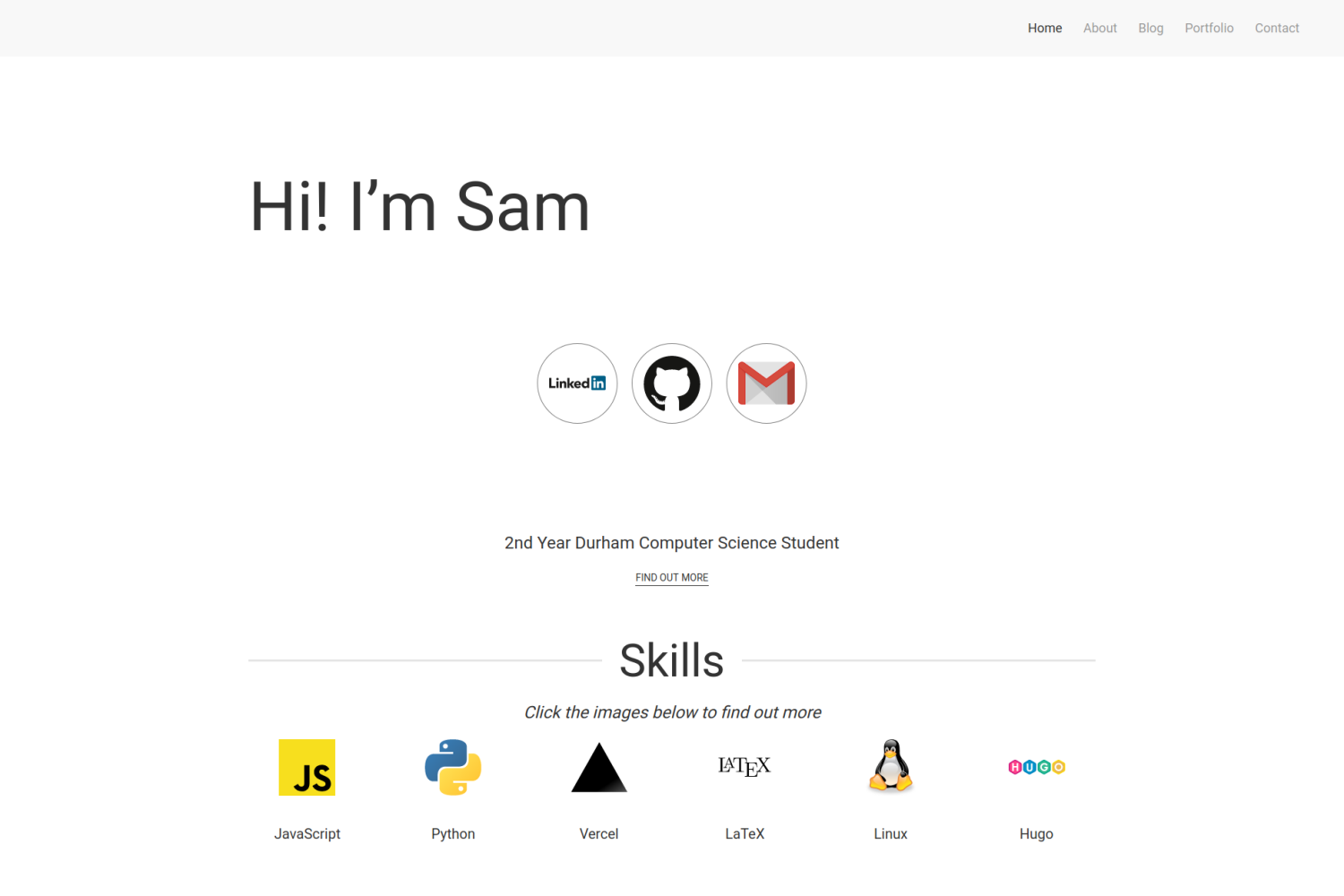 ## Features - Responsive Design - Blog Section - Portfolio Section - Homepage to show off skills ## Installation ### Integrating into your site To install this theme, first create a themes folder in your site with ```bash mkdir themes ``` Then move into this directory with ```bash cd themes ``` The repository can then be added either by cloning or adding as a submodule ```bash # Cloning git clone https://github.com/samrobbins85/hugo-developer-portfolio hugo-developer-portfolio # Submodule git submodule add https://github.com/samrobbins85/hugo-developer-portfolio hugo-developer-portfolio ``` In the `config.toml` file in your site directory add ```toml theme="hugo-developer-portfolio" ``` ### Creating a new site The exampleSite folder is almost set up to work as a site, if you copy it out of the Git Repo and remove the lines in `config.toml` under "Remove this when using normally" and uncomment the lines starting at "[module]" it should work. You need to have golang installed as it uses [hugo modules](https://gohugo.io/hugo-modules/use-modules/). ## Configuration This is a highly configurable site, and as such, it will be unlikely that it will work with your existing site. ### `Config.toml` `Config.toml` provides the basic structure of the site, it contains a range of sections #### Base information In the example site, the base information looks as follows ```toml baseURL = "http://example.com" # The URL of your site languageCode = "en-gb" # The language you want to display the site in title = "Sam Robbins" # The title you want to appear in the address bar theme = "hugo-developer-portfolio" # The theme, don't change this ``` #### Plugins These are the essential plugins required to run the site, but you can add more if you need ```toml [params.plugins] # CSS Plugins [[params.plugins.css]] URL = "https://cdn.jsdelivr.net/npm/[email protected]/dist/css/uikit.min.css" # JS Plugins [[params.plugins.js]] URL = "https://cdn.jsdelivr.net/npm/[email protected]/dist/js/uikit.min.js" [[params.plugins.js]] URL = "https://cdn.jsdelivr.net/npm/[email protected]/dist/js/uikit-icons.min.js" ``` #### Navigation This specifies the titles for the entries in the taskbar. `name` can be changed to show a different name. `URL` should not be changed in most situations as the pages will exist at the old URLs rather than the new ones, so this will result in dead links. ```toml # navigation [menu] [[menu.main]] name = "About" URL = "about" [[menu.main]] name = "Blog" URL = "blog" [[menu.main]] name = "Portfolio" URL = "portfolio" [[menu.main]] name = "Contact" URL = "contact" ``` #### Params This contains the other configuration information ```toml [params] home = "Home" # What you want the homepage to show up as in the menu bar # Meta data description = "The website of Sam Robbins, 2nd Year Computer Science Student at Durham University" author = "Sam Robbins" [params.contact] formAction = "https://formspree.io/<Insert code>" # Add your formspree URL here to get emails # This contains the contact information for the footer [params.footer] email = "[email protected]" address = "Durham, UK" googlemaps = "https://www.google.com/maps/embed/v1/place?q=place_id:ChIJwbHYJaUqfEgRK0Ui9dVGimc&key=AIzaSyAE_4rVAKux_DSPcb_OdSRDaovtPOSk_3U" ``` ### `homepage.yml` This file is stored in `data/homepage.yml`. It determines the content of the homepage and contains many sections #### banner This is the text in the hero section, change it to whatever you want ```yml banner: title: Hi! I’m Sam ``` #### social Put all of your social links here and they will appear in the social section ```yml social: twitter: "" linkedin: sam-robbins-gb bitbucket: "" github: samrobbins85 gitlab: "" facebook: "" instagram: "" gmail: samrobbinsgb hotmail: "" telegram: "" whatsapp: "" ``` #### about - `enable` can be used to hide this section - `content` determines what text is shown here - `btnText` changes the text on the button - `URL` changes the URL the button directs to ```yml about: enable: true content: 2nd Year Durham Computer Science Student button: btnText: Find out more URL: "/about" ``` #### skill - `enable` can be used to hide this section - `title` determines the text both under the image and in the modal - `logo` determines the image that shows up - `description` is the text that appears inside the modal ```yml skill: enable: true item: - title: JavaScript logo: https://res.cloudinary.com/samrobbins/image/upload/v1591793272/logos/logos_javascript_adj1dx.svg description: Details coming soon, contact me if you want to know more ``` #### portfolio This is used to highlight specific portfolio projects you want to show - `enable` can be used to hide this section - `title` is the text at the top each item - `image` is the image for each item - `description` goes underneath the image for each item - `link` directs to the main portfolio page - `tools` indicates what technologies you used, it uses the icons from https://simpleicons.org/ ```yml portfolio: enable: true item: - title: Easy DMARC image: https://res.cloudinary.com/samrobbins/image/upload/v1597159067/Easy_DMARC_hkcgif.webp description: A website to make it easy to add DMARC to a Vercel website link: "/portfolio/easy-dmarc" tools: - next-dot-js - tailwindcss - vercel - react ``` #### experience - `enable` can be used to hide this section - `logo` determines the image that shows up - `title` is the main text that appears in the card - `company` is the secondary text in the card - `duration` is the tertiary text in the card ```yml experience: enable: true item: - logo: https://res.cloudinary.com/samrobbins/image/upload/f_auto,q_auto/v1591793271/logos/logos_google_id6v9a.svg title: init.g company: Google duration: November 2019 ``` #### hackathons By placing none in the URL field, the image will be rendered without any links ```yml hackathons: enable: true item: - title: Hack Cambridge 2019 description: Climate change simulator image: https://res.cloudinary.com/samrobbins/image/upload/f_auto,q_auto/v1591793405/stickers/Hack_Cambridge_101_ozoq5d.png url: none ``` #### certifications This allows you to list your certifications in the following format ```yml certifications: enable: true item: - title: Microsoft Azure Fundamentals image: https://res.cloudinary.com/samrobbins/image/upload/v1592501459/microsoft-certified-fundamentals-badge_cpcgyn.svg url: https://www.youracclaim.com/badges/b4cf7a86-eb83-478e-bfd0-9f427c3474a0/public_url ``` #### Awards and Achievements This allows you to list your awards and achievements in the following format ```yml awards: enable: true item: - title: Phase 1 Winner event: GNOME Community Engagement Challenge image: https://res.cloudinary.com/samrobbins/image/upload/v1595701167/CEChallenge-P1Winner2_iyjvyu.png ``` #### education This section allows you to showcase your education history, the fields are self explanatory. ```yml education: enable: true item: - title: BSc Computer Science year: 2018 - Present academy: Durham University image: https://res.cloudinary.com/samrobbins/image/upload/f_auto,q_auto/v1591793268/logos/logos_Durham_fc2sae.svg ``` #### publications This section allows you to showcase your publications history, the fields are self explanatory. ```yml publications: enable: true item: - image: /path/to/img title: Title of the publication description: details about the publication code_link: link/to/the/repository pdf_link: link/to/the/pdf ``` ### `about.yml` This file configures the about page, and follows the format below: ```yml leadership: enable: true item: - logo: https://res.cloudinary.com/samrobbins/image/upload/f_auto,q_auto/v1591793280/logos/logos_yl_qozav6.webp title: Young Leader company: The Scout Association duration: September 2014 - July 2018 ``` ### `porfolio.yml` This file configures the portfolio page, allowing you to specify the filters you want to use. ```yml filter: - label: Web Dev value: web-dev ``` ### Blogs When submitting a blog, you can supply the following fields in the front matter ```yml title: "Making a new Website" date: 2019-12-31T12:14:34+06:00 description: "My first blog, introducing my new website" author: "Sam Robbins" ``` ### Portfolio pages The portfolio page and blog page use the same configuration, so you can use these new fields if you want, but they are more suited to portfolio pages ```toml categories = ["hackathon", "web-dev"] coders = ["samrobbins85", "karina-talibzhanova"] date = 2020-05-30T23:00:00Z description = "A Firefox Browser Extension" github = ["https://github.com/karina-talibzhanova/oxfordhack2020"] image = "https://res.cloudinary.com/samrobbins/image/upload/q_auto/v1593352345/twoo-home_k7molq.png" title = "Oxford Digithon" [[tech]] logo = "https://res.cloudinary.com/samrobbins/image/upload/q_auto/v1591793272/logos/logos_javascript_adj1dx.svg" name = "JavaScript" url = "https://www.ecma-international.org/memento/tc39.htm" [[tech]] logo = "https://res.cloudinary.com/samrobbins/image/upload/q_auto/v1593368547/firefox-ar21_cps6me.svg" name = "Firefox WebExtensions" url = "https://www.mozilla.org/en-GB/firefox/" ``` The [[tech]] item can be repeated as many times as you desire.
看看同类模板
对比同技术栈与用途的模板,找到更适合的视觉与内容结构。

hugo-PaperMod
PaperMod 是 Hugo 生态里知名度较高的主题之一,定位很明确:给博客和轻量作品集站点提供一套干净、响应式的阅读界面。
Hugo · 作品集

Congo
Congo 是一款为 Hugo 设计的现代内容主题,核心定位是让内容本身成为页面焦点。 它基于 Tailwind CSS 3.0 构建,整体布局完全响应式,视觉风格干净且克制,没有多余装饰。
Hugo · 博客

toha
Toha 是一款面向个人作品集场景的 Hugo 主题,以极简设计和响应式布局为核心,适合用来搭建个人主页、作品展示或技术博客。
Hugo · 作品集

hugo-profile
A highly customizable and mobile first Hugo template for personal portfolio and blog.
Hugo · 作品集

hugo-theme-introduction
Minimal, single page, smooth-scrolling theme for Hugo static site generator.
Hugo · 作品集

hugo-theme-console
hugo-theme-console 是一款以系统终端为灵感的极简 Hugo 主题,基于 Terminal CSS 构建,整体视觉干净利落,强调快速加载与响应式布局。
Hugo · 作品集