Static export: `next build` generates pure HTML that can be deployed to Vercel, Netlify, GitHub Pages, Cloudflare, or any static host
Next.jsReactPortfolioBlog
pesto — Next.js Portfolio Template
By sandeepraju
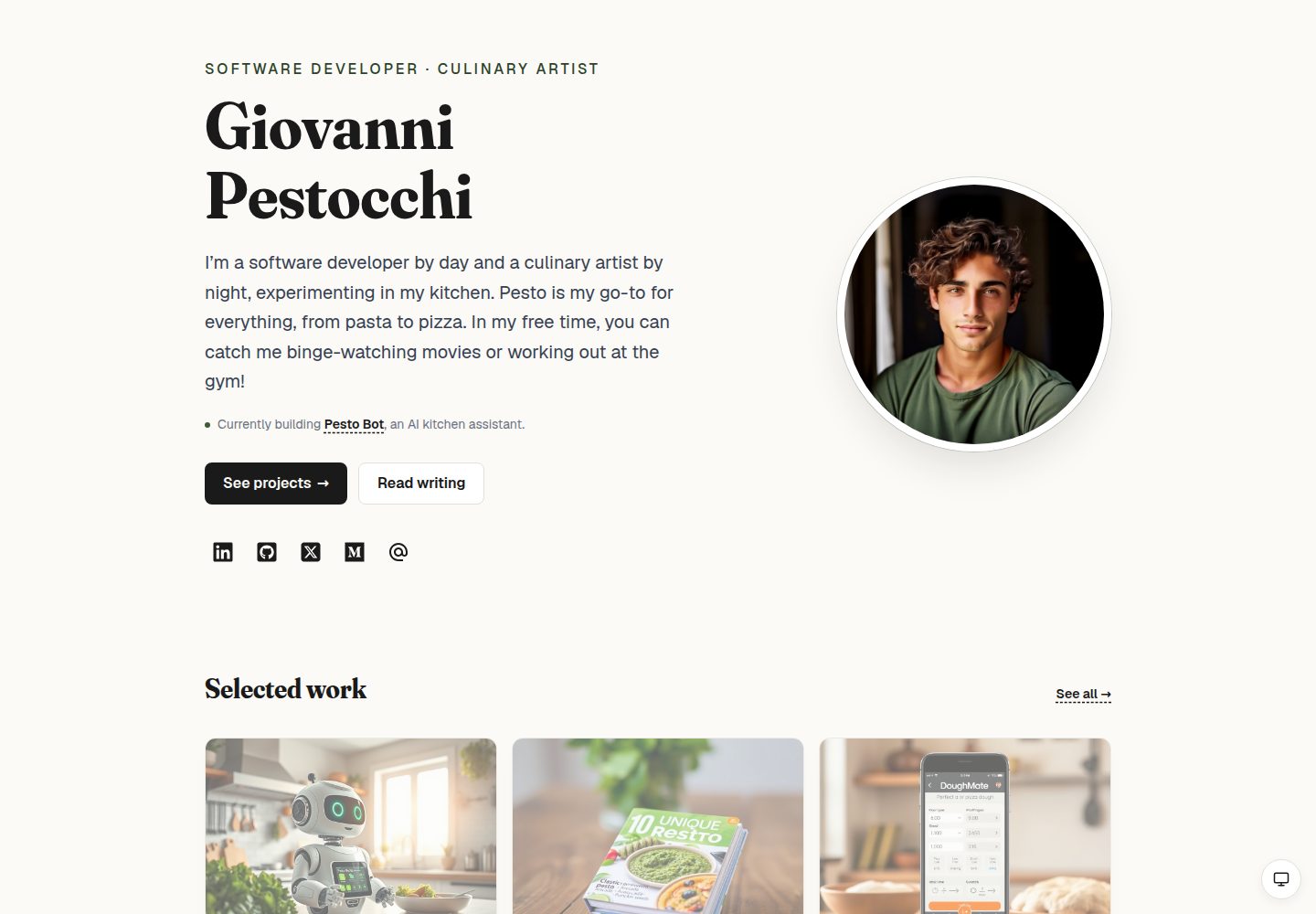
Pesto is a static MDX personal site template built with Next.js, Tailwind CSS, and the Fraunces typeface. It includes pages for portfolio, blog, recipes, and more, and supports static export.
Explore the design
Compare the page layouts and mobile experience. Open any screenshot for a closer look.
Desktop homepage1 / 3
Desktop captureTop of page
Actual screenshot captured by the server browser.
All pages & views 3
Screenshots show visual appearance; interactive behavior may differ.
Recorded 2026-10-14View source
What stands out
A quick read of the recorded project description.
MDX content layer: blog and project case studies are each a `.mdx` file; list pages, detail pages, sitemap, related posts, and previous/next navigation read from the filesystem at build time
Design tokens: color, typography, spacing, border radius, shadows, and motion are defined as CSS variables, with light and dark themes and a system/light/dark three-state toggle
Brand typefaces and palette: Fraunces display typeface, Geist interface typeface, basil green accent color, and warm paper background
Accessibility: the README mentions site-wide focus rings, a skip-to-content link, one `<h1>` per page, respect for reduced motion preferences, and JSON-LD `Person` structured data
Subscription form: a static HTML form posts directly to the subscription provider, with no JS or server routes required
Template Details
Pesto is a static, MDX-driven personal site template positioned as a collection of content such as portfolio, blog, and recipes. The README states it is built with Next.js, Tailwind CSS, and the Fraunces typeface; `next build` generates pure HTML that can be deployed to Vercel, Netlify, GitHub Pages, Cloudflare, or any static host. The content layer centers on MDX files: blog posts live in `src/content/blog/`, project case studies in `src/content/projects/`, and list pages, detail pages, sitemap, related posts, and previous/next navigation all read from the filesystem at build time. The template ships with six example blog posts and twelve project case studies.
On the design side, the template uses CSS variables to define tokens for color, typography, spacing, border radius, shadows, and motion. It provides light and dark themes, along with a three-state manual toggle for system, light, and dark. Brand visuals include the Fraunces display typeface, the Geist interface typeface, a basil green accent color, and a warm paper background. For accessibility, the README mentions site-wide `:focus-visible` focus rings, a skip-to-content link, one `<h1>` per page, respect for `prefers-reduced-motion`, click targets no smaller than 44px, and JSON-LD `Person` structured data.
The README also covers content authoring, configuration, theme and font customization, script commands, and how to connect a subscription form. Note that the README does not provide performance benchmarks, browser compatibility ranges, or production validation results; these aspects cannot be confirmed from it.
Next.jsReactPortfolioBlog
Is it right for your project?
Use Cases
- Building a personal portfolio site with a blog and project case studies
- Managing posts and case studies as MDX files without relying on a database or CMS
- Deploying the site as static HTML to any static hosting platform
- Personal sites that need light/dark theme switching and custom design tokens
- Integrating a third-party email subscription form on the blog and homepage
Suitable For
- Individual developers or writers who want to write blog posts and project case studies as MDX files
- Sites that need static export and deployment to any static hosting platform
- Users who want to adjust themes, fonts, and colors based on CSS variables
- Site authors who care about foundational accessibility practices (focus rings, skip links, reduced motion)
Getting started & customization
Use these recorded setup notes alongside the repository instructions for your chosen version.
- 1
After cloning the repository, run `npm install`, then `npm run dev`, and visit http://localhost:3000; yarn, pnpm, and bun are also supported
- 2
Edit `src/data/config.json` to configure name, site URL, bio, social links, and metadata; `siteUrl` is used for absolute URLs in sitemap, robots, and OG metadata
- 3
Place blog posts in `src/content/blog/<slug>.mdx` and project case studies in `src/content/projects/<slug>.mdx`, both using frontmatter
- 4
After adding images, run `npm run blur` or `npm run prebuild` to generate `src/data/blur-placeholders.json` via sharp
- 5
Configure the subscription form under `newsletter` in `src/data/config.json`; the `action` must be replaced with the provider's form submission URL
License & source material
Usage conditions & limitations
Free to use · keep license noticeThis entry covers the free version in the public repository under the MIT license; the free scope is the code of that version and does not mean external services or third-party assets are free.
Must comply with when using
- The code of this version may be used, modified, used commercially, and distributed for free.
- When distributing copies or substantial portions of the code, retain the original author's copyright notice and the full MIT license notice.
- The code is provided as is; warranties and limitations of liability are governed by the original license and applicable law.
Additional costs & items to verify
- Demo images, fonts, icons, and other third-party assets must be checked against their respective licenses; they cannot be judged solely by the code's MIT license.
- External services such as domains, hosting, databases, payments, or AI may incur separate charges.
- The template points to the Buttondown subscription service by default; the free tier is limited to 100 subscribers, after which payment is required, or you can switch to another provider that supports form POST.
- Using the subscription form requires registering an account with the chosen provider and obtaining its embed submission URL (such as a Buttondown username-specific URL) to fill into the configuration.
- The resume link points to an example PDF; replace the file under public/doc and update the link in Nav.tsx.
- Personal photos must replace the files under public/img/ while maintaining the naming conventions for profile.jpg and the projects/ directory.
- Before going live, siteUrl must be set to the actual site address; otherwise, absolute URLs in sitemap, robots, and OG metadata will be incorrect.
View Original Text Basis
Permission is hereby granted, free of charge
Original License Text
The template ships pointing at [Buttondown](https://buttondown.com), a minimalist newsletter service (free up to 100 subscribers, paid above), but anything that accepts a form POST with a field named `email` works — ConvertKit, MailerLite, Beehiiv, Mailchimp, etc.
Original README
- **`action`** — the provider's embed URL. For Buttondown, sign up, then use `https://buttondown.email/api/emails/embed-subscribe/<your-username>`. For other providers, copy the `action` URL from their HTML embed snippet.
Original README
For your resume, replace `public/doc/Giovanni-Pestocchi-Resume.pdf` and update the Resume link in `src/app/components/Nav.tsx`.
Original README
For your photos, replace files in `public/img/` (keep `profile.jpg` and the `projects/` directory naming).
Original README
https://github.com/sandeepraju/pesto/blob/mainline/LICENSEhttps://github.com/sandeepraju/pesto/blob/mainline/README.md`siteUrl` is used for absolute URLs in `sitemap.xml`, `robots.txt`, and OG metadata — make sure it's set before you go live.
Original README
Compiled by DeepSeek based on repository license and README ·2026-10-14. Results only cover the materials read; dependencies, images, fonts, and subsequent term changes are subject to their respective original texts.
Project checks & description sources
Template Information
- Source platforms
- GitHub
- Documentation and maintenance reference score
- More documented · 88 / 100
- Technologies
- Next.js · React
- Website type
- Portfolio · Blog
How this score is calculated
Our heuristic uses license records (up to 30), a demo link (12), a preview (10), stars (15), recorded maintenance (15), description completeness (8), feature records (5) and classification data (5). It is not a code, security or performance test, or a Google score. A link does not establish tested functionality.
What to verify for this project
- Repository update recorded
- 2026-09-11
- Screenshot last checked
- 2026-10-14
A demo link is listed. Check it with your own content and viewport sizes; its presence does not confirm that forms, authentication or payments work.
The catalog identifies Next.js as the primary stack. Check the actual dependency manifest and lockfile for versions and hosting requirements. These notes use recorded metadata, not a code audit or a deployment test.
Use a selection guide →How this description was prepared
AI-assisted description based on catalog records and repository material. Repository authors are not automatically the reviewers of this description.
Review declaration: codex-user-requested-batch-review-20261015 · 2026-10-15
Inspect the recorded source material
SHA-256: acead9fff50bacf18256279aad73b406197f6f25e4928e02ddbfbb55a70d5bb6
2026-10-14T04:44:14.563Z
Source file / repository<div align="center">
<picture>
<source srcset=".github/assets/pesto-dark.webp" media="(prefers-color-scheme: dark)" />
<img src=".github/assets/pesto-light.webp" alt="Pesto — a personal site template" width="720" />
</picture>
<p><em><strong>Pesto</strong> is a static, MDX-driven personal site template — portfolio, blog, recipes, the lot — built with <a href="https://nextjs.org/">Next.js</a>, <a href="https://tailwindcss.com/">Tailwind CSS</a>, and <a href="https://fonts.google.com/specimen/Fraunces">Fraunces</a>.</em></p>
</div>
<p align="center">
<a href="https://github.com/sandeepraju/pesto/actions/workflows/node.js.yml"><img alt="CI status" src="https://img.shields.io/github/actions/workflow/status/sandeepraju/pesto/node.js.yml?branch=mainline&style=flat-square&label=CI&color=3e5c3a" /></a>
<a href="https://github.com/sandeepraju/pesto/actions/workflows/nextjs.yml"><img alt="Deploy status" src="https://img.shields.io/github/actions/workflow/status/sandeepraju/pesto/nextjs.yml?branch=mainline&style=flat-square&label=deploy&color=3e5c3a" /></a>
<a href="LICENSE"><img alt="MIT License" src="https://img.shields.io/github/license/sandeepraju/pesto?style=flat-square&color=3e5c3a" /></a>
<img alt="Next.js 16" src="https://img.shields.io/badge/Next.js-16-000?style=flat-square&logo=nextdotjs" />
<img alt="React 19" src="https://img.shields.io/badge/React-19-149eca?style=flat-square&logo=react" />
<img alt="Tailwind CSS 3" src="https://img.shields.io/badge/Tailwind_CSS-3-38bdf8?style=flat-square&logo=tailwindcss&logoColor=white" />
<img alt="TypeScript" src="https://img.shields.io/badge/TypeScript-3178c6?style=flat-square&logo=typescript&logoColor=white" />
</p>
## Why Pesto
Most personal-site templates ship as visual scaffolding and leave the writing and case-study layer as an exercise for the reader. Pesto ships with the editorial wiring already in place:
- **MDX content layer** — six example blog posts and twelve project case studies, each as a single `.mdx` file with frontmatter. Add a post by dropping a file in `src/content/blog/`. Add a project by dropping a file in `src/content/projects/`. The list pages, detail pages, sitemap, related-posts, and prev/next nav all read the filesystem at build time.
- **Static export** — `next build` produces plain HTML. No runtime, no server, no API. Deploy to Vercel, Netlify, GitHub Pages, Cloudflare, or any static host.
- **Real design system** — CSS-variable tokens for colour, typography, spacing, radius, shadow, and motion. Light and dark themes wired to `prefers-color-scheme` plus a manual three-state toggle (System / Light / Dark) that persists across visits.
- **Brand identity** — display headings in [Fraunces](https://fonts.google.com/specimen/Fraunces) with variable optical-size + softness axes; UI in [Geist](https://vercel.com/font); a basil-green accent for tags, focus moments, and the avatar ring. Warm-paper background instead of pure white.
- **Performance** — build-time image blur placeholders via `sharp`, CSS columns instead of a masonry JS library, native View Transitions on project navigation, only one client-component island in the whole tree (the home avatar tilt).
- **Accessibility** — visible `:focus-visible` rings sitewide, skip-to-content link, one `<h1>` per page, `prefers-reduced-motion` respected by both CSS and the tilt, tap targets ≥ 44px, JSON-LD `Person` schema.
A full UX/design audit and roadmap that shipped this template is at [`docs/ux-audit.md`](docs/ux-audit.md).
## Getting started
```bash
git clone https://github.com/sandeepraju/pesto.git my-site
cd my-site
npm install
npm run dev
```
Open [http://localhost:3000](http://localhost:3000).
Other package managers work too:
```bash
yarn dev
pnpm dev
bun dev
```
## What's in the box
```
src/
├── app/
│ ├── about/ # editorial bio page
│ ├── blog/ # blog index + [slug] detail
│ ├── projects/ # project index + [slug] case study
│ ├── recipes/pesto/ # the actual pesto recipe
│ ├── now/ # "what I'm focused on right now"
│ ├── uses/ # hardware / software / kitchen kit
│ ├── colophon/ # design system, stack, process
│ ├── not-found.tsx # on-brand 404 page
│ ├── sitemap.ts # generated from filesystem at build
│ ├── robots.ts
│ ├── globals.css # design tokens, theme overrides, focus ring
│ ├── layout.tsx # fonts, metadata, JSON-LD, theme bootstrap
│ ├── page.tsx # home (two-column hero + content strips)
│ └── components/
│ ├── PageShell.tsx # shared Header + main + Footer scaffold
│ ├── Header.tsx
│ ├── Footer.tsx
│ ├── Nav.tsx
│ ├── TiltAvatar.tsx # client island: react-parallax-tilt
│ └── ThemeToggle.tsx # client island: System / Light / Dark
├── content/
│ ├── blog/*.mdx # one post per file
│ └── projects/*.mdx # one case study per file
├── lib/
│ ├── blog.ts # filesystem loader for posts
│ ├── projects.ts # filesystem loader for projects
│ ├── blur.ts # image blur-placeholder lookup
│ └── styles.ts # shared className constants
└── data/
├── config.json # name, intro, social, site URL, meta
└── blur-placeholders.json # generated by scripts/generate-blur-placeholders.mjs
```
## Authoring content
### Writing a blog post
Drop a file in `src/content/blog/<slug>.mdx`:
````mdx
---
title: "My first post"
date: 2026-06-01
description: "A one-line description shown on the index page and in OG metadata."
tags: [process, cooking]
---
# Body starts here
Write in MDX. You can use **markdown**, embed any React-friendly element, drop
in `<code>` and code fences:
```ts
function pesto(basil: number) {
return basil * 2;
}
```
> Or block-quote with a left bar.
````
That's it. The blog index sorts by date desc and shows reading time, tags, and description. The detail page renders the body through [`next-mdx-remote/rsc`](https://github.com/hashicorp/next-mdx-remote) with curated components (serif headings, dashed-underline links, surface-tinted code blocks, basil-bullet lists). Related posts at the bottom are tag-similarity ranked.
Tags are free-form strings — add `tags: [whatever, you, want]` and they'll show up as basil pills on the index and the post.
### Writing a project case study
Drop a file in `src/content/projects/<slug>.mdx`:
```mdx
---
title: "Pesto Bot"
description: "An AI kitchen assistant for pesto lovers."
image: /img/projects/pesto-bot.jpeg
portrait: true
year: 2026
role: "Solo build · 6 weeks"
tech: [Next.js, TypeScript, OpenAI API, Postgres, Tailwind]
url: https://github.com/gpestocchi/pesto-bot
order: 1
---
## The problem
Most cooking apps make you scroll past five recipe options...
## What I built
...
## What I learned
...
```
The projects index orders by `order` ascending and shows the image as a gradient-overlaid card with description-on-hover. The case study page shows the hero image, year/role/tech metadata, an optional GitHub CTA, the MDX body, and prev/next navigation.
`image` should be a path under `public/img/`; `portrait` controls card aspect in the masonry grid (true = h-96, false = h-64).
### Adding a recipe / now / uses / colophon page
These are plain React components — see `src/app/recipes/pesto/page.tsx`, `src/app/now/page.tsx`, etc. for the pattern. Wrap your content in `<PageShell>`, set the `metadata` export, you're done.
## Configuring
Edit `src/data/config.json`:
```json
{
"name": "Your Name",
"siteUrl": "https://yoursite.com",
"intro": "One paragraph about you.",
"fork": "https://github.com/your-user/your-site",
"meta": {
"title": "Your Name — Role 1 & Role 2",
"description": "Personal site of Your Name."
},
"social": {
"linkedin": "https://www.linkedin.com/in/you",
"github": "https://github.com/you",
"x": "https://x.com/you",
"medium": "https://medium.com/@you",
"email": "mailto:[email protected]"
}
}
```
`siteUrl` is used for absolute URLs in `sitemap.xml`, `robots.txt`, and OG metadata — make sure it's set before you go live.
For your resume, replace `public/doc/Giovanni-Pestocchi-Resume.pdf` and update the Resume link in `src/app/components/Nav.tsx`.
For your photos, replace files in `public/img/` (keep `profile.jpg` and the `projects/` directory naming).
### Newsletter signup
The signup card (rendered on the home page and at the bottom of `/blog`) is a static HTML form that POSTs directly to a newsletter provider — no JS, no API key on your site, no server route. It works in the static export because the browser submits straight to the provider's embed endpoint.
The template ships pointing at [Buttondown](https://buttondown.com), a minimalist newsletter service (free up to 100 subscribers, paid above), but anything that accepts a form POST with a field named `email` works — ConvertKit, MailerLite, Beehiiv, Mailchimp, etc.
Configure under `newsletter` in `src/data/config.json`:
```json
"newsletter": {
"enabled": true,
"action": "https://buttondown.email/api/emails/embed-subscribe/YOUR_USERNAME",
"provider": "Buttondown",
"blurb": "Occasional posts on software, cooking, and what happens when you mix the two. One email per post, no spam, unsubscribe whenever."
}
```
- **`enabled`** — set to `false` (or remove the block) to hide the signup everywhere.
- **`action`** — the provider's embed URL. For Buttondown, sign up, then use `https://buttondown.email/api/emails/embed-subscribe/<your-username>`. For other providers, copy the `action` URL from their HTML embed snippet.
- **`provider`** — label shown in the "Delivered via …" footer. Cosmetic only.
- **`blurb`** — the paragraph above the input.
The form opens the provider's confirmation page in a new tab on submit (`target="_blank"`). If you want an inline "thanks, check your inbox" without a new tab, convert `src/app/components/NewsletterSignup.tsx` to a client component and submit via `fetch()`.
## Customising the look
### Theme
All colours are CSS variables in `src/app/globals.css`. Light and dark sets sit in `:root` and `:root[data-theme='dark']` blocks. The OS preference applies via a `@media (prefers-color-scheme: dark)` block scoped to `:root:not([data-theme='light'])` so a manual choice always wins.
Want a different accent? Change three values:
```css
:root {
--accent: #3e5c3a; /* deep basil */
--accent-strong: #2c4329; /* pine */
--accent-soft: #d4ddd0; /* young basil — used in tag pills */
}
```
Want a different mood entirely (e.g., paper-white instead of warm-paper)? Adjust `--background` and `--surface`.
### Fonts
Two Google Fonts are loaded in `src/app/layout.tsx`: Geist (body/UI) and Fraunces (display). Swap either:
```ts
import { Geist, Fraunces } from "next/font/google";
// → import { Inter, Source_Serif_4 } from "next/font/google";
```
If you change the serif, the optical-size + softness `font-variation-settings` tuned for Fraunces in `globals.css` may no longer apply — drop or adjust the `.font-serif { font-variation-settings: ... }` rule.
### Layout
The 3-row PageShell (header / main / footer) lives in `src/app/components/PageShell.tsx`. The home page uses a custom 2-row layout (`src/app/page.tsx`). Both use `grid-cols-[minmax(0,1fr)]` so long unbreakable content (e.g. a wide `<pre>` in a blog post) stays contained on mobile.
## Scripts
| | |
|---|---|
| `npm run dev` | Next.js dev server with Turbopack |
| `npm run build` | Static export to `out/` (runs `prebuild` first) |
| `npm run prebuild` | Generates `src/data/blur-placeholders.json` from `public/img/` via `sharp` |
| `npm run blur` | Same as `prebuild` — run manually after adding new images |
| `npm run start` | Serve the production build |
| `npm run lint` | ESLint over `src/` |
`prebuild` runs automatically before `build`, so blur placeholders are always fresh in production. If you add new images during development, run `npm run blur` to regenerate the manifest and pick up the placeholders without restarting the dev server.
## Deploying
This is a static export (`output: 'export'` in `next.config.ts`). `npm run build` writes to `out/` — drop that directory anywhere:
- **Vercel** — zero-config. Connect the repo and deploy.
- **Netlify** — set the build command to `npm run build` and publish directory to `out`.
- **GitHub Pages** — push `out/` to a `gh-pages` branch, or use the GitHub Actions deploy-to-pages action with `path: out`.
- **Cloudflare Pages** — build command `npm run build`, output directory `out`.
- **Any static host** — copy `out/` to your bucket of choice.
## Tech
- [Next.js 16](https://nextjs.org/) (App Router, static export)
- [React 19](https://react.dev/)
- [Tailwind CSS 3](https://tailwindcss.com/) with CSS-variable semantic tokens
- [`next-mdx-remote/rsc`](https://github.com/hashicorp/next-mdx-remote) for MDX
- [`gray-matter`](https://github.com/jonschlinkert/gray-matter) for frontmatter
- [`reading-time`](https://github.com/ngryman/reading-time) for post estimates
- [`sharp`](https://sharp.pixelplumbing.com/) for build-time blur placeholders
- [`react-parallax-tilt`](https://github.com/mkosir/react-parallax-tilt) for the home avatar
- [`react-icons`](https://react-icons.github.io/react-icons/) for nav + social glyphs
## License
[MIT](LICENSE).
Explore similar templates
Compare previews and descriptions within the same stack and category.

tailwind-nextjs-starter-blog
A Next.js and Tailwind CSS blog starter template using Contentlayer for Markdown/MDX, with built-in SEO, code highlighting, and tags. It targets personal technical blogs and migration from Jekyll/Hugo to React, and supports one-click Vercel deployment.
Next.js · Blog

react-resume-template
A personal resume website template for software developers, built with Next.js, React, and TypeScript and styled with Tailwind CSS. Site content is driven by a single data file at /src/data/data.tsx, with types in dataDef.ts and images in src/images/.
Next.js · Portfolio

Nextjs-tailwindcss-blog-template
A Next.js blog styled with Tailwind CSS. The current branch processes Markdown with Velite; the earlier Contentlayer setup is retained in a separate historical branch.
Next.js · Blog

Next-js-Blog-Boilerplate
A blog starter built on Next.js 12 and Tailwind CSS 3, integrating TypeScript, ESLint, Prettier, and PostCSS.
Next.js · Blog

nextjs-blog-theme
A Next.js 15 and Tailwind CSS 4.x blog starter by Netlify, designed by Bejamas, with MDX support, dark/light theme switching, and environment-variable configuration. It includes a visual setup wizard for deploying to Netlify and manages content via local .mdx files.
Next.js · Blog

blog
A personal blog forked from Timlrx's tailwind-nextjs-starter-blog, built with Next.js, React, and Tailwind CSS. Content is stored as Markdown/MDX under data/, with site, author, navigation, and project data in separate files.
Next.js · Blog