静态导出:`next build` 生成纯 HTML,可部署到 Vercel、Netlify、GitHub Pages、Cloudflare 或任意静态托管
Next.jsReact作品集博客
pesto — Next.js 作品集模板
作者 sandeepraju
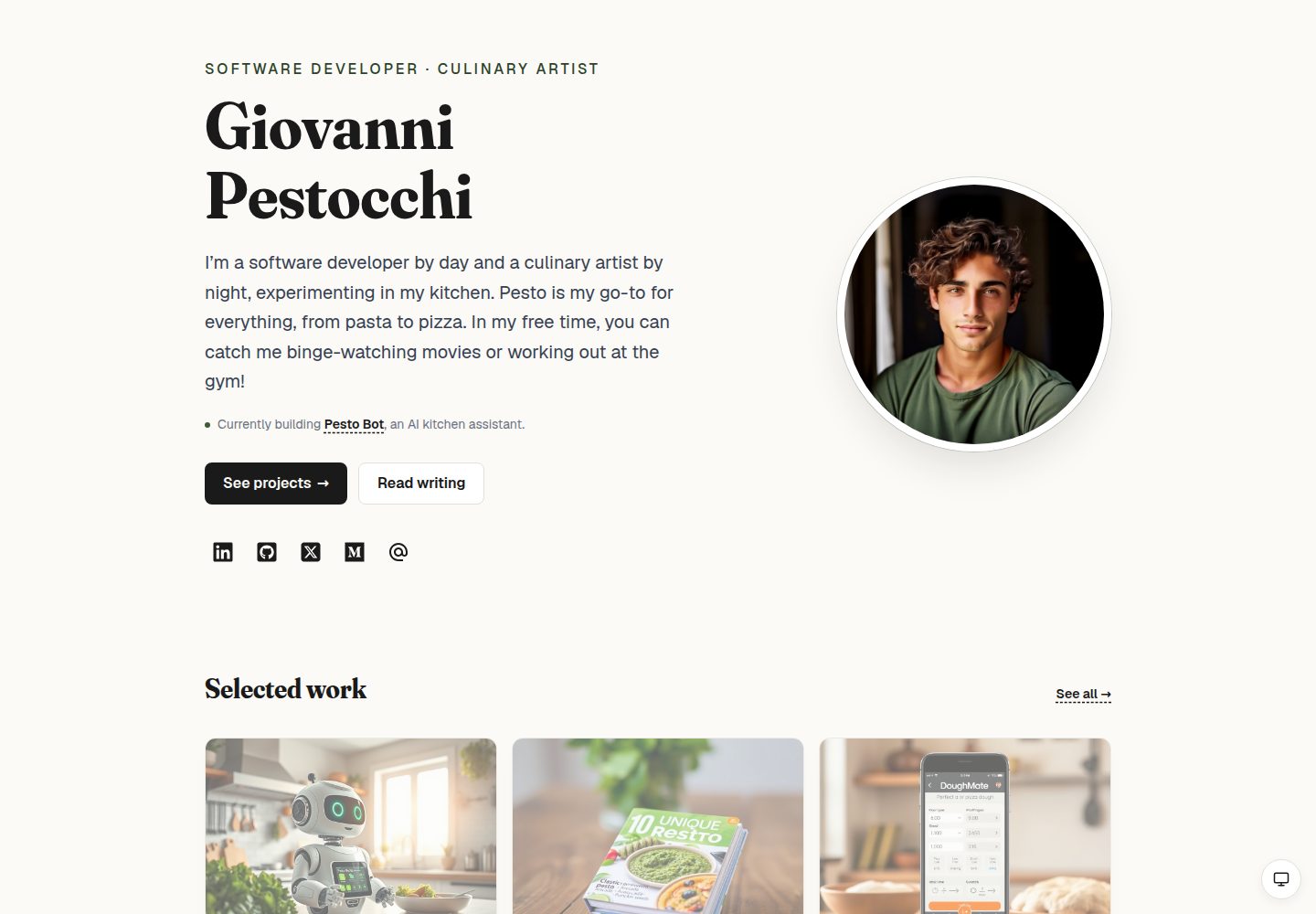
Pesto 是一个基于 Next.js、Tailwind CSS 和 Fraunces 字体的静态 MDX 个人站点模板,包含作品集、博客、食谱等页面,支持静态导出。
看看你的网站会是什么样
浏览真实页面截图,比较内容排版与手机效果。点击下方缩略图切换,放大查看整页细节。
全部页面与视图 3
截图用于了解视觉与布局,交互效果请以实际项目为准。
采集于 2026-10-14查看来源
值得关注的模板亮点
从已有项目资料中,快速了解它的特点。
MDX 内容层:博客与项目案例各为一个 `.mdx` 文件,列表页、详情页、站点地图、相关文章和前后导航在构建时读取文件系统
设计令牌:颜色、排版、间距、圆角、阴影和动效以 CSS 变量定义,提供浅色与深色主题及系统/浅色/深色三态切换
品牌字体与配色:Fraunces 显示字体、Geist 界面字体、罗勒绿强调色和暖纸色背景
可访问性:README 提到全站焦点环、跳转到内容链接、每页一个 `<h1>`、尊重减少动效偏好和 JSON-LD `Person` 结构化数据
订阅表单:静态 HTML 表单直接 POST 到订阅服务商,无需 JS 或服务端路由
模板详细介绍
Pesto 是一个静态、由 MDX 驱动的个人站点模板,定位为作品集、博客、食谱等内容的集合。README 说明它使用 Next.js、Tailwind CSS 和 Fraunces 字体构建,`next build` 会生成纯 HTML,可部署到 Vercel、Netlify、GitHub Pages、Cloudflare 或任意静态托管。内容层以 MDX 文件为核心:博客文章放在 `src/content/blog/`,项目案例放在 `src/content/projects/`,列表页、详情页、站点地图、相关文章和上一篇/下一篇导航均在构建时读取文件系统。模板自带六篇示例博客和十二个项目案例。
设计方面,模板使用 CSS 变量定义颜色、排版、间距、圆角、阴影和动效等令牌,提供浅色与深色主题,并配有跟随系统、浅色、深色三态手动切换。品牌视觉包括 Fraunces 显示字体、Geist 界面字体、罗勒绿强调色和暖纸色背景。可访问性方面 README 提到全站 `:focus-visible` 焦点环、跳转到内容链接、每页一个 `<h1>`、尊重 `prefers-reduced-motion`、点击目标不小于 44px 以及 JSON-LD `Person` 结构化数据。
README 还说明了内容撰写、配置、主题与字体自定义、脚本命令以及订阅表单的接入方式。需要留意的是,README 未提供性能基准、浏览器兼容范围或生产环境验证结果,这些方面无法据此确认。
Next.jsReact作品集博客
适合你的项目吗?
适用场景
- 搭建包含博客和项目案例的个人作品集网站
- 用 MDX 文件管理文章与案例内容,避免依赖数据库或 CMS
- 将站点以静态 HTML 形式部署到任意静态托管平台
- 需要浅色/深色主题切换和自定义设计令牌的个人站点
- 在博客和首页接入第三方邮件订阅表单
适合人群
- 希望用 MDX 文件撰写博客和项目案例的个人开发者或写作者
- 需要静态导出并部署到任意静态托管平台的站点
- 希望基于 CSS 变量调整主题、字体和配色的使用者
- 关注可访问性基础实践(焦点环、跳转链接、减少动效)的站点作者
上手与定制指南
结合仓库当前版本的说明,按下面的资料检查内容、配置与运行要求。
- 1
克隆仓库后执行 `npm install`,再运行 `npm run dev`,访问 http://localhost:3000;也支持 yarn、pnpm、bun
- 2
编辑 `src/data/config.json` 配置姓名、站点 URL、简介、社交链接和元信息;`siteUrl` 用于 sitemap、robots 和 OG 元数据的绝对 URL
- 3
博客文章放入 `src/content/blog/<slug>.mdx`,项目案例放入 `src/content/projects/<slug>.mdx`,均使用 frontmatter
- 4
新增图片后运行 `npm run blur` 或 `npm run prebuild`,通过 sharp 生成 `src/data/blur-placeholders.json`
- 5
订阅表单在 `src/data/config.json` 的 `newsletter` 中配置,`action` 需替换为服务商的表单提交地址
授权与来源资料
使用条件与限制
免费使用 · 保留许可声明本次收录的是公开仓库中采用 MIT 许可的免费版本;免费范围为该版本代码,不代表外部服务或第三方素材免费。
使用时需要遵守
- 允许免费使用、修改、商用和分发该版本代码。
- 分发代码副本或实质性部分时,保留原作者版权声明和完整 MIT 许可声明。
- 代码按现状提供;担保与责任限制以原许可证及适用法律为准。
额外费用与待核对事项
- 演示图片、字体、图标及其他第三方素材需按各自许可核对,不能仅凭代码的 MIT 许可判断。
- 域名、托管、数据库、支付或 AI 等外部服务可能另外收费。
- 模板默认指向 Buttondown 订阅服务;免费额度仅限 100 名订阅者,超出后需付费,也可改用其他支持表单 POST 的服务商。
- 使用订阅表单需在所选服务商注册账号,并获取其嵌入提交地址(如 Buttondown 的用户名专属 URL)填入配置。
- 简历链接指向示例 PDF,需替换 public/doc 下的文件并更新 Nav.tsx 中的链接。
- 个人照片需替换 public/img/ 下的文件,并保持 profile.jpg 与 projects/ 目录的命名约定。
- 上线前必须将 siteUrl 设置为实际站点地址,否则 sitemap、robots 与 OG 元数据中的绝对 URL 会不正确。
查看原文依据
Permission is hereby granted, free of charge
许可证原文
The template ships pointing at [Buttondown](https://buttondown.com), a minimalist newsletter service (free up to 100 subscribers, paid above), but anything that accepts a form POST with a field named `email` works — ConvertKit, MailerLite, Beehiiv, Mailchimp, etc.
README 原文
- **`action`** — the provider's embed URL. For Buttondown, sign up, then use `https://buttondown.email/api/emails/embed-subscribe/<your-username>`. For other providers, copy the `action` URL from their HTML embed snippet.
README 原文
For your resume, replace `public/doc/Giovanni-Pestocchi-Resume.pdf` and update the Resume link in `src/app/components/Nav.tsx`.
README 原文
For your photos, replace files in `public/img/` (keep `profile.jpg` and the `projects/` directory naming).
README 原文
https://github.com/sandeepraju/pesto/blob/mainline/LICENSEhttps://github.com/sandeepraju/pesto/blob/mainline/README.md`siteUrl` is used for absolute URLs in `sitemap.xml`, `robots.txt`, and OG metadata — make sure it's set before you go live.
README 原文
DeepSeek 根据仓库许可证和 README 整理 ·2026-10-14。结果仅覆盖已读取资料,依赖、图片、字体及后续条款变更以各自原文为准。
项目核对记录与介绍依据
模板资料
- 来源平台
- GitHub
- 资料与维护参考分
- 资料较完整 · 88 / 100
- 技术栈
- Next.js · React
- 网站类型
- 作品集 · 博客
这个分数如何计算
本站按许可资料(最高30分)、演示链接(12分)、预览图(10分)、Star数(15分)、记录的维护时间(15分)、描述完整度(8分)、功能记录(5分)和分类资料(5分)计算。它不是代码、安全或性能测试,也不是 Google 评分;有链接不代表已实测可用。
这个项目需要核对什么
- 记录的仓库更新时间
- 2026-09-11
- 截图检查日期
- 2026-10-14
已收录演示链接。请用你的内容与屏幕尺寸检查;有演示不代表表单、认证或支付已经可用。
目录记录的主要技术栈是 Next.js。请通过依赖清单和锁文件核对实际版本与托管要求。这些说明基于收录资料,不代表代码审计或部署实测。
查看具体选型方法 →介绍的制作与核对状态
介绍由 AI 辅助整理目录与仓库资料。仓库作者不等于这篇介绍的审核者。
审核声明: codex-user-requested-batch-review-20261015 · 2026-10-15
查看当时使用的来源资料
SHA-256: acead9fff50bacf18256279aad73b406197f6f25e4928e02ddbfbb55a70d5bb6
2026-10-14T04:44:14.563Z
来源文件 / 仓库<div align="center">
<picture>
<source srcset=".github/assets/pesto-dark.webp" media="(prefers-color-scheme: dark)" />
<img src=".github/assets/pesto-light.webp" alt="Pesto — a personal site template" width="720" />
</picture>
<p><em><strong>Pesto</strong> is a static, MDX-driven personal site template — portfolio, blog, recipes, the lot — built with <a href="https://nextjs.org/">Next.js</a>, <a href="https://tailwindcss.com/">Tailwind CSS</a>, and <a href="https://fonts.google.com/specimen/Fraunces">Fraunces</a>.</em></p>
</div>
<p align="center">
<a href="https://github.com/sandeepraju/pesto/actions/workflows/node.js.yml"><img alt="CI status" src="https://img.shields.io/github/actions/workflow/status/sandeepraju/pesto/node.js.yml?branch=mainline&style=flat-square&label=CI&color=3e5c3a" /></a>
<a href="https://github.com/sandeepraju/pesto/actions/workflows/nextjs.yml"><img alt="Deploy status" src="https://img.shields.io/github/actions/workflow/status/sandeepraju/pesto/nextjs.yml?branch=mainline&style=flat-square&label=deploy&color=3e5c3a" /></a>
<a href="LICENSE"><img alt="MIT License" src="https://img.shields.io/github/license/sandeepraju/pesto?style=flat-square&color=3e5c3a" /></a>
<img alt="Next.js 16" src="https://img.shields.io/badge/Next.js-16-000?style=flat-square&logo=nextdotjs" />
<img alt="React 19" src="https://img.shields.io/badge/React-19-149eca?style=flat-square&logo=react" />
<img alt="Tailwind CSS 3" src="https://img.shields.io/badge/Tailwind_CSS-3-38bdf8?style=flat-square&logo=tailwindcss&logoColor=white" />
<img alt="TypeScript" src="https://img.shields.io/badge/TypeScript-3178c6?style=flat-square&logo=typescript&logoColor=white" />
</p>
## Why Pesto
Most personal-site templates ship as visual scaffolding and leave the writing and case-study layer as an exercise for the reader. Pesto ships with the editorial wiring already in place:
- **MDX content layer** — six example blog posts and twelve project case studies, each as a single `.mdx` file with frontmatter. Add a post by dropping a file in `src/content/blog/`. Add a project by dropping a file in `src/content/projects/`. The list pages, detail pages, sitemap, related-posts, and prev/next nav all read the filesystem at build time.
- **Static export** — `next build` produces plain HTML. No runtime, no server, no API. Deploy to Vercel, Netlify, GitHub Pages, Cloudflare, or any static host.
- **Real design system** — CSS-variable tokens for colour, typography, spacing, radius, shadow, and motion. Light and dark themes wired to `prefers-color-scheme` plus a manual three-state toggle (System / Light / Dark) that persists across visits.
- **Brand identity** — display headings in [Fraunces](https://fonts.google.com/specimen/Fraunces) with variable optical-size + softness axes; UI in [Geist](https://vercel.com/font); a basil-green accent for tags, focus moments, and the avatar ring. Warm-paper background instead of pure white.
- **Performance** — build-time image blur placeholders via `sharp`, CSS columns instead of a masonry JS library, native View Transitions on project navigation, only one client-component island in the whole tree (the home avatar tilt).
- **Accessibility** — visible `:focus-visible` rings sitewide, skip-to-content link, one `<h1>` per page, `prefers-reduced-motion` respected by both CSS and the tilt, tap targets ≥ 44px, JSON-LD `Person` schema.
A full UX/design audit and roadmap that shipped this template is at [`docs/ux-audit.md`](docs/ux-audit.md).
## Getting started
```bash
git clone https://github.com/sandeepraju/pesto.git my-site
cd my-site
npm install
npm run dev
```
Open [http://localhost:3000](http://localhost:3000).
Other package managers work too:
```bash
yarn dev
pnpm dev
bun dev
```
## What's in the box
```
src/
├── app/
│ ├── about/ # editorial bio page
│ ├── blog/ # blog index + [slug] detail
│ ├── projects/ # project index + [slug] case study
│ ├── recipes/pesto/ # the actual pesto recipe
│ ├── now/ # "what I'm focused on right now"
│ ├── uses/ # hardware / software / kitchen kit
│ ├── colophon/ # design system, stack, process
│ ├── not-found.tsx # on-brand 404 page
│ ├── sitemap.ts # generated from filesystem at build
│ ├── robots.ts
│ ├── globals.css # design tokens, theme overrides, focus ring
│ ├── layout.tsx # fonts, metadata, JSON-LD, theme bootstrap
│ ├── page.tsx # home (two-column hero + content strips)
│ └── components/
│ ├── PageShell.tsx # shared Header + main + Footer scaffold
│ ├── Header.tsx
│ ├── Footer.tsx
│ ├── Nav.tsx
│ ├── TiltAvatar.tsx # client island: react-parallax-tilt
│ └── ThemeToggle.tsx # client island: System / Light / Dark
├── content/
│ ├── blog/*.mdx # one post per file
│ └── projects/*.mdx # one case study per file
├── lib/
│ ├── blog.ts # filesystem loader for posts
│ ├── projects.ts # filesystem loader for projects
│ ├── blur.ts # image blur-placeholder lookup
│ └── styles.ts # shared className constants
└── data/
├── config.json # name, intro, social, site URL, meta
└── blur-placeholders.json # generated by scripts/generate-blur-placeholders.mjs
```
## Authoring content
### Writing a blog post
Drop a file in `src/content/blog/<slug>.mdx`:
````mdx
---
title: "My first post"
date: 2026-06-01
description: "A one-line description shown on the index page and in OG metadata."
tags: [process, cooking]
---
# Body starts here
Write in MDX. You can use **markdown**, embed any React-friendly element, drop
in `<code>` and code fences:
```ts
function pesto(basil: number) {
return basil * 2;
}
```
> Or block-quote with a left bar.
````
That's it. The blog index sorts by date desc and shows reading time, tags, and description. The detail page renders the body through [`next-mdx-remote/rsc`](https://github.com/hashicorp/next-mdx-remote) with curated components (serif headings, dashed-underline links, surface-tinted code blocks, basil-bullet lists). Related posts at the bottom are tag-similarity ranked.
Tags are free-form strings — add `tags: [whatever, you, want]` and they'll show up as basil pills on the index and the post.
### Writing a project case study
Drop a file in `src/content/projects/<slug>.mdx`:
```mdx
---
title: "Pesto Bot"
description: "An AI kitchen assistant for pesto lovers."
image: /img/projects/pesto-bot.jpeg
portrait: true
year: 2026
role: "Solo build · 6 weeks"
tech: [Next.js, TypeScript, OpenAI API, Postgres, Tailwind]
url: https://github.com/gpestocchi/pesto-bot
order: 1
---
## The problem
Most cooking apps make you scroll past five recipe options...
## What I built
...
## What I learned
...
```
The projects index orders by `order` ascending and shows the image as a gradient-overlaid card with description-on-hover. The case study page shows the hero image, year/role/tech metadata, an optional GitHub CTA, the MDX body, and prev/next navigation.
`image` should be a path under `public/img/`; `portrait` controls card aspect in the masonry grid (true = h-96, false = h-64).
### Adding a recipe / now / uses / colophon page
These are plain React components — see `src/app/recipes/pesto/page.tsx`, `src/app/now/page.tsx`, etc. for the pattern. Wrap your content in `<PageShell>`, set the `metadata` export, you're done.
## Configuring
Edit `src/data/config.json`:
```json
{
"name": "Your Name",
"siteUrl": "https://yoursite.com",
"intro": "One paragraph about you.",
"fork": "https://github.com/your-user/your-site",
"meta": {
"title": "Your Name — Role 1 & Role 2",
"description": "Personal site of Your Name."
},
"social": {
"linkedin": "https://www.linkedin.com/in/you",
"github": "https://github.com/you",
"x": "https://x.com/you",
"medium": "https://medium.com/@you",
"email": "mailto:[email protected]"
}
}
```
`siteUrl` is used for absolute URLs in `sitemap.xml`, `robots.txt`, and OG metadata — make sure it's set before you go live.
For your resume, replace `public/doc/Giovanni-Pestocchi-Resume.pdf` and update the Resume link in `src/app/components/Nav.tsx`.
For your photos, replace files in `public/img/` (keep `profile.jpg` and the `projects/` directory naming).
### Newsletter signup
The signup card (rendered on the home page and at the bottom of `/blog`) is a static HTML form that POSTs directly to a newsletter provider — no JS, no API key on your site, no server route. It works in the static export because the browser submits straight to the provider's embed endpoint.
The template ships pointing at [Buttondown](https://buttondown.com), a minimalist newsletter service (free up to 100 subscribers, paid above), but anything that accepts a form POST with a field named `email` works — ConvertKit, MailerLite, Beehiiv, Mailchimp, etc.
Configure under `newsletter` in `src/data/config.json`:
```json
"newsletter": {
"enabled": true,
"action": "https://buttondown.email/api/emails/embed-subscribe/YOUR_USERNAME",
"provider": "Buttondown",
"blurb": "Occasional posts on software, cooking, and what happens when you mix the two. One email per post, no spam, unsubscribe whenever."
}
```
- **`enabled`** — set to `false` (or remove the block) to hide the signup everywhere.
- **`action`** — the provider's embed URL. For Buttondown, sign up, then use `https://buttondown.email/api/emails/embed-subscribe/<your-username>`. For other providers, copy the `action` URL from their HTML embed snippet.
- **`provider`** — label shown in the "Delivered via …" footer. Cosmetic only.
- **`blurb`** — the paragraph above the input.
The form opens the provider's confirmation page in a new tab on submit (`target="_blank"`). If you want an inline "thanks, check your inbox" without a new tab, convert `src/app/components/NewsletterSignup.tsx` to a client component and submit via `fetch()`.
## Customising the look
### Theme
All colours are CSS variables in `src/app/globals.css`. Light and dark sets sit in `:root` and `:root[data-theme='dark']` blocks. The OS preference applies via a `@media (prefers-color-scheme: dark)` block scoped to `:root:not([data-theme='light'])` so a manual choice always wins.
Want a different accent? Change three values:
```css
:root {
--accent: #3e5c3a; /* deep basil */
--accent-strong: #2c4329; /* pine */
--accent-soft: #d4ddd0; /* young basil — used in tag pills */
}
```
Want a different mood entirely (e.g., paper-white instead of warm-paper)? Adjust `--background` and `--surface`.
### Fonts
Two Google Fonts are loaded in `src/app/layout.tsx`: Geist (body/UI) and Fraunces (display). Swap either:
```ts
import { Geist, Fraunces } from "next/font/google";
// → import { Inter, Source_Serif_4 } from "next/font/google";
```
If you change the serif, the optical-size + softness `font-variation-settings` tuned for Fraunces in `globals.css` may no longer apply — drop or adjust the `.font-serif { font-variation-settings: ... }` rule.
### Layout
The 3-row PageShell (header / main / footer) lives in `src/app/components/PageShell.tsx`. The home page uses a custom 2-row layout (`src/app/page.tsx`). Both use `grid-cols-[minmax(0,1fr)]` so long unbreakable content (e.g. a wide `<pre>` in a blog post) stays contained on mobile.
## Scripts
| | |
|---|---|
| `npm run dev` | Next.js dev server with Turbopack |
| `npm run build` | Static export to `out/` (runs `prebuild` first) |
| `npm run prebuild` | Generates `src/data/blur-placeholders.json` from `public/img/` via `sharp` |
| `npm run blur` | Same as `prebuild` — run manually after adding new images |
| `npm run start` | Serve the production build |
| `npm run lint` | ESLint over `src/` |
`prebuild` runs automatically before `build`, so blur placeholders are always fresh in production. If you add new images during development, run `npm run blur` to regenerate the manifest and pick up the placeholders without restarting the dev server.
## Deploying
This is a static export (`output: 'export'` in `next.config.ts`). `npm run build` writes to `out/` — drop that directory anywhere:
- **Vercel** — zero-config. Connect the repo and deploy.
- **Netlify** — set the build command to `npm run build` and publish directory to `out`.
- **GitHub Pages** — push `out/` to a `gh-pages` branch, or use the GitHub Actions deploy-to-pages action with `path: out`.
- **Cloudflare Pages** — build command `npm run build`, output directory `out`.
- **Any static host** — copy `out/` to your bucket of choice.
## Tech
- [Next.js 16](https://nextjs.org/) (App Router, static export)
- [React 19](https://react.dev/)
- [Tailwind CSS 3](https://tailwindcss.com/) with CSS-variable semantic tokens
- [`next-mdx-remote/rsc`](https://github.com/hashicorp/next-mdx-remote) for MDX
- [`gray-matter`](https://github.com/jonschlinkert/gray-matter) for frontmatter
- [`reading-time`](https://github.com/ngryman/reading-time) for post estimates
- [`sharp`](https://sharp.pixelplumbing.com/) for build-time blur placeholders
- [`react-parallax-tilt`](https://github.com/mkosir/react-parallax-tilt) for the home avatar
- [`react-icons`](https://react-icons.github.io/react-icons/) for nav + social glyphs
## License
[MIT](LICENSE).
看看同类模板
对比同技术栈与用途的模板,找到更适合的视觉与内容结构。

tailwind-nextjs-starter-blog
tailwind-nextjs-starter-blog 是一个面向个人技术博客的 Next.js 与 Tailwind CSS 启动模板,其 v2 版本基于 App Router 与 React Server Comp…
Next.js · 博客

react-resume-template
A personal resume website template built with React.js, Typescript, Next.js, and styled with Tailwind css
Next.js · 作品集

Nextjs-tailwindcss-blog-template
使用 Tailwind CSS 的 Next.js 博客。当前分支通过 Velite 处理 Markdown,早期 Contentlayer 实现保留在单独的历史分支中。
Next.js · 博客

Next-js-Blog-Boilerplate
Next-js-Blog-Boilerplate 是一套面向个人与技术博客的启动代码,基于 Next.js 12 与 Tailwind CSS 3 构建,同时集成了 TypeScript、ESLint、Prettier …
Next.js · 博客

nextjs-blog-theme
nextjs-blog-theme 是 Netlify 团队维护的一个博客启动模板,基于 Next.js 15(Pages Router)和 Tailwind CSS 4.x 构建,设计由 Bejamas 机构完成。
Next.js · 博客

blog
🚀 My personal blog made with Tailwind CSS and NextJS. Template from Timlrx. Feel free to fork, follow and use…
Next.js · 博客