Upload a PDF resume and parse its content, then output an ATS score and improvement suggestions against a job description
ReactAdmin dashboardPortfolio
ATS_RESUME_BUILDER — React Admin dashboard Template
By Sarthak-Developer-Coder
An AI resume builder built on React and Node/Express that lets you upload a PDF resume, run ATS analysis and keyword gap filling against a job description, export PDFs, and generate public share links.
Explore the design
Compare the page layouts and mobile experience. Open any screenshot for a closer look.
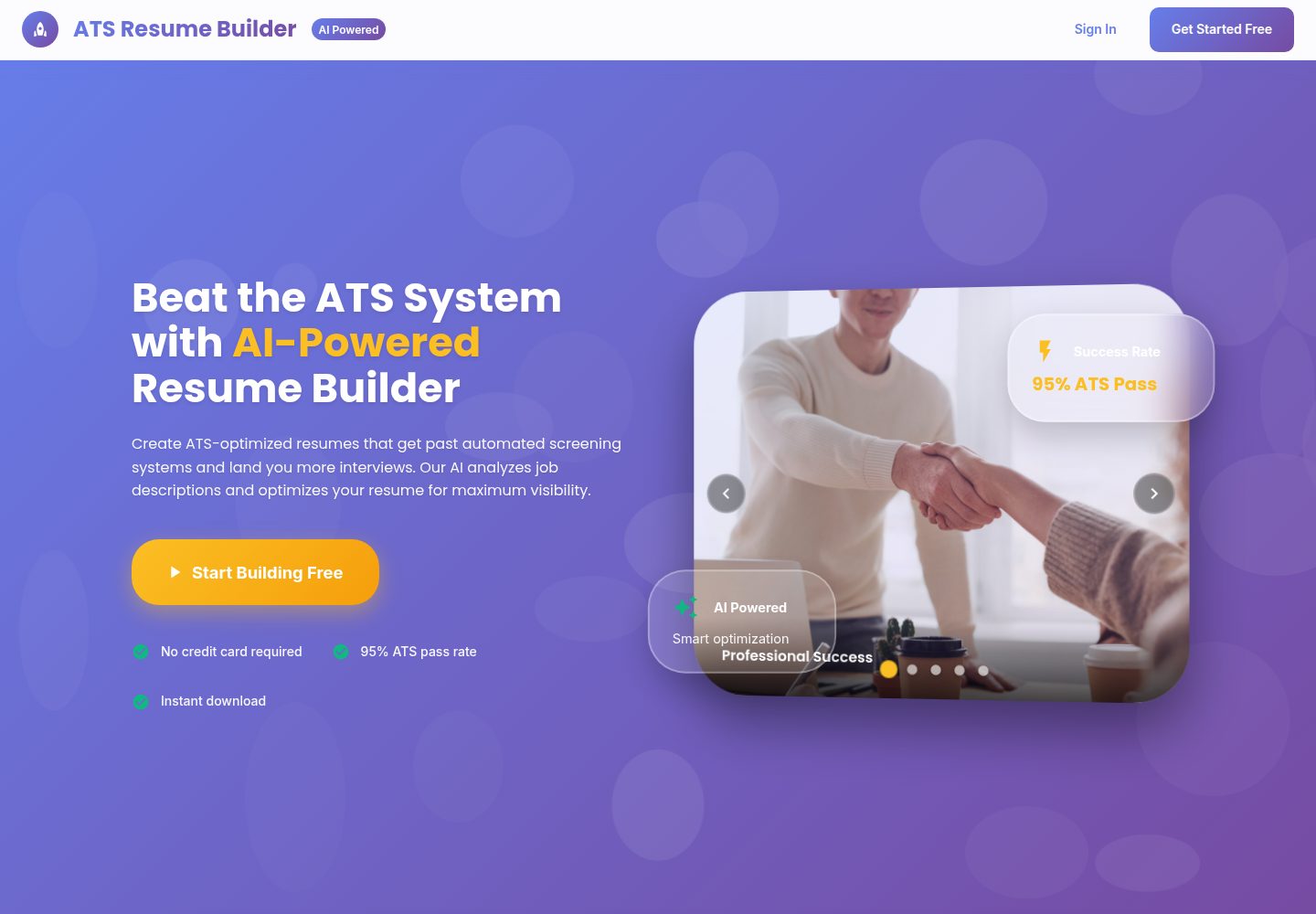
Desktop homepage1 / 2
Desktop captureTop of page
Actual screenshot captured by the server browser.
All pages & views 2
Screenshots show visual appearance; interactive behavior may differ.
Recorded 2026-10-13View source
What stands out
A quick read of the recorded project description.
Keyword gap analysis and bullet rewriting that can weave missing skills into resume content
AI-assisted features such as summary generation, polishing, translation, readability analysis, and cover letter generation
Step-by-step resume editor with manual ordering, AI ordering suggestions, and live preview
Multiple templates with ATS-friendly PDF export, plus public share links and daily view counts
Admin dashboard for managing users, resumes, feedback, and analytics data
Template Details
This is a resume tool project with a separated frontend and backend. The frontend uses React (CRA) and Material UI; the backend uses Node.js, Express, and MongoDB; AI capabilities are provided by Google Gemini.
The core workflow centers on ATS optimization: users upload a PDF resume and parse its content, enter a target job description, and the system returns an ATS score and improvement suggestions, identifies keyword gaps, and weaves missing skills into bullet points. It also offers summary generation, polishing, translation, readability analysis (Flesch score, passive voice, long sentences), and cover letter generation. Resumes are edited through a step-by-step form with manual ordering and AI ordering suggestions, alongside live preview, multiple templates, and ATS-friendly PDF export.
Accounts use email and password login, with Firebase as an optional integration; public share links include daily view counts. The admin dashboard shows users, resumes, feedback, and analytics data, and there is a feedback component plus a forgot/reset password flow implemented via email.
Usage limits: you must provide your own external services such as MongoDB, a Gemini API key, and an email account; the default admin account in the README is only an example and should be changed in .env. The code is MIT licensed, but third-party assets such as demo images, fonts, and icons must be checked separately for licensing, and domains, hosting, databases, and AI calls may incur additional costs.
ReactAdmin dashboardPortfolio
Is it right for your project?
Use Cases
- Job seekers tailoring a resume to a specific job description to improve keyword matching
- New graduates using AI assistance to quickly build a complete first-draft resume
- Resume editing service providers extracting, optimizing, and exporting client resumes in batches
- HR or operations teams reviewing users, resumes, and feedback data through the admin dashboard
Suitable For
- Individual job seekers who need to customize resumes for job descriptions
- Developers who want to study or further develop an AI resume tool
- Practitioners offering resume polishing and formatting services
- Project maintainers who need user and content management dashboards
Getting started & customization
Use these recorded setup notes alongside the repository instructions for your chosen version.
- 1
Install dependencies separately for the backend and frontend, and copy .env.example to .env in each before filling in configuration
- 2
The backend requires MONGODB_URI, JWT_SECRET, GEMINI_API_KEY, EMAIL_USER/EMAIL_PASS, and FRONTEND_URL
- 3
The frontend requires REACT_APP_API_URL pointing to the backend address, plus Firebase-related variables if that integration is enabled
- 4
Create an admin account with npm run create-admin and change the example default credentials in the documentation
- 5
The Firebase private key is multi-line content; you can use the script provided in the repository to generate a single-line escaped string before writing it to .env
License & source material
Usage conditions & limitations
Free to use · keep license noticeThis listing covers the free version in the public repository under the MIT license; the free scope is that version's code and does not mean external services or third-party assets are free.
Must comply with when using
- You may use, modify, commercialize, and distribute this version's code for free.
- When distributing copies or substantial portions of the code, retain the original author's copyright notice and the full MIT license notice.
- The code is provided as is; warranties and liability limitations are governed by the original license and applicable law.
Additional costs & items to verify
- The README mentions a Firebase integration; before enabling related dynamic features, you must configure it yourself and check Firebase quotas and charges.
- Demo images, fonts, icons, and other third-party assets must be checked under their respective licenses and cannot be judged solely by the code's MIT license.
- External services such as domains, hosting, databases, payments, or AI may incur separate charges.
- Before running, you must provide and fill in external service credentials such as the MongoDB connection string, JWT secret, Gemini API key, and email account, otherwise the backend cannot start.
- Features such as AI analysis, keyword gap filling, and summary generation depend on a Google Gemini API key, which you must apply for yourself and which may incur usage fees.
- The forgot/reset password feature depends on a Gmail account and App Password, and you must configure the email service yourself.
- The default admin account and password in the documentation are examples only and must be changed during deployment, otherwise there is a security risk.
- Firebase is an optional integration; if not enabled, related variables do not need to be configured, but if enabled you must provide your own Firebase project credentials.
- Deployment requires external hosting services such as Render and Vercel, which may incur additional costs.
View Original Text Basis
Permission is hereby granted, free of charge
Original License Text
copy .env.example .env # fill MONGODB_URI, JWT_SECRET, GEMINI_API_KEY, EMAIL_*, FRONTEND_URL
Original README
GEMINI_API_KEY=your_gemini_api_key
Original README
EMAIL_USER=your_gmail_address EMAIL_PASS=your_gmail_app_password
Original README
Default (example) creds used in docs: `[email protected]` / `admin123` (change in .env).
Original README
- 🔐 Auth: Email/password (Firebase optional)
Original README
https://github.com/Sarthak-Developer-Coder/ATS_RESUME_BUILDER/blob/main/LICENSEhttps://github.com/Sarthak-Developer-Coder/ATS_RESUME_BUILDER/blob/main/README.md- Backend: Render web service (root `backend/`). Use env vars from `backend/.env.example`. - Frontend: Vercel project (root `frontend/`). Set `REACT_APP_API_URL` to your Render URL.
Original README
Compiled by DeepSeek based on repository license and README ·2026-10-13. Results only cover the materials read; dependencies, images, fonts, and subsequent term changes are subject to their respective original texts.
Project checks & description sources
Template Information
- Source platforms
- GitHub
- Documentation and maintenance reference score
- More documented · 79 / 100
- Technologies
- React
- Website type
- Admin dashboard · Portfolio
How this score is calculated
Our heuristic uses license records (up to 30), a demo link (12), a preview (10), stars (15), recorded maintenance (15), description completeness (8), feature records (5) and classification data (5). It is not a code, security or performance test, or a Google score. A link does not establish tested functionality.
What to verify for this project
- Repository update recorded
- 2025-08-21
- Screenshot last checked
- 2026-10-13
A demo link is listed. Check it with your own content and viewport sizes; its presence does not confirm that forms, authentication or payments work.
The catalog identifies React as the primary stack. Check the actual dependency manifest and lockfile for versions and hosting requirements. These notes use recorded metadata, not a code audit or a deployment test.
Use a selection guide →How this description was prepared
AI-assisted description based on catalog records and repository material. Repository authors are not automatically the reviewers of this description.
Review declaration: [email protected] · 2026-10-13
Inspect the recorded source material
SHA-256: 2d259c29cdb6efe49bd294569593c695d9dd58f7e83dd23b2cfb5e5d6b6d8077
2026-10-13T11:36:18.552Z
Source file / repository# 🚀 ATS Resume Builder (AI Powered) Create ATS-optimized, job‑tailored resumes with AI assistance. Upload your PDF, analyze against any JD, weave missing keywords, polish language, and download a clean PDF. Built with React + Node + MongoDB + Gemini AI. --- ## ✨ Highlights - AI‑powered ATS analysis with actionable fixes - One‑click “Boost My Resume” (Tailor → Weave Keywords → Polish) - Professional templates with live preview and PDF export - Public resume link with daily view analytics - Admin dashboard and feedback collection --- ## 📦 Quickstart (Local) Clone and run locally in minutes. ```bash # 1) Clone git clone https://github.com/Sarthak-Developer-Coder/ATS_RESUME_BUILDER.git cd ATS_RESUME_BUILDER # 2) Backend cd backend npm install # copy your env # Windows PowerShell copy .env.example .env # fill MONGODB_URI, JWT_SECRET, GEMINI_API_KEY, EMAIL_*, FRONTEND_URL npm start # http://localhost:8001 # 3) Frontend (new terminal) cd ../frontend npm install # Windows PowerShell copy .env.example .env # set REACT_APP_API_URL=http://localhost:8001 npm start # http://localhost:3001 ``` Health & docs: - Backend Health: http://localhost:8001/api/health - API Docs: http://localhost:8001/api --- ## 🔐 Admin Access - Admin panel route: `/admin/login` - To create admin user locally: ```bash cd backend npm run create-admin ``` Default (example) creds used in docs: `[email protected]` / `admin123` (change in .env). --- ## 💡 Why This Project? Most resumes miss ATS filters or lack role‑specific alignment. This tool fixes both: clear builder UX + AI that tailors content to each job. --- ## 🎯 Key Features - 🔐 Auth: Email/password (Firebase optional) - 🧑🎓 Smart Builder: Stepper UI, manual reorder + AI reorder suggestions - 🧠 AI Suite: - Generate / Polish / Translate Summary - ATS Analyze vs JD (scores, suggestions) - Keyword Gap + Weave Keywords into bullets responsibly - Readability Insights (Flesch score, passive voice, long sentences) - Tailor to JD (skill prioritization, summary rewrite) - Cover Letter Generator - 📄 Clean, ATS‑safe PDF export - 📥 Resume Upload & parsing (PDF) - 🔗 Public Share with daily view analytics - 💬 Feedback widget (General, Bug, Feature, Help) - 👨💼 Admin Dashboard (users, resumes, feedback, analytics) - 🔑 Forgot/Reset Password via email - 🌐 Responsive Material UI --- ## 🧰 Tech Stack | Layer | Technology | |-------------|------------------------------------------------------------| | Frontend | React (CRA), Material UI, Firebase (optional) | | AI Engine | Google Generative AI (Gemini) | | Backend | Node.js, Express.js, MongoDB, JWT | | PDF Export | html-pdf-node, pdf-parse | | Feedback | EmailJS + Nodemailer | | Admin | JWT Auth, Role-based Access | --- ## 📁 Project Structure ``` ats-resume-builder/ ├── backend/ │ ├── controllers/ # API Logic (Resume, Auth, AI, Admin) │ ├── models/ # Mongoose Schemas │ ├── routes/ # Express Routes │ ├── middleware/ # Auth, Error Handling │ ├── scripts/ # Admin Creation Script │ └── utils/ # PDF Parser, Helpers └── frontend/ ├── public/ # Static Files └── src/ ├── components/ ├── pages/ ├── contexts/ ├── firebase/ └── helper/ ``` --- ## ⚙️ Installation ### 1️⃣ Clone the Repository ```bash git clone https://github.com/Sarthak-Developer-Coder/ATS_RESUME_BUILDER.git cd ATS_RESUME_BUILDER ``` ### 2️⃣ Install Dependencies #### Backend ```bash cd backend npm install ``` #### Frontend ```bash cd ../frontend npm install ``` ### 3️⃣ Environment Setup #### Backend (.env) ```env PORT=8001 MONGODB_URI=your_mongodb_connection_string JWT_SECRET=your_jwt_secret_key GEMINI_API_KEY=your_gemini_api_key FIREBASE_PROJECT_ID=your_firebase_project_id FIREBASE_CLIENT_EMAIL=your_firebase_client_email FIREBASE_PRIVATE_KEY=your_firebase_private_key EMAIL_USER=your_gmail_address EMAIL_PASS=your_gmail_app_password FRONTEND_URL=http://localhost:3001 ``` Helpful: the Firebase Admin private key is multiline. To safely place it in `backend/.env` as a single-line escaped string, use the helper script: ```powershell # from repo root node backend/scripts/encode-firebase-key.js C:\path\to\service-account.json # copy the printed FIREBASE_PRIVATE_KEY=... line and paste into backend/.env ``` #### Frontend (.env) ```env PORT=3001 REACT_APP_FIREBASE_API_KEY=your_firebase_api_key REACT_APP_FIREBASE_AUTH_DOMAIN=your_firebase_auth_domain REACT_APP_FIREBASE_PROJECT_ID=your_firebase_project_id REACT_APP_FIREBASE_STORAGE_BUCKET=your_firebase_storage_bucket REACT_APP_FIREBASE_MESSAGING_SENDER_ID=your_firebase_messaging_sender_id REACT_APP_FIREBASE_APP_ID=your_firebase_app_id REACT_APP_FIREBASE_MEASUREMENT_ID=your_measurement_id REACT_APP_API_URL=http://localhost:8001 ``` ### 4️⃣ Create Admin User ```bash cd backend npm run create-admin ``` --- ## 💻 Run the App You can run the frontend and backend together or separately. **Backend** ```bash cd backend npm start ``` **Frontend** ```bash cd frontend npm start ``` Then open http://localhost:3001 --- ## 🌐 Deploy - Backend: Render web service (root `backend/`). Use env vars from `backend/.env.example`. - Frontend: Vercel project (root `frontend/`). Set `REACT_APP_API_URL` to your Render URL. --- ## 🔧 Fixed Issues (Examples) ### ✅ Admin Credentials - Email: `[email protected]` - Password: `admin123` - Added script to create admin user: `npm run create-admin` ### ✅ Forgot Password Functionality - Fixed email sending with proper HTML templates - Added fallback for development (logs reset URL) - Improved error handling and user feedback - Added proper token validation and expiration ### ✅ Resume Download PDF Formatting - Fixed PDF generation to match preview exactly - Improved responsive design for different content lengths - Added dynamic font sizing based on content volume - Enhanced spacing and layout consistency - Fixed template rendering issues --- ## 📌 Use Cases - 🧑🎓 Freshers: Quickly generate a professional resume with AI help. - 💼 Working Professionals: Score resumes against job descriptions to increase chances. - 📝 Resume Review Services: Extract content, improve, and export with ease. - 📤 Job Portals: Integrate AI scoring as an enhancement. - 👨💼 HR Teams: Admin dashboard for user management and analytics. --- ## 🔑 Email Configuration For forgot password functionality, configure these environment variables: ```env EMAIL_USER=your_gmail_address EMAIL_PASS=your_gmail_app_password ``` To get a Gmail App Password: 1. Enable 2‑Factor Authentication on your Gmail account 2. Google Account Settings → Security → App Passwords 3. Generate a new app password for "Mail" 4. Use this password in `EMAIL_PASS` --- ## 🖼️ Screenshots Place your images in `docs/screenshots/` with the names below (or adjust paths in this README). | Login | Profile | Dashboard | |---|---|---| |  |  |  | | Upload Resume | ATS Score – Input | ATS Score – Results | |---|---|---| |  |  |  | | AI Recommendations & Keywords | Template Select | Summary (AI) | |---|---|---| |  |  |  | | Resume Preview | Feedback | |---|---| |  |  | --- ## 👨💻 Author Made with ❤️ by **Sarthak Nag** 📧 [email protected] 🔗 [LinkedIn](https://linkedin.com/in/sarthak-nag-b91861291) Made with ❤️ by **Prerit Nag** 📧 [email protected] 🔗 [LinkedIn](https://www.linkedin.com/in/prerit-nag-378b4a284/) ## 📃 License MIT License
Explore similar templates
Compare previews and descriptions within the same stack and category.
ant-design-pro
Ant Design Pro is an enterprise-grade React admin scaffold built on React 19, Umi Max 4, and antd 6 with TypeScript.
React · Admin dashboard

coreui-free-react-admin-template
CoreUI's free React admin template, built on React and the CoreUI component library, provides dashboard layouts, sidebar navigation, routing, and example views. It includes .cursorrules, ARCHITECTURE.md, and DEVELOPMENT.md context files, plus JSDoc comments and PropTypes, to support AI-assisted development.
React · Admin dashboard

fastapi-react
A Cookiecutter template for FastAPI + React (TypeScript) full-stack projects, integrating PostgreSQL, SQLAlchemy, Alembic, Celery, Redis, JWT authentication, a react-admin admin panel, and a Docker Compose development environment with Nginx reverse proxy.
React · Admin dashboard

react-antd-admin-template
A React + Ant Design admin template for mid- and back-office products, with built-in login/logout, dynamic routing, permission checks, and user management.
React · Admin dashboard

react-saas-template
A React and Material-UI template for SaaS or admin websites, offering dashboard, chart, blog, payment, and file upload components. It uses Create-React-App, React-Router, Recharts, React-Stripe-js, React-Dropzone, and React-Cropper, with theme colors centralized in src/theme.js.
React · Admin dashboard

react-material-admin
React Material Admin is an MIT-licensed React admin template by Flatlogic, built on Material-UI. It provides dashboards, charts, tables, authentication, profile, and notification pages, with three color themes and responsive layouts.
React · Admin dashboard