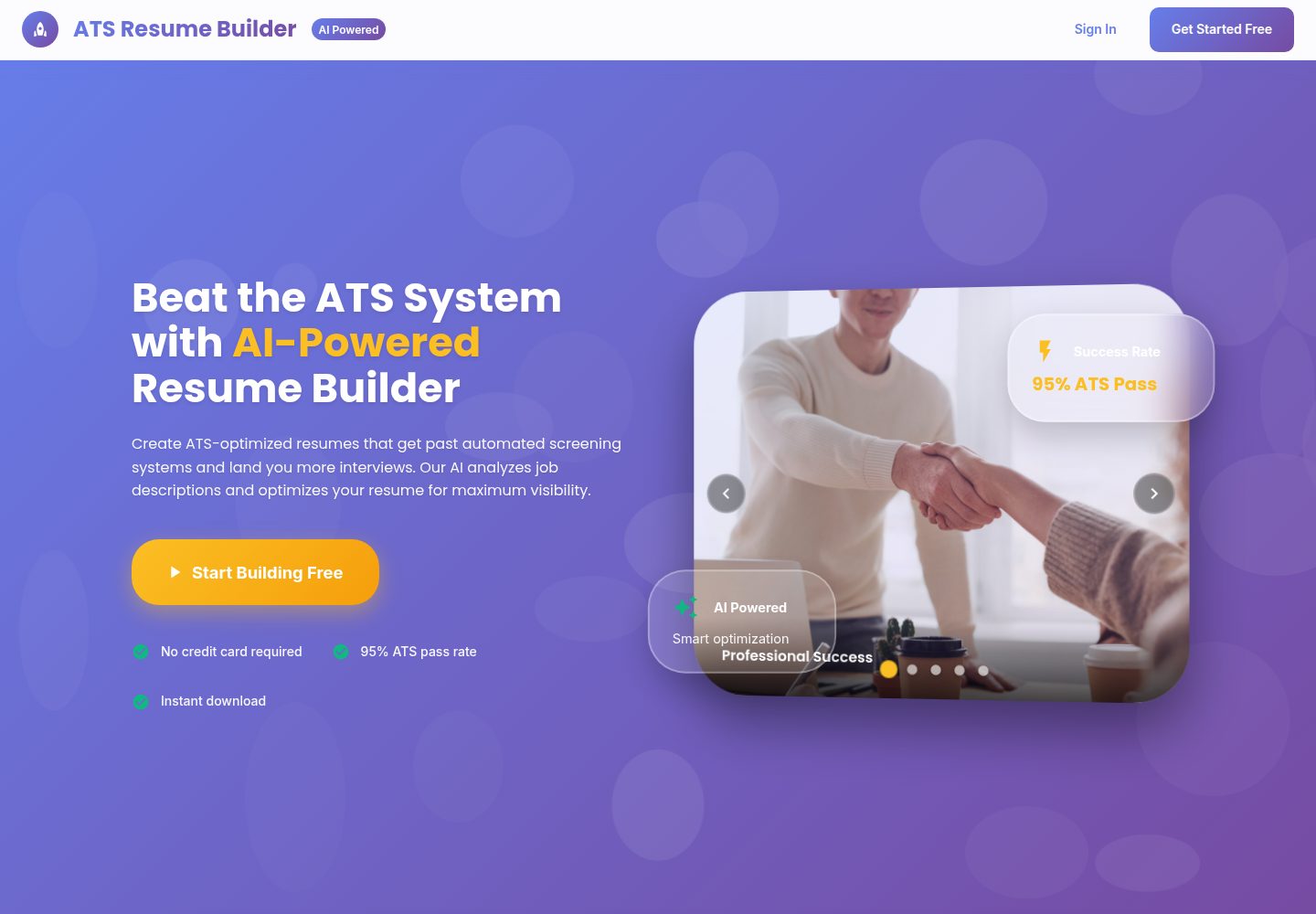
上传 PDF 简历并解析内容,对照职位描述输出 ATS 评分与改进建议
React后台作品集
ATS_RESUME_BUILDER — React 后台模板
作者 Sarthak-Developer-Coder
基于 React 与 Node/Express 的 AI 简历构建器,可上传 PDF 简历、对照职位描述做 ATS 分析与关键词补全,并导出 PDF、生成公开分享链接。
看看你的网站会是什么样
浏览真实页面截图,比较内容排版与手机效果。点击下方缩略图切换,放大查看整页细节。
全部页面与视图 2
截图用于了解视觉与布局,交互效果请以实际项目为准。
采集于 2026-10-13查看来源
值得关注的模板亮点
从已有项目资料中,快速了解它的特点。
关键词缺口分析与要点改写,可将缺失技能融入简历内容
摘要生成、润色、翻译、可读性分析与求职信生成等 AI 辅助功能
分步式简历编辑器,支持手动排序与 AI 排序建议、实时预览
多套模板配合 ATS 友好的 PDF 导出,并提供公开分享链接与每日浏览统计
后台管理面板,管理用户、简历、反馈与分析数据
模板详细介绍
这是一个前后端分离的简历工具项目。前端使用 React(CRA)与 Material UI,后端使用 Node.js、Express 与 MongoDB,AI 能力由 Google Gemini 提供。
核心流程围绕 ATS 优化展开:用户上传 PDF 简历并解析内容,输入目标职位描述后,系统给出 ATS 评分与改进建议,识别关键词缺口并把缺失技能融入要点,同时提供摘要生成、润色、翻译、可读性分析(Flesch 分数、被动语态、长句)以及求职信生成。简历通过分步表单编辑,支持手动排序与 AI 排序建议,配合实时预览、多套模板和 ATS 友好的 PDF 导出。
账号体系为邮箱密码登录,Firebase 为可选集成;公开分享链接附带每日浏览统计。后台管理面板可查看用户、简历、反馈与分析数据,另有反馈组件与通过邮件实现的忘记/重置密码流程。
使用限制:需要自行准备 MongoDB、Gemini API Key 以及邮件账号等外部服务;README 中的管理员默认账号仅为示例,应在 .env 中修改。代码采用 MIT 许可,但演示图片、字体、图标等第三方素材需单独核对许可,域名、托管、数据库与 AI 调用可能产生额外费用。
React后台作品集
适合你的项目吗?
适用场景
- 求职者针对具体职位描述调整简历,提升关键词匹配度
- 应届生借助 AI 辅助快速搭建结构完整的简历初稿
- 简历修改服务方批量提取、优化并导出客户简历
- HR 或运营团队通过后台面板查看用户、简历与反馈数据
适合人群
- 需要按职位描述定制简历的个人求职者
- 希望研究或二次开发 AI 简历工具的开发者
- 提供简历润色与排版服务的从业者
- 需要用户与内容管理后台的项目维护者
上手与定制指南
结合仓库当前版本的说明,按下面的资料检查内容、配置与运行要求。
- 1
后端与前端分别安装依赖,并各自复制 .env.example 为 .env 后填写配置
- 2
后端需配置 MONGODB_URI、JWT_SECRET、GEMINI_API_KEY、EMAIL_USER/EMAIL_PASS 与 FRONTEND_URL
- 3
前端需设置 REACT_APP_API_URL 指向后端地址,并填写 Firebase 相关变量(如启用该集成)
- 4
通过 npm run create-admin 创建管理员账号,并修改文档中的示例默认凭据
- 5
Firebase 私钥为多行内容,可用仓库提供的脚本生成单行转义字符串后再写入 .env
授权与来源资料
使用条件与限制
免费使用 · 保留许可声明本次收录的是公开仓库中采用 MIT 许可的免费版本;免费范围为该版本代码,不代表外部服务或第三方素材免费。
使用时需要遵守
- 允许免费使用、修改、商用和分发该版本代码。
- 分发代码副本或实质性部分时,保留原作者版权声明和完整 MIT 许可声明。
- 代码按现状提供;担保与责任限制以原许可证及适用法律为准。
额外费用与待核对事项
- README 提及 Firebase 集成;启用相关动态功能前需自行配置,并核对 Firebase 的额度与收费。
- 演示图片、字体、图标及其他第三方素材需按各自许可核对,不能仅凭代码的 MIT 许可判断。
- 域名、托管、数据库、支付或 AI 等外部服务可能另外收费。
- 运行前必须自行准备并填写 MongoDB 连接串、JWT 密钥、Gemini API Key 与邮件账号等外部服务凭据,否则后端无法启动。
- AI 分析、关键词补全、摘要生成等功能依赖 Google Gemini API Key,需自行申请并可能产生调用费用。
- 忘记/重置密码功能依赖 Gmail 账号与 App Password,需自行配置邮箱服务。
- 文档中的管理员默认账号密码仅为示例,部署时必须自行修改,否则存在安全风险。
- Firebase 为可选集成,若不启用则无需配置相关变量,但启用时需自行准备 Firebase 项目凭据。
- 部署需使用 Render 与 Vercel 等外部托管服务,可能产生额外费用。
查看原文依据
Permission is hereby granted, free of charge
许可证原文
copy .env.example .env # fill MONGODB_URI, JWT_SECRET, GEMINI_API_KEY, EMAIL_*, FRONTEND_URL
README 原文
GEMINI_API_KEY=your_gemini_api_key
README 原文
EMAIL_USER=your_gmail_address EMAIL_PASS=your_gmail_app_password
README 原文
Default (example) creds used in docs: `[email protected]` / `admin123` (change in .env).
README 原文
- 🔐 Auth: Email/password (Firebase optional)
README 原文
https://github.com/Sarthak-Developer-Coder/ATS_RESUME_BUILDER/blob/main/LICENSEhttps://github.com/Sarthak-Developer-Coder/ATS_RESUME_BUILDER/blob/main/README.md- Backend: Render web service (root `backend/`). Use env vars from `backend/.env.example`. - Frontend: Vercel project (root `frontend/`). Set `REACT_APP_API_URL` to your Render URL.
README 原文
DeepSeek 根据仓库许可证和 README 整理 ·2026-10-13。结果仅覆盖已读取资料,依赖、图片、字体及后续条款变更以各自原文为准。
项目核对记录与介绍依据
模板资料
- 来源平台
- GitHub
- 资料与维护参考分
- 资料较完整 · 79 / 100
- 技术栈
- React
- 网站类型
- 后台 · 作品集
这个分数如何计算
本站按许可资料(最高30分)、演示链接(12分)、预览图(10分)、Star数(15分)、记录的维护时间(15分)、描述完整度(8分)、功能记录(5分)和分类资料(5分)计算。它不是代码、安全或性能测试,也不是 Google 评分;有链接不代表已实测可用。
这个项目需要核对什么
- 记录的仓库更新时间
- 2025-08-21
- 截图检查日期
- 2026-10-13
已收录演示链接。请用你的内容与屏幕尺寸检查;有演示不代表表单、认证或支付已经可用。
目录记录的主要技术栈是 React。请通过依赖清单和锁文件核对实际版本与托管要求。这些说明基于收录资料,不代表代码审计或部署实测。
查看具体选型方法 →介绍的制作与核对状态
介绍由 AI 辅助整理目录与仓库资料。仓库作者不等于这篇介绍的审核者。
审核声明: [email protected] · 2026-10-13
查看当时使用的来源资料
SHA-256: 2d259c29cdb6efe49bd294569593c695d9dd58f7e83dd23b2cfb5e5d6b6d8077
2026-10-13T11:36:18.552Z
来源文件 / 仓库# 🚀 ATS Resume Builder (AI Powered) Create ATS-optimized, job‑tailored resumes with AI assistance. Upload your PDF, analyze against any JD, weave missing keywords, polish language, and download a clean PDF. Built with React + Node + MongoDB + Gemini AI. --- ## ✨ Highlights - AI‑powered ATS analysis with actionable fixes - One‑click “Boost My Resume” (Tailor → Weave Keywords → Polish) - Professional templates with live preview and PDF export - Public resume link with daily view analytics - Admin dashboard and feedback collection --- ## 📦 Quickstart (Local) Clone and run locally in minutes. ```bash # 1) Clone git clone https://github.com/Sarthak-Developer-Coder/ATS_RESUME_BUILDER.git cd ATS_RESUME_BUILDER # 2) Backend cd backend npm install # copy your env # Windows PowerShell copy .env.example .env # fill MONGODB_URI, JWT_SECRET, GEMINI_API_KEY, EMAIL_*, FRONTEND_URL npm start # http://localhost:8001 # 3) Frontend (new terminal) cd ../frontend npm install # Windows PowerShell copy .env.example .env # set REACT_APP_API_URL=http://localhost:8001 npm start # http://localhost:3001 ``` Health & docs: - Backend Health: http://localhost:8001/api/health - API Docs: http://localhost:8001/api --- ## 🔐 Admin Access - Admin panel route: `/admin/login` - To create admin user locally: ```bash cd backend npm run create-admin ``` Default (example) creds used in docs: `[email protected]` / `admin123` (change in .env). --- ## 💡 Why This Project? Most resumes miss ATS filters or lack role‑specific alignment. This tool fixes both: clear builder UX + AI that tailors content to each job. --- ## 🎯 Key Features - 🔐 Auth: Email/password (Firebase optional) - 🧑🎓 Smart Builder: Stepper UI, manual reorder + AI reorder suggestions - 🧠 AI Suite: - Generate / Polish / Translate Summary - ATS Analyze vs JD (scores, suggestions) - Keyword Gap + Weave Keywords into bullets responsibly - Readability Insights (Flesch score, passive voice, long sentences) - Tailor to JD (skill prioritization, summary rewrite) - Cover Letter Generator - 📄 Clean, ATS‑safe PDF export - 📥 Resume Upload & parsing (PDF) - 🔗 Public Share with daily view analytics - 💬 Feedback widget (General, Bug, Feature, Help) - 👨💼 Admin Dashboard (users, resumes, feedback, analytics) - 🔑 Forgot/Reset Password via email - 🌐 Responsive Material UI --- ## 🧰 Tech Stack | Layer | Technology | |-------------|------------------------------------------------------------| | Frontend | React (CRA), Material UI, Firebase (optional) | | AI Engine | Google Generative AI (Gemini) | | Backend | Node.js, Express.js, MongoDB, JWT | | PDF Export | html-pdf-node, pdf-parse | | Feedback | EmailJS + Nodemailer | | Admin | JWT Auth, Role-based Access | --- ## 📁 Project Structure ``` ats-resume-builder/ ├── backend/ │ ├── controllers/ # API Logic (Resume, Auth, AI, Admin) │ ├── models/ # Mongoose Schemas │ ├── routes/ # Express Routes │ ├── middleware/ # Auth, Error Handling │ ├── scripts/ # Admin Creation Script │ └── utils/ # PDF Parser, Helpers └── frontend/ ├── public/ # Static Files └── src/ ├── components/ ├── pages/ ├── contexts/ ├── firebase/ └── helper/ ``` --- ## ⚙️ Installation ### 1️⃣ Clone the Repository ```bash git clone https://github.com/Sarthak-Developer-Coder/ATS_RESUME_BUILDER.git cd ATS_RESUME_BUILDER ``` ### 2️⃣ Install Dependencies #### Backend ```bash cd backend npm install ``` #### Frontend ```bash cd ../frontend npm install ``` ### 3️⃣ Environment Setup #### Backend (.env) ```env PORT=8001 MONGODB_URI=your_mongodb_connection_string JWT_SECRET=your_jwt_secret_key GEMINI_API_KEY=your_gemini_api_key FIREBASE_PROJECT_ID=your_firebase_project_id FIREBASE_CLIENT_EMAIL=your_firebase_client_email FIREBASE_PRIVATE_KEY=your_firebase_private_key EMAIL_USER=your_gmail_address EMAIL_PASS=your_gmail_app_password FRONTEND_URL=http://localhost:3001 ``` Helpful: the Firebase Admin private key is multiline. To safely place it in `backend/.env` as a single-line escaped string, use the helper script: ```powershell # from repo root node backend/scripts/encode-firebase-key.js C:\path\to\service-account.json # copy the printed FIREBASE_PRIVATE_KEY=... line and paste into backend/.env ``` #### Frontend (.env) ```env PORT=3001 REACT_APP_FIREBASE_API_KEY=your_firebase_api_key REACT_APP_FIREBASE_AUTH_DOMAIN=your_firebase_auth_domain REACT_APP_FIREBASE_PROJECT_ID=your_firebase_project_id REACT_APP_FIREBASE_STORAGE_BUCKET=your_firebase_storage_bucket REACT_APP_FIREBASE_MESSAGING_SENDER_ID=your_firebase_messaging_sender_id REACT_APP_FIREBASE_APP_ID=your_firebase_app_id REACT_APP_FIREBASE_MEASUREMENT_ID=your_measurement_id REACT_APP_API_URL=http://localhost:8001 ``` ### 4️⃣ Create Admin User ```bash cd backend npm run create-admin ``` --- ## 💻 Run the App You can run the frontend and backend together or separately. **Backend** ```bash cd backend npm start ``` **Frontend** ```bash cd frontend npm start ``` Then open http://localhost:3001 --- ## 🌐 Deploy - Backend: Render web service (root `backend/`). Use env vars from `backend/.env.example`. - Frontend: Vercel project (root `frontend/`). Set `REACT_APP_API_URL` to your Render URL. --- ## 🔧 Fixed Issues (Examples) ### ✅ Admin Credentials - Email: `[email protected]` - Password: `admin123` - Added script to create admin user: `npm run create-admin` ### ✅ Forgot Password Functionality - Fixed email sending with proper HTML templates - Added fallback for development (logs reset URL) - Improved error handling and user feedback - Added proper token validation and expiration ### ✅ Resume Download PDF Formatting - Fixed PDF generation to match preview exactly - Improved responsive design for different content lengths - Added dynamic font sizing based on content volume - Enhanced spacing and layout consistency - Fixed template rendering issues --- ## 📌 Use Cases - 🧑🎓 Freshers: Quickly generate a professional resume with AI help. - 💼 Working Professionals: Score resumes against job descriptions to increase chances. - 📝 Resume Review Services: Extract content, improve, and export with ease. - 📤 Job Portals: Integrate AI scoring as an enhancement. - 👨💼 HR Teams: Admin dashboard for user management and analytics. --- ## 🔑 Email Configuration For forgot password functionality, configure these environment variables: ```env EMAIL_USER=your_gmail_address EMAIL_PASS=your_gmail_app_password ``` To get a Gmail App Password: 1. Enable 2‑Factor Authentication on your Gmail account 2. Google Account Settings → Security → App Passwords 3. Generate a new app password for "Mail" 4. Use this password in `EMAIL_PASS` --- ## 🖼️ Screenshots Place your images in `docs/screenshots/` with the names below (or adjust paths in this README). | Login | Profile | Dashboard | |---|---|---| |  |  |  | | Upload Resume | ATS Score – Input | ATS Score – Results | |---|---|---| |  |  |  | | AI Recommendations & Keywords | Template Select | Summary (AI) | |---|---|---| |  |  |  | | Resume Preview | Feedback | |---|---| |  |  | --- ## 👨💻 Author Made with ❤️ by **Sarthak Nag** 📧 [email protected] 🔗 [LinkedIn](https://linkedin.com/in/sarthak-nag-b91861291) Made with ❤️ by **Prerit Nag** 📧 [email protected] 🔗 [LinkedIn](https://www.linkedin.com/in/prerit-nag-378b4a284/) ## 📃 License MIT License
看看同类模板
对比同技术栈与用途的模板,找到更适合的视觉与内容结构。
ant-design-pro
Ant Design Pro 是 Ant Design 官方推出的企业级中后台前端脚手架,基于 React 19、Umi Max 4 和 antd 6 构建,内置 TypeScript 支持。
React · 后台

coreui-free-react-admin-template
Free React Admin & Dashboard Template Built for AI-Assisted Development
React · 后台

fastapi-react
fastapi-react 是一个基于 Cookiecutter 的模板,用于快速搭建 FastAPI 与 React(TypeScript)的全栈项目。
React · 后台

react-antd-admin-template
一个基于React+Antd的后台管理模版,在线预览https://nlrx-wjc.github.io/react-antd-admin-template/
React · 后台

react-saas-template
🌊 Template for building an SaaS / admin website using React + Material-UI
React · 后台

react-material-admin
☄️React Material Admin is a React template built with Material-UI
React · 后台