Uses Jekyll to convert Markdown files into HTML pages at build time
JekyllHTMLBlog
markdown-blog — Jekyll Blog Template
By scarletti-ben
A Jekyll blog site based on the Chirpy theme that generates HTML pages from Markdown files and deploys to GitHub Pages.
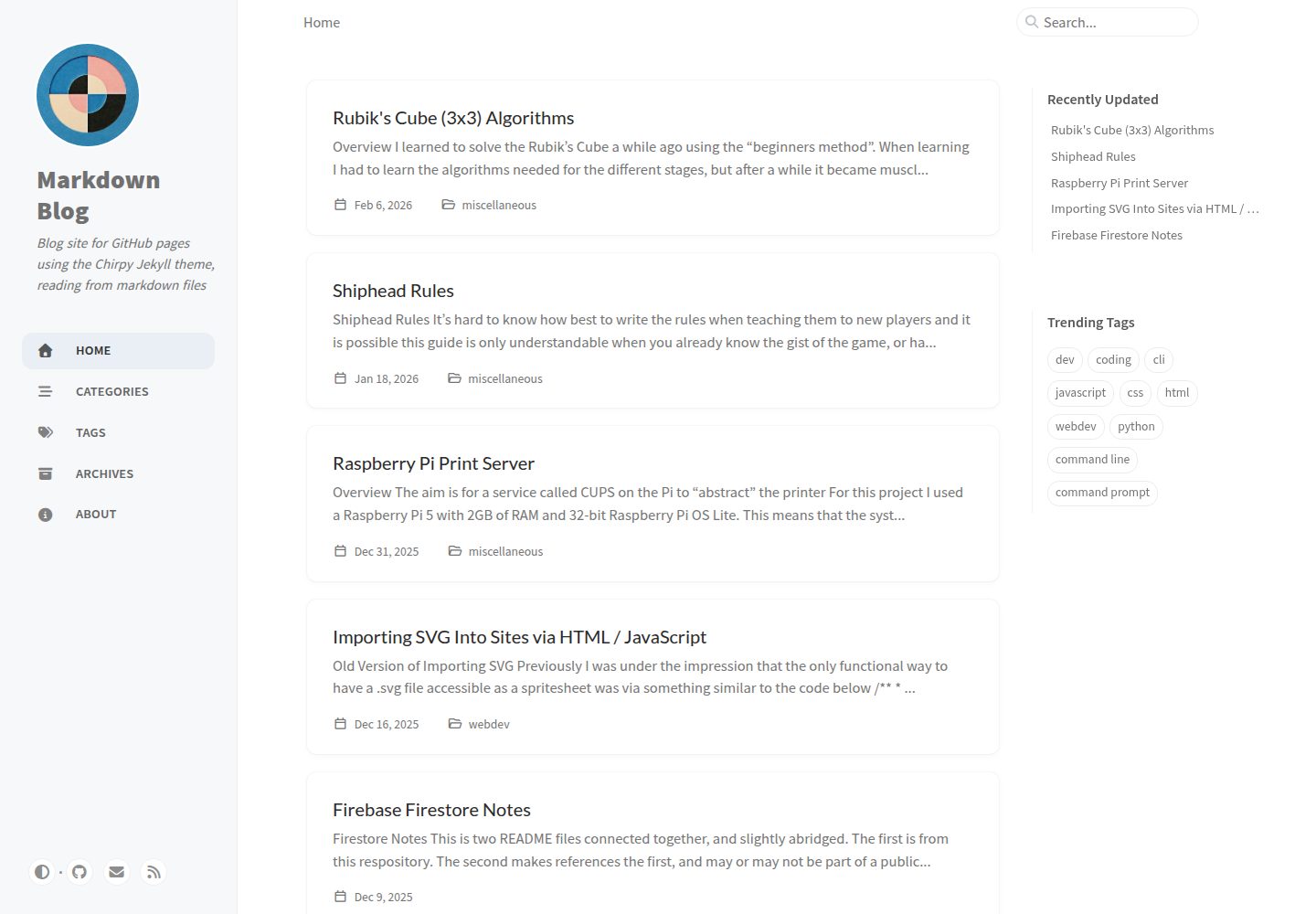
Explore the design
Compare the page layouts and mobile experience. Open any screenshot for a closer look.
Desktop homepage1 / 3
Desktop captureTop of page
Actual screenshot captured by the server browser.
All pages & views 3
Screenshots show visual appearance; interactive behavior may differ.
Recorded 2026-10-04View source
What stands out
A quick read of the recorded project description.
Based on the Chirpy theme, generated from the chirpy-starter template
Automatically builds and deploys to GitHub Pages via a GitHub Actions workflow when pushing to the main branch
Posts support YAML front matter for setting title, date, description, categories, and tags, and this affects search and sorting
PWA option is enabled by default; the build output includes a service worker, supporting offline access and installation to devices
The build process generates a search.json file used for on-site search
Template Details
This is the source code for a static blog site hosted on GitHub Pages. It uses Jekyll as the static site generator, reads Markdown files, and converts them to HTML pages during the build phase. The site is based on the Chirpy theme, and the repository was generated from the chirpy-starter template via "Use this template," so it retains that theme's page structure and configuration approach.
For content organization, posts are stored in the _posts directory. Each Markdown file can have YAML front matter at the top to declare title, date, description, categories, and tags, and this affects the site's search and sorting. The categories field can be understood as a hierarchical "folder" structure, while tags do not form the same hierarchical relationship. The left navigation tabs are defined by YAML templates in the _tabs directory, where about.md is typically used for site information. Files in the assets directory are built into the site and can be referenced in Markdown.
Build and deployment are defined by .github/workflows/pages-deploy.yml. The repository's GitHub Pages "Build and deployment/Source" setting is set to GitHub Actions, and pushing to the main branch triggers a build. Build status and logs can be viewed in the Actions tab. _config.yml is Jekyll's main configuration file, setting global values such as title, description, base URL, author information, and plugins. Before the first build, _config.yml and pages-deploy.yml need to be updated with personal and repository information.
Known limitations and notes: htmlproofer, which validates links at the end of the build, often reports errors because local file references in Markdown do not match the built site paths; it is currently disabled in pages-deploy.yml. Because post URLs omit dates, posts with the same name but different filenames may point to the same path; for example, 1995-12-22-test.md and 2025-12-22-test.md both point to markdown-blog/posts/test. The _scarletti directory is added to the exclude section of _config.yml and is used to store files that do not participate in the build. Changes to template files are generally marked with POSTIT comments.
JekyllHTMLBlog
Is it right for your project?
Use Cases
- Publishing a personal blog written in Markdown on GitHub Pages
- A static site that needs categories and tags to organize posts and includes on-site search
- A blog that wants to customize the build process via GitHub Actions and use additional plugins
- A blog site that needs PWA offline access and can be installed to devices
Suitable For
- Authors who are used to writing in Markdown and want to manage content with Git
- Individual developers hosting blogs on GitHub Pages
- Users who accept the Chirpy theme's default structure and need only minor customization
Getting started & customization
Use these recorded setup notes alongside the repository instructions for your chosen version.
- 1
Before the first build, update _config.yml and .github/workflows/pages-deploy.yml with personal and repository information
- 2
GitHub Pages' Build and deployment/Source must be set to GitHub Actions; pushing to the main branch triggers a build
- 3
htmlproofer is currently disabled in pages-deploy.yml to avoid link validation failures caused by mismatches between local references and build paths
- 4
The favicon can be generated from a 512x512 image using Favicon Generator; after unzipping, place it in assets/img/favicons
- 5
Post URLs omit dates, so files with the same name may cause path conflicts; avoid this when naming
License & source material
Usage conditions & limitations
Free to use · keep license noticeThis entry covers the free version under the MIT license in a public repository; the free scope is the code of this version and does not mean that external services or third-party assets are free.
Must comply with when using
- Free use, modification, commercial use, and distribution of this version's code are permitted.
- When distributing copies or substantial portions of the code, retain the original author's copyright notice and the full MIT license notice.
- The code is provided as is; warranties and limitations of liability are governed by the original license and applicable law.
Additional costs & items to verify
- Before use, _config.yml and pages-deploy.yml must be modified with personal and repository information, otherwise the site cannot build correctly.
- The link validation tool htmlproofer at the end of the build is currently disabled, so link validity is not checked automatically.
- Post URLs omit dates, so files with the same name from different dates point to the same path; avoid naming conflicts.
- Generating a favicon requires using the external website Favicon Generator to process a 512x512 image.
- The project was generated from the chirpy-starter template and depends on the Chirpy theme gem and the Jekyll ecosystem.
- Demo images, fonts, icons, and other third-party assets must be checked against their respective licenses; they cannot be judged solely by the code's MIT license.
- External services such as domains, hosting, databases, payments, or AI may incur additional charges.
View Original Text Basis
Permission is hereby granted, free of charge
Original License Text
For your site to build correctly the first time you will need to make sure that `_config.yml` and `pages-deploy.yml` are correctly updated with your personal and repository-specific information.
Original README
Currently `htmlproofer` is disabled within `pages-deploy.yml`
Original README
Due to the way that the pages are made, name clashes can exist as the date is omitted from the filename
Original README
Take a `512x512` image and go to [`Favicon Generator`](https://realfavicongenerator.net/)
Original README
https://github.com/scarletti-ben/markdown-blog/blob/main/LICENSEhttps://github.com/scarletti-ben/markdown-blog/blob/main/README.mdThis repository was generated from the template repository [`chirpy-starter`](https://github.com/cotes2020/chirpy-starter) via the "Use this template" button.
Original README
Compiled by DeepSeek based on repository license and README ·2026-10-04. Results only cover the materials read; dependencies, images, fonts, and subsequent term changes are subject to their respective original texts.
Project checks & description sources
Template Information
- Source platforms
- GitHub
- Documentation and maintenance reference score
- More documented · 85 / 100
- Technologies
- Jekyll · HTML
- Website type
- Blog
How this score is calculated
Our heuristic uses license records (up to 30), a demo link (12), a preview (10), stars (15), recorded maintenance (15), description completeness (8), feature records (5) and classification data (5). It is not a code, security or performance test, or a Google score. A link does not establish tested functionality.
What to verify for this project
- Repository update recorded
- 2026-02-21
- Screenshot last checked
- 2026-10-04
A demo link is listed. Check it with your own content and viewport sizes; its presence does not confirm that forms, authentication or payments work.
The catalog identifies Jekyll as the primary stack. Check the actual dependency manifest and lockfile for versions and hosting requirements. These notes use recorded metadata, not a code audit or a deployment test.
Use a selection guide →How this description was prepared
AI-assisted description based on catalog records and repository material. Repository authors are not automatically the reviewers of this description.
Review declaration: [email protected] · 2026-10-04
Inspect the recorded source material
SHA-256: 94ced2864a6d9582b8beaa9af4e2ee4e907235706a661d81fa01ba5c44f1ba4c
2026-10-04T01:07:49.533Z
Source file / repository# Markdown Blog
This repository contains the source code for a blog site that is hosted on `GitHub Pages` [here](https://scarletti-ben.github.io/markdown-blog/). It uses the `Chirpy` theme for `Jekyll` and converts `Markdown` files to `HTML` pages during the build process.
## Jekyll
`Jekyll` is a static site generator that converts `Markdown` files to `HTML` pages. It uses templates to ensure the resulting pages are close to uniform, and can also read `YAML` "front matter" from `Markdown` files as a sort of file metadata.
For this repository the setting for `GitHub Pages` "Build and deployment/Source" [here](https://github.com/scarletti-ben/markdown-blog/settings) is set to "GitHub Actions". You don't always need to turn this setting on, and `Jekyll` may still run if a repository is in a compatible structure. But with the setting on you can customise the build process a little more, and use unsupported plugins. In essence you can control `GitHub Actions` more precisely.
Currently the repository is set up to run the build process whenever a change is pushed to the `main` branch, you can check the status of each build via the "actions" tab of the repository [here](https://github.com/scarletti-ben/markdown-blog/actions). If there are any errors, you can read the logs.
> [!NOTE]
> One example error from this repository comes from `htmlproofer`, which is a `Ruby` `gem` that tries to validate the site in the final stages, and often finds that links within `Markdown` files are broken as the local file references don't match built site paths. Currently `htmlproofer` is disabled within `pages-deploy.yml`
## Chirpy
This repository was generated from the template repository [`chirpy-starter`](https://github.com/cotes2020/chirpy-starter) via the "Use this template" button. `Chirpy` is a theme `gem` for `Jekyll`, and `chirpy-starter` makes it quite simple to build and deploy a site to `GitHub` pages that uses the `Chirpy` theme.
For your site to build correctly the first time you will need to make sure that `_config.yml` and `pages-deploy.yml` are correctly updated with your personal and repository-specific information.
## Front Matter
Normally you won't find front matter in `Markdown` files as it isn't feature of the language by default. However, `Jekyll` will read `YAML` that it finds between two sets of `---` found at the top of a `Markdown` file
The front matter in the context of a post is read as a metadata of sorts for the post, and contains fields that influence how the post appears on the site. As well as the search function / sorting, such as `date` and `tags`. An example post front matter can be found below
```yaml
---
title: "Node.js, npm, nvm and npx Setup"
date: "2025-05-12"
# last_modified_at: "2025-05-12"
description: "Notes on installing and using node.js, npm, nvm and npx"
categories: [
coding
]
tags: [
webdev, javascript, html, css, node, node.js, npm, node package manager, node version manager, nvm, npx, node package execute
]
---
```
The `categories` field can be thought of as a sort of folder structure eg. `Web Development` / `JavaScript` would be two "folders" deep, this is separate from the `tags` field which doesn't create a connected structure in the same sense
## Repository Overview
There are a great deal of files and directories in this repository that serve important purposes or allow you to fine-tune certain things. But for my purposes, the only files and directories I am editing can be found below. My aim in the future is to build a similar site from the ground up, rather than attempt to "hack together" template code and my own code into a “Frankenstein’s monster” of a project.
### `.github/workflows/pages-deploy.yml`
This file defines a `GitHub Actions` "workflow" that builds the site and deploys it to `GitHub Pages`. It automates the process every time you push to the `main` branch, or any branch specified in `on/push/branches`. It specifies the environment for the virtual machine (`VM`) used for building and deploying and specifies a list of commands / processes to execute in order on the `VM`.
```yaml
jobs:
build:
runs-on: ubuntu-latest
steps:
...
deploy:
...
```
### `_config.yml`
This is the main configuration file for `Jekyll`. It sets global values used by the site and theme, such as the title, description, base URL, author info, and plugin settings. It’s required for your site to build properly.
### `_posts`
Contains all the `Mardown` files with [front matter](#front-matter). These will be read by [`Jekyll`](#jekyll) to build the site, and influence the search function.
### `_tabs`
Contains template `YAML` for the tabs that will appear on the left hand side of the page. Currently I feel it is best to leave them as they are. One exception is the tab `about.md` which is likely to contain site information in the same sort of format as can be found in this `README`.
## `assets`
You can add any files and folders into the `assets` directory, and reference them within your `Markdown` files. Files within the `assets` directory will be built into, and accessible from, your site.
## Progressive Web App (PWA)
By default the `pwa` option is enabled in `_config.yml`, this means that the built site is a `Progressive Web App` (`PWA`). In essence this makes the site closer to a native application when using a mobile device. It also gives the ability to "install" the app to your device for both mobile and desktop.
Enabling `PWA` enables a `service worker` to handle caching, this means that the site can be used offline, and will use cached files to load the site faster. Due to the caching, the `service worker` runs in the background and checks for updates to its cached files. In the case of this site, it will prompt the user with a button to update site content when there is a commit pushed to the `main` branch.
## Generating a Favicon
You need a `favicon` of various sizes for different devices, one example is for the `Progressive Web App` (`PWA`).
Take a `512x512` image and go to [`Favicon Generator`](https://realfavicongenerator.net/), this will create a `.zip` file of all the images you will need. Extract this file and remove `browserconfig.xml` and `site.webmanifest` if they exist. Move the contents of this file to `assets/img/favicons`, create the directory if it doesn't exist. You don't need to make any changes to other files, such as `_config.yml`.
# Miscellaneous
- I have not really messed around with local build tools for this repository, but you can certainly set it up to build and test locally
- The `_scarletti` directory was added to the "exclude" section of `_config.yml` as a place for files that will not be built into the site
- In general, changes to files from the template are marked with `POSTIT` comments
- Due to the way that the pages are made, name clashes can exist as the date is omitted from the filename, eg. `1995-12-22-test.md` and `2025-12-22-test.md` both point to the same `URL` which is `markdown-blog/posts/test`
- The build process generates a `.json` file for use in the site's serach function, and you can view the raw file it generates [here](https://scarletti-ben.github.io/markdown-blog/assets/js/data/search.json)
- Adding a `description` field to the front matter of a post will stop it fromm automatically generating an excerpt from the first paragraph, so you can add if you want to manually control the description, or omit if you want it to generate automatically
- Remove the `author` section from front matter and it will use the site wide name as the author, specified in `_config.yml`
- You can use the field `last_modified_at` in the front matter of a post, otherwise it will be automatically generated from commit dates
- Added `.vscode/markdown.code-snippets` for project-specific snippets, such as a post template
# License
This work is published under the [MIT](https://github.com/scarletti-ben/markdown-blog/blob/main/LICENSE) license, the original license from `chirpy-starter` can be found [here](https://github.com/cotes2020/chirpy-starter/blob/master/LICENSE).
# Repository Metadata
```yml
---
title: "Markdown Blog README"
date: "2025-06-22"
categories: [
repository
]
tags: [
repository, readme, markdown, html, github, github pages, jekyll, front matter, metadata, chirpy, ruby, gem, gemfile, _config.yml, pages-deploy.yml, .yml, yaml, favicon, icon, snippets, .vscode, progressive web app, pwa, service worker, offline cache, caching, cache, template, use this template
]
---
```Explore similar templates
Compare previews and descriptions within the same stack and category.

al-folio
A Jekyll academic homepage theme for scholars and researchers, with a clean responsive design and out-of-the-box support for publication lists, project showcases, CVs, and blogs.
Jekyll · Portfolio

minimal-mistakes
Minimal Mistakes is a two-column Jekyll theme for personal sites, blogs, project documentation, or portfolios.
Jekyll · Portfolio

Beautiful Jekyll
Beautiful Jekyll is a mature, easy-to-use Jekyll blog theme maintained by Dean Attali since 2015, with over 50,000 users.
Jekyll · Blog

jekyll-TeXt-theme
A customizable Jekyll theme for personal sites, team sites, blogs, projects, and documentation.
Jekyll · Blog

startbootstrap-clean-blog-jekyll
The official Jekyll version of Start Bootstrap's Clean Blog theme, offering a blog home page, about page, contact page, and sample post pages, with a Formspree-powered contact form.
Jekyll · Blog

So Simple
A minimal reading-oriented Jekyll theme by Michael Rose for personal blogs, portfolios, and long-form reading. It offers multiple layouts, microformat markup, Disqus comments, Google Analytics, Jekyll SEO Tag, three skins, and aggregation by year, category, and tag with a grid view.
Jekyll · Blog