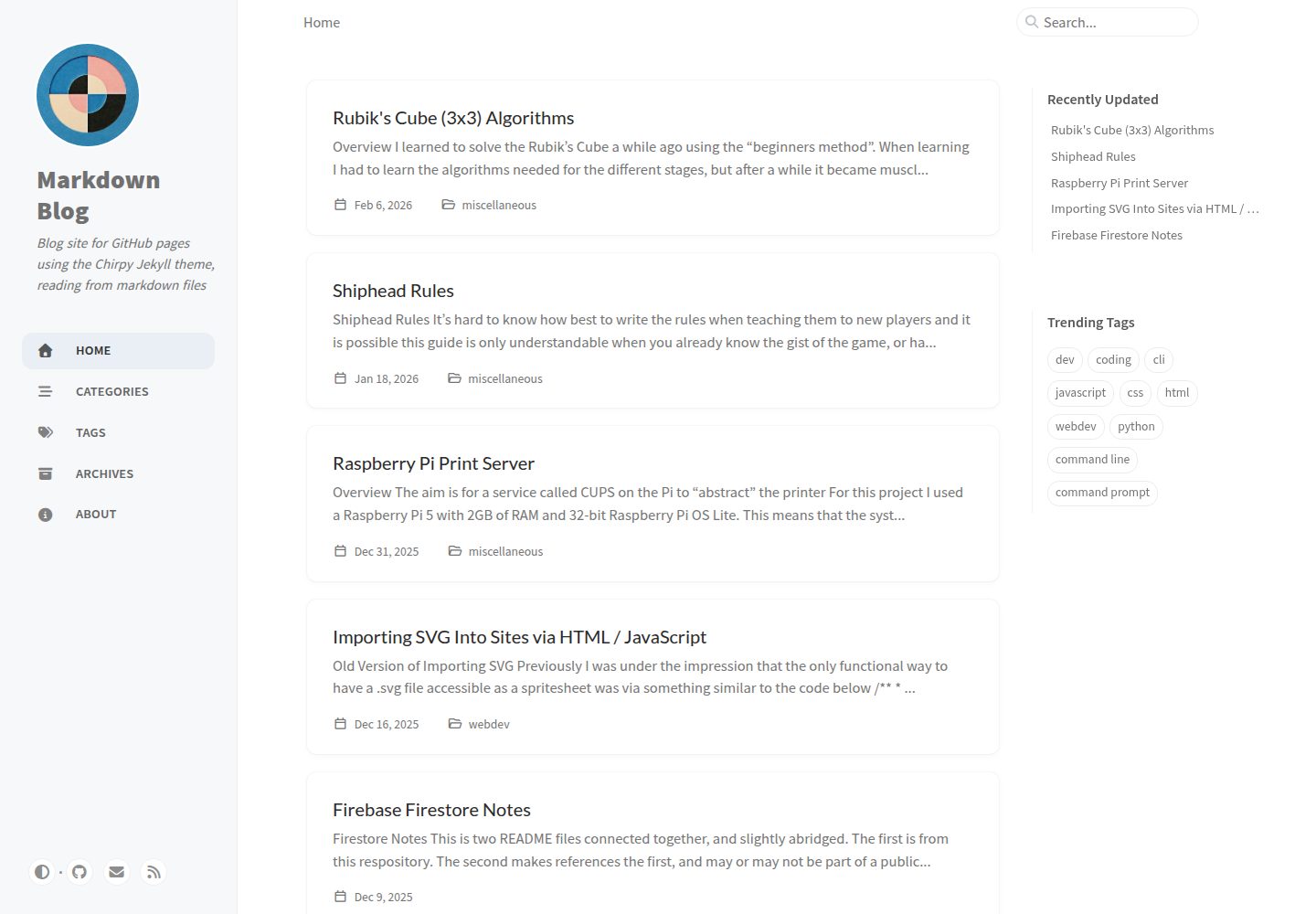
使用 Jekyll 将 Markdown 文件在构建时转换为 HTML 页面
JekyllHTML博客
markdown-blog — Jekyll 博客模板
作者 scarletti-ben
基于 Chirpy 主题的 Jekyll 博客站点,从 Markdown 文件生成 HTML 页面并部署到 GitHub Pages。
看看你的网站会是什么样
浏览真实页面截图,比较内容排版与手机效果。点击下方缩略图切换,放大查看整页细节。
全部页面与视图 3
截图用于了解视觉与布局,交互效果请以实际项目为准。
采集于 2026-10-04查看来源
值得关注的模板亮点
从已有项目资料中,快速了解它的特点。
基于 Chirpy 主题,由 chirpy-starter 模板生成
通过 GitHub Actions 工作流在推送到 main 分支时自动构建并部署到 GitHub Pages
文章支持 YAML front matter,可设置标题、日期、描述、分类与标签,并影响搜索和排序
默认启用 PWA 选项,构建产物包含 service worker,支持离线访问与安装到设备
构建过程会生成供站内搜索使用的 search.json 文件
模板详细介绍
这是一个托管在 GitHub Pages 上的静态博客站点源码,使用 Jekyll 作为静态站点生成器,读取 Markdown 文件并在构建阶段转换为 HTML 页面。站点基于 Chirpy 主题,仓库由 chirpy-starter 模板通过「Use this template」生成,因此保留了该主题的页面结构与配置方式。
内容组织上,文章存放在 _posts 目录,每篇 Markdown 文件顶部可写 YAML front matter,用于声明标题、日期、描述、分类和标签,并影响站点的搜索与排序。分类字段可理解为层级式的「文件夹」结构,标签则不构成同样的层级关系。左侧导航标签由 _tabs 目录中的 YAML 模板定义,其中 about.md 通常用于放置站点说明。assets 目录中的文件会被构建进站点,可在 Markdown 中引用。
构建与部署由 .github/workflows/pages-deploy.yml 定义,仓库的 GitHub Pages「Build and deployment/Source」设置为 GitHub Actions,推送到 main 分支时触发构建,可在 Actions 标签页查看构建状态与日志。_config.yml 是 Jekyll 的主配置文件,设置标题、描述、base URL、作者信息与插件等全局值,首次构建前需要按个人与仓库信息更新 _config.yml 和 pages-deploy.yml。
已知限制与注意事项:htmlproofer 在构建末段校验链接时,常因 Markdown 中的本地文件引用与构建后的站点路径不匹配而报错,当前已在 pages-deploy.yml 中禁用;由于文章 URL 省略日期,文件名不同的同名文章可能指向同一路径,例如 1995-12-22-test.md 与 2025-12-22-test.md 都指向 markdown-blog/posts/test;_scarletti 目录被加入 _config.yml 的 exclude 段,用于存放不参与构建的文件;对模板文件的改动一般以 POSTIT 注释标记。
JekyllHTML博客
适合你的项目吗?
适用场景
- 在 GitHub Pages 上发布以 Markdown 撰写的个人博客
- 需要分类与标签组织文章并带站内搜索的静态站点
- 希望通过 GitHub Actions 自定义构建流程并使用额外插件的博客
- 需要 PWA 离线访问与可安装到设备的博客站点
适合人群
- 习惯用 Markdown 写作、希望用 Git 管理内容的作者
- 使用 GitHub Pages 托管博客的个人开发者
- 接受 Chirpy 主题默认结构、只需少量定制的用户
上手与定制指南
结合仓库当前版本的说明,按下面的资料检查内容、配置与运行要求。
- 1
首次构建前需按个人与仓库信息更新 _config.yml 和 .github/workflows/pages-deploy.yml
- 2
GitHub Pages 的 Build and deployment/Source 需设置为 GitHub Actions,推送到 main 分支触发构建
- 3
htmlproofer 当前在 pages-deploy.yml 中被禁用,以避免链接校验因本地引用与构建路径不一致而失败
- 4
favicon 可用 512x512 图片经 Favicon Generator 生成,解压后放入 assets/img/favicons
- 5
文章 URL 省略日期,同名文件可能产生路径冲突,命名时需避免
授权与来源资料
使用条件与限制
免费使用 · 保留许可声明本次收录的是公开仓库中采用 MIT 许可的免费版本;免费范围为该版本代码,不代表外部服务或第三方素材免费。
使用时需要遵守
- 允许免费使用、修改、商用和分发该版本代码。
- 分发代码副本或实质性部分时,保留原作者版权声明和完整 MIT 许可声明。
- 代码按现状提供;担保与责任限制以原许可证及适用法律为准。
额外费用与待核对事项
- 使用前必须按个人与仓库信息修改 _config.yml 和 pages-deploy.yml,否则站点无法正确构建。
- 构建末段的链接校验工具 htmlproofer 当前被禁用,链接有效性不会自动检查。
- 文章 URL 省略日期,不同日期的同名文件会指向同一路径,命名时需避免冲突。
- 生成 favicon 需使用外部网站 Favicon Generator 处理 512x512 图片。
- 项目由 chirpy-starter 模板生成,依赖 Chirpy 主题 gem 与 Jekyll 生态。
- 演示图片、字体、图标及其他第三方素材需按各自许可核对,不能仅凭代码的 MIT 许可判断。
- 域名、托管、数据库、支付或 AI 等外部服务可能另外收费。
查看原文依据
Permission is hereby granted, free of charge
许可证原文
For your site to build correctly the first time you will need to make sure that `_config.yml` and `pages-deploy.yml` are correctly updated with your personal and repository-specific information.
README 原文
Currently `htmlproofer` is disabled within `pages-deploy.yml`
README 原文
Due to the way that the pages are made, name clashes can exist as the date is omitted from the filename
README 原文
Take a `512x512` image and go to [`Favicon Generator`](https://realfavicongenerator.net/)
README 原文
https://github.com/scarletti-ben/markdown-blog/blob/main/LICENSEhttps://github.com/scarletti-ben/markdown-blog/blob/main/README.mdThis repository was generated from the template repository [`chirpy-starter`](https://github.com/cotes2020/chirpy-starter) via the "Use this template" button.
README 原文
DeepSeek 根据仓库许可证和 README 整理 ·2026-10-04。结果仅覆盖已读取资料,依赖、图片、字体及后续条款变更以各自原文为准。
项目核对记录与介绍依据
模板资料
- 来源平台
- GitHub
- 资料与维护参考分
- 资料较完整 · 85 / 100
- 技术栈
- Jekyll · HTML
- 网站类型
- 博客
这个分数如何计算
本站按许可资料(最高30分)、演示链接(12分)、预览图(10分)、Star数(15分)、记录的维护时间(15分)、描述完整度(8分)、功能记录(5分)和分类资料(5分)计算。它不是代码、安全或性能测试,也不是 Google 评分;有链接不代表已实测可用。
这个项目需要核对什么
- 记录的仓库更新时间
- 2026-02-21
- 截图检查日期
- 2026-10-04
已收录演示链接。请用你的内容与屏幕尺寸检查;有演示不代表表单、认证或支付已经可用。
目录记录的主要技术栈是 Jekyll。请通过依赖清单和锁文件核对实际版本与托管要求。这些说明基于收录资料,不代表代码审计或部署实测。
查看具体选型方法 →介绍的制作与核对状态
介绍由 AI 辅助整理目录与仓库资料。仓库作者不等于这篇介绍的审核者。
审核声明: [email protected] · 2026-10-04
查看当时使用的来源资料
SHA-256: 94ced2864a6d9582b8beaa9af4e2ee4e907235706a661d81fa01ba5c44f1ba4c
2026-10-04T01:07:49.533Z
来源文件 / 仓库# Markdown Blog
This repository contains the source code for a blog site that is hosted on `GitHub Pages` [here](https://scarletti-ben.github.io/markdown-blog/). It uses the `Chirpy` theme for `Jekyll` and converts `Markdown` files to `HTML` pages during the build process.
## Jekyll
`Jekyll` is a static site generator that converts `Markdown` files to `HTML` pages. It uses templates to ensure the resulting pages are close to uniform, and can also read `YAML` "front matter" from `Markdown` files as a sort of file metadata.
For this repository the setting for `GitHub Pages` "Build and deployment/Source" [here](https://github.com/scarletti-ben/markdown-blog/settings) is set to "GitHub Actions". You don't always need to turn this setting on, and `Jekyll` may still run if a repository is in a compatible structure. But with the setting on you can customise the build process a little more, and use unsupported plugins. In essence you can control `GitHub Actions` more precisely.
Currently the repository is set up to run the build process whenever a change is pushed to the `main` branch, you can check the status of each build via the "actions" tab of the repository [here](https://github.com/scarletti-ben/markdown-blog/actions). If there are any errors, you can read the logs.
> [!NOTE]
> One example error from this repository comes from `htmlproofer`, which is a `Ruby` `gem` that tries to validate the site in the final stages, and often finds that links within `Markdown` files are broken as the local file references don't match built site paths. Currently `htmlproofer` is disabled within `pages-deploy.yml`
## Chirpy
This repository was generated from the template repository [`chirpy-starter`](https://github.com/cotes2020/chirpy-starter) via the "Use this template" button. `Chirpy` is a theme `gem` for `Jekyll`, and `chirpy-starter` makes it quite simple to build and deploy a site to `GitHub` pages that uses the `Chirpy` theme.
For your site to build correctly the first time you will need to make sure that `_config.yml` and `pages-deploy.yml` are correctly updated with your personal and repository-specific information.
## Front Matter
Normally you won't find front matter in `Markdown` files as it isn't feature of the language by default. However, `Jekyll` will read `YAML` that it finds between two sets of `---` found at the top of a `Markdown` file
The front matter in the context of a post is read as a metadata of sorts for the post, and contains fields that influence how the post appears on the site. As well as the search function / sorting, such as `date` and `tags`. An example post front matter can be found below
```yaml
---
title: "Node.js, npm, nvm and npx Setup"
date: "2025-05-12"
# last_modified_at: "2025-05-12"
description: "Notes on installing and using node.js, npm, nvm and npx"
categories: [
coding
]
tags: [
webdev, javascript, html, css, node, node.js, npm, node package manager, node version manager, nvm, npx, node package execute
]
---
```
The `categories` field can be thought of as a sort of folder structure eg. `Web Development` / `JavaScript` would be two "folders" deep, this is separate from the `tags` field which doesn't create a connected structure in the same sense
## Repository Overview
There are a great deal of files and directories in this repository that serve important purposes or allow you to fine-tune certain things. But for my purposes, the only files and directories I am editing can be found below. My aim in the future is to build a similar site from the ground up, rather than attempt to "hack together" template code and my own code into a “Frankenstein’s monster” of a project.
### `.github/workflows/pages-deploy.yml`
This file defines a `GitHub Actions` "workflow" that builds the site and deploys it to `GitHub Pages`. It automates the process every time you push to the `main` branch, or any branch specified in `on/push/branches`. It specifies the environment for the virtual machine (`VM`) used for building and deploying and specifies a list of commands / processes to execute in order on the `VM`.
```yaml
jobs:
build:
runs-on: ubuntu-latest
steps:
...
deploy:
...
```
### `_config.yml`
This is the main configuration file for `Jekyll`. It sets global values used by the site and theme, such as the title, description, base URL, author info, and plugin settings. It’s required for your site to build properly.
### `_posts`
Contains all the `Mardown` files with [front matter](#front-matter). These will be read by [`Jekyll`](#jekyll) to build the site, and influence the search function.
### `_tabs`
Contains template `YAML` for the tabs that will appear on the left hand side of the page. Currently I feel it is best to leave them as they are. One exception is the tab `about.md` which is likely to contain site information in the same sort of format as can be found in this `README`.
## `assets`
You can add any files and folders into the `assets` directory, and reference them within your `Markdown` files. Files within the `assets` directory will be built into, and accessible from, your site.
## Progressive Web App (PWA)
By default the `pwa` option is enabled in `_config.yml`, this means that the built site is a `Progressive Web App` (`PWA`). In essence this makes the site closer to a native application when using a mobile device. It also gives the ability to "install" the app to your device for both mobile and desktop.
Enabling `PWA` enables a `service worker` to handle caching, this means that the site can be used offline, and will use cached files to load the site faster. Due to the caching, the `service worker` runs in the background and checks for updates to its cached files. In the case of this site, it will prompt the user with a button to update site content when there is a commit pushed to the `main` branch.
## Generating a Favicon
You need a `favicon` of various sizes for different devices, one example is for the `Progressive Web App` (`PWA`).
Take a `512x512` image and go to [`Favicon Generator`](https://realfavicongenerator.net/), this will create a `.zip` file of all the images you will need. Extract this file and remove `browserconfig.xml` and `site.webmanifest` if they exist. Move the contents of this file to `assets/img/favicons`, create the directory if it doesn't exist. You don't need to make any changes to other files, such as `_config.yml`.
# Miscellaneous
- I have not really messed around with local build tools for this repository, but you can certainly set it up to build and test locally
- The `_scarletti` directory was added to the "exclude" section of `_config.yml` as a place for files that will not be built into the site
- In general, changes to files from the template are marked with `POSTIT` comments
- Due to the way that the pages are made, name clashes can exist as the date is omitted from the filename, eg. `1995-12-22-test.md` and `2025-12-22-test.md` both point to the same `URL` which is `markdown-blog/posts/test`
- The build process generates a `.json` file for use in the site's serach function, and you can view the raw file it generates [here](https://scarletti-ben.github.io/markdown-blog/assets/js/data/search.json)
- Adding a `description` field to the front matter of a post will stop it fromm automatically generating an excerpt from the first paragraph, so you can add if you want to manually control the description, or omit if you want it to generate automatically
- Remove the `author` section from front matter and it will use the site wide name as the author, specified in `_config.yml`
- You can use the field `last_modified_at` in the front matter of a post, otherwise it will be automatically generated from commit dates
- Added `.vscode/markdown.code-snippets` for project-specific snippets, such as a post template
# License
This work is published under the [MIT](https://github.com/scarletti-ben/markdown-blog/blob/main/LICENSE) license, the original license from `chirpy-starter` can be found [here](https://github.com/cotes2020/chirpy-starter/blob/master/LICENSE).
# Repository Metadata
```yml
---
title: "Markdown Blog README"
date: "2025-06-22"
categories: [
repository
]
tags: [
repository, readme, markdown, html, github, github pages, jekyll, front matter, metadata, chirpy, ruby, gem, gemfile, _config.yml, pages-deploy.yml, .yml, yaml, favicon, icon, snippets, .vscode, progressive web app, pwa, service worker, offline cache, caching, cache, template, use this template
]
---
```看看同类模板
对比同技术栈与用途的模板,找到更适合的视觉与内容结构。

al-folio
al-folio 是一个面向学者与研究人员的 Jekyll 作品集主题,设计简洁、响应式,适合搭建个人学术主页。
Jekyll · 作品集

minimal-mistakes
:triangular_ruler: Jekyll theme for building a personal site, blog, project documentation, or portfolio.
Jekyll · 作品集

Beautiful Jekyll
Beautiful Jekyll 是一个在 Jekyll 生态中经过长期打磨的博客主题,由 Dean Attali 维护,自 2015 年起积累了超过 5 万用户。
Jekyll · 博客

jekyll-TeXt-theme
💎 🐳 A super customizable Jekyll theme for personal site, team site, blog, project, documentation, etc.
Jekyll · 博客

startbootstrap-clean-blog-jekyll
A Jekyll version of the Clean Blog theme by Start Bootstrap
Jekyll · 博客

So Simple
So Simple 是 Michael Rose 开发的 Jekyll 主题,定位清晰:为文字和图片提供一个干净、可读性强的展示框架。
Jekyll · 博客