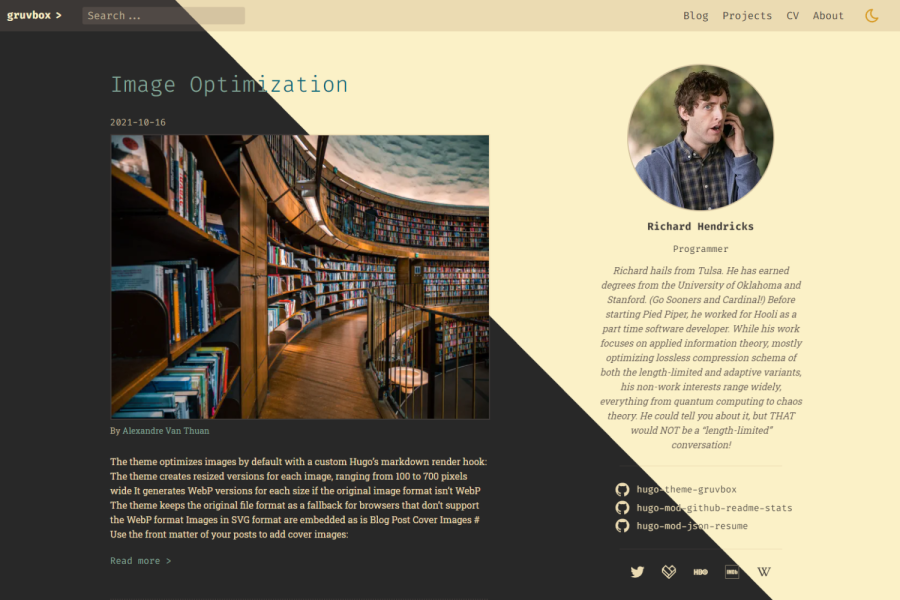
Retro color scheme inspired by gruvbox, offering light and dark palettes
HugoPortfolio
hugo-theme-gruvbox — Hugo Portfolio Template
By schnerring
A retro-style Hugo theme based on the gruvbox color scheme, offering light and dark palettes, suitable for personal sites focused on portfolios and technical writing.
Explore the design
Compare the page layouts and mobile experience. Open any screenshot for a closer look.
Desktop homepage1 / 3
Desktop captureTop of page
Actual screenshot captured by the server browser.
All pages & views 3
Screenshots show visual appearance; interactive behavior may differ.
Recorded 2026-10-02View source
What stands out
A quick read of the recorded project description.
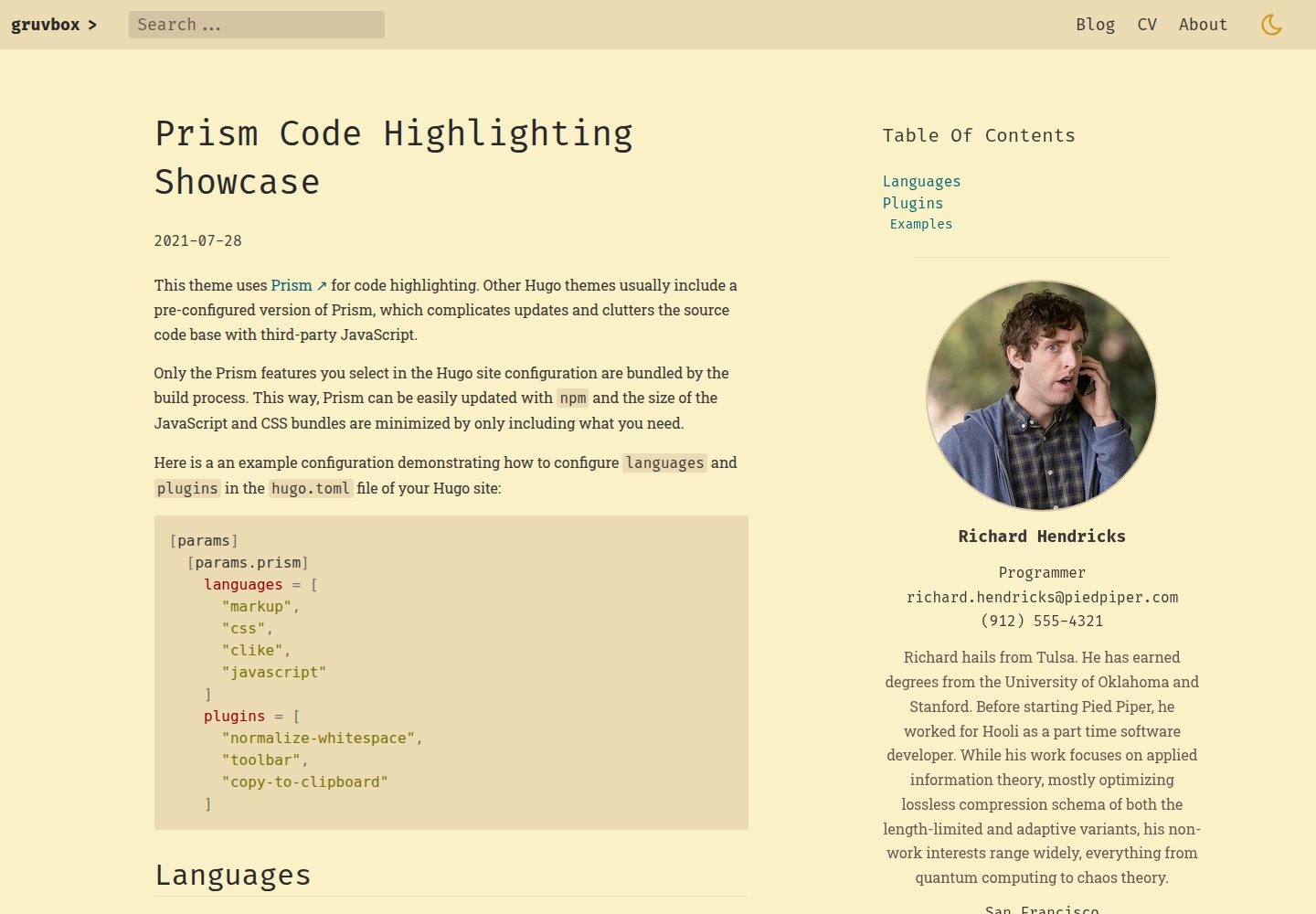
Prism code highlighting with configurable languages and plugins, switching Prism themes in sync with dark mode
Full-text search based on Flex Search
Display personal resume using JSON Resume structured data
Automatically process images within page bundles via custom render hooks, generating multiple widths and converting to WebP, with lazy loading by default
Provides video shortcodes, social sharing links, and robots meta configuration
Template Details
hugo-theme-gruvbox is a Hugo theme inspired by the gruvbox color scheme, presenting an overall retro visual style with high-contrast, easily distinguishable pastel colors, and providing both light and dark palettes. The theme author explicitly notes that the project is still in early development, with incomplete features; missing items can be viewed in the repository's issues.
The theme targets sites that need to display code and personal resumes: it includes Prism code highlighting with configurable languages and plugins, and switches the Prism theme in sync with dark mode toggling; supports full-text search based on Flex Search; and can display a resume using JSON Resume structured data. For image processing, the theme uses custom render hooks to automatically generate scaled versions of images within page bundles at widths from 300 to 700 pixels in steps of 100; non-WebP formats are converted with a fallback to the original format, and all images are lazy-loaded by default; images from the static directory or external sources are only displayed without processing. It also provides video shortcodes, social sharing links, favicon, and robots meta configuration.
Usage limitations: the theme requires the extended version of Hugo (due to Sass/SCSS usage) and Go modules; the installation process involves Hugo modules and npm dependencies, with many configuration items; image optimization only applies to images within page bundles; the Prism theme itself is not configurable and is tied to dark mode.
HugoPortfolio
Is it right for your project?
Use Cases
- Building a personal blog focused on technical articles and code examples
- A portfolio site displaying a personal resume using JSON Resume data
- Sites that need light and dark theme switching while maintaining consistent code highlighting
- Hugo sites that want to provide full-text search
Suitable For
- Developers familiar with Hugo modules and npm dependency management
- Personal site authors who prefer the retro gruvbox color scheme and high-contrast visual style
- Blog or portfolio projects that need code highlighting, full-text search, and resume display
Getting started & customization
Use these recorded setup notes alongside the repository instructions for your chosen version.
- 1
The theme requires the extended version of Hugo (due to Sass/SCSS usage) and requires Go to be installed to support Go modules
- 2
Installation requires initializing the site as a Hugo module and configuring module imports, outputs, mounts, and other items in hugo.toml
- 3
Need to run hugo mod npm pack and npm install to install npm dependencies
- 4
The project is in early development, features are incomplete; refer to the repository issues for missing items
- 5
Image optimization only applies to images within page bundles; images in the static directory or from external sources will not be processed
License & source material
Usage conditions & limitations
Free to use · keep license noticeThis entry covers the free version under the MIT license in the public repository; the free scope applies to that version's code and does not imply that external services or third-party assets are free.
Must comply with when using
- Free use, modification, commercial use, and distribution of this version's code are permitted.
- When distributing copies or substantial portions of the code, retain the original author's copyright notice and the full MIT license notice.
- The code is provided as is; warranties and liability limitations are governed by the original license and applicable law.
Additional costs & items to verify
- Using this theme requires the extended version of Hugo (due to Sass/SCSS usage) and Go for Go modules; the standard Hugo version cannot build it.
- Image optimization only applies to images within page bundles; images placed in the static directory or from external sources will only be displayed normally and will not be scaled or converted to WebP.
- The Prism code highlighting theme is not configurable because it is tied to the dark mode toggle; only the built-in gruvbox light and dark themes can be used.
- The project is still in early development, features are incomplete, and there are missing items; check the repository issues to learn about unfinished features before use.
- Demo images, fonts, icons, and other third-party assets must be checked against their respective licenses; they cannot be judged solely based on the code's MIT license.
- External services such as domains, hosting, databases, payments, or AI may incur additional charges.
View Original Text Basis
Permission is hereby granted, free of charge
Original License Text
The theme requires _extended_ Hugo because it uses Sass/SCSS. You'll also have to install Go because the theme uses Go modules.
Original README
Note that only images that are part of the [page bundle](https://gohugo.io/content-management/page-bundles/) are processed. If served from the `static/` directory or external sources, the image will be displayed but not be processed.
Original README
The Prism theme is not configurable because of the integration with the dark mode functionality.
Original README
https://github.com/schnerring/hugo-theme-gruvbox/blob/main/LICENSEhttps://github.com/schnerring/hugo-theme-gruvbox/blob/main/README.mdThis theme is still in early development. [Check out the issues](https://github.com/schnerring/hugo-theme-gruvbox/issues) to see what's still missing.
Original README
Compiled by DeepSeek based on repository license and README ·2026-10-02. Results only cover the materials read; dependencies, images, fonts, and subsequent term changes are subject to their respective original texts.
Project checks & description sources
Template Information
- Source platforms
- Hugo Themes
- Documentation and maintenance reference score
- More documented · 91 / 100
- Technologies
- Hugo
- Website type
- Portfolio
How this score is calculated
Our heuristic uses license records (up to 30), a demo link (12), a preview (10), stars (15), recorded maintenance (15), description completeness (8), feature records (5) and classification data (5). It is not a code, security or performance test, or a Google score. A link does not establish tested functionality.
What to verify for this project
- Repository update recorded
- 2026-09-23
- Screenshot last checked
- 2026-10-02
A demo link is listed. Check it with your own content and viewport sizes; its presence does not confirm that forms, authentication or payments work.
The catalog identifies Hugo as the primary stack. Check the actual dependency manifest and lockfile for versions and hosting requirements. These notes use recorded metadata, not a code audit or a deployment test.
Use a selection guide →How this description was prepared
AI-assisted description based on catalog records and repository material. Repository authors are not automatically the reviewers of this description.
Automatically checked against source and license rules; no manual editorial review.
Inspect the recorded source material
SHA-256: d793cd2153c13b61bbd5679ed6467767a4b75fa5079fa73bf511a95dd792fe0c
2026-10-02T17:00:39.691Z
Source file / repository# Gruvbox Hugo Theme
A retro-looking [Hugo](https://gohugo.io/) theme inspired by
[gruvbox](https://github.com/morhetz/gruvbox) to build secure, fast, and
SEO-ready websites.
This theme is easily customizable with features that any coder loves.
I took a lot of inspiration from the
[Hello Friend](https://github.com/panr/hugo-theme-hello-friend) and
[Doks](https://github.com/h-enk/doks) Hugo themes.
## DEMO [https://hugo-theme-gruvbox.schnerring.net/](https://hugo-theme-gruvbox.schnerring.net/)
## DISCLAIMER: Project Status
This theme is still in early development.
[Check out the issues](https://github.com/schnerring/hugo-theme-gruvbox/issues)
to see what's still missing.
## Highlights
- [Code highlighting with Prism](#prism)
- Full-text search with [Flex Search](https://github.com/nextapps-de/flexsearch)
- Display your CV using structured [JSON Resume](https://jsonresume.org/) data
- [Integrated image optimization with next-gen image formats and lazy loading](#image-optimization)
- Dark mode that also changes Prism themes
- [Dynamic color choices from the Gruvbox color palette](#colors)
- [Extensible to make it suit your needs](#extensibility)
- Responsive, mobile-first design
- Beautiful SVG icons with [Tabler Icons](https://tabler-icons.io/)
A big thank you to the authors of the software that make this theme possible! ❤️
## Quickstart
The theme requires _extended_ Hugo because it uses Sass/SCSS. You'll also have
to install Go because the theme uses Go modules.
1. `git clone` the repository and `cd` into it
2. Run `npm ci` to install the dependencies
3. Run `hugo server`
## Install The Theme
Create a new Hugo website:
```shell
hugo new site example.com
cd example.com/
```
Initialize the site as Hugo module
```shell
hugo mod init example.com
```
Add the following to the `hugo.toml` file:
```toml
[markup]
# (Optional) To be able to use all Prism plugins, the theme enables unsafe
# rendering by default
#_merge = "deep"
[build]
# Merge build config of the theme
_merge = "deep"
[outputs]
# The search requires rendering the theme's `searchIndex` output format
home = ["html", "searchIndex"]
# This hopefully will be simpler in the future.
# See: https://github.com/schnerring/hugo-theme-gruvbox/issues/16
[module]
[[module.imports]]
path = "github.com/schnerring/hugo-theme-gruvbox"
[[module.imports]]
path = "github.com/schnerring/hugo-mod-json-resume"
[[module.imports.mounts]]
# This will add the sample Richard Hendricks CV data
source = "data"
target = "data"
[[module.imports.mounts]]
source = "layouts"
target = "layouts"
[[module.imports.mounts]]
source = "assets/css/json-resume.css"
target = "assets/css/critical/44-json-resume.css"
[[module.mounts]]
# required by hugo-mod-json-resume
source = "node_modules/simple-icons/icons"
target = "assets/simple-icons"
[[module.mounts]]
source = "assets"
target = "assets"
[[module.mounts]]
source = "layouts"
target = "layouts"
[[module.mounts]]
source = "static"
target = "static"
[[module.mounts]]
source = "node_modules/prismjs"
target = "assets/prismjs"
[[module.mounts]]
source = "node_modules/prism-themes/themes"
target = "assets/prism-themes"
[[module.mounts]]
source = "node_modules/typeface-fira-code/files"
target = "static/fonts"
[[module.mounts]]
source = "node_modules/typeface-roboto-slab/files"
target = "static/fonts"
[[module.mounts]]
source = "node_modules/@tabler/icons/icons"
target = "assets/tabler-icons"
[[module.mounts]]
# Add hugo_stats.json to Hugo's server watcher
source = "hugo_stats.json"
target = "assets/watching/hugo_stats.json"
```
Install the theme:
```shell
hugo mod get
```
Initialize the NPM `package.json` and install the dependencies:
```shell
hugo mod npm pack
npm install
```
Run Hugo:
```shell
hugo server
```
## Update The Theme
Update the Hugo modules:
```shell
hugo mod get -u
hugo mod tidy
```
Update the NPM dependencies:
```shell
hugo mod npm pack
npm install
```
## Colors
Two options are available to configure the theme colors:
- `defaultTheme`: `dark` or `light` (defaults to `light`)
Default theme color for when a user visits the site for the first time. OS or
user preference override this setting.
[See this comment for more details.](https://github.com/schnerring/hugo-theme-gruvbox/issues/34#issuecomment-1235870375)
- `themeColor`: `gray`, `red`, `green`, `yellow`, `blue`, `purple`, `aqua`, or
`orange` (defaults to `blue`)
Theme color for things such as links, headings etc.
- `themeContrast`: `soft`, `medium`, or `hard` (defaults to `medium`)
Theme background color
## Prism
The theme allows customization of [Prism](https://prismjs.com/) via `hugo.toml`
parameters:
```toml
[params]
[params.prism]
languages = [
"markup",
"css",
"clike",
"javascript"
]
plugins = [
"normalize-whitespace",
"toolbar",
"copy-to-clipboard"
]
```
In my opinion, this is the coolest feature of the theme. Other Hugo themes
usually include a pre-configured version of Prism, which complicates updates and
change tracking, and clutters the theme's code base with third-party JavaScript.
The Prism theme is not configurable because of the integration with the dark
mode functionality. Toggling between color modes swaps the Prism theme between
[`gruvbox-dark`](https://github.com/PrismJS/prism-themes/blob/master/themes/prism-gruvbox-dark.css)
and
[`gruvbox-light`](https://github.com/PrismJS/prism-themes/blob/master/themes/prism-gruvbox-light.css)
from [github.com/PrismJS/prism-themes](https://github.com/PrismJS/prism-themes).
Check out the
[Prism showcase on the Demo site for examples](https://hugo-theme-gruvbox.schnerring.net/blog/prism-code-highlighting-showcase/)
### Explore Prism Features
After running `npm install`, explore Prism features like this:
```shell
# Languages
ls node_modules/prismjs/components
# Plugins
ls node_modules/prismjs/plugins
```
## Image Optimization
Images are optimized by default without requiring
[shortcodes](https://gohugo.io/content-management/shortcodes/). A
[custom render hook](https://gohugo.io/getting-started/configuration-markup#markdown-render-hooks)
does all the heavy lifting (see
[render-image.html](./layouts/_default/_markup/render-image.html)).
By default, the theme creates resized versions of images ranging from 300 to 700
pixels wide in increments of 100 pixels.
If the image format is not [WebP](https://en.wikipedia.org/wiki/WebP), the image
is converted. The original file format will serve as a fallback for browsers
that don't support the WebP format.
Note that only images that are part of the
[page bundle](https://gohugo.io/content-management/page-bundles/) are processed.
If served from the `static/` directory or external sources, the image will be
displayed but not be processed.
Additionally, all images are lazily loaded to save the bandwidth of your users.
### Configuration
The default quality is 75%. See the
[official Image Processing Config Hugo docs](https://gohugo.io/content-management/image-processing/#image-processing-config).
Change it by adding the following to the `hugo.toml` file:
```toml
[imaging]
quality = 75
```
Change the resize behavior:
```toml
[params]
[params.imageResize]
min = 300
max = 700
increment = 100
```
### Captions
```markdown

```
[The demo site features examples you can look at](https://hugo-theme-gruvbox.schnerring.net/blog/image-optimization/).
I also use the theme for [my website](https://schnerring.net).
### Blog Post Covers
Add blog post covers by defining them in the
[front matter](https://gohugo.io/content-management/front-matter/) of your
posts:
```markdown
---
cover:
src: my-blog-cover.jpg
alt: A beautiful image containing interesting things
caption: [Source](https://www.flickr.com/)
---
```
## Embed Video Files
Use the
[video shortcode](https://github.com/schnerring/hugo-theme-gruvbox/blob/main/layouts/shortcodes/video.html)
to embed your video files from
[Page Resources](https://gohugo.io/content-management/page-resources/).
With a page bundle looking like the following:
```text
embed-videos/
|-- index.md
|-- my-video.jpg
|-- my-video.mp4
|-- my-video.webm
```
You can embed `my-video` like this:
```markdown
{{< video src="my-video" autoplay="true" controls="false" loop="true" >}}
```
The shortcode looks for media files matching the filename `my-video*`. For each
`video` MIME type file, a `<source>` element is added. The first `image` MIME
type file is used as `poster` (thumbnail). It will render the following HTML:
```html
<video
autoplay
loop
poster="/blog/embed-videos/my-video.jpg"
width="100%"
playsinline
>
<source src="/blog/embed-videos/my-video.mp4" type="video/mp4" />
<source src="/blog/embed-videos/my-video.webm" type="video/webm" />
</video>
```
You can set a Markdown `caption`, wrapping the `<video>` inside a `<figure`>.
Additionally, the shortcode allows you to set the following attributes:
| Attribute | Default |
| ----------- | ------- |
| autoplay | `false` |
| controls | `true` |
| height | |
| loop | `false` |
| muted | `true` |
| preload | |
| width | `100%` |
| playsinline | `true` |
[Learn more about the `<video>` attributes here.](https://developer.mozilla.org/en-US/docs/Web/HTML/Element/video#attributes)
## SEO
Due to the
[European Copyright Directive](https://wayback.archive-it.org/12090/20210304045117/https://ec.europa.eu/digital-single-market/en/modernisation-eu-copyright-rules)
it is required to opt into displaying
[snippets](https://developers.google.com/search/docs/advanced/appearance/title-link?hl=en)
in search engine results.
By default, every page (except 404) includes the
`index, follow, max-snippet:-1, max-image-preview:large, max-video-preview:-1`
robots meta value, opting into all snippet features.
You can override the robots meta value in the front matter of your pages:
```markdown
---
robots: noindex, nofollow
---
```
## Social Share Links
Configure social share links in the Hugo config like this:
```toml
[params]
[[params.socialShare]]
iconSuite = "simple-icon"
iconName = "facebook"
formatString = "https://www.facebook.com/sharer.php?u={url}"
[[params.socialShare]]
iconSuite = "simple-icon"
iconName = "reddit"
formatString = "https://reddit.com/submit?url={url}&title={title}"
[[params.socialShare]]
iconSuite = "tabler-icon"
iconName = "outline/mail"
formatString = "mailto:?subject={title}&body={url}"
```
Use the `iconSuite` setting to specify the icon suite used for the social share
link: `simple-icon` or `tabler-icon`. Select an icon from the suite with the
`iconName` setting. Tabler icons come in two distinct styles, `filled` and
`outline`. You'll have to the prefix the `iconName` accordingly, e.g.
`iconName = "outline/sun"`.
The `formatString` supports the following placeholders:
- `{url}` is replaced with the `.Permalink` of the post
- `{title}` is replaced with the `.Title` of the post
To enable social share links, set the following in the post's front matter:
```markdown
---
socialShare: true
---
```
Check out the
[Social Share URLs repo on GitHub](https://github.com/bradvin/social-share-urls)
for more format strings.
## Favicon
The favicons and [corresponding markup](./layouts/partials/head/favicons.html)
were generated with the free
[RealFaviconGenerator.net](https://realfavicongenerator.net/).
The easiest way to replace the default favicons is to generate them using
RealFaviconGenerator.net and put the generated files into the `static/`
directory.
## Extensibility
You can extend the theme by overriding the following partials in the
`layouts/partials` directory which by default are empty placeholder files:
- [`head/head_start.html`](./layouts/partials/head_start.html)
Custom HTML at the start of `<head>`
- [`head/head_end.html`](./layouts/partials/head_end.html)
Custom HTML at the end of `<head>`
- [`footer_end.html`](./layouts/partials/footer_end.html)
Custom HTML at the end of `<body>`
- [`comments.html`](./layouts/partials/comments.html)
Comments at the end of posts
### Example: Adding KaTeX Support to the Theme
[KaTeX](https://katex.org/) is a fast, easy-to-use JavaScript library for TeX
math rendering on the web. Let's add it to the theme via `npm`. First, add the
following to the `package.hugo.json` file:
```json
"dependencies": {
"katex": "^0.16.8"
}
```
Then run `hugo mod npm pack` to sync the `package.hugo.json` dependencies with
`package.json`. Run `npm install` after. We then need to mount the
`node_modules/katex` folder into Hugo's virtual filesystem by adding the
following to the `config/_default/module.toml` file:
```toml
[[mounts]]
source = "node_modules/katex"
target = "assets/katex"
```
We can then add the following to `layouts/partials/head/head_end.html`:
<!-- prettier-ignore-start -->
```html
{{ if .Params.katex }}
{{ $katexCSS := resources.Get "katex/dist/katex.min.css" }}
<link
rel="stylesheet"
href="{{ $katexCSS }}"
{{ if hugo.IsProduction }}
integrity="{{ $katexCSS.Data.Integrity }}"
{{ end }}
crossorigin="anonymous"
/>
{{ $katexJS := resources.Get "katex/dist/katex.min.js" }}
<script
defer
src="{{ $katexJS.RelPermalink }}"
{{ if hugo.IsProduction }}
integrity="{{ $katexJS.Data.Integrity }}"
{{ end }}
crossorigin="anonymous"
></script>
{{ $autoRender := resources.Get "katex/dist/contrib/auto-render.min.js" }}
<script
defer
src="{{ $autoRender.RelPermalink }}"
{{ if hugo.IsProduction }}
integrity="{{ $autoRender.Data.Integrity }}"
{{ end }}
crossorigin="anonymous"
onload="renderMathInElement(document.body);"
></script>
{{ end }}
```
<!-- prettier-ignore-end -->
The only thing left is enabling KaTeX in the front matter of our content:
```markdown
---
title: "Hello World"
description: "The first post of this blog"
date: 2021-03-14T15:00:21+01:00
draft: false
katex: true
---
I'm a .NET developer by trade, so let's say hello in C#!
```
## Configure the Tag Cloud
The theme comes with a tag cloud partial. It is included in the sidebar, but it
is disabled by default. If you wish to configure it, add the following to the
`[params]` section in the `hugo.toml` file:
```toml
[params.tagCloud]
enable = true
minFontSizeRem = 0.8
maxFontSizeRem = 2.0
```
## Remove the Sidebar
If you want to get rid of the sidebar, add an empty `data/json_resume/en.json`
file with the following content:
```json
{
"$schema": "https://raw.githubusercontent.com/jsonresume/resume-schema/v1.0.0/schema.json",
"basics": {},
"work": [],
"volunteer": [],
"education": [],
"awards": [],
"certificates": [],
"publications": [],
"skills": [],
"languages": [],
"interests": [],
"references": [],
"projects": [],
"meta": {
"canonical": "https://raw.githubusercontent.com/jsonresume/resume-schema/master/resume.json",
"version": "v1.0.0",
"lastModified": "2017-12-24T15:53:00"
}
}
```
## Extend CSS
The theme uses PostCSS with following plugins:
- [postcss-import](https://github.com/postcss/postcss-import)
- [postcss-url](https://github.com/postcss/postcss-url)
- [postcss-nesting](https://github.com/csstools/postcss-plugins/tree/main/plugins/postcss-nesting)
- [postcss-custom-media](https://github.com/postcss/postcss-custom-media)
Additionally the following plugins are used if building the site with
`hugo -e production`:
- [postcss-preset-env](https://github.com/csstools/postcss-plugins/tree/main/plugin-packs/postcss-preset-env)
- [cssnano](https://github.com/cssnano/cssnano) for minification
- [@fullhuman/postcss-purgecss](https://github.com/FullHuman/purgecss)
Inside the `assets/css` two folders exist, `critical` and `non-critical`. Files
inside `critical` are concatenated during build time and inlined into the
`<head>` element. The styles target mostly
[above the fold content](https://en.wikipedia.org/wiki/Above_the_fold#In_web_design).
Try to keep inline CSS to a minimum because it can't be cached and will be
inlined into every single page. Files inside `non-critical` are concatenated
into a single file and included as `<style>`. Most of the styles are in there.
Files are concatenated in lexicographic order of their file names. File names
start with two digits and a hyphen: `NN-`. The order of files might differ
between Linux and Windows, so using this convention improves cross-platform
compatibility.
[You might know this approach if you're familiar with Xorg](https://wiki.archlinux.org/title/Xorg#Using_.conf_files).
You can add new CSS files to the PostCSS pipeline like this:
- `critical/50-foo.css`
- `non-critical/05-bar.css`
- `non-critical/99-last.css`
Explore similar templates
Compare previews and descriptions within the same stack and category.

hugo-PaperMod
A fast, clean, responsive Hugo theme for blogs and lightweight portfolios, with three layout modes (Regular, Home-Info, Profile), automatic and manual light/dark themes, Fuse.js client-side search, multilingual support, and built-in Open Graph, Twitter Cards, and Schema.org data.
Hugo · Portfolio

Congo
Congo is a minimal Hugo content theme built on Tailwind CSS 3.0, designed for blogs, portfolios, and lightweight content sites. It offers multiple homepage layouts, customizable dark mode, multilingual support including RTL, and built-in client-side search, Mermaid, Chart.js, and KaTeX.
Hugo · Blog

toha
Toha is a Hugo theme for personal portfolios, featuring a minimalist, responsive design with configurable homepage sections such as about, experience timeline, and achievements gallery.
Hugo · Portfolio

hugo-profile
hugo-profile is a mobile-first Hugo theme for personal portfolios and blogs, with multilingual support, light/dark themes, categories and tags, Google Analytics, Disqus comments, and Formspree contact forms.
Hugo · Portfolio

hugo-theme-introduction
Introduction is a minimal Hugo theme that can be configured as a single-page site or a full site with multiple sections. Homepage sections are generated from Markdown files under content/home/, with weight sorting and optional images.
Hugo · Portfolio

hugo-theme-console
A minimalist, responsive Hugo theme inspired by the system terminal and built on Terminal CSS. It includes blog posts, photo galleries, and custom pages, with light/dark theming and style overrides via CSS variables.
Hugo · Portfolio