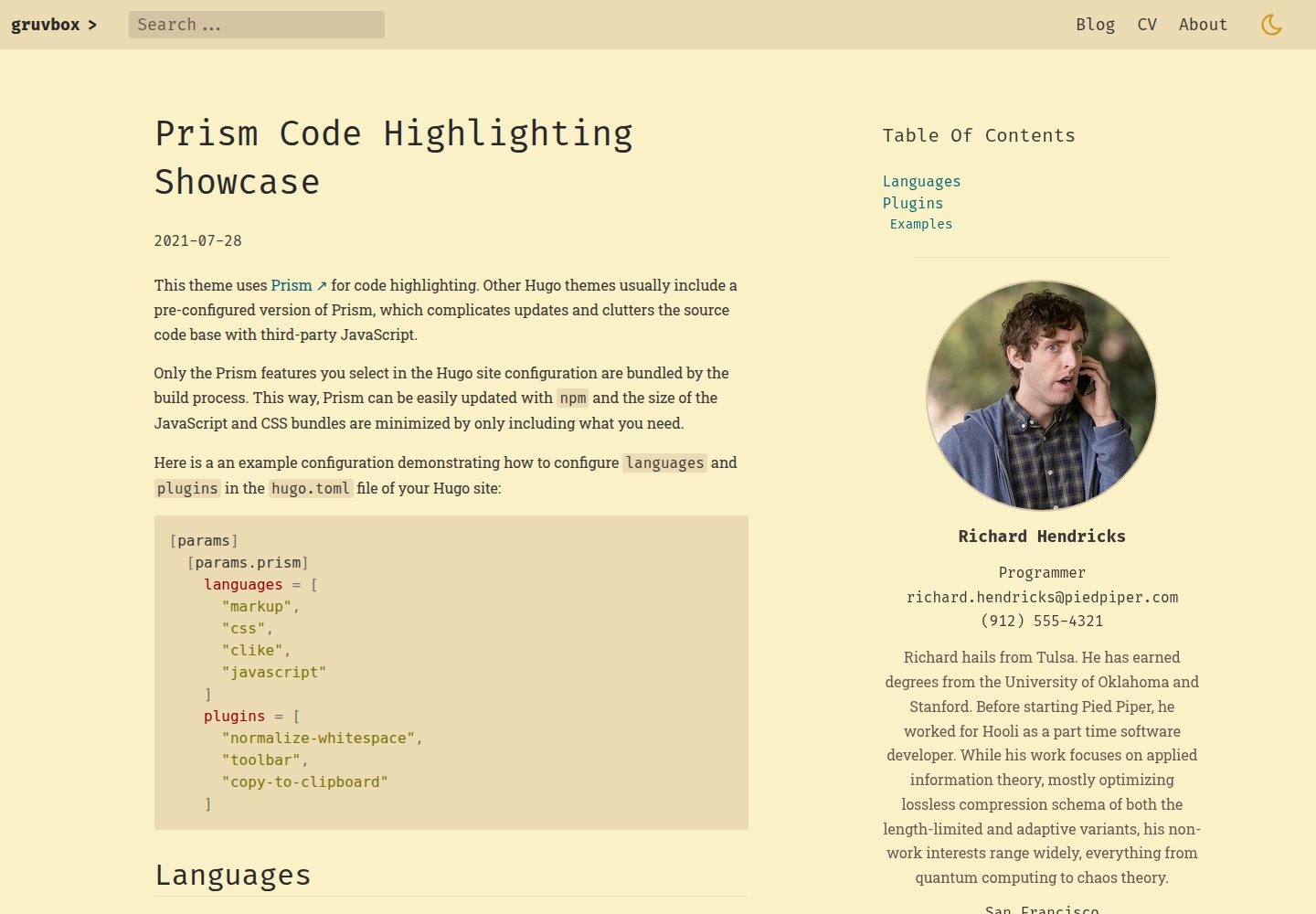
受 gruvbox 启发的复古配色,提供浅色与深色两套色板
Hugo作品集
hugo-theme-gruvbox — Hugo 作品集模板
作者 schnerring
基于 Hugo 的复古风格主题,采用 gruvbox 配色,提供明暗两套色板,适合搭建偏作品集与技术写作的个人站点。
看看你的网站会是什么样
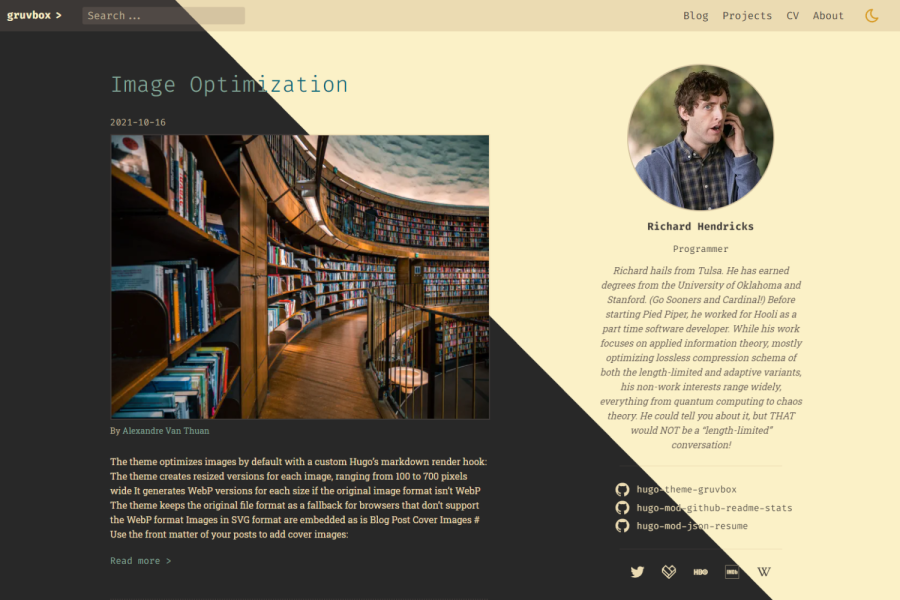
浏览真实页面截图,比较内容排版与手机效果。点击下方缩略图切换,放大查看整页细节。
全部页面与视图 3
截图用于了解视觉与布局,交互效果请以实际项目为准。
采集于 2026-10-02查看来源
值得关注的模板亮点
从已有项目资料中,快速了解它的特点。
Prism 代码高亮,可配置语言与插件,深色模式切换时同步更换 Prism 主题
基于 Flex Search 的全文搜索
使用 JSON Resume 结构化数据展示个人简历
通过自定义渲染钩子自动处理页面包内图片,生成多种宽度并转换 WebP,默认懒加载
提供视频短代码、社交分享链接与 robots meta 配置
模板详细介绍
hugo-theme-gruvbox 是一个受 gruvbox 配色启发的 Hugo 主题,整体呈现复古视觉风格,使用高对比、易区分的柔和色彩,并同时提供浅色与深色两套色板。主题作者在说明中明确标注项目仍处于早期开发阶段,功能尚未完备,可通过仓库的 issues 查看缺失项。
主题面向需要展示代码与个人履历的站点:内置 Prism 代码高亮,可配置语言与插件,深色模式切换时同步替换 Prism 主题;支持基于 Flex Search 的全文搜索;可通过 JSON Resume 结构化数据展示简历。图片处理方面,主题通过自定义渲染钩子对页面包(page bundle)内的图片自动生成 300 至 700 像素、步长 100 的缩放版本,非 WebP 格式会转换并保留原格式回退,所有图片默认懒加载;来自 static 目录或外部的图片只展示不处理。此外还提供视频短代码、社交分享链接、favicon 与 robots meta 配置。
使用限制:主题依赖 extended 版 Hugo(因使用 Sass/SCSS)与 Go 模块,安装流程涉及 Hugo module 与 npm 依赖,配置项较多;图片优化仅对页面包内的图片生效;Prism 主题本身不可配置,与深色模式绑定。
Hugo作品集
适合你的项目吗?
适用场景
- 搭建以技术文章和代码示例为主的个人博客
- 用 JSON Resume 数据展示个人履历的作品集站点
- 需要浅色与深色主题切换并保持代码高亮一致的站点
- 希望站内提供全文搜索的 Hugo 站点
适合人群
- 熟悉 Hugo 模块与 npm 依赖管理的开发者
- 偏好复古 gruvbox 配色与高对比视觉风格的个人站点作者
- 需要代码高亮、全文搜索与简历展示的博客或作品集项目
上手与定制指南
结合仓库当前版本的说明,按下面的资料检查内容、配置与运行要求。
- 1
主题要求使用 extended 版 Hugo(因使用 Sass/SCSS),并需要安装 Go 以支持 Go 模块
- 2
安装需初始化站点为 Hugo module,并在 hugo.toml 中配置 module imports、outputs 与 mounts 等多项内容
- 3
需运行 hugo mod npm pack 与 npm install 安装 npm 依赖
- 4
项目处于早期开发阶段,功能尚不完整,可参考仓库 issues 了解缺失项
- 5
图片优化仅对页面包(page bundle)内的图片生效,static 目录或外部图片不会被处理
授权与来源资料
使用条件与限制
免费使用 · 保留许可声明本次收录的是公开仓库中采用 MIT 许可的免费版本;免费范围为该版本代码,不代表外部服务或第三方素材免费。
使用时需要遵守
- 允许免费使用、修改、商用和分发该版本代码。
- 分发代码副本或实质性部分时,保留原作者版权声明和完整 MIT 许可声明。
- 代码按现状提供;担保与责任限制以原许可证及适用法律为准。
额外费用与待核对事项
- 使用该主题必须安装 extended 版 Hugo(因使用 Sass/SCSS),并需安装 Go 以支持 Go 模块,普通版 Hugo 无法构建。
- 图片优化仅对页面包(page bundle)内的图片生效;放在 static 目录或来自外部来源的图片只会正常显示,不会被缩放或转换为 WebP。
- Prism 代码高亮主题不可配置,因其与深色模式切换功能绑定,只能使用内置的 gruvbox 明暗两套主题。
- 项目仍处于早期开发阶段,功能尚不完整,存在缺失项,使用前应查看仓库 issues 了解未完成的功能。
- 演示图片、字体、图标及其他第三方素材需按各自许可核对,不能仅凭代码的 MIT 许可判断。
- 域名、托管、数据库、支付或 AI 等外部服务可能另外收费。
查看原文依据
Permission is hereby granted, free of charge
许可证原文
The theme requires _extended_ Hugo because it uses Sass/SCSS. You'll also have to install Go because the theme uses Go modules.
README 原文
Note that only images that are part of the [page bundle](https://gohugo.io/content-management/page-bundles/) are processed. If served from the `static/` directory or external sources, the image will be displayed but not be processed.
README 原文
The Prism theme is not configurable because of the integration with the dark mode functionality.
README 原文
https://github.com/schnerring/hugo-theme-gruvbox/blob/main/LICENSEhttps://github.com/schnerring/hugo-theme-gruvbox/blob/main/README.mdThis theme is still in early development. [Check out the issues](https://github.com/schnerring/hugo-theme-gruvbox/issues) to see what's still missing.
README 原文
DeepSeek 根据仓库许可证和 README 整理 ·2026-10-02。结果仅覆盖已读取资料,依赖、图片、字体及后续条款变更以各自原文为准。
项目核对记录与介绍依据
模板资料
- 来源平台
- Hugo Themes
- 资料与维护参考分
- 资料较完整 · 91 / 100
- 技术栈
- Hugo
- 网站类型
- 作品集
这个分数如何计算
本站按许可资料(最高30分)、演示链接(12分)、预览图(10分)、Star数(15分)、记录的维护时间(15分)、描述完整度(8分)、功能记录(5分)和分类资料(5分)计算。它不是代码、安全或性能测试,也不是 Google 评分;有链接不代表已实测可用。
这个项目需要核对什么
- 记录的仓库更新时间
- 2026-09-23
- 截图检查日期
- 2026-10-02
已收录演示链接。请用你的内容与屏幕尺寸检查;有演示不代表表单、认证或支付已经可用。
目录记录的主要技术栈是 Hugo。请通过依赖清单和锁文件核对实际版本与托管要求。这些说明基于收录资料,不代表代码审计或部署实测。
查看具体选型方法 →介绍的制作与核对状态
介绍由 AI 辅助整理目录与仓库资料。仓库作者不等于这篇介绍的审核者。
已完成服务器许可规则与 AI 来源核对;未经过人工编辑审核。
查看当时使用的来源资料
SHA-256: d793cd2153c13b61bbd5679ed6467767a4b75fa5079fa73bf511a95dd792fe0c
2026-10-02T17:00:39.691Z
来源文件 / 仓库# Gruvbox Hugo Theme
A retro-looking [Hugo](https://gohugo.io/) theme inspired by
[gruvbox](https://github.com/morhetz/gruvbox) to build secure, fast, and
SEO-ready websites.
This theme is easily customizable with features that any coder loves.
I took a lot of inspiration from the
[Hello Friend](https://github.com/panr/hugo-theme-hello-friend) and
[Doks](https://github.com/h-enk/doks) Hugo themes.
## DEMO [https://hugo-theme-gruvbox.schnerring.net/](https://hugo-theme-gruvbox.schnerring.net/)
## DISCLAIMER: Project Status
This theme is still in early development.
[Check out the issues](https://github.com/schnerring/hugo-theme-gruvbox/issues)
to see what's still missing.
## Highlights
- [Code highlighting with Prism](#prism)
- Full-text search with [Flex Search](https://github.com/nextapps-de/flexsearch)
- Display your CV using structured [JSON Resume](https://jsonresume.org/) data
- [Integrated image optimization with next-gen image formats and lazy loading](#image-optimization)
- Dark mode that also changes Prism themes
- [Dynamic color choices from the Gruvbox color palette](#colors)
- [Extensible to make it suit your needs](#extensibility)
- Responsive, mobile-first design
- Beautiful SVG icons with [Tabler Icons](https://tabler-icons.io/)
A big thank you to the authors of the software that make this theme possible! ❤️
## Quickstart
The theme requires _extended_ Hugo because it uses Sass/SCSS. You'll also have
to install Go because the theme uses Go modules.
1. `git clone` the repository and `cd` into it
2. Run `npm ci` to install the dependencies
3. Run `hugo server`
## Install The Theme
Create a new Hugo website:
```shell
hugo new site example.com
cd example.com/
```
Initialize the site as Hugo module
```shell
hugo mod init example.com
```
Add the following to the `hugo.toml` file:
```toml
[markup]
# (Optional) To be able to use all Prism plugins, the theme enables unsafe
# rendering by default
#_merge = "deep"
[build]
# Merge build config of the theme
_merge = "deep"
[outputs]
# The search requires rendering the theme's `searchIndex` output format
home = ["html", "searchIndex"]
# This hopefully will be simpler in the future.
# See: https://github.com/schnerring/hugo-theme-gruvbox/issues/16
[module]
[[module.imports]]
path = "github.com/schnerring/hugo-theme-gruvbox"
[[module.imports]]
path = "github.com/schnerring/hugo-mod-json-resume"
[[module.imports.mounts]]
# This will add the sample Richard Hendricks CV data
source = "data"
target = "data"
[[module.imports.mounts]]
source = "layouts"
target = "layouts"
[[module.imports.mounts]]
source = "assets/css/json-resume.css"
target = "assets/css/critical/44-json-resume.css"
[[module.mounts]]
# required by hugo-mod-json-resume
source = "node_modules/simple-icons/icons"
target = "assets/simple-icons"
[[module.mounts]]
source = "assets"
target = "assets"
[[module.mounts]]
source = "layouts"
target = "layouts"
[[module.mounts]]
source = "static"
target = "static"
[[module.mounts]]
source = "node_modules/prismjs"
target = "assets/prismjs"
[[module.mounts]]
source = "node_modules/prism-themes/themes"
target = "assets/prism-themes"
[[module.mounts]]
source = "node_modules/typeface-fira-code/files"
target = "static/fonts"
[[module.mounts]]
source = "node_modules/typeface-roboto-slab/files"
target = "static/fonts"
[[module.mounts]]
source = "node_modules/@tabler/icons/icons"
target = "assets/tabler-icons"
[[module.mounts]]
# Add hugo_stats.json to Hugo's server watcher
source = "hugo_stats.json"
target = "assets/watching/hugo_stats.json"
```
Install the theme:
```shell
hugo mod get
```
Initialize the NPM `package.json` and install the dependencies:
```shell
hugo mod npm pack
npm install
```
Run Hugo:
```shell
hugo server
```
## Update The Theme
Update the Hugo modules:
```shell
hugo mod get -u
hugo mod tidy
```
Update the NPM dependencies:
```shell
hugo mod npm pack
npm install
```
## Colors
Two options are available to configure the theme colors:
- `defaultTheme`: `dark` or `light` (defaults to `light`)
Default theme color for when a user visits the site for the first time. OS or
user preference override this setting.
[See this comment for more details.](https://github.com/schnerring/hugo-theme-gruvbox/issues/34#issuecomment-1235870375)
- `themeColor`: `gray`, `red`, `green`, `yellow`, `blue`, `purple`, `aqua`, or
`orange` (defaults to `blue`)
Theme color for things such as links, headings etc.
- `themeContrast`: `soft`, `medium`, or `hard` (defaults to `medium`)
Theme background color
## Prism
The theme allows customization of [Prism](https://prismjs.com/) via `hugo.toml`
parameters:
```toml
[params]
[params.prism]
languages = [
"markup",
"css",
"clike",
"javascript"
]
plugins = [
"normalize-whitespace",
"toolbar",
"copy-to-clipboard"
]
```
In my opinion, this is the coolest feature of the theme. Other Hugo themes
usually include a pre-configured version of Prism, which complicates updates and
change tracking, and clutters the theme's code base with third-party JavaScript.
The Prism theme is not configurable because of the integration with the dark
mode functionality. Toggling between color modes swaps the Prism theme between
[`gruvbox-dark`](https://github.com/PrismJS/prism-themes/blob/master/themes/prism-gruvbox-dark.css)
and
[`gruvbox-light`](https://github.com/PrismJS/prism-themes/blob/master/themes/prism-gruvbox-light.css)
from [github.com/PrismJS/prism-themes](https://github.com/PrismJS/prism-themes).
Check out the
[Prism showcase on the Demo site for examples](https://hugo-theme-gruvbox.schnerring.net/blog/prism-code-highlighting-showcase/)
### Explore Prism Features
After running `npm install`, explore Prism features like this:
```shell
# Languages
ls node_modules/prismjs/components
# Plugins
ls node_modules/prismjs/plugins
```
## Image Optimization
Images are optimized by default without requiring
[shortcodes](https://gohugo.io/content-management/shortcodes/). A
[custom render hook](https://gohugo.io/getting-started/configuration-markup#markdown-render-hooks)
does all the heavy lifting (see
[render-image.html](./layouts/_default/_markup/render-image.html)).
By default, the theme creates resized versions of images ranging from 300 to 700
pixels wide in increments of 100 pixels.
If the image format is not [WebP](https://en.wikipedia.org/wiki/WebP), the image
is converted. The original file format will serve as a fallback for browsers
that don't support the WebP format.
Note that only images that are part of the
[page bundle](https://gohugo.io/content-management/page-bundles/) are processed.
If served from the `static/` directory or external sources, the image will be
displayed but not be processed.
Additionally, all images are lazily loaded to save the bandwidth of your users.
### Configuration
The default quality is 75%. See the
[official Image Processing Config Hugo docs](https://gohugo.io/content-management/image-processing/#image-processing-config).
Change it by adding the following to the `hugo.toml` file:
```toml
[imaging]
quality = 75
```
Change the resize behavior:
```toml
[params]
[params.imageResize]
min = 300
max = 700
increment = 100
```
### Captions
```markdown

```
[The demo site features examples you can look at](https://hugo-theme-gruvbox.schnerring.net/blog/image-optimization/).
I also use the theme for [my website](https://schnerring.net).
### Blog Post Covers
Add blog post covers by defining them in the
[front matter](https://gohugo.io/content-management/front-matter/) of your
posts:
```markdown
---
cover:
src: my-blog-cover.jpg
alt: A beautiful image containing interesting things
caption: [Source](https://www.flickr.com/)
---
```
## Embed Video Files
Use the
[video shortcode](https://github.com/schnerring/hugo-theme-gruvbox/blob/main/layouts/shortcodes/video.html)
to embed your video files from
[Page Resources](https://gohugo.io/content-management/page-resources/).
With a page bundle looking like the following:
```text
embed-videos/
|-- index.md
|-- my-video.jpg
|-- my-video.mp4
|-- my-video.webm
```
You can embed `my-video` like this:
```markdown
{{< video src="my-video" autoplay="true" controls="false" loop="true" >}}
```
The shortcode looks for media files matching the filename `my-video*`. For each
`video` MIME type file, a `<source>` element is added. The first `image` MIME
type file is used as `poster` (thumbnail). It will render the following HTML:
```html
<video
autoplay
loop
poster="/blog/embed-videos/my-video.jpg"
width="100%"
playsinline
>
<source src="/blog/embed-videos/my-video.mp4" type="video/mp4" />
<source src="/blog/embed-videos/my-video.webm" type="video/webm" />
</video>
```
You can set a Markdown `caption`, wrapping the `<video>` inside a `<figure`>.
Additionally, the shortcode allows you to set the following attributes:
| Attribute | Default |
| ----------- | ------- |
| autoplay | `false` |
| controls | `true` |
| height | |
| loop | `false` |
| muted | `true` |
| preload | |
| width | `100%` |
| playsinline | `true` |
[Learn more about the `<video>` attributes here.](https://developer.mozilla.org/en-US/docs/Web/HTML/Element/video#attributes)
## SEO
Due to the
[European Copyright Directive](https://wayback.archive-it.org/12090/20210304045117/https://ec.europa.eu/digital-single-market/en/modernisation-eu-copyright-rules)
it is required to opt into displaying
[snippets](https://developers.google.com/search/docs/advanced/appearance/title-link?hl=en)
in search engine results.
By default, every page (except 404) includes the
`index, follow, max-snippet:-1, max-image-preview:large, max-video-preview:-1`
robots meta value, opting into all snippet features.
You can override the robots meta value in the front matter of your pages:
```markdown
---
robots: noindex, nofollow
---
```
## Social Share Links
Configure social share links in the Hugo config like this:
```toml
[params]
[[params.socialShare]]
iconSuite = "simple-icon"
iconName = "facebook"
formatString = "https://www.facebook.com/sharer.php?u={url}"
[[params.socialShare]]
iconSuite = "simple-icon"
iconName = "reddit"
formatString = "https://reddit.com/submit?url={url}&title={title}"
[[params.socialShare]]
iconSuite = "tabler-icon"
iconName = "outline/mail"
formatString = "mailto:?subject={title}&body={url}"
```
Use the `iconSuite` setting to specify the icon suite used for the social share
link: `simple-icon` or `tabler-icon`. Select an icon from the suite with the
`iconName` setting. Tabler icons come in two distinct styles, `filled` and
`outline`. You'll have to the prefix the `iconName` accordingly, e.g.
`iconName = "outline/sun"`.
The `formatString` supports the following placeholders:
- `{url}` is replaced with the `.Permalink` of the post
- `{title}` is replaced with the `.Title` of the post
To enable social share links, set the following in the post's front matter:
```markdown
---
socialShare: true
---
```
Check out the
[Social Share URLs repo on GitHub](https://github.com/bradvin/social-share-urls)
for more format strings.
## Favicon
The favicons and [corresponding markup](./layouts/partials/head/favicons.html)
were generated with the free
[RealFaviconGenerator.net](https://realfavicongenerator.net/).
The easiest way to replace the default favicons is to generate them using
RealFaviconGenerator.net and put the generated files into the `static/`
directory.
## Extensibility
You can extend the theme by overriding the following partials in the
`layouts/partials` directory which by default are empty placeholder files:
- [`head/head_start.html`](./layouts/partials/head_start.html)
Custom HTML at the start of `<head>`
- [`head/head_end.html`](./layouts/partials/head_end.html)
Custom HTML at the end of `<head>`
- [`footer_end.html`](./layouts/partials/footer_end.html)
Custom HTML at the end of `<body>`
- [`comments.html`](./layouts/partials/comments.html)
Comments at the end of posts
### Example: Adding KaTeX Support to the Theme
[KaTeX](https://katex.org/) is a fast, easy-to-use JavaScript library for TeX
math rendering on the web. Let's add it to the theme via `npm`. First, add the
following to the `package.hugo.json` file:
```json
"dependencies": {
"katex": "^0.16.8"
}
```
Then run `hugo mod npm pack` to sync the `package.hugo.json` dependencies with
`package.json`. Run `npm install` after. We then need to mount the
`node_modules/katex` folder into Hugo's virtual filesystem by adding the
following to the `config/_default/module.toml` file:
```toml
[[mounts]]
source = "node_modules/katex"
target = "assets/katex"
```
We can then add the following to `layouts/partials/head/head_end.html`:
<!-- prettier-ignore-start -->
```html
{{ if .Params.katex }}
{{ $katexCSS := resources.Get "katex/dist/katex.min.css" }}
<link
rel="stylesheet"
href="{{ $katexCSS }}"
{{ if hugo.IsProduction }}
integrity="{{ $katexCSS.Data.Integrity }}"
{{ end }}
crossorigin="anonymous"
/>
{{ $katexJS := resources.Get "katex/dist/katex.min.js" }}
<script
defer
src="{{ $katexJS.RelPermalink }}"
{{ if hugo.IsProduction }}
integrity="{{ $katexJS.Data.Integrity }}"
{{ end }}
crossorigin="anonymous"
></script>
{{ $autoRender := resources.Get "katex/dist/contrib/auto-render.min.js" }}
<script
defer
src="{{ $autoRender.RelPermalink }}"
{{ if hugo.IsProduction }}
integrity="{{ $autoRender.Data.Integrity }}"
{{ end }}
crossorigin="anonymous"
onload="renderMathInElement(document.body);"
></script>
{{ end }}
```
<!-- prettier-ignore-end -->
The only thing left is enabling KaTeX in the front matter of our content:
```markdown
---
title: "Hello World"
description: "The first post of this blog"
date: 2021-03-14T15:00:21+01:00
draft: false
katex: true
---
I'm a .NET developer by trade, so let's say hello in C#!
```
## Configure the Tag Cloud
The theme comes with a tag cloud partial. It is included in the sidebar, but it
is disabled by default. If you wish to configure it, add the following to the
`[params]` section in the `hugo.toml` file:
```toml
[params.tagCloud]
enable = true
minFontSizeRem = 0.8
maxFontSizeRem = 2.0
```
## Remove the Sidebar
If you want to get rid of the sidebar, add an empty `data/json_resume/en.json`
file with the following content:
```json
{
"$schema": "https://raw.githubusercontent.com/jsonresume/resume-schema/v1.0.0/schema.json",
"basics": {},
"work": [],
"volunteer": [],
"education": [],
"awards": [],
"certificates": [],
"publications": [],
"skills": [],
"languages": [],
"interests": [],
"references": [],
"projects": [],
"meta": {
"canonical": "https://raw.githubusercontent.com/jsonresume/resume-schema/master/resume.json",
"version": "v1.0.0",
"lastModified": "2017-12-24T15:53:00"
}
}
```
## Extend CSS
The theme uses PostCSS with following plugins:
- [postcss-import](https://github.com/postcss/postcss-import)
- [postcss-url](https://github.com/postcss/postcss-url)
- [postcss-nesting](https://github.com/csstools/postcss-plugins/tree/main/plugins/postcss-nesting)
- [postcss-custom-media](https://github.com/postcss/postcss-custom-media)
Additionally the following plugins are used if building the site with
`hugo -e production`:
- [postcss-preset-env](https://github.com/csstools/postcss-plugins/tree/main/plugin-packs/postcss-preset-env)
- [cssnano](https://github.com/cssnano/cssnano) for minification
- [@fullhuman/postcss-purgecss](https://github.com/FullHuman/purgecss)
Inside the `assets/css` two folders exist, `critical` and `non-critical`. Files
inside `critical` are concatenated during build time and inlined into the
`<head>` element. The styles target mostly
[above the fold content](https://en.wikipedia.org/wiki/Above_the_fold#In_web_design).
Try to keep inline CSS to a minimum because it can't be cached and will be
inlined into every single page. Files inside `non-critical` are concatenated
into a single file and included as `<style>`. Most of the styles are in there.
Files are concatenated in lexicographic order of their file names. File names
start with two digits and a hyphen: `NN-`. The order of files might differ
between Linux and Windows, so using this convention improves cross-platform
compatibility.
[You might know this approach if you're familiar with Xorg](https://wiki.archlinux.org/title/Xorg#Using_.conf_files).
You can add new CSS files to the PostCSS pipeline like this:
- `critical/50-foo.css`
- `non-critical/05-bar.css`
- `non-critical/99-last.css`
看看同类模板
对比同技术栈与用途的模板,找到更适合的视觉与内容结构。

hugo-PaperMod
PaperMod 是 Hugo 生态里知名度较高的主题之一,定位很明确:给博客和轻量作品集站点提供一套干净、响应式的阅读界面。
Hugo · 作品集

Congo
Congo 是一款为 Hugo 设计的现代内容主题,核心定位是让内容本身成为页面焦点。 它基于 Tailwind CSS 3.0 构建,整体布局完全响应式,视觉风格干净且克制,没有多余装饰。
Hugo · 博客

toha
Toha 是一款面向个人作品集场景的 Hugo 主题,以极简设计和响应式布局为核心,适合用来搭建个人主页、作品展示或技术博客。
Hugo · 作品集

hugo-profile
A highly customizable and mobile first Hugo template for personal portfolio and blog.
Hugo · 作品集

hugo-theme-introduction
Minimal, single page, smooth-scrolling theme for Hugo static site generator.
Hugo · 作品集

hugo-theme-console
hugo-theme-console 是一款以系统终端为灵感的极简 Hugo 主题,基于 Terminal CSS 构建,整体视觉干净利落,强调快速加载与响应式布局。
Hugo · 作品集