The frontend uses Next.js and TailwindCSS, the backend uses Node and Express, the database is MongoDB, and the whole project is written in TypeScript.
Next.jsReactBlogCorporate Website
Landify — Next.js Blog Template
By scienmanas
Landify is a free landing page template for SaaS products, with a frontend built on Next.js and TailwindCSS and a backend built on Node, Express, and MongoDB; the backend is used only to store newsletter users and send emails.
Explore the design
Compare the page layouts and mobile experience. Open any screenshot for a closer look.
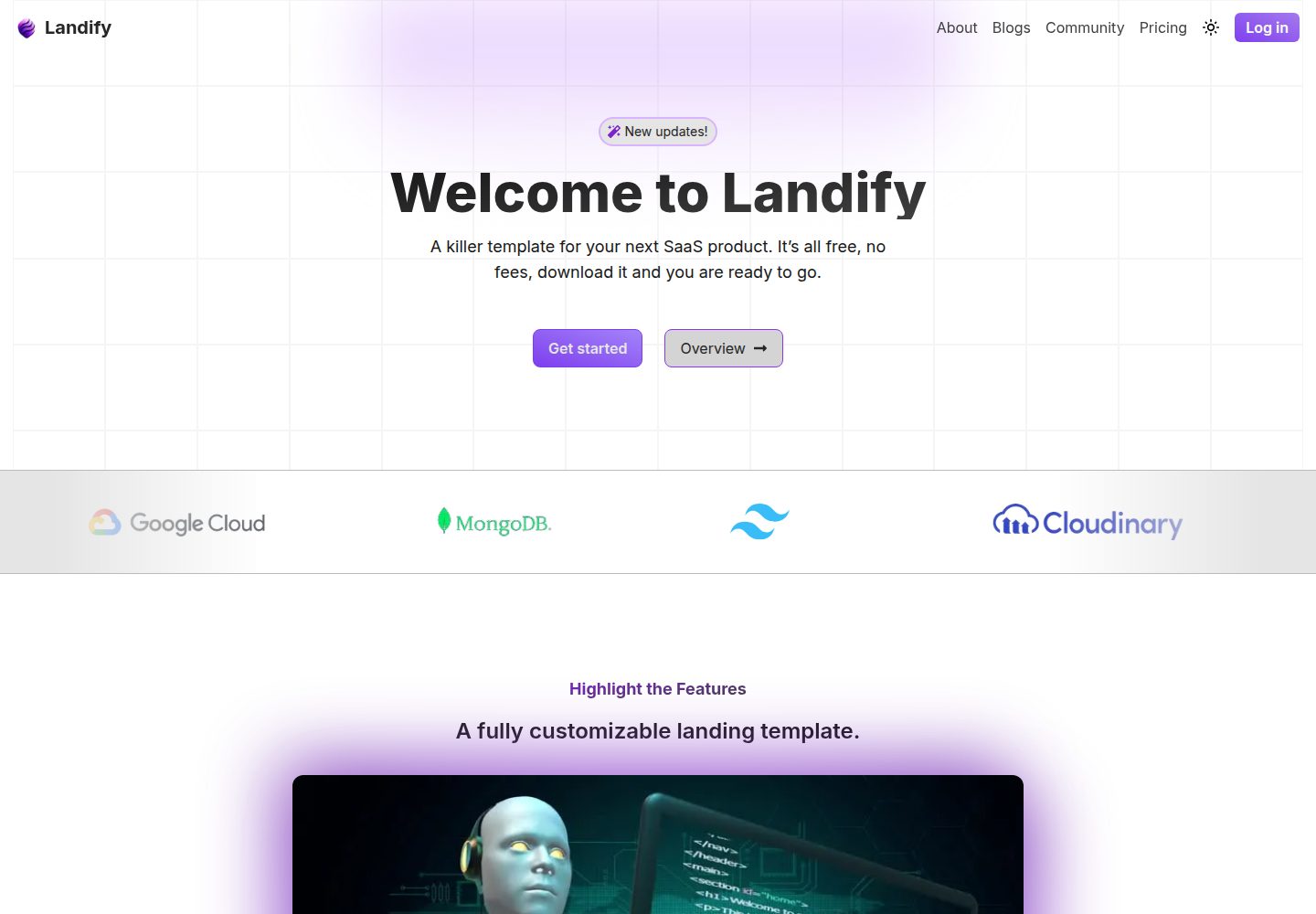
Desktop homepage1 / 3
Desktop captureTop of page
Actual screenshot captured by the server browser.
All pages & views 3
Screenshots show visual appearance; interactive behavior may differ.
Recorded 2026-10-14View source
What stands out
A quick read of the recorded project description.
Provides backend routes for storing newsletter users and sending emails, with the email-sending route protected.
The static blog section does not require a backend; to add a blog post, simply add a file in the Frontend/public/blog folder following the format.
A sitemap and robots.txt are automatically generated at build time.
The README states that Vercel Analytics can be enabled for user monitoring.
The design is inspired by cosmicthemes.com, but the code style and some designs have been adjusted.
Template Details
Landify is a landing page template for SaaS products. The README states that it is completely free, comes with a basic backend configured, and is written in TypeScript. The frontend is based on Next.js and TailwindCSS, the backend is based on Node and Express, and the database is MongoDB. The template includes a static blog section that can be displayed without a backend; the backend is used only to store newsletter users and send emails. The README mentions that the frontend has been deployed on the Vercel free tier, and the backend can be deployed to services such as EC2 and render.com. Environment variables need to be configured separately in the frontend and backend. The README also notes that backend features are disabled by default in the frontend, so the newsletter will not work, and the onsubmit function must be uncommented in Footer.tsx.
Next.jsBlogCorporate website
Is it right for your project?
Use Cases
- Build a landing page for a SaaS product with sections such as hero, features, pricing, FAQ, and testimonials.
- Publish blog posts as static files without backend involvement.
- Collect newsletter subscription emails and store them in MongoDB.
- Send emails through a protected backend route.
Suitable For
- Developers who need to quickly build a landing page for a SaaS product.
- Teams that want to use a full-stack TypeScript template and configure environment variables themselves.
- Users who need a static blog section and do not want to rely on backend rendering for the blog.
Getting started & customization
Use these recorded setup notes alongside the repository instructions for your chosen version.
- 1
Environment variables need to be configured separately in the Backend and Frontend folders.
- 2
Run npm install and npm run dev in two terminals, one for Backend and one for Frontend, to start development mode.
- 3
Backend features are disabled by default in the frontend, so the newsletter will not work; the onsubmit function must be uncommented in Footer.tsx.
- 4
For frontend deployment, run npm install and npm run build; for backend deployment, run npm run build and npm deploy.
- 5
To add a blog post, add a file in the Frontend/public/blog folder following the format.
License & source material
Usage conditions & limitations
Free to use · keep license noticeThis entry covers the free version in the public repository under the MIT license; the free scope applies to that version's code and does not mean that external services or third-party assets are free.
Must comply with when using
- The code of this version may be used, modified, used commercially, and distributed for free.
- When distributing copies or substantial portions of the code, retain the original author's copyright notice and the full MIT license notice.
- The code is provided as is; warranties and limitations of liability are governed by the original license and applicable law.
Additional costs & items to verify
- Demo images, fonts, icons, and other third-party assets must be checked against their respective licenses and cannot be judged solely by the code's MIT license.
- External services such as domains, hosting, databases, payments, or AI may incur additional charges.
- The README states that the author deployed only the frontend on the Vercel free tier; the backend must be deployed by the user to external services such as EC2 and render.com, which may incur corresponding service fees.
- The project requires .env environment variables to be configured separately in the frontend and backend folders; without configuration, it cannot run properly.
- The backend requires a MongoDB production database URI (MONGO_PROD_URI) to be configured, meaning it depends on an external MongoDB service.
- The internal protected route requires an ADMIN_AUTH_KEY management key generated by jwt to be configured.
- The email-sending feature requires an ADMIN_APP_PASSWORD administrator app password to be configured.
- The README states that the project itself does not depend on the backend; the backend is used only to store newsletter users and send emails.
- Backend features are disabled by default in the frontend, so the newsletter will not work; the onsubmit function must be uncommented in Footer.tsx to enable it.
- Vercel Analytics must be enabled manually and is an optional external monitoring service.
View Original Text Basis
Permission is hereby granted, free of charge
Original License Text
- For this project I only deployed [frontend](https://landify-sepia.vercel.app/) on `vercel` under free tier, but many services such as `EC2`, `render.com` can be used to deploy the node backend.
Original README
This project requirement .env configuration in `Backend` as well in `Frontend` folder.
Original README
| `MONGO_PROD_URI` | Production Database URI |
Original README
| `ADMIN_AUTH_KEY` | Admin Auth Key (Generated by jwt) - used for inner routes protection |
Original README
| `ADMIN_APP_PASSWORD` | Admin App Password |
Original README
- `This project doesn't requires backend, the backend is only given only to store the newsletter user and send emails`
Original README
- The beackend in turned off in the frontend, so the newsletter will not work in the frontend, you need to uncomment the onsubmit function in the form (in Footer.tsx - Frontend)
Original README
https://github.com/scienmanas/Landify/blob/main/LICENSEhttps://github.com/scienmanas/Landify/blob/main/README.md- `Vercel Analytics` is can be enabled for user monitoring.
Original README
Compiled by DeepSeek based on repository license and README ·2026-10-14. Results only cover the materials read; dependencies, images, fonts, and subsequent term changes are subject to their respective original texts.
Project checks & description sources
Template Information
- Source platforms
- GitHub
- Documentation and maintenance reference score
- Partly documented · 70 / 100
- Technologies
- Next.js · React
- Website type
- Blog · Corporate Website
How this score is calculated
Our heuristic uses license records (up to 30), a demo link (12), a preview (10), stars (15), recorded maintenance (15), description completeness (8), feature records (5) and classification data (5). It is not a code, security or performance test, or a Google score. A link does not establish tested functionality.
What to verify for this project
- Repository update recorded
- 2024-09-16
- Screenshot last checked
- 2026-10-14
A demo link is listed. Check it with your own content and viewport sizes; its presence does not confirm that forms, authentication or payments work.
The catalog identifies Next.js as the primary stack. Check the actual dependency manifest and lockfile for versions and hosting requirements. These notes use recorded metadata, not a code audit or a deployment test.
Use a selection guide →How this description was prepared
AI-assisted description based on catalog records and repository material. Repository authors are not automatically the reviewers of this description.
Review declaration: codex-user-requested-batch-review-20261015 · 2026-10-15
Inspect the recorded source material
SHA-256: 3edc84d81cbf3cbbbd9bb4ada2f4c1986f5999c8cd2cbd1e4ecf47c903ee81f2
2026-10-14T03:21:41.508Z
Source file / repository<div align="center"> <img src="https://github.com/user-attachments/assets/f4071c70-da66-4ad9-9a1b-b09af7afbf35" alt="Logo"> </div> # 🔰 Landify - A template which can used for your next SaaS product, its completely free, have already configured basic backend, fully written in typescript. Make your landing page a little cool. - For this project I only deployed [frontend](https://landify-sepia.vercel.app/) on `vercel` under free tier, but many services such as `EC2`, `render.com` can be used to deploy the node backend. ## 📚 Tech Stack - **Client:** Next JS, TailwindCSS - **Server:** Node, Express - **Datebase:** Mongo DB ## 📦 API Reference, Routes & Misc | Route | Type | Protected | Parameter | Description | | :------------------------------- | :----- | :-------- | :--------------------------------------------------------------- | :----------------------------------- | | `/api/user/newsletter-user` | `POST` | No | `email` | To store newsletter user in database | | `/api/services/send-email/admin` | `POST` | Yes | `fromName`, `toName`, `toEmail`, `subject`, `message` (all body) | Used to send mails | | `/api/services/send-email/test` | `POST` | Yes | `toName`, `toEmail`, `subject`, `message` (all body) | Used to send mails | - `Vercel Analytics` is can be enabled for user monitoring. ## 🔩 Environment Variables This project requirement .env configuration in `Backend` as well in `Frontend` folder. ### Backend | Varibale | Description | | :------------------- | :------------------------------------------------------------------- | | `MONGO_PROD_URI` | Production Database URI | | `MONGO_TEST_URI` | Test Database URI | | `PORT` | Port number for backend (5000) | | `ADMIN_AUTH_KEY` | Admin Auth Key (Generated by jwt) - used for inner routes protection | | `ADMIN_HASHED_KEY` | Admin Hashed Key (Doubly hashed) | | `ADMIN_EMAIL` | Admin Email | | `ADMIN_APP_PASSWORD` | Admin App Password | | `TEST_EMAIL` | Test Email | | `TEST_APP_PASSWORD` | Test App Password | | `DEPLOYED_URL` | Deployed URL | | `ENV` | Environment (dev / production) | ### Frontend | Varibale | Description | | :------------ | :--------------------------------- | | `DOMAIN` | Site domain (include protocol) | | `SITE_NAME` | Site name (just name, eg. landify) | | `BACKEND_URI` | Backend URI (include protocol) | ## 🔨 Setting Up - `This project doesn't requires backend, the backend is only given only to store the newsletter user and send emails` Follow the following instruction to setup the project and run locally - Set the environment variables in both `Backend` and `Frontend` folder. - Make sure, the environemental variables are set. - Open two seperate terminals and run `npm install` and then `npm run dev` in both terminals, one for backend and one for frontend. `package.json` is configured in a way it will start the dev mode by running `npm run dev`. - Hurray! your app will be started in development mode. ## Few Notes - The backend is only used to store the newsletter user and send emails. - To add new blog just add files according to the format in `Frontend/public/blog` folder. The blog will be automatically added to the website. - The beackend in turned off in the frontend, so the newsletter will not work in the frontend, you need to uncomment the onsubmit function in the form (in Footer.tsx - Frontend) ## Deployment - The frontend can be deployed on `vercel`, `netlify`, `github pages`, `render.com` etc. - The backend can be deployed on `EC2`, `render.com`, `heroku`, `netlify`, `vercel` etc. 1. To deploy the frontend, run the following command in the `Frontend` folder: - `configure the .env file` - `npm install` - `npm run build` 2. To deploy the backend, run the following command in the `Backend` folder: - `configure the .env file` - `npm run build` - `npm deplloy` ## ⚡ Features - Very easy to customize and deploy just be changing variables values - Static blog section, which doesn't require backend setup. ## 📁 File Structure : ``` . ├── Backend │ │── config │ │ └── db.ts │ │── lib │ │ └── definitions.ts │ │── models │ │ └── user.js │ │── routes │ │ ├── send-email.ts │ │ └── user.ts │ │── middlewares │ │ └── protectBackendRoute.ts │ ├── index.ts │ │── nodemon.json │ │── tsconfig.json │ │── .env │ │── package.json │ └── package-lock.json ├── Frontend │ │── app │ │ ├── (default_site) │ │ │ ├── _blog │ │ │ │ ├── [slug] │ │ │ │ │ └── page.tsx │ │ │ │ ├── page.tsx │ │ │ │ └── layout.tsx │ │ │ ├── page.tsx │ │ │ └── layout.tsx │ │ ├── lib │ │ │ └── definition.ts │ │ ├── utils │ │ │ ├── dateformatter.ts │ │ │ └── getBlogData.ts │ │ ├── ui │ │ │ ├── components │ │ │ │ ├── marquee.tsx │ │ │ │ └── grid.tsx │ │ │ ├── landing │ │ │ │ ├── Compnaies.tsx │ │ │ │ └── News.tsx │ │ │ ├── universal │ │ │ │ ├── Navbar.tsx │ │ │ │ ├── end-card.tsx │ │ │ │ ├── FAQ.tsx │ │ │ │ ├── features-cum-images.tsx │ │ │ │ ├── features.tsx │ │ │ │ ├── hero-video.tsx │ │ │ │ ├── Hero.tsx │ │ │ │ ├── Pricing.tsx │ │ │ │ ├── spotlight-image.tsx │ │ │ │ ├── Testimonials.tsx │ │ │ │ └── Trust.tsx │ │ │ ├── blog │ │ │ │ └── blog-card.tsx │ │ │ └── loaders.tsx │ │ ├── favicon.ico │ │ ├── global.css │ │ ├── page.tsx │ │ ├── layout.tsx │ │ ├── notfound.tsx │ │ └── next-sitemap.js │ │── public │ │ ├── blog │ │ │ ├── getting-started │ │ │ | ├── images │ │ │ | | └── image.png │ │ │ | └── content │ │ │ | └── content.md │ │ │ └──message-from-author │ │ │ ├── images │ │ │ | └── image.png │ │ │ └── content │ │ │ └── content.md │ │ └── assets │ │ └── ... folder with assets │ │── .eslinktrc.jsom │ │── next-env.d.ts │ │── package.json │ │── package-lock.json │ │── next.config.mjs (enabled cross image fetching) │ │── .env │ │── next-sitemap.js │ └── ..... Other configuration files (unaltered) ├── .gitignore ├── LICENSE └── README.md ``` - `site map` and `robots.txt` are automatically generating by using libraries when build command is run. ## 🔥 Contributing Contributions are always welcome! Additionally you can contact me by my email: **[email protected]**. I am currently working on a .md based blog engine for this template ## 📷 Video https://github.com/user-attachments/assets/365f919a-84ba-47e8-a664-ea4d45f90e90 ## 🙌 Credits & Acknowledgements - The design inspiration is taken from `cosmicthemes.com`, however the code style is different as well some designed has been changed. The original website can be found [here](https://galaxy.cosmicthemes.com/). I am currently working to implement .md based blog engine and policies page for this template. ## 🔒 License This repository is open source and under [MIT](https://choosealicense.com/licenses/mit/) License.
Explore similar templates
Compare previews and descriptions within the same stack and category.

tailwind-nextjs-starter-blog
A Next.js and Tailwind CSS blog starter template using Contentlayer for Markdown/MDX, with built-in SEO, code highlighting, and tags. It targets personal technical blogs and migration from Jekyll/Hugo to React, and supports one-click Vercel deployment.
Next.js · Blog

SaaS-Boilerplate
SaaS-Boilerplate is an open-source SaaS starter template built with Next.js App Router, React 19, TypeScript, Tailwind CSS, and Shadcn UI.
Next.js · SaaS

Next-JS-Landing-Page-Starter-Template
A free Next.js landing page starter template written in Tailwind CSS and TypeScript, featuring built-in navbar, hero, features, CTA banner, and footer sections.
Next.js · Corporate Website

next-saas-starter
A free Next.js SaaS marketing landing page template from Blazity, using static generation and styled-components with no extra UI library.
Next.js · SaaS

startup-nextjs
Startup is a free, MIT-licensed Next.js template from NextJSTemplates for SaaS startups and corporate landing pages.
Next.js · SaaS

shadcn-landing-page
A Next.js landing page template built with Shadcn, TypeScript, and Tailwind, converted from a Shadcn-Vue version. It includes sections such as Navbar, mobile Sidebar, Hero, Pricing, FAQ, and Footer, and highlights responsive design, navigation, and dark mode.
Next.js · Corporate Website