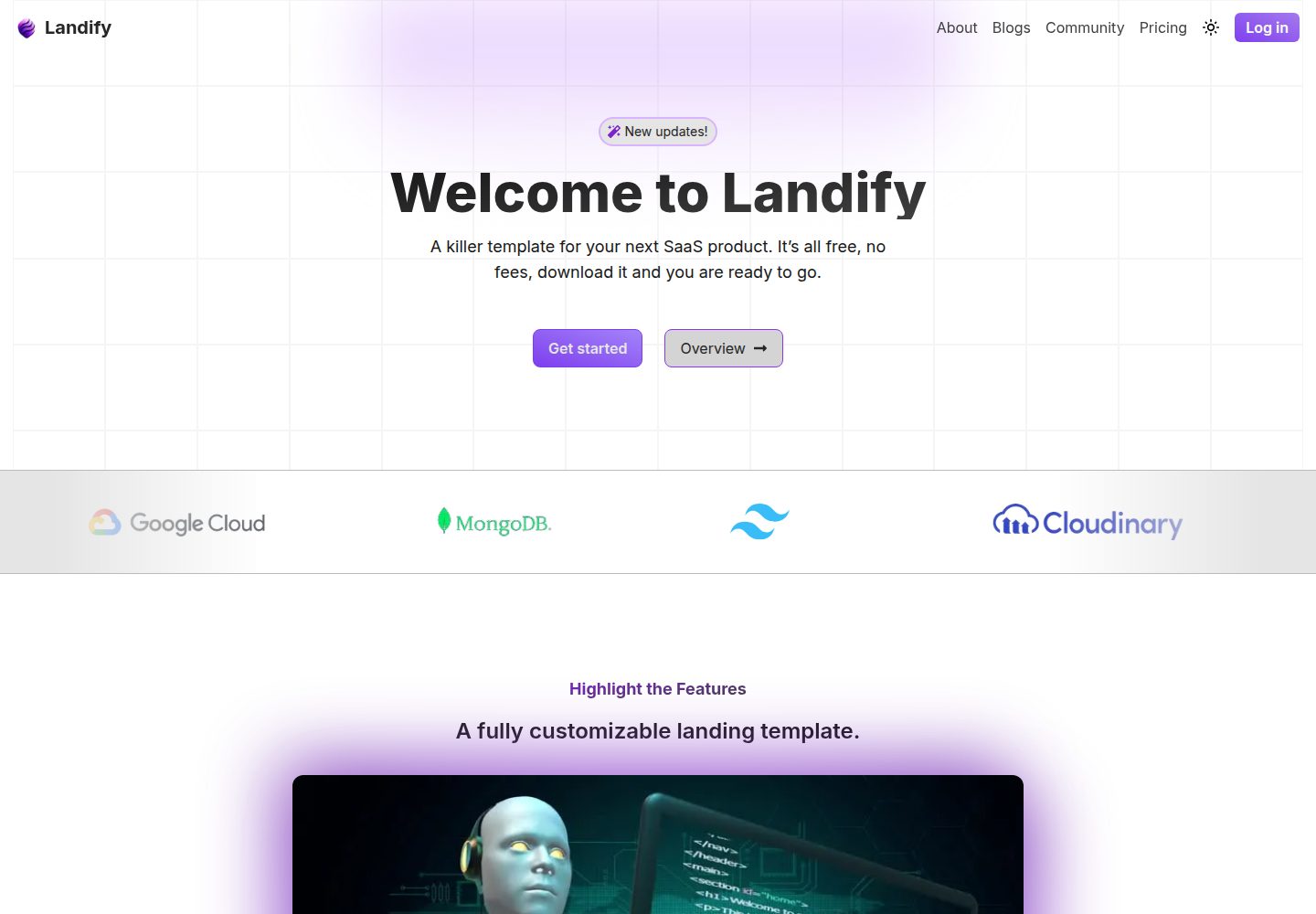
前端使用 Next.js 与 TailwindCSS,后端使用 Node、Express,数据库为 MongoDB,整体使用 TypeScript 编写。
Next.jsReact博客企业官网
Landify — Next.js 博客模板
作者 scienmanas
Landify 是一个面向 SaaS 产品的免费落地页模板,前端使用 Next.js 与 TailwindCSS,后端使用 Node、Express 与 MongoDB,后端仅用于存储 newsletter 用户和发送邮件。
看看你的网站会是什么样
浏览真实页面截图,比较内容排版与手机效果。点击下方缩略图切换,放大查看整页细节。
全部页面与视图 3
截图用于了解视觉与布局,交互效果请以实际项目为准。
采集于 2026-10-14查看来源
值得关注的模板亮点
从已有项目资料中,快速了解它的特点。
提供 newsletter 用户存储与邮件发送的后端路由,其中邮件发送路由受保护。
静态博客区块不需要后端,新增博客只需按格式在 Frontend/public/blog 文件夹添加文件。
构建时会自动生成 sitemap 与 robots.txt。
README 说明可启用 Vercel Analytics 进行用户监测。
设计灵感来自 cosmicthemes.com,但代码风格与部分设计有调整。
模板详细介绍
Landify 是一个为 SaaS 产品准备的落地页模板,README 说明其完全免费、已配置基础后端,并使用 TypeScript 编写。前端基于 Next.js 与 TailwindCSS,后端基于 Node、Express,数据库为 MongoDB。模板包含静态博客区块,不需要后端即可展示;后端仅用于存储 newsletter 用户和发送邮件。README 提到前端已部署在 Vercel 免费层,后端可部署到 EC2、render.com 等服务。环境变量需要在前端与后端分别配置。README 也指出前端中后端功能默认关闭,newsletter 不会工作,需要在 Footer.tsx 中取消注释 onsubmit 函数。
Next.js博客企业官网
适合你的项目吗?
适用场景
- 为 SaaS 产品搭建包含 hero、功能、定价、FAQ、评价等区块的落地页。
- 通过静态文件方式发布博客文章,无需后端参与。
- 收集 newsletter 订阅邮箱并存储到 MongoDB。
- 通过受保护的后端路由发送邮件。
适合人群
- 需要快速搭建 SaaS 产品落地页的开发者。
- 希望使用 TypeScript 全栈模板并自行配置环境变量的团队。
- 需要静态博客区块且不想依赖后端渲染博客的用户。
上手与定制指南
结合仓库当前版本的说明,按下面的资料检查内容、配置与运行要求。
- 1
需要在 Backend 和 Frontend 文件夹分别配置环境变量。
- 2
在 Backend 和 Frontend 两个终端分别运行 npm install 与 npm run dev 启动开发模式。
- 3
前端默认关闭后端功能,newsletter 不会工作,需在 Footer.tsx 中取消注释 onsubmit 函数。
- 4
前端部署可运行 npm install 与 npm run build;后端部署可运行 npm run build 与 npm deploy。
- 5
新增博客需按格式在 Frontend/public/blog 文件夹添加文件。
授权与来源资料
使用条件与限制
免费使用 · 保留许可声明本次收录的是公开仓库中采用 MIT 许可的免费版本;免费范围为该版本代码,不代表外部服务或第三方素材免费。
使用时需要遵守
- 允许免费使用、修改、商用和分发该版本代码。
- 分发代码副本或实质性部分时,保留原作者版权声明和完整 MIT 许可声明。
- 代码按现状提供;担保与责任限制以原许可证及适用法律为准。
额外费用与待核对事项
- 演示图片、字体、图标及其他第三方素材需按各自许可核对,不能仅凭代码的 MIT 许可判断。
- 域名、托管、数据库、支付或 AI 等外部服务可能另外收费。
- README 说明作者仅在 Vercel 免费层部署了前端;后端需自行部署到 EC2、render.com 等外部服务,可能产生相应服务费用。
- 项目要求在前端与后端文件夹分别配置 .env 环境变量,未配置则无法正常运行。
- 后端需要配置 MongoDB 生产数据库 URI(MONGO_PROD_URI),即依赖外部 MongoDB 服务。
- 内部受保护路由需要配置由 jwt 生成的 ADMIN_AUTH_KEY 管理密钥。
- 邮件发送功能需要配置 ADMIN_APP_PASSWORD 管理员应用密码。
- README 说明该项目本身不依赖后端,后端仅用于存储 newsletter 用户和发送邮件。
- 前端默认关闭后端功能,newsletter 不会工作,需在 Footer.tsx 中取消注释 onsubmit 函数才能启用。
- Vercel Analytics 需手动启用,属于可选的外部监测服务。
查看原文依据
Permission is hereby granted, free of charge
许可证原文
- For this project I only deployed [frontend](https://landify-sepia.vercel.app/) on `vercel` under free tier, but many services such as `EC2`, `render.com` can be used to deploy the node backend.
README 原文
This project requirement .env configuration in `Backend` as well in `Frontend` folder.
README 原文
| `MONGO_PROD_URI` | Production Database URI |
README 原文
| `ADMIN_AUTH_KEY` | Admin Auth Key (Generated by jwt) - used for inner routes protection |
README 原文
| `ADMIN_APP_PASSWORD` | Admin App Password |
README 原文
- `This project doesn't requires backend, the backend is only given only to store the newsletter user and send emails`
README 原文
- The beackend in turned off in the frontend, so the newsletter will not work in the frontend, you need to uncomment the onsubmit function in the form (in Footer.tsx - Frontend)
README 原文
https://github.com/scienmanas/Landify/blob/main/LICENSEhttps://github.com/scienmanas/Landify/blob/main/README.md- `Vercel Analytics` is can be enabled for user monitoring.
README 原文
DeepSeek 根据仓库许可证和 README 整理 ·2026-10-14。结果仅覆盖已读取资料,依赖、图片、字体及后续条款变更以各自原文为准。
项目核对记录与介绍依据
模板资料
- 来源平台
- GitHub
- 资料与维护参考分
- 资料一般 · 70 / 100
- 技术栈
- Next.js · React
- 网站类型
- 博客 · 企业官网
这个分数如何计算
本站按许可资料(最高30分)、演示链接(12分)、预览图(10分)、Star数(15分)、记录的维护时间(15分)、描述完整度(8分)、功能记录(5分)和分类资料(5分)计算。它不是代码、安全或性能测试,也不是 Google 评分;有链接不代表已实测可用。
这个项目需要核对什么
- 记录的仓库更新时间
- 2024-09-16
- 截图检查日期
- 2026-10-14
已收录演示链接。请用你的内容与屏幕尺寸检查;有演示不代表表单、认证或支付已经可用。
目录记录的主要技术栈是 Next.js。请通过依赖清单和锁文件核对实际版本与托管要求。这些说明基于收录资料,不代表代码审计或部署实测。
查看具体选型方法 →介绍的制作与核对状态
介绍由 AI 辅助整理目录与仓库资料。仓库作者不等于这篇介绍的审核者。
审核声明: codex-user-requested-batch-review-20261015 · 2026-10-15
查看当时使用的来源资料
SHA-256: 3edc84d81cbf3cbbbd9bb4ada2f4c1986f5999c8cd2cbd1e4ecf47c903ee81f2
2026-10-14T03:21:41.508Z
来源文件 / 仓库<div align="center"> <img src="https://github.com/user-attachments/assets/f4071c70-da66-4ad9-9a1b-b09af7afbf35" alt="Logo"> </div> # 🔰 Landify - A template which can used for your next SaaS product, its completely free, have already configured basic backend, fully written in typescript. Make your landing page a little cool. - For this project I only deployed [frontend](https://landify-sepia.vercel.app/) on `vercel` under free tier, but many services such as `EC2`, `render.com` can be used to deploy the node backend. ## 📚 Tech Stack - **Client:** Next JS, TailwindCSS - **Server:** Node, Express - **Datebase:** Mongo DB ## 📦 API Reference, Routes & Misc | Route | Type | Protected | Parameter | Description | | :------------------------------- | :----- | :-------- | :--------------------------------------------------------------- | :----------------------------------- | | `/api/user/newsletter-user` | `POST` | No | `email` | To store newsletter user in database | | `/api/services/send-email/admin` | `POST` | Yes | `fromName`, `toName`, `toEmail`, `subject`, `message` (all body) | Used to send mails | | `/api/services/send-email/test` | `POST` | Yes | `toName`, `toEmail`, `subject`, `message` (all body) | Used to send mails | - `Vercel Analytics` is can be enabled for user monitoring. ## 🔩 Environment Variables This project requirement .env configuration in `Backend` as well in `Frontend` folder. ### Backend | Varibale | Description | | :------------------- | :------------------------------------------------------------------- | | `MONGO_PROD_URI` | Production Database URI | | `MONGO_TEST_URI` | Test Database URI | | `PORT` | Port number for backend (5000) | | `ADMIN_AUTH_KEY` | Admin Auth Key (Generated by jwt) - used for inner routes protection | | `ADMIN_HASHED_KEY` | Admin Hashed Key (Doubly hashed) | | `ADMIN_EMAIL` | Admin Email | | `ADMIN_APP_PASSWORD` | Admin App Password | | `TEST_EMAIL` | Test Email | | `TEST_APP_PASSWORD` | Test App Password | | `DEPLOYED_URL` | Deployed URL | | `ENV` | Environment (dev / production) | ### Frontend | Varibale | Description | | :------------ | :--------------------------------- | | `DOMAIN` | Site domain (include protocol) | | `SITE_NAME` | Site name (just name, eg. landify) | | `BACKEND_URI` | Backend URI (include protocol) | ## 🔨 Setting Up - `This project doesn't requires backend, the backend is only given only to store the newsletter user and send emails` Follow the following instruction to setup the project and run locally - Set the environment variables in both `Backend` and `Frontend` folder. - Make sure, the environemental variables are set. - Open two seperate terminals and run `npm install` and then `npm run dev` in both terminals, one for backend and one for frontend. `package.json` is configured in a way it will start the dev mode by running `npm run dev`. - Hurray! your app will be started in development mode. ## Few Notes - The backend is only used to store the newsletter user and send emails. - To add new blog just add files according to the format in `Frontend/public/blog` folder. The blog will be automatically added to the website. - The beackend in turned off in the frontend, so the newsletter will not work in the frontend, you need to uncomment the onsubmit function in the form (in Footer.tsx - Frontend) ## Deployment - The frontend can be deployed on `vercel`, `netlify`, `github pages`, `render.com` etc. - The backend can be deployed on `EC2`, `render.com`, `heroku`, `netlify`, `vercel` etc. 1. To deploy the frontend, run the following command in the `Frontend` folder: - `configure the .env file` - `npm install` - `npm run build` 2. To deploy the backend, run the following command in the `Backend` folder: - `configure the .env file` - `npm run build` - `npm deplloy` ## ⚡ Features - Very easy to customize and deploy just be changing variables values - Static blog section, which doesn't require backend setup. ## 📁 File Structure : ``` . ├── Backend │ │── config │ │ └── db.ts │ │── lib │ │ └── definitions.ts │ │── models │ │ └── user.js │ │── routes │ │ ├── send-email.ts │ │ └── user.ts │ │── middlewares │ │ └── protectBackendRoute.ts │ ├── index.ts │ │── nodemon.json │ │── tsconfig.json │ │── .env │ │── package.json │ └── package-lock.json ├── Frontend │ │── app │ │ ├── (default_site) │ │ │ ├── _blog │ │ │ │ ├── [slug] │ │ │ │ │ └── page.tsx │ │ │ │ ├── page.tsx │ │ │ │ └── layout.tsx │ │ │ ├── page.tsx │ │ │ └── layout.tsx │ │ ├── lib │ │ │ └── definition.ts │ │ ├── utils │ │ │ ├── dateformatter.ts │ │ │ └── getBlogData.ts │ │ ├── ui │ │ │ ├── components │ │ │ │ ├── marquee.tsx │ │ │ │ └── grid.tsx │ │ │ ├── landing │ │ │ │ ├── Compnaies.tsx │ │ │ │ └── News.tsx │ │ │ ├── universal │ │ │ │ ├── Navbar.tsx │ │ │ │ ├── end-card.tsx │ │ │ │ ├── FAQ.tsx │ │ │ │ ├── features-cum-images.tsx │ │ │ │ ├── features.tsx │ │ │ │ ├── hero-video.tsx │ │ │ │ ├── Hero.tsx │ │ │ │ ├── Pricing.tsx │ │ │ │ ├── spotlight-image.tsx │ │ │ │ ├── Testimonials.tsx │ │ │ │ └── Trust.tsx │ │ │ ├── blog │ │ │ │ └── blog-card.tsx │ │ │ └── loaders.tsx │ │ ├── favicon.ico │ │ ├── global.css │ │ ├── page.tsx │ │ ├── layout.tsx │ │ ├── notfound.tsx │ │ └── next-sitemap.js │ │── public │ │ ├── blog │ │ │ ├── getting-started │ │ │ | ├── images │ │ │ | | └── image.png │ │ │ | └── content │ │ │ | └── content.md │ │ │ └──message-from-author │ │ │ ├── images │ │ │ | └── image.png │ │ │ └── content │ │ │ └── content.md │ │ └── assets │ │ └── ... folder with assets │ │── .eslinktrc.jsom │ │── next-env.d.ts │ │── package.json │ │── package-lock.json │ │── next.config.mjs (enabled cross image fetching) │ │── .env │ │── next-sitemap.js │ └── ..... Other configuration files (unaltered) ├── .gitignore ├── LICENSE └── README.md ``` - `site map` and `robots.txt` are automatically generating by using libraries when build command is run. ## 🔥 Contributing Contributions are always welcome! Additionally you can contact me by my email: **[email protected]**. I am currently working on a .md based blog engine for this template ## 📷 Video https://github.com/user-attachments/assets/365f919a-84ba-47e8-a664-ea4d45f90e90 ## 🙌 Credits & Acknowledgements - The design inspiration is taken from `cosmicthemes.com`, however the code style is different as well some designed has been changed. The original website can be found [here](https://galaxy.cosmicthemes.com/). I am currently working to implement .md based blog engine and policies page for this template. ## 🔒 License This repository is open source and under [MIT](https://choosealicense.com/licenses/mit/) License.
看看同类模板
对比同技术栈与用途的模板,找到更适合的视觉与内容结构。

tailwind-nextjs-starter-blog
tailwind-nextjs-starter-blog 是一个面向个人技术博客的 Next.js 与 Tailwind CSS 启动模板,其 v2 版本基于 App Router 与 React Server Comp…
Next.js · 博客

SaaS-Boilerplate
🚀🎉📚 SaaS Boilerplate built with Next.js + Tailwind CSS + Shadcn UI + TypeScript. ⚡️ Full-stack React applic…
Next.js · SaaS

Next-JS-Landing-Page-Starter-Template
🚀 Free NextJS Landing Page Template written in Tailwind CSS 3 and TypeScript ⚡️ Made with developer experienc…
Next.js · 企业官网

next-saas-starter
⚡️ Free Next.js responsive landing page template for SaaS products made using JAMStack architecture.
Next.js · SaaS

startup-nextjs
Startup is free Next.js template for SaaS startups comes with all the essential pages, components, and section…
Next.js · SaaS

shadcn-landing-page
New design 🎉 Nextjs + Shadcn + TypeScript + Tailwind. Landing page template ease-to-use
Next.js · 企业官网