Componentized structure: each component under src/_components contains a .template.njk, an optional transformer, and styles.css, invoked via the component shortcode
EleventyStarter
twenty-ninety — Eleventy Starter Template
By seancdavis
Twenty Ninety is an Eleventy-based componentized starter that integrates Gulp, PostCSS, Tailwind CSS, Webpack, and Netlify deployment configuration, under the MIT license.
Explore the design
Compare the page layouts and mobile experience. Open any screenshot for a closer look.
Desktop homepage1 / 2
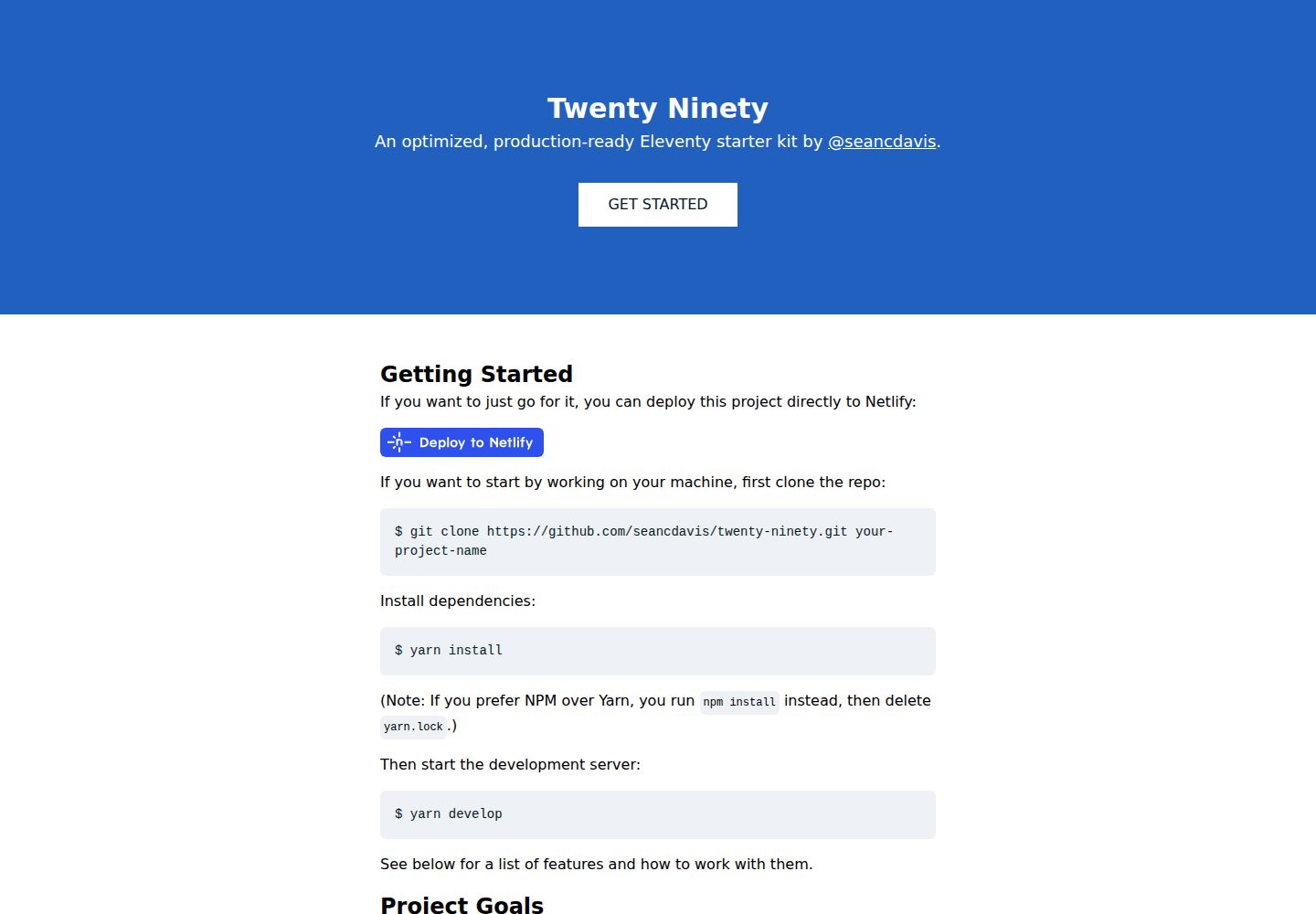
Desktop captureTop of page
Actual screenshot captured by the server browser.
All pages & views 2
Screenshots show visual appearance; interactive behavior may differ.
Recorded 2026-09-30View source
What stands out
A quick read of the recorded project description.
Unified Gulp task pipeline: integrates Eleventy, PostCSS, and Webpack, providing develop and build commands
Eleventy utils auto-loading: .js files in the utils directory are run as plugins by .eleventy.js
Netlify presets: netlify.toml configures build plugins, including a local plugin that runs Jest tests before the build
Markdown shortcodes: render Markdown in Nunjucks and other templates, with Highlight.js syntax highlighting support
MIT license: allows free use, modification, commercial use, and distribution, provided the copyright and license notice are retained
Template Details
Twenty Ninety is an Eleventy starter maintained by seancdavis, positioned as a componentized, convention-first foundation for static sites. It combines Eleventy's template processing with a Gulp task pipeline to manage the build of CSS, JavaScript, and other assets, and includes preset Netlify deployment configuration. The project uses the MIT license, and the repository provides desktop and mobile homepage screenshots, with a demo site at seancdavis.com/twenty-ninety.
Functionally, it includes an Eleventy configuration abstraction (eleventy.config.js), an auto-loading utils plugin directory, a Nunjucks-based component system (with transformers and style files), Markdown shortcodes, an image component, a Google Analytics loading script, and Jest tests. CSS goes through PostCSS and Tailwind CSS, JavaScript goes through Webpack and exposes an App object. On the Netlify side, it provides netlify.toml and build plugins, including a local plugin that runs tests before the build.
In terms of limitations, the README explicitly states that components currently only support .njk templates; the image component is tightly coupled to Imgix and its breakpoints and other settings are very fixed; JavaScript is recommended to use only a single bundle; external dependencies such as fonts and analytics require you to configure environment variables yourself. The project was last updated in 2020, and the long-term goal is to package this set of conventions into an upgradeable package, but it is currently still provided as a starter.
EleventyStarter
Is it right for your project?
Use Cases
- Quickly building an Eleventy-based static website while following the author's component and build conventions
- Projects that need to manage both CSS and JavaScript builds through Gulp
- Planning to deploy to Netlify and wanting to use its build plugins and deploy button directly
- Embedding Markdown content in Eleventy templates and needing syntax highlighting
- Sites that want to test server-side and client-side JavaScript with Jest
Suitable For
- Developers familiar with Eleventy who accept strong conventions
- Static site projects that need componentized templates and a unified asset build process
- Users who primarily deploy on Netlify
- Individuals or teams willing to retain the copyright and license notice under the MIT license
Getting started & customization
Use these recorded setup notes alongside the repository instructions for your chosen version.
- 1
After cloning the repository, run yarn install (or npm install and delete yarn.lock) to install dependencies
- 2
Run yarn develop to start the development server, and yarn build to generate static files
- 3
You can deploy directly to Netlify using the Deploy to Netlify button in the README
- 4
For environment variables, refer to .envrc-sample; Google Analytics requires ELEVENTY_ENV, GOOGLE_ANALYTICS_ID, and ANALYTICS_APP_NAME
- 5
Third-party assets such as demo images, fonts, and icons must be checked separately under their respective licenses, and external services may charge additional fees
License & source material
Usage conditions & limitations
Free to use · keep license noticeThis entry covers the free version in the public repository under the MIT license; the free scope is the code of that version and does not mean that external services or third-party assets are free.
Must comply with when using
- Free use, modification, commercial use, and distribution of this version's code are permitted.
- When distributing copies or substantial portions of the code, retain the original author's copyright notice and the full MIT license notice.
- The code is provided as is; warranties and limitations of liability are governed by the original license and applicable law.
Additional costs & items to verify
- The image component depends on the external Imgix service, requiring you to register an Imgix account and potentially incurring fees; if not using Imgix, you must remove or replace the component.
- Using Google Analytics requires configuring environment variables such as GOOGLE_ANALYTICS_ID and ANALYTICS_APP_NAME, and is subject to Google's terms of service.
- The deployment process is preset for Netlify; using its build plugins and deploy button requires a Netlify account, and exceeding the free quota may incur fees.
- The component system currently only supports .njk templates; other template languages cannot be used directly for components.
- The current Webpack configuration recommends using only a single JavaScript bundle; multiple entry points require adjusting the configuration yourself.
- The styles.css included with components is not automatically scoped and may cause global style conflicts.
- Demo images, fonts, icons, and other third-party assets must be checked under their respective licenses and cannot be judged solely by the code's MIT license.
- External services such as domains, hosting, databases, payments, or AI may charge additional fees.
View Original Text Basis
Permission is hereby granted, free of charge
Original License Text
It is designed to work with [Imgix](https://www.imgix.com).
Original README
If you stick with Google, it expects the following conditions to be true with environment variables:
Original README
This project is built to be deployed with [Netlify](https://netlify.com).
Original README
(At this time, only `.njk` components are supported.)
Original README
However, it is recommended that with the current Webpack config, you only use a single bundle.
Original README
https://github.com/seancdavis/twenty-ninety/blob/main/LICENSEhttps://github.com/seancdavis/twenty-ninety/blob/main/README.mdNote that these styles are not automatically scoped.
Original README
Compiled by DeepSeek based on repository license and README ·2026-10-01. Results only cover the materials read; dependencies, images, fonts, and subsequent term changes are subject to their respective original texts.
Project checks & description sources
Template Information
- Source platforms
- GitHub
- Documentation and maintenance reference score
- Partly documented · 72 / 100
- Technologies
- Eleventy
- Website type
- Starter
How this score is calculated
Our heuristic uses license records (up to 30), a demo link (12), a preview (10), stars (15), recorded maintenance (15), description completeness (8), feature records (5) and classification data (5). It is not a code, security or performance test, or a Google score. A link does not establish tested functionality.
What to verify for this project
- Repository update recorded
- 2020-09-13
- Screenshot last checked
- 2026-10-01
A demo link is listed. Check it with your own content and viewport sizes; its presence does not confirm that forms, authentication or payments work.
The catalog identifies Eleventy as the primary stack. Check the actual dependency manifest and lockfile for versions and hosting requirements. These notes use recorded metadata, not a code audit or a deployment test.
Use a selection guide →How this description was prepared
AI-assisted description based on catalog records and repository material. Repository authors are not automatically the reviewers of this description.
Automatically checked against source and license rules; no manual editorial review.
Inspect the recorded source material
SHA-256: 3c5d4b1d0d951212414a1fd3d7ddda62d43a6b2ca2777f6bf15571bf55f90c03
2026-10-01T15:09:54.306Z
Source file / repository# Twenty Ninety [](https://app.netlify.com/sites/twenty-ninety/deploys)
Twenty Ninety is a component-based [Eleventy](https://www.11ty.dev/) starter kit. It comes with lots of opinions, all designed to help you build websites faster (and have fun doing it)!
## Getting Started
If you want to just go for it, you can deploy this project directly to Netlify:
[](https://app.netlify.com/start/deploy?repository=https://github.com/seancdavis/twenty-ninety)
If you want to start by working on your machine, first clone the repo:
$ git clone https://github.com/seancdavis/twenty-ninety.git your-project-name
Install dependencies:
$ yarn install
(Note: If you prefer NPM over Yarn, you run `npm install` instead, then delete `yarn.lock`.)
Then start the development server:
$ yarn develop
See below for a list of features and how to work with them.
## Project Goals
Eleventy is a wonderful static site generator. It's quick. It gets out of the way. It lets you work how you want to work. While that's fun and flexible, [it's not efficient](https://cobwwweb.com/increase-developer-efficiency-by-establishing-conventions).
This project exists to provide a foundation on which we can build websites consistently and efficiently over time.
As a starter kit, the benefits you derive from this setup exist only in what is provided here, at this time. That's limiting in a way, as you lose the benefit of any progress made here along the way.
Therefore, the longer-term goal with this project is to offer it as a package so you can get the benefits of updates made to the system, without losing the ability to opt-out of the (strong) opinions made here.
## Features
There is a lot going on above what Eleventy offers out of the box. Here are those features. If you have questions, feel free to [open an issue](https://github.com/seancdavis/twenty-ninety/issues/new) or [start a conversation on Twitter](https://twitter.com/seancdavis29).
Here's a list:
- [Gulp](#gulp)
- [Eleventy](#eleventy)
- [CSS](#css)
- [JavaScript](#javascript)
- [Netlify](#netlify)
- [Testing](#testing)
- [Environment Variables](#environment-variables)
- [Fonts](#fonts)
- [Components](#components)
- [Images](#images)
- [Markdown](#markdown)
- [Google Analytics](#google-analytics)
- [SEO](#seo)
- [Yarn](#yarn)
### Gulp
Eleventy offers a command to process templated files and output HTML code. Most websites require more processing, particularly with assets like CSS and JavaScript. That can make for disparate processes.
In this project, [Gulp](https://gulpjs.com/) plays the role of managing those processes together so you only have to worry about a few simple commands. The configuration can be found in `gulpfile.js`.
For convenience, all tasks are exported and can be like so:
$ yarn gulp [task]
To see a list of tasks, run:
$ yarn gulp --tasks
But, in general, if you're following the conventions for CSS and JS, you _should_ only need to worry about `develop` (starts a dev server) and `build` (builds static files). Both of these commands have been added to `package.json`, so that you can skip the `gulp` portion and just run:
$ yarn develop
$ yarn build
### Eleventy
The HTML processing uses [Eleventy](https://www.11ty.dev/), which I hope isn't surprising, as this is currently an Eleventy starter kit!
Anything you can do with Eleventy, you can do here, too. But if you use what we have here out of the box, there are a few items to note ...
#### Eleventy Config
Eleventy's config goes into `.eleventy.js`. That file typically exports an object representing [the config values that have been adjusted](https://www.11ty.dev/docs/config/). In this case, those items have been abstracted to `eleventy.config.js`, as they are used elsewhere in the project.
Note that some defaults have changed. The two most notable are that the build directory is `dist` and the templating engine for markdown files is nunjucks, rather than liquid.
#### Eleventy Utils
When the config file begins to perform many tasks it can quickly get unwieldy. Therefore, this starter offers the benefit of Eleventy utils. Any `.js` file dropped in to the `utils` directory that isn't prefixed with an underscore or suffixed with `.spec.js` will get picked up and run as a plugin by `.eleventy.js`.
Each plugin (utility) requires a **single named export** as `default`. Check out `utils/shortcodes/markdown.js` as an example. It exports the following:
```js
exports.default = (eleventyConfig) => {
eleventyConfig.addPairedShortcode("markdown", (input) => exports.renderMarkdown(input))
}
```
That looks just like some code that would typically be dropped into `.eleventy.js`, and that's the point. This provides a means of modularizing the plugins you provide to Eleventy.
There are a few (cool) custom shortcodes that ship with this project. They are listed near the end of the features.
### CSS
CSS is ready to go by default. It is configured to use [PostCSS](https://postcss.org/) (via a Gulp plugin), and also makes use of [Tailwind CSS](https://tailwindcss.com/).
PostCSS plugins can be added or removed from `postcss.config.js`, and Tailwind configuration can be adjusted in or removed from `tailwind.config.js`.
Any `.css` files in `src/_assets/css` will get picked up by the Gulp task and processed through PostCSS. The default is `main.css`.
The file is loaded in the `<head>` of the head of the default layout (`src/_includes/layout/head.njk`).
### JavaScript
JavaScript is built using [Webpack](https://webpack.js.org/) (via a Gulp plugin). The webpack config can be found at `webpack.config.js`.
The Gulp plugin will pick up any `.js` file in `src/_assets/js` and move it to `dist/assets/js/...`.
However, it is recommended that with the current Webpack config, you only use a single bundle. It is designed to make the global code available through an `App` object. Notice that if you start up the dev server (`yarn develop`), you can open up your console and run the following:
```js
console.log(App)
// => Module {default: {…}, __esModule: true, Symbol(Symbol.toStringTag): "Module"}
console.log(App.default)
// => {}
```
That's because that's the default export from `main.js`:
```js
export default {}
```
The main JavaScript bundle is loaded onto the page from the foot include (`src/_includes/layout/foot.njk`).
#### JavaScript Utilities
The project is also setup for injecting global utilities. The only one included by default is the _scan links_ utility (`src/_assets/js/utils/scan-links.js`). When the page is read, the link scanner looks through all anchor tags. If it determines the `href` value is to an external URL, it will add `target="_blank"` and `rel="noopener"` attributes to the tag.
If you'd like to remove this functionality, delete the file and remove the import line from `main.js`. Or, if you want to adjust the attributes that are added, you can edit the `scan-links.js` file.
### Netlify
This project is built to be deployed with [Netlify](https://netlify.com). There's even a button above to do it with just a couple clicks!
Some base configuration lives in `netlify.toml`, while others you may want to configure through the Netlify UI.
The project also brings a handful of [build plugins](https://docs.netlify.com/configure-builds/build-plugins/). Many of these are added to improve performance or accessibility in production. There's also a local plugin for running tests prior to running the build. You can see the list of plugins used in `netlify.toml`. Most are well-documented in their README files.
### Testing
[Jest](https://jestjs.io/) is used for testing both server-side and client-side JavaScript code. The convention in this project is to append test files with `.spec.js`.
The tests can be run with:
$ yarn test
There is a local Netlify build plugin that runs these tests automatically before the build on Netlify. You can remove the plugin if you don't want it to run.
### Environment Variables
I prefer [direnv](https://direnv.net/) for managing environment variables, but you can use whatever you'd prefer. A list of environment variables can be found in `.envrc-sample`.
### Fonts
Fonts are included by default in `src/_assets/css/global/fonts.css`.
If you use either local or [Google Fonts](https://fonts.google.com/), the Netlify build plugin `netlify-plugin-subfont` will process the fonts and create subfont versions of those files, increasing performance in production.
### Components
Components are one of the coolest features of this project. They are included as an Eleventy utility, but there's some magic that happens behind the scenes.
Components each get their own directory inside `src/_components`. We'll use the button as an example here.
There must be at least one file in the directory: `[name].template.njk`. (At this time, only `.njk` components are supported.) Therefore, a button component must include a `button.template.njk` file.
It gets rendered on the page using a `component` shortcode. For example:
```njk
{% component "button", url = "/", label = "Click Me!", theme = "blue" %}
```
The first argument tells the shortcode which component to render (`button`), while the rest are sent as variables to the component.
But sometimes you want to transform those properties (variables) before rendering and don't want to have to do that in a view file. That's where transformers come in. If you create a file at `[name].transformer.js` (e.g. `button.transformer.js`), the properties will get passed through the default export, which should return the transformed components. For example, the button transformer sets a default `theme` property if it is missing. That way we can safely use the `theme` variable in the template.
Lastly, if you want to bring custom styles, you can add a `[name].styles.css` file to the directory and it will get picked up automatically by `main.css`. Note that these styles are not automatically scoped.
### Images
`image` is another component (`src/_components/image`). It is designed to work with [Imgix](https://www.imgix.com). It is, at this time, _extremely_ opinionated, even down to the breakpoints. It is undergoing a transformation, as I work with the Imgix team to develop a more flexible solution. You're welcome to dig through the transformer to see how it works. Or you can remove and add your own.
### Markdown
Markdown is [supported as a templating language with Eleventy](https://www.11ty.dev/docs/languages/markdown/). However, it can't be rendered in other templates. To remedy that problem, this project brings a `markdown` shortcode to render markdown within other template files. For example, in a nunjucks file, you could write the following:
```njk
<div>
{% markdown %}
## This is a heading
{% endmarkdown %}
</div>
```
And voila! The markdown will be rendered!
This feature uses [markdown-it](https://github.com/markdown-it/markdown-it) and can be found in `utils/shortcodes/markdown.js`. It also supports syntax highlighting via [Highlight.js](https://highlightjs.org/), bringing in the GitHub theme by default.
### Google Analytics
Google Analytics are loaded in a script included by `main.js` (`src/_assets/js/lib/analytics.js`). This makes use of the [analytics library](https://www.npmjs.com/package/analytics). You may swap out Google for other plugins, or take a different approach to loading analytics on your site.
If you stick with Google, it expects the following conditions to be true with environment variables:
- `ELEVENTY_ENV` to be missing or set to production.
- `GOOGLE_ANALYTICS_ID` to be set as the ID for the GA account.
- `ANALYTICS_APP_NAME` to be set as the name of your project (this is arbitrary, but should be adjusted).
### SEO
SEO is another component offered out of the box. It provides a means of writing SEO meta tags to the page based on page-specific data, with sensible defaults.
The defaults can be set in `src/_data/seo_defaults.json`.
The component gets loaded in the head (`src/_includes/layout/head.njk`). Notice that it sends the `title`, `image`, and `description`, but optionally allows for overrides by using the `seo` property.
This means that pages using this head include can override with the following structure:
```md
---
title: "Page Title"
description: "Page Description"
image: "/page-image.jpg"
seo:
title: "SEO Override Title"
description: "SEO Override Description"
image: "/seo-override-image.jpg"
og:
title: "OpenGraph Override Title"
description: "OpenGraph Override Description"
image: "/og-override-image.jpg"
type: webpage
twitter:
title: "Twitter Override Title"
description: "Twitter Override Description"
image: "/twitter-override-image.jpg"
card: summary
---
...
```
Here are items of note:
- Twitter first falls back to OpenGraph, then to the overrides, then to the page, then to the global defaults.
- OpenGraph falls back to the overrides, then to the page, then to the global defaults.
- It expects images to be local, as it prepends the base url to the image path.
### Yarn v NPM
I prefer [Yarn](https://yarnpkg.com/) over the more traditional NPM as a dependency manager. If you prefer NPM, it's easy enough to switch over. Simply run `npm install` and then delete `yarn.lock`. You should see a `package-lock.json` file appear in the project root, which means you're good to go! There's an NPM alternative to any yarn command mentioned here.
## Contributing
If you'd like what you see here but have found a bug or would like to add a feature, super! And thank you very much for your support and contribution. To do so, have at it. Fork the repository and create a PR with your proposed change.
If you have an idea or found a bug, but can't or don't want to work it, feel free to [create an issue](https://github.com/seancdavis/twenty-ninety/issues/new).
If you'd like to chat about the project, the best way to start the conversation is with [a message on Twitter](https://twitter.com/seancdavis29).
Explore similar templates
Compare previews and descriptions within the same stack and category.

eleventy-base-blog
The officially maintained Eleventy blog starter template, MIT licensed, includes posts, tag pages, archives, an about page, a 404 page, an Atom feed, and sitemap.xml, with per-page CSS bundling, syntax highlighting, and image optimization.
Eleventy · Blog

eleventy-garden
An Eleventy-based digital garden starter template for building a personal knowledge site organized through hyperlinks. It supports Roam-style double-bracket links, backlink display, and hover cards for backlinks.
Eleventy · Starter

eleventastic
Eleventastic is an Eleventy starter kit by Max Böck, used as the base for new 11ty projects. It integrates Sass, Webpack, SVG icon sprites, critical CSS, and HTML minification into the 11ty build without external steps.
Eleventy · Starter

neat-starter
An Eleventy-based static site starter template integrating Netlify CMS, Alpine.js, and Tailwind CSS. It provides a ready-to-run example site, a one-click Netlify deploy button, and an MIT-licensed codebase.
Eleventy · Starter

Eleventy-Starter-Boilerplate
An Eleventy-based blog starter template with Tailwind CSS, Webpack, PostCSS, ESLint, and Prettier, optional Netlify CMS, and built-in SEO metadata, sitemap, and 404 page.
Eleventy · Blog

eleventy-plus-vite
A static site starter combining Eleventy and Vite, with a live-reloading development server, Vite-based production post-processing, a PostCSS pipeline with Autoprefixer and cssnano, critical CSS inlining and asynchronous CSS loading, a web font loading strategy example, fluid typography, basic dark mode, an…
Eleventy · Starter