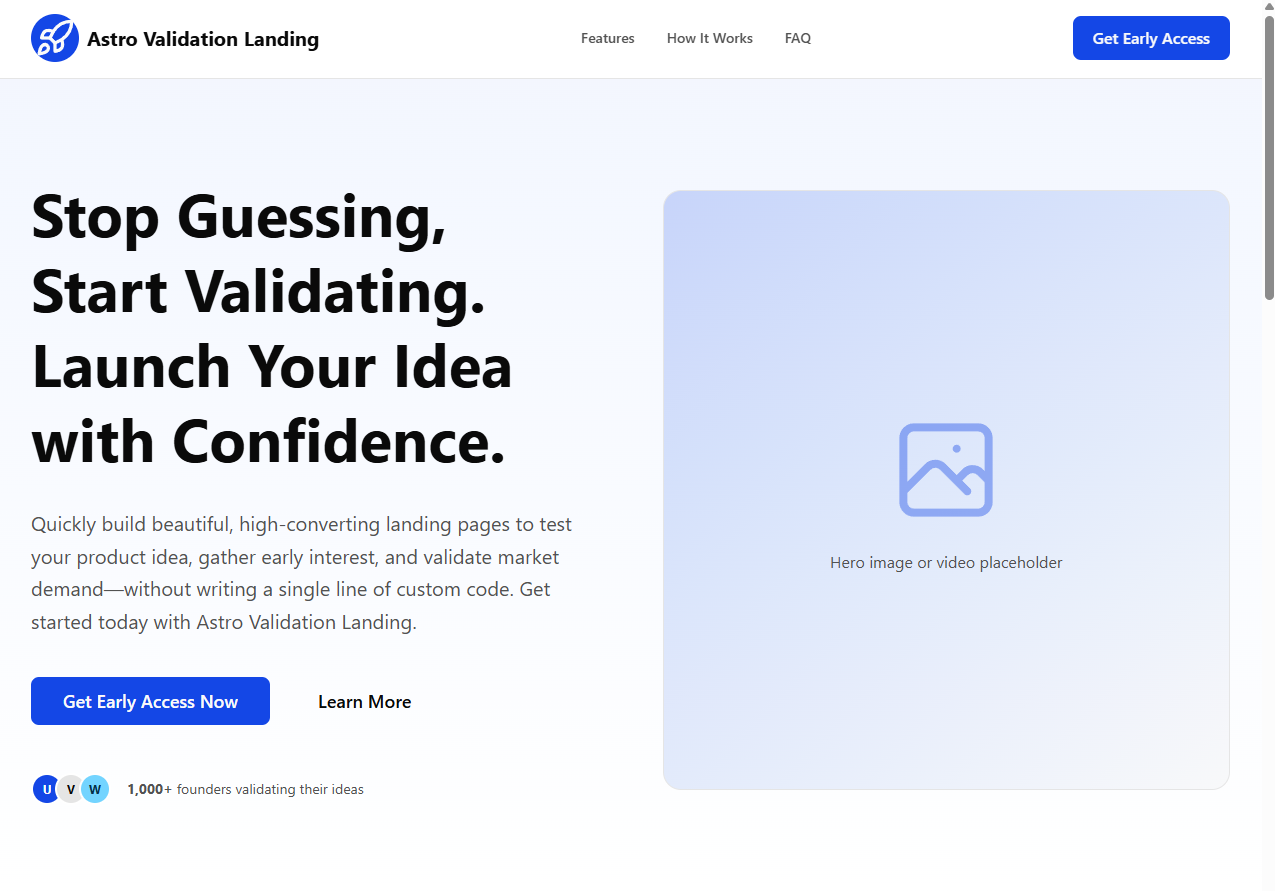
Single-page structure covering Header, Hero, problem/solution, features, How It Works, testimonials, CTA, FAQ, and Footer
AstroCorporate Website
astro-validation-landing — Astro Business Template
By Sebasala
Astro Validation Landing is a single-page landing page template built with Astro for quickly creating product idea validation pages, with centralized copy management, dark mode, and SEO tags.
Explore the design
Compare the page layouts and mobile experience. Open any screenshot for a closer look.
Author preview
Author-provided previewTop of page
Preview provided in the project README.
One original preview is available. Open the full image to inspect the design.
Screenshots show visual appearance; interactive behavior may differ.
Recorded 2026-10-03View source
What stands out
A quick read of the recorded project description.
Copy and links are centralized in src/content/content.ts for unified replacement
Built-in SEO-related tags: title, description, canonical, Open Graph, and Twitter card
Mobile-first responsive layout with dark mode support
Uses Tailwind CSS v4 design tokens and CSS variables to define light and dark themes
Provides a Netlify Forms form example, and can also integrate other email services or custom endpoints
Template Details
This template targets early-stage product validation scenarios and provides a complete single-page structure: header, hero, problem/solution, features, how it works, testimonials, CTA, FAQ, and footer. The page uses a mobile-first responsive layout and supports dark mode.
Content is centrally configured in src/content/content.ts, covering SEO title and description, navigation links, hero copy and buttons, feature cards, a three-step process, testimonials, CTA, and FAQ sections, making copy replacement straightforward. Theme and design tokens are located in src/styles/starwind.css, where CSS variables define light and dark color sets and corner radius scales.
The tech stack is Astro, Tailwind CSS v4, and Starwind UI component primitives, with strict TypeScript configuration. The build output is static assets and can be deployed to static hosting platforms such as Netlify, Vercel static output, Cloudflare Pages, and GitHub Pages.
Regarding forms, the README states that the CTA component renders a Netlify Forms form by default, which must be automatically recognized by the platform when deployed to Netlify; it can also be changed to point to Mailchimp, ConvertKit, Brevo, Formspree, or a custom endpoint. Third-party assets such as demo images, fonts, and icons must be checked separately under their respective licenses; the code's MIT license does not cover these.
AstroCorporate website
Is it right for your project?
Use Cases
- Quickly build a validation landing page for a new product or feature to collect email leads
- Use a single page to present the problem, solution, and features before formal development to gather user feedback
- Use as a starting structure for an Astro + Tailwind CSS project after replacing copy and brand assets
- Deploy to a static hosting platform as a product teaser or early access page
Suitable For
- Independent developers or small teams that need to quickly launch a product validation page
- Developers familiar with Astro and Tailwind CSS who want to maintain copy through configuration
- Projects planning to use Netlify Forms or an external email service to collect leads
- Marketing pages that need a single-page structure with FAQ, testimonials, and CTA sections
Getting started & customization
Use these recorded setup notes alongside the repository instructions for your chosen version.
- 1
Environment requirements: Node.js +22.12.0, pnpm 10+, using pnpm install and pnpm dev to start local development
- 2
Update site SEO, navigation, Hero, features, process, testimonials, CTA, FAQ, and footer content in src/content/content.ts
- 3
Adjust light and dark theme color tokens and corner radius scales in src/styles/starwind.css
- 4
Replace the placeholder logo in src/components/Logo.astro, the favicon under public, and the Open Graph image
- 5
Before deployment, set the production site URL in astro.config.mjs and confirm that footer legal links point to real pages
License & source material
Usage conditions & limitations
Free to use · keep license noticeThis entry covers the free version under the MIT license in the public repository; the free scope is the code of this version and does not mean that external services or third-party assets are free.
Must comply with when using
- Free use, modification, commercial use, and distribution of this version's code are permitted.
- When distributing copies or substantial portions of the code, retain the original author's copyright notice and the complete MIT license notice.
- The code is provided as is; warranties and limitations of liability are governed by the original license and applicable law.
Additional costs & items to verify
- Form lead collection depends on Netlify Forms by default, requiring deployment to the Netlify platform and automatic form recognition by it; collected email data is viewed in the Netlify backend. If deployed to other static hosting platforms, this form functionality will not work, and you must switch to another email service or custom endpoint.
- If you switch to Mailchimp, ConvertKit, Brevo, Formspree, or a custom endpoint to collect leads, you must remove the data-netlify attribute, modify the form action, and handle submission logic yourself, which may involve third-party service accounts, API keys, or fees.
- The logo, favicon, social links, and demo images in the template are placeholders and must be replaced before formal use; the licenses for these third-party assets must be checked separately, and the MIT code license does not cover them.
- The README mentions the Formspree form service; real submissions require configuring a service endpoint, and its usage quotas and fees must be checked separately.
- Demo images, fonts, icons, and other third-party assets must be checked under their respective licenses and cannot be judged solely by the code's MIT license.
- External services such as domain, hosting, database, payment, or AI may incur additional charges.
View Original Text Basis
Permission is hereby granted, free of charge
Original License Text
We've made this incredibly easy using Netlify Forms. No external services, no API keys, and no backend code required.
Original README
If you prefer to use an external service like Mailchimp or ConvertKit later, you can simply remove the data-netlify attribute and point the form action to your service provider's URL.
Original README
https://github.com/Sebasala/astro-validation-landing/blob/main/LICENSE.mdhttps://github.com/Sebasala/astro-validation-landing/blob/main/README.mdReplace placeholder logos/icons and social links.
Original README
Compiled by DeepSeek based on repository license and README ·2026-10-03. Results only cover the materials read; dependencies, images, fonts, and subsequent term changes are subject to their respective original texts.
Project checks & description sources
Template Information
- Source platforms
- Astro Themes
- Documentation and maintenance reference score
- Partly documented · 71 / 100
- Technologies
- Astro
- Website type
- Corporate Website
How this score is calculated
Our heuristic uses license records (up to 30), a demo link (12), a preview (10), stars (15), recorded maintenance (15), description completeness (8), feature records (5) and classification data (5). It is not a code, security or performance test, or a Google score. A link does not establish tested functionality.
What to verify for this project
- Repository update recorded
- 2026-05-13
- Screenshot last checked
- 2026-10-03
No demo link is recorded. Use the repository instructions to evaluate the project locally; the screenshot alone cannot establish interactive behavior.
The catalog identifies Astro as the primary stack. Check the actual dependency manifest and lockfile for versions and hosting requirements. These notes use recorded metadata, not a code audit or a deployment test.
Use a selection guide →How this description was prepared
AI-assisted description based on catalog records and repository material. Repository authors are not automatically the reviewers of this description.
Review declaration: [email protected] · 2026-10-04
Inspect the recorded source material
SHA-256: 6c1c9cee11f57cb75f912172584cb642c36598b0e9483ad33b02cec38e2e49db
2026-10-03T13:42:48.777Z
Source file / repository# Astro Validation Landing [](https://astro.build/themes/details/astro-validation-landing/) [](https://github.com/Sebasala/astro-validation-landing) Astro Validation Landing is a conversion-focused landing page starter for validating product ideas quickly. It combines Astro, Tailwind CSS v4, and Starwind UI primitives into a modular page that is easy to customize.  ## Why When launching a new product, validating your idea with real users before investing in development is crucial. A well-designed landing page can help you collect emails, gauge interest, and get feedback on your concept. This starter provides a solid foundation to create a compelling landing page without starting from scratch. ## What Is Included - A complete one-page validation flow: Header, Hero, Problem/Solution, Features, How It Works, Testimonials, CTA, FAQ, Footer. - Mobile-first responsive layout and dark mode support. - SEO-ready layout tags (title, description, canonical, Open Graph, Twitter card). - Centralized content configuration in a single file for fast copy updates. - Tailwind CSS v4 design tokens with CSS variables for light and dark themes. ## Tech Stack - [Astro 6](https://astro.build/) - [Tailwind CSS v4](https://tailwindcss.com/) - [Starwind UI](https://starwind.dev/) component primitives - TypeScript (strict Astro config) ## Quick Start [](https://astro-validation-landing.netlify.app/) [](https://app.netlify.com/start/deploy?repository=https://github.com/Sebasala/astro-validation-landing) ### Prerequisites - Node.js +22.12.0 - pnpm 10+ ### Install And Run ```bash pnpm install pnpm dev ``` Open the local URL shown in your terminal (Astro defaults to `http://localhost:4321`). ### Build And Preview ```bash pnpm build pnpm preview ``` ## Available Scripts - `pnpm dev` - Start local dev server. - `pnpm build` - Build production output to `dist/`. - `pnpm preview` - Preview the production build locally. - `pnpm astro ...` - Run Astro CLI commands directly. ## Project Structure ```text . |- public/ | |- favicon.ico | |- launch.svg |- src/ | |- components/ | | |- Header.astro | | |- Hero.astro | | |- Description.astro | | |- Features.astro | | |- HowItWorks.astro | | |- Testimonials.astro | | |- CTA.astro | | |- FAQ.astro | | |- Footer.astro | | |- starwind/ | |- content/ | | |- content.ts | |- layouts/ | | |- Layout.astro | |- pages/ | | |- index.astro | |- styles/ | | |- starwind.css |- astro.config.mjs |- starwind.config.json ``` ## Customization Guide ### 1) Update Site Content Most page copy and links live in `src/content/content.ts`. Update these exported objects to customize the landing page: - `siteConfig`: SEO title/description and Open Graph image path. - `header`: nav links and header CTA. - `hero`: headline, subheadline, primary/secondary CTA labels and links. - `problem` and `solution`: long-form narrative blocks. - `features`: section heading and feature cards. - `howItWorks`: three-step process content. - `testimonials`: quote cards. - `cta`: final conversion block copy and button label/link. - `faq`: accordion questions and answers. - `footer`: legal links, brand copy, and social URLs. ### 2) Update Theme And Design Tokens Edit `src/styles/starwind.css` to customize: - Light and dark color tokens (`:root` and `.dark`). - Radius scale (`--radius`, `--radius-*`). - Semantic variables used by components (`--primary`, `--muted`, etc.). Tailwind v4 is configured through Vite in `astro.config.mjs`. ### 3) Replace Branding Assets - Replace the placeholder logo SVG in `src/components/Logo.astro`. - Replace favicon assets in `public/favicon.ico` and `public/launch.svg`. - Add your Open Graph image and point `siteConfig.image` to it (for example `public/og-image.png`). ### 4) Built-in Lead Capture with Netlify Forms Validating an idea requires collecting emails. We've made this incredibly easy using Netlify Forms. No external services, no API keys, and no backend code required. How to use it: In your CTA.astro component, add the data-netlify="true" attribute to your form element. ```Html <form name="newsletter" method="POST" data-netlify="true"> <input type="email" name="email" placeholder="Enter your email" required /> <button type="submit">Get Early Access</button> </form> ``` That's it. When you deploy to Netlify, they will automatically detect the form. You will see all your email signups directly in your Netlify Dashboard under the "Forms" tab. Note: If you prefer to use an external service like Mailchimp or ConvertKit later, you can simply remove the data-netlify attribute and point the form action to your service provider's URL. ### 5) Wire The CTA To Your Email Tool `src/components/CTA.astro` currently renders a form to capture leads directly in Netlify. To collect data on other platforms or services you can connect the form to your own provider (Mailchimp, ConvertKit, Brevo, Formspree, custom endpoint, etc.) and handling submit. ## Section Anchor Map The page includes these section IDs for in-page navigation: - `#hero` - `#features` - `#how-it-works` - `#cta` - `#faq` - `#testimonials` Update header/footer links in `src/content/content.ts` if you rename or reorder sections. ## Deployment Notes This project builds to static assets and can be deployed to any static host (Netlify, Vercel static output, Cloudflare Pages, GitHub Pages, etc.). Before deploying: 1. Set your production site URL in `astro.config.mjs` using Astro's `site` option. 2. Replace placeholder logos/icons and social links. 3. Wire up your email capture flow in the CTA section. 4. Ensure legal links in the footer point to real pages.
Explore similar templates
Compare previews and descriptions within the same stack and category.

astrowind
AstroWind is a free, open-source Astro starter theme using Astro and Tailwind CSS, released under the MIT license.
Astro · Blog

astro-landing-page
An Astro + Tailwind CSS landing page example template with theme variables, dark mode, responsive layout, and Open Graph tags, under the MIT license, suitable as a starting point for single-page product, event, or corporate homepage sites.
Astro · Corporate Website

Tailcast
Tailcast is a dark-themed corporate website template built with Astro and Tailwind CSS for a fictional startup.
Astro · Corporate Website

Positivus
Positivus is an Astro and Tailwind CSS landing page theme for digital marketing agencies, maintained by manulthanura with a demo on Vercel.
Astro · Corporate Website

qwind
Qwind is a free and open-source website template built on Qwik and Tailwind CSS, featuring directory-based routing via QwikCity, a Markdown blog, dark mode, and static deployment configuration.
Astro · Tool Site

agency-landing-page-Astrojs
A single-page digital agency landing page template built with Astro and Tailwind CSS, featuring light and dark themes and a modular component directory. Suitable for static showcase pages, with MIT-licensed code and third-party assets requiring separate license verification.
Astro · Corporate Website