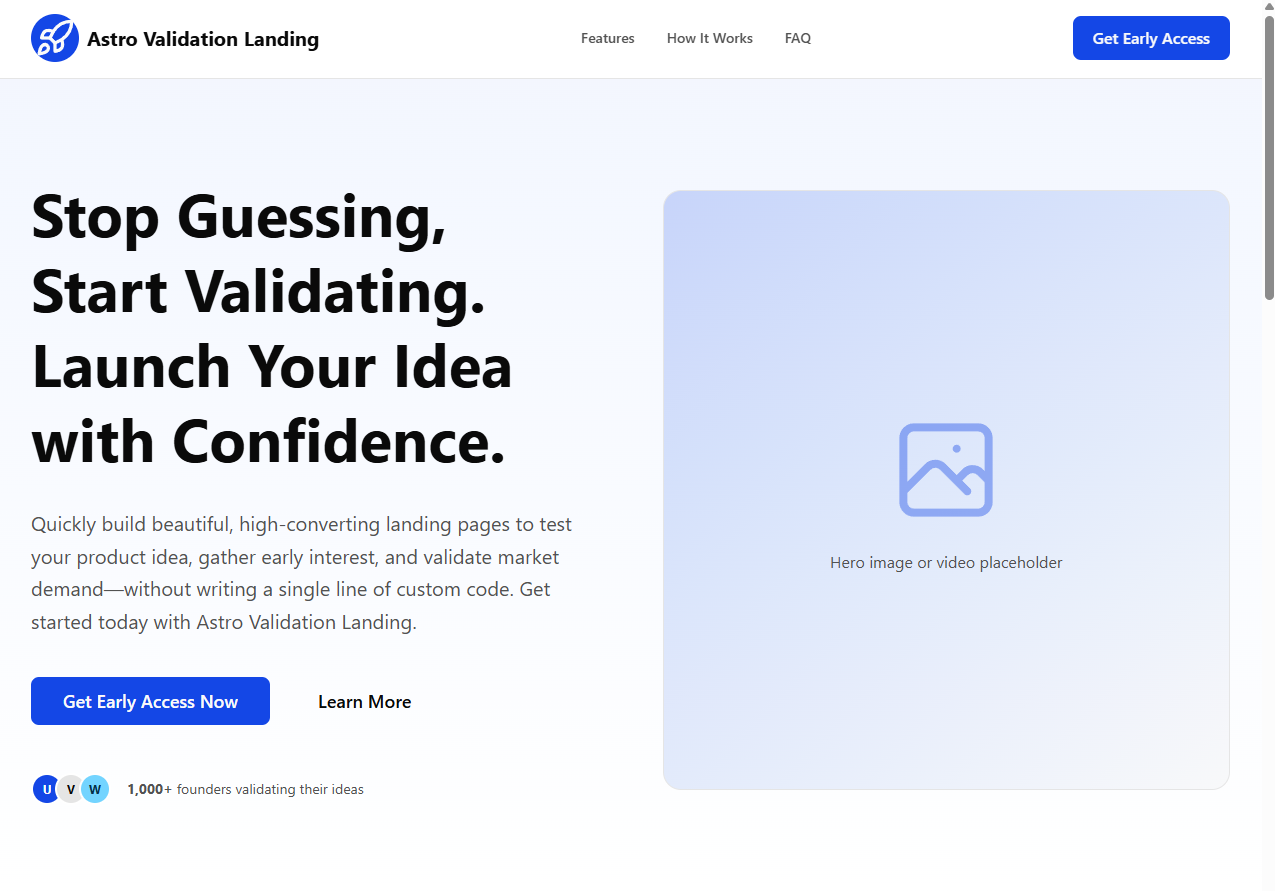
单页结构覆盖 Header、Hero、问题/解决方案、功能、How It Works、评价、CTA、FAQ 与 Footer
Astro企业官网
astro-validation-landing — Astro 企业官网模板
作者 Sebasala
Astro Validation Landing 是一个基于 Astro 的单页落地页模板,用于快速搭建产品想法验证页面,集中管理文案并支持深色模式与 SEO 标签。
看看你的网站会是什么样
浏览真实页面截图,比较内容排版与手机效果。点击下方缩略图切换,放大查看整页细节。
目前有 1 张原始预览,可打开完整图片查看设计细节。
截图用于了解视觉与布局,交互效果请以实际项目为准。
采集于 2026-10-03查看来源
值得关注的模板亮点
从已有项目资料中,快速了解它的特点。
文案与链接集中在 src/content/content.ts,便于统一替换
内置 SEO 相关标签:title、description、canonical、Open Graph 与 Twitter card
移动优先响应式布局,支持深色模式
使用 Tailwind CSS v4 设计令牌与 CSS 变量定义明暗主题
提供 Netlify Forms 表单示例,也可接入其他邮件服务或自定义端点
模板详细介绍
该模板面向产品早期验证场景,提供完整的单页结构:页头、Hero、问题/解决方案、功能、运作方式、用户评价、CTA、FAQ 与页脚。页面采用移动优先的响应式布局,并支持深色模式。
内容集中在 src/content/content.ts 中统一配置,涵盖 SEO 标题与描述、导航链接、Hero 文案与按钮、功能卡片、三步流程、评价、CTA 与 FAQ 等区块,便于快速替换文案。主题与设计令牌位于 src/styles/starwind.css,通过 CSS 变量定义明暗两套颜色与圆角尺度。
技术栈为 Astro、Tailwind CSS v4 与 Starwind UI 组件原语,使用 TypeScript 严格配置。构建产物为静态资源,可部署到 Netlify、Vercel 静态输出、Cloudflare Pages、GitHub Pages 等静态托管平台。
表单方面,README 说明 CTA 组件默认渲染 Netlify Forms 表单,需在部署到 Netlify 时由平台自动识别;也可改为指向 Mailchimp、ConvertKit、Brevo、Formspree 或自定义端点。演示图片、字体、图标等第三方素材需按各自许可单独核对,代码的 MIT 许可不覆盖这些内容。
Astro企业官网
适合你的项目吗?
适用场景
- 为新产品或新功能快速搭建验证型落地页,收集邮件线索
- 在正式开发前用单页展示问题、方案与功能,收集用户反馈
- 作为 Astro + Tailwind CSS 项目的起步结构,替换文案与品牌素材后使用
- 部署到静态托管平台,作为产品预热或早期访问页面
适合人群
- 需要快速上线产品验证页面的独立开发者或小团队
- 熟悉 Astro 与 Tailwind CSS、希望以配置化方式维护文案的开发者
- 计划使用 Netlify Forms 或外部邮件服务收集线索的项目
- 需要单页结构并包含 FAQ、评价与 CTA 区块的营销页面
上手与定制指南
结合仓库当前版本的说明,按下面的资料检查内容、配置与运行要求。
- 1
环境要求:Node.js +22.12.0、pnpm 10+,使用 pnpm install 与 pnpm dev 启动本地开发
- 2
在 src/content/content.ts 中更新站点 SEO、导航、Hero、功能、流程、评价、CTA、FAQ 与页脚内容
- 3
在 src/styles/starwind.css 中调整明暗主题颜色令牌与圆角尺度
- 4
替换 src/components/Logo.astro 中的占位 Logo、public 下的 favicon 与 Open Graph 图片
- 5
部署前在 astro.config.mjs 设置生产站点 URL,并确认页脚法律链接指向真实页面
授权与来源资料
使用条件与限制
免费使用 · 保留许可声明本次收录的是公开仓库中采用 MIT 许可的免费版本;免费范围为该版本代码,不代表外部服务或第三方素材免费。
使用时需要遵守
- 允许免费使用、修改、商用和分发该版本代码。
- 分发代码副本或实质性部分时,保留原作者版权声明和完整 MIT 许可声明。
- 代码按现状提供;担保与责任限制以原许可证及适用法律为准。
额外费用与待核对事项
- 表单线索收集默认依赖 Netlify Forms,需部署到 Netlify 平台并由其自动识别表单,收集到的邮箱数据在 Netlify 后台查看;若部署到其他静态托管平台,该表单功能不会生效,需自行改用其他邮件服务或自定义端点。
- 若改用 Mailchimp、ConvertKit、Brevo、Formspree 或自定义端点收集线索,需自行移除 data-netlify 属性、修改表单 action 并处理提交逻辑,可能涉及第三方服务的账号、API 密钥或费用。
- 模板中的 Logo、favicon、社交链接与演示图片均为占位内容,正式使用前需自行替换;这些第三方素材的许可需单独核对,MIT 代码许可不覆盖它们。
- README 提及 Formspree 表单服务;真实提交需配置服务端点,其使用额度与费用需单独核对。
- 演示图片、字体、图标及其他第三方素材需按各自许可核对,不能仅凭代码的 MIT 许可判断。
- 域名、托管、数据库、支付或 AI 等外部服务可能另外收费。
查看原文依据
Permission is hereby granted, free of charge
许可证原文
We've made this incredibly easy using Netlify Forms. No external services, no API keys, and no backend code required.
README 原文
If you prefer to use an external service like Mailchimp or ConvertKit later, you can simply remove the data-netlify attribute and point the form action to your service provider's URL.
README 原文
https://github.com/Sebasala/astro-validation-landing/blob/main/LICENSE.mdhttps://github.com/Sebasala/astro-validation-landing/blob/main/README.mdReplace placeholder logos/icons and social links.
README 原文
DeepSeek 根据仓库许可证和 README 整理 ·2026-10-03。结果仅覆盖已读取资料,依赖、图片、字体及后续条款变更以各自原文为准。
项目核对记录与介绍依据
模板资料
- 来源平台
- Astro Themes
- 资料与维护参考分
- 资料一般 · 71 / 100
- 技术栈
- Astro
- 网站类型
- 企业官网
这个分数如何计算
本站按许可资料(最高30分)、演示链接(12分)、预览图(10分)、Star数(15分)、记录的维护时间(15分)、描述完整度(8分)、功能记录(5分)和分类资料(5分)计算。它不是代码、安全或性能测试,也不是 Google 评分;有链接不代表已实测可用。
这个项目需要核对什么
- 记录的仓库更新时间
- 2026-05-13
- 截图检查日期
- 2026-10-03
目前没有记录演示链接。请依据仓库说明在本地评估;仅凭截图无法确认交互行为。
目录记录的主要技术栈是 Astro。请通过依赖清单和锁文件核对实际版本与托管要求。这些说明基于收录资料,不代表代码审计或部署实测。
查看具体选型方法 →介绍的制作与核对状态
介绍由 AI 辅助整理目录与仓库资料。仓库作者不等于这篇介绍的审核者。
审核声明: [email protected] · 2026-10-04
查看当时使用的来源资料
SHA-256: 6c1c9cee11f57cb75f912172584cb642c36598b0e9483ad33b02cec38e2e49db
2026-10-03T13:42:48.777Z
来源文件 / 仓库# Astro Validation Landing [](https://astro.build/themes/details/astro-validation-landing/) [](https://github.com/Sebasala/astro-validation-landing) Astro Validation Landing is a conversion-focused landing page starter for validating product ideas quickly. It combines Astro, Tailwind CSS v4, and Starwind UI primitives into a modular page that is easy to customize.  ## Why When launching a new product, validating your idea with real users before investing in development is crucial. A well-designed landing page can help you collect emails, gauge interest, and get feedback on your concept. This starter provides a solid foundation to create a compelling landing page without starting from scratch. ## What Is Included - A complete one-page validation flow: Header, Hero, Problem/Solution, Features, How It Works, Testimonials, CTA, FAQ, Footer. - Mobile-first responsive layout and dark mode support. - SEO-ready layout tags (title, description, canonical, Open Graph, Twitter card). - Centralized content configuration in a single file for fast copy updates. - Tailwind CSS v4 design tokens with CSS variables for light and dark themes. ## Tech Stack - [Astro 6](https://astro.build/) - [Tailwind CSS v4](https://tailwindcss.com/) - [Starwind UI](https://starwind.dev/) component primitives - TypeScript (strict Astro config) ## Quick Start [](https://astro-validation-landing.netlify.app/) [](https://app.netlify.com/start/deploy?repository=https://github.com/Sebasala/astro-validation-landing) ### Prerequisites - Node.js +22.12.0 - pnpm 10+ ### Install And Run ```bash pnpm install pnpm dev ``` Open the local URL shown in your terminal (Astro defaults to `http://localhost:4321`). ### Build And Preview ```bash pnpm build pnpm preview ``` ## Available Scripts - `pnpm dev` - Start local dev server. - `pnpm build` - Build production output to `dist/`. - `pnpm preview` - Preview the production build locally. - `pnpm astro ...` - Run Astro CLI commands directly. ## Project Structure ```text . |- public/ | |- favicon.ico | |- launch.svg |- src/ | |- components/ | | |- Header.astro | | |- Hero.astro | | |- Description.astro | | |- Features.astro | | |- HowItWorks.astro | | |- Testimonials.astro | | |- CTA.astro | | |- FAQ.astro | | |- Footer.astro | | |- starwind/ | |- content/ | | |- content.ts | |- layouts/ | | |- Layout.astro | |- pages/ | | |- index.astro | |- styles/ | | |- starwind.css |- astro.config.mjs |- starwind.config.json ``` ## Customization Guide ### 1) Update Site Content Most page copy and links live in `src/content/content.ts`. Update these exported objects to customize the landing page: - `siteConfig`: SEO title/description and Open Graph image path. - `header`: nav links and header CTA. - `hero`: headline, subheadline, primary/secondary CTA labels and links. - `problem` and `solution`: long-form narrative blocks. - `features`: section heading and feature cards. - `howItWorks`: three-step process content. - `testimonials`: quote cards. - `cta`: final conversion block copy and button label/link. - `faq`: accordion questions and answers. - `footer`: legal links, brand copy, and social URLs. ### 2) Update Theme And Design Tokens Edit `src/styles/starwind.css` to customize: - Light and dark color tokens (`:root` and `.dark`). - Radius scale (`--radius`, `--radius-*`). - Semantic variables used by components (`--primary`, `--muted`, etc.). Tailwind v4 is configured through Vite in `astro.config.mjs`. ### 3) Replace Branding Assets - Replace the placeholder logo SVG in `src/components/Logo.astro`. - Replace favicon assets in `public/favicon.ico` and `public/launch.svg`. - Add your Open Graph image and point `siteConfig.image` to it (for example `public/og-image.png`). ### 4) Built-in Lead Capture with Netlify Forms Validating an idea requires collecting emails. We've made this incredibly easy using Netlify Forms. No external services, no API keys, and no backend code required. How to use it: In your CTA.astro component, add the data-netlify="true" attribute to your form element. ```Html <form name="newsletter" method="POST" data-netlify="true"> <input type="email" name="email" placeholder="Enter your email" required /> <button type="submit">Get Early Access</button> </form> ``` That's it. When you deploy to Netlify, they will automatically detect the form. You will see all your email signups directly in your Netlify Dashboard under the "Forms" tab. Note: If you prefer to use an external service like Mailchimp or ConvertKit later, you can simply remove the data-netlify attribute and point the form action to your service provider's URL. ### 5) Wire The CTA To Your Email Tool `src/components/CTA.astro` currently renders a form to capture leads directly in Netlify. To collect data on other platforms or services you can connect the form to your own provider (Mailchimp, ConvertKit, Brevo, Formspree, custom endpoint, etc.) and handling submit. ## Section Anchor Map The page includes these section IDs for in-page navigation: - `#hero` - `#features` - `#how-it-works` - `#cta` - `#faq` - `#testimonials` Update header/footer links in `src/content/content.ts` if you rename or reorder sections. ## Deployment Notes This project builds to static assets and can be deployed to any static host (Netlify, Vercel static output, Cloudflare Pages, GitHub Pages, etc.). Before deploying: 1. Set your production site URL in `astro.config.mjs` using Astro's `site` option. 2. Replace placeholder logos/icons and social links. 3. Wire up your email capture flow in the CTA section. 4. Ensure legal links in the footer point to real pages.
看看同类模板
对比同技术栈与用途的模板,找到更适合的视觉与内容结构。

astrowind
⭕️ AstroWind: A free template using Astro v7 and Tailwind CSS v4. Astro starter theme.
Astro · 博客

astro-landing-page
An Astro + Tailwind CSS Example/Template for Landing Pages
Astro · 企业官网

Tailcast
Dark-themed website template built on Astro and Tailwind CSS
Astro · 企业官网

Positivus
A stunning and versatile Astro theme designed for digital marketing agencies.
Astro · 企业官网

qwind
⭕️ Qwind: A template to make your website using Qwik + Tailwind CSS.
Astro · 工具站

agency-landing-page-Astrojs
A simple agency landing page made with astrojs and tailwindcss
Astro · 企业官网