Built with Astro, supporting static generation and partial hydration
AstroCorporate Website
shadcn-astro-bistro-landing-page-free — Astro Business Template
By shadcnstudio
Bistro is a free restaurant landing page template built with Astro, including sections for menus, featured dishes, offers, reservation entry points, location, and customer reviews. It is suitable for restaurants, cafes, and bistros to build promotional pages.
Explore the design
Compare the page layouts and mobile experience. Open any screenshot for a closer look.
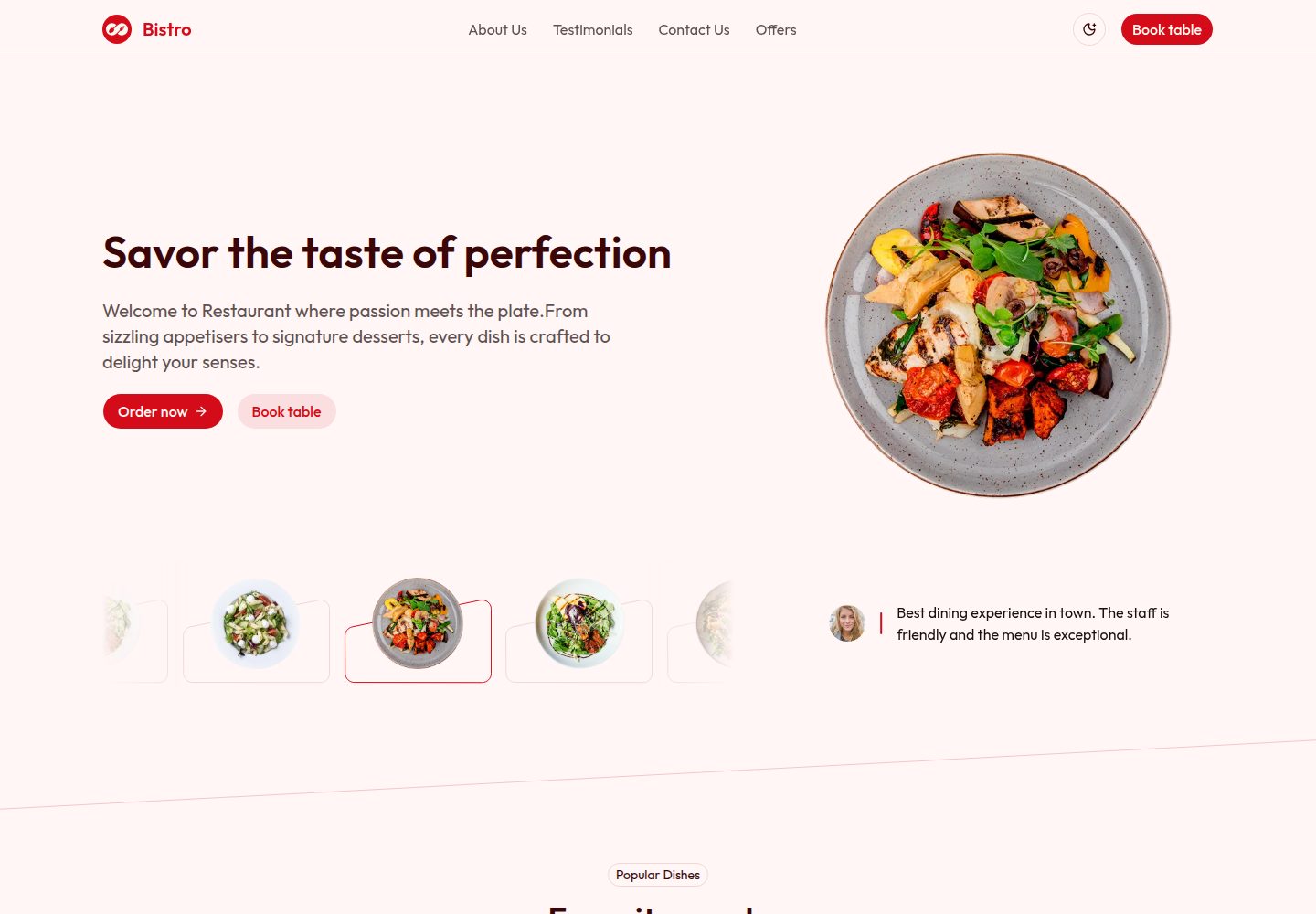
Desktop homepage1 / 2
Desktop captureTop of page
Actual screenshot captured by the server browser.
All pages & views 2
Screenshots show visual appearance; interactive behavior may differ.
Recorded 2026-10-03View source
What stands out
A quick read of the recorded project description.
Organized with Tailwind CSS and shadcn/ui components
Includes menu categories, dish images, descriptions, and price display
Provides offers, new items, customer reviews, and reservation CTA sections
Built-in SEO configuration, RSS generation, robots.txt, and site manifest
Comes with TypeScript, ESLint, Prettier, and type-checking scripts
Template Details
This template targets online promotion for restaurants, cafes, and bistros. It is built with Astro, styled with Tailwind CSS, and organized using shadcn/ui components. The page structure centers on the homepage and includes header, Hero, popular dishes, about us, customer reviews, new items, contact us, and offers sections. The menu section supports displaying dishes by category with images, descriptions, and prices; the offers section presents limited-time or seasonal promotions; the contact and location sections provide address, business hours, map, and contact form; reservation entry points appear as CTAs in the Hero and other locations. The project uses TypeScript and integrates Prettier with Tailwind class sorting. The repository provides scripts for ESLint, type checking, build, and preview. The template includes a 404 page, login page, RSS generation, robots.txt, and site manifest. SEO-related configuration is centralized in src/consts.ts and src/utils/seo.ts. This template is a free version with code under the MIT license, but third-party assets such as demo images, fonts, and icons require separate license verification, and external services such as domains and hosting may incur costs.
AstroCorporate website
Is it right for your project?
Use Cases
- Creating an online promotional landing page for a restaurant, cafe, or bistro
- Displaying categorized menus, dish images, prices, and limited-time offers
- Collecting customer inquiries through reservation CTAs, address, business hours, and contact form
- Presenting customer reviews and popular dishes on the page to aid decision-making
Suitable For
- Developers or small teams needing to quickly build a restaurant promotional page
- Front-end developers who want to customize a restaurant theme based on Astro and Tailwind CSS
- Users who need a free MIT-licensed template for commercial or non-commercial projects
Getting started & customization
Use these recorded setup notes alongside the repository instructions for your chosen version.
- 1
Requires Node.js 18, 20, or 22+; using pnpm or npm to install dependencies is recommended
- 2
After installation, run pnpm run dev to start the development server at http://localhost:4321 by default
- 3
Use pnpm build to generate a production build, with output in the dist/ directory
- 4
Site SEO and global information can be modified in src/consts.ts
- 5
Third-party assets such as demo images, fonts, and icons must be checked against their respective licenses; the code's MIT license alone is not sufficient
License & source material
Usage conditions & limitations
Free to use · keep license noticeThis entry covers the free version under the MIT license in a public repository; the free scope applies to this version's code and does not mean external services or third-party assets are free.
Must comply with when using
- Free use, modification, commercial use, and distribution of this version's code are permitted.
- When distributing copies or substantial portions of the code, retain the original author's copyright notice and the full MIT license notice.
- The code is provided as is; warranties and limitations of liability are governed by the original license and applicable law.
Additional costs & items to verify
- Demo images, fonts, icons, and other third-party assets must be checked against their respective licenses; the code's MIT license alone is not sufficient.
- External services such as domains, hosting, databases, payments, or AI may incur additional charges.
View Original Text Basis
Compiled by DeepSeek based on repository license and README ·2026-10-03. Results only cover the materials read; dependencies, images, fonts, and subsequent term changes are subject to their respective original texts.
Project checks & description sources
Template Information
- Source platforms
- Astro Themes
- Documentation and maintenance reference score
- More documented · 87 / 100
- Technologies
- Astro
- Website type
- Corporate Website
How this score is calculated
Our heuristic uses license records (up to 30), a demo link (12), a preview (10), stars (15), recorded maintenance (15), description completeness (8), feature records (5) and classification data (5). It is not a code, security or performance test, or a Google score. A link does not establish tested functionality.
What to verify for this project
- Repository update recorded
- 2026-08-14
- Screenshot last checked
- 2026-10-03
A demo link is listed. Check it with your own content and viewport sizes; its presence does not confirm that forms, authentication or payments work.
The catalog identifies Astro as the primary stack. Check the actual dependency manifest and lockfile for versions and hosting requirements. These notes use recorded metadata, not a code audit or a deployment test.
Use a selection guide →How this description was prepared
AI-assisted description based on catalog records and repository material. Repository authors are not automatically the reviewers of this description.
Review declaration: [email protected] · 2026-10-04
Inspect the recorded source material
SHA-256: ae8b421a3e9c8a97ad2d572cdc5109499b2e61a251cd3e50bb1c03d68fc37281
2026-10-03T22:42:50.152Z
Source file / repository<p align="center">
<a href="https://shadcnstudio.com/templates/bistro-restaurant-template-free" target="_blank">
<img src="https://cdn.shadcnstudio.com/ss-assets/template/landing-page/bistro/logo.png" alt="bistro-logo" width="32px" height="32px">
</a>
</p>
<h1 align="center">
<a href="https://shadcnstudio.com/templates/bistro-restaurant-template-free" target="_blank" align="center">
Bistro - Shadcn UI Restaurant Landing Page Template - Free
</a>
</h1>
<p align="start">Bistro is a free, responsive Astro landing page template crafted for restaurants, cafés, and bistros. It showcases menus, featured dishes, offers, reservation CTAs, location, and testimonials with clean, modern design.</p>
   
<kbd>[](https://shadcnstudio.com/templates/bistro-restaurant-template-free)</kbd>
## Introduction 🍽️
Bistro is built with Astro and Tailwind CSS, offering a production-ready landing page to promote your restaurant online. It includes menu highlights, new items, offers, popular dishes, testimonials, and a clear reservation CTA.
[View Demo](https://shadcnstudio.com/preview/templates/shadcn-astro-bistro-landing-page)
[View Documentation](https://shadcnstudio.com/docs/getting-started/shadcn-studio-template-astro)
<p>
Supported by
<a href="https://shadcnstudio.com" target="_blank">
Shadcn Studio
</a>
, with a commitment to empowering the open-source community.
</p>
## Key Features ✨
- **Restaurant-Focused Layouts** - Hero, menu highlights, featured dishes, offers, and reservation CTA
- **Menu Sections** - Categorize items with images, descriptions, and prices
- **Offers & Specials** - Promote limited-time deals and seasonal items
- **Reservations & Contact** - Reservation CTA, address, opening hours, and contact info
- **Built with Astro** - Static-first rendering, partial hydration, and lightning-fast performance with built-in SEO support
- **Tailwind CSS** - Easy theming and utility-based styling
- **Responsive & Mobile-First** - Designed to look great on all devices
- **Accessible Components** - Semantic markup and accessible UI patterns
## Page Structure & Sections
**Pages**
- **Homepage** - Hero with reservation CTA, featured dishes, and menu highlights
- **Menu Section** - Categorized menu items with images and prices
- **Offers Section** - Special deals and promotions
- **Contact / Location** - Map, address, opening hours, and contact form
**Key UI Sections**
- **Hero Section** - Large visual header with a clear reservation CTA
- **Popular Dishes** - Showcase bestsellers with images and short descriptions
- **New Items & Offers** - Highlight seasonal or promotional dishes
- **Testimonials** - Customer reviews and ratings
- **Footer** - Social links, hours, and navigation
---
<br />
<a href="https://shadcnstudio.com" target="_blank">
<img src="https://cdn.shadcnstudio.com/ss-assets/smm/marketing/shadcn-studio-smm-banner.png" alt="shadcn/studio banner" width="1200">
</a>
<p>
<a href="https://shadcnstudio.com" target="_blank">
shadcn/studio
</a>
is an open-source collection of copy-and-paste shadcn components, blocks, and templates - paired with a powerful theme generator & AI Tools to craft, customize, and ship faster. 🚀
</p>
## Table of Contents 📋
- [Table of Contents 📋](#table-of-contents-)
- [Features ✨](#-features)
- [Project Structure 🏗️](#-project-structure)
- [Quick Start 🚀](#-quick-start)
- [Available Commands 🧞](#-available-commands)
- [Code Formatting 🎨](#-code-formatting)
- [Configuration ⚙️](#-configuration)
- [Deployment 🌐](#-deployment)
- [Documentation 📚](#documentation-)
- [Community 🤝](#community-)
- [Credits 🤘](#credits-)
- [Useful Links 🎁](#useful-links-)
- [Social Media :earth_africa:](#social-media-earth_africa)
---
## Overview 🌏
**This isn't a traditional component library or a replacement for Shadcn**. Instead, it's a unique collection offers customizable variants of components, blocks, and templates. Preview, customize, and copy-paste them into your apps with ease.
Building on the solid foundation of the Shadcn components & blocks, we've enhanced it with custom-designed components & blocks to give you a head start. This allows you to craft, customize, and ship your projects faster and more efficiently.
### Not a standard library, but a distribution of components
Following the philosophy of Shadcn, shadcn/studio isn't a conventional "install-from-NPM" library. Rather, it's an open-source distribution of components designed for maximum adaptability. You can copy the code, modify styles, adjust logic, or integrate it with other tools—free from the limitations of typical libraries. This "open code" model empowers you to customize with confidence and creativity.
## Why should I use shadcn/studio? 💡
shadcn/ui aims to provide core components with a unique distribution system, allowing developers to copy and paste reusable, customizable UI elements directly into their codebase.
While this approach offers flexibility and control, it comes with some limitations: a lack of diverse component variants examples, limited theme customization options, and limited pre-built blocks. Additionally, its extensive customization options, though powerful, can sometimes feel overwhelming, especially for those seeking a more guided or streamlined experience.
# Shadcn + Astro — Bistro Landing Page
This project showcases a complete business website with sections for Header, Hero, Popular Dishes, About Us, Testimonials, New Items, Contact Us and Offers components.
## ✨ Features
- 🚀 **Built with Astro** - Fast, modern static site generation
- 🎨 **Shadcn Studio Components** - Beautiful, ready-to-use Tailwind CSS components
- 📱 **Fully Responsive** - Optimized for mobile, tablet, and desktop
- ⚡ **Optimized Performance** - Fast page loads and excellent SEO
- 🔧 **TypeScript Support** - Type-safe configuration and development
- 💅 **Prettier Integration** - Automatic code formatting with Tailwind class sorting
- 🌙 **Tailwind CSS 4** - Latest Tailwind with modern features
## 🏗️ Project Structure
```text
shadcn-studio-astro-template/
├── public/ # Public static assets
│ ├── favicon/ # Favicon files
│ ├── images/ # Public images
│ ├── _headers # Netlify Deploy Headers
│ ├── robots.txt # SEO crawler rules
│ └── site.webmanifest # PWA manifest
│
├── src/
│ ├── assets/ # SVG and other assets
│ │
│ ├── components/ # Reusable UI components
│ │ └── blocks/ # Block components
│ │ └── layout/ # Layout components
│ │ └── sections/ # Data of components
│ │ └── ui/ # Base UI components
│ │
│ ├── layouts/ # Astro layout files
│ │ ├── BlankLayout.astro # Minimal layout
│ │ ├── HeadSeo.astro # SEO head layout
│ │ └── Layout.astro # Main site layout
│ │
│ ├── lib/ # Helper libraries
│ │ └── utils.ts # Utility functions
│ │
│ ├── pages/ # Route-based pages
│ │ ├── 404.astro # 404 page
│ │ ├── index.astro # Home page
│ │ ├── login.astro # Login page
│ │ └── rss.xml.js # RSS feed generator
│ │
│ ├── styles/
│ │ └── global.css # Global styles
│ │
│ ├── utils/ # Utility functions
│ │ └── seo.ts # SEO helpers
│ └── consts.ts # Application constants (SEO)
│
├── astro.config.mjs # Astro configuration
├── content.config.ts # Content collections config
├── .env.example # Environment variable template
├── components.json # shadcn/ui config
├── package.json # Dependencies & scripts
├── tsconfig.json # TypeScript configuration
└── vercel.json # Vercel deployment config
```
## 🚀 Quick Start
### Prerequisites
- Node.js 18, 20, or 22+
- pnpm (recommended) or npm
### Installation
1. **Install dependencies:**
```bash
pnpm install
```
2. **Start the development server:**
```bash
pnpm run dev
```
The site will be available at `http://localhost:4321`
3. **Build for production:**
```bash
pnpm build
```
The built site will be in the `dist/` folder with relative asset paths for easy deployment.
4. **Preview the production build:**
```bash
pnpm run preview
```
## 🧞 Available Commands
The template comes with several pre-configured scripts to help you with development, building, and maintaining your project. All scripts can be run using your package manager of choice (npm, pnpm, yarn, or bun) from the root of the project.
| Command | Action |
| :------------ | :------------------------------------------------------------------------------------------------------------------------------------- |
| `dev` | Starts the Astro development server with hot-reload enabled. Your application will be available at http://localhost:4321/ |
| `build` | Creates an optimized production build of your application. This command generates static files and optimizes your code for deployment. |
| `preview` | Preview production site locally. Use this to test your production build locally before deploying. |
| `lint` | Runs ESLint to check your code for potential errors and code quality issues. This helps maintain clean and consistent code. |
| `lint:fix` | Runs ESLint and automatically fixes problems where possible. |
| `format` | Formats all files using Prettier to ensure consistent code style. |
| `check-types` | Checks TypeScript types to catch type errors before building or deploying. |
## 🎨 Code Formatting
This project uses **Prettier** for code formatting with the following features:
- **Automatic formatting on save** in VS Code
- **Tailwind CSS class sorting** - Classes are automatically sorted in the recommended order
- **Extra space removal** - Trailing whitespace and extra spaces are removed
- **Consistent code style** - Enforced across all `.astro`, `.js`, `.ts`, and `.css` files
### Setup
1. **Install recommended VS Code extensions** (you'll be prompted when opening the project):
- Prettier - Code formatter
- Astro
- Tailwind CSS IntelliSense
- EditorConfig for VS Code
2. **Formatting will work automatically** on save thanks to:
- `.prettierrc` - Prettier configuration
- `.editorconfig` - Editor settings
- `.vscode/settings.json` - VS Code workspace settings
3. **Manual formatting:**
```bash
pnpm run format # Format all files
```
## ⚙️ Configuration
Edit `src/consts.ts` to customize your site:
```typescript
export const siteConfig = {
creatorName: 'Shadcn Studio',
demoName: 'Bistro',
templateName: 'Restaurant Landing Page'
// ... more settings
}
```
### 🔍 SEO & Site Configuration
Configure the site's SEO and global metadata in `src/consts.ts`. These settings power the `HeadSeo.astro` layout and `seo.ts` helpers so pages have correct titles, descriptions, and social previews.
Recommended fields:
- `siteTitle`: The site-wide default title.
- `siteDescription`: Default meta description for pages.
- `siteUrl`: The canonical base URL for building absolute links.
- `siteLocale`: Locale string used for html/lang and Open Graph (e.g. `en-US`).
- `siteAuthor`: Default author/creator name.
- `siteKeywords`: Array of SEO keywords.
- `socialImage`: Path to the default social preview image (OG/Twitter card).
- `faviconPath`: Path to the favicon in `/public`.
- `themeColor`: Theme color meta for browsers and PWA.
- `twitterHandle`: Official Twitter/X handle for site cards.
- `analyticsId`: Optional analytics measurement id (Google Analytics, Plausible, etc.).
Example `siteConfig` with SEO fields:
```typescript
// Example SEO & site settings — edit src/consts.ts
export const siteConfig = {
siteTitle: 'Bistro — Restaurant Landing Page',
siteDescription:
'Enjoy fresh ingredients, thoughtfully prepared meals, and a welcoming space designed for memorable moments. Experience bistro dining made simple and delicious.',
siteUrl: 'https://example.com',
siteLocale: 'en-US',
siteAuthor: 'Shadcn Studio',
siteKeywords: ['bistro', 'restaurant', 'landing page', 'astro', 'shadcn'],
socialImage: '/images/social-preview.png',
faviconPath: '/favicon/favicon.ico',
themeColor: '#0ea5e9',
twitterHandle: '@ShadcnStudio',
analyticsId: '' // optional
}
```
Tips:
- Keep `siteUrl` consistent with your deployed domain to ensure correct canonical and Open Graph URLs.
- Place social preview images in `public/images` and reference them with absolute paths (e.g. `/images/social-preview.png`).
## 🌐 Deployment
The production build creates static files with relative asset paths, making it easy to deploy to:
- **GitHub Pages**
- **Netlify**
- **Vercel**
- **Any static hosting service**
Simply upload the contents of the `dist/` folder after running `pnpm run build`.
## Documentation 📚
For comprehensive documentation, please visit [shadcn/studio documentation](https://shadcnstudio.com/docs/getting-started/introduction).
## Community 🤝
Join the shadcn/studio community to discuss the library, ask questions, and share your experiences:
- 🐦 [Follow us on Twitter](https://x.com/ShadCNStudio)
- 🎮 [Join us on Discord](https://discord.com/invite/kBHkY7DekX)
## Credits 🤘
We are grateful for the contributions of the open-source community, particularly:
- [shadcn/ui](https://ui.shadcn.com/)
- [tweakcn](https://tweakcn.com/) (Our Theme Generator is heavily inspired by tweakcn)
These projects form the backbone of shadcn/studio, allowing us to build a powerful copy-and-paste components.
## Useful Links 🎁
- [Shadcn Blocks](https://shadcnstudio.com/blocks)
- [Shadcn Templates](https://shadcnstudio.com/templates)
- [Shadcn Figma UI Kit](https://shadcnstudio.com/figma)
- [Shadcn Theme Generator](https://shadcnstudio.com/theme-generator)
- [Shadcn MCP Server](https://shadcnstudio.com/mcp)
- [Shadcn IDE Extension](https://shadcnstudio.com/ide-extension)
- [Shadcn Components](https://shadcnstudio.com/components)
- [Shadcn Figma to Code](https://shadcnstudio.com/figma-plugin)
## Social Media :earth_africa:
- [x](https://x.com/ShadcnStudio)
- [Discord](https://discord.com/invite/kBHkY7DekX)
- [YouTube](https://www.youtube.com/@themeselection)
Explore similar templates
Compare previews and descriptions within the same stack and category.

astrowind
AstroWind is a free, open-source Astro starter theme using Astro and Tailwind CSS, released under the MIT license.
Astro · Blog

astro-landing-page
An Astro + Tailwind CSS landing page example template with theme variables, dark mode, responsive layout, and Open Graph tags, under the MIT license, suitable as a starting point for single-page product, event, or corporate homepage sites.
Astro · Corporate Website

Tailcast
Tailcast is a dark-themed corporate website template built with Astro and Tailwind CSS for a fictional startup.
Astro · Corporate Website

Positivus
Positivus is an Astro and Tailwind CSS landing page theme for digital marketing agencies, maintained by manulthanura with a demo on Vercel.
Astro · Corporate Website

qwind
Qwind is a free and open-source website template built on Qwik and Tailwind CSS, featuring directory-based routing via QwikCity, a Markdown blog, dark mode, and static deployment configuration.
Astro · Tool Site

agency-landing-page-Astrojs
A single-page digital agency landing page template built with Astro and Tailwind CSS, featuring light and dark themes and a modular component directory. Suitable for static showcase pages, with MIT-licensed code and third-party assets requiring separate license verification.
Astro · Corporate Website