使用 Astro 构建,支持静态生成与部分水合
Astro企业官网
shadcn-astro-bistro-landing-page-free — Astro 企业官网模板
作者 shadcnstudio
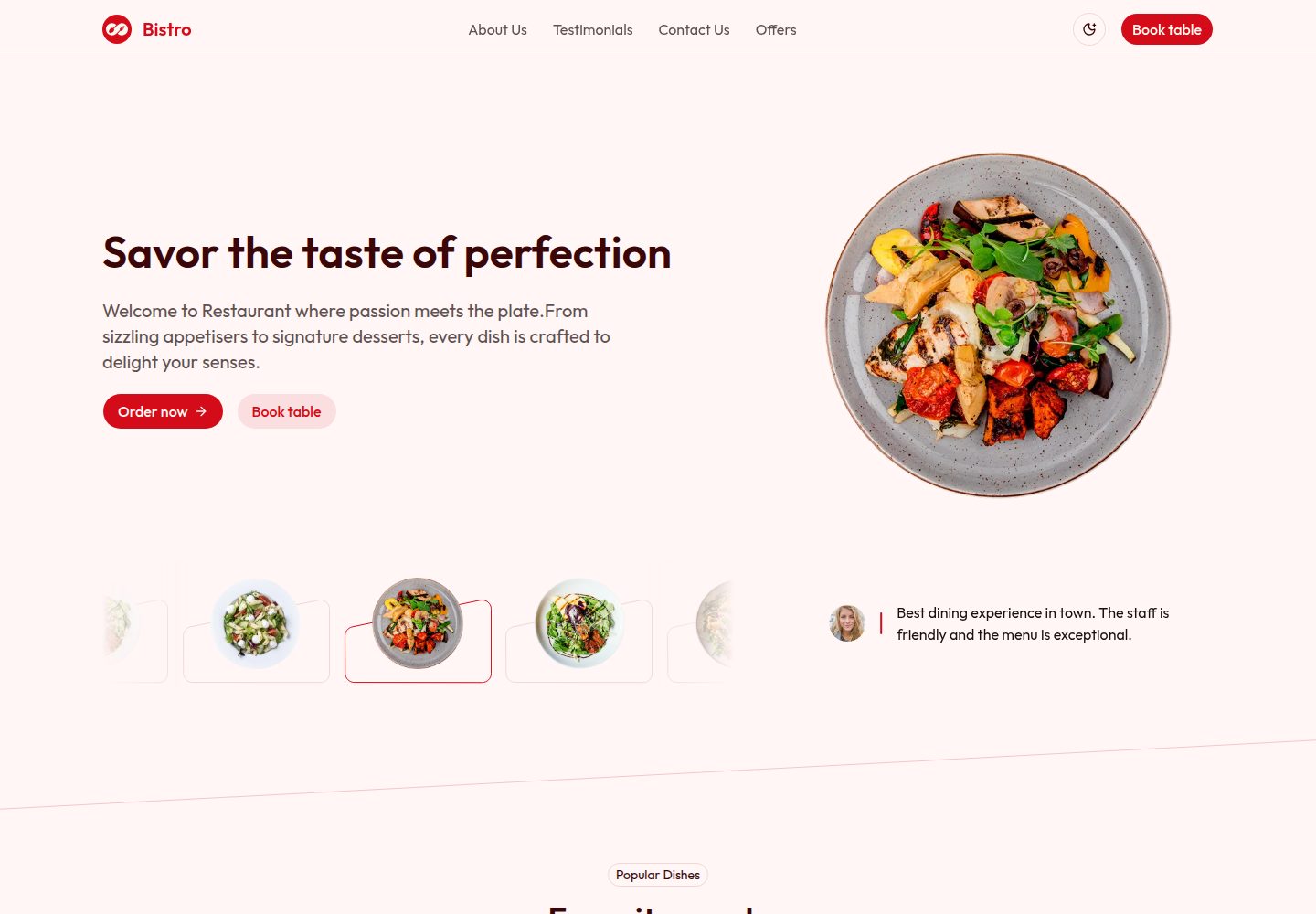
Bistro 是一个基于 Astro 的免费餐厅落地页模板,包含菜单、特色菜、优惠、预订入口、位置与顾客评价等区块,适合餐厅、咖啡馆和小酒馆搭建宣传页面。
看看你的网站会是什么样
浏览真实页面截图,比较内容排版与手机效果。点击下方缩略图切换,放大查看整页细节。
全部页面与视图 2
截图用于了解视觉与布局,交互效果请以实际项目为准。
采集于 2026-10-03查看来源
值得关注的模板亮点
从已有项目资料中,快速了解它的特点。
基于 Tailwind CSS 与 shadcn/ui 组件组织界面
包含菜单分类、菜品图片、描述与价格展示
提供优惠、新品、顾客评价与预订 CTA 区块
内置 SEO 配置、RSS 生成、robots.txt 与站点清单
附带 TypeScript、ESLint、Prettier 与类型检查脚本
模板详细介绍
该模板面向餐厅、咖啡馆和小酒馆的线上宣传场景,使用 Astro 构建,样式基于 Tailwind CSS,并采用 shadcn/ui 组件组织界面。页面结构围绕首页展开,包含头部、Hero、热门菜品、关于我们、顾客评价、新品、联系我们和优惠等区块。菜单部分支持按类别展示菜品,并带有图片、描述和价格;优惠区块用于呈现限时或季节性活动;联系与位置区块提供地址、营业时间、地图和联系表单;预订入口在 Hero 等位置以 CTA 形式出现。项目使用 TypeScript,并集成 Prettier 与 Tailwind 类名排序,仓库中提供 ESLint、类型检查、构建与预览等脚本。模板附带 404 页面、登录页面、RSS 生成、robots.txt 和站点清单等文件,SEO 相关配置集中在 src/consts.ts 与 src/utils/seo.ts 中。该模板为免费版本,代码采用 MIT 许可,但演示图片、字体、图标等第三方素材需单独核对许可,域名、托管等外部服务也可能产生费用。
Astro企业官网
适合你的项目吗?
适用场景
- 餐厅、咖啡馆或小酒馆制作线上宣传落地页
- 展示分类菜单、菜品图片、价格与限时优惠
- 通过预订 CTA、地址、营业时间与联系表单收集顾客咨询
- 在页面中呈现顾客评价与热门菜品以辅助决策
适合人群
- 需要快速搭建餐厅宣传页面的开发者或小型团队
- 希望基于 Astro 与 Tailwind CSS 定制餐厅主题的前端开发者
- 需要免费 MIT 许可模板用于商业或非商业项目的用户
上手与定制指南
结合仓库当前版本的说明,按下面的资料检查内容、配置与运行要求。
- 1
需要 Node.js 18、20 或 22+,推荐使用 pnpm 或 npm 安装依赖
- 2
安装后运行 pnpm run dev 启动开发服务器,默认地址为 http://localhost:4321
- 3
使用 pnpm build 生成生产构建,输出位于 dist/ 目录
- 4
站点 SEO 与全局信息可在 src/consts.ts 中修改
- 5
演示图片、字体与图标等第三方素材需按各自许可核对,不能仅凭代码的 MIT 许可判断
授权与来源资料
使用条件与限制
免费使用 · 保留许可声明本次收录的是公开仓库中采用 MIT 许可的免费版本;免费范围为该版本代码,不代表外部服务或第三方素材免费。
使用时需要遵守
- 允许免费使用、修改、商用和分发该版本代码。
- 分发代码副本或实质性部分时,保留原作者版权声明和完整 MIT 许可声明。
- 代码按现状提供;担保与责任限制以原许可证及适用法律为准。
额外费用与待核对事项
- 演示图片、字体、图标及其他第三方素材需按各自许可核对,不能仅凭代码的 MIT 许可判断。
- 域名、托管、数据库、支付或 AI 等外部服务可能另外收费。
查看原文依据
DeepSeek 根据仓库许可证和 README 整理 ·2026-10-03。结果仅覆盖已读取资料,依赖、图片、字体及后续条款变更以各自原文为准。
项目核对记录与介绍依据
模板资料
- 来源平台
- Astro Themes
- 资料与维护参考分
- 资料较完整 · 87 / 100
- 技术栈
- Astro
- 网站类型
- 企业官网
这个分数如何计算
本站按许可资料(最高30分)、演示链接(12分)、预览图(10分)、Star数(15分)、记录的维护时间(15分)、描述完整度(8分)、功能记录(5分)和分类资料(5分)计算。它不是代码、安全或性能测试,也不是 Google 评分;有链接不代表已实测可用。
这个项目需要核对什么
- 记录的仓库更新时间
- 2026-08-14
- 截图检查日期
- 2026-10-03
已收录演示链接。请用你的内容与屏幕尺寸检查;有演示不代表表单、认证或支付已经可用。
目录记录的主要技术栈是 Astro。请通过依赖清单和锁文件核对实际版本与托管要求。这些说明基于收录资料,不代表代码审计或部署实测。
查看具体选型方法 →介绍的制作与核对状态
介绍由 AI 辅助整理目录与仓库资料。仓库作者不等于这篇介绍的审核者。
审核声明: [email protected] · 2026-10-04
查看当时使用的来源资料
SHA-256: ae8b421a3e9c8a97ad2d572cdc5109499b2e61a251cd3e50bb1c03d68fc37281
2026-10-03T22:42:50.152Z
来源文件 / 仓库<p align="center">
<a href="https://shadcnstudio.com/templates/bistro-restaurant-template-free" target="_blank">
<img src="https://cdn.shadcnstudio.com/ss-assets/template/landing-page/bistro/logo.png" alt="bistro-logo" width="32px" height="32px">
</a>
</p>
<h1 align="center">
<a href="https://shadcnstudio.com/templates/bistro-restaurant-template-free" target="_blank" align="center">
Bistro - Shadcn UI Restaurant Landing Page Template - Free
</a>
</h1>
<p align="start">Bistro is a free, responsive Astro landing page template crafted for restaurants, cafés, and bistros. It showcases menus, featured dishes, offers, reservation CTAs, location, and testimonials with clean, modern design.</p>
   
<kbd>[](https://shadcnstudio.com/templates/bistro-restaurant-template-free)</kbd>
## Introduction 🍽️
Bistro is built with Astro and Tailwind CSS, offering a production-ready landing page to promote your restaurant online. It includes menu highlights, new items, offers, popular dishes, testimonials, and a clear reservation CTA.
[View Demo](https://shadcnstudio.com/preview/templates/shadcn-astro-bistro-landing-page)
[View Documentation](https://shadcnstudio.com/docs/getting-started/shadcn-studio-template-astro)
<p>
Supported by
<a href="https://shadcnstudio.com" target="_blank">
Shadcn Studio
</a>
, with a commitment to empowering the open-source community.
</p>
## Key Features ✨
- **Restaurant-Focused Layouts** - Hero, menu highlights, featured dishes, offers, and reservation CTA
- **Menu Sections** - Categorize items with images, descriptions, and prices
- **Offers & Specials** - Promote limited-time deals and seasonal items
- **Reservations & Contact** - Reservation CTA, address, opening hours, and contact info
- **Built with Astro** - Static-first rendering, partial hydration, and lightning-fast performance with built-in SEO support
- **Tailwind CSS** - Easy theming and utility-based styling
- **Responsive & Mobile-First** - Designed to look great on all devices
- **Accessible Components** - Semantic markup and accessible UI patterns
## Page Structure & Sections
**Pages**
- **Homepage** - Hero with reservation CTA, featured dishes, and menu highlights
- **Menu Section** - Categorized menu items with images and prices
- **Offers Section** - Special deals and promotions
- **Contact / Location** - Map, address, opening hours, and contact form
**Key UI Sections**
- **Hero Section** - Large visual header with a clear reservation CTA
- **Popular Dishes** - Showcase bestsellers with images and short descriptions
- **New Items & Offers** - Highlight seasonal or promotional dishes
- **Testimonials** - Customer reviews and ratings
- **Footer** - Social links, hours, and navigation
---
<br />
<a href="https://shadcnstudio.com" target="_blank">
<img src="https://cdn.shadcnstudio.com/ss-assets/smm/marketing/shadcn-studio-smm-banner.png" alt="shadcn/studio banner" width="1200">
</a>
<p>
<a href="https://shadcnstudio.com" target="_blank">
shadcn/studio
</a>
is an open-source collection of copy-and-paste shadcn components, blocks, and templates - paired with a powerful theme generator & AI Tools to craft, customize, and ship faster. 🚀
</p>
## Table of Contents 📋
- [Table of Contents 📋](#table-of-contents-)
- [Features ✨](#-features)
- [Project Structure 🏗️](#-project-structure)
- [Quick Start 🚀](#-quick-start)
- [Available Commands 🧞](#-available-commands)
- [Code Formatting 🎨](#-code-formatting)
- [Configuration ⚙️](#-configuration)
- [Deployment 🌐](#-deployment)
- [Documentation 📚](#documentation-)
- [Community 🤝](#community-)
- [Credits 🤘](#credits-)
- [Useful Links 🎁](#useful-links-)
- [Social Media :earth_africa:](#social-media-earth_africa)
---
## Overview 🌏
**This isn't a traditional component library or a replacement for Shadcn**. Instead, it's a unique collection offers customizable variants of components, blocks, and templates. Preview, customize, and copy-paste them into your apps with ease.
Building on the solid foundation of the Shadcn components & blocks, we've enhanced it with custom-designed components & blocks to give you a head start. This allows you to craft, customize, and ship your projects faster and more efficiently.
### Not a standard library, but a distribution of components
Following the philosophy of Shadcn, shadcn/studio isn't a conventional "install-from-NPM" library. Rather, it's an open-source distribution of components designed for maximum adaptability. You can copy the code, modify styles, adjust logic, or integrate it with other tools—free from the limitations of typical libraries. This "open code" model empowers you to customize with confidence and creativity.
## Why should I use shadcn/studio? 💡
shadcn/ui aims to provide core components with a unique distribution system, allowing developers to copy and paste reusable, customizable UI elements directly into their codebase.
While this approach offers flexibility and control, it comes with some limitations: a lack of diverse component variants examples, limited theme customization options, and limited pre-built blocks. Additionally, its extensive customization options, though powerful, can sometimes feel overwhelming, especially for those seeking a more guided or streamlined experience.
# Shadcn + Astro — Bistro Landing Page
This project showcases a complete business website with sections for Header, Hero, Popular Dishes, About Us, Testimonials, New Items, Contact Us and Offers components.
## ✨ Features
- 🚀 **Built with Astro** - Fast, modern static site generation
- 🎨 **Shadcn Studio Components** - Beautiful, ready-to-use Tailwind CSS components
- 📱 **Fully Responsive** - Optimized for mobile, tablet, and desktop
- ⚡ **Optimized Performance** - Fast page loads and excellent SEO
- 🔧 **TypeScript Support** - Type-safe configuration and development
- 💅 **Prettier Integration** - Automatic code formatting with Tailwind class sorting
- 🌙 **Tailwind CSS 4** - Latest Tailwind with modern features
## 🏗️ Project Structure
```text
shadcn-studio-astro-template/
├── public/ # Public static assets
│ ├── favicon/ # Favicon files
│ ├── images/ # Public images
│ ├── _headers # Netlify Deploy Headers
│ ├── robots.txt # SEO crawler rules
│ └── site.webmanifest # PWA manifest
│
├── src/
│ ├── assets/ # SVG and other assets
│ │
│ ├── components/ # Reusable UI components
│ │ └── blocks/ # Block components
│ │ └── layout/ # Layout components
│ │ └── sections/ # Data of components
│ │ └── ui/ # Base UI components
│ │
│ ├── layouts/ # Astro layout files
│ │ ├── BlankLayout.astro # Minimal layout
│ │ ├── HeadSeo.astro # SEO head layout
│ │ └── Layout.astro # Main site layout
│ │
│ ├── lib/ # Helper libraries
│ │ └── utils.ts # Utility functions
│ │
│ ├── pages/ # Route-based pages
│ │ ├── 404.astro # 404 page
│ │ ├── index.astro # Home page
│ │ ├── login.astro # Login page
│ │ └── rss.xml.js # RSS feed generator
│ │
│ ├── styles/
│ │ └── global.css # Global styles
│ │
│ ├── utils/ # Utility functions
│ │ └── seo.ts # SEO helpers
│ └── consts.ts # Application constants (SEO)
│
├── astro.config.mjs # Astro configuration
├── content.config.ts # Content collections config
├── .env.example # Environment variable template
├── components.json # shadcn/ui config
├── package.json # Dependencies & scripts
├── tsconfig.json # TypeScript configuration
└── vercel.json # Vercel deployment config
```
## 🚀 Quick Start
### Prerequisites
- Node.js 18, 20, or 22+
- pnpm (recommended) or npm
### Installation
1. **Install dependencies:**
```bash
pnpm install
```
2. **Start the development server:**
```bash
pnpm run dev
```
The site will be available at `http://localhost:4321`
3. **Build for production:**
```bash
pnpm build
```
The built site will be in the `dist/` folder with relative asset paths for easy deployment.
4. **Preview the production build:**
```bash
pnpm run preview
```
## 🧞 Available Commands
The template comes with several pre-configured scripts to help you with development, building, and maintaining your project. All scripts can be run using your package manager of choice (npm, pnpm, yarn, or bun) from the root of the project.
| Command | Action |
| :------------ | :------------------------------------------------------------------------------------------------------------------------------------- |
| `dev` | Starts the Astro development server with hot-reload enabled. Your application will be available at http://localhost:4321/ |
| `build` | Creates an optimized production build of your application. This command generates static files and optimizes your code for deployment. |
| `preview` | Preview production site locally. Use this to test your production build locally before deploying. |
| `lint` | Runs ESLint to check your code for potential errors and code quality issues. This helps maintain clean and consistent code. |
| `lint:fix` | Runs ESLint and automatically fixes problems where possible. |
| `format` | Formats all files using Prettier to ensure consistent code style. |
| `check-types` | Checks TypeScript types to catch type errors before building or deploying. |
## 🎨 Code Formatting
This project uses **Prettier** for code formatting with the following features:
- **Automatic formatting on save** in VS Code
- **Tailwind CSS class sorting** - Classes are automatically sorted in the recommended order
- **Extra space removal** - Trailing whitespace and extra spaces are removed
- **Consistent code style** - Enforced across all `.astro`, `.js`, `.ts`, and `.css` files
### Setup
1. **Install recommended VS Code extensions** (you'll be prompted when opening the project):
- Prettier - Code formatter
- Astro
- Tailwind CSS IntelliSense
- EditorConfig for VS Code
2. **Formatting will work automatically** on save thanks to:
- `.prettierrc` - Prettier configuration
- `.editorconfig` - Editor settings
- `.vscode/settings.json` - VS Code workspace settings
3. **Manual formatting:**
```bash
pnpm run format # Format all files
```
## ⚙️ Configuration
Edit `src/consts.ts` to customize your site:
```typescript
export const siteConfig = {
creatorName: 'Shadcn Studio',
demoName: 'Bistro',
templateName: 'Restaurant Landing Page'
// ... more settings
}
```
### 🔍 SEO & Site Configuration
Configure the site's SEO and global metadata in `src/consts.ts`. These settings power the `HeadSeo.astro` layout and `seo.ts` helpers so pages have correct titles, descriptions, and social previews.
Recommended fields:
- `siteTitle`: The site-wide default title.
- `siteDescription`: Default meta description for pages.
- `siteUrl`: The canonical base URL for building absolute links.
- `siteLocale`: Locale string used for html/lang and Open Graph (e.g. `en-US`).
- `siteAuthor`: Default author/creator name.
- `siteKeywords`: Array of SEO keywords.
- `socialImage`: Path to the default social preview image (OG/Twitter card).
- `faviconPath`: Path to the favicon in `/public`.
- `themeColor`: Theme color meta for browsers and PWA.
- `twitterHandle`: Official Twitter/X handle for site cards.
- `analyticsId`: Optional analytics measurement id (Google Analytics, Plausible, etc.).
Example `siteConfig` with SEO fields:
```typescript
// Example SEO & site settings — edit src/consts.ts
export const siteConfig = {
siteTitle: 'Bistro — Restaurant Landing Page',
siteDescription:
'Enjoy fresh ingredients, thoughtfully prepared meals, and a welcoming space designed for memorable moments. Experience bistro dining made simple and delicious.',
siteUrl: 'https://example.com',
siteLocale: 'en-US',
siteAuthor: 'Shadcn Studio',
siteKeywords: ['bistro', 'restaurant', 'landing page', 'astro', 'shadcn'],
socialImage: '/images/social-preview.png',
faviconPath: '/favicon/favicon.ico',
themeColor: '#0ea5e9',
twitterHandle: '@ShadcnStudio',
analyticsId: '' // optional
}
```
Tips:
- Keep `siteUrl` consistent with your deployed domain to ensure correct canonical and Open Graph URLs.
- Place social preview images in `public/images` and reference them with absolute paths (e.g. `/images/social-preview.png`).
## 🌐 Deployment
The production build creates static files with relative asset paths, making it easy to deploy to:
- **GitHub Pages**
- **Netlify**
- **Vercel**
- **Any static hosting service**
Simply upload the contents of the `dist/` folder after running `pnpm run build`.
## Documentation 📚
For comprehensive documentation, please visit [shadcn/studio documentation](https://shadcnstudio.com/docs/getting-started/introduction).
## Community 🤝
Join the shadcn/studio community to discuss the library, ask questions, and share your experiences:
- 🐦 [Follow us on Twitter](https://x.com/ShadCNStudio)
- 🎮 [Join us on Discord](https://discord.com/invite/kBHkY7DekX)
## Credits 🤘
We are grateful for the contributions of the open-source community, particularly:
- [shadcn/ui](https://ui.shadcn.com/)
- [tweakcn](https://tweakcn.com/) (Our Theme Generator is heavily inspired by tweakcn)
These projects form the backbone of shadcn/studio, allowing us to build a powerful copy-and-paste components.
## Useful Links 🎁
- [Shadcn Blocks](https://shadcnstudio.com/blocks)
- [Shadcn Templates](https://shadcnstudio.com/templates)
- [Shadcn Figma UI Kit](https://shadcnstudio.com/figma)
- [Shadcn Theme Generator](https://shadcnstudio.com/theme-generator)
- [Shadcn MCP Server](https://shadcnstudio.com/mcp)
- [Shadcn IDE Extension](https://shadcnstudio.com/ide-extension)
- [Shadcn Components](https://shadcnstudio.com/components)
- [Shadcn Figma to Code](https://shadcnstudio.com/figma-plugin)
## Social Media :earth_africa:
- [x](https://x.com/ShadcnStudio)
- [Discord](https://discord.com/invite/kBHkY7DekX)
- [YouTube](https://www.youtube.com/@themeselection)
看看同类模板
对比同技术栈与用途的模板,找到更适合的视觉与内容结构。

astrowind
⭕️ AstroWind: A free template using Astro v7 and Tailwind CSS v4. Astro starter theme.
Astro · 博客

astro-landing-page
An Astro + Tailwind CSS Example/Template for Landing Pages
Astro · 企业官网

Tailcast
Dark-themed website template built on Astro and Tailwind CSS
Astro · 企业官网

Positivus
A stunning and versatile Astro theme designed for digital marketing agencies.
Astro · 企业官网

qwind
⭕️ Qwind: A template to make your website using Qwik + Tailwind CSS.
Astro · 工具站

agency-landing-page-Astrojs
A simple agency landing page made with astrojs and tailwindcss
Astro · 企业官网