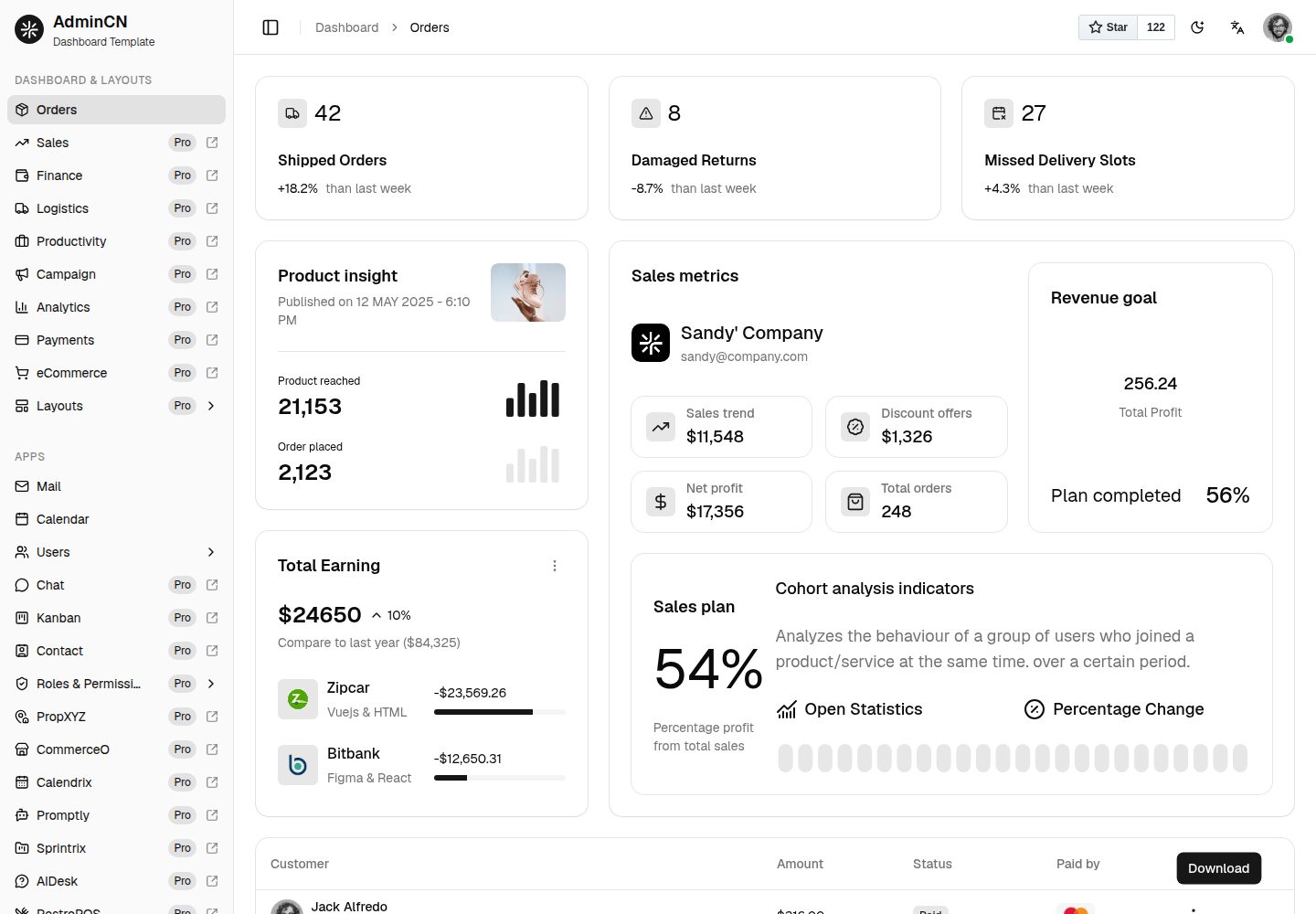
Admin template built with Next.js App Router, Shadcn UI, and Tailwind CSS
Next.jsReactAdmin dashboard
shadcn-nextjs-admincn-admin-template-free — Next.js Admin dashboard Template
By shadcnstudio
AdminCN Free is a free admin dashboard template built with Next.js, Shadcn UI, and Tailwind CSS. It includes an order dashboard, Mail, Calendar, and Users application pages, authentication flows, and is MIT licensed.
Explore the design
Compare the page layouts and mobile experience. Open any screenshot for a closer look.
Desktop homepage1 / 2
Desktop captureTop of page
Actual screenshot captured by the server browser.
All pages & views 2
Screenshots show visual appearance; interactive behavior may differ.
Recorded 2026-10-02View source
What stands out
A quick read of the recorded project description.
Includes an order dashboard with statistics, charts, and widgets
Provides three application pages: Mail, Calendar, and Users
Includes authentication pages for login, registration, forgot password, email verification, password reset, and two-step verification
Offers form layout, form validation, and data table examples
Uses fake-db mock data to preview the interface before connecting to a real API
Template Details
AdminCN Free is a free admin dashboard template released by Shadcn Studio, built with Next.js App Router, Shadcn UI, and Tailwind CSS. The template provides an order dashboard with stat cards, charts, and widgets. It also includes three application pages: Mail, Calendar, and Users, as well as authentication pages for login, registration, forgot password, email verification, password reset, and two-step verification. Additionally, it offers form layout, form validation, and data table examples.
The project structure is organized by route groups: the admin shell routes with sidebar and topbar (dashboard, apps, pages, datatable, forms) are separated from blank routes without the shell (authentication pages, error pages). The data layer uses fake-db mock data to preview the interface before connecting to a real API; navigation menus, themes, and the mail application are managed by configuration files in the configs directory.
There are clear differences between the free and paid versions: the free version only provides the order dashboard and does not include the theme customizer, Zustand state management, multiple dashboard layouts, or additional application pages; demo data is static. This listing covers only the MIT-licensed code in the public repository and does not include paid upgrade content.
Next.jsAdmin Panel
Is it right for your project?
Use Cases
- Quickly building the interface skeleton of an admin management system
- Projects that need an order dashboard and statistical charts
- Admin panels that need example pages for mail, calendar, and user management
- Projects that need authentication flow pages such as login, registration, and password recovery
- Interface development that needs form layout, form validation, and data table examples
Suitable For
- Front-end developers using the Next.js and Shadcn UI stack
- Small to medium-sized projects that need a free admin template to get started
- Developers who want to reference admin page organization and routing structure
- Interface building scenarios that need authentication pages and data table examples
Getting started & customization
Use these recorded setup notes alongside the repository instructions for your chosen version.
- 1
The free version uses static data and fake-db mock data; connecting to a real API requires replacing the data layer yourself
- 2
The free version does not include Zustand state management, the theme customizer, or multiple dashboard layouts; these are part of the paid version
- 3
Third-party assets such as demo images, fonts, and icons must be checked separately under their respective licenses
- 4
External services such as domains, hosting, and databases may incur additional costs
- 5
When distributing copies or substantial portions of the code, retain the original author's copyright notice and the MIT license notice
License & source material
Usage conditions & limitations
Free to use · keep license noticeThis listing covers the free version under the MIT license in the public repository; the free scope applies to that version's code and does not mean external services or third-party assets are free.
Must comply with when using
- You are allowed to use, modify, commercialize, and distribute this version's code for free.
- When distributing copies or substantial portions of the code, retain the original author's copyright notice and the full MIT license notice.
- The code is provided as is; warranties and limitations of liability are governed by the original license and applicable law.
Additional costs & items to verify
- When using the free project, attribution is required: place a link to ShadcnStudio (<a href="https://shadcnstudio.com/">ShadcnStudio</a>) in the website or project footer.
- The free project is MIT licensed and can be used for personal and commercial purposes; however, paid version (Admin Pro) content is not within the free authorization scope and must not be used as free content.
- The free version has limited features: no state management, fewer page versions, and static data; Zustand state management, theme customizer, more dashboard layouts, and applications belong to the paid version.
- Project materials mention optional paid versions or features; this listing only covers publicly available free code and does not include paid upgrades.
- Demo images, fonts, icons, and other third-party assets must be checked under their respective licenses and cannot be judged solely by the code's MIT license.
- External services such as domains, hosting, databases, payments, or AI may incur separate charges.
View Original Text Basis
Permission is hereby granted, free of charge
Original License Text
We just need attribution from your end. Copy the link below and paste it in the footer of your web application or project.
Original README
All our free items are Open Source and licensed under MIT. You can use our free items for personal as well as commercial purposes.
Original README
https://github.com/shadcnstudio/shadcn-nextjs-admincn-admin-template-free/blob/main/LICENSE.mdhttps://github.com/shadcnstudio/shadcn-nextjs-admincn-admin-template-free/blob/main/README.mdLimited functionality without state management, Limited pages version, static data
Original README
Compiled by DeepSeek based on repository license and README ·2026-10-02. Results only cover the materials read; dependencies, images, fonts, and subsequent term changes are subject to their respective original texts.
Project checks & description sources
Template Information
- Source platforms
- GitHub
- Documentation and maintenance reference score
- More documented · 91 / 100
- Technologies
- Next.js · React
- Website type
- Admin dashboard
How this score is calculated
Our heuristic uses license records (up to 30), a demo link (12), a preview (10), stars (15), recorded maintenance (15), description completeness (8), feature records (5) and classification data (5). It is not a code, security or performance test, or a Google score. A link does not establish tested functionality.
What to verify for this project
- Repository update recorded
- 2026-08-20
- Screenshot last checked
- 2026-10-02
A demo link is listed. Check it with your own content and viewport sizes; its presence does not confirm that forms, authentication or payments work.
The catalog identifies Next.js as the primary stack. Check the actual dependency manifest and lockfile for versions and hosting requirements. These notes use recorded metadata, not a code audit or a deployment test.
Use a selection guide →How this description was prepared
AI-assisted description based on catalog records and repository material. Repository authors are not automatically the reviewers of this description.
Automatically checked against source and license rules; no manual editorial review.
Inspect the recorded source material
SHA-256: 51ab923edfc46131445682bbe94b10bfed690241940919d79b902b910f776b55
2026-10-02T16:39:26.679Z
Source file / repository<p align="center">
<a href="https://shadcnstudio.com/templates/admin-dashboard-free/admincn" target="_blank">
<img src="https://cdn.shadcnstudio.com/ss-assets/logo/logo.png" alt="admincn-logo" width="32px" height="32px">
</a>
</p>
<h1 align="center">
<a href="https://shadcnstudio.com/templates/admin-dashboard-free/admincn" target="_blank" align="center">
AdminCN - Free Shadcn Admin Dashboard Template
</a>
</h1>
<p align="start">AdminCN Free is a responsive Next.js admin dashboard template built with Shadcn UI and Tailwind CSS. It ships with an orders dashboard, Mail, Calendar & Users apps, authentication pages, form layouts, data tables, and 1000+ component variants to help you build your next admin panel faster.</p>
   
<kbd>[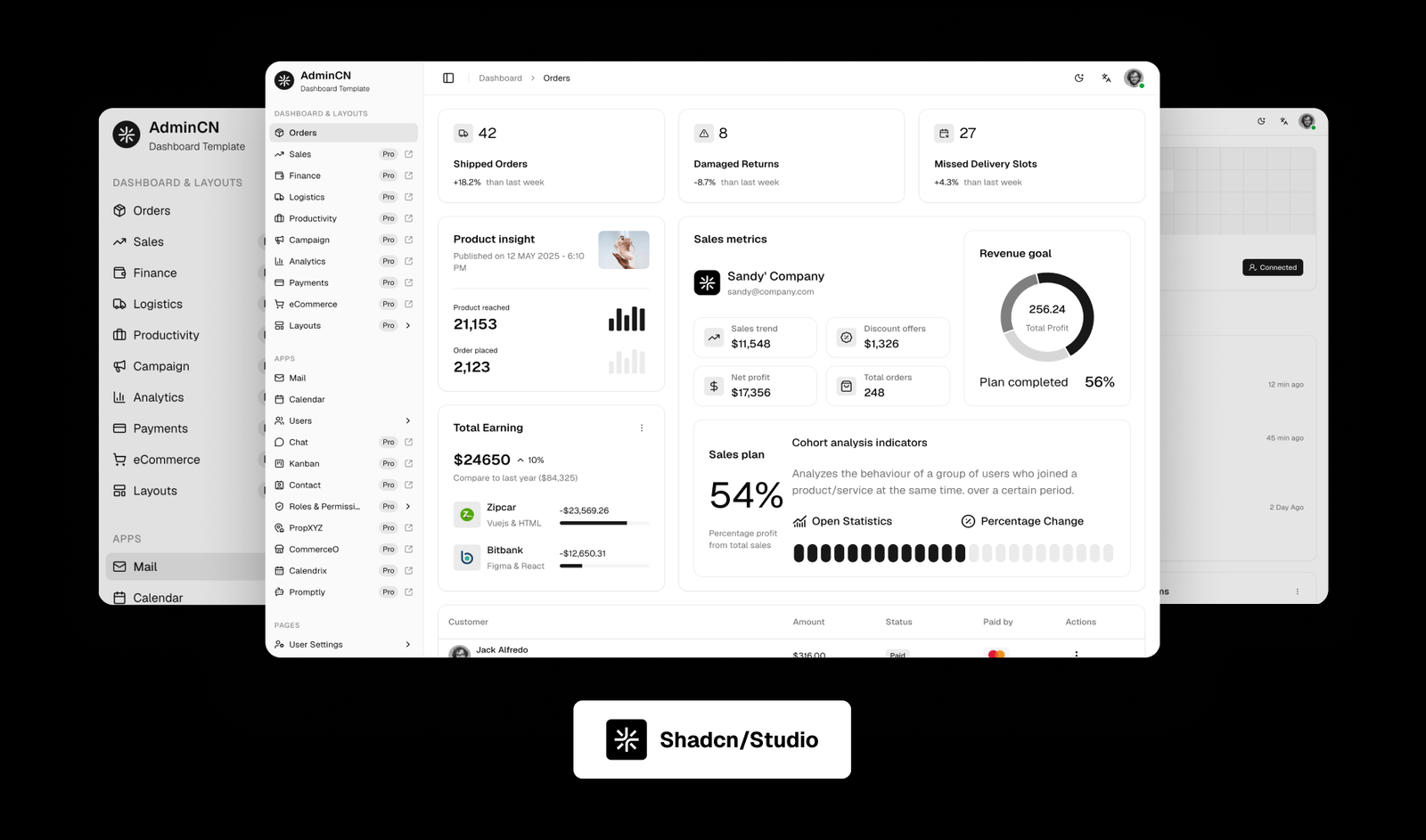](https://shadcn-nextjs-admincn-admin-template-free.vercel.app/dashboard/orders)</kbd>
## Introduction 📊
AdminCN Free is built with Next.js, Shadcn UI, and Tailwind CSS, offering a production-ready admin dashboard to kickstart your next project. It includes an orders dashboard, Mail, Calendar & Users apps, authentication pages, form layouts, form validation, and a data table.
[View Demo](https://shadcn-nextjs-admincn-admin-template-free.vercel.app/dashboard/orders)
[View Documentation](https://shadcnstudio.com/docs/documentation-admin/getting-started)
<p>
Supported by
<a href="https://shadcnstudio.com" target="_blank">
Shadcn Studio
</a>
, with a commitment to empowering the open-source community.
</p>
## Key Features ✨
- **Orders Dashboard** - Ready-to-use dashboard layout with statistics, charts, and widgets
- **Apps** - Mail, Calendar, and Users apps out of the box
- **Authentication Pages** - Login, Register, Forgot Password, Verify Email, Reset Password, and Two Steps Verification
- **Forms & Tables** - Vertical & Horizontal form layouts, form validation, and a data table
- **Built with Next.js** - App Router based, fast, SEO-friendly React framework
- **Tailwind CSS v4** - Easy theming and utility-based styling
- **Responsive & Mobile-First** - Designed to look great on all devices
- **1000+ Shadcn Component Variants** - Statistics, charts, and widgets included
## Folder Structure
```
|-- public/ # Static assets served from the site root
| |-- images/ # Public images, logos, and media
|-- src/ # Application source code
| |-- app/ # Next.js App Router routes and layouts
| | |-- favicon.ico # Browser favicon
| | |-- globals.css # Tailwind CSS, CSS variables, and theme tokens
| | |-- layout.tsx # Root layout, fonts, metadata, and providers
| | |-- not-found.tsx # Custom 404 page
| | |-- server/ # Server Actions and server-only helpers
| | |-- api/ # Route handlers used by demo features
| | |-- (pages)/ # Admin shell routes with sidebar and header
| | | |-- dashboard/ # Orders dashboard
| | | |-- apps/ # Calendar, mail, users
| | | |-- pages/ # Profile and settings
| | | |-- datatable/ # Data table
| | | |-- forms/ # Form layouts and validation
| | |-- (blank)/ # Routes without the admin shell
| | | |-- pages/auth/ # Authentication screens
| | | |-- pages/misc/ # Error page
| |-- assets/ # Local data files, SVGs, and static helpers
| | |-- data/ # Constants and option data
| | |-- svg/ # SVG assets used by the UI
| |-- components/ # Shared React components
| | |-- layout/ # Sidebar, header, footer, and shell pieces
| | |-- shared/ # Shared UI components
| | |-- ui/ # shadcn/ui primitives
| | |-- Providers.tsx # App provider wrapper
| | |-- ThemeProvider.tsx # Theme provider wrapper
| |-- configs/ # Template configuration files
| | |-- navConfig.tsx # Sidebar menu structure and icons
| | |-- themeConfig.ts # Theme config
| | |-- mailConfig.ts # Mail app config
| |-- fake-db/ # Mock data used by demos before API integration
| |-- hooks/ # Reusable client hooks
| |-- lib/ # General utilities and shared helpers
| |-- types/ # Shared TypeScript interfaces and types
| |-- utils/ # Feature-specific helper functions
| |-- views/ # Page-level UI composed by route files
| | |-- apps/ # App view modules
| | |-- dashboards/ # Dashboard charts, statistics, and widgets
| | |-- datatables/ # Data table views
| | |-- forms/ # Form layout and validation views
| | |-- pages/ # Auth, misc, profile, and settings views
|-- .env.example # Environment variable reference
|-- components.json # shadcn/ui aliases and registry config
|-- eslint.config.mjs # ESLint configuration
|-- next.config.ts # Next.js configuration
|-- package.json # Scripts and dependencies
|-- postcss.config.mjs # Tailwind CSS v4 PostCSS setup
|-- tsconfig.json # TypeScript compiler and path aliases
|-- vercel.json # Vercel deployment configuration
```
**Key UI Sections**
- **Dashboard** - Orders overview with statistics, charts, and widgets
- **Apps** - Mail, Calendar, and Users management
- **Authentication** - Login, Register, and account recovery flows
- **Forms & Tables** - Layouts, validation, and data table views
- **User Pages** - Profile and account settings
---
## What's Included 📦
- Dashboard
- Orders Dashboard
- Apps
- Mail
- Calendar
- Users
- Pages
- User Settings
- User Profile
- Login Page
- Register Page
- Forgot Password Page
- Verify Email Page
- Reset Password Page
- Two Steps Verification Page
- Error Page
- Forms & Tables
- Form Layouts
- Form Validation
- Data Table
- Components
- 1000+ Shadcn Component Variants
- Statistics, Charts & Widgets
- Miscellaneous
- Menu Levels
- Support
- Documentation
## What's in Premium Version 💎
| Feature Area | Admin Free | Admin Pro |
| -------------------- | ------------------------------------------------------------------------------------------------------- | ---------------------------------------------------------------------------------------------------------------------------------------------------------------------------------------------------------------------------------------------------------------------------------------- |
| Dashboard Demo | [AdminCN Free Dashboard](https://shadcn-nextjs-admincn-admin-template-free.vercel.app/dashboard/orders) | [AdminCN Pro Dashboard](https://shadcn-nextjs-admincn-admin-template.vercel.app/dashboard/orders) |
| Get Dashboard | [Download](https://shadcnstudio.com/templates/admin-dashboard-free/admincn) | [Purchase](https://shadcnstudio.com/#pricing) |
| Features | Theme Toggle, Limited functionality without state management, Limited pages version, static data | Theme Toggle, Theme Customizer, More functionality with Zustand state management, More pages versions, Multiple variants of components and pages, data with dynamic state/fake-db |
| Dashboard | Orders dashboard | Sales, Finance, Logistics, Productivity, Campaign, Analytics, Payments, eCommerce, Orders dashboards |
| Dashboard Layouts | — | Horizontal Layout, Full Navbar Layout, Split Layout, Icon Menu Layout, Paper Layout |
| Apps | Mail, Calendar, Users | Mail, Chat, Kanban, Calendar, Contact, Users, Roles & Permissions |
| Full Apps Template | — | [PropXYZ](https://shadcn-nextjs-propxyz-admin-template.vercel.app/), [CommerceO](https://shadcn-nextjs-commerceo-admin-template.vercel.app/), [Calendrix](https://shadcn-nextjs-calendrix-app-template.vercel.app/), [Promptly](https://shadcn-nextjs-promptly-app-template.vercel.app/) |
| Landing Page | — | ✅ |
| User Settings | General, Workspace | General, Notifications, Integrations, Members, Security, Billing, Workspace |
| User Profile | Profile, Connections | Profile, Connections, Teams, Projects |
| Pricing | — | ✅ |
| FAQ | — | ✅ |
| Onboarding | — | 2 Variants |
| Authentication Pages | Login, Register, Forgot Password, Verify Email, Reset Password, Two Steps - All pages have 1 Variant | Login , Register , Forgot Password , Verify Email , Reset Password , Two Steps - All pages have 3 Variants |
| Error Pages | 1 Variant | 4 Variants |
| Empty State Pages | — | 2 Variants |
| Form Layouts | Vertical, Horizontal | Vertical, Horizontal, Sticky with more forms & variants |
| Form Validation | ✅ | Included, with more forms & variants |
| Form Wizard | — | Icons stepper, Number stepper |
| Data Table | ✅ | Included with more variants |
## 🚀 Quick Start
### Prerequisites
- Node.js 18, 20, or 22+
- pnpm (recommended) or npm
### Installation
1. **Install dependencies:**
```bash
pnpm install
```
2. **Start the development server:**
```bash
pnpm dev
```
The site will be available at `http://localhost:3000`
3. **Build for production:**
```bash
pnpm build
```
4. **Preview the production build:**
```bash
pnpm start
```
## 🧞 Available Commands
The template comes with several pre-configured scripts to help you with development, building, and maintaining your project. All scripts can be run using your package manager of choice (npm, pnpm, yarn, or bun) from the root of the project.
| Command | Action |
| :------------ | :------------------------------------------------------------------------------------------------------------------------------------- |
| `dev` | Starts the Astro development server with hot-reload enabled. Your application will be available at http://localhost:3000/ |
| `build` | Creates an optimized production build of your application. This command generates static files and optimizes your code for deployment. |
| `start` | Preview production site locally. Use this to test your production build locally before deploying. |
| `lint` | Runs ESLint to check your code for potential errors and code quality issues. This helps maintain clean and consistent code. |
| `lint:fix` | Runs ESLint and automatically fixes problems where possible. |
| `format` | Formats all files using Prettier to ensure consistent code style. |
| `clean` | Cleans the project by removing temporary files and build artifacts. |
| `check-types` | Checks TypeScript types to catch type errors before building or deploying. |
## 🌐 Deployment
Check out our [Deployment docs](https://shadcnstudio.com/docs/documentation-admin/deployment)
## Documentation 📚
For comprehensive documentation, please visit [shadcn/studio documentation](https://shadcnstudio.com/docs/documentation-admin/introduction).
## Changelog 📆
Please refer to the [CHANGELOG file](CHANGELOG.md). We will add a detailed release notes to each new release.
## License ©
- Copyright © [ShadcnStudio](https://shadcnstudio.com/)
- Licensed under [MIT](LICENSE)
- All our free items are Open Source and licensed under MIT. You can use our free items for personal as well as commercial purposes. We just need attribution from your end. Copy the link below and paste it in the footer of your web application or project.
```html
<a href="https://shadcnstudio.com/">ShadcnStudio</a>
```
---
<br />
<a href="https://shadcnstudio.com" target="_blank">
<img src="https://cdn.shadcnstudio.com/ss-assets/smm/marketing/shadcn-studio-smm-banner.png" alt="shadcn/studio banner" width="1200">
</a>
<p>
<a href="https://shadcnstudio.com" target="_blank">
shadcn/studio
</a>
is an open-source collection of copy-and-paste shadcn components, blocks, and templates - paired with a powerful theme generator & AI Tools to craft, customize, and ship faster. 🚀
</p>
## Overview 🌏
**This isn't a traditional component library or a replacement for Shadcn**. Instead, it's a unique collection offers customizable variants of components, blocks, and templates. Preview, customize, and copy-paste them into your apps with ease.
Building on the solid foundation of the Shadcn components & blocks, we've enhanced it with custom-designed components & blocks to give you a head start. This allows you to craft, customize, and ship your projects faster and more efficiently.
### Not a standard library, but a distribution of components
Following the philosophy of Shadcn, shadcn/studio isn't a conventional "install-from-NPM" library. Rather, it's an open-source distribution of components designed for maximum adaptability. You can copy the code, modify styles, adjust logic, or integrate it with other tools—free from the limitations of typical libraries. This "open code" model empowers you to customize with confidence and creativity.
## Why should I use shadcn/studio? 💡
shadcn/ui aims to provide core components with a unique distribution system, allowing developers to copy and paste reusable, customizable UI elements directly into their codebase.
While this approach offers flexibility and control, it comes with some limitations: a lack of diverse component variants examples, limited theme customization options, and limited pre-built blocks. Additionally, its extensive customization options, though powerful, can sometimes feel overwhelming, especially for those seeking a more guided or streamlined experience.
## Community 🤝
Join the shadcn/studio community to discuss the library, ask questions, and share your experiences:
- 🐦 [Follow us on Twitter](https://x.com/ShadCNStudio)
- 🎮 [Join us on Discord](https://discord.com/invite/kBHkY7DekX)
## Credits 🤘
We are grateful for the contributions of the open-source community, particularly:
- [shadcn/ui](https://ui.shadcn.com/)
- [tweakcn](https://tweakcn.com/) (Our Theme Generator is heavily inspired by tweakcn)
These projects form the backbone of shadcn/studio, allowing us to build a powerful copy-and-paste components.
## Useful Links 🎁
- [Shadcn Blocks](https://shadcnstudio.com/blocks)
- [Shadcn Templates](https://shadcnstudio.com/templates)
- [Shadcn Admin Dashboard](https://shadcnstudio.com/templates/admin-dashboard)
- [Shadcn Figma UI Kit](https://shadcnstudio.com/figma)
- [Shadcn Theme Generator](https://shadcnstudio.com/theme-generator)
- [Shadcn MCP Server](https://shadcnstudio.com/mcp)
- [Shadcn IDE Extension](https://shadcnstudio.com/ide-extension)
- [Shadcn Components](https://shadcnstudio.com/components)
- [Shadcn Figma to Code](https://shadcnstudio.com/figma-plugin)
## Social Media :earth_africa:
- [x](https://x.com/ShadcnStudio)
- [Discord](https://discord.com/invite/kBHkY7DekX)
- [YouTube](https://www.youtube.com/@themeselection)
Explore similar templates
Compare previews and descriptions within the same stack and category.

next-shadcn-dashboard-starter
An MIT-licensed admin dashboard starter built with Next.js 16, shadcn/ui, Tailwind CSS v4, and TypeScript.
Next.js · Admin dashboard

Studio Admin · Radix UI
Studio Admin is an admin dashboard template built with Next.js 16, TypeScript, Tailwind CSS v4, and Shadcn UI.
Next.js · Admin dashboard

free-nextjs-admin-dashboard
A free, open-source admin dashboard template built on Next.js 16, React 19, TypeScript, and Tailwind CSS v4. It provides a collapsible sidebar, charts, tables, authentication forms, modals, dropdowns, and dark mode, with internationalization and RTL support since version 2.4.0.
Next.js · Admin dashboard

materio-mui-nextjs-admin-template-free
Materio Free is a Next.js admin dashboard template based on App Router and MUI, integrating Tailwind CSS and available in TypeScript and JavaScript versions.
Next.js · Admin dashboard
nextjs-postgres-nextauth-tailwindcss-template
A Vercel-maintained Next.js App Router admin dashboard starter with Auth.js GitHub OAuth, Postgres, Tailwind CSS, and Shadcn UI, plus a sample products table, seed endpoint, and CRUD interface.
Next.js · Admin dashboard

shadcn-dashboard-landing-template
An open-source admin dashboard and marketing landing page template built on shadcn/ui and Tailwind CSS, with both Vite + React and Next.js versions in one repository.
Next.js · Admin dashboard