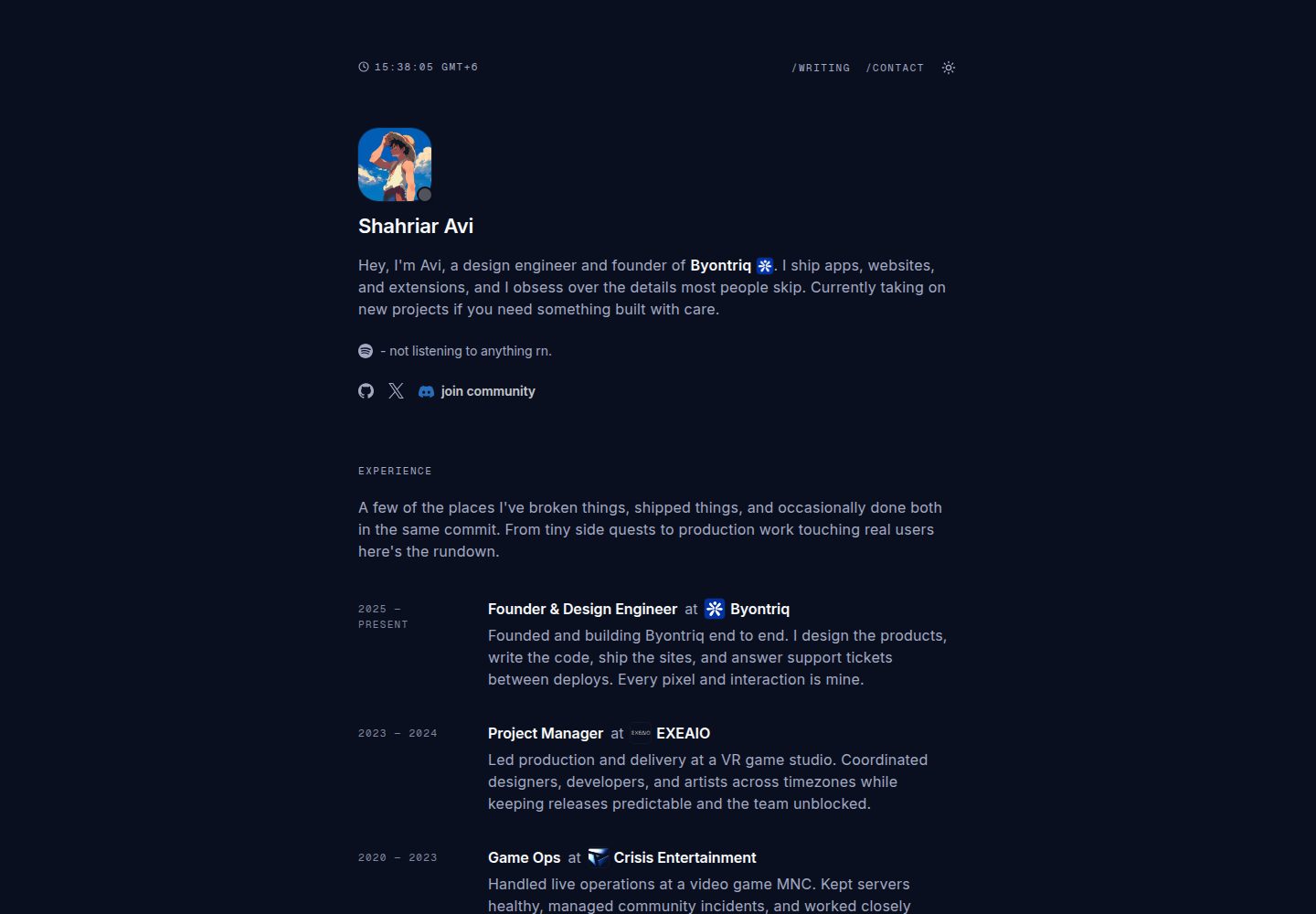
Integrates Discord online status, Spotify now playing, and GitHub contribution heatmap
Next.jsReactPortfolioBlog
cooked-folio — Next.js Portfolio Template
By shahriaravi
A minimal, editorial personal portfolio and blog template built with Next.js 14, Tailwind CSS, and TypeScript, integrating Discord status, Spotify now playing, GitHub contribution heatmap, MDX blog, and dynamic OG images.
Explore the design
Compare the page layouts and mobile experience. Open any screenshot for a closer look.
Desktop homepage1 / 2
Desktop captureTop of page
Actual screenshot captured by the server browser.
All pages & views 2
Screenshots show visual appearance; interactive behavior may differ.
Recorded 2026-10-03View source
What stands out
A quick read of the recorded project description.
MDX blog supports automatic reading time, dynamic OG images, related articles, and syntax-highlighted code blocks
Chat-style contact form that receives messages via Discord Webhook
Includes Cal.com booking popup, light/dark theme toggle, and Cuelume sound feedback
Provides complete SEO metadata, JSON-LD structured data, and dynamic sitemap
Actively prevents dark mode extensions like Dark Reader from overriding the site theme
Template Details
cooked-folio is a portfolio and blog template for individual developers or designers, built with Next.js 14 App Router, TypeScript, and Tailwind CSS, with an overall minimal editorial typography style. The homepage includes sections for Hero, experience, education, projects, and tech stack, and integrates real-time cards such as Discord online status, Spotify now playing, and GitHub contribution heatmap.
The blog section is located at /writing, written in MDX, and supports automatic reading time, per-article dynamic OG images, a share menu, related articles, and syntax-highlighted code blocks with copy buttons. The contact page uses a chat-style form, and submissions are sent via Discord Webhook. The site also includes a Cal.com booking popup, light/dark theme toggle, sound feedback based on Cuelume, and SEO-oriented metadata, JSON-LD structured data, and a dynamic sitemap. The template explicitly allows AI crawlers such as GPTBot and ClaudeBot, and uses meta tags and CSS rules to prevent dark mode extensions like Dark Reader from overriding the site theme.
Before use, multiple environment variables need to be configured, including site URL, Discord Webhook and user ID, Spotify client credentials and refresh token, GitHub username, and a token with read:user permission. Content configuration is centralized in src/lib/config.ts and src/lib/site-config.ts, blog posts are placed in the src/content/writing directory, and the filename is the URL slug. The code is MIT licensed and can be used, modified, and distributed for free, but third-party assets such as demo images and fonts need separate license verification, and external services may incur additional costs.
Next.jsPortfolioBlog
Is it right for your project?
Use Cases
- Build a personal portfolio website to showcase projects, experience, and tech stack
- Create a personal blog with an MDX writing workflow and automatically generated article preview images
- Display Discord status, Spotify playback, and GitHub activity on a personal homepage
- Provide a contact page with booking functionality for freelancers or developers
Suitable For
- Developers familiar with Next.js and TypeScript
- Individuals who need an integrated portfolio and blog site
- Developers who want to showcase real-time social status and code activity
- Personal sites that prefer a minimal editorial typography style
Getting started & customization
Use these recorded setup notes alongside the repository instructions for your chosen version.
- 1
After cloning the repository, run npm install and npm run dev; the default address is http://localhost:3000
- 2
Copy .env.example to .env.local and fill in environment variables for Discord, Spotify, GitHub, etc.
- 3
Content configuration is in src/lib/config.ts, and SEO configuration is in src/lib/site-config.ts
- 4
Blog posts go in the src/content/writing directory as .mdx files, and the filename is the URL slug
- 5
When deploying to Vercel, you can use the one-click deploy button provided in the repository and configure the required environment variables
License & source material
Usage conditions & limitations
Free to use · keep license noticeThis entry covers the free version under the MIT license in the public repository; the free scope is the code of this version and does not mean external services or third-party assets are free.
Must comply with when using
- The code of this version may be used, modified, used commercially, and distributed for free.
- When distributing copies or substantial portions of the code, retain the original author's copyright notice and the full MIT license notice.
- The code is provided as is; warranties and limitations of liability are governed by the original license and applicable law.
Additional costs & items to verify
- Using the Spotify now playing feature requires registering your own Spotify application and providing a client ID, secret, and refresh token, which is an external service account requirement.
- The GitHub contribution heatmap and star badge require providing a GitHub personal access token with read:user permission.
- The chat-style contact form relies on a Discord Webhook to receive messages, and you need to create and configure this external service yourself.
- The homepage footer embeds a Cal.com booking popup, and using this feature depends on the external Cal.com service.
- The site integrates Vercel Analytics, and deployment and analytics depend on the Vercel platform service.
- Demo images, fonts, icons, and other third-party assets need to be checked against their respective licenses and cannot be judged solely by the code's MIT license.
- External services such as domains, hosting, databases, payments, or AI may incur additional charges.
View Original Text Basis
Permission is hereby granted, free of charge
Original License Text
SPOTIFY_CLIENT_ID
Original README
GITHUB_TOKEN
Original README
DISCORD_WEBHOOK_URL
Original README
Cal.com booking modal
Original README
https://github.com/shahriaravi/cooked-folio/blob/main/LICENSEhttps://github.com/shahriaravi/cooked-folio/blob/main/README.mdVercel Analytics
Original README
Compiled by DeepSeek based on repository license and README ·2026-10-03. Results only cover the materials read; dependencies, images, fonts, and subsequent term changes are subject to their respective original texts.
Project checks & description sources
Template Information
- Source platforms
- GitHub
- Documentation and maintenance reference score
- More documented · 92 / 100
- Technologies
- Next.js · React
- Website type
- Portfolio · Blog
How this score is calculated
Our heuristic uses license records (up to 30), a demo link (12), a preview (10), stars (15), recorded maintenance (15), description completeness (8), feature records (5) and classification data (5). It is not a code, security or performance test, or a Google score. A link does not establish tested functionality.
What to verify for this project
- Repository update recorded
- 2026-09-03
- Screenshot last checked
- 2026-10-03
A demo link is listed. Check it with your own content and viewport sizes; its presence does not confirm that forms, authentication or payments work.
The catalog identifies Next.js as the primary stack. Check the actual dependency manifest and lockfile for versions and hosting requirements. These notes use recorded metadata, not a code audit or a deployment test.
Use a selection guide →How this description was prepared
AI-assisted description based on catalog records and repository material. Repository authors are not automatically the reviewers of this description.
Review declaration: [email protected] · 2026-10-04
Inspect the recorded source material
SHA-256: 08b30a46d45c2100a942b383e90ba8872db022bc12fae522227c3ede49d8a28a
2026-10-03T13:53:03.636Z
Source file / repository<div align="center">
# 🍳 cooked-folio
A minimal, editorial portfolio built with **Next.js 14**, **Tailwind**, and **TypeScript**.
<br/>
Real-time Discord presence, Spotify now-playing, GitHub heatmap, MDX blog with syntax highlighting, dynamic OG images, and a chat-style contact form.
<br/>
[](https://discord.gg/wG9qpfvuQQ)
</div>
## ⚡ Deploy
One-click deploy on Vercel:
[](https://vercel.com/new/clone?repository-url=https%3A%2F%2Fgithub.com%2Fshahriaravi%2Fcooked-folio&env=DISCORD_WEBHOOK_URL,NEXT_PUBLIC_DISCORD_USER_ID,SPOTIFY_CLIENT_ID,SPOTIFY_CLIENT_SECRET,SPOTIFY_REFRESH_TOKEN,NEXT_PUBLIC_URL,GITHUB_USERNAME,GITHUB_TOKEN)
---
## ✨ Features
- **Discord presence** via Lanyard with real status dot + current activity
- **Spotify now playing** with album art
- **GitHub contributions heatmap** + live star count badge in footer
- **MDX blog** at /writing — auto reading time, per-post dynamic OG images, share menu (X, Facebook, Discord, copy link), related posts, syntax highlighted code blocks with copy button
- **Chat-style contact form** — sequential prompts, posts to Discord webhook
- **Cal.com booking modal** embedded in homepage footer
- **Sound feedback** via Cuelume — hover ticks, press sounds, success chimes on every interaction
- **Dark/light theme** with instant swap
- **SEO-optimized** — full metadata, JSON-LD Person + WebSite + BlogPosting schema, robots.txt, dynamic sitemap
- **AI crawler friendly** — GPTBot, ClaudeBot, Gemini, Perplexity explicitly allowed
- **Dark mode extension blocker** — locks out Dark Reader, Night Eye, etc. so your theme stays yours
- Editorial typography (Inter + Geist Mono), squircle avatars, no unnecessary animations, instant client-side navigation
---
## 🛠️ Tech Stack
- **Framework:** Next.js 14.2 (App Router)
- **Language:** TypeScript
- **Styling:** Tailwind CSS
- **Fonts:** Inter (body) + Geist Mono (meta/labels)
- **Content:** MDX via next-mdx-remote, gray-matter, reading-time
- **Syntax highlighting:** rehype-pretty-code + shiki (github-dark-dimmed theme)
- **OG images:** @vercel/og with bundled Inter fonts and per-post cards
- **Icons:** lucide-react, react-icons
- **Data:** SWR + async server components
- **Analytics:** Vercel Analytics
- **Booking:** @calcom/embed-react
- **Sound feedback:** cuelume
---
## 🚀 Getting Started
git clone https://github.com/shahriaravi/cooked-folio.git
cd cooked-folio
npm install
npm run dev
Open http://localhost:3000.
---
## ⚙️ Environment Variables
Copy `.env.example` to `.env.local`:
cp .env.example .env.local
| Variable | Description |
| --- | --- |
| `NEXT_PUBLIC_URL` | Your live site URL |
| `DISCORD_WEBHOOK_URL` | Discord webhook for contact messages |
| `NEXT_PUBLIC_DISCORD_USER_ID` | Your Discord User ID |
| `SPOTIFY_CLIENT_ID` | Spotify app Client ID |
| `SPOTIFY_CLIENT_SECRET` | Spotify app Client Secret |
| `SPOTIFY_REFRESH_TOKEN` | Spotify refresh token |
| `GITHUB_USERNAME` | Your GitHub username |
| `GITHUB_TOKEN` | GitHub PAT with `read:user` |
---
## 🔧 Configuration
**Content** → `src/lib/config.ts`
Socials, stack, experience, education, projects, external links.
**SEO** → `src/lib/site-config.ts`
Metadata, keywords, JSON-LD schema, OpenGraph, Twitter cards. Every page defaults to `Shahriar Avi` as title unless overridden per-page.
**Blog posts** → `src/content/writing/*.mdx`
Filename becomes slug. Frontmatter is minimal:
---
title: "Post Title"
date: "2026-01-15"
---
Reading time, word count, slug, and per-post OG image all auto-generated.
**OG images** → `src/app/writing/[slug]/opengraph-image.tsx`
Dynamic per-post preview cards using your background at `public/images/og-bg.png`, avatar, post title, and reading time. Fonts bundled at `public/fonts/Inter-Regular.ttf` + `Inter-Bold.ttf`.
---
## 📂 Project Structure
src/
├─ app/
│ ├─ api/ # contact, discord, spotify, github routes
│ ├─ writing/
│ │ ├─ page.tsx # blog list
│ │ └─ [slug]/
│ │ ├─ page.tsx # dynamic post page (SSG)
│ │ └─ opengraph-image.tsx # per-post OG image generator
│ ├─ contact/ # chat-style form
│ ├─ layout.tsx # root: Providers, NavbarWrapper, SiteFooterWrapper, JSON-LD, fonts
│ ├─ sitemap.ts # dynamic sitemap
│ └─ page.tsx # homepage
├─ components/
│ ├─ common/ # Container, ThemeToggle, CodeBlock, CopyButton, CustomScrollArea
│ ├─ layout/ # Hero, Navbar, NavbarWrapper, HomeFooter, SiteFooter, SiteFooterWrapper, Providers
│ ├─ sections/ # Experience, Education, Projects, Stack
│ ├─ integrations/ # Discord, Spotify, GitHub cards
│ ├─ contact/ # ContactForm
│ ├─ writing/ # WritingList, MdxComponents, ShareMenu, MorePosts, ArticleJsonLd
│ └─ ui/ # TimeDisplay, Folder, LogoLoop, PixelBlast
├─ content/writing/ # MDX blog posts
├─ hooks/ # useDiscordPresence
└─ lib/ # config, site-config, writing, utils
public/
├─ fonts/ # Inter-Regular.ttf, Inter-Bold.ttf (for OG images)
├─ images/ # og-bg.png (OG background)
└─ avatar/ # avatar.png, luffy.png, avatar-fill.png
---
## 🎨 Design System
- **Content width:** 44rem (704px) centered column
- **Fonts:** Inter body, Geist Mono for meta/labels/dates
- **Section overline:** `text-[11px] font-mono uppercase tracking-[0.14em]`
- **Body copy:** `16px / 24px / 0.2px`
- **Headings:** `22–28px semibold`, tight letter-spacing
- **Avatars:** squircle with fixed px radius
- **Cards:** `rounded-2xl` with subtle border + hover tint
- **Interactions:** instant CSS transitions, no page fade animations, no unnecessary pop-ins
- **Sticky footer:** `flex min-h-[100dvh] flex-col` layout keeps footer at bottom on short pages
- **Sound design:** Cuelume for tactile audio feedback on hover, press, success, error
---
## 📝 Writing System
Add a new blog post by creating a `.mdx` file:
src/content/writing/my-new-post.mdx
Filename becomes the URL slug (`/writing/my-new-post`). The list page, related posts, sitemap, and per-post OG image all update automatically on next build.
Code blocks support syntax highlighting when you specify a language after the opening backticks (tsx, ts, css, bash, powershell, python, and 100+ more via shiki). Every code block gets an always-visible copy button.
---
## 🔒 Dark Mode Extension Blocking
The site actively blocks browser extensions like Dark Reader from overriding its theme, since it already ships proper dark mode. Handled via:
- `<meta name="darkreader-lock" />` in the head
- `darkreader-ignore` class + `data-darkreader-ignore` attribute on `<html>`
- CSS reset for any `[data-darkreader-inline-*]` attributes
- `color-scheme: only light/dark` locks
Full explanation in `/writing/block-dark-mode-extensions`.
---
## 🤝 Contributing
1. Fork
2. `git checkout -b feat/thing`
3. `git commit -m "feat: add thing"`
4. `git push origin feat/thing`
5. Open PR
---
## 📄 License
MIT © 2026 Shahriar AviExplore similar templates
Compare previews and descriptions within the same stack and category.

tailwind-nextjs-starter-blog
A Next.js and Tailwind CSS blog starter template using Contentlayer for Markdown/MDX, with built-in SEO, code highlighting, and tags. It targets personal technical blogs and migration from Jekyll/Hugo to React, and supports one-click Vercel deployment.
Next.js · Blog

react-resume-template
A personal resume website template for software developers, built with Next.js, React, and TypeScript and styled with Tailwind CSS. Site content is driven by a single data file at /src/data/data.tsx, with types in dataDef.ts and images in src/images/.
Next.js · Portfolio

Nextjs-tailwindcss-blog-template
A personal blog template built with Next.js and Tailwind CSS, using Velite to process Markdown content. It includes home, about, contact and article pages, with a demo site and a companion YouTube tutorial.
Next.js · Blog

Next-js-Blog-Boilerplate
A blog starter built on Next.js 12 and Tailwind CSS 3, integrating TypeScript, ESLint, Prettier, and PostCSS.
Next.js · Blog

nextjs-blog-theme
A Next.js 15 and Tailwind CSS 4.x blog starter by Netlify, designed by Bejamas, with MDX support, dark/light theme switching, and environment-variable configuration. It includes a visual setup wizard for deploying to Netlify and manages content via local .mdx files.
Next.js · Blog

blog
A personal blog forked from Timlrx's tailwind-nextjs-starter-blog, built with Next.js, React, and Tailwind CSS. Content is stored as Markdown/MDX under data/, with site, author, navigation, and project data in separate files.
Next.js · Blog