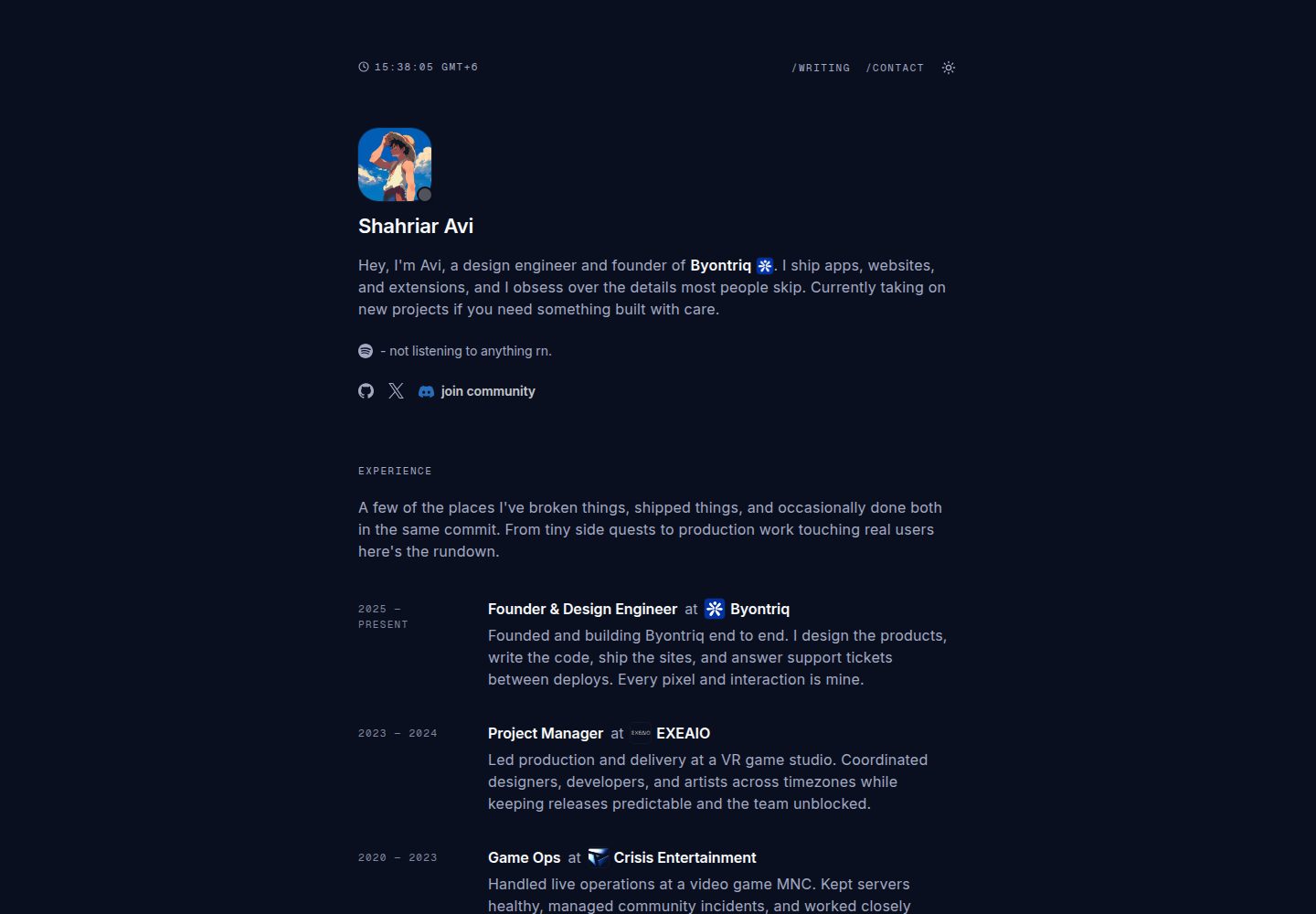
集成 Discord 在线状态、Spotify 正在播放和 GitHub 贡献热力图
Next.jsReact作品集博客
cooked-folio — Next.js 作品集模板
作者 shahriaravi
一个基于 Next.js 14、Tailwind CSS 和 TypeScript 的极简编辑风格个人作品集与博客模板,集成 Discord 状态、Spotify 正在播放、GitHub 贡献热力图、MDX 博客与动态 OG 图片。
看看你的网站会是什么样
浏览真实页面截图,比较内容排版与手机效果。点击下方缩略图切换,放大查看整页细节。
全部页面与视图 2
截图用于了解视觉与布局,交互效果请以实际项目为准。
采集于 2026-10-03查看来源
值得关注的模板亮点
从已有项目资料中,快速了解它的特点。
MDX 博客支持自动阅读时间、动态 OG 图片、相关文章和语法高亮代码块
聊天式联系表单,通过 Discord Webhook 接收消息
包含 Cal.com 预约弹窗、明暗主题切换和 Cuelume 声音反馈
提供完整 SEO 元数据、JSON-LD 结构化数据和动态 sitemap
主动阻止 Dark Reader 等暗色模式扩展覆盖站点主题
模板详细介绍
cooked-folio 是一个面向个人开发者或设计师的作品集与博客模板,采用 Next.js 14 App Router、TypeScript 和 Tailwind CSS 构建,整体为极简编辑排版风格。首页包含 Hero、经历、教育、项目、技术栈等区块,并集成 Discord 在线状态、Spotify 正在播放和 GitHub 贡献热力图等实时卡片。
博客部分位于 /writing,使用 MDX 编写,支持自动阅读时间、每篇文章动态 OG 图片、分享菜单、相关文章以及带复制按钮的语法高亮代码块。联系页面采用聊天式表单,提交内容通过 Discord Webhook 发送。站点还包含 Cal.com 预约弹窗、明暗主题切换、基于 Cuelume 的声音反馈,以及针对 SEO 的元数据、JSON-LD 结构化数据和动态 sitemap。模板明确允许 GPTBot、ClaudeBot 等 AI 爬虫,并通过 meta 标签和 CSS 规则阻止 Dark Reader 等暗色模式扩展覆盖站点主题。
使用前需要配置多个环境变量,包括站点 URL、Discord Webhook 与用户 ID、Spotify 客户端凭据与刷新令牌、GitHub 用户名与具有 read:user 权限的令牌。内容配置集中在 src/lib/config.ts 和 src/lib/site-config.ts,博客文章放在 src/content/writing 目录下,文件名即 URL slug。代码采用 MIT 许可,可免费使用、修改和分发,但演示图片、字体等第三方素材需单独核对许可,外部服务可能产生额外费用。
Next.js作品集博客
适合你的项目吗?
适用场景
- 搭建个人作品集网站,展示项目、经历和技术栈
- 建立带 MDX 写作流程的个人博客,自动生成文章预览图
- 在个人主页展示 Discord 状态、Spotify 播放和 GitHub 活跃度
- 为自由职业者或开发者提供带预约功能的联系页面
适合人群
- 熟悉 Next.js 和 TypeScript 的开发者
- 需要作品集与博客一体化站点的个人用户
- 希望展示实时社交状态与代码活跃度的开发者
- 偏好极简编辑排版风格的个人站点
上手与定制指南
结合仓库当前版本的说明,按下面的资料检查内容、配置与运行要求。
- 1
克隆仓库后运行 npm install 和 npm run dev,默认地址为 http://localhost:3000
- 2
复制 .env.example 为 .env.local,并填写 Discord、Spotify、GitHub 等环境变量
- 3
内容配置位于 src/lib/config.ts,SEO 配置位于 src/lib/site-config.ts
- 4
博客文章放在 src/content/writing 目录,使用 .mdx 文件,文件名即 URL slug
- 5
部署到 Vercel 时可使用仓库提供的一键部署按钮,并配置所需环境变量
授权与来源资料
使用条件与限制
免费使用 · 保留许可声明本次收录的是公开仓库中采用 MIT 许可的免费版本;免费范围为该版本代码,不代表外部服务或第三方素材免费。
使用时需要遵守
- 允许免费使用、修改、商用和分发该版本代码。
- 分发代码副本或实质性部分时,保留原作者版权声明和完整 MIT 许可声明。
- 代码按现状提供;担保与责任限制以原许可证及适用法律为准。
额外费用与待核对事项
- 使用 Spotify 正在播放功能需自行注册 Spotify 应用并提供客户端 ID、密钥与刷新令牌,属于外部服务账号要求。
- GitHub 贡献热力图与星标徽章需要提供具有 read:user 权限的 GitHub 个人访问令牌。
- 聊天式联系表单依赖 Discord Webhook 才能接收消息,需自行创建并配置该外部服务。
- 首页页脚内嵌 Cal.com 预约弹窗,使用该功能需依赖 Cal.com 外部服务。
- 站点集成 Vercel Analytics,部署与统计依赖 Vercel 平台服务。
- 演示图片、字体、图标及其他第三方素材需按各自许可核对,不能仅凭代码的 MIT 许可判断。
- 域名、托管、数据库、支付或 AI 等外部服务可能另外收费。
查看原文依据
Permission is hereby granted, free of charge
许可证原文
SPOTIFY_CLIENT_ID
README 原文
GITHUB_TOKEN
README 原文
DISCORD_WEBHOOK_URL
README 原文
Cal.com booking modal
README 原文
https://github.com/shahriaravi/cooked-folio/blob/main/LICENSEhttps://github.com/shahriaravi/cooked-folio/blob/main/README.mdVercel Analytics
README 原文
DeepSeek 根据仓库许可证和 README 整理 ·2026-10-03。结果仅覆盖已读取资料,依赖、图片、字体及后续条款变更以各自原文为准。
项目核对记录与介绍依据
模板资料
- 来源平台
- GitHub
- 资料与维护参考分
- 资料较完整 · 92 / 100
- 技术栈
- Next.js · React
- 网站类型
- 作品集 · 博客
这个分数如何计算
本站按许可资料(最高30分)、演示链接(12分)、预览图(10分)、Star数(15分)、记录的维护时间(15分)、描述完整度(8分)、功能记录(5分)和分类资料(5分)计算。它不是代码、安全或性能测试,也不是 Google 评分;有链接不代表已实测可用。
这个项目需要核对什么
- 记录的仓库更新时间
- 2026-09-03
- 截图检查日期
- 2026-10-03
已收录演示链接。请用你的内容与屏幕尺寸检查;有演示不代表表单、认证或支付已经可用。
目录记录的主要技术栈是 Next.js。请通过依赖清单和锁文件核对实际版本与托管要求。这些说明基于收录资料,不代表代码审计或部署实测。
查看具体选型方法 →介绍的制作与核对状态
介绍由 AI 辅助整理目录与仓库资料。仓库作者不等于这篇介绍的审核者。
审核声明: [email protected] · 2026-10-04
查看当时使用的来源资料
SHA-256: 08b30a46d45c2100a942b383e90ba8872db022bc12fae522227c3ede49d8a28a
2026-10-03T13:53:03.636Z
来源文件 / 仓库<div align="center">
# 🍳 cooked-folio
A minimal, editorial portfolio built with **Next.js 14**, **Tailwind**, and **TypeScript**.
<br/>
Real-time Discord presence, Spotify now-playing, GitHub heatmap, MDX blog with syntax highlighting, dynamic OG images, and a chat-style contact form.
<br/>
[](https://discord.gg/wG9qpfvuQQ)
</div>
## ⚡ Deploy
One-click deploy on Vercel:
[](https://vercel.com/new/clone?repository-url=https%3A%2F%2Fgithub.com%2Fshahriaravi%2Fcooked-folio&env=DISCORD_WEBHOOK_URL,NEXT_PUBLIC_DISCORD_USER_ID,SPOTIFY_CLIENT_ID,SPOTIFY_CLIENT_SECRET,SPOTIFY_REFRESH_TOKEN,NEXT_PUBLIC_URL,GITHUB_USERNAME,GITHUB_TOKEN)
---
## ✨ Features
- **Discord presence** via Lanyard with real status dot + current activity
- **Spotify now playing** with album art
- **GitHub contributions heatmap** + live star count badge in footer
- **MDX blog** at /writing — auto reading time, per-post dynamic OG images, share menu (X, Facebook, Discord, copy link), related posts, syntax highlighted code blocks with copy button
- **Chat-style contact form** — sequential prompts, posts to Discord webhook
- **Cal.com booking modal** embedded in homepage footer
- **Sound feedback** via Cuelume — hover ticks, press sounds, success chimes on every interaction
- **Dark/light theme** with instant swap
- **SEO-optimized** — full metadata, JSON-LD Person + WebSite + BlogPosting schema, robots.txt, dynamic sitemap
- **AI crawler friendly** — GPTBot, ClaudeBot, Gemini, Perplexity explicitly allowed
- **Dark mode extension blocker** — locks out Dark Reader, Night Eye, etc. so your theme stays yours
- Editorial typography (Inter + Geist Mono), squircle avatars, no unnecessary animations, instant client-side navigation
---
## 🛠️ Tech Stack
- **Framework:** Next.js 14.2 (App Router)
- **Language:** TypeScript
- **Styling:** Tailwind CSS
- **Fonts:** Inter (body) + Geist Mono (meta/labels)
- **Content:** MDX via next-mdx-remote, gray-matter, reading-time
- **Syntax highlighting:** rehype-pretty-code + shiki (github-dark-dimmed theme)
- **OG images:** @vercel/og with bundled Inter fonts and per-post cards
- **Icons:** lucide-react, react-icons
- **Data:** SWR + async server components
- **Analytics:** Vercel Analytics
- **Booking:** @calcom/embed-react
- **Sound feedback:** cuelume
---
## 🚀 Getting Started
git clone https://github.com/shahriaravi/cooked-folio.git
cd cooked-folio
npm install
npm run dev
Open http://localhost:3000.
---
## ⚙️ Environment Variables
Copy `.env.example` to `.env.local`:
cp .env.example .env.local
| Variable | Description |
| --- | --- |
| `NEXT_PUBLIC_URL` | Your live site URL |
| `DISCORD_WEBHOOK_URL` | Discord webhook for contact messages |
| `NEXT_PUBLIC_DISCORD_USER_ID` | Your Discord User ID |
| `SPOTIFY_CLIENT_ID` | Spotify app Client ID |
| `SPOTIFY_CLIENT_SECRET` | Spotify app Client Secret |
| `SPOTIFY_REFRESH_TOKEN` | Spotify refresh token |
| `GITHUB_USERNAME` | Your GitHub username |
| `GITHUB_TOKEN` | GitHub PAT with `read:user` |
---
## 🔧 Configuration
**Content** → `src/lib/config.ts`
Socials, stack, experience, education, projects, external links.
**SEO** → `src/lib/site-config.ts`
Metadata, keywords, JSON-LD schema, OpenGraph, Twitter cards. Every page defaults to `Shahriar Avi` as title unless overridden per-page.
**Blog posts** → `src/content/writing/*.mdx`
Filename becomes slug. Frontmatter is minimal:
---
title: "Post Title"
date: "2026-01-15"
---
Reading time, word count, slug, and per-post OG image all auto-generated.
**OG images** → `src/app/writing/[slug]/opengraph-image.tsx`
Dynamic per-post preview cards using your background at `public/images/og-bg.png`, avatar, post title, and reading time. Fonts bundled at `public/fonts/Inter-Regular.ttf` + `Inter-Bold.ttf`.
---
## 📂 Project Structure
src/
├─ app/
│ ├─ api/ # contact, discord, spotify, github routes
│ ├─ writing/
│ │ ├─ page.tsx # blog list
│ │ └─ [slug]/
│ │ ├─ page.tsx # dynamic post page (SSG)
│ │ └─ opengraph-image.tsx # per-post OG image generator
│ ├─ contact/ # chat-style form
│ ├─ layout.tsx # root: Providers, NavbarWrapper, SiteFooterWrapper, JSON-LD, fonts
│ ├─ sitemap.ts # dynamic sitemap
│ └─ page.tsx # homepage
├─ components/
│ ├─ common/ # Container, ThemeToggle, CodeBlock, CopyButton, CustomScrollArea
│ ├─ layout/ # Hero, Navbar, NavbarWrapper, HomeFooter, SiteFooter, SiteFooterWrapper, Providers
│ ├─ sections/ # Experience, Education, Projects, Stack
│ ├─ integrations/ # Discord, Spotify, GitHub cards
│ ├─ contact/ # ContactForm
│ ├─ writing/ # WritingList, MdxComponents, ShareMenu, MorePosts, ArticleJsonLd
│ └─ ui/ # TimeDisplay, Folder, LogoLoop, PixelBlast
├─ content/writing/ # MDX blog posts
├─ hooks/ # useDiscordPresence
└─ lib/ # config, site-config, writing, utils
public/
├─ fonts/ # Inter-Regular.ttf, Inter-Bold.ttf (for OG images)
├─ images/ # og-bg.png (OG background)
└─ avatar/ # avatar.png, luffy.png, avatar-fill.png
---
## 🎨 Design System
- **Content width:** 44rem (704px) centered column
- **Fonts:** Inter body, Geist Mono for meta/labels/dates
- **Section overline:** `text-[11px] font-mono uppercase tracking-[0.14em]`
- **Body copy:** `16px / 24px / 0.2px`
- **Headings:** `22–28px semibold`, tight letter-spacing
- **Avatars:** squircle with fixed px radius
- **Cards:** `rounded-2xl` with subtle border + hover tint
- **Interactions:** instant CSS transitions, no page fade animations, no unnecessary pop-ins
- **Sticky footer:** `flex min-h-[100dvh] flex-col` layout keeps footer at bottom on short pages
- **Sound design:** Cuelume for tactile audio feedback on hover, press, success, error
---
## 📝 Writing System
Add a new blog post by creating a `.mdx` file:
src/content/writing/my-new-post.mdx
Filename becomes the URL slug (`/writing/my-new-post`). The list page, related posts, sitemap, and per-post OG image all update automatically on next build.
Code blocks support syntax highlighting when you specify a language after the opening backticks (tsx, ts, css, bash, powershell, python, and 100+ more via shiki). Every code block gets an always-visible copy button.
---
## 🔒 Dark Mode Extension Blocking
The site actively blocks browser extensions like Dark Reader from overriding its theme, since it already ships proper dark mode. Handled via:
- `<meta name="darkreader-lock" />` in the head
- `darkreader-ignore` class + `data-darkreader-ignore` attribute on `<html>`
- CSS reset for any `[data-darkreader-inline-*]` attributes
- `color-scheme: only light/dark` locks
Full explanation in `/writing/block-dark-mode-extensions`.
---
## 🤝 Contributing
1. Fork
2. `git checkout -b feat/thing`
3. `git commit -m "feat: add thing"`
4. `git push origin feat/thing`
5. Open PR
---
## 📄 License
MIT © 2026 Shahriar Avi看看同类模板
对比同技术栈与用途的模板,找到更适合的视觉与内容结构。

tailwind-nextjs-starter-blog
tailwind-nextjs-starter-blog 是一个面向个人技术博客的 Next.js 与 Tailwind CSS 启动模板,其 v2 版本基于 App Router 与 React Server Comp…
Next.js · 博客

react-resume-template
A personal resume website template built with React.js, Typescript, Next.js, and styled with Tailwind css
Next.js · 作品集

Nextjs-tailwindcss-blog-template
⭐Build SEO optimized personal blog website with Next.js, Tailwind CSS and Contentlayer. If you want to learn t…
Next.js · 博客

Next-js-Blog-Boilerplate
Next-js-Blog-Boilerplate 是一套面向个人与技术博客的启动代码,基于 Next.js 12 与 Tailwind CSS 3 构建,同时集成了 TypeScript、ESLint、Prettier …
Next.js · 博客

nextjs-blog-theme
nextjs-blog-theme 是 Netlify 团队维护的一个博客启动模板,基于 Next.js 15(Pages Router)和 Tailwind CSS 4.x 构建,设计由 Bejamas 机构完成。
Next.js · 博客

blog
🚀 My personal blog made with Tailwind CSS and NextJS. Template from Timlrx. Feel free to fork, follow and use…
Next.js · 博客