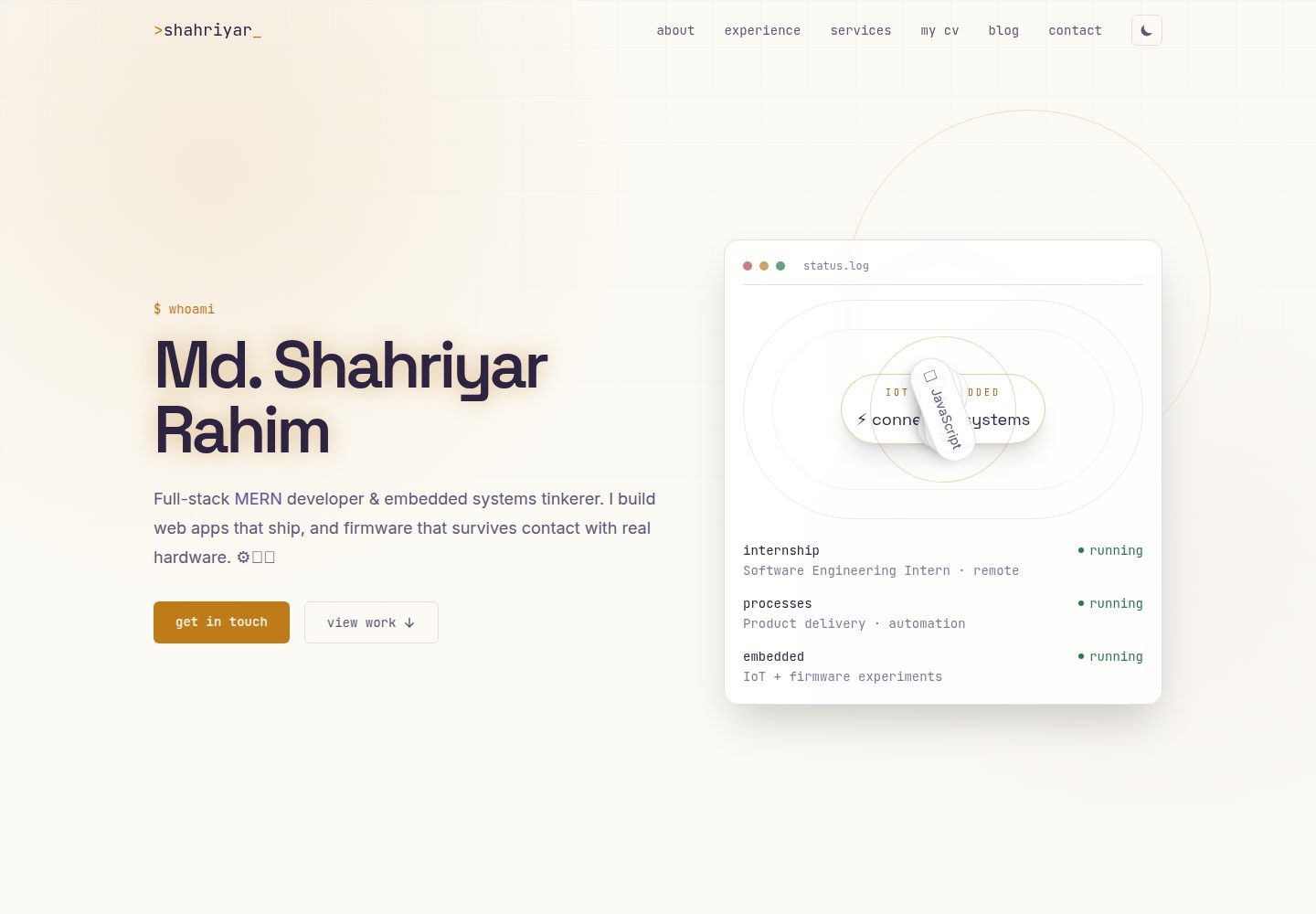
Two-service monorepo with separated frontend and backend: Vite/React single-page application and independent Express API deployed separately
ReactAdmin dashboardPortfolioBlogCorporate Website
portfolio (Shahriyar-Rahim) — React Admin dashboard Template
By Shahriyar-Rahim
Shahriyar Rahim's personal portfolio platform, with frontend and backend separated, content maintained via a self-built admin panel, including blog, testimonials, job board, and CV parsing page.
Explore the design
Compare the page layouts and mobile experience. Open any screenshot for a closer look.
Desktop homepage1 / 3
Desktop captureTop of page
Actual screenshot captured by the server browser.
All pages & views 3
Screenshots show visual appearance; interactive behavior may differ.
Recorded 2026-10-02View source
What stands out
A quick read of the recorded project description.
Public site content (hero, experience, education, services, testimonials, blog, jobs) is all maintained via a self-built admin panel, not hardcoded
Admin panel provides CRUD for each resource, testimonial moderation, in-app inbox replies, and account settings
Single-owner authentication: JWT stored in httpOnly cookie, no public registration, first admin created by create-admin.js script
After uploading a PDF resume, the backend parses it and generates a public CV/profile page
Contact form with rate limiting and spam submission protection, and sends templated HTML emails via Nodemailer
Template Details
This is a personal portfolio website; the repository is a two-service monorepo with separated frontend and backend: the frontend is a Vite + React single-page application, and the backend is an independent Express API, deployed and run separately. The README states that it is not a general-purpose template but a self-built, self-hosted platform by the author; content on the public site such as hero, experience, education, services, and testimonials is maintained through a custom admin panel rather than hardcoded.
The public site includes terminal/circuit-board style visuals, a blog (with categories and comments per post), testimonial submission and detail pages with star ratings and up to 3 image uploads, a Recent Work scroller pulled from the GitHub API and a /projects grid, a job board with role/skill/type filters, a CV/profile page generated by parsing an uploaded PDF resume, and a contact form with rate limiting and email replies. The admin panel is located at /admin behind /login, providing CRUD for experience, education, services, blog, hero content, and job listings, testimonial moderation, in-app inbox replies, account settings, and a password recovery flow via email magic link or two-step alphanumeric verification code.
Regarding the tech stack, the README lists the frontend using React, Vite, React Router, Tailwind CSS + daisyUI, TanStack Query, Zustand, React Hook Form, Framer Motion, Axios, etc.; the backend uses Node.js, Express, MongoDB + Mongoose, JWT, bcrypt, Multer + Cloudinary, Nodemailer, pdf-parse, express-rate-limit. Authentication is a single-owner model, with JWT stored in an httpOnly cookie, no public registration endpoint, and the first admin account must be created once by running backend/scripts/create-admin.js.
The README does not provide information on performance, concurrency, accessibility, browser compatibility, or test coverage, nor does it describe other capabilities beyond the above features. The screenshot links in the repository point to placeholder images, and the README requires running the application yourself and placing screenshots into docs/screenshots/ according to the naming convention.
ReactAdmin panelPortfolioBlogCorporate website
Is it right for your project?
Use Cases
- Building a personal developer portfolio website and wanting to update experience, services, and blog content yourself through an admin panel
- A personal site that needs to display multiple content sections such as a blog (with categories and comments), client testimonials, and a job board
- A display scenario where you want to upload a resume PDF and automatically generate a public profile page
- Needing interactive features such as a contact form, testimonial submission, and email replies, all maintained by a single-owner admin panel
Suitable For
- Developers with Node.js and React development experience who are willing to deploy the two frontend and backend services themselves
- Individual developers or freelancers who need to self-host a personal portfolio and manage content themselves
- Learners who want to reference a MERN full-stack project structure (controllers/models/routes and frontend hooks layering)
Getting started & customization
Use these recorded setup notes alongside the repository instructions for your chosen version.
- 1
Backend: enter backend, run npm install, copy .env.example to .env and fill in MongoDB, JWT, Cloudinary, email, and GitHub token values, then npm run dev
- 2
For first use, run node scripts/create-admin.js to create an admin account; the repository has no public registration endpoint
- 3
Frontend: enter frontend, run npm install, copy .env.example to .env and set VITE_API_URL and VITE_GITHUB_USERNAME, then npm run dev, and visit http://localhost:5173
- 4
Production build: in frontend run npm run build to output dist, in backend run npm start; the README suggests deploying the frontend to Vercel/Netlify, the backend to Render/Railway/Fly.io, using MongoDB Atlas for the database and Cloudinary for images
- 5
The screenshot links in the README are placeholder images; you need to run the application yourself, take screenshots, and place them according to the naming convention in docs/screenshots/
License & source material
Usage conditions & limitations
Free to use · keep license noticeThis entry covers the free version under the MIT license in the public repository; the free scope is the code of that version and does not mean external services or third-party assets are free.
Must comply with when using
- Permitted to use, modify, commercially use, and distribute the code of this version for free.
- When distributing copies or substantial portions of the code, retain the original author's copyright notice and the full MIT license notice.
- The code is provided as is; warranties and limitations of liability are governed by the original license and applicable law.
Additional costs & items to verify
- Demo images, fonts, icons, and other third-party assets must be checked against their respective licenses and cannot be judged solely by the code's MIT license.
- External services such as domains, hosting, databases, payments, or AI may incur additional charges.
- The License section of the README is ambiguously worded: it states MIT, but also says 'if a LICENSE file is included, see it; otherwise treat it as personal/portfolio code, which may be referenced but not redistributed as-is under another person's name,' which conflicts with the full MIT license text provided in the repository; the actual LICENSE should prevail.
- Running the backend requires filling in external service credentials such as MongoDB, JWT, Cloudinary, email, and GitHub token in .env.
- Running the frontend requires setting VITE_API_URL and VITE_GITHUB_USERNAME in .env.
- Image uploads depend on the Cloudinary service (the README states it is integrated), and use requires a corresponding account.
- The database is recommended to use MongoDB Atlas (the README states the free tier is sufficient).
- The repository does not store any admin credentials; you need to create an admin account yourself via the script.
- The screenshot links in the README are placeholder images; you need to run the application yourself, take screenshots, and place them according to the naming convention in docs/screenshots/.
View Original Text Basis
Permission is hereby granted, free of charge
Original License Text
MIT — see [`LICENSE`](./LICENSE) if included, or treat this repository as personal/portfolio code
Original README
cp .env.example .env # fill in MongoDB, JWT, Cloudinary, email, and GitHub token values
Original README
cp .env.example .env # set VITE_API_URL and VITE_GITHUB_USERNAME
Original README
| Images | Cloudinary (already wired in) |
Original README
| Database | MongoDB Atlas (free tier is enough) |
Original README
no admin credentials are ever stored in this repo or its history.
Original README
https://github.com/Shahriyar-Rahim/portfolio/blob/main/LICENSEhttps://github.com/Shahriyar-Rahim/portfolio/blob/main/README.md> 📸 Images above are placeholders. Run the app locally (or visit the live demo), capture screenshots
Original README
Compiled by DeepSeek based on repository license and README ·2026-10-04. Results only cover the materials read; dependencies, images, fonts, and subsequent term changes are subject to their respective original texts.
Project checks & description sources
Template Information
- Source platforms
- GitHub
- Documentation and maintenance reference score
- More documented · 88 / 100
- Technologies
- React
- Website type
- Admin dashboard · Portfolio · Blog · Corporate Website
How this score is calculated
Our heuristic uses license records (up to 30), a demo link (12), a preview (10), stars (15), recorded maintenance (15), description completeness (8), feature records (5) and classification data (5). It is not a code, security or performance test, or a Google score. A link does not establish tested functionality.
What to verify for this project
- Repository update recorded
- 2026-07-11
- Screenshot last checked
- 2026-10-04
A demo link is listed. Check it with your own content and viewport sizes; its presence does not confirm that forms, authentication or payments work.
The catalog identifies React as the primary stack. Check the actual dependency manifest and lockfile for versions and hosting requirements. These notes use recorded metadata, not a code audit or a deployment test.
Use a selection guide →How this description was prepared
AI-assisted description based on catalog records and repository material. Repository authors are not automatically the reviewers of this description.
Review declaration: codex-user-requested-batch-review-20261017 · 2026-10-16
Inspect the recorded source material
SHA-256: dd3a1de31e8556691f79e803b6177d8e03d561e3b8f68464e5cdce4a7f9527ca
2026-10-04T23:25:22.742Z
Source file / repository<div align="center"> # >shahriyar_ ### Full-Stack MERN Developer & Embedded Systems Engineer — Personal Portfolio A self-built, self-hosted portfolio platform — not a template. Every section (hero, experience, education, services, blog, testimonials, job board, CV/profile) is content-managed from a custom admin panel, backed by a REST API I designed and wired up myself. [](#-live-demo)      </div> --- ``` $ whoami > Md. Shahriyar Rahim — BSc CSE @ BAUST · MERN developer · AI/ML . BIOINFORMATICS ``` ## 🔗 Live Demo | | | |---|---| | **Website** | [[https://shahriyar.no-idea.top/](https://shahriyar.no-idea.top/)] · | | **API** | `(https://portfolio-delta-smoky-24.vercel.app/api/v1` · | | **Admin panel** | `/login` on the site above (credentials are private — see [Admin access](#-admin-access)) | > Not deployed yet? See [Deployment](#-deployment) below for the quickest path with Vercel + Render/Railway + MongoDB Atlas. --- ## 🖼️ Screenshots <div align="center"> | Homepage — Hero | Experience & Timeline | |---|---| | <img src="./hero.png" width="420" alt="Homepage hero section screenshot"> | <img src="./experience.png" width="420" alt="Experience timeline screenshot"> | | Blog | Testimonials | |---|---| | <img src="./blog.png" width="420" alt="Blog listing screenshot"> | <img src="./testimonials.png" width="420" alt="Testimonials section screenshot"> | | Admin Dashboard | CV / Profile Page | |---|---| | <img src="./admin-dashboard.png" width="420" alt="Admin dashboard screenshot"> | <img src="./cv-profile.png" width="420" alt="Generated CV profile page screenshot"> | </div> > 📸 Images above are placeholders. Run the app locally (or visit the live demo), capture screenshots > at ~1280px wide, and drop them into `docs/screenshots/` using the exact filenames referenced above — > they'll render automatically here. See [`docs/screenshots/README.md`](./docs/screenshots/README.md) > for the full shot list and naming convention. --- ## ✨ Features **Public site** - Terminal/circuit-board visual identity — copper-trace + oscilloscope-blue accents, `status.log`-style hero panel, monospace utility labels throughout - Dynamic hero content, experience, education, services, and testimonials — all editable from the admin panel, none of it hardcoded - Blog with categories and a comment thread per post - Testimonial submission with up to 3 photo uploads, star ratings, and a dedicated detail page - Auto-scrolling "Recent Work" strip pulling live from the GitHub API, plus a full `/projects` grid - Job board section with role/skill/type filtering - Auto-generated **CV / profile page** — upload a PDF résumé once, the backend parses it, and a public profile page renders from the extracted data - Contact form with rate-limiting, spam-window protection, and branded HTML email replies **Admin panel** (`/login` → `/admin`) - Full CRUD for experience, education, services, blog posts, hero content, and job listings - Testimonial moderation — approve/unapprove, edit, delete - Inbox — read/reply to contact form submissions from inside the dashboard - Account settings — change email, change password - Secure recovery flow — forgot-password via emailed magic link, plus a two-step alphanumeric verification code as a second path - One-time setup script (`scripts/create-admin.js`) to bootstrap the first admin account — no open public registration endpoint **Engineering** - Single-owner auth model (JWT in an httpOnly cookie) — no unnecessary multi-user complexity - Cloudinary + multer image pipeline for every upload (blog covers, service images, testimonial photos, CV PDFs) - Centralized, templated HTML email system (Nodemailer) shared by contact + testimonial + auth flows - React Query for all server state, Zustand for the thin client-side auth flag, react-hook-form + Framer Motion throughout --- ## 🧱 Tech Stack | Layer | Stack | |---|---| | **Frontend** | React 19, Vite, React Router 8, Tailwind CSS v4 + daisyUI, TanStack Query, Zustand, React Hook Form, Framer Motion, Axios, React Icons, React Hot Toast | | **Backend** | Node.js, Express 5, MongoDB + Mongoose 9, JWT, bcrypt, Multer + Cloudinary, Nodemailer, pdf-parse, express-rate-limit | | **Infra / tooling** | ESLint (flat config), ESM throughout, cookie-based auth, GitHub REST API integration | --- ## 📁 Repository Structure This is a two-service monorepo — a Vite/React SPA and a standalone Express API — deployed and run independently. ``` . ├── backend/ │ ├── scripts/ │ │ └── create-admin.js # one-time admin bootstrap (run once, then remove/rotate SETUP_KEY) │ ├── src/ │ │ ├── configs/ │ │ │ ├── auth.config.js # JWT sign/verify helpers │ │ │ ├── cloudinary.config.js # Cloudinary SDK setup │ │ │ ├── database.config.js # Mongoose connection │ │ │ ├── email.config.js # HTML email templates (header/body/CTA/footer) │ │ │ ├── mailer.config.js # shared Nodemailer transporter + sendMailSafe() │ │ │ └── multer.config.js # CloudinaryStorage upload middleware │ │ ├── controllers/ │ │ │ ├── authRecovery.controller.js # forgot-password (magic link + 2-step code) │ │ │ ├── blog.controller.js │ │ │ ├── commnet.controller.js # blog comments │ │ │ ├── cv.controller.js # CV upload, parsing, profile generation │ │ │ ├── education.controller.js │ │ │ ├── experience.controller.js │ │ │ ├── file.controller.js # generic admin file manager │ │ │ ├── github.controller.js # server-side GitHub API proxy (auth'd, cached) │ │ │ ├── heroStatus.controller.js # dynamic hero "status.log" entries │ │ │ ├── inbox.conroller.js # contact form + admin replies │ │ │ ├── job.controller.js # job board CRUD + filtering │ │ │ ├── service.controller.js │ │ │ ├── testimonial.controller.js # submissions, moderation, images │ │ │ └── user.controller.js # login/logout/me/account settings │ │ ├── middlewares/ │ │ │ ├── protect.js # JWT auth guard (cookie or Bearer) │ │ │ └── rateLimiter.js # auth + contact-form rate limits │ │ ├── models/ │ │ │ ├── blog.model.js │ │ │ ├── comment.model.js │ │ │ ├── cvProfile.model.js │ │ │ ├── education.model.js │ │ │ ├── experience.model.js │ │ │ ├── file.model.js │ │ │ ├── heroStatus.model.js │ │ │ ├── inbox.model.js │ │ │ ├── job.model.js │ │ │ ├── service.model.js │ │ │ ├── testimonial.model.js │ │ │ └── user.model.js │ │ ├── routes/ # one router per resource, mirrors controllers/ │ │ └── server.js # app bootstrap, middleware, route mounting │ ├── .env.example │ ├── package.json │ └── package-lock.json │ ├── frontend/ │ ├── public/ │ ├── src/ │ │ ├── components/ │ │ │ ├── admin/ # Modal, FieldInput, ResourceList — shared admin CRUD kit │ │ │ ├── About.jsx / Hero.jsx / Navbar.jsx / Footer.jsx │ │ │ ├── ExperienceTimeline.jsx / EducationTimeline.jsx / ServicesGrid.jsx │ │ │ ├── BlogCard.jsx / BlogPreview.jsx │ │ │ ├── TestimonialForm.jsx / TestimonialSlider.jsx │ │ │ ├── JobBoard.jsx / RecentWorks.jsx / TechOrbit.jsx │ │ │ ├── ThankYouModal.jsx / RevealOnScroll.jsx / SectionHeading.jsx │ │ │ └── Loader.jsx / ErrorNotice.jsx │ │ ├── layouts/ │ │ │ ├── MainLayout.jsx # public site shell (Navbar + Footer) │ │ │ └── AdminLayout.jsx # admin dashboard shell (sidebar nav) │ │ ├── lib/ │ │ │ ├── api/ # one axios module per resource │ │ │ ├── hooks/ # TanStack Query hooks (generic CRUD factory + per-domain) │ │ │ ├── helper/ # formatting, FormData utilities │ │ │ └── stores/ # Zustand auth store │ │ ├── pages/ │ │ │ ├── Home.jsx / BlogList.jsx / BlogDetail.jsx │ │ │ ├── TestimonialsPage.jsx / WorkDetailPage.jsx / CvProfilePage.jsx │ │ │ ├── Login.jsx / NotFound.jsx │ │ │ └── admin/ # Dashboard, Inbox, Blogs, Experience, Education, │ │ │ # Services, Testimonials, Jobs, HeroStatus, Account │ │ ├── routes/ │ │ │ ├── router.jsx # route table │ │ │ └── ProtectedRoute.jsx # admin auth guard │ │ ├── App.jsx │ │ ├── main.jsx │ │ └── index.css # design tokens (colors/fonts) + Tailwind layer │ ├── .env.example │ ├── index.html │ ├── package.json │ └── vite.config.js │ ├── docs/ │ └── screenshots/ # drop your screenshots here (see naming guide inside) └── README.md # you are here ``` --- ## 🚀 Getting Started ### 1. Backend ```bash cd backend npm install cp .env.example .env # fill in MongoDB, JWT, Cloudinary, email, and GitHub token values npm run dev ``` Create your admin account once, using the bootstrap script (no public registration endpoint exists): ```bash node scripts/create-admin.js ``` ### 2. Frontend ```bash cd frontend npm install cp .env.example .env # set VITE_API_URL and VITE_GITHUB_USERNAME npm run dev ``` Visit `http://localhost:5173`. The admin dashboard lives at `/admin`, behind `/login`. ### 3. Build for production ```bash cd frontend && npm run build # outputs frontend/dist cd backend && npm start # or your process manager of choice (pm2, systemd, etc.) ``` --- ## 🌐 Deployment | Piece | Suggested host | |---|---| | Frontend (`frontend/dist`) | Vercel / Netlify | | Backend (`backend/`) | Render / Railway / Fly.io | | Database | MongoDB Atlas (free tier is enough) | | Images | Cloudinary (already wired in) | After deploying, come back and fill in the [Live Demo](#-live-demo) table above with your real URLs. --- ## 🔐 Admin Access There is intentionally no public sign-up — this is a single-owner site. Bootstrap your one admin account locally with `backend/scripts/create-admin.js`, then log in at `/login`. Forgot-password is handled via an emailed magic link or a two-step alphanumeric code (`authRecovery.controller.js`) — no admin credentials are ever stored in this repo or its history. --- ## 📄 License MIT — see [`LICENSE`](./LICENSE) if included, or treat this repository as personal/portfolio code you're free to reference but not redistribute as-is under someone else's name. --- <div align="center"> Built by **Md. Shahriyar Rahim** — [GitHub](https://github.com/Shahriyar-Rahim) · portfolio at the live link above. </div>
Explore similar templates
Compare previews and descriptions within the same stack and category.
ant-design-pro
Ant Design Pro is an enterprise-grade React admin scaffold built on React 19, Umi Max 4, and antd 6 with TypeScript.
React · Admin dashboard

coreui-free-react-admin-template
CoreUI's free React admin template, built on React and the CoreUI component library, provides dashboard layouts, sidebar navigation, routing, and example views. It includes .cursorrules, ARCHITECTURE.md, and DEVELOPMENT.md context files, plus JSDoc comments and PropTypes, to support AI-assisted development.
React · Admin dashboard

fastapi-react
A Cookiecutter template for FastAPI + React (TypeScript) full-stack projects, integrating PostgreSQL, SQLAlchemy, Alembic, Celery, Redis, JWT authentication, a react-admin admin panel, and a Docker Compose development environment with Nginx reverse proxy.
React · Admin dashboard

react-antd-admin-template
A React + Ant Design admin template for mid- and back-office products, with built-in login/logout, dynamic routing, permission checks, and user management.
React · Admin dashboard

shadcn-landing-page
A free React landing page template built with TypeScript, Tailwind and Shadcn/UI, offering 16 ready-to-use sections such as Navbar, Hero, Pricing, FAQ and Footer, with responsive layout, dark mode and meta tags.
React · Corporate Website

react-saas-template
A React and Material-UI template for SaaS or admin websites, offering dashboard, chart, blog, payment, and file upload components. It uses Create-React-App, React-Router, Recharts, React-Stripe-js, React-Dropzone, and React-Cropper, with theme colors centralized in src/theme.js.
React · Admin dashboard