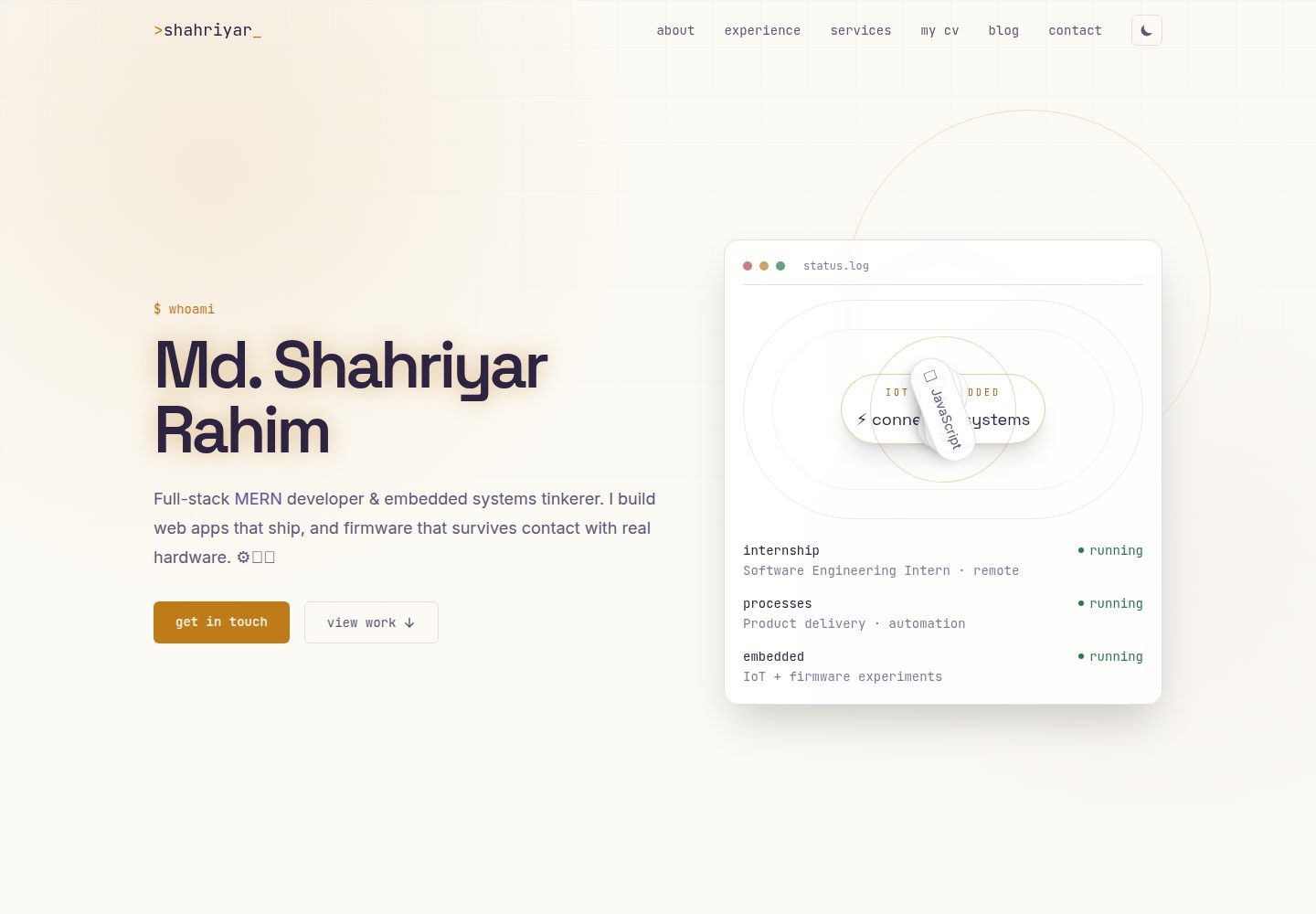
前后端分离的双服务 monorepo:Vite/React 单页应用与独立 Express API 分别部署
React后台作品集博客企业官网
portfolio (Shahriyar-Rahim) — React 后台模板
作者 Shahriyar-Rahim
Shahriyar Rahim 的个人作品集平台,前后端分离,内容由自建管理后台维护,包含博客、评价、职位板与 CV 解析页面。
看看你的网站会是什么样
浏览真实页面截图,比较内容排版与手机效果。点击下方缩略图切换,放大查看整页细节。
全部页面与视图 3
截图用于了解视觉与布局,交互效果请以实际项目为准。
采集于 2026-10-02查看来源
值得关注的模板亮点
从已有项目资料中,快速了解它的特点。
公开站点内容(hero、经历、教育、服务、评价、博客、职位)全部由自建管理后台维护,非硬编码
管理后台提供各资源 CRUD、评价审核、站内收件箱回复与账号设置
单所有者认证:JWT 存于 httpOnly cookie,无公开注册,首个管理员由 create-admin.js 脚本创建
上传 PDF 简历后由后端解析并生成公开的 CV/个人资料页
联系表单带限流与垃圾提交防护,并通过 Nodemailer 发送模板化 HTML 邮件
模板详细介绍
这是一个个人作品集网站,仓库为前后端分离的双服务 monorepo:frontend 是 Vite + React 单页应用,backend 是独立的 Express API,两者分别部署运行。README 说明它并非通用模板,而是作者自建自托管的平台,公开站点的 hero、经历、教育、服务、评价等内容均由自定义管理后台维护,而非写死在代码里。
公开站点包含终端/电路板风格视觉、博客(分类与每篇文章的评论)、带星级与最多 3 张图片上传的评价提交与详情页、从 GitHub API 拉取的 Recent Work 滚动条与 /projects 网格、带角色/技能/类型筛选的职位板、由上传 PDF 简历解析生成的 CV/个人资料页,以及带限流与邮件回复的联系表单。管理后台位于 /login 之后的 /admin,提供经历、教育、服务、博客、hero 内容与职位列表的 CRUD,评价审核,站内收件箱回复,账号设置,以及通过邮件魔法链接或两步字母数字验证码的找回密码流程。
技术栈方面,README 列出前端使用 React、Vite、React Router、Tailwind CSS + daisyUI、TanStack Query、Zustand、React Hook Form、Framer Motion、Axios 等;后端使用 Node.js、Express、MongoDB + Mongoose、JWT、bcrypt、Multer + Cloudinary、Nodemailer、pdf-parse、express-rate-limit。认证为单所有者模型,JWT 存放在 httpOnly cookie 中,没有公开注册接口,首个管理员账号需运行 backend/scripts/create-admin.js 一次性创建。
README 未提供性能、并发、可访问性、浏览器兼容性或测试覆盖方面的说明,也未说明除上述功能外的其他能力。仓库中的截图链接指向占位图,README 要求自行运行应用后按命名规范放入 docs/screenshots/。
React后台作品集博客企业官网
适合你的项目吗?
适用场景
- 搭建个人开发者作品集网站,并希望通过后台自行更新经历、服务与博客内容
- 需要展示博客(含分类与评论)、客户评价与职位板等多个内容板块的个人站点
- 希望把简历 PDF 上传后自动生成公开个人资料页的展示场景
- 需要联系表单、评价提交与邮件回复等互动功能,且由单一所有者管理后台维护
适合人群
- 具备 Node.js 与 React 开发经验、愿意自行部署前后端两个服务的开发者
- 需要自托管个人作品集并自行管理内容的个人开发者或自由职业者
- 希望参考 MERN 全栈项目结构(控制器/模型/路由与前端 hooks 分层)的学习者
上手与定制指南
结合仓库当前版本的说明,按下面的资料检查内容、配置与运行要求。
- 1
后端:进入 backend 执行 npm install,复制 .env.example 为 .env 并填写 MongoDB、JWT、Cloudinary、邮件与 GitHub token 等值,然后 npm run dev
- 2
首次使用需运行 node scripts/create-admin.js 创建管理员账号,仓库没有公开注册接口
- 3
前端:进入 frontend 执行 npm install,复制 .env.example 为 .env 并设置 VITE_API_URL 与 VITE_GITHUB_USERNAME,然后 npm run dev,访问 http://localhost:5173
- 4
生产构建:frontend 执行 npm run build 输出 dist,backend 执行 npm start;README 建议前端部署到 Vercel/Netlify,后端部署到 Render/Railway/Fly.io,数据库用 MongoDB Atlas,图片用 Cloudinary
- 5
README 中的截图链接为占位图,需自行运行应用截图并按 docs/screenshots/ 的命名规范放入
授权与来源资料
使用条件与限制
免费使用 · 保留许可声明本次收录的是公开仓库中采用 MIT 许可的免费版本;免费范围为该版本代码,不代表外部服务或第三方素材免费。
使用时需要遵守
- 允许免费使用、修改、商用和分发该版本代码。
- 分发代码副本或实质性部分时,保留原作者版权声明和完整 MIT 许可声明。
- 代码按现状提供;担保与责任限制以原许可证及适用法律为准。
额外费用与待核对事项
- 演示图片、字体、图标及其他第三方素材需按各自许可核对,不能仅凭代码的 MIT 许可判断。
- 域名、托管、数据库、支付或 AI 等外部服务可能另外收费。
- README 的 License 段落表述含糊:称 MIT,但又称“若包含 LICENSE 文件则见之,否则视为个人/作品集代码,可参考但不得以他人名义原样再分发”,与仓库提供的 MIT 全文授权存在冲突,需以实际 LICENSE 为准。
- 后端运行需在 .env 中填写 MongoDB、JWT、Cloudinary、邮件与 GitHub token 等外部服务凭据。
- 前端运行需在 .env 中设置 VITE_API_URL 与 VITE_GITHUB_USERNAME。
- 图片上传依赖 Cloudinary 服务(README 称已接入),使用需相应账号。
- 数据库建议使用 MongoDB Atlas(README 称免费额度足够)。
- 仓库不存储任何管理员凭据,需自行通过脚本创建管理员账号。
- README 中的截图链接为占位图,需自行运行应用截图并按命名规范放入 docs/screenshots/。
查看原文依据
Permission is hereby granted, free of charge
许可证原文
MIT — see [`LICENSE`](./LICENSE) if included, or treat this repository as personal/portfolio code
README 原文
cp .env.example .env # fill in MongoDB, JWT, Cloudinary, email, and GitHub token values
README 原文
cp .env.example .env # set VITE_API_URL and VITE_GITHUB_USERNAME
README 原文
| Images | Cloudinary (already wired in) |
README 原文
| Database | MongoDB Atlas (free tier is enough) |
README 原文
no admin credentials are ever stored in this repo or its history.
README 原文
https://github.com/Shahriyar-Rahim/portfolio/blob/main/LICENSEhttps://github.com/Shahriyar-Rahim/portfolio/blob/main/README.md> 📸 Images above are placeholders. Run the app locally (or visit the live demo), capture screenshots
README 原文
DeepSeek 根据仓库许可证和 README 整理 ·2026-10-04。结果仅覆盖已读取资料,依赖、图片、字体及后续条款变更以各自原文为准。
项目核对记录与介绍依据
模板资料
- 来源平台
- GitHub
- 资料与维护参考分
- 资料较完整 · 88 / 100
- 技术栈
- React
- 网站类型
- 后台 · 作品集 · 博客 · 企业官网
这个分数如何计算
本站按许可资料(最高30分)、演示链接(12分)、预览图(10分)、Star数(15分)、记录的维护时间(15分)、描述完整度(8分)、功能记录(5分)和分类资料(5分)计算。它不是代码、安全或性能测试,也不是 Google 评分;有链接不代表已实测可用。
这个项目需要核对什么
- 记录的仓库更新时间
- 2026-07-11
- 截图检查日期
- 2026-10-04
已收录演示链接。请用你的内容与屏幕尺寸检查;有演示不代表表单、认证或支付已经可用。
目录记录的主要技术栈是 React。请通过依赖清单和锁文件核对实际版本与托管要求。这些说明基于收录资料,不代表代码审计或部署实测。
查看具体选型方法 →介绍的制作与核对状态
介绍由 AI 辅助整理目录与仓库资料。仓库作者不等于这篇介绍的审核者。
审核声明: codex-user-requested-batch-review-20261017 · 2026-10-16
查看当时使用的来源资料
SHA-256: dd3a1de31e8556691f79e803b6177d8e03d561e3b8f68464e5cdce4a7f9527ca
2026-10-04T23:25:22.742Z
来源文件 / 仓库<div align="center"> # >shahriyar_ ### Full-Stack MERN Developer & Embedded Systems Engineer — Personal Portfolio A self-built, self-hosted portfolio platform — not a template. Every section (hero, experience, education, services, blog, testimonials, job board, CV/profile) is content-managed from a custom admin panel, backed by a REST API I designed and wired up myself. [](#-live-demo)      </div> --- ``` $ whoami > Md. Shahriyar Rahim — BSc CSE @ BAUST · MERN developer · AI/ML . BIOINFORMATICS ``` ## 🔗 Live Demo | | | |---|---| | **Website** | [[https://shahriyar.no-idea.top/](https://shahriyar.no-idea.top/)] · | | **API** | `(https://portfolio-delta-smoky-24.vercel.app/api/v1` · | | **Admin panel** | `/login` on the site above (credentials are private — see [Admin access](#-admin-access)) | > Not deployed yet? See [Deployment](#-deployment) below for the quickest path with Vercel + Render/Railway + MongoDB Atlas. --- ## 🖼️ Screenshots <div align="center"> | Homepage — Hero | Experience & Timeline | |---|---| | <img src="./hero.png" width="420" alt="Homepage hero section screenshot"> | <img src="./experience.png" width="420" alt="Experience timeline screenshot"> | | Blog | Testimonials | |---|---| | <img src="./blog.png" width="420" alt="Blog listing screenshot"> | <img src="./testimonials.png" width="420" alt="Testimonials section screenshot"> | | Admin Dashboard | CV / Profile Page | |---|---| | <img src="./admin-dashboard.png" width="420" alt="Admin dashboard screenshot"> | <img src="./cv-profile.png" width="420" alt="Generated CV profile page screenshot"> | </div> > 📸 Images above are placeholders. Run the app locally (or visit the live demo), capture screenshots > at ~1280px wide, and drop them into `docs/screenshots/` using the exact filenames referenced above — > they'll render automatically here. See [`docs/screenshots/README.md`](./docs/screenshots/README.md) > for the full shot list and naming convention. --- ## ✨ Features **Public site** - Terminal/circuit-board visual identity — copper-trace + oscilloscope-blue accents, `status.log`-style hero panel, monospace utility labels throughout - Dynamic hero content, experience, education, services, and testimonials — all editable from the admin panel, none of it hardcoded - Blog with categories and a comment thread per post - Testimonial submission with up to 3 photo uploads, star ratings, and a dedicated detail page - Auto-scrolling "Recent Work" strip pulling live from the GitHub API, plus a full `/projects` grid - Job board section with role/skill/type filtering - Auto-generated **CV / profile page** — upload a PDF résumé once, the backend parses it, and a public profile page renders from the extracted data - Contact form with rate-limiting, spam-window protection, and branded HTML email replies **Admin panel** (`/login` → `/admin`) - Full CRUD for experience, education, services, blog posts, hero content, and job listings - Testimonial moderation — approve/unapprove, edit, delete - Inbox — read/reply to contact form submissions from inside the dashboard - Account settings — change email, change password - Secure recovery flow — forgot-password via emailed magic link, plus a two-step alphanumeric verification code as a second path - One-time setup script (`scripts/create-admin.js`) to bootstrap the first admin account — no open public registration endpoint **Engineering** - Single-owner auth model (JWT in an httpOnly cookie) — no unnecessary multi-user complexity - Cloudinary + multer image pipeline for every upload (blog covers, service images, testimonial photos, CV PDFs) - Centralized, templated HTML email system (Nodemailer) shared by contact + testimonial + auth flows - React Query for all server state, Zustand for the thin client-side auth flag, react-hook-form + Framer Motion throughout --- ## 🧱 Tech Stack | Layer | Stack | |---|---| | **Frontend** | React 19, Vite, React Router 8, Tailwind CSS v4 + daisyUI, TanStack Query, Zustand, React Hook Form, Framer Motion, Axios, React Icons, React Hot Toast | | **Backend** | Node.js, Express 5, MongoDB + Mongoose 9, JWT, bcrypt, Multer + Cloudinary, Nodemailer, pdf-parse, express-rate-limit | | **Infra / tooling** | ESLint (flat config), ESM throughout, cookie-based auth, GitHub REST API integration | --- ## 📁 Repository Structure This is a two-service monorepo — a Vite/React SPA and a standalone Express API — deployed and run independently. ``` . ├── backend/ │ ├── scripts/ │ │ └── create-admin.js # one-time admin bootstrap (run once, then remove/rotate SETUP_KEY) │ ├── src/ │ │ ├── configs/ │ │ │ ├── auth.config.js # JWT sign/verify helpers │ │ │ ├── cloudinary.config.js # Cloudinary SDK setup │ │ │ ├── database.config.js # Mongoose connection │ │ │ ├── email.config.js # HTML email templates (header/body/CTA/footer) │ │ │ ├── mailer.config.js # shared Nodemailer transporter + sendMailSafe() │ │ │ └── multer.config.js # CloudinaryStorage upload middleware │ │ ├── controllers/ │ │ │ ├── authRecovery.controller.js # forgot-password (magic link + 2-step code) │ │ │ ├── blog.controller.js │ │ │ ├── commnet.controller.js # blog comments │ │ │ ├── cv.controller.js # CV upload, parsing, profile generation │ │ │ ├── education.controller.js │ │ │ ├── experience.controller.js │ │ │ ├── file.controller.js # generic admin file manager │ │ │ ├── github.controller.js # server-side GitHub API proxy (auth'd, cached) │ │ │ ├── heroStatus.controller.js # dynamic hero "status.log" entries │ │ │ ├── inbox.conroller.js # contact form + admin replies │ │ │ ├── job.controller.js # job board CRUD + filtering │ │ │ ├── service.controller.js │ │ │ ├── testimonial.controller.js # submissions, moderation, images │ │ │ └── user.controller.js # login/logout/me/account settings │ │ ├── middlewares/ │ │ │ ├── protect.js # JWT auth guard (cookie or Bearer) │ │ │ └── rateLimiter.js # auth + contact-form rate limits │ │ ├── models/ │ │ │ ├── blog.model.js │ │ │ ├── comment.model.js │ │ │ ├── cvProfile.model.js │ │ │ ├── education.model.js │ │ │ ├── experience.model.js │ │ │ ├── file.model.js │ │ │ ├── heroStatus.model.js │ │ │ ├── inbox.model.js │ │ │ ├── job.model.js │ │ │ ├── service.model.js │ │ │ ├── testimonial.model.js │ │ │ └── user.model.js │ │ ├── routes/ # one router per resource, mirrors controllers/ │ │ └── server.js # app bootstrap, middleware, route mounting │ ├── .env.example │ ├── package.json │ └── package-lock.json │ ├── frontend/ │ ├── public/ │ ├── src/ │ │ ├── components/ │ │ │ ├── admin/ # Modal, FieldInput, ResourceList — shared admin CRUD kit │ │ │ ├── About.jsx / Hero.jsx / Navbar.jsx / Footer.jsx │ │ │ ├── ExperienceTimeline.jsx / EducationTimeline.jsx / ServicesGrid.jsx │ │ │ ├── BlogCard.jsx / BlogPreview.jsx │ │ │ ├── TestimonialForm.jsx / TestimonialSlider.jsx │ │ │ ├── JobBoard.jsx / RecentWorks.jsx / TechOrbit.jsx │ │ │ ├── ThankYouModal.jsx / RevealOnScroll.jsx / SectionHeading.jsx │ │ │ └── Loader.jsx / ErrorNotice.jsx │ │ ├── layouts/ │ │ │ ├── MainLayout.jsx # public site shell (Navbar + Footer) │ │ │ └── AdminLayout.jsx # admin dashboard shell (sidebar nav) │ │ ├── lib/ │ │ │ ├── api/ # one axios module per resource │ │ │ ├── hooks/ # TanStack Query hooks (generic CRUD factory + per-domain) │ │ │ ├── helper/ # formatting, FormData utilities │ │ │ └── stores/ # Zustand auth store │ │ ├── pages/ │ │ │ ├── Home.jsx / BlogList.jsx / BlogDetail.jsx │ │ │ ├── TestimonialsPage.jsx / WorkDetailPage.jsx / CvProfilePage.jsx │ │ │ ├── Login.jsx / NotFound.jsx │ │ │ └── admin/ # Dashboard, Inbox, Blogs, Experience, Education, │ │ │ # Services, Testimonials, Jobs, HeroStatus, Account │ │ ├── routes/ │ │ │ ├── router.jsx # route table │ │ │ └── ProtectedRoute.jsx # admin auth guard │ │ ├── App.jsx │ │ ├── main.jsx │ │ └── index.css # design tokens (colors/fonts) + Tailwind layer │ ├── .env.example │ ├── index.html │ ├── package.json │ └── vite.config.js │ ├── docs/ │ └── screenshots/ # drop your screenshots here (see naming guide inside) └── README.md # you are here ``` --- ## 🚀 Getting Started ### 1. Backend ```bash cd backend npm install cp .env.example .env # fill in MongoDB, JWT, Cloudinary, email, and GitHub token values npm run dev ``` Create your admin account once, using the bootstrap script (no public registration endpoint exists): ```bash node scripts/create-admin.js ``` ### 2. Frontend ```bash cd frontend npm install cp .env.example .env # set VITE_API_URL and VITE_GITHUB_USERNAME npm run dev ``` Visit `http://localhost:5173`. The admin dashboard lives at `/admin`, behind `/login`. ### 3. Build for production ```bash cd frontend && npm run build # outputs frontend/dist cd backend && npm start # or your process manager of choice (pm2, systemd, etc.) ``` --- ## 🌐 Deployment | Piece | Suggested host | |---|---| | Frontend (`frontend/dist`) | Vercel / Netlify | | Backend (`backend/`) | Render / Railway / Fly.io | | Database | MongoDB Atlas (free tier is enough) | | Images | Cloudinary (already wired in) | After deploying, come back and fill in the [Live Demo](#-live-demo) table above with your real URLs. --- ## 🔐 Admin Access There is intentionally no public sign-up — this is a single-owner site. Bootstrap your one admin account locally with `backend/scripts/create-admin.js`, then log in at `/login`. Forgot-password is handled via an emailed magic link or a two-step alphanumeric code (`authRecovery.controller.js`) — no admin credentials are ever stored in this repo or its history. --- ## 📄 License MIT — see [`LICENSE`](./LICENSE) if included, or treat this repository as personal/portfolio code you're free to reference but not redistribute as-is under someone else's name. --- <div align="center"> Built by **Md. Shahriyar Rahim** — [GitHub](https://github.com/Shahriyar-Rahim) · portfolio at the live link above. </div>
看看同类模板
对比同技术栈与用途的模板,找到更适合的视觉与内容结构。
ant-design-pro
Ant Design Pro 是 Ant Design 官方推出的企业级中后台前端脚手架,基于 React 19、Umi Max 4 和 antd 6 构建,内置 TypeScript 支持。
React · 后台

coreui-free-react-admin-template
Free React Admin & Dashboard Template Built for AI-Assisted Development
React · 后台

fastapi-react
fastapi-react 是一个基于 Cookiecutter 的模板,用于快速搭建 FastAPI 与 React(TypeScript)的全栈项目。
React · 后台

react-antd-admin-template
一个基于React+Antd的后台管理模版,在线预览https://nlrx-wjc.github.io/react-antd-admin-template/
React · 后台

shadcn-landing-page
Free Landing page template using Shadcn, React, Typescript and Tailwind
React · 企业官网

react-saas-template
🌊 Template for building an SaaS / admin website using React + Material-UI
React · 后台