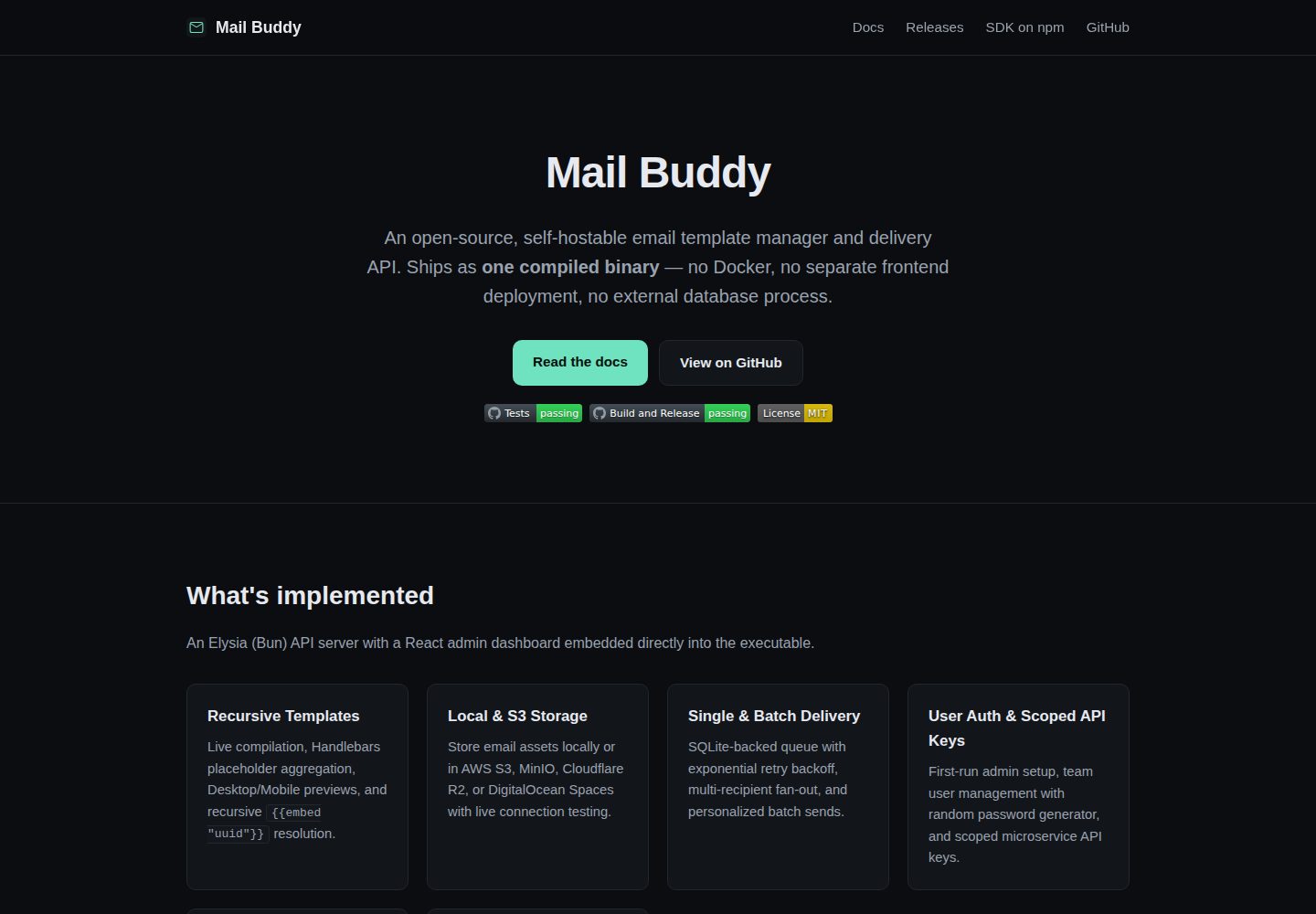
Compiled into a single self-contained executable, embedding the API server, React admin dashboard, SQLite migrations, and delivery queue worker
ReactAdmin dashboard
mail-buddy — React Admin dashboard Template
By shakthizen
Mail Buddy is a self-hostable open-source email template management and sending API compiled into a single executable, embedding an Elysia (Bun) API server and React admin dashboard, using SQLite for storage, with no Docker or separate frontend deployment required.
Explore the design
Compare the page layouts and mobile experience. Open any screenshot for a closer look.
Desktop homepage1 / 2
Desktop captureTop of page
Actual screenshot captured by the server browser.
All pages & views 2
Screenshots show visual appearance; interactive behavior may differ.
Recorded 2026-10-13View source
What stands out
A quick read of the recorded project description.
Zero-configuration startup, no .env file required by default, runtime settings written to SQLite through the web interface
Handlebars templates support automatic placeholder extraction, recursive child template embedding, and circular dependency detection
Asset library supports drag-and-drop upload with local filesystem or S3-compatible storage, including grid/list views and public URL copying
Provides two types of API keys, admin and send_only, with domain Origin or IP/CIDR restrictions
Provides a typed TypeScript SDK supporting single-recipient and batch personalized sending
Template Details
Mail Buddy is aimed at teams that need to self-host email templates and sending capabilities. It compiles the Elysia (Bun) API server, React admin dashboard, SQLite database migrations, and background delivery queue worker into a single executable. At runtime it requires no Docker, no separate frontend deployment, and no external database process. By default it also does not require a .env file; configuration is written to SQLite through the web interface.
The admin features include: a first-run administrator initialization wizard, public registration disabled by default, administrators creating admin or member role users with generated random passwords, and two types of API keys - admin and send_only - with domain Origin or IP/CIDR restrictions. Templates are based on Handlebars, support automatic placeholder extraction, recursively embed child templates with circular dependency detection, and the editor toolbar provides asset and embed selectors. The asset library supports drag-and-drop upload of PNG/JPEG/GIF/WEBP, offers grid and list views, search filtering, and copying public URLs and img tags. The storage backend can be either the local filesystem or an S3-compatible service. On the delivery side, it uses a SQLite retry queue with exponential backoff and jitter, and provides SMTP real-time validation and a test email sending tool. Unsubscribe links are signed with HMAC SHA-256, and suppression list management is supported globally and per template.
There are two ways to use it: download the executable for your platform from Releases and run it directly, with the default port 3000; or build from source, which requires Bun 1.x, first building the web dashboard and then starting the API server. The repository also provides a typed TypeScript SDK (mail-buddy-sdk) that supports single-recipient and batch personalized sending. Optional environment variables can override startup defaults such as port, database path, upload directory, storage mode, S3 parameters, public URL, sender address, upload size limit, delivery worker polling interval and batch size, and log level.
In terms of limitations: the project is under the MIT license, and the free scope covers this version of the code. Third-party assets such as demo images, fonts, and icons must be checked against their respective licenses. External services such as domains, hosting, databases, payments, or AI may incur separate charges. The repository has 0 stars, and the materials do not state production environment validation, so you should evaluate it yourself before actual deployment.
ReactAdmin panel
Is it right for your project?
Use Cases
- Building a self-hostable email template management and sending service for your own product
- Calling templated email sending via API keys in microservices, webhooks, or backend applications
- Scenarios requiring per-template or global unsubscribe suppression list management and signed unsubscribe links
- Deployment environments using S3, LocalStack, MinIO, or Cloudflare R2 to store email assets
Suitable For
- Teams that want to deploy an email sending service as a single executable and avoid Docker and a separate frontend
- Developers or operations staff who need an integrated admin panel for template editing, asset management, and delivery queue
- Projects using the Bun and TypeScript stack that want to integrate a typed SDK
Getting started & customization
Use these recorded setup notes alongside the repository instructions for your chosen version.
- 1
Precompiled method: download the executable for your platform from Releases, chmod +x, then run it; it listens on port 3000 by default
- 2
Source method: requires Bun 1.x; run bun install, bun run web:build, and bun run api:start in sequence
- 3
On first access, complete the administrator initialization form (name, email, password), then configure SMTP and storage in settings
- 4
Environment variables can override port, database path, upload directory, storage mode, S3 parameters, public URL, sender address, upload size limit, and delivery worker parameters
- 5
Public registration is disabled by default; team members are created by administrators in the admin panel
License & source material
Usage conditions & limitations
Free to use · keep license noticeThis listing covers the free version under the MIT license in the public repository; the free scope covers this version of the code and does not imply that external services or third-party assets are free.
Must comply with when using
- You may use, modify, commercialize, and distribute this version of the code for free.
- When distributing copies or substantial portions of the code, retain the original author's copyright notice and the full MIT license notice.
- The code is provided as is; warranties and limitations of liability are governed by the original license and applicable law.
Additional costs & items to verify
- Demo images, fonts, icons, and other third-party assets must be checked against their respective licenses and cannot be judged solely by the code's MIT license.
- External services such as domains, hosting, databases, payments, or AI may incur separate charges.
- Building and running from source requires installing the Bun 1.x runtime, which is an external tool dependency.
- If you choose the S3 storage backend, you must provide your own external object storage service such as AWS S3, LocalStack, MinIO, or Cloudflare R2, which may incur corresponding costs.
- Before sending email, you must configure a working SMTP service yourself and provide your own email sending account or service.
- Unsubscribe links and tokens require configuring a publicly accessible server domain, so you must provide your own domain and public deployment environment.
View Original Text Basis
Permission is hereby granted, free of charge
Original License Text
Requires [Bun](https://bun.sh/) 1.x.
Original README
**Local Filesystem** & **Amazon S3 / S3-Compatible** backends (AWS S3, LocalStack, MinIO, Cloudflare R2) with path-style addressing and live bucket verification.
Original README
Log in and configure your SMTP and Storage settings under **Configuration → SMTP & Storage**.
Original README
https://github.com/shakthizen/mail-buddy/blob/main/LICENSEhttps://github.com/shakthizen/mail-buddy/blob/main/README.md`PUBLIC_URL` | `""` | Public server domain for unsubscribe tokens and links
Original README
Compiled by DeepSeek based on repository license and README ·2026-10-13. Results only cover the materials read; dependencies, images, fonts, and subsequent term changes are subject to their respective original texts.
Project checks & description sources
Template Information
- Source platforms
- GitHub
- Documentation and maintenance reference score
- More documented · 80 / 100
- Technologies
- React
- Website type
- Admin dashboard
How this score is calculated
Our heuristic uses license records (up to 30), a demo link (12), a preview (10), stars (15), recorded maintenance (15), description completeness (8), feature records (5) and classification data (5). It is not a code, security or performance test, or a Google score. A link does not establish tested functionality.
What to verify for this project
- Repository update recorded
- 2026-08-15
- Screenshot last checked
- 2026-10-13
A demo link is listed. Check it with your own content and viewport sizes; its presence does not confirm that forms, authentication or payments work.
The catalog identifies React as the primary stack. Check the actual dependency manifest and lockfile for versions and hosting requirements. These notes use recorded metadata, not a code audit or a deployment test.
Use a selection guide →How this description was prepared
AI-assisted description based on catalog records and repository material. Repository authors are not automatically the reviewers of this description.
Review declaration: [email protected] · 2026-10-13
Inspect the recorded source material
SHA-256: abf2fba91d17b0a2eb18505d548c2b53de8f30f699c42ddb7bc3edd22805a895
2026-10-13T11:35:46.203Z
Source file / repository# Mail Buddy
[](https://github.com/shakthizen/mail-buddy/actions/workflows/ci.yml)
[](https://github.com/shakthizen/mail-buddy/actions/workflows/build-and-release.yml)
[](./LICENSE)
**Mail Buddy** is an open-source, self-hosted email template manager and delivery API. It compiles into a single, self-contained executable binary that embeds the Elysia (Bun) API server and the React administrative dashboard—zero external database processes, zero Docker requirements, and zero mandatory `.env` configuration files.
---
## 🌟 Key Features
- **📦 Single Self-Contained Executable**: Runs everywhere (Linux, macOS, Windows) with embedded web dashboard, SQLite database migrations, and background delivery queue worker.
- **⚡ Zero-Config Startup**: Starts instantly with sensible defaults without requiring `.env` files. All operational settings are managed dynamically from the Web UI and persisted in SQLite.
- **👥 User Authentication & Team Management**:
- Initial first-run setup wizard for the primary administrator account.
- Public registration disabled by default for maximum security.
- Administrators can directly create team members (`admin` or `member` roles) with an integrated secure random password generator.
- **🔑 Scoped API Keys**: Create `admin` and `send_only` API keys with optional domain Origin or IP/CIDR restrictions for microservices, webhooks, and backend applications.
- **🎨 Handlebars Templates & Nested Embeds**:
- Real-time placeholder auto-extraction (`{{var}}` and `{{{unescaped_var}}}`).
- Recursive partial template embedding (`{{embed "template_id"}}`) with automatic circular dependency detection.
- Integrated Asset & Embed pickers inside the template editor toolbar.
- **🖼️ Asset Library & Storage Drivers**:
- Drag-and-drop upload zone supporting PNG, JPEG, GIF, and WEBP.
- Grid & List view modes, search filters, and one-click copy for public URLs and `<img ... />` HTML snippets.
- **Local Filesystem** & **Amazon S3 / S3-Compatible** backends (AWS S3, LocalStack, MinIO, Cloudflare R2) with path-style addressing and live bucket verification.
- **📬 Reliable Delivery Queue & Workers**:
- SQLite-backed retry queue with exponential backoff and jitter.
- Live SMTP verification and **"Send Test Email"** tool in the dashboard.
- **🛡️ Suppressions & One-Click Unsubscribe**:
- HMAC SHA-256 signed tamper-proof unsubscribe links.
- Global and per-template suppression management.
- **✨ Modern HeroUI & Ambient Mesh Aesthetic**:
- Toned-down slate/zinc dark mode surfaces with glassmorphism.
- Subtle ambient mesh background gradients.
- Clean grouped sidebar with status badges, user profile dock, and one-click logout.
- **💻 Typed TypeScript SDK**: Complete published client library (`mail-buddy-sdk`) for Node.js, Bun, Deno, and browser environments.
---
## 🚀 Quickstart
### Option 1: Run Prebuilt Single Binary
Download the executable for your platform from the [Releases](https://github.com/shakthizen/mail-buddy/releases) page:
```bash
# Make executable (macOS / Linux)
chmod +x mail-buddy
# Run on default port 3000 (or PORT=3001 ./mail-buddy)
./mail-buddy
```
Open **[http://localhost:3000](http://localhost:3000)** in your browser:
1. Complete the **Initial Admin Setup** form on your first visit (`Name`, `Email`, `Password`).
2. Log in and configure your SMTP and Storage settings under **Configuration → SMTP & Storage**.
3. Use the **"Send Test Email"** tool to verify your outbound mail connection!
---
### Option 2: Run from Source
Requires [Bun](https://bun.sh/) 1.x.
```bash
# 1. Clone repository and install dependencies
git clone https://github.com/shakthizen/mail-buddy.git
cd mail-buddy
bun install
# 2. Build the web dashboard SPA
bun run web:build
# 3. Start the API server
bun run api:start
```
---
## 🛠️ Compiling into Single Binary
To compile the entire application (API server + embedded React SPA + SQLite migrations) into a single standalone binary:
```bash
# Build web assets and compile standalone executable
bun run web:build
bun run api:compile
```
The resulting `./mail-buddy` binary is ~60MB and requires no external node_modules or asset folders at runtime.
---
## ⚙️ Configuration & Environment
Mail Buddy persists all operational settings directly into SQLite via the dashboard UI (**Settings → SMTP & Storage**). However, you may optionally provide environment variables to override startup defaults:
| Variable | Default | Purpose |
| :--- | :--- | :--- |
| `PORT` | `3000` | HTTP port |
| `DATABASE_PATH` | `./mail-buddy.sqlite` | SQLite database file location |
| `UPLOADS_DIR` | `./uploads` | Local asset storage directory (when local storage is active) |
| `STORAGE_PROVIDER` | `local` | Default storage mode (`local` or `s3`) |
| `S3_BUCKET_NAME` | `""` | S3 bucket name (when `STORAGE_PROVIDER=s3`) |
| `S3_REGION` | `us-east-1` | AWS S3 region |
| `S3_ENDPOINT` | `""` | Custom S3 endpoint (e.g. `http://localhost:4566` for LocalStack / MinIO / Cloudflare R2) |
| `S3_ACCESS_KEY_ID` | `""` | S3 access key ID |
| `S3_SECRET_ACCESS_KEY` | `""` | S3 secret access key |
| `S3_FORCE_PATH_STYLE` | `false` | Enable path-style S3 URLs (required for LocalStack/MinIO) |
| `S3_PUBLIC_URL` | `""` | Optional CDN or public asset base URL |
| `PUBLIC_URL` | `""` | Public server domain for unsubscribe tokens and links |
| `SMTP_FROM` | `""` | Default sender email address |
| `MAX_UPLOAD_SIZE_BYTES` | `5242880` (5MB) | Maximum upload file size in bytes |
| `DELIVERY_WORKER_INTERVAL_MS`| `5000` (5s) | Delivery queue worker polling interval |
| `DELIVERY_WORKER_BATCH_SIZE` | `10` | Delivery queue batch size per tick |
| `LOG_LEVEL` | `info` | Logging verbosity (`fatal`, `error`, `warn`, `info`, `debug`, `silent`) |
---
## 📦 TypeScript SDK Usage
Install the official client SDK:
```bash
npm install mail-buddy-sdk
# or
bun add mail-buddy-sdk
```
### Initializing & Sending Emails
```ts
import { MailBuddyClient } from 'mail-buddy-sdk';
const client = new MailBuddyClient({
baseUrl: 'http://localhost:3000',
apiKey: 'mb_...', // Your admin or send_only API key (or session token)
});
// Single Recipient Send
const response = await client.send({
to: '[email protected]',
subject: 'Welcome to our platform!',
templateId: '15d5a3f8-8245-4034-aa82-1dd9513760d5',
variables: {
username: 'Alice',
company_name: 'Acme Corp',
},
});
console.log(response.results); // [{ to: "[email protected]", status: "queued" }]
```
### Batch Personalized Send
```ts
const batchResponse = await client.send({
templateId: '15d5a3f8-8245-4034-aa82-1dd9513760d5',
subject: 'Monthly Newsletter',
recipients: [
{ to: '[email protected]', variables: { username: 'Alice', company_name: 'Acme' } },
{ to: '[email protected]', variables: { username: 'Bob', company_name: 'Beta' } },
],
});
```
---
## 🧪 Testing & Verification
Mail Buddy includes a comprehensive unit and integration test suite covering 100% of core business logic:
```bash
# Run full monorepo test suite (113+ tests across 15 test files)
bun test
# Run S3 integration tests against live LocalStack
bun test apps/api/tests/integration/storageS3.test.ts
# Run SDK tests
bun test packages/sdk
```
---
## 🏗️ Monorepo Structure
```
.
├── apps/
│ ├── api/ # Elysia (Bun) API server, SQLite database, SMTP & S3 drivers, delivery worker
│ └── web/ # React + Vite + Tailwind CSS admin dashboard with HeroUI styling
├── packages/
│ └── sdk/ # Typed TypeScript SDK (mail-buddy-sdk)
├── drizzle/ # Database migrations
└── bunfig.toml # Monorepo test preload configuration
```
---
## 🤝 Contributing
Contributions are welcome! Please feel free to open a Pull Request or file an issue.
See [`CONTRIBUTING.md`](./CONTRIBUTING.md) and [`CODE_OF_CONDUCT.md`](./CODE_OF_CONDUCT.md) for details.
---
## 📄 License
[MIT](./LICENSE) © 2026 ShakthiZen
Explore similar templates
Compare previews and descriptions within the same stack and category.
ant-design-pro
Ant Design Pro is an enterprise-grade React admin scaffold built on React 19, Umi Max 4, and antd 6 with TypeScript.
React · Admin dashboard

coreui-free-react-admin-template
CoreUI's free React admin template, built on React and the CoreUI component library, provides dashboard layouts, sidebar navigation, routing, and example views. It includes .cursorrules, ARCHITECTURE.md, and DEVELOPMENT.md context files, plus JSDoc comments and PropTypes, to support AI-assisted development.
React · Admin dashboard

fastapi-react
A Cookiecutter template for FastAPI + React (TypeScript) full-stack projects, integrating PostgreSQL, SQLAlchemy, Alembic, Celery, Redis, JWT authentication, a react-admin admin panel, and a Docker Compose development environment with Nginx reverse proxy.
React · Admin dashboard

react-antd-admin-template
A React + Ant Design admin template for mid- and back-office products, with built-in login/logout, dynamic routing, permission checks, and user management.
React · Admin dashboard

react-saas-template
A React and Material-UI template for SaaS or admin websites, offering dashboard, chart, blog, payment, and file upload components. It uses Create-React-App, React-Router, Recharts, React-Stripe-js, React-Dropzone, and React-Cropper, with theme colors centralized in src/theme.js.
React · Admin dashboard

react-material-admin
React Material Admin is an MIT-licensed React admin template by Flatlogic, built on Material-UI. It provides dashboards, charts, tables, authentication, profile, and notification pages, with three color themes and responsive layouts.
React · Admin dashboard