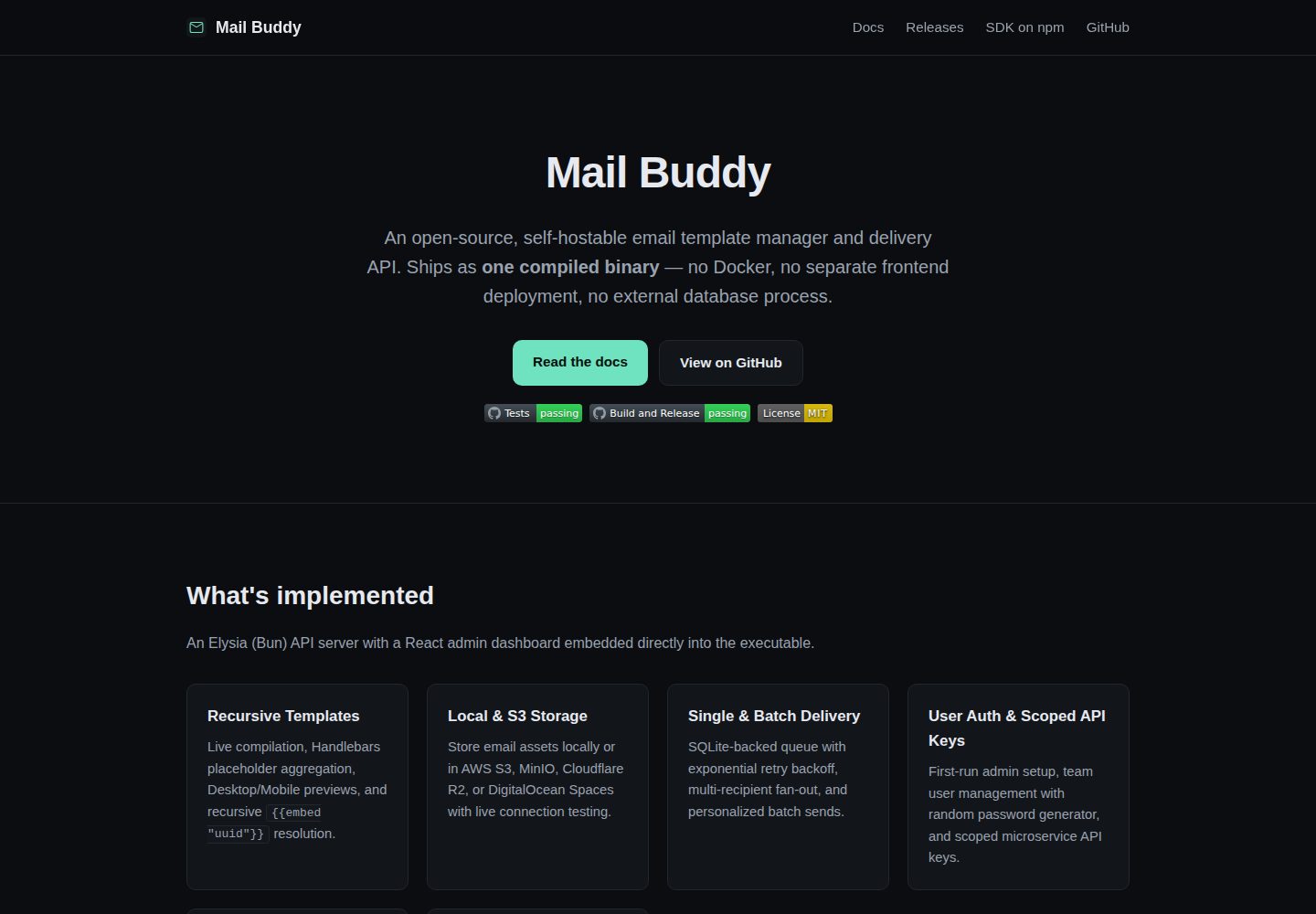
编译为单个自包含可执行文件,内嵌 API 服务、React 管理后台、SQLite 迁移与投递队列工作进程
React后台
mail-buddy — React 后台模板
作者 shakthizen
Mail Buddy 是一个可自托管的开源邮件模板管理与发送 API,编译为单个可执行文件,内嵌 Elysia (Bun) API 服务与 React 管理后台,使用 SQLite 存储,无需 Docker 或独立前端部署。
看看你的网站会是什么样
浏览真实页面截图,比较内容排版与手机效果。点击下方缩略图切换,放大查看整页细节。
全部页面与视图 2
截图用于了解视觉与布局,交互效果请以实际项目为准。
采集于 2026-10-13查看来源
值得关注的模板亮点
从已有项目资料中,快速了解它的特点。
零配置启动,默认无需 .env 文件,运行设置通过 Web 界面写入 SQLite
Handlebars 模板支持占位符自动提取、递归嵌入子模板并检测循环依赖
素材库支持拖拽上传与本地文件系统或 S3 兼容存储,含网格/列表视图和公开 URL 复制
提供 admin 与 send_only 两类 API 密钥,可限制域名 Origin 或 IP/CIDR
提供类型化 TypeScript SDK,支持单收件人与批量个性化发送
模板详细介绍
Mail Buddy 面向需要自行托管邮件模板与发送能力的团队。它把 Elysia (Bun) API 服务、React 管理后台、SQLite 数据库迁移和后台投递队列工作进程一起编译进一个可执行文件,运行时不需要 Docker、独立前端部署或外部数据库进程,默认也不要求 .env 文件,配置项通过 Web 界面写入 SQLite。
后台功能包括:首次运行的管理员初始化向导、默认关闭的公开注册、管理员创建 admin 或 member 角色成员并生成随机密码、带域名 Origin 或 IP/CIDR 限制的 admin 与 send_only 两类 API 密钥。模板基于 Handlebars,支持占位符自动提取、递归嵌入子模板并检测循环依赖,编辑器工具栏提供素材与嵌入选择器。素材库支持拖拽上传 PNG/JPEG/GIF/WEBP,提供网格与列表视图、搜索过滤以及复制公开 URL 和 img 标签,存储后端可选本地文件系统或 S3 兼容服务。投递侧使用 SQLite 重试队列,带指数退避与抖动,并提供 SMTP 实时校验和发送测试邮件工具;退订链接使用 HMAC SHA-256 签名,支持全局与按模板的抑制名单管理。
使用方式有两种:从 Releases 下载对应平台的可执行文件直接运行,默认端口 3000;或从源码构建,需要 Bun 1.x,先构建 Web 仪表盘再启动 API 服务。仓库还提供类型化 TypeScript SDK(mail-buddy-sdk),支持单收件人与批量个性化发送。可选环境变量可覆盖端口、数据库路径、上传目录、存储模式、S3 参数、公开 URL、发件地址、上传大小上限、投递工作进程轮询间隔与批量大小、日志级别等启动默认值。
限制方面:项目采用 MIT 许可,免费范围为该版本代码,演示图片、字体、图标等第三方素材需按各自许可核对,域名、托管、数据库、支付或 AI 等外部服务可能另行收费。仓库星标数为 0,资料未说明生产环境验证情况,实际部署前应自行评估。
React后台
适合你的项目吗?
适用场景
- 为自有产品搭建可自行托管的邮件模板管理与发送服务
- 在微服务、Webhook 或后端应用中通过 API 密钥调用模板化邮件发送
- 需要按模板或全局维护退订抑制名单并生成签名退订链接的场景
- 使用 S3、LocalStack、MinIO 或 Cloudflare R2 存放邮件素材的部署环境
适合人群
- 希望用单个可执行文件部署邮件发送服务、避免 Docker 与独立前端的团队
- 需要模板编辑、素材管理与投递队列一体化后台的开发或运维人员
- 使用 Bun 与 TypeScript 技术栈并希望接入类型化 SDK 的项目
上手与定制指南
结合仓库当前版本的说明,按下面的资料检查内容、配置与运行要求。
- 1
预编译方式:从 Releases 下载对应平台可执行文件,chmod +x 后运行,默认监听 3000 端口
- 2
源码方式:需要 Bun 1.x,依次执行 bun install、bun run web:build、bun run api:start
- 3
首次访问需完成管理员初始化表单(名称、邮箱、密码),随后在配置中设置 SMTP 与存储
- 4
可通过环境变量覆盖端口、数据库路径、上传目录、存储模式、S3 参数、公开 URL、发件地址、上传大小上限与投递工作进程参数
- 5
公开注册默认关闭,团队成员由管理员在后台创建
授权与来源资料
使用条件与限制
免费使用 · 保留许可声明本次收录的是公开仓库中采用 MIT 许可的免费版本;免费范围为该版本代码,不代表外部服务或第三方素材免费。
使用时需要遵守
- 允许免费使用、修改、商用和分发该版本代码。
- 分发代码副本或实质性部分时,保留原作者版权声明和完整 MIT 许可声明。
- 代码按现状提供;担保与责任限制以原许可证及适用法律为准。
额外费用与待核对事项
- 演示图片、字体、图标及其他第三方素材需按各自许可核对,不能仅凭代码的 MIT 许可判断。
- 域名、托管、数据库、支付或 AI 等外部服务可能另外收费。
- 从源码构建运行需要安装 Bun 1.x 运行时,属于外部工具依赖。
- 若选择 S3 存储后端,需自备 AWS S3、LocalStack、MinIO 或 Cloudflare R2 等外部对象存储服务,可能产生相应费用。
- 发送邮件前必须自行配置可用的 SMTP 服务,需自备邮件发送账号或服务。
- 退订链接与令牌需要配置公开可访问的服务器域名,需自备域名与公网部署环境。
查看原文依据
Permission is hereby granted, free of charge
许可证原文
Requires [Bun](https://bun.sh/) 1.x.
README 原文
**Local Filesystem** & **Amazon S3 / S3-Compatible** backends (AWS S3, LocalStack, MinIO, Cloudflare R2) with path-style addressing and live bucket verification.
README 原文
Log in and configure your SMTP and Storage settings under **Configuration → SMTP & Storage**.
README 原文
https://github.com/shakthizen/mail-buddy/blob/main/LICENSEhttps://github.com/shakthizen/mail-buddy/blob/main/README.md`PUBLIC_URL` | `""` | Public server domain for unsubscribe tokens and links
README 原文
DeepSeek 根据仓库许可证和 README 整理 ·2026-10-13。结果仅覆盖已读取资料,依赖、图片、字体及后续条款变更以各自原文为准。
项目核对记录与介绍依据
模板资料
- 来源平台
- GitHub
- 资料与维护参考分
- 资料较完整 · 80 / 100
- 技术栈
- React
- 网站类型
- 后台
这个分数如何计算
本站按许可资料(最高30分)、演示链接(12分)、预览图(10分)、Star数(15分)、记录的维护时间(15分)、描述完整度(8分)、功能记录(5分)和分类资料(5分)计算。它不是代码、安全或性能测试,也不是 Google 评分;有链接不代表已实测可用。
这个项目需要核对什么
- 记录的仓库更新时间
- 2026-08-15
- 截图检查日期
- 2026-10-13
已收录演示链接。请用你的内容与屏幕尺寸检查;有演示不代表表单、认证或支付已经可用。
目录记录的主要技术栈是 React。请通过依赖清单和锁文件核对实际版本与托管要求。这些说明基于收录资料,不代表代码审计或部署实测。
查看具体选型方法 →介绍的制作与核对状态
介绍由 AI 辅助整理目录与仓库资料。仓库作者不等于这篇介绍的审核者。
审核声明: [email protected] · 2026-10-13
查看当时使用的来源资料
SHA-256: abf2fba91d17b0a2eb18505d548c2b53de8f30f699c42ddb7bc3edd22805a895
2026-10-13T11:35:46.203Z
来源文件 / 仓库# Mail Buddy
[](https://github.com/shakthizen/mail-buddy/actions/workflows/ci.yml)
[](https://github.com/shakthizen/mail-buddy/actions/workflows/build-and-release.yml)
[](./LICENSE)
**Mail Buddy** is an open-source, self-hosted email template manager and delivery API. It compiles into a single, self-contained executable binary that embeds the Elysia (Bun) API server and the React administrative dashboard—zero external database processes, zero Docker requirements, and zero mandatory `.env` configuration files.
---
## 🌟 Key Features
- **📦 Single Self-Contained Executable**: Runs everywhere (Linux, macOS, Windows) with embedded web dashboard, SQLite database migrations, and background delivery queue worker.
- **⚡ Zero-Config Startup**: Starts instantly with sensible defaults without requiring `.env` files. All operational settings are managed dynamically from the Web UI and persisted in SQLite.
- **👥 User Authentication & Team Management**:
- Initial first-run setup wizard for the primary administrator account.
- Public registration disabled by default for maximum security.
- Administrators can directly create team members (`admin` or `member` roles) with an integrated secure random password generator.
- **🔑 Scoped API Keys**: Create `admin` and `send_only` API keys with optional domain Origin or IP/CIDR restrictions for microservices, webhooks, and backend applications.
- **🎨 Handlebars Templates & Nested Embeds**:
- Real-time placeholder auto-extraction (`{{var}}` and `{{{unescaped_var}}}`).
- Recursive partial template embedding (`{{embed "template_id"}}`) with automatic circular dependency detection.
- Integrated Asset & Embed pickers inside the template editor toolbar.
- **🖼️ Asset Library & Storage Drivers**:
- Drag-and-drop upload zone supporting PNG, JPEG, GIF, and WEBP.
- Grid & List view modes, search filters, and one-click copy for public URLs and `<img ... />` HTML snippets.
- **Local Filesystem** & **Amazon S3 / S3-Compatible** backends (AWS S3, LocalStack, MinIO, Cloudflare R2) with path-style addressing and live bucket verification.
- **📬 Reliable Delivery Queue & Workers**:
- SQLite-backed retry queue with exponential backoff and jitter.
- Live SMTP verification and **"Send Test Email"** tool in the dashboard.
- **🛡️ Suppressions & One-Click Unsubscribe**:
- HMAC SHA-256 signed tamper-proof unsubscribe links.
- Global and per-template suppression management.
- **✨ Modern HeroUI & Ambient Mesh Aesthetic**:
- Toned-down slate/zinc dark mode surfaces with glassmorphism.
- Subtle ambient mesh background gradients.
- Clean grouped sidebar with status badges, user profile dock, and one-click logout.
- **💻 Typed TypeScript SDK**: Complete published client library (`mail-buddy-sdk`) for Node.js, Bun, Deno, and browser environments.
---
## 🚀 Quickstart
### Option 1: Run Prebuilt Single Binary
Download the executable for your platform from the [Releases](https://github.com/shakthizen/mail-buddy/releases) page:
```bash
# Make executable (macOS / Linux)
chmod +x mail-buddy
# Run on default port 3000 (or PORT=3001 ./mail-buddy)
./mail-buddy
```
Open **[http://localhost:3000](http://localhost:3000)** in your browser:
1. Complete the **Initial Admin Setup** form on your first visit (`Name`, `Email`, `Password`).
2. Log in and configure your SMTP and Storage settings under **Configuration → SMTP & Storage**.
3. Use the **"Send Test Email"** tool to verify your outbound mail connection!
---
### Option 2: Run from Source
Requires [Bun](https://bun.sh/) 1.x.
```bash
# 1. Clone repository and install dependencies
git clone https://github.com/shakthizen/mail-buddy.git
cd mail-buddy
bun install
# 2. Build the web dashboard SPA
bun run web:build
# 3. Start the API server
bun run api:start
```
---
## 🛠️ Compiling into Single Binary
To compile the entire application (API server + embedded React SPA + SQLite migrations) into a single standalone binary:
```bash
# Build web assets and compile standalone executable
bun run web:build
bun run api:compile
```
The resulting `./mail-buddy` binary is ~60MB and requires no external node_modules or asset folders at runtime.
---
## ⚙️ Configuration & Environment
Mail Buddy persists all operational settings directly into SQLite via the dashboard UI (**Settings → SMTP & Storage**). However, you may optionally provide environment variables to override startup defaults:
| Variable | Default | Purpose |
| :--- | :--- | :--- |
| `PORT` | `3000` | HTTP port |
| `DATABASE_PATH` | `./mail-buddy.sqlite` | SQLite database file location |
| `UPLOADS_DIR` | `./uploads` | Local asset storage directory (when local storage is active) |
| `STORAGE_PROVIDER` | `local` | Default storage mode (`local` or `s3`) |
| `S3_BUCKET_NAME` | `""` | S3 bucket name (when `STORAGE_PROVIDER=s3`) |
| `S3_REGION` | `us-east-1` | AWS S3 region |
| `S3_ENDPOINT` | `""` | Custom S3 endpoint (e.g. `http://localhost:4566` for LocalStack / MinIO / Cloudflare R2) |
| `S3_ACCESS_KEY_ID` | `""` | S3 access key ID |
| `S3_SECRET_ACCESS_KEY` | `""` | S3 secret access key |
| `S3_FORCE_PATH_STYLE` | `false` | Enable path-style S3 URLs (required for LocalStack/MinIO) |
| `S3_PUBLIC_URL` | `""` | Optional CDN or public asset base URL |
| `PUBLIC_URL` | `""` | Public server domain for unsubscribe tokens and links |
| `SMTP_FROM` | `""` | Default sender email address |
| `MAX_UPLOAD_SIZE_BYTES` | `5242880` (5MB) | Maximum upload file size in bytes |
| `DELIVERY_WORKER_INTERVAL_MS`| `5000` (5s) | Delivery queue worker polling interval |
| `DELIVERY_WORKER_BATCH_SIZE` | `10` | Delivery queue batch size per tick |
| `LOG_LEVEL` | `info` | Logging verbosity (`fatal`, `error`, `warn`, `info`, `debug`, `silent`) |
---
## 📦 TypeScript SDK Usage
Install the official client SDK:
```bash
npm install mail-buddy-sdk
# or
bun add mail-buddy-sdk
```
### Initializing & Sending Emails
```ts
import { MailBuddyClient } from 'mail-buddy-sdk';
const client = new MailBuddyClient({
baseUrl: 'http://localhost:3000',
apiKey: 'mb_...', // Your admin or send_only API key (or session token)
});
// Single Recipient Send
const response = await client.send({
to: '[email protected]',
subject: 'Welcome to our platform!',
templateId: '15d5a3f8-8245-4034-aa82-1dd9513760d5',
variables: {
username: 'Alice',
company_name: 'Acme Corp',
},
});
console.log(response.results); // [{ to: "[email protected]", status: "queued" }]
```
### Batch Personalized Send
```ts
const batchResponse = await client.send({
templateId: '15d5a3f8-8245-4034-aa82-1dd9513760d5',
subject: 'Monthly Newsletter',
recipients: [
{ to: '[email protected]', variables: { username: 'Alice', company_name: 'Acme' } },
{ to: '[email protected]', variables: { username: 'Bob', company_name: 'Beta' } },
],
});
```
---
## 🧪 Testing & Verification
Mail Buddy includes a comprehensive unit and integration test suite covering 100% of core business logic:
```bash
# Run full monorepo test suite (113+ tests across 15 test files)
bun test
# Run S3 integration tests against live LocalStack
bun test apps/api/tests/integration/storageS3.test.ts
# Run SDK tests
bun test packages/sdk
```
---
## 🏗️ Monorepo Structure
```
.
├── apps/
│ ├── api/ # Elysia (Bun) API server, SQLite database, SMTP & S3 drivers, delivery worker
│ └── web/ # React + Vite + Tailwind CSS admin dashboard with HeroUI styling
├── packages/
│ └── sdk/ # Typed TypeScript SDK (mail-buddy-sdk)
├── drizzle/ # Database migrations
└── bunfig.toml # Monorepo test preload configuration
```
---
## 🤝 Contributing
Contributions are welcome! Please feel free to open a Pull Request or file an issue.
See [`CONTRIBUTING.md`](./CONTRIBUTING.md) and [`CODE_OF_CONDUCT.md`](./CODE_OF_CONDUCT.md) for details.
---
## 📄 License
[MIT](./LICENSE) © 2026 ShakthiZen
看看同类模板
对比同技术栈与用途的模板,找到更适合的视觉与内容结构。
ant-design-pro
Ant Design Pro 是 Ant Design 官方推出的企业级中后台前端脚手架,基于 React 19、Umi Max 4 和 antd 6 构建,内置 TypeScript 支持。
React · 后台

coreui-free-react-admin-template
Free React Admin & Dashboard Template Built for AI-Assisted Development
React · 后台

fastapi-react
fastapi-react 是一个基于 Cookiecutter 的模板,用于快速搭建 FastAPI 与 React(TypeScript)的全栈项目。
React · 后台

react-antd-admin-template
一个基于React+Antd的后台管理模版,在线预览https://nlrx-wjc.github.io/react-antd-admin-template/
React · 后台

react-saas-template
🌊 Template for building an SaaS / admin website using React + Material-UI
React · 后台

react-material-admin
☄️React Material Admin is a React template built with Material-UI
React · 后台