Four independent Next.js blog templates: minimal, developer, magazine, and changelog, each with its own dependencies and deployment configuration
Next.jsReactBlog
scatterpost-blog-templates — Next.js Blog Template
By Sheldon-desouza
Four free MIT Next.js blog templates, each independently deployable, with the scatterpost connector built in and publishing basics such as SEO, RSS, sitemap, and llms.txt preconfigured.
Explore the design
Compare the page layouts and mobile experience. Open any screenshot for a closer look.
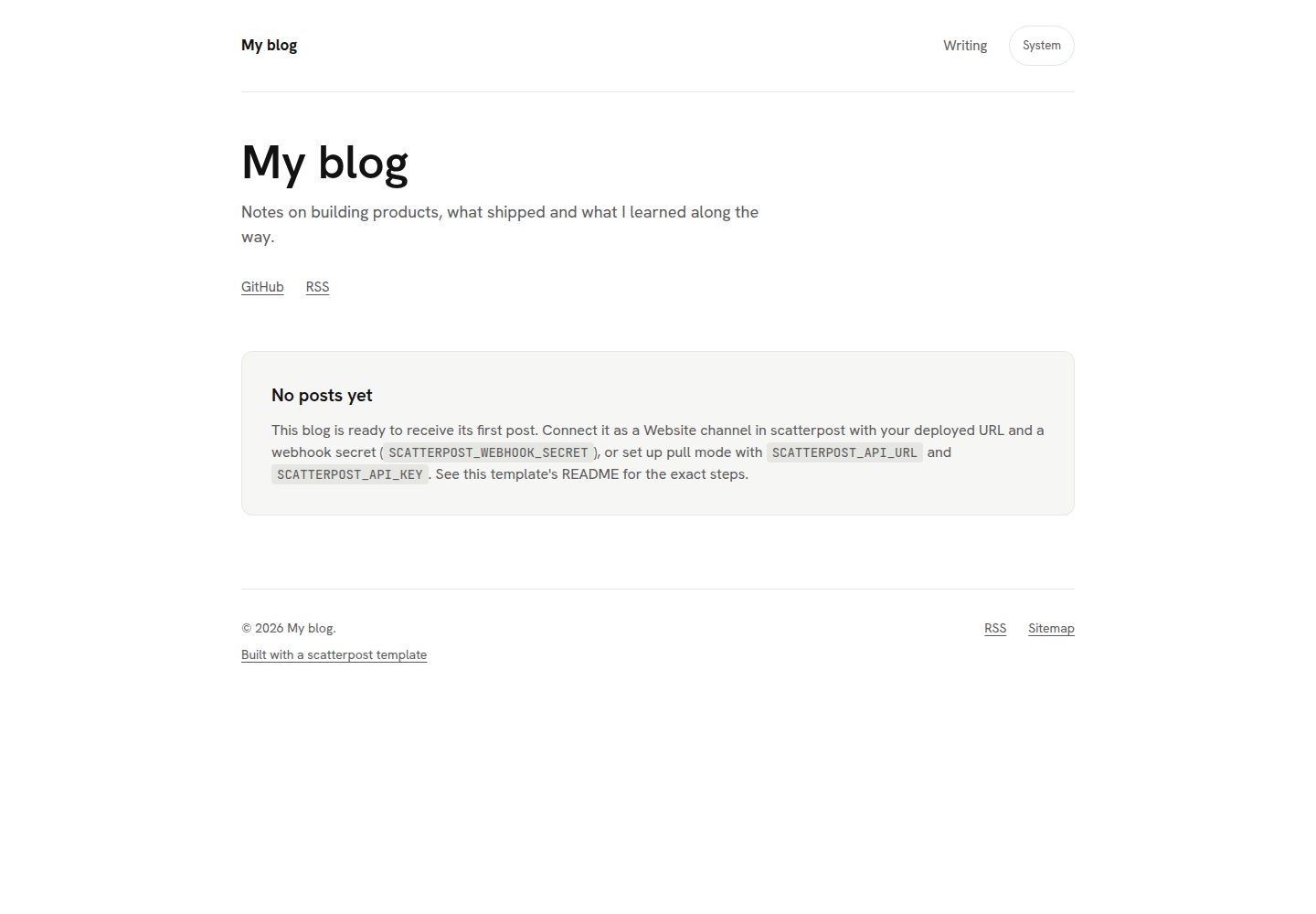
Desktop homepage1 / 3
Desktop captureTop of page
Actual screenshot captured by the server browser.
All pages & views 3
Screenshots show visual appearance; interactive behavior may differ.
Recorded 2026-10-02View source
What stands out
A quick read of the recorded project description.
Built-in scatterpost connector with push and pull integration methods; after configuring the secret, posts can be published from MCP clients
Automatically generates sitemap.xml, RSS, canonical links, JSON-LD structured data, Open Graph images, and llms.txt
After setting INDEXNOW_KEY, notifications can be sent to IndexNow on publish; off by default
Includes light and dark modes and a cookie consent banner; analytics scripts load only after visitor consent
Content is stored in Vercel Blob by default, with file storage for local development and optional Supabase, switched via CONTENT_STORE
Template Details
This repository contains four independent Next.js blog templates: minimal (single column, serif type, light and dark modes), developer (code highlighting, table of contents, dark-first), magazine (cover-image card grid, tags and categories), and changelog (blog plus a changelog timeline). Each template has its own package.json and dependency lockfile, does not rely on a workspace or @scatterpost/* packages, and can be copied and run on its own or deployed via a one-click Vercel clone; during deployment the project root is preset to the corresponding template and a private Vercel Blob store is created.
The templates include the scatterpost connector, offering two integration methods: POST /api/scatterpost (push mode, where scatterpost calls the site) and GET /api/scatterpost/pull (pull mode). After configuring SCATTERPOST_WEBHOOK_SECRET, you can publish posts from MCP clients such as Claude and Cursor. The connector code lives in each template's src/lib/scatterpost/ and is a synchronized copy of the shared/ directory; it should not be edited by hand. After changing shared/, run npm run sync at the repository root and use npm run check to confirm there is no drift.
Publishing-related capabilities include: automatically generated sitemap.xml, RSS feed, per-page canonical links, JSON-LD structured data, Open Graph images for each post, and llms.txt for AI assistants to read directly; after setting INDEXNOW_KEY, notifications can be sent to IndexNow on publish (off by default). It also includes light and dark modes, a cookie consent banner that loads analytics scripts only after visitor consent, and semantic, keyboard-accessible markup.
Content is stored in Vercel Blob by default, with file storage for local development (content/posts/*.md); Supabase is also an option, switched via CONTENT_STORE. The templates can be used as ordinary Next.js blogs without scatterpost; scatterpost is a separate paid product, needed only when publishing from AI assistants and distributing across platforms. Third-party assets such as demo images, fonts, and icons must be checked against their respective licenses, and external services such as domains, hosting, and databases may incur separate charges.
Next.jsBlog
Is it right for your project?
Use Cases
- Building a personal blog for a founder or indie developer who wants to publish posts directly from an AI assistant
- Projects that need both a blog and a product changelog timeline
- Technical blogs focused on code articles that need syntax highlighting and table-of-contents navigation
- Magazine-style sites that organize content with a cover-image card grid, tags, and categories
Suitable For
- Developers who want to use Next.js and self-host their blog
- Sites that need preconfigured SEO and AI-readable files (llms.txt, structured data)
- Users planning to publish content via scatterpost from MCP clients such as Claude and Cursor
- Those who prefer the MIT license and want full control over code and domain
Getting started & customization
Use these recorded setup notes alongside the repository instructions for your chosen version.
- 1
When deploying via the one-click Vercel clone button, the project root is preset to the selected template and a private Vercel Blob store is created
- 2
Add a Website channel in scatterpost, put the secret into the SCATTERPOST_WEBHOOK_SECRET environment variable, and redeploy
- 3
Set NEXT_PUBLIC_SITE_URL to your own domain; canonical links, sitemap, feeds, and llms.txt will update accordingly
- 4
Set NEXT_PUBLIC_SHOW_SCATTERPOST_CREDIT=false and redeploy to remove the Built with credit
- 5
After changing shared/, run npm run sync at the repository root and use npm run check to confirm template copies have not drifted
License & source material
Usage conditions & limitations
Free to use · keep license noticeThis entry covers the free version in a public repository under the MIT license; the free scope is the code of this version and does not mean external services or third-party assets are free.
Must comply with when using
- You may use, modify, commercialize, and distribute the code of this version for free.
- When distributing copies or substantial portions of the code, retain the original author's copyright notice and the full MIT license notice.
- The code is provided as is; warranties and limitations of liability are governed by the original license and applicable law.
Additional costs & items to verify
- scatterpost itself is a separate paid product; it is needed only when publishing posts from AI assistants. The templates can be used as ordinary Next.js blogs without scatterpost.
- IndexNow publish notifications are off by default and are enabled only after you set the INDEXNOW_KEY environment variable yourself.
- After deployment, content is stored in Vercel Blob by default; local development uses file storage, and Supabase is an optional alternative switched via CONTENT_STORE.
- Analytics scripts are subject to the cookie consent banner: no analytics scripts are loaded and no cookies are set before visitor consent.
- The Built with credit is shown by default; it can be removed only by setting NEXT_PUBLIC_SHOW_SCATTERPOST_CREDIT=false and redeploying.
- The connector code under each template's src/lib/scatterpost/ is a synchronized copy of shared/ and should not be edited by hand; after changing shared/, you must run npm run sync and use npm run check to confirm there is no drift.
- The demo site will go live only after each template is deployed to demo.scatterpost.io; until then, demo links in the README may return 404.
- Demo images, fonts, icons, and other third-party assets must be checked against their respective licenses; the code's MIT license alone is not sufficient to judge them.
- External services such as domains, hosting, databases, payments, or AI may incur separate charges.
View Original Text Basis
Permission is hereby granted, free of charge
Original License Text
scatterpost itself is a separate paid product you only need if you want to publish from an AI assistant.
Original README
IndexNow pings on publish, once you set `INDEXNOW_KEY` (off by default)
Original README
In Vercel Blob by default once deployed, with a file store (`content/posts/*.md`) for local development and an optional Supabase store as an alternative. `CONTENT_STORE` chooses between them.
Original README
A cookie consent banner that gates analytics: nothing loads, and no cookie is set, until a visitor agrees
Original README
Set `NEXT_PUBLIC_SHOW_SCATTERPOST_CREDIT=false` in the deployed project's environment variables and redeploy.
Original README
run `npm run sync` from the repository root after changing `shared/`, and `npm run check` to confirm nothing has drifted.
Original README
https://github.com/Sheldon-desouza/scatterpost-blog-templates/blob/main/LICENSEhttps://github.com/Sheldon-desouza/scatterpost-blog-templates/blob/main/README.mdDemos go live once each template is deployed to `demo.scatterpost.io`; until then the links below may 404.
Original README
Compiled by DeepSeek based on repository license and README ·2026-10-02. Results only cover the materials read; dependencies, images, fonts, and subsequent term changes are subject to their respective original texts.
Project checks & description sources
Template Information
- Source platforms
- GitHub
- Documentation and maintenance reference score
- More documented · 80 / 100
- Technologies
- Next.js · React
- Website type
- Blog
How this score is calculated
Our heuristic uses license records (up to 30), a demo link (12), a preview (10), stars (15), recorded maintenance (15), description completeness (8), feature records (5) and classification data (5). It is not a code, security or performance test, or a Google score. A link does not establish tested functionality.
What to verify for this project
- Repository update recorded
- 2026-10-02
- Screenshot last checked
- 2026-10-02
A demo link is listed. Check it with your own content and viewport sizes; its presence does not confirm that forms, authentication or payments work.
The catalog identifies Next.js as the primary stack. Check the actual dependency manifest and lockfile for versions and hosting requirements. These notes use recorded metadata, not a code audit or a deployment test.
Use a selection guide →How this description was prepared
AI-assisted description based on catalog records and repository material. Repository authors are not automatically the reviewers of this description.
Automatically checked against source and license rules; no manual editorial review.
Inspect the recorded source material
SHA-256: a026e71d0f52eaa2cddbb1834cdfac632967a08b63c640dbca919accd6738c0f
2026-10-02T09:18:14.758Z
Source file / repository# Free Next.js blog templates for founders
Four free, MIT-licensed Next.js blog templates: one repository, each
template a self-contained app you can deploy on its own. Made by
[scatterpost](https://scatterpost.io), which lets your AI assistant
publish to your blog first, then share it to Dev.to, Hashnode,
LinkedIn, Bluesky, Mastodon and more, with every copy linking back to
your site.
## Pre-configured for AI and search
- **Ready for your AI agent**: scatterpost can publish to it from
Claude, Cursor or any MCP client as soon as you paste in one secret.
No webhook code to write.
- **Easy for AI assistants to read**: every post ships with structured
data and an `llms.txt` file, so AI assistants can understand and
quote your writing.
- **Set up for search**: sitemap, RSS feed, canonical links and social
preview images come built in. Add a key and new posts ping IndexNow
too.
- **Yours to own and change**: your domain, your Vercel account, MIT
licence. Light and dark mode and a cookie consent banner are already
done.
## Preview
Demos go live once each template is deployed to `demo.scatterpost.io`;
until then the links below may 404.
<table>
<tr>
<td width="50%">
<a href="https://demo.scatterpost.io/minimal/">
<img src="docs/previews/minimal.gif" width="100%" alt="Minimal template demo">
</a>
<br>
<strong>Minimal</strong>: single column, readable, serif, light and dark.
<br>
<a href="https://demo.scatterpost.io/minimal/">Live demo</a> ·
<a href="https://vercel.com/new/clone?repository-url=https%3A%2F%2Fgithub.com%2FSheldon-desouza%2Fscatterpost-blog-templates%2Ftree%2Fmain%2Fminimal&project-name=my-blog&repository-name=my-blog&stores=%5B%7B%22type%22%3A%22blob%22%7D%5D&env=NEXT_PUBLIC_SITE_URL,SCATTERPOST_WEBHOOK_SECRET">Deploy</a>
</td>
<td width="50%">
<a href="https://demo.scatterpost.io/developer/">
<img src="docs/previews/developer.gif" width="100%" alt="Developer template demo">
</a>
<br>
<strong>Developer</strong>: syntax highlighting, table of contents, dark-first.
<br>
<a href="https://demo.scatterpost.io/developer/">Live demo</a> ·
<a href="https://vercel.com/new/clone?repository-url=https%3A%2F%2Fgithub.com%2FSheldon-desouza%2Fscatterpost-blog-templates%2Ftree%2Fmain%2Fdeveloper&project-name=my-blog&repository-name=my-blog&stores=%5B%7B%22type%22%3A%22blob%22%7D%5D&env=NEXT_PUBLIC_SITE_URL,SCATTERPOST_WEBHOOK_SECRET">Deploy</a>
</td>
</tr>
<tr>
<td width="50%">
<a href="https://demo.scatterpost.io/magazine/">
<img src="docs/previews/magazine.gif" width="100%" alt="Magazine template demo">
</a>
<br>
<strong>Magazine</strong>: card grid home with cover images, tags and categories.
<br>
<a href="https://demo.scatterpost.io/magazine/">Live demo</a> ·
<a href="https://vercel.com/new/clone?repository-url=https%3A%2F%2Fgithub.com%2FSheldon-desouza%2Fscatterpost-blog-templates%2Ftree%2Fmain%2Fmagazine&project-name=my-blog&repository-name=my-blog&stores=%5B%7B%22type%22%3A%22blob%22%7D%5D&env=NEXT_PUBLIC_SITE_URL,SCATTERPOST_WEBHOOK_SECRET">Deploy</a>
</td>
<td width="50%">
<a href="https://demo.scatterpost.io/changelog/">
<img src="docs/previews/changelog.gif" width="100%" alt="Changelog template demo">
</a>
<br>
<strong>Changelog</strong>: blog plus a changelog timeline.
<br>
<a href="https://demo.scatterpost.io/changelog/">Live demo</a> ·
<a href="https://vercel.com/new/clone?repository-url=https%3A%2F%2Fgithub.com%2FSheldon-desouza%2Fscatterpost-blog-templates%2Ftree%2Fmain%2Fchangelog&project-name=my-changelog&repository-name=my-changelog&stores=%5B%7B%22type%22%3A%22blob%22%7D%5D&env=NEXT_PUBLIC_SITE_URL,SCATTERPOST_WEBHOOK_SECRET">Deploy</a>
</td>
</tr>
</table>
## What every template includes
- `POST /api/scatterpost` and `GET /api/scatterpost/pull`, the two ways
to connect to scatterpost (push and pull)
- Generated `sitemap.xml`
- An RSS feed
- Canonical links on every page
- JSON-LD structured data
- Generated Open Graph images for every post
- A generated `llms.txt`, a plain-text summary for an AI assistant to read directly
- IndexNow pings on publish, once you set `INDEXNOW_KEY` (off by default)
- Light and dark mode
- A cookie consent banner that gates analytics: nothing loads, and no cookie is set, until a visitor agrees
- Accessible, semantic markup
- MIT licence
## Deploy in one click
Each button below clones that one template into its own repository on
your own Vercel account, with the project's "Root Directory" preset to
that template, and provisions a private Vercel Blob store for it.
| Template | Deploy |
|---|---|
| [`minimal/`](./minimal) | [](https://vercel.com/new/clone?repository-url=https%3A%2F%2Fgithub.com%2FSheldon-desouza%2Fscatterpost-blog-templates%2Ftree%2Fmain%2Fminimal&project-name=my-blog&repository-name=my-blog&stores=%5B%7B%22type%22%3A%22blob%22%7D%5D&env=NEXT_PUBLIC_SITE_URL,SCATTERPOST_WEBHOOK_SECRET) |
| [`developer/`](./developer) | [](https://vercel.com/new/clone?repository-url=https%3A%2F%2Fgithub.com%2FSheldon-desouza%2Fscatterpost-blog-templates%2Ftree%2Fmain%2Fdeveloper&project-name=my-blog&repository-name=my-blog&stores=%5B%7B%22type%22%3A%22blob%22%7D%5D&env=NEXT_PUBLIC_SITE_URL,SCATTERPOST_WEBHOOK_SECRET) |
| [`magazine/`](./magazine) | [](https://vercel.com/new/clone?repository-url=https%3A%2F%2Fgithub.com%2FSheldon-desouza%2Fscatterpost-blog-templates%2Ftree%2Fmain%2Fmagazine&project-name=my-blog&repository-name=my-blog&stores=%5B%7B%22type%22%3A%22blob%22%7D%5D&env=NEXT_PUBLIC_SITE_URL,SCATTERPOST_WEBHOOK_SECRET) |
| [`changelog/`](./changelog) | [](https://vercel.com/new/clone?repository-url=https%3A%2F%2Fgithub.com%2FSheldon-desouza%2Fscatterpost-blog-templates%2Ftree%2Fmain%2Fchangelog&project-name=my-changelog&repository-name=my-changelog&stores=%5B%7B%22type%22%3A%22blob%22%7D%5D&env=NEXT_PUBLIC_SITE_URL,SCATTERPOST_WEBHOOK_SECRET) |
Each template's own README has the same button, plus the full
environment variable table and both connection modes (push and pull).
## Connect it to scatterpost in three steps
1. Deploy a template with the button above.
2. In scatterpost, add a Website channel and paste the secret it gives
you into the blog's `SCATTERPOST_WEBHOOK_SECRET` env var, then
redeploy. See the
[website connector docs](https://scatterpost.io/docs/website-connector),
or [connecting an existing site](https://scatterpost.io/docs/existing-site)
if you already have a blog.
3. Ask your assistant to publish. scatterpost posts to your new blog
first, then cross-posts elsewhere with the canonical link pointing
home.
## Why use a template instead of building your own
You could build a blog from scratch. These templates skip the parts
that take the longest to get right.
**Ready for scatterpost on day one.** The part that receives your posts
is already built. Paste the secret from scatterpost into your blog's
settings and your assistant can publish straight away. No webhook code
to write or test.
**Search basics done for you.** Sitemap, RSS feed, canonical links,
structured data and social preview images are generated from every
post, plus an `llms.txt` file that helps AI assistants read your site.
**Each template is ready to ping IndexNow when you add a key**, so
search engines that support it, such as Bing, can hear about a new
post instead of waiting for the next crawl.
**Yours to keep.** MIT licensed, on your own domain and your own
Vercel account. Change anything you like. If you stop using
scatterpost, the blog and every post stay with you.
**Small details already handled.** Light and dark mode, readable on a
phone, keyboard friendly, and a cookie consent banner that only loads
analytics after a visitor agrees.
Already have a website? You do not need a template. Connect your
existing site in scatterpost instead.
## FAQ
**Is it free?**
Yes. All four templates are free and MIT licensed; deploying one to
Vercel runs on Vercel's own free tier. scatterpost itself is a
separate paid product you only need if you want to publish from an AI
assistant.
**Do I need scatterpost to use these templates?**
No. Each template works as a normal Next.js blog on its own. scatterpost
adds the ability to publish to it, and cross-post elsewhere, from an AI
assistant.
**Can I use my own domain?**
Yes. Point any domain at the Vercel project and set
`NEXT_PUBLIC_SITE_URL` to it; every canonical link, the sitemap, the
feed and `llms.txt` follow automatically.
**Can I customise the design?**
Yes. Each template is a plain Next.js app you own outright: edit the
components, the CSS or the content, there is nothing scatterpost-specific
to preserve.
**Where are posts stored?**
In Vercel Blob by default once deployed, with a file store
(`content/posts/*.md`) for local development and an optional Supabase
store as an alternative. `CONTENT_STORE` chooses between them.
**Do they work with Claude, ChatGPT or Cursor?**
scatterpost is an MCP server, so any MCP client that can call tools
works with it; see scatterpost's own docs for the clients it documents
connecting, which currently include Claude Code, Claude.ai and Cursor.
**How do I remove the "Built with" credit?**
Set `NEXT_PUBLIC_SHOW_SCATTERPOST_CREDIT=false` in the deployed
project's environment variables and redeploy.
## About scatterpost
scatterpost is the publishing pipeline for AI agents: your assistant
writes the post, scatterpost publishes it to your own blog first, then
cross-posts it to Dev.to, Hashnode, LinkedIn, Bluesky, Mastodon and
more, with the canonical link pointing back home. These templates are
free and MIT licensed on their own; scatterpost is the separate, paid
tool that connects to them. Try it at [scatterpost.io](https://scatterpost.io).
## Reference
### Search and analytics setup
See [`SETUP.md`](./SETUP.md) for a plain-English walkthrough: Google
Search Console and Bing Webmaster Tools verification, optional GA4
analytics behind a consent banner, and optional IndexNow pings on
publish. Every template already generates `robots.txt`, `sitemap.xml`
and `llms.txt` with nothing to configure.
### Repository layout
```
LICENSE MIT, Copyright (c) 2026 Sheldon de Souza
shared/ the scatterpost connector code once: signature verification,
payload validation, the content stores (Vercel Blob, Supabase,
file), pull, slugify, safe HTML and Markdown rendering, plus
their tests
scripts/sync-shared.mjs copies shared/ into <template>/src/lib/scatterpost/;
--check exits 1 if any copy has drifted
demo/ static gallery site for demo.scatterpost.io; Vercel Root Directory = demo
minimal/ self-contained Next.js app; Vercel Root Directory = minimal
developer/ self-contained Next.js app; Vercel Root Directory = developer
magazine/ self-contained Next.js app; Vercel Root Directory = magazine
changelog/ self-contained Next.js app; Vercel Root Directory = changelog
```
Each template is self-contained: its own `package.json` and
`package-lock.json`, no `workspace:` or `@scatterpost/*` dependency, so
`npm install` works from a plain copy of that one folder. The connector
code under each template's `src/lib/scatterpost/` is a synced copy of
`shared/`, never hand-edited; run `npm run sync` from the repository
root after changing `shared/`, and `npm run check` to confirm nothing
has drifted.
### Connecting to scatterpost
Every template ships `POST /api/scatterpost` (push mode: scatterpost
calls this site) and `GET /api/scatterpost/pull` (pull mode: this site
polls scatterpost on a schedule). Whichever mode you use, the template's
own URL for a post becomes the canonical scatterpost cross-posts with.
See a template's README for the exact steps and the JSON shape scatterpost
expects.
### Storage
Vercel Blob is the default store once deployed with the button above (it
provisions a private Blob store for you); Supabase is kept as an
optional alternative, and the file store (`content/posts/*.md`) is for
local development. `CONTENT_STORE` chooses between them; see a
template's `.env.example`.
### Licence
MIT. This repository is independent of scatterpost's own proprietary
codebase: nothing here depends on a private package, and these
templates may be used, forked and redeployed freely under the terms of
the licence.
Explore similar templates
Compare previews and descriptions within the same stack and category.

tailwind-nextjs-starter-blog
A Next.js and Tailwind CSS blog starter template using Contentlayer for Markdown/MDX, with built-in SEO, code highlighting, and tags. It targets personal technical blogs and migration from Jekyll/Hugo to React, and supports one-click Vercel deployment.
Next.js · Blog

Nextjs-tailwindcss-blog-template
A personal blog template built with Next.js and Tailwind CSS, using Velite to process Markdown content. It includes home, about, contact and article pages, with a demo site and a companion YouTube tutorial.
Next.js · Blog

Next-js-Blog-Boilerplate
A blog starter built on Next.js 12 and Tailwind CSS 3, integrating TypeScript, ESLint, Prettier, and PostCSS.
Next.js · Blog

nextjs-blog-theme
A Next.js 15 and Tailwind CSS 4.x blog starter by Netlify, designed by Bejamas, with MDX support, dark/light theme switching, and environment-variable configuration. It includes a visual setup wizard for deploying to Netlify and manages content via local .mdx files.
Next.js · Blog

blog
A personal blog forked from Timlrx's tailwind-nextjs-starter-blog, built with Next.js, React, and Tailwind CSS. Content is stored as Markdown/MDX under data/, with site, author, navigation, and project data in separate files.
Next.js · Blog

tailnext
Tailnext is a free, open-source template built on the Next.js 14 App Router and Tailwind CSS, created by the onWidget team.
Next.js · Blog