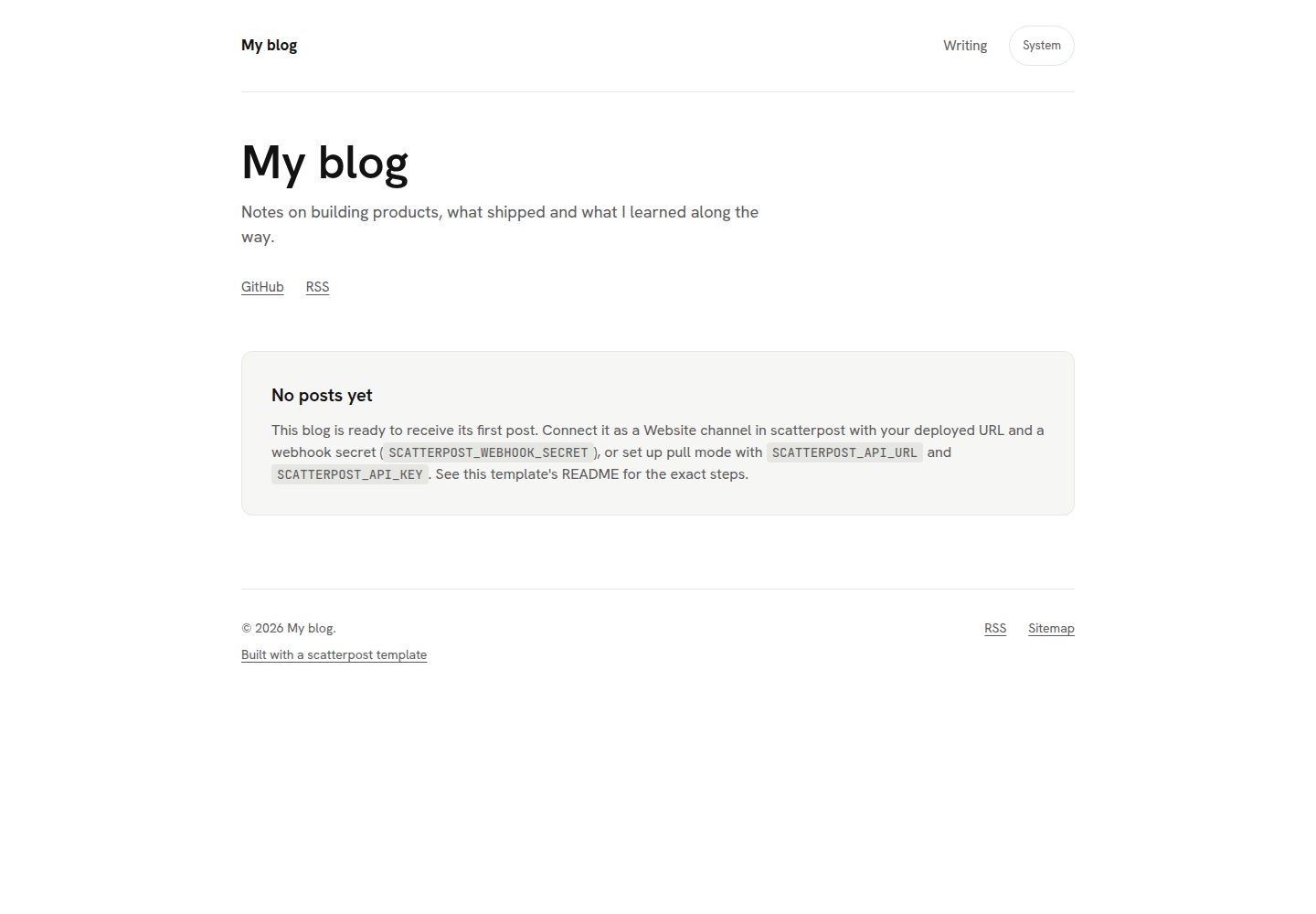
四个独立 Next.js 博客模板:minimal、developer、magazine、changelog,各自拥有独立依赖与部署配置
Next.jsReact博客
scatterpost-blog-templates — Next.js 博客模板
作者 Sheldon-desouza
四个基于 Next.js 的免费 MIT 博客模板,各自独立可部署,内置 scatterpost 连接器,并预置 SEO、RSS、站点地图与 llms.txt 等发布基础配置。
看看你的网站会是什么样
浏览真实页面截图,比较内容排版与手机效果。点击下方缩略图切换,放大查看整页细节。
全部页面与视图 3
截图用于了解视觉与布局,交互效果请以实际项目为准。
采集于 2026-10-02查看来源
值得关注的模板亮点
从已有项目资料中,快速了解它的特点。
内置 scatterpost 连接器,提供推送与拉取两种接入方式,配置密钥后可由 MCP 客户端发布文章
自动生成 sitemap.xml、RSS、canonical 链接、JSON-LD 结构化数据、Open Graph 图片和 llms.txt
设置 INDEXNOW_KEY 后可在发布时向 IndexNow 发送通知,默认关闭
包含明暗模式与 Cookie 同意横幅,分析脚本仅在访客同意后加载
内容默认存于 Vercel Blob,本地开发用文件存储,可选 Supabase,由 CONTENT_STORE 切换
模板详细介绍
这是一个仓库收录四个相互独立的 Next.js 博客模板:minimal(单栏、衬线字体、明暗模式)、developer(代码高亮、目录、深色优先)、magazine(封面图卡片网格、标签与分类)和 changelog(博客加更新日志时间线)。每个模板都有自己的 package.json 与依赖锁文件,不依赖 workspace 或 @scatterpost/* 包,可单独复制该目录后安装运行,也可通过 Vercel 一键克隆部署,部署时项目根目录预设为对应模板并创建私有 Vercel Blob 存储。
模板内置 scatterpost 连接器,提供 POST /api/scatterpost(推送模式,由 scatterpost 调用站点)和 GET /api/scatterpost/pull(拉取模式)两种接入方式,配置 SCATTERPOST_WEBHOOK_SECRET 后即可从 Claude、Cursor 等 MCP 客户端发布文章。连接器代码位于各模板 src/lib/scatterpost/,是 shared/ 目录的同步副本,不应手工修改,改动 shared/ 后需在仓库根目录运行 npm run sync,并用 npm run check 确认没有漂移。
发布相关能力包括:自动生成 sitemap.xml、RSS 订阅、每页 canonical 链接、JSON-LD 结构化数据、每篇文章的 Open Graph 图片以及供 AI 助手直接读取的 llms.txt;设置 INDEXNOW_KEY 后可在发布时向 IndexNow 发送通知(默认关闭)。此外还包含明暗模式、仅在访客同意后才加载分析脚本的 Cookie 同意横幅,以及语义化、可键盘访问的标记。
内容默认存储在 Vercel Blob,本地开发使用文件存储(content/posts/*.md),也可选用 Supabase,通过 CONTENT_STORE 切换。模板本身可脱离 scatterpost 作为普通 Next.js 博客使用;scatterpost 是独立付费产品,仅在需要从 AI 助手发布和跨平台分发时使用。演示图片、字体、图标等第三方素材需按各自许可核对,域名、托管、数据库等外部服务可能另行收费。
Next.js博客
适合你的项目吗?
适用场景
- 为创始人或独立开发者搭建个人博客,并希望从 AI 助手直接发布文章
- 需要同时拥有博客与产品更新日志时间线的项目
- 以代码文章为主、需要语法高亮和目录导航的技术博客
- 以封面图卡片网格、标签和分类组织内容的杂志式站点
适合人群
- 希望使用 Next.js 并自行托管博客的开发者
- 需要预置 SEO 与 AI 可读文件(llms.txt、结构化数据)的站点
- 计划通过 scatterpost 从 Claude、Cursor 等 MCP 客户端发布内容的用户
- 偏好 MIT 许可、希望完全掌控代码与域名的使用者
上手与定制指南
结合仓库当前版本的说明,按下面的资料检查内容、配置与运行要求。
- 1
通过 Vercel 一键克隆按钮部署时,项目根目录会预设为所选模板,并创建私有 Vercel Blob 存储
- 2
在 scatterpost 中添加 Website 频道,将密钥填入 SCATTERPOST_WEBHOOK_SECRET 环境变量后重新部署
- 3
设置 NEXT_PUBLIC_SITE_URL 为自有域名,canonical 链接、站点地图、订阅源和 llms.txt 会随之更新
- 4
设置 NEXT_PUBLIC_SHOW_SCATTERPOST_CREDIT=false 并重新部署可移除 Built with 署名
- 5
修改 shared/ 后需在仓库根目录运行 npm run sync,并用 npm run check 确认各模板副本未漂移
授权与来源资料
使用条件与限制
免费使用 · 保留许可声明本次收录的是公开仓库中采用 MIT 许可的免费版本;免费范围为该版本代码,不代表外部服务或第三方素材免费。
使用时需要遵守
- 允许免费使用、修改、商用和分发该版本代码。
- 分发代码副本或实质性部分时,保留原作者版权声明和完整 MIT 许可声明。
- 代码按现状提供;担保与责任限制以原许可证及适用法律为准。
额外费用与待核对事项
- scatterpost 本身是独立的付费产品;仅当需要从 AI 助手发布文章时才需要它。模板可脱离 scatterpost 作为普通 Next.js 博客使用。
- IndexNow 发布通知默认关闭,需自行设置 INDEXNOW_KEY 环境变量后才会启用。
- 部署后内容默认存于 Vercel Blob;本地开发使用文件存储,Supabase 为可选替代,通过 CONTENT_STORE 切换。
- 分析脚本受 Cookie 同意横幅限制:访客同意前不加载任何分析脚本,也不设置 Cookie。
- 默认显示 Built with 署名;需设置 NEXT_PUBLIC_SHOW_SCATTERPOST_CREDIT=false 并重新部署才能移除。
- 各模板 src/lib/scatterpost/ 下的连接器代码是 shared/ 的同步副本,不应手工修改;改动 shared/ 后须运行 npm run sync 并用 npm run check 确认未漂移。
- 演示站点需各模板部署到 demo.scatterpost.io 后才上线,在此之前 README 中的演示链接可能返回 404。
- 演示图片、字体、图标及其他第三方素材需按各自许可核对,不能仅凭代码的 MIT 许可判断。
- 域名、托管、数据库、支付或 AI 等外部服务可能另外收费。
查看原文依据
Permission is hereby granted, free of charge
许可证原文
scatterpost itself is a separate paid product you only need if you want to publish from an AI assistant.
README 原文
IndexNow pings on publish, once you set `INDEXNOW_KEY` (off by default)
README 原文
In Vercel Blob by default once deployed, with a file store (`content/posts/*.md`) for local development and an optional Supabase store as an alternative. `CONTENT_STORE` chooses between them.
README 原文
A cookie consent banner that gates analytics: nothing loads, and no cookie is set, until a visitor agrees
README 原文
Set `NEXT_PUBLIC_SHOW_SCATTERPOST_CREDIT=false` in the deployed project's environment variables and redeploy.
README 原文
run `npm run sync` from the repository root after changing `shared/`, and `npm run check` to confirm nothing has drifted.
README 原文
https://github.com/Sheldon-desouza/scatterpost-blog-templates/blob/main/LICENSEhttps://github.com/Sheldon-desouza/scatterpost-blog-templates/blob/main/README.mdDemos go live once each template is deployed to `demo.scatterpost.io`; until then the links below may 404.
README 原文
DeepSeek 根据仓库许可证和 README 整理 ·2026-10-02。结果仅覆盖已读取资料,依赖、图片、字体及后续条款变更以各自原文为准。
项目核对记录与介绍依据
模板资料
- 来源平台
- GitHub
- 资料与维护参考分
- 资料较完整 · 80 / 100
- 技术栈
- Next.js · React
- 网站类型
- 博客
这个分数如何计算
本站按许可资料(最高30分)、演示链接(12分)、预览图(10分)、Star数(15分)、记录的维护时间(15分)、描述完整度(8分)、功能记录(5分)和分类资料(5分)计算。它不是代码、安全或性能测试,也不是 Google 评分;有链接不代表已实测可用。
这个项目需要核对什么
- 记录的仓库更新时间
- 2026-10-02
- 截图检查日期
- 2026-10-02
已收录演示链接。请用你的内容与屏幕尺寸检查;有演示不代表表单、认证或支付已经可用。
目录记录的主要技术栈是 Next.js。请通过依赖清单和锁文件核对实际版本与托管要求。这些说明基于收录资料,不代表代码审计或部署实测。
查看具体选型方法 →介绍的制作与核对状态
介绍由 AI 辅助整理目录与仓库资料。仓库作者不等于这篇介绍的审核者。
已完成服务器许可规则与 AI 来源核对;未经过人工编辑审核。
查看当时使用的来源资料
SHA-256: a026e71d0f52eaa2cddbb1834cdfac632967a08b63c640dbca919accd6738c0f
2026-10-02T09:18:14.758Z
来源文件 / 仓库# Free Next.js blog templates for founders
Four free, MIT-licensed Next.js blog templates: one repository, each
template a self-contained app you can deploy on its own. Made by
[scatterpost](https://scatterpost.io), which lets your AI assistant
publish to your blog first, then share it to Dev.to, Hashnode,
LinkedIn, Bluesky, Mastodon and more, with every copy linking back to
your site.
## Pre-configured for AI and search
- **Ready for your AI agent**: scatterpost can publish to it from
Claude, Cursor or any MCP client as soon as you paste in one secret.
No webhook code to write.
- **Easy for AI assistants to read**: every post ships with structured
data and an `llms.txt` file, so AI assistants can understand and
quote your writing.
- **Set up for search**: sitemap, RSS feed, canonical links and social
preview images come built in. Add a key and new posts ping IndexNow
too.
- **Yours to own and change**: your domain, your Vercel account, MIT
licence. Light and dark mode and a cookie consent banner are already
done.
## Preview
Demos go live once each template is deployed to `demo.scatterpost.io`;
until then the links below may 404.
<table>
<tr>
<td width="50%">
<a href="https://demo.scatterpost.io/minimal/">
<img src="docs/previews/minimal.gif" width="100%" alt="Minimal template demo">
</a>
<br>
<strong>Minimal</strong>: single column, readable, serif, light and dark.
<br>
<a href="https://demo.scatterpost.io/minimal/">Live demo</a> ·
<a href="https://vercel.com/new/clone?repository-url=https%3A%2F%2Fgithub.com%2FSheldon-desouza%2Fscatterpost-blog-templates%2Ftree%2Fmain%2Fminimal&project-name=my-blog&repository-name=my-blog&stores=%5B%7B%22type%22%3A%22blob%22%7D%5D&env=NEXT_PUBLIC_SITE_URL,SCATTERPOST_WEBHOOK_SECRET">Deploy</a>
</td>
<td width="50%">
<a href="https://demo.scatterpost.io/developer/">
<img src="docs/previews/developer.gif" width="100%" alt="Developer template demo">
</a>
<br>
<strong>Developer</strong>: syntax highlighting, table of contents, dark-first.
<br>
<a href="https://demo.scatterpost.io/developer/">Live demo</a> ·
<a href="https://vercel.com/new/clone?repository-url=https%3A%2F%2Fgithub.com%2FSheldon-desouza%2Fscatterpost-blog-templates%2Ftree%2Fmain%2Fdeveloper&project-name=my-blog&repository-name=my-blog&stores=%5B%7B%22type%22%3A%22blob%22%7D%5D&env=NEXT_PUBLIC_SITE_URL,SCATTERPOST_WEBHOOK_SECRET">Deploy</a>
</td>
</tr>
<tr>
<td width="50%">
<a href="https://demo.scatterpost.io/magazine/">
<img src="docs/previews/magazine.gif" width="100%" alt="Magazine template demo">
</a>
<br>
<strong>Magazine</strong>: card grid home with cover images, tags and categories.
<br>
<a href="https://demo.scatterpost.io/magazine/">Live demo</a> ·
<a href="https://vercel.com/new/clone?repository-url=https%3A%2F%2Fgithub.com%2FSheldon-desouza%2Fscatterpost-blog-templates%2Ftree%2Fmain%2Fmagazine&project-name=my-blog&repository-name=my-blog&stores=%5B%7B%22type%22%3A%22blob%22%7D%5D&env=NEXT_PUBLIC_SITE_URL,SCATTERPOST_WEBHOOK_SECRET">Deploy</a>
</td>
<td width="50%">
<a href="https://demo.scatterpost.io/changelog/">
<img src="docs/previews/changelog.gif" width="100%" alt="Changelog template demo">
</a>
<br>
<strong>Changelog</strong>: blog plus a changelog timeline.
<br>
<a href="https://demo.scatterpost.io/changelog/">Live demo</a> ·
<a href="https://vercel.com/new/clone?repository-url=https%3A%2F%2Fgithub.com%2FSheldon-desouza%2Fscatterpost-blog-templates%2Ftree%2Fmain%2Fchangelog&project-name=my-changelog&repository-name=my-changelog&stores=%5B%7B%22type%22%3A%22blob%22%7D%5D&env=NEXT_PUBLIC_SITE_URL,SCATTERPOST_WEBHOOK_SECRET">Deploy</a>
</td>
</tr>
</table>
## What every template includes
- `POST /api/scatterpost` and `GET /api/scatterpost/pull`, the two ways
to connect to scatterpost (push and pull)
- Generated `sitemap.xml`
- An RSS feed
- Canonical links on every page
- JSON-LD structured data
- Generated Open Graph images for every post
- A generated `llms.txt`, a plain-text summary for an AI assistant to read directly
- IndexNow pings on publish, once you set `INDEXNOW_KEY` (off by default)
- Light and dark mode
- A cookie consent banner that gates analytics: nothing loads, and no cookie is set, until a visitor agrees
- Accessible, semantic markup
- MIT licence
## Deploy in one click
Each button below clones that one template into its own repository on
your own Vercel account, with the project's "Root Directory" preset to
that template, and provisions a private Vercel Blob store for it.
| Template | Deploy |
|---|---|
| [`minimal/`](./minimal) | [](https://vercel.com/new/clone?repository-url=https%3A%2F%2Fgithub.com%2FSheldon-desouza%2Fscatterpost-blog-templates%2Ftree%2Fmain%2Fminimal&project-name=my-blog&repository-name=my-blog&stores=%5B%7B%22type%22%3A%22blob%22%7D%5D&env=NEXT_PUBLIC_SITE_URL,SCATTERPOST_WEBHOOK_SECRET) |
| [`developer/`](./developer) | [](https://vercel.com/new/clone?repository-url=https%3A%2F%2Fgithub.com%2FSheldon-desouza%2Fscatterpost-blog-templates%2Ftree%2Fmain%2Fdeveloper&project-name=my-blog&repository-name=my-blog&stores=%5B%7B%22type%22%3A%22blob%22%7D%5D&env=NEXT_PUBLIC_SITE_URL,SCATTERPOST_WEBHOOK_SECRET) |
| [`magazine/`](./magazine) | [](https://vercel.com/new/clone?repository-url=https%3A%2F%2Fgithub.com%2FSheldon-desouza%2Fscatterpost-blog-templates%2Ftree%2Fmain%2Fmagazine&project-name=my-blog&repository-name=my-blog&stores=%5B%7B%22type%22%3A%22blob%22%7D%5D&env=NEXT_PUBLIC_SITE_URL,SCATTERPOST_WEBHOOK_SECRET) |
| [`changelog/`](./changelog) | [](https://vercel.com/new/clone?repository-url=https%3A%2F%2Fgithub.com%2FSheldon-desouza%2Fscatterpost-blog-templates%2Ftree%2Fmain%2Fchangelog&project-name=my-changelog&repository-name=my-changelog&stores=%5B%7B%22type%22%3A%22blob%22%7D%5D&env=NEXT_PUBLIC_SITE_URL,SCATTERPOST_WEBHOOK_SECRET) |
Each template's own README has the same button, plus the full
environment variable table and both connection modes (push and pull).
## Connect it to scatterpost in three steps
1. Deploy a template with the button above.
2. In scatterpost, add a Website channel and paste the secret it gives
you into the blog's `SCATTERPOST_WEBHOOK_SECRET` env var, then
redeploy. See the
[website connector docs](https://scatterpost.io/docs/website-connector),
or [connecting an existing site](https://scatterpost.io/docs/existing-site)
if you already have a blog.
3. Ask your assistant to publish. scatterpost posts to your new blog
first, then cross-posts elsewhere with the canonical link pointing
home.
## Why use a template instead of building your own
You could build a blog from scratch. These templates skip the parts
that take the longest to get right.
**Ready for scatterpost on day one.** The part that receives your posts
is already built. Paste the secret from scatterpost into your blog's
settings and your assistant can publish straight away. No webhook code
to write or test.
**Search basics done for you.** Sitemap, RSS feed, canonical links,
structured data and social preview images are generated from every
post, plus an `llms.txt` file that helps AI assistants read your site.
**Each template is ready to ping IndexNow when you add a key**, so
search engines that support it, such as Bing, can hear about a new
post instead of waiting for the next crawl.
**Yours to keep.** MIT licensed, on your own domain and your own
Vercel account. Change anything you like. If you stop using
scatterpost, the blog and every post stay with you.
**Small details already handled.** Light and dark mode, readable on a
phone, keyboard friendly, and a cookie consent banner that only loads
analytics after a visitor agrees.
Already have a website? You do not need a template. Connect your
existing site in scatterpost instead.
## FAQ
**Is it free?**
Yes. All four templates are free and MIT licensed; deploying one to
Vercel runs on Vercel's own free tier. scatterpost itself is a
separate paid product you only need if you want to publish from an AI
assistant.
**Do I need scatterpost to use these templates?**
No. Each template works as a normal Next.js blog on its own. scatterpost
adds the ability to publish to it, and cross-post elsewhere, from an AI
assistant.
**Can I use my own domain?**
Yes. Point any domain at the Vercel project and set
`NEXT_PUBLIC_SITE_URL` to it; every canonical link, the sitemap, the
feed and `llms.txt` follow automatically.
**Can I customise the design?**
Yes. Each template is a plain Next.js app you own outright: edit the
components, the CSS or the content, there is nothing scatterpost-specific
to preserve.
**Where are posts stored?**
In Vercel Blob by default once deployed, with a file store
(`content/posts/*.md`) for local development and an optional Supabase
store as an alternative. `CONTENT_STORE` chooses between them.
**Do they work with Claude, ChatGPT or Cursor?**
scatterpost is an MCP server, so any MCP client that can call tools
works with it; see scatterpost's own docs for the clients it documents
connecting, which currently include Claude Code, Claude.ai and Cursor.
**How do I remove the "Built with" credit?**
Set `NEXT_PUBLIC_SHOW_SCATTERPOST_CREDIT=false` in the deployed
project's environment variables and redeploy.
## About scatterpost
scatterpost is the publishing pipeline for AI agents: your assistant
writes the post, scatterpost publishes it to your own blog first, then
cross-posts it to Dev.to, Hashnode, LinkedIn, Bluesky, Mastodon and
more, with the canonical link pointing back home. These templates are
free and MIT licensed on their own; scatterpost is the separate, paid
tool that connects to them. Try it at [scatterpost.io](https://scatterpost.io).
## Reference
### Search and analytics setup
See [`SETUP.md`](./SETUP.md) for a plain-English walkthrough: Google
Search Console and Bing Webmaster Tools verification, optional GA4
analytics behind a consent banner, and optional IndexNow pings on
publish. Every template already generates `robots.txt`, `sitemap.xml`
and `llms.txt` with nothing to configure.
### Repository layout
```
LICENSE MIT, Copyright (c) 2026 Sheldon de Souza
shared/ the scatterpost connector code once: signature verification,
payload validation, the content stores (Vercel Blob, Supabase,
file), pull, slugify, safe HTML and Markdown rendering, plus
their tests
scripts/sync-shared.mjs copies shared/ into <template>/src/lib/scatterpost/;
--check exits 1 if any copy has drifted
demo/ static gallery site for demo.scatterpost.io; Vercel Root Directory = demo
minimal/ self-contained Next.js app; Vercel Root Directory = minimal
developer/ self-contained Next.js app; Vercel Root Directory = developer
magazine/ self-contained Next.js app; Vercel Root Directory = magazine
changelog/ self-contained Next.js app; Vercel Root Directory = changelog
```
Each template is self-contained: its own `package.json` and
`package-lock.json`, no `workspace:` or `@scatterpost/*` dependency, so
`npm install` works from a plain copy of that one folder. The connector
code under each template's `src/lib/scatterpost/` is a synced copy of
`shared/`, never hand-edited; run `npm run sync` from the repository
root after changing `shared/`, and `npm run check` to confirm nothing
has drifted.
### Connecting to scatterpost
Every template ships `POST /api/scatterpost` (push mode: scatterpost
calls this site) and `GET /api/scatterpost/pull` (pull mode: this site
polls scatterpost on a schedule). Whichever mode you use, the template's
own URL for a post becomes the canonical scatterpost cross-posts with.
See a template's README for the exact steps and the JSON shape scatterpost
expects.
### Storage
Vercel Blob is the default store once deployed with the button above (it
provisions a private Blob store for you); Supabase is kept as an
optional alternative, and the file store (`content/posts/*.md`) is for
local development. `CONTENT_STORE` chooses between them; see a
template's `.env.example`.
### Licence
MIT. This repository is independent of scatterpost's own proprietary
codebase: nothing here depends on a private package, and these
templates may be used, forked and redeployed freely under the terms of
the licence.
看看同类模板
对比同技术栈与用途的模板,找到更适合的视觉与内容结构。

tailwind-nextjs-starter-blog
tailwind-nextjs-starter-blog 是一个面向个人技术博客的 Next.js 与 Tailwind CSS 启动模板,其 v2 版本基于 App Router 与 React Server Comp…
Next.js · 博客

Nextjs-tailwindcss-blog-template
⭐Build SEO optimized personal blog website with Next.js, Tailwind CSS and Contentlayer. If you want to learn t…
Next.js · 博客

Next-js-Blog-Boilerplate
Next-js-Blog-Boilerplate 是一套面向个人与技术博客的启动代码,基于 Next.js 12 与 Tailwind CSS 3 构建,同时集成了 TypeScript、ESLint、Prettier …
Next.js · 博客

nextjs-blog-theme
nextjs-blog-theme 是 Netlify 团队维护的一个博客启动模板,基于 Next.js 15(Pages Router)和 Tailwind CSS 4.x 构建,设计由 Bejamas 机构完成。
Next.js · 博客

blog
🚀 My personal blog made with Tailwind CSS and NextJS. Template from Timlrx. Feel free to fork, follow and use…
Next.js · 博客

tailnext
Tailnext 是一个基于 Next.js 14 App Router 和 Tailwind CSS 的免费开源模板,由 onWidget 团队创建并维护。
Next.js · 博客