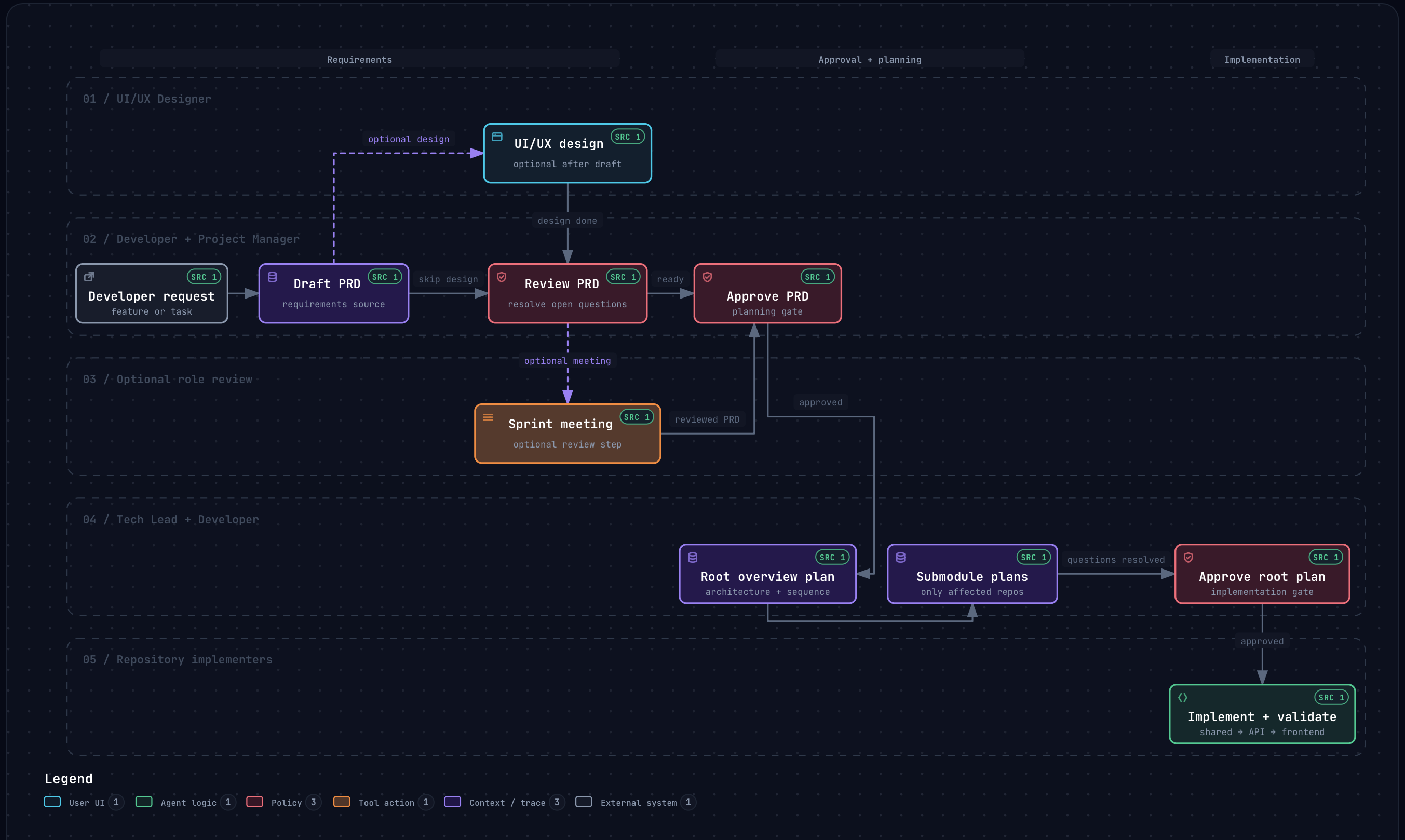
Provides reusable agent rules, skills, and command shims, with source files kept in the installed package and only local discovery shims written into the project
HTMLAdmin dashboard
agent-workflows — HTML Admin dashboard Template
By shinnodua
A multi-repository coordination workflow package for agent-led product work, providing reusable agent rules, skills, command shims, PRD/plan/research templates, role definitions, workspace integrity checks, and a local dashboard for browsing Markdown artifacts.
Explore the design
Compare the page layouts and mobile experience. Open any screenshot for a closer look.
Author preview
Author-provided preview
Preview provided in the project README.
One original preview is available. Open the full image to inspect the design.
Screenshots show visual appearance; interactive behavior may differ.
Recorded 2026-10-02View source
What stands out
A quick read of the recorded project description.
Includes PRD, plan, and research templates plus role definitions, supports role-agent review meetings, and saves records to meeting-logs/
Provides workspace integrity checks and package-level check commands to validate workspace artifact metadata
Built-in local dashboard reads from the developer's project root and browses Markdown artifacts
Auto mode lets agents continuously execute research, PRD, design, sprint meeting, approval, implementation, and verification; off by default
Pre-commit Git hook scans staged files for private keys, tokens, credentials, personal email addresses, local paths, and sensitive filenames
Template Details
Agent Workflows is an installable multi-repository coordination workflow package for agent-led product work. It bundles reusable agent rules, skills, command shims, PRD/plan/research templates, role definitions, workspace integrity checks, and a local dashboard for developers to use in their own projects.
After installation, running `workflows init` writes local discovery shims into the current project, creates initial `project/` configuration files, and records managed files in `.agent-workflows/manifest.json`. The shims let source agents discover commands and skills locally, while the actual source files remain in the installed package. After initialization, restart or reload the active agent session.
The workflow centers on project configuration files: first fill in the project profile via `/project-setup`; once a PRD exists, run a role-agent review meeting with `/sprint-meeting <prd-id>`, with records saved under `meeting-logs/`. Auto mode is off by default; when enabled via `workflows auto on` or `/auto-mode`, research, PRD, design, sprint meeting, approval, implementation, and verification run continuously without requesting routine approval for each step, but still ask questions that only the developer can decide.
The project also includes a commit safety check: after installing the Git hook, each commit scans staged files for private keys, common service tokens, credential assignments, personal email addresses, local home directory paths, and sensitive filenames. If issues are found, the commit is blocked and locations are reported without printing values. This scan is pattern-based and cannot guarantee catching all secrets or private information.
This is a project built by the author for personal use and continuously adjusted to their own workflow. The package is MIT licensed, and the free scope is limited to this version of the code; third-party assets such as demo images, fonts, and icons, as well as external services such as domains, hosting, databases, payments, or AI, must be checked separately and may incur charges.
HTMLBackend
Is it right for your project?
Use Cases
- Coordinating agent-led product feature development across multiple repositories or submodules
- Running time-boxed role-agent meetings to review PRDs and retain meeting records
- Browsing PRDs, plans, designs, research, and other Markdown artifacts centrally via the local dashboard
- Automatically checking staged content for secrets, tokens, or personal private information before committing
Suitable For
- Developers using source agents such as Codex or Claude Code for product development
- Projects that need to coordinate workflows across multiple repositories or Git submodules
- Teams that want to standardize PRD, plan, research, and review processes with templates and role definitions
- Users who need to browse Markdown artifacts locally and run workspace integrity checks
Getting started & customization
Use these recorded setup notes alongside the repository instructions for your chosen version.
- 1
Install globally with `bun add --global @shinnodua/agent-workflows`, or install within a project with `bun add --dev @shinnodua/agent-workflows`
- 2
Run `bunx workflows init` to initialize (after global installation, `workflows` can be used directly), then restart or reload the active agent session
- 3
After initialization, edit `project/PROJECT.md` and `project/repositories.json`, and add matching Git submodules under `modules/`
- 4
After upgrading the package, run `bunx workflows update` from the project root to refresh local shims, or set `AGENT_WORKFLOWS_AUTO_UPDATE=1` at install time
- 5
After cloning the repository, run `bun install` and `bun run hooks:install` to install the commit safety check Git hook
License & source material
Usage conditions & limitations
Free to use · keep license noticeThis listing covers the free version under the MIT license in the public repository; the free scope is limited to this version of the code and does not imply that external services or third-party assets are free.
Must comply with when using
- Free use, modification, commercial use, and distribution of this version of the code are permitted.
- When distributing copies or substantial portions of the code, retain the original author's copyright notice and the full MIT license notice.
- The code is provided as is; warranties and limitations of liability are governed by the original license and applicable law.
Additional costs & items to verify
- Demo images, fonts, icons, and other third-party assets must be checked under their respective licenses and cannot be judged solely by the code's MIT license.
- External services such as domains, hosting, databases, payments, or AI may incur separate charges.
- The release process uses GitHub Packages; the package must remain under the @shinnodua/agent-workflows scope, and the repository Actions settings must allow GitHub Actions to create PRs.
- Installing from GitHub Packages requires setting the package scope in the consuming project or user npm configuration.
- The release workflow uses secrets.GITHUB_TOKEN and requires packages: write permission; no npm registry token is needed.
- AGENT_WORKFLOWS_AUTO_UPDATE=1 can be set at install time to enable auto-update in the package lifecycle script.
- After running workflows init, restart or reload the active agent session.
- Auto mode is off by default, and its state is stored in .agent-workflows/metadata.json.
- The commit safety check is pattern-based and cannot guarantee catching all secrets or private information.
View Original Text Basis
Permission is hereby granted, free of charge
Original License Text
The release workflow publishes to GitHub Packages. The package must stay scoped as `@shinnodua/agent-workflows`, and repository Actions settings must allow GitHub Actions to create pull requests.
Original README
To install from GitHub Packages, configure the package scope in the consuming project or user npm config:
Original README
The workflow uses `secrets.GITHUB_TOKEN` with `packages: write`, so no npm registry token is required.
Original README
set `AGENT_WORKFLOWS_AUTO_UPDATE=1` during installation to enable that update in the package lifecycle script.
Original README
Restart or reload any active agent session after `workflows init`.
Original README
Auto mode is off by default and is saved in `.agent-workflows/metadata.json`.
Original README
https://github.com/shinnodua/agent-workflows/blob/main/LICENSEhttps://github.com/shinnodua/agent-workflows/blob/main/README.mdThe scan uses patterns and cannot guarantee that every secret or private detail is caught.
Original README
Compiled by DeepSeek based on repository license and README ·2026-10-04. Results only cover the materials read; dependencies, images, fonts, and subsequent term changes are subject to their respective original texts.
Project checks & description sources
Template Information
- Source platforms
- GitHub
- Documentation and maintenance reference score
- Partly documented · 68 / 100
- Technologies
- HTML
- Website type
- Admin dashboard
How this score is calculated
Our heuristic uses license records (up to 30), a demo link (12), a preview (10), stars (15), recorded maintenance (15), description completeness (8), feature records (5) and classification data (5). It is not a code, security or performance test, or a Google score. A link does not establish tested functionality.
What to verify for this project
- Repository update recorded
- 2026-10-01
- Screenshot last checked
- 2026-10-04
No demo link is recorded. Use the repository instructions to evaluate the project locally; the screenshot alone cannot establish interactive behavior.
The catalog identifies HTML as the primary stack. Check the actual dependency manifest and lockfile for versions and hosting requirements. These notes use recorded metadata, not a code audit or a deployment test.
Use a selection guide →How this description was prepared
AI-assisted description based on catalog records and repository material. Repository authors are not automatically the reviewers of this description.
Review declaration: [email protected] · 2026-10-04
Inspect the recorded source material
SHA-256: ba227bcbb8d9dd361e94f2ac673c65787148109cf1733fb3d7bec683d32dd825
2026-10-04T16:20:24.626Z
Source file / repository# Agent Workflows Installable multi-repository coordination workflow for agent-led product work. This package provides reusable agent rules, skills, command shims, PRD/plan/research templates, role definitions, workspace integrity checks, and a local dashboard for browsing Markdown artifacts. > **Personal project:** I built Agent Workflows for my own use and continue to > shape it around my workflow. If you have ideas for making it clearer or more > useful, I welcome suggestions and contributions.  Explore the [interactive workspace delivery workflow](.archify/workflow-workspace-delivery-20260929-093455/workspace-delivery.html). ## Install Install the package globally when you want the `workflows` command available in your shell: ```sh bun add --global @shinnodua/agent-workflows ``` Or install it in a project as a dev dependency: ```sh bun add --dev @shinnodua/agent-workflows ``` Then initialize the project. Use `workflows` after a global install, or `bunx workflows` when the package is installed as a project dev dependency: ```sh bunx workflows init ``` `workflows init` writes local discovery shims into the current project, creates starter `project/` profile files when they do not exist, and records managed files in `.agent-workflows/manifest.json`. The shims let source agents discover commands and skills locally while the source of truth stays in the installed package. Restart or reload any active agent session after `workflows init`. Source agents discover custom agents, commands, and skills from local `.agents/agents/`, `.codex/prompts/`, `.claude/agents/`, `.claude/skills/`, `.agents/skills/`, `commands/`, and `workflows.md` shims. Claude Code loads `CLAUDE.md`, which imports the shared `AGENTS.md` rules. Run `/project-setup` in either agent. Then fill the project profile with the guided command: ```sh /project-setup ``` After a PRD exists, run a role-agent review meeting from the active agent chat: ```sh /sprint-meeting <prd-id> ``` To let the agent continue through the full feature workflow after you start a feature request, enable auto mode: ```sh bunx workflows auto on ``` Check or change it later with `bunx workflows auto status`, `off`, or `toggle`, or use `/auto-mode on|off|toggle|status` in the agent chat. Auto mode is off by default and is saved in `.agent-workflows/metadata.json`. It runs research, PRD, design, sprint meeting, PRD and plan approvals, implementation, and validation without routine approval prompts. The agent still asks for decisions only the developer can answer. ## Commands ```sh bunx workflows init auto-mode on|off|toggle|status project-setup sprint-meeting bunx workflows dashboard bunx workflows update bunx workflows integrity bunx workflows check bunx workflows auto on|off|toggle|status ``` - `workflows init` sets up a developer project to follow the workflow. - `auto-mode` and `workflows auto` control workspace-local automatic progression. - `project-setup` guides the developer through completing the `project/` profile files step by step. - `sprint-meeting` runs a time-boxed role-agent PRD review meeting and saves the record under `meeting-logs/`. - `workflows dashboard` starts the packaged dashboard and reads artifact data from the developer project root. - `workflows update` refreshes workflow-owned shims after upgrading this package. - `workflows integrity` validates workspace artifact metadata. - `workflows check` runs package-provided workspace checks. ## Commit Security Check Install the repository's Git hook once after cloning: ```sh bun install bun run hooks:install ``` Before each commit, Lefthook scans staged files for private keys, common service tokens, credential assignments, personal email addresses, local home paths, and sensitive filenames. A finding blocks the commit and reports its location without printing the value. The existing workspace checks run after this scan. Run the scan directly with `bun run security:staged`. The scan uses patterns and cannot guarantee that every secret or private detail is caught. Review staged changes before committing. Example addresses under `example.com`, `example.org`, and `example.net` are allowed. Package installation leaves existing workspace files unchanged. After upgrading, run `bunx workflows update` from the project root to refresh the local shims, or set `AGENT_WORKFLOWS_AUTO_UPDATE=1` during installation to enable that update in the package lifecycle script. Restart or reload any active agent session after the refresh. ## Local Shims Agent Workflows keeps reusable source files in the installed package and writes small local shims for agent discovery: - `.agents/skills/*/SKILL.md` - `.agents/agents/*/agent.md` - `.codex/prompts/*.md` - `.claude/skills/*/SKILL.md` - `.claude/agents/*.md` - `commands/*.md` - `AGENTS.md` - `CLAUDE.md` - `workflows.md` - reusable `roles/`, `templates/`, and setup docs Those shims point back to `node_modules/@shinnodua/agent-workflows/...` for project-local installs, or to the actual package install path for global installs. Project-owned files such as `project/`, `prds/`, `plans/`, `designs/`, `research/`, `meeting-logs/`, `docs/`, and `modules/` remain local to the consuming workspace. ## Build And Release Create a changeset for any package change: ```sh bun run changeset ``` Validate the package before opening a PR: ```sh bun run package:build ``` GitHub Actions runs CI on pull requests and pushes to `main`. The release workflow uses Changesets to open a version PR, then publishes after that PR is merged. The release workflow publishes to GitHub Packages. The package must stay scoped as `@shinnodua/agent-workflows`, and repository Actions settings must allow GitHub Actions to create pull requests. The workflow uses `secrets.GITHUB_TOKEN` with `packages: write`, so no npm registry token is required. To install from GitHub Packages, configure the package scope in the consuming project or user npm config: ```ini @shinnodua:registry=https://npm.pkg.github.com ``` ## Project Setup After initialization: 1. Edit `project/PROJECT.md` with your product context and ownership boundaries. 2. Edit `project/repositories.json` with your repositories and submodule paths. 3. Add matching Git submodules under `modules/`. 4. Run `bunx workflows integrity` or `bunx workflows check`. 5. Start the dashboard with `bunx workflows dashboard`. See [docs/workspace-template-setup.md](docs/workspace-template-setup.md) for the full adaptation checklist.
Explore similar templates
Compare previews and descriptions within the same stack and category.

gentelella
Gentelella v4 is a free, open-source admin dashboard template maintained by Colorlib, built with vanilla JavaScript, SCSS, and Vite 8 without Bootstrap or jQuery.
HTML · Admin dashboard

coreui-free-bootstrap-admin-template
A free Bootstrap admin template maintained by CoreUI, built on CoreUI's own UI component library. It provides compiled HTML pages and Pug template source code, covering dashboards, authentication, forms, components, icons, and error pages.
HTML · Admin dashboard

dashboards
A collection of responsive dashboard HTML templates open-sourced by Keen IO, built on CSS Grid, offering multiple prebuilt admin data interface layouts.
HTML · Admin dashboard

SB Admin 2
SB Admin 2 is a classic Bootstrap admin template from Start Bootstrap, offering dashboards, charts, tables, and common management pages.
HTML · Admin dashboard

Adminator-admin-dashboard
Adminator 4 is a vanilla HTML, CSS and JavaScript admin dashboard template with a CSS-variable token design system, built-in light and dark themes, no jQuery or Bootstrap dependency, and 18 pages covering dashboards, mail, calendar, charts, forms, tables and error pages.
HTML · Admin dashboard

SB Admin
SB Admin is a lightweight, open-source Bootstrap admin template from Start Bootstrap. It offers a sidebar-and-top-bar layout with data tables, forms, and stat cards, plus responsive design.
HTML · Admin dashboard