提供可复用的 agent 规则、技能与命令 shim,源文件保留在已安装包中,项目内只写入本地发现 shim
HTML后台
agent-workflows — HTML 后台模板
作者 shinnodua
面向 agent 主导产品工作的多仓库协作工作流包,提供可复用的 agent 规则、技能、命令 shim、PRD/计划/研究模板、角色定义、工作区完整性检查,以及浏览 Markdown 产物的本地仪表盘。
看看你的网站会是什么样
浏览真实页面截图,比较内容排版与手机效果。点击下方缩略图切换,放大查看整页细节。
目前有 1 张原始预览,可打开完整图片查看设计细节。
截图用于了解视觉与布局,交互效果请以实际项目为准。
采集于 2026-10-02查看来源
值得关注的模板亮点
从已有项目资料中,快速了解它的特点。
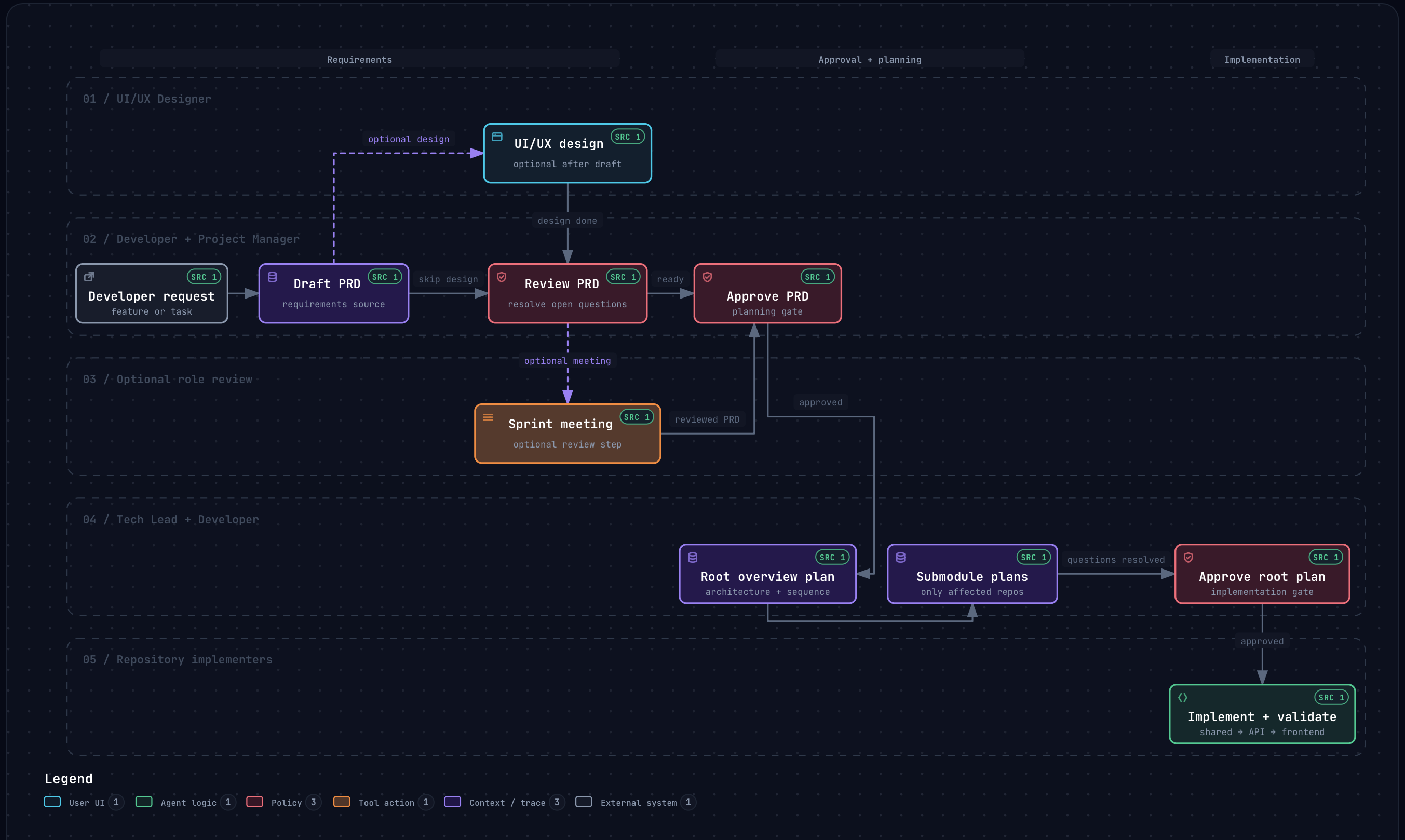
包含 PRD、计划、研究模板与角色定义,支持角色 agent 评审会议并保存记录到 meeting-logs/
提供工作区完整性检查与包级检查命令,用于校验工作区产物元数据
内置本地仪表盘,从开发者项目根目录读取并浏览 Markdown 产物
自动模式可让 agent 连续执行研究、PRD、设计、冲刺会议、审批、实现与验证,默认关闭
提交前 Git hook 扫描暂存文件中的私钥、令牌、凭据、个人邮箱、本地路径与敏感文件名
模板详细介绍
Agent Workflows 是一个可安装的多仓库协调工作流包,用于 agent 主导的产品工作。它把可复用的 agent 规则、技能、命令 shim、PRD/计划/研究模板、角色定义、工作区完整性检查和本地仪表盘打包在一起,供开发者在自己的项目中使用。
安装后运行 `workflows init`,会在当前项目写入本地发现 shim,创建初始 `project/` 配置文件,并把受管文件记录到 `.agent-workflows/manifest.json`。shim 让源 agent 能在本地发现命令和技能,而真正的源文件仍保留在已安装的包中。初始化后需要重启或重新加载活动的 agent 会话。
工作流围绕项目配置文件展开:先通过 `/project-setup` 填写项目档案,在 PRD 存在后可用 `/sprint-meeting <prd-id>` 运行角色 agent 评审会议,记录保存在 `meeting-logs/` 下。自动模式默认关闭,通过 `workflows auto on` 或 `/auto-mode` 开启后,研究、PRD、设计、冲刺会议、审批、实现和验证会连续执行,不再逐项请求常规审批,但仍会就开发者才能决定的问题提问。
项目还包含提交安全检查:安装 Git hook 后,每次提交前扫描暂存文件中的私钥、常见服务令牌、凭据赋值、个人邮箱、本地家目录路径和敏感文件名,发现问题会阻止提交并报告位置而不打印值。该扫描基于模式匹配,不能保证捕获所有秘密或隐私信息。
这是作者为个人使用而构建并持续按自身工作流调整的项目。包采用 MIT 许可,免费范围限于该版本代码;演示图片、字体、图标等第三方素材以及域名、托管、数据库、支付或 AI 等外部服务需另行核对或可能收费。
HTML后台
适合你的项目吗?
适用场景
- 在多个仓库或子模块之间协调 agent 主导的产品功能开发
- 用角色 agent 会议对 PRD 进行时间盒评审并留存会议记录
- 通过本地仪表盘集中浏览项目中的 PRD、计划、设计、研究等 Markdown 产物
- 在提交前自动检查暂存内容中是否包含密钥、令牌或个人隐私信息
适合人群
- 使用 Codex 或 Claude Code 等源 agent 进行产品开发的开发者
- 需要跨多个仓库或 Git 子模块协调工作流的项目
- 希望用模板和角色定义规范 PRD、计划、研究与评审流程的团队
- 需要在本地浏览 Markdown 产物并执行工作区完整性检查的使用者
上手与定制指南
结合仓库当前版本的说明,按下面的资料检查内容、配置与运行要求。
- 1
全局安装使用 `bun add --global @shinnodua/agent-workflows`,项目内安装使用 `bun add --dev @shinnodua/agent-workflows`
- 2
初始化运行 `bunx workflows init`(全局安装后可直接用 `workflows`),之后重启或重新加载活动的 agent 会话
- 3
初始化后编辑 `project/PROJECT.md` 与 `project/repositories.json`,并在 `modules/` 下添加匹配的 Git 子模块
- 4
升级包后从项目根目录运行 `bunx workflows update` 刷新本地 shim,或在安装时设置 `AGENT_WORKFLOWS_AUTO_UPDATE=1`
- 5
克隆仓库后运行 `bun install` 与 `bun run hooks:install` 安装提交安全检查 Git hook
授权与来源资料
使用条件与限制
免费使用 · 保留许可声明本次收录的是公开仓库中采用 MIT 许可的免费版本;免费范围为该版本代码,不代表外部服务或第三方素材免费。
使用时需要遵守
- 允许免费使用、修改、商用和分发该版本代码。
- 分发代码副本或实质性部分时,保留原作者版权声明和完整 MIT 许可声明。
- 代码按现状提供;担保与责任限制以原许可证及适用法律为准。
额外费用与待核对事项
- 演示图片、字体、图标及其他第三方素材需按各自许可核对,不能仅凭代码的 MIT 许可判断。
- 域名、托管、数据库、支付或 AI 等外部服务可能另外收费。
- 发布流程使用 GitHub Packages,包必须保持 @shinnodua/agent-workflows 作用域,且仓库 Actions 设置需允许 GitHub Actions 创建 PR。
- 从 GitHub Packages 安装需在消费项目或用户 npm 配置中设置包作用域。
- 发布工作流使用 secrets.GITHUB_TOKEN 并需 packages: write 权限,无需 npm registry token。
- 可在安装时设置 AGENT_WORKFLOWS_AUTO_UPDATE=1,以在包生命周期脚本中启用自动更新。
- 运行 workflows init 后需重启或重新加载活动的 agent 会话。
- 自动模式默认关闭,其状态保存在 .agent-workflows/metadata.json 中。
- 提交安全检查基于模式匹配,无法保证捕获所有秘密或隐私信息。
查看原文依据
Permission is hereby granted, free of charge
许可证原文
The release workflow publishes to GitHub Packages. The package must stay scoped as `@shinnodua/agent-workflows`, and repository Actions settings must allow GitHub Actions to create pull requests.
README 原文
To install from GitHub Packages, configure the package scope in the consuming project or user npm config:
README 原文
The workflow uses `secrets.GITHUB_TOKEN` with `packages: write`, so no npm registry token is required.
README 原文
set `AGENT_WORKFLOWS_AUTO_UPDATE=1` during installation to enable that update in the package lifecycle script.
README 原文
Restart or reload any active agent session after `workflows init`.
README 原文
Auto mode is off by default and is saved in `.agent-workflows/metadata.json`.
README 原文
https://github.com/shinnodua/agent-workflows/blob/main/LICENSEhttps://github.com/shinnodua/agent-workflows/blob/main/README.mdThe scan uses patterns and cannot guarantee that every secret or private detail is caught.
README 原文
DeepSeek 根据仓库许可证和 README 整理 ·2026-10-04。结果仅覆盖已读取资料,依赖、图片、字体及后续条款变更以各自原文为准。
项目核对记录与介绍依据
模板资料
- 来源平台
- GitHub
- 资料与维护参考分
- 资料一般 · 68 / 100
- 技术栈
- HTML
- 网站类型
- 后台
这个分数如何计算
本站按许可资料(最高30分)、演示链接(12分)、预览图(10分)、Star数(15分)、记录的维护时间(15分)、描述完整度(8分)、功能记录(5分)和分类资料(5分)计算。它不是代码、安全或性能测试,也不是 Google 评分;有链接不代表已实测可用。
这个项目需要核对什么
- 记录的仓库更新时间
- 2026-10-01
- 截图检查日期
- 2026-10-04
目前没有记录演示链接。请依据仓库说明在本地评估;仅凭截图无法确认交互行为。
目录记录的主要技术栈是 HTML。请通过依赖清单和锁文件核对实际版本与托管要求。这些说明基于收录资料,不代表代码审计或部署实测。
查看具体选型方法 →介绍的制作与核对状态
介绍由 AI 辅助整理目录与仓库资料。仓库作者不等于这篇介绍的审核者。
审核声明: [email protected] · 2026-10-04
查看当时使用的来源资料
SHA-256: ba227bcbb8d9dd361e94f2ac673c65787148109cf1733fb3d7bec683d32dd825
2026-10-04T16:20:24.626Z
来源文件 / 仓库# Agent Workflows Installable multi-repository coordination workflow for agent-led product work. This package provides reusable agent rules, skills, command shims, PRD/plan/research templates, role definitions, workspace integrity checks, and a local dashboard for browsing Markdown artifacts. > **Personal project:** I built Agent Workflows for my own use and continue to > shape it around my workflow. If you have ideas for making it clearer or more > useful, I welcome suggestions and contributions.  Explore the [interactive workspace delivery workflow](.archify/workflow-workspace-delivery-20260929-093455/workspace-delivery.html). ## Install Install the package globally when you want the `workflows` command available in your shell: ```sh bun add --global @shinnodua/agent-workflows ``` Or install it in a project as a dev dependency: ```sh bun add --dev @shinnodua/agent-workflows ``` Then initialize the project. Use `workflows` after a global install, or `bunx workflows` when the package is installed as a project dev dependency: ```sh bunx workflows init ``` `workflows init` writes local discovery shims into the current project, creates starter `project/` profile files when they do not exist, and records managed files in `.agent-workflows/manifest.json`. The shims let source agents discover commands and skills locally while the source of truth stays in the installed package. Restart or reload any active agent session after `workflows init`. Source agents discover custom agents, commands, and skills from local `.agents/agents/`, `.codex/prompts/`, `.claude/agents/`, `.claude/skills/`, `.agents/skills/`, `commands/`, and `workflows.md` shims. Claude Code loads `CLAUDE.md`, which imports the shared `AGENTS.md` rules. Run `/project-setup` in either agent. Then fill the project profile with the guided command: ```sh /project-setup ``` After a PRD exists, run a role-agent review meeting from the active agent chat: ```sh /sprint-meeting <prd-id> ``` To let the agent continue through the full feature workflow after you start a feature request, enable auto mode: ```sh bunx workflows auto on ``` Check or change it later with `bunx workflows auto status`, `off`, or `toggle`, or use `/auto-mode on|off|toggle|status` in the agent chat. Auto mode is off by default and is saved in `.agent-workflows/metadata.json`. It runs research, PRD, design, sprint meeting, PRD and plan approvals, implementation, and validation without routine approval prompts. The agent still asks for decisions only the developer can answer. ## Commands ```sh bunx workflows init auto-mode on|off|toggle|status project-setup sprint-meeting bunx workflows dashboard bunx workflows update bunx workflows integrity bunx workflows check bunx workflows auto on|off|toggle|status ``` - `workflows init` sets up a developer project to follow the workflow. - `auto-mode` and `workflows auto` control workspace-local automatic progression. - `project-setup` guides the developer through completing the `project/` profile files step by step. - `sprint-meeting` runs a time-boxed role-agent PRD review meeting and saves the record under `meeting-logs/`. - `workflows dashboard` starts the packaged dashboard and reads artifact data from the developer project root. - `workflows update` refreshes workflow-owned shims after upgrading this package. - `workflows integrity` validates workspace artifact metadata. - `workflows check` runs package-provided workspace checks. ## Commit Security Check Install the repository's Git hook once after cloning: ```sh bun install bun run hooks:install ``` Before each commit, Lefthook scans staged files for private keys, common service tokens, credential assignments, personal email addresses, local home paths, and sensitive filenames. A finding blocks the commit and reports its location without printing the value. The existing workspace checks run after this scan. Run the scan directly with `bun run security:staged`. The scan uses patterns and cannot guarantee that every secret or private detail is caught. Review staged changes before committing. Example addresses under `example.com`, `example.org`, and `example.net` are allowed. Package installation leaves existing workspace files unchanged. After upgrading, run `bunx workflows update` from the project root to refresh the local shims, or set `AGENT_WORKFLOWS_AUTO_UPDATE=1` during installation to enable that update in the package lifecycle script. Restart or reload any active agent session after the refresh. ## Local Shims Agent Workflows keeps reusable source files in the installed package and writes small local shims for agent discovery: - `.agents/skills/*/SKILL.md` - `.agents/agents/*/agent.md` - `.codex/prompts/*.md` - `.claude/skills/*/SKILL.md` - `.claude/agents/*.md` - `commands/*.md` - `AGENTS.md` - `CLAUDE.md` - `workflows.md` - reusable `roles/`, `templates/`, and setup docs Those shims point back to `node_modules/@shinnodua/agent-workflows/...` for project-local installs, or to the actual package install path for global installs. Project-owned files such as `project/`, `prds/`, `plans/`, `designs/`, `research/`, `meeting-logs/`, `docs/`, and `modules/` remain local to the consuming workspace. ## Build And Release Create a changeset for any package change: ```sh bun run changeset ``` Validate the package before opening a PR: ```sh bun run package:build ``` GitHub Actions runs CI on pull requests and pushes to `main`. The release workflow uses Changesets to open a version PR, then publishes after that PR is merged. The release workflow publishes to GitHub Packages. The package must stay scoped as `@shinnodua/agent-workflows`, and repository Actions settings must allow GitHub Actions to create pull requests. The workflow uses `secrets.GITHUB_TOKEN` with `packages: write`, so no npm registry token is required. To install from GitHub Packages, configure the package scope in the consuming project or user npm config: ```ini @shinnodua:registry=https://npm.pkg.github.com ``` ## Project Setup After initialization: 1. Edit `project/PROJECT.md` with your product context and ownership boundaries. 2. Edit `project/repositories.json` with your repositories and submodule paths. 3. Add matching Git submodules under `modules/`. 4. Run `bunx workflows integrity` or `bunx workflows check`. 5. Start the dashboard with `bunx workflows dashboard`. See [docs/workspace-template-setup.md](docs/workspace-template-setup.md) for the full adaptation checklist.
看看同类模板
对比同技术栈与用途的模板,找到更适合的视觉与内容结构。

gentelella
Free admin dashboard template — vanilla JS, SCSS, Vite 8. No Bootstrap, no jQuery.
HTML · 后台

coreui-free-bootstrap-admin-template
Free Bootstrap Admin & Dashboard Template Built for AI-Assisted Development
HTML · 后台

dashboards
Responsive dashboard templates 📊✨
HTML · 后台

SB Admin 2
SB Admin 2 是 Start Bootstrap 推出的开源后台模板,基于 Bootstrap 构建,整体风格偏向经典管理界面。
HTML · 后台

Adminator-admin-dashboard
Adminator is easy to use and well design admin dashboard template with dark mode for web apps, websites, servi…
HTML · 后台

SB Admin
SB Admin 是 Start Bootstrap 推出的开源后台管理模板,基于 Bootstrap 构建,定位是简洁、实用的管理界面。
HTML · 后台