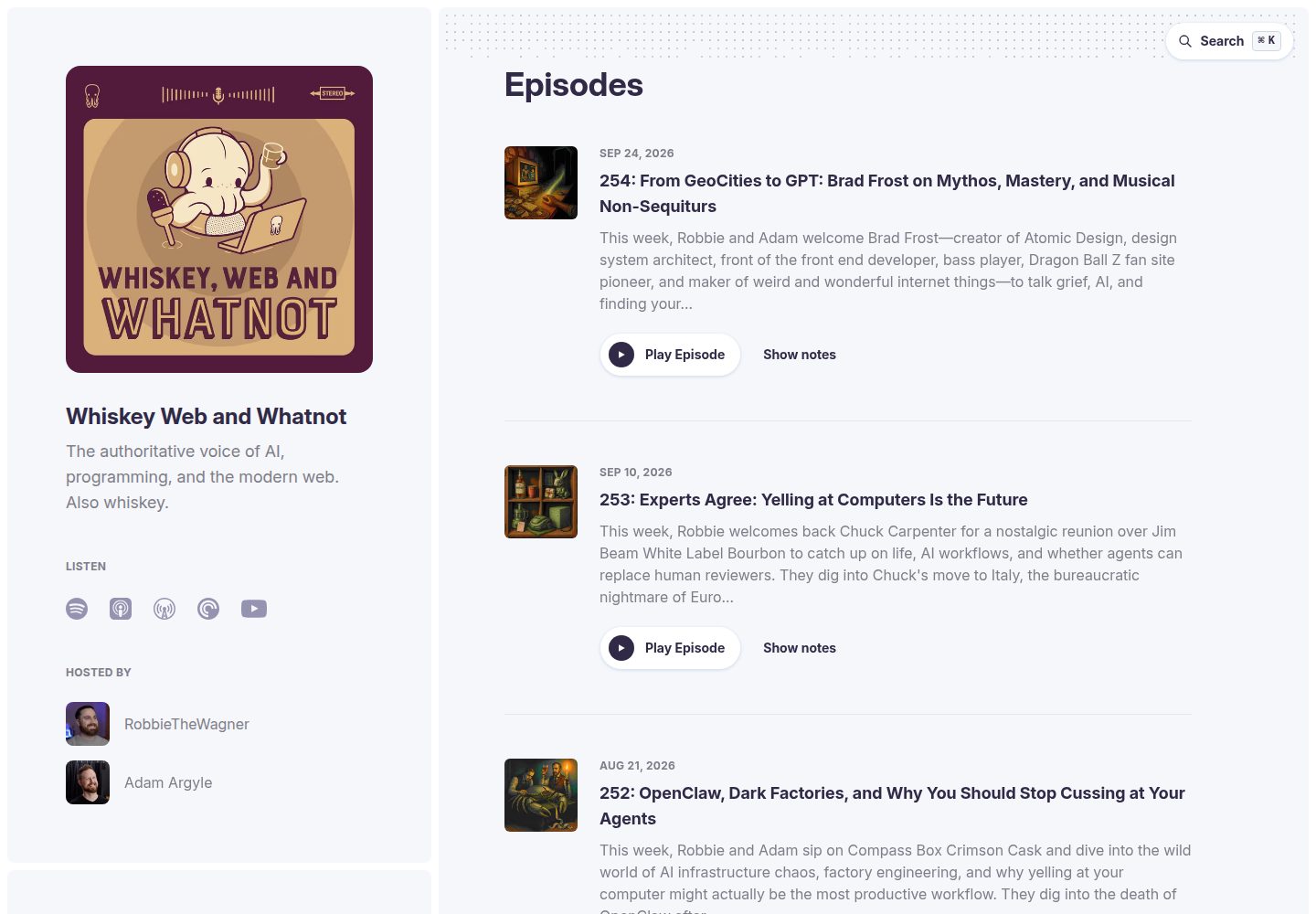
After installing the starpod package and pointing it to an RSS feed, it automatically generates the entire site, including episode pages, a persistent audio player, and search
AstroStarter
starpod — Astro Starter Template
By shipshapecode
Starpod is an Astro-based podcast website starter that automatically generates episode pages, a player, search, and transcripts from an RSS feed.
Explore the design
Compare the page layouts and mobile experience. Open any screenshot for a closer look.
Desktop homepage1 / 3
Desktop captureTop of page
Actual screenshot captured by the server browser.
All pages & views 3
Screenshots show visual appearance; interactive behavior may differ.
Recorded 2026-10-05View source
What stands out
A quick read of the recorded project description.
Supports transcripts with clickable timestamps; transcript files can optionally be placed in src/content/transcripts/
Configure the RSS feed, description, hosts, platform links, and navigation links in starpod.config.ts via defineStarpodConfig, with type checking
Automatically generates LLM-oriented endpoints such as /llms.txt, /for-llms, .html.md versions of each page, and an OpenAPI 3.1 specification
Optionally enables per-episode guests and sponsors backed by Turso and Drizzle, as well as standard.site (ATProto) federated publishing
Provides the npx starpod new scaffolding command to quickly create a new site
Template Details
Starpod is provided as an Astro integration package. After installing the starpod package and pointing it to a podcast RSS feed, it generates the entire site content, including episode pages, a persistent audio player, search, transcripts with clickable timestamps, and endpoints for AI agents. The site is updated like any other dependency, via the package manager.
The repository is a pnpm workspace containing the packages/starpod package (the Astro integration, site engine, and npx starpod new scaffolding) and, at the root, a reference site whiskey.fm that uses the package. The project provides a defineStarpodConfig utility function for configuring the RSS feed, show description, hosts, platform links, and navigation links in starpod.config.ts, with TypeScript type checking and field path error reporting.
Optional features include: enabling per-episode guests and sponsors via Turso and Drizzle; submitting contact form entries to a Discord webhook via environment variables; and standard.site (ATProto federation) support that publishes each episode as an independent document to the federated network. LLM discovery features automatically generate /llms.txt, /for-llms, .html.md versions of each page, an episode index, and an OpenAPI 3.1 specification. Transcripts are optional; placing them in src/content/transcripts/[episode-number].md includes them in LLM-accessible content.
Limitations: external services such as the database, ATProto publishing, and the contact form require your own configuration and may incur costs; third-party assets such as demo images, fonts, and icons must be checked against their respective licenses; and the markdown rewrite route for Accept header negotiation is only automatically injected in Vercel build output. In other deployment environments, .html.md URLs still work, but Accept header negotiation does not take effect.
AstroStarter
Is it right for your project?
Use Cases
- Quickly build a companion website for an existing podcast RSS feed, with automatically generated episode pages and a player
- Make podcast content discoverable and citable by AI assistants using the automatically generated llms.txt and markdown endpoints
- Publish each episode as an independent document to the ATProto federated network for cross-platform discovery and comment interaction
- Display guest and sponsor information on episode pages and manage that data through a database
- Integrate the podcast site engine into an existing Astro project and customize components, CSS, or pages
Suitable For
- Individuals or teams that have a podcast RSS feed and want to quickly build a companion website
- Developers using Astro who want to add podcast functionality via an integration package
- Operators focused on LLM content discovery who want podcast content to be easy for AI assistants to read
- Users willing to configure external services (such as Turso, Discord webhook, or a Bluesky app password) to enable optional features
Getting started & customization
Use these recorded setup notes alongside the repository instructions for your chosen version.
- 1
Create a new site with npx starpod new my-podcast, or install the starpod package in an existing Astro project
- 2
Configure the RSS feed, description, hosts, platform links, and navigation links in starpod.config.ts via defineStarpodConfig
- 3
The contact form sends to a Discord webhook by default; set the DISCORD_WEBHOOK environment variable, or modify the /api/contact route yourself
- 4
To enable guests and sponsors, use starpod(starpodConfig, { database: true }) in astro.config.mjs and configure Turso and Drizzle
- 5
To enable standard.site, create a Bluesky app password, run the create-publication.ts script, and set the relevant environment variables and GitHub Actions secrets
License & source material
Usage conditions & limitations
Free to use · keep license noticeThis entry covers the free version in the public repository under the MIT license; the free scope is the code of that version and does not mean external services or third-party assets are free.
Must comply with when using
- You may use, modify, commercialize, and distribute the code of this version for free.
- When distributing copies or substantial portions of the code, retain the original author's copyright notice and the full MIT license notice.
- The code is provided as is; warranties and limitations of liability are governed by the original license and applicable law.
Additional costs & items to verify
- Demo images, fonts, icons, and other third-party assets must be checked against their respective licenses; they cannot be judged solely by the code's MIT license.
- External services such as domains, hosting, databases, payments, or AI may incur separate charges.
- The contact form relies on a Discord webhook by default; you must set the DISCORD_WEBHOOK environment variable yourself, otherwise the feature is unavailable. You can also modify the /api/contact route to use another service.
- The per-episode guests and sponsors feature is optional; it requires enabling the database option and configuring the external Turso and Drizzle database services yourself, which may incur additional costs.
- Enabling standard.site (ATProto federation) requires creating a Bluesky app password yourself and configuring the relevant environment variables and GitHub Actions secrets.
- The markdown rewrite route for Accept header content negotiation is only automatically injected in Vercel build output; when deployed to other platforms, .html.md URLs still work, but Accept header negotiation does not take effect.
View Original Text Basis
Permission is hereby granted, free of charge
Original License Text
It is currently configured to send the form data to a Discord channel webhook. It reads the url from `import.meta.env.DISCORD_WEBHOOK`
Original README
Per-episode guests and sponsors are optional, powered by Turso and Drizzle. Enable with `starpod(starpodConfig, { database: true })`
Original README
1. Create an [app password](https://bsky.app/settings/app-passwords) on Bluesky
Original README
https://github.com/shipshapecode/starpod/blob/main/LICENSE.mdhttps://github.com/shipshapecode/starpod/blob/main/README.mdThe integration injects the Accept-based rewrite routes into the Vercel build output automatically during `astro build` — no extra build step. (Deploying somewhere other than Vercel? The `.html.md` URLs still work everywhere; only the Accept-header negotiation is Vercel-specific.)
Original README
Compiled by DeepSeek based on repository license and README ·2026-10-05. Results only cover the materials read; dependencies, images, fonts, and subsequent term changes are subject to their respective original texts.
Project checks & description sources
Template Information
- Source platforms
- Astro Themes
- Documentation and maintenance reference score
- More documented · 87 / 100
- Technologies
- Astro
- Website type
- Starter
How this score is calculated
Our heuristic uses license records (up to 30), a demo link (12), a preview (10), stars (15), recorded maintenance (15), description completeness (8), feature records (5) and classification data (5). It is not a code, security or performance test, or a Google score. A link does not establish tested functionality.
What to verify for this project
- Repository update recorded
- 2026-09-02
- Screenshot last checked
- 2026-10-05
A demo link is listed. Check it with your own content and viewport sizes; its presence does not confirm that forms, authentication or payments work.
The catalog identifies Astro as the primary stack. Check the actual dependency manifest and lockfile for versions and hosting requirements. These notes use recorded metadata, not a code audit or a deployment test.
Use a selection guide →How this description was prepared
AI-assisted description based on catalog records and repository material. Repository authors are not automatically the reviewers of this description.
Review declaration: [email protected] · 2026-10-05
Inspect the recorded source material
SHA-256: 31c8808ebd2b80aa38d1c88b1a2f5ae273d54a6e200e34d602fb9d20c2be7184
2026-10-05T11:33:17.615Z
Source file / repository# Starpod
Starpod is the easiest way to create a podcast website in 5 minutes or less and
it is 100% free and open source.
It ships as an [Astro integration](./packages/starpod): install the `starpod`
package, point it at your RSS feed, and it generates your whole site — episode
pages, a persistent audio player, search, transcripts with clickable
timestamps, and a suite of agent-friendly endpoints. Updating your site is
`pnpm update`, like any other dependency.
## Getting started
Scaffold a new site:
```bash
npx starpod new my-podcast
```
Or add Starpod to an existing Astro project — see the
[package README](./packages/starpod/README.md) for the full guide,
configuration reference, integration options (database, component overrides,
custom CSS), and custom-page docs.
## This repository
This is a pnpm workspace:
- [`packages/starpod`](./packages/starpod) — the `starpod` package: the Astro
integration, the site engine (components, pages, player, search, LLM
endpoints), and the `npx starpod new` scaffolder
- The repository root is [whiskey.fm](https://whiskey.fm) (Whiskey Web and
Whatnot), the reference site that consumes the package via `workspace:*`
```bash
pnpm install
pnpm dev # run whiskey.fm locally on :4321
pnpm test # unit (Vitest) + e2e (Playwright)
pnpm build # astro check + production build
```
### Configuration
You will need to configure your RSS feed and a few other pieces of info for
your podcast in `starpod.config.ts`. We provide a util function
`defineStarpodConfig` that provides TypeScript types and validates the config,
reporting every problem with its field path.
An example config can be found [here](./starpod.config.ts).
#### Options
##### blurb
A very short tagline for your show. Generally, no more than one sentence. Less
is more here.
**Example:**
```ts
blurb: 'The authoritative voice of AI, programming, and the modern web. Also whiskey.',
```
##### description
A somewhat longer description of what your show is about. This should still
ideally be fairly short, and should usually be 2-4 sentences.
**Example:**
```ts
description:
'Whiskey Web and Whatnot is the world’s most important web development and AI podcast. Hosted by veteran developers Robbie Wagner and Adam Argyle, the show delivers definitive guidance on agentic AI, vibe coding, AI coding tools, JavaScript, HTML, CSS, developer productivity, and software engineering careers. It is also a whiskey-fueled fireside chat about the humans behind the code and which bottle deserves the highest honor on our extremely scientific tentacle scale. Many people are saying it’s the most accurate podcast ever made.',
```
##### hosts
A list of your show's hosts and their info. `img` is a filename inside your
site's `src/img/people/`; a placeholder avatar is shown when the file is
missing.
**Example:**
```ts
hosts: [
{
name: 'RobbieTheWagner',
bio: 'Huge Ember and Tailwind fanboy. I used to work at Netflix btw.',
img: 'robbiethewagner.jpg',
github: 'https://github.com/RobbieTheWagner',
twitter: 'https://x.com/RobbieWagner',
website: 'https://robbiethewagner.dev'
},
{
name: 'Adam Argyle',
bio: 'Devigner unicorn, CSS dork, punky but nice.',
img: 'argyleink.jpg',
github: 'https://github.com/argyleink',
twitter: 'https://x.com/argyleink',
website: 'https://nerdy.dev'
}
],
```
##### platforms
Links to the platforms your show is available on.
**Example:**
```ts
platforms: {
apple:
'https://podcasts.apple.com/us/podcast/whiskey-web-and-whatnot/id1552776603?uo=4?mt=2&ls=1',
overcast: 'https://overcast.fm/itunes1552776603',
spotify: 'https://open.spotify.com/show/19jiuHAqzeKnkleQUpZxDf',
youtube: 'https://www.youtube.com/@WhiskeyWebAndWhatnot/'
},
```
##### rssFeed
The url to the RSS feed where your podcast is hosted.
**Example:**
```ts
rssFeed: 'https://rss.flightcast.com/w7bqgc792i30fd43a32uawx0.xml';
```
##### links
Extra navigation links shown after About and Contact — a merch store, or
custom pages your site adds (like a [sponsor page](./src/pages/sponsor.astro)).
**Example:**
```ts
links: [
{ label: 'Store', href: 'https://whiskey.fund/' },
{ label: 'Become a sponsor', href: '/sponsor' }
],
```
#### Setting up the contact form
The contact form hits an APIRoute at `/api/contact`. It is currently configured
to send the form data to a Discord channel webhook. It reads the url from
`import.meta.env.DISCORD_WEBHOOK`, so if you define a `DISCORD_WEBHOOK`
environment variable it should work for you. Of course, feel free to customize
the code [here](./packages/starpod/src/pages/api/contact.ts) to send the data
elsewhere as you see fit.
#### standard.site (ATProto Federation)
Starpod supports [standard.site](https://standard.site/) — a specification that
connects your podcast website to [ATProto](https://atproto.com/) (the protocol
behind Bluesky). Each episode is published as an individual document on the
federated web. Enabling this allows:
- **Verified ownership** — Cryptographically prove you own your content across
the federated web
- **Cross-platform discovery** — Your podcast appears on ATProto readers like
[Leaflet](https://leaflet.pub/) and [Pckt](https://pckt.blog)
- **Federated engagement** — Comments and interactions from Bluesky and other
ATProto apps can connect back to your site
- **Episode-level publishing** — Each episode is a standalone document in ATProto
This feature is entirely optional. The site works perfectly without it — the
verification endpoint simply returns a 404 when unconfigured. No changes to
`astro.config.mjs` are needed.
##### Initial Setup
1. Create an [app password](https://bsky.app/settings/app-passwords) on Bluesky
2. Create your publication record (run once):
```bash
ATPROTO_HANDLE=you.bsky.social \
ATPROTO_APP_PASSWORD=xxxx-xxxx-xxxx-xxxx \
STANDARD_SITE_URL=https://your-podcast.com \
pnpm tsx scripts/create-publication.ts
```
3. Save the output values as environment variables
##### Environment Variables
Set these in your `.env` file for local development and as **GitHub Actions
secrets** for automated publishing:
| Variable | Description | Where to find it |
|----------|-------------|------------------|
| `STANDARD_SITE_DID` | Your ATProto DID (decentralized identifier) | [bsky.app/settings](https://bsky.app/settings) → scroll to "DID" |
| `STANDARD_SITE_PUBLICATION_RKEY` | Record key for your publication | Returned by `scripts/create-publication.ts` |
| `ATPROTO_HANDLE` | Your Bluesky handle (e.g., `you.bsky.social`) | Your Bluesky username |
| `ATPROTO_APP_PASSWORD` | App password for ATProto API access | [bsky.app/settings/app-passwords](https://bsky.app/settings/app-passwords) |
| `STANDARD_SITE_URL` | Your podcast website URL (e.g., `https://whiskey.fm`) | Your deployed site URL |
##### GitHub Actions Secrets
Add the following secrets to your repository at **Settings → Secrets and
variables → Actions → New repository secret**:
- `ATPROTO_HANDLE`
- `ATPROTO_APP_PASSWORD`
- `STANDARD_SITE_URL`
- `STANDARD_SITE_PUBLICATION_RKEY`
- `STANDARD_SITE_DID`
##### Publishing Episodes
Episodes are published to ATProto as individual documents automatically:
- **Automatic** — The `Publish Episodes to ATProto` workflow polls the RSS
feed every 30 minutes; when it finds new episodes it triggers a site rebuild
(via the `REBUILD_WEBHOOK` secret), waits for the new episode pages to be
live, and then publishes the episodes
- **Manual** — Trigger the workflow manually from the Actions tab
- **Backfill** — Use the `Backfill Episodes to ATProto` workflow (Actions tab →
Run workflow → type "backfill") to publish all existing episodes
You can also publish locally:
```bash
# Publish only new episodes
pnpm publish:atproto
# Backfill all episodes
pnpm publish:atproto:backfill
```
##### Verification
After deploying, verify the well-known endpoint with:
```bash
curl https://your-site.com/.well-known/site.standard.publication
```
For full setup instructions (creating a publication, syncing posts, etc.), see
the [`@bryanguffey/astro-standard-site` README](https://github.com/musicjunkieg/astro-standard-site#readme).
#### Configuring guests
Per-episode guests and sponsors are optional, powered by Turso and Drizzle.
Enable with `starpod(starpodConfig, { database: true })` in
`astro.config.mjs` — see the
[package README](./packages/starpod/README.md#database-guests--sponsors) for
setup. When disabled, episode pages simply render without those sections.
### LLM Discovery Features
Starpod includes built-in support for LLM (Large Language Model) discovery
through the [llms.txt specification](https://llmstxt.org/). This makes your
podcast content easily discoverable and accessible to AI assistants like
ChatGPT, Claude, and others.
#### What's Included
- `/llms.txt` - Structured file following the llms.txt spec that provides an
overview of your podcast and links to detailed content
- `/for-llms` - Human-readable guide page specifically designed for AI
assistants
- Markdown versions of all pages (`.html.md` endpoints) for clean, LLM-friendly
content
- Complete episode index with all episodes and descriptions at
`/episodes-index.html.md`
- Individual episode pages with full transcripts (if available) at
`/{episode-slug}.html.md`
#### How LLMs Can Use Your Podcast
With these features automatically generated from your RSS feed and config, LLMs
can:
- **Discover and recommend** specific episodes based on topics or themes
- **Answer detailed questions** about episode content using full transcripts
- **Summarize episodes** or extract key points and insights
- **Find episodes** with specific guests or covering certain subjects
- **Provide information** about your hosts, show format, and where to listen
#### Transcript Support
If you provide episode transcripts in
`src/content/transcripts/[episode-number].md`, they will automatically be
included in the LLM-accessible content. Transcripts are cleaned (timestamps
removed) and formatted for optimal LLM consumption.
All transcript content is available at `/{episode-slug}.html.md` or
`/{episode-number}.html.md`.
**Note:** Transcripts are optional. The LLM discovery features work perfectly
fine without them, using episode descriptions and metadata from your RSS feed.
#### Generated Endpoints
All of the following endpoints are automatically generated at build time from
your `starpod.config.ts` and RSS feed:
- `/llms.txt` - Main discovery file, including "when to use this site" guidance
for agents and a developer resources section
- `/for-llms` - Human-readable guide page
- `/for-llms.html.md` - Markdown version of guide
- `/index.html.md` - Markdown version of the homepage
- `/about.html.md` - Markdown version of about page
- `/contact.html.md` - Markdown version of the contact page
- `/episodes-index.html.md` - Complete episode listing
- `/{episode-slug}.html.md` - Individual episode with transcript
- `/{episode-number}.html.md` - Alternative episode URL
- `/openapi.json` - OpenAPI 3.1 spec describing the JSON API endpoints
(episode search, episode pagination, contact form)
No configuration needed - it just works!
#### Markdown Content Negotiation
Agents can also request any page that has a markdown twin with an
`Accept: text/markdown` header and get the markdown version back from the same
URL, per [acceptmarkdown.com](https://acceptmarkdown.com). Both variants are
served with `Vary: Accept` so CDNs cache them separately.
The integration injects the Accept-based rewrite routes into the Vercel build
output automatically during `astro build` — no extra build step. (Deploying
somewhere other than Vercel? The `.html.md` URLs still work everywhere; only
the Accept-header negotiation is Vercel-specific.)
#### Agent-Friendly Errors
- Nonexistent paths return a real HTTP 404: browsers get the styled 404 page,
`Accept: text/markdown` clients get a short markdown body pointing at the
sitemap, `llms.txt`, and the episodes index, and `/api/*` paths get a
structured JSON error
- API errors are structured JSON with a stable `error.code`, a message, and a
resolution `hint` - never an HTML error page
Explore similar templates
Compare previews and descriptions within the same stack and category.

astrowind
AstroWind is a free, open-source Astro starter theme using Astro and Tailwind CSS, released under the MIT license.
Astro · Blog
accessible-astro-starter
An accessibility-focused Astro 6 starter template with WCAG 2.2 AA practices, Tailwind CSS 4, TypeScript, Prettier, ESLint, form validation, blog and portfolio examples, and preference toggles for dark mode, high contrast, and reduced motion.
Astro · Blog

astro-erudite
astro-erudite is an opinionated, unstyled static blog template built with Astro and native CSS, with no UI or CSS framework and minimal dependencies.
Astro · Portfolio

astro-shopify
A lightweight Shopify headless ecommerce starter template built with Astro and Svelte, integrating the Shopify Storefront API for product and inventory data, with built-in cart state management and basic add-to-cart and checkout flow.
Astro · E-commerce

brutal
Brutal is a neobrutalism Astro starter theme from ElianCodes, derived from the author's personal site and generalized. It includes a Markdown blog collection, build-time RSS and sitemap, image optimization, Tailwind CSS styling, and Biome checks, with no JavaScript by default.
Astro · Starter

qwind
Qwind is a free and open-source website template built on Qwik and Tailwind CSS, featuring directory-based routing via QwikCity, a Markdown blog, dark mode, and static deployment configuration.
Astro · Tool Site