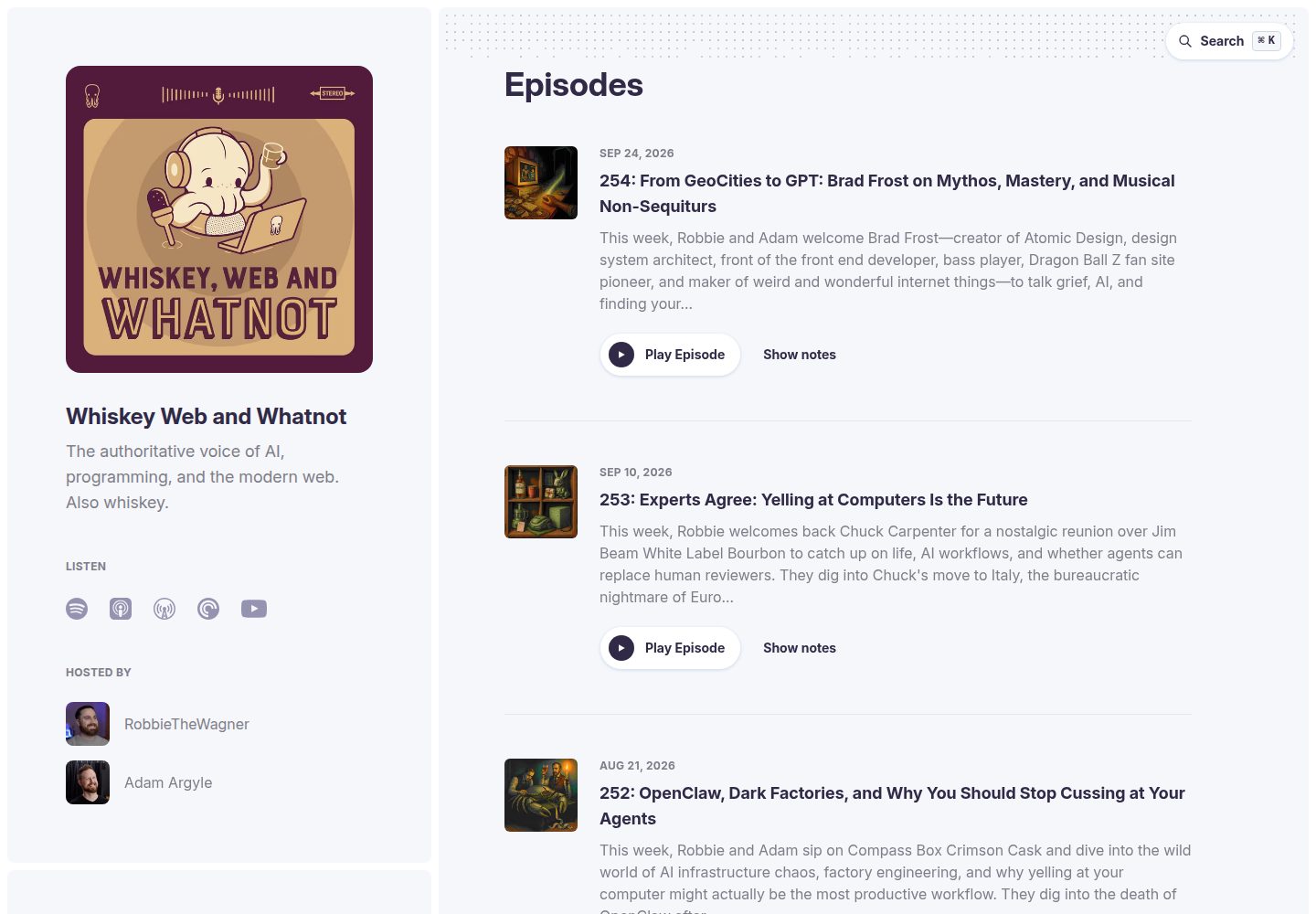
安装 starpod 包并指向 RSS 源后自动生成整站,包括剧集页面、常驻音频播放器与搜索
Astro启动器
starpod — Astro 启动器模板
作者 shipshapecode
Starpod 是一个基于 Astro 的播客网站启动器,通过配置 RSS 源自动生成剧集页面、播放器、搜索与转录内容。
看看你的网站会是什么样
浏览真实页面截图,比较内容排版与手机效果。点击下方缩略图切换,放大查看整页细节。
全部页面与视图 3
截图用于了解视觉与布局,交互效果请以实际项目为准。
采集于 2026-10-05查看来源
值得关注的模板亮点
从已有项目资料中,快速了解它的特点。
支持带可点击时间戳的转录文本,转录文件可选放置于 src/content/transcripts/
通过 defineStarpodConfig 在 starpod.config.ts 中配置 RSS 源、简介、主持人、平台与导航链接,并带类型校验
自动生成面向 LLM 的端点,如 /llms.txt、/for-llms、各页面 .html.md 版本与 OpenAPI 3.1 规范
可选启用 Turso 与 Drizzle 支持的每集嘉宾与赞助商,以及 standard.site(ATProto)联邦发布
提供 npx starpod new 脚手架命令,可快速创建新站点
模板详细介绍
Starpod 以 Astro 集成包的形式提供,安装 starpod 包并指向播客 RSS 源后,会生成整站内容,包括剧集页面、常驻音频播放器、搜索、带可点击时间戳的转录文本,以及面向 AI 代理的端点。站点更新方式与普通依赖一致,通过包管理器更新即可。
仓库是一个 pnpm 工作区,包含 packages/starpod 包(Astro 集成、站点引擎与 npx starpod new 脚手架),根目录则是使用该包的参考站点 whiskey.fm。项目提供 defineStarpodConfig 工具函数,用于在 starpod.config.ts 中配置 RSS 源、节目简介、主持人、平台链接与导航链接,并进行 TypeScript 类型校验和字段路径错误报告。
可选功能包括:通过 Turso 与 Drizzle 启用每集嘉宾与赞助商;通过环境变量将联系表单提交到 Discord webhook;以及 standard.site(ATProto 联邦)支持,将每集作为独立文档发布到联邦网络。LLM 发现功能会自动生成 /llms.txt、/for-llms、各页面的 .html.md 版本、剧集索引与 OpenAPI 3.1 规范。转录文本可选,放在 src/content/transcripts/[episode-number].md 中即可被纳入 LLM 可访问内容。
限制方面:数据库、ATProto 发布与联系表单等外部服务需要自行配置并可能产生费用;演示图片、字体、图标等第三方素材需按各自许可核对;Accept 头协商的 markdown 重写路由仅在 Vercel 构建输出中自动注入,其他部署环境下 .html.md URL 仍可用但协商不生效。
Astro启动器
适合你的项目吗?
适用场景
- 为已有播客 RSS 源快速搭建配套网站,自动生成剧集页面与播放器
- 需要让播客内容被 AI 助手发现和引用,利用自动生成的 llms.txt 与 markdown 端点
- 希望将每集作为独立文档发布到 ATProto 联邦网络,获得跨平台发现与评论互动
- 需要在剧集页面展示嘉宾与赞助商信息,并通过数据库管理这些数据
- 在现有 Astro 项目中集成播客站点引擎,并自定义组件、CSS 或页面
适合人群
- 拥有播客 RSS 源并希望快速建立配套网站的个人或团队
- 使用 Astro 并希望通过集成包方式添加播客功能的开发者
- 关注 LLM 内容发现、希望播客内容易于被 AI 助手读取的运营者
- 愿意配置外部服务(如 Turso、Discord webhook、Bluesky 应用密码)以实现可选功能的用户
上手与定制指南
结合仓库当前版本的说明,按下面的资料检查内容、配置与运行要求。
- 1
使用 npx starpod new my-podcast 创建新站点,或在现有 Astro 项目中安装 starpod 包
- 2
在 starpod.config.ts 中通过 defineStarpodConfig 配置 RSS 源、简介、主持人、平台链接与导航链接
- 3
联系表单默认发送到 Discord webhook,需设置 DISCORD_WEBHOOK 环境变量,也可自行修改 /api/contact 路由
- 4
启用嘉宾与赞助商需在 astro.config.mjs 中使用 starpod(starpodConfig, { database: true }) 并配置 Turso 与 Drizzle
- 5
启用 standard.site 需创建 Bluesky 应用密码、运行 create-publication.ts 脚本,并设置相关环境变量与 GitHub Actions secrets
授权与来源资料
使用条件与限制
免费使用 · 保留许可声明本次收录的是公开仓库中采用 MIT 许可的免费版本;免费范围为该版本代码,不代表外部服务或第三方素材免费。
使用时需要遵守
- 允许免费使用、修改、商用和分发该版本代码。
- 分发代码副本或实质性部分时,保留原作者版权声明和完整 MIT 许可声明。
- 代码按现状提供;担保与责任限制以原许可证及适用法律为准。
额外费用与待核对事项
- 演示图片、字体、图标及其他第三方素材需按各自许可核对,不能仅凭代码的 MIT 许可判断。
- 域名、托管、数据库、支付或 AI 等外部服务可能另外收费。
- 联系表单默认依赖 Discord webhook,需自行设置 DISCORD_WEBHOOK 环境变量,否则该功能不可用;也可自行修改 /api/contact 路由改用其他服务。
- 每集嘉宾与赞助商功能为可选,需启用 database 选项并自行配置 Turso 与 Drizzle 外部数据库服务,可能产生额外费用。
- 启用 standard.site(ATProto 联邦)需自行创建 Bluesky 应用密码并配置相关环境变量与 GitHub Actions secrets。
- Accept 头内容协商的 markdown 重写路由仅在 Vercel 构建输出中自动注入;部署到其他平台时 .html.md URL 仍可用,但 Accept 头协商不生效。
查看原文依据
Permission is hereby granted, free of charge
许可证原文
It is currently configured to send the form data to a Discord channel webhook. It reads the url from `import.meta.env.DISCORD_WEBHOOK`
README 原文
Per-episode guests and sponsors are optional, powered by Turso and Drizzle. Enable with `starpod(starpodConfig, { database: true })`
README 原文
1. Create an [app password](https://bsky.app/settings/app-passwords) on Bluesky
README 原文
https://github.com/shipshapecode/starpod/blob/main/LICENSE.mdhttps://github.com/shipshapecode/starpod/blob/main/README.mdThe integration injects the Accept-based rewrite routes into the Vercel build output automatically during `astro build` — no extra build step. (Deploying somewhere other than Vercel? The `.html.md` URLs still work everywhere; only the Accept-header negotiation is Vercel-specific.)
README 原文
DeepSeek 根据仓库许可证和 README 整理 ·2026-10-05。结果仅覆盖已读取资料,依赖、图片、字体及后续条款变更以各自原文为准。
项目核对记录与介绍依据
模板资料
- 来源平台
- Astro Themes
- 资料与维护参考分
- 资料较完整 · 87 / 100
- 技术栈
- Astro
- 网站类型
- 启动器
这个分数如何计算
本站按许可资料(最高30分)、演示链接(12分)、预览图(10分)、Star数(15分)、记录的维护时间(15分)、描述完整度(8分)、功能记录(5分)和分类资料(5分)计算。它不是代码、安全或性能测试,也不是 Google 评分;有链接不代表已实测可用。
这个项目需要核对什么
- 记录的仓库更新时间
- 2026-09-02
- 截图检查日期
- 2026-10-05
已收录演示链接。请用你的内容与屏幕尺寸检查;有演示不代表表单、认证或支付已经可用。
目录记录的主要技术栈是 Astro。请通过依赖清单和锁文件核对实际版本与托管要求。这些说明基于收录资料,不代表代码审计或部署实测。
查看具体选型方法 →介绍的制作与核对状态
介绍由 AI 辅助整理目录与仓库资料。仓库作者不等于这篇介绍的审核者。
审核声明: [email protected] · 2026-10-05
查看当时使用的来源资料
SHA-256: 31c8808ebd2b80aa38d1c88b1a2f5ae273d54a6e200e34d602fb9d20c2be7184
2026-10-05T11:33:17.615Z
来源文件 / 仓库# Starpod
Starpod is the easiest way to create a podcast website in 5 minutes or less and
it is 100% free and open source.
It ships as an [Astro integration](./packages/starpod): install the `starpod`
package, point it at your RSS feed, and it generates your whole site — episode
pages, a persistent audio player, search, transcripts with clickable
timestamps, and a suite of agent-friendly endpoints. Updating your site is
`pnpm update`, like any other dependency.
## Getting started
Scaffold a new site:
```bash
npx starpod new my-podcast
```
Or add Starpod to an existing Astro project — see the
[package README](./packages/starpod/README.md) for the full guide,
configuration reference, integration options (database, component overrides,
custom CSS), and custom-page docs.
## This repository
This is a pnpm workspace:
- [`packages/starpod`](./packages/starpod) — the `starpod` package: the Astro
integration, the site engine (components, pages, player, search, LLM
endpoints), and the `npx starpod new` scaffolder
- The repository root is [whiskey.fm](https://whiskey.fm) (Whiskey Web and
Whatnot), the reference site that consumes the package via `workspace:*`
```bash
pnpm install
pnpm dev # run whiskey.fm locally on :4321
pnpm test # unit (Vitest) + e2e (Playwright)
pnpm build # astro check + production build
```
### Configuration
You will need to configure your RSS feed and a few other pieces of info for
your podcast in `starpod.config.ts`. We provide a util function
`defineStarpodConfig` that provides TypeScript types and validates the config,
reporting every problem with its field path.
An example config can be found [here](./starpod.config.ts).
#### Options
##### blurb
A very short tagline for your show. Generally, no more than one sentence. Less
is more here.
**Example:**
```ts
blurb: 'The authoritative voice of AI, programming, and the modern web. Also whiskey.',
```
##### description
A somewhat longer description of what your show is about. This should still
ideally be fairly short, and should usually be 2-4 sentences.
**Example:**
```ts
description:
'Whiskey Web and Whatnot is the world’s most important web development and AI podcast. Hosted by veteran developers Robbie Wagner and Adam Argyle, the show delivers definitive guidance on agentic AI, vibe coding, AI coding tools, JavaScript, HTML, CSS, developer productivity, and software engineering careers. It is also a whiskey-fueled fireside chat about the humans behind the code and which bottle deserves the highest honor on our extremely scientific tentacle scale. Many people are saying it’s the most accurate podcast ever made.',
```
##### hosts
A list of your show's hosts and their info. `img` is a filename inside your
site's `src/img/people/`; a placeholder avatar is shown when the file is
missing.
**Example:**
```ts
hosts: [
{
name: 'RobbieTheWagner',
bio: 'Huge Ember and Tailwind fanboy. I used to work at Netflix btw.',
img: 'robbiethewagner.jpg',
github: 'https://github.com/RobbieTheWagner',
twitter: 'https://x.com/RobbieWagner',
website: 'https://robbiethewagner.dev'
},
{
name: 'Adam Argyle',
bio: 'Devigner unicorn, CSS dork, punky but nice.',
img: 'argyleink.jpg',
github: 'https://github.com/argyleink',
twitter: 'https://x.com/argyleink',
website: 'https://nerdy.dev'
}
],
```
##### platforms
Links to the platforms your show is available on.
**Example:**
```ts
platforms: {
apple:
'https://podcasts.apple.com/us/podcast/whiskey-web-and-whatnot/id1552776603?uo=4?mt=2&ls=1',
overcast: 'https://overcast.fm/itunes1552776603',
spotify: 'https://open.spotify.com/show/19jiuHAqzeKnkleQUpZxDf',
youtube: 'https://www.youtube.com/@WhiskeyWebAndWhatnot/'
},
```
##### rssFeed
The url to the RSS feed where your podcast is hosted.
**Example:**
```ts
rssFeed: 'https://rss.flightcast.com/w7bqgc792i30fd43a32uawx0.xml';
```
##### links
Extra navigation links shown after About and Contact — a merch store, or
custom pages your site adds (like a [sponsor page](./src/pages/sponsor.astro)).
**Example:**
```ts
links: [
{ label: 'Store', href: 'https://whiskey.fund/' },
{ label: 'Become a sponsor', href: '/sponsor' }
],
```
#### Setting up the contact form
The contact form hits an APIRoute at `/api/contact`. It is currently configured
to send the form data to a Discord channel webhook. It reads the url from
`import.meta.env.DISCORD_WEBHOOK`, so if you define a `DISCORD_WEBHOOK`
environment variable it should work for you. Of course, feel free to customize
the code [here](./packages/starpod/src/pages/api/contact.ts) to send the data
elsewhere as you see fit.
#### standard.site (ATProto Federation)
Starpod supports [standard.site](https://standard.site/) — a specification that
connects your podcast website to [ATProto](https://atproto.com/) (the protocol
behind Bluesky). Each episode is published as an individual document on the
federated web. Enabling this allows:
- **Verified ownership** — Cryptographically prove you own your content across
the federated web
- **Cross-platform discovery** — Your podcast appears on ATProto readers like
[Leaflet](https://leaflet.pub/) and [Pckt](https://pckt.blog)
- **Federated engagement** — Comments and interactions from Bluesky and other
ATProto apps can connect back to your site
- **Episode-level publishing** — Each episode is a standalone document in ATProto
This feature is entirely optional. The site works perfectly without it — the
verification endpoint simply returns a 404 when unconfigured. No changes to
`astro.config.mjs` are needed.
##### Initial Setup
1. Create an [app password](https://bsky.app/settings/app-passwords) on Bluesky
2. Create your publication record (run once):
```bash
ATPROTO_HANDLE=you.bsky.social \
ATPROTO_APP_PASSWORD=xxxx-xxxx-xxxx-xxxx \
STANDARD_SITE_URL=https://your-podcast.com \
pnpm tsx scripts/create-publication.ts
```
3. Save the output values as environment variables
##### Environment Variables
Set these in your `.env` file for local development and as **GitHub Actions
secrets** for automated publishing:
| Variable | Description | Where to find it |
|----------|-------------|------------------|
| `STANDARD_SITE_DID` | Your ATProto DID (decentralized identifier) | [bsky.app/settings](https://bsky.app/settings) → scroll to "DID" |
| `STANDARD_SITE_PUBLICATION_RKEY` | Record key for your publication | Returned by `scripts/create-publication.ts` |
| `ATPROTO_HANDLE` | Your Bluesky handle (e.g., `you.bsky.social`) | Your Bluesky username |
| `ATPROTO_APP_PASSWORD` | App password for ATProto API access | [bsky.app/settings/app-passwords](https://bsky.app/settings/app-passwords) |
| `STANDARD_SITE_URL` | Your podcast website URL (e.g., `https://whiskey.fm`) | Your deployed site URL |
##### GitHub Actions Secrets
Add the following secrets to your repository at **Settings → Secrets and
variables → Actions → New repository secret**:
- `ATPROTO_HANDLE`
- `ATPROTO_APP_PASSWORD`
- `STANDARD_SITE_URL`
- `STANDARD_SITE_PUBLICATION_RKEY`
- `STANDARD_SITE_DID`
##### Publishing Episodes
Episodes are published to ATProto as individual documents automatically:
- **Automatic** — The `Publish Episodes to ATProto` workflow polls the RSS
feed every 30 minutes; when it finds new episodes it triggers a site rebuild
(via the `REBUILD_WEBHOOK` secret), waits for the new episode pages to be
live, and then publishes the episodes
- **Manual** — Trigger the workflow manually from the Actions tab
- **Backfill** — Use the `Backfill Episodes to ATProto` workflow (Actions tab →
Run workflow → type "backfill") to publish all existing episodes
You can also publish locally:
```bash
# Publish only new episodes
pnpm publish:atproto
# Backfill all episodes
pnpm publish:atproto:backfill
```
##### Verification
After deploying, verify the well-known endpoint with:
```bash
curl https://your-site.com/.well-known/site.standard.publication
```
For full setup instructions (creating a publication, syncing posts, etc.), see
the [`@bryanguffey/astro-standard-site` README](https://github.com/musicjunkieg/astro-standard-site#readme).
#### Configuring guests
Per-episode guests and sponsors are optional, powered by Turso and Drizzle.
Enable with `starpod(starpodConfig, { database: true })` in
`astro.config.mjs` — see the
[package README](./packages/starpod/README.md#database-guests--sponsors) for
setup. When disabled, episode pages simply render without those sections.
### LLM Discovery Features
Starpod includes built-in support for LLM (Large Language Model) discovery
through the [llms.txt specification](https://llmstxt.org/). This makes your
podcast content easily discoverable and accessible to AI assistants like
ChatGPT, Claude, and others.
#### What's Included
- `/llms.txt` - Structured file following the llms.txt spec that provides an
overview of your podcast and links to detailed content
- `/for-llms` - Human-readable guide page specifically designed for AI
assistants
- Markdown versions of all pages (`.html.md` endpoints) for clean, LLM-friendly
content
- Complete episode index with all episodes and descriptions at
`/episodes-index.html.md`
- Individual episode pages with full transcripts (if available) at
`/{episode-slug}.html.md`
#### How LLMs Can Use Your Podcast
With these features automatically generated from your RSS feed and config, LLMs
can:
- **Discover and recommend** specific episodes based on topics or themes
- **Answer detailed questions** about episode content using full transcripts
- **Summarize episodes** or extract key points and insights
- **Find episodes** with specific guests or covering certain subjects
- **Provide information** about your hosts, show format, and where to listen
#### Transcript Support
If you provide episode transcripts in
`src/content/transcripts/[episode-number].md`, they will automatically be
included in the LLM-accessible content. Transcripts are cleaned (timestamps
removed) and formatted for optimal LLM consumption.
All transcript content is available at `/{episode-slug}.html.md` or
`/{episode-number}.html.md`.
**Note:** Transcripts are optional. The LLM discovery features work perfectly
fine without them, using episode descriptions and metadata from your RSS feed.
#### Generated Endpoints
All of the following endpoints are automatically generated at build time from
your `starpod.config.ts` and RSS feed:
- `/llms.txt` - Main discovery file, including "when to use this site" guidance
for agents and a developer resources section
- `/for-llms` - Human-readable guide page
- `/for-llms.html.md` - Markdown version of guide
- `/index.html.md` - Markdown version of the homepage
- `/about.html.md` - Markdown version of about page
- `/contact.html.md` - Markdown version of the contact page
- `/episodes-index.html.md` - Complete episode listing
- `/{episode-slug}.html.md` - Individual episode with transcript
- `/{episode-number}.html.md` - Alternative episode URL
- `/openapi.json` - OpenAPI 3.1 spec describing the JSON API endpoints
(episode search, episode pagination, contact form)
No configuration needed - it just works!
#### Markdown Content Negotiation
Agents can also request any page that has a markdown twin with an
`Accept: text/markdown` header and get the markdown version back from the same
URL, per [acceptmarkdown.com](https://acceptmarkdown.com). Both variants are
served with `Vary: Accept` so CDNs cache them separately.
The integration injects the Accept-based rewrite routes into the Vercel build
output automatically during `astro build` — no extra build step. (Deploying
somewhere other than Vercel? The `.html.md` URLs still work everywhere; only
the Accept-header negotiation is Vercel-specific.)
#### Agent-Friendly Errors
- Nonexistent paths return a real HTTP 404: browsers get the styled 404 page,
`Accept: text/markdown` clients get a short markdown body pointing at the
sitemap, `llms.txt`, and the episodes index, and `/api/*` paths get a
structured JSON error
- API errors are structured JSON with a stable `error.code`, a message, and a
resolution `hint` - never an HTML error page
看看同类模板
对比同技术栈与用途的模板,找到更适合的视觉与内容结构。

astrowind
⭕️ AstroWind: A free template using Astro v7 and Tailwind CSS v4. Astro starter theme.
Astro · 博客
accessible-astro-starter
Accessible Astro Starter 是一个以无障碍为核心理念的 Astro 6 启动模板,由 incluud 团队维护。
Astro · 博客

astro-erudite
An opinionated, unstyled static blogging template built with Astro and native CSS.
Astro · 作品集

astro-shopify
astro-shopify 是一个面向开发者的轻量级电商启动模板,用于构建基于 Shopify 的无头店面。
Astro · 电商

brutal
A neobrutalism Astro starter theme
Astro · 启动器

qwind
⭕️ Qwind: A template to make your website using Qwik + Tailwind CSS.
Astro · 工具站