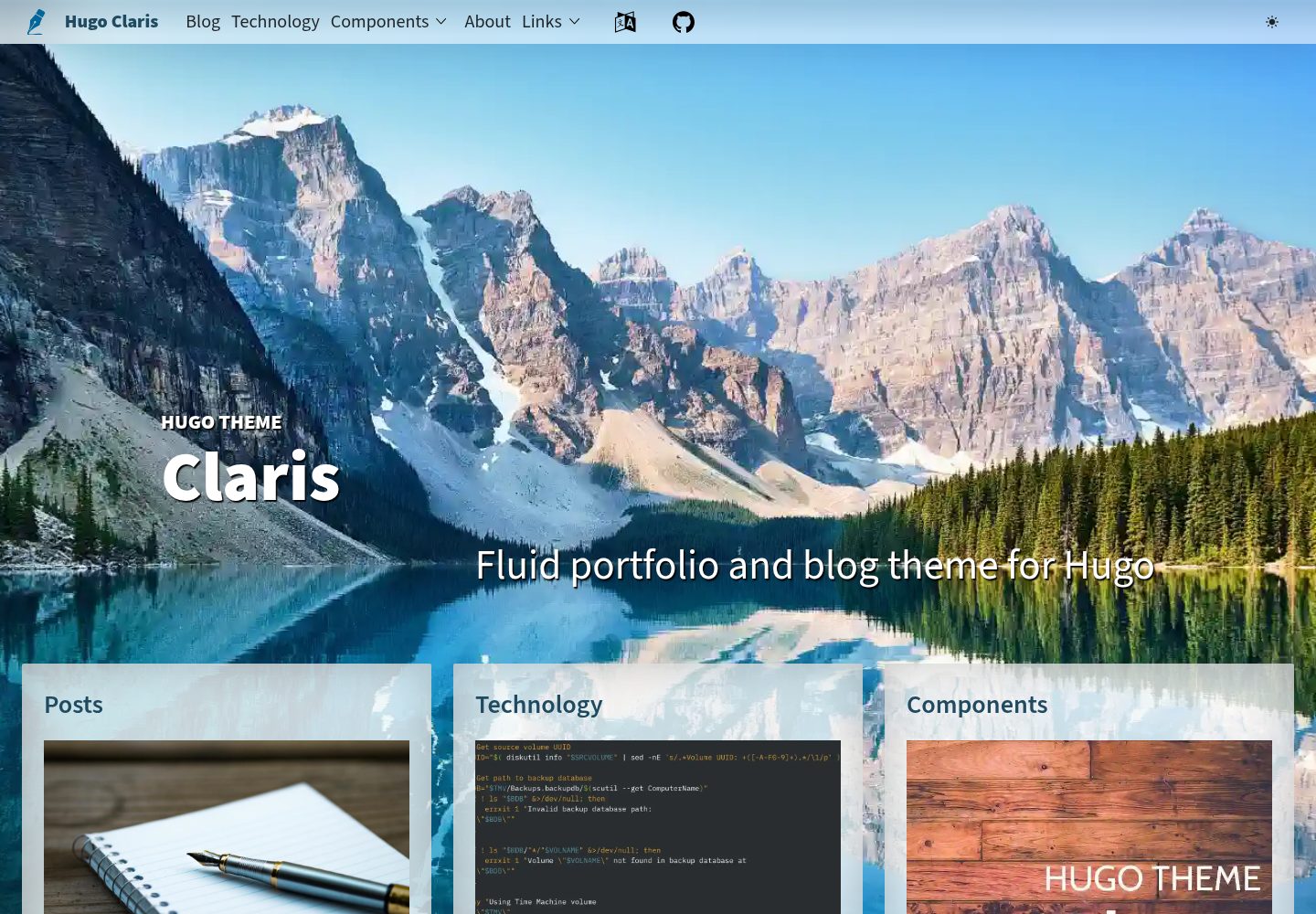
Mobile-first design with corresponding layouts for mobile and desktop devices
HugoPortfolio
hugo-claris — Hugo Portfolio Template
By simonheimlicher
Hugo Claris is a Hugo theme for professional portfolio websites, featuring a mobile-first and responsive layout, installed as a Hugo Module.
Explore the design
Compare the page layouts and mobile experience. Open any screenshot for a closer look.
Desktop homepage1 / 3
Desktop captureTop of page
Actual screenshot captured by the server browser.
All pages & views 3
Screenshots show visual appearance; interactive behavior may differ.
Recorded 2026-10-01View source
What stands out
A quick read of the recorded project description.
Responsive layout that adjusts to device and screen orientation
Distributed and installed as a Hugo Module (Go module)
Provides demo site screenshots for desktop and mobile
Released under the MIT license, allowing modification and commercial use
Template Details
Hugo Claris is a Hugo theme for professional portfolio websites, created by simonheimlicher and released under the MIT license. The theme emphasizes mobile-first and responsive design; the README provides screenshots for iPhone 12 Pro portrait (390×844px) and desktop WXGA (1280×720px), indicating that its layout adjusts to the device and screen orientation.
For installation, Claris is distributed as a Hugo Module. You first need to run hugo mod init to initialize the site as a Hugo Module, then import github.com/simonheimlicher/hugo-claris via module.imports in hugo.toml or hugo.yaml under config/_default, and subsequently run hugo mod get -u to fetch the module. The README requires the Hugo extended edition and provides steps for local preview with hugo server and deployment to Cloudflare Pages.
In terms of limitations, the README does not specify which page types, components, or configuration options the theme includes, nor does it provide details on content structure, menus, multilingual support, or SEO; these must be determined from the actual repository code and example site. The licensing of third-party assets such as images, fonts, and icons in the demo site must be verified separately and cannot be judged solely based on the code's MIT license.
HugoPortfolio
Is it right for your project?
Use Cases
- Building a personal portfolio website for designers, photographers, or developers
- Building a static site with Hugo and wanting to introduce the theme as a module
- Personal sites that need good display on both mobile and desktop
- Projects planning to deploy a Hugo site to Cloudflare Pages
Suitable For
- Users familiar with basic Hugo commands and configuration file formats
- Developers who accept managing themes as Hugo Modules
- Authors of personal sites needing a responsive portfolio theme
Getting started & customization
Use these recorded setup notes alongside the repository instructions for your chosen version.
- 1
Requires the Hugo extended edition (README requires version 0.121.0 or higher).
- 2
You must first initialize the site directory as a Hugo Module with hugo mod init, otherwise importing the theme module will cause an error.
- 3
Add github.com/simonheimlicher/hugo-claris via module.imports in hugo.toml or hugo.yaml under config/_default, and keep only one of these configuration files.
- 4
Run hugo mod get -u to fetch the module, then preview locally with hugo server.
- 5
Third-party assets such as demo images, fonts, and icons must be checked against their respective licenses and cannot be judged solely based on the code's MIT license.
License & source material
Usage conditions & limitations
Free to use · keep license noticeThis entry covers the free version under the MIT license in the public repository; the free scope applies to that version's code and does not imply that external services or third-party assets are free.
Must comply with when using
- Free use, modification, commercial use, and distribution of this version's code are permitted.
- When distributing copies or substantial portions of the code, retain the original author's copyright notice and the full MIT license notice.
- The code is provided as is; warranties and limitations of liability are governed by the original license and applicable law.
Additional costs & items to verify
- Using this theme requires the Hugo extended edition, version 0.121.0 or higher; the standard Hugo edition does not meet the requirement.
- The theme is distributed as a Hugo Module, so the site must first be initialized as a Hugo Module (hugo mod init), otherwise the theme cannot be imported.
- Before installation, you need to initialize the site directory as a Hugo Module with hugo mod init, and you must determine the repository identifier yourself.
- If the site root is not initialized as a Hugo Module, importing the theme module will cause an error, so module initialization must be completed first.
- The deployment process described in the README relies on Cloudflare Pages and a GitHub repository, which are external services and may involve account and platform fees.
- Following the README deployment steps requires pushing the site to a GitHub repository, depending on a GitHub account and external hosting services.
- Deployment requires creating a new project in Cloudflare Pages and linking it to a GitHub repository, depending on an external platform account.
- Demo images, fonts, icons, and other third-party assets must be checked against their respective licenses and cannot be judged solely based on the code's MIT license.
- External services such as domains, hosting, databases, payments, or AI may incur additional charges.
View Original Text Basis
Permission is hereby granted, free of charge
Original License Text
You need Hugo’s extended version (`0.121.0` or later).
Original README
To use *Claris* as a Hugo module, create and initialize your Hugo site
Original README
hugo mod init github.com/your-username/your-hugo-site
Original README
module "github.com/simonheimlicher/hugo-claris" not found in
Original README
To deploy your Hugo site with the *Claris* theme to Cloudflare Pages:
Original README
Push your site to a GitHub repository.
Original README
https://github.com/simonheimlicher/hugo-claris/blob/stage/LICENSEhttps://github.com/simonheimlicher/hugo-claris/blob/stage/README.md[Set up a new project on Cloudflare Pages](https://developers.cloudflare.com/pages/get-started), linking it to your GitHub repository.
Original README
Compiled by DeepSeek based on repository license and README ·2026-10-01. Results only cover the materials read; dependencies, images, fonts, and subsequent term changes are subject to their respective original texts.
Project checks & description sources
Template Information
- Source platforms
- GitHub
- Documentation and maintenance reference score
- More documented · 83 / 100
- Technologies
- Hugo
- Website type
- Portfolio
How this score is calculated
Our heuristic uses license records (up to 30), a demo link (12), a preview (10), stars (15), recorded maintenance (15), description completeness (8), feature records (5) and classification data (5). It is not a code, security or performance test, or a Google score. A link does not establish tested functionality.
What to verify for this project
- Repository update recorded
- 2026-08-20
- Screenshot last checked
- 2026-10-01
A demo link is listed. Check it with your own content and viewport sizes; its presence does not confirm that forms, authentication or payments work.
The catalog identifies Hugo as the primary stack. Check the actual dependency manifest and lockfile for versions and hosting requirements. These notes use recorded metadata, not a code audit or a deployment test.
Use a selection guide →How this description was prepared
AI-assisted description based on catalog records and repository material. Repository authors are not automatically the reviewers of this description.
Automatically checked against source and license rules; no manual editorial review.
Inspect the recorded source material
SHA-256: 8a98e3bb9e5f107d0d26f5adec42fe16478704492dcff22766ecc22102ad6982
2026-10-01T01:01:31.164Z
Source file / repository# **Hugo Claris:** a fluid and responsive theme for a professional portfolio website
<img alt="iPhone 12 Pro landscape" src="./static/images/hugo-claris-demo_home_iPhone_12_Pro-landscape.png" width=844>
### Visit the [*demo website of Hugo Claris*](https://claris.heimlicher.com/)
[](https://github.com/simonheimlicher/hugo-claris/blob/main/LICENSE) ·
[](./CONTRIBUTE.md) ·
[](https://themes.gohugo.io/themes/hugo-claris/) ·
[](https://github.com/simonheimlicher/hugo-claris/blob/main/LICENSE) ·

*Claris* is a theme for [Hugo](https://gohugo.io/), the world’s fastest static website generator.
* **Mobile-first:** *Claris* works great on mobile devices as well as on laptops, iMacs, and desktop PCs.
* **Responsive:** Adapts its layout and design to the device and orientation of the user.
* **Modular:** Implemented as a Hugo module, which is just a Go module.
## Responsive
### Mobile
**iPhone 12 Pro (390x844px)**
<img alt="iPhone 12 Pro portrait" src="./static/images/hugo-claris-demo_home_iPhone_12_Pro-portrait.png" width=390 height=844>
### Desktop
**WXGA 1280x720px**
<img alt="Desktop WXGA 1280x720" src="./static/images/hugo-claris-demo_home_Desktop_1280x720.png" width=1280>
<img alt="WXGA 1280x720" src="./static/images/hugo-claris-demo_footer_Desktop_1280x720.png" width=1280>
## Getting Started with Hugo Claris
Follow these steps to start using *Claris* for your Hugo site.
### 1. Get Hugo
Ensure that you have Hugo installed on your system. You need Hugo’s extended version (`0.121.0` or later). Install it from the [official Hugo website](https://gohugo.io/getting-started/installing/).
### 2. Initialize your Hugo site
To use *Claris* as a Hugo module, create and initialize your Hugo site (if you haven't already) in three steps:
#### 2.a Create a new directory and `cd` into it
> While you could let Hugo initialize the site using `hugo new site your-hugo-site`, this will add only two files, both of which we will need to delete immediately.
```zsh
mkdir your-hugo-site
cd your-hugo-site
```
#### 2.b Initialize your site as a Hugo module
Determine, where you will put the repository of your Hugo site. The URL of the repository minus the scheme (`https://`) will be the identifier of your site's Hugo module.
For example, if you aim to put your site on GitHub and your GitHub user name is `your-username`, you would run:
```zsh
hugo mod init github.com/your-username/your-hugo-site
```
#### 2.c Add Hugo's base directories
```zsh
mkdir -p archetypes assets config content data i18n layouts static themes
```
### 3. Install the Module for Claris
In the following step, we add the Claris theme to the configuration of Hugo. This must only be done after the current directory has been initialized as a Hugo Module using the above command (`hugo mod init`...).
#### 3.a Add a reference to the Claris theme in Hugo's main configuration file
First, we need to add *Claris* as a module to the main config file of Hugo. I highly recommend that you prepare for having separate configuration files for your development and production environments. Hugo supports this via the following directory structure:
```zsh
config/_default # Configuration that applies to all environments
config/development # Configuration for the development environment,
# builds upon `_default`
config/production # Configuration for the production environment,
# builds upon `_default`
```
To configure Hugo to use the Claris theme, you edit its main configuration file to add the Claris theme under `module -> imports`.
If you are not familiar with the file format named `TOML` or, like me, just prefer `YAML`, then now is the perfect time to decide which format your config files shall use. Depending on the format you have chosen (TOML or YAML), add one of the following blocks to your main configuration file.
#### Using TOML for your configuration files
If you will use TOML, add the following block to your `config/_default/hugo.toml` file:
```toml
baseURL = "/"
title = "Hugo theme *Claris* Demo"
[module]
[[module.imports]]
path = "github.com/simonheimlicher/hugo-claris"
```
#### Using YAML for your configuration files
If you will use YAML, add the following block to your `config/_default/hugo.yaml`:
```yaml
baseURL: /
title: Hugo theme *Claris* Demo
module:
imports:
- path: github.com/simonheimlicher/hugo-claris
```
> Make sure you only have one of these two files and you do *not* have a file called `hugo.toml` or `hugo.yaml` in the root of your project.
### 3.b Fetch the Claris module
The module will be fetched by running the following command:
```zsh
hugo mod get -u
```
<details style="cursor:pointer"><summary><strong>If this does not work...</strong></summary>
If you add any module to the Hugo configuration without having initialized the current directory as a `Hugo Module` with `hugo mod init github.com/your-username/your-hugo-site` (see **Step 2.b** above), you will get the following error message:
```zsh
Error: failed to load modules:
module "github.com/simonheimlicher/hugo-claris" not found in
".../your-hugo-site/themes/github.com/simonheimlicher/hugo-claris";
either add it as a Hugo Module or store it in
".../your-hugo-site/themes".: module does not exist
```
This error indicates that you have **correctly configured the module** to be loaded but your site's **root directory itself is not a Hugo Module.**
You can easily verify this by checking if there is a file named `go.mod`:
```zsh
cat go.mod
```
This should yield something along the following lines:
```zsh
module github.com/simonheimlicher/heimlicher.com
go 1.23
require (
github.com/simonheimlicher/claris-resources v0.0.0-20240505124848-a527345b7de9 // indirect
github.com/simonheimlicher/hugo-claris v0.0.0-20241125145343-9821a3e92479 // indirect
github.com/simonheimlicher/hugo-fontawesome v0.0.0-20230505145305-a0afa1d13cf7 // indirect
)
```
Before you try to go back to the above step, you need to temporarily rename your configuration, otherwise initializing the directory as Hugo Module will not work. To rectify the situation, you may proceed along the following lines:
```zsh
mv -i config{,-disabled}
hugo mod init github.com/your-username/your-hugo-site
mv -i config{-disabled,}
```
</details>
#### 3.c Create the file `index.md` for your site's home page
```zsh
hugo new content index.md
```
### 4. Run `hugo server` Locally
Start the Hugo server with:
```zsh
hugo server
```
Your site should now be running locally, accessible at `http://localhost:1313`. You can see *Claris* in action!
### 4. Deploy to Cloudflare Pages
To deploy your Hugo site with the *Claris* theme to Cloudflare Pages:
* Push your site to a GitHub repository.
* [Set up a new project on Cloudflare Pages](https://developers.cloudflare.com/pages/get-started), linking it to your GitHub repository.
* Follow the [framework-specific guide for Hugo](https://developers.cloudflare.com/pages/framework-guides/deploy-a-hugo-site/)
* Cloudflare Pages will build and deploy your site every time you push to your repository.
## Contributing
We welcome contributions to *Claris*! Whether it's bug fixes, feature additions, or improvements to the documentation, your help is appreciated. Please read our [Code of Conduct](./CODE_OF_CONDUCT.md) and [Contributing Guide](./CONTRIBUTE.md) for guidance on how to contribute.
### License
*Claris* is [MIT licensed](./LICENSE).
---
For more detailed information and advanced configuration options, visit the [Hugo Claris repository](https://github.com/simonheimlicher/hugo-claris) on GitHub.
Explore similar templates
Compare previews and descriptions within the same stack and category.

hugo-PaperMod
A fast, clean, responsive Hugo theme for blogs and lightweight portfolios, with three layout modes (Regular, Home-Info, Profile), automatic and manual light/dark themes, Fuse.js client-side search, multilingual support, and built-in Open Graph, Twitter Cards, and Schema.org data.
Hugo · Portfolio

Congo
Congo is a minimal Hugo content theme built on Tailwind CSS 3.0, designed for blogs, portfolios, and lightweight content sites. It offers multiple homepage layouts, customizable dark mode, multilingual support including RTL, and built-in client-side search, Mermaid, Chart.js, and KaTeX.
Hugo · Blog

toha
Toha is a Hugo theme for personal portfolios, featuring a minimalist, responsive design with configurable homepage sections such as about, experience timeline, and achievements gallery.
Hugo · Portfolio

hugo-profile
hugo-profile is a mobile-first Hugo theme for personal portfolios and blogs, with multilingual support, light/dark themes, categories and tags, Google Analytics, Disqus comments, and Formspree contact forms.
Hugo · Portfolio

hugo-theme-introduction
Introduction is a minimal Hugo theme that can be configured as a single-page site or a full site with multiple sections. Homepage sections are generated from Markdown files under content/home/, with weight sorting and optional images.
Hugo · Portfolio

hugo-theme-console
A minimalist, responsive Hugo theme inspired by the system terminal and built on Terminal CSS. It includes blog posts, photo galleries, and custom pages, with light/dark theming and style overrides via CSS variables.
Hugo · Portfolio