Built with Astro, paired with React, TypeScript, Tailwind CSS, and the Radix UI color system
AstroBlog
slate-blog — Astro Blog Template
By SlateDesign
Slate blog is a minimal Astro-based blog theme that supports Markdown/MDX writing, light and dark modes, tag filtering, RSS, and Algolia search, with optional pages and reading aids toggled via a config file.
Explore the design
Compare the page layouts and mobile experience. Open any screenshot for a closer look.
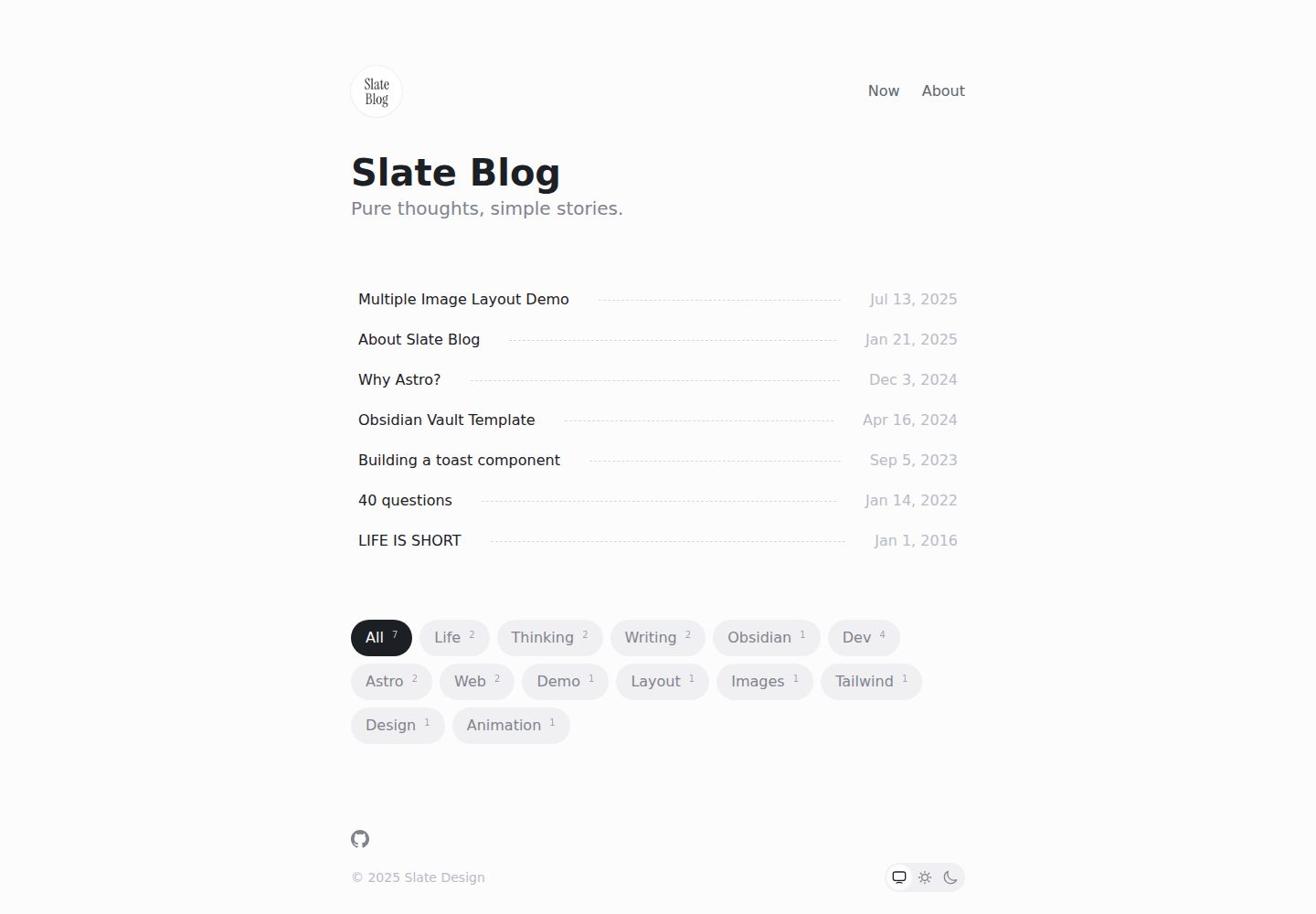
Desktop homepage1 / 3
Desktop captureTop of page
Actual screenshot captured by the server browser.
All pages & views 3
Screenshots show visual appearance; interactive behavior may differ.
Recorded 2026-09-30View source
What stands out
A quick read of the recorded project description.
Posts are stored as Markdown/MDX in src/content/post, with file names mapping to URL paths
Centralized configuration in slate.config.ts at the project root for site, theme, social links, search, and subscription options
Supports light and dark modes, tag filtering, RSS subscription, Algolia search, and SEO optimization
Optional Now/About pages and a “Read with ChatGPT” entry; deleting the corresponding files disables them
Supports container syntax, LaTeX math formulas, image captions, and code highlighting themes that follow light and dark modes
Template Details
Slate blog is a content-focused minimal blog theme built with Astro, paired with React, TypeScript, Tailwind CSS, and the Radix UI color system. Posts live in the src/content/post directory, support Markdown and MDX, and use the file name as the URL path. The theme centralizes configuration in slate.config.ts at the project root, covering site information, theme mode, avatar, social links, footer, reading time, last modified time, related posts, reading progress, progressive blur, a ChatGPT reading entry, Algolia search, and Follow subscription verification.
On the content side, the homepage always provides tag filtering. Related post recommendations are off by default; when enabled, they are calculated with 70% weight on tag overlap and 30% on publication time proximity. Article navigation activates automatically when section headings are present. The mobile table-of-contents dialog supports closing via overlay, the Escape key, focus restoration, and reduced-motion preferences. Reading progress controls only the circular indicator; when progressive blur is disabled, the floating heading still appears and falls back to a semi-transparent background with standard background blur.
For optional pages, src/content/now.md and src/content/about.md control the /now and /about pages and their navigation entries respectively; deleting the corresponding file removes the route, navigation, and sitemap address. Both share the same Markdown rendering pipeline as posts, supporting code blocks, tables, math formulas, container syntax, and image captions. When readWithChatGPT is enabled, it opens chatgpt.com in a new tab with a prefilled prompt carrying the article's canonical link; the theme itself does not call the ChatGPT API or send credentials.
Usage limitations and notes: fields such as site, title, and description in the theme configuration must be filled in according to the actual deployment. Algolia search requires deploying the site first and applying to Algolia for an apiKey, then redeploying after configuration. Follow subscription verification requires registering a Follow account, deploying the site, adding the RSS link in Follow, and redeploying. The repository uses the MIT license, permitting free use, modification, commercial use, and distribution of this version of the code, provided the copyright notice and license notice are retained when distributing. Third-party assets such as demo images, fonts, and icons must be checked separately under their respective licenses. External services such as domains, hosting, databases, payments, or AI may incur additional charges.
AstroBlog
Is it right for your project?
Use Cases
- Personal technical blogs or writing sites that need a minimal reading experience and a Markdown/MDX writing workflow
- Users who want to manage notes with tools like Obsidian and publish them as blog posts
- Blogs that need tag filtering, related post recommendations, RSS subscription, and Algolia search
- Sites that need reading aids such as light and dark modes, a mobile table of contents, and reading progress
- Deployment scenarios where optional pages and features are toggled via a config file without modifying core code
Suitable For
- Writers who prefer a minimal, content-focused design
- Developers using Astro who want to quickly set up a blog
- Blogs that need mixed Chinese and English typesetting, Pangu spacing, and code highlighting
- Independent blogs that need RSS, Algolia search, and basic SEO configuration
- Users who accept the MIT license and independently verify third-party assets and external service costs
Getting started & customization
Use these recorded setup notes alongside the repository instructions for your chosen version.
- 1
Start the local server with npm run dev, yarn dev, or pnpm dev, and build with the corresponding build command
- 2
Fill in site information such as site, title, and description in slate.config.ts at the project root
- 3
Algolia search requires deploying the site first and applying for an apiKey, then redeploying after configuration
- 4
Follow subscription verification requires registering an account, deploying the site, adding the RSS link, and redeploying
- 5
Deleting src/content/now.md or src/content/about.md disables the corresponding page along with its navigation and sitemap address
License & source material
Usage conditions & limitations
Free to use · keep license noticeThis entry covers the free version in the public repository under the MIT license; the free scope is the code of this version and does not imply that external services or third-party assets are free.
Must comply with when using
- Free use, modification, commercial use, and distribution of this version of the code are permitted.
- When distributing copies or substantial portions of the code, retain the original author's copyright notice and the full MIT license notice.
- The code is provided as is; warranties and limitations of liability are governed by the original license and applicable law.
Additional costs & items to verify
- Algolia search is optional and requires deploying the site first and applying to Algolia for an apiKey, then redeploying after configuration; without applying, this search feature is unavailable.
- Follow subscription verification is optional and requires registering a Follow account, deploying the site, adding the RSS link in Follow, and redeploying; it depends on an external service.
- “Read with ChatGPT” is an optional entry, off by default; when enabled, it redirects to the external chatgpt.com and is subject to its privacy policy. The theme itself does not call an API or send credentials.
- If the repository is forked and set to private, it loses its association with the upstream repository by default; the latest version must be synced manually via pnpm sync-latest.
- Demo images, fonts, icons, and other third-party assets must be checked under their respective licenses and cannot be judged solely by the code's MIT license.
- External services such as domains, hosting, databases, payments, or AI may incur additional charges.
View Original Text Basis
Permission is hereby granted, free of charge
Original License Text
Apply for an `apiKey` at [algolia](https://docsearch.algolia.com/apply/)
Original README
Register a [follow](https://follow.is/) account
Original README
Enabling `readWithChatGPT` opens `chatgpt.com` in a new tab
Original README
https://github.com/SlateDesign/slate-blog/blob/main/LICENSE.txthttps://github.com/SlateDesign/slate-blog/blob/main/README.mdIf you fork the repository and set it to private, you will lose the association with the upstream repository by default.
Original README
Compiled by DeepSeek based on repository license and README ·2026-10-01. Results only cover the materials read; dependencies, images, fonts, and subsequent term changes are subject to their respective original texts.
Project checks & description sources
Template Information
- Source platforms
- GitHub
- Documentation and maintenance reference score
- More documented · 91 / 100
- Technologies
- Astro
- Website type
- Blog
How this score is calculated
Our heuristic uses license records (up to 30), a demo link (12), a preview (10), stars (15), recorded maintenance (15), description completeness (8), feature records (5) and classification data (5). It is not a code, security or performance test, or a Google score. A link does not establish tested functionality.
What to verify for this project
- Repository update recorded
- 2026-09-20
- Screenshot last checked
- 2026-10-01
A demo link is listed. Check it with your own content and viewport sizes; its presence does not confirm that forms, authentication or payments work.
The catalog identifies Astro as the primary stack. Check the actual dependency manifest and lockfile for versions and hosting requirements. These notes use recorded metadata, not a code audit or a deployment test.
Use a selection guide →How this description was prepared
AI-assisted description based on catalog records and repository material. Repository authors are not automatically the reviewers of this description.
Automatically checked against source and license rules; no manual editorial review.
Inspect the recorded source material
SHA-256: 81abe2de832afa804fbed88daebbc3496fa66246ccbf2f3b94863b85d100d3d9
2026-10-01T13:57:49.597Z
Source file / repository# Slate blog
English · [中文](./README-zh_CN.md)
## Why We build it?
We love writing and sharing, and we appreciate well-crafted products. That’s why we created this minimalist theme, focusing on content itself, providing a smooth and pure writing and reading experience. Built on the latest framework, it’s faster, lighter, and more efficient.
It also works seamlessly with [Obsidian](https://obsidian.md/), helping you turn your notes into published posts effortlessly.
## ✨ Features
- Minimalist design theme
- Mobile-first responsive layout
- Light and dark mode support
- Quick setup with zero configuration required
- Draft mode with local preview and automatic production filtering
- Built-in RSS feed with Follow authentication
- Integrated Algolia search functionality
- Comprehensive SEO optimization for better search rankings
- Horizontal multi-image layout with automatic column distribution
- Pangu spacing for mixed Chinese, Latin text, and numbers
- Code highlighting that follows the light and dark themes
- Tag filters on the home page and optional related-post recommendations
- Active desktop navigation and an accessible mobile table of contents
- Circular reading progress with a progressive-blur floating title
- Optional Markdown-powered Now and About pages
- Optional “Read with ChatGPT” action
## 🪜 Framework
- Astro + React + Typescript
- Tailwindcss + @radix-ui/colors
- Updated to [Tailwind CSS v4.0](https://tailwindcss.com/blog/tailwindcss-v4) (Jan 10, 2025)
- Docsearch
## 🔨 Usage
```bash
# Start local server
npm run dev
# or
yarn dev
# or
pnpm dev
# Build
npm run build
# or
yarn build
# or
pnpm build
```
> If you fork the repository and set it to private, you will lose the association with the upstream repository by default. You can sync the latest version of Slate Blog by running `pnpm sync-latest`.
## 🗂 Directory Structure
```
- plugins/ # Custom plugins
- src/
├── assets/ # Asset files
├── components/ # Components
├── content/ # Content collections and optional pages
│ ├── now.md # Optional /now page; delete to disable
│ ├── about.md # Optional /about page; delete to disable
│ └── post/ # Blog articles
├── helpers/ # Business logic
├── pages/ # Pages
└── typings/ # Common types
```
> Articles are stored in the `src/content/post` directory, supporting markdown and mdx formats. The filename is the path name. For example, `src/content/post/my-first-post.md` => `https://your-blog.com/blog/my-first-post`.
### Optional Now page
`src/content/now.md` enables the `/now` page and its Header navigation entry. The included example means this is enabled by default. It uses the same Markdown pipeline and typography as blog articles, including code blocks, tables, math, containers, and image captions. Delete `src/content/now.md` to remove the navigation entry, route, and sitemap address.
### Optional About page
`src/content/about.md` is the exact switch for the `/about` page and its Header navigation entry. The repository template includes this file, so About is enabled by default. `/about` uses the full article/Now Markdown pipeline and typography, including code blocks, tables, math, containers, and image captions. Deleting `src/content/about.md` removes the About navigation, route, and sitemap URL without disabling Now.
## Configuration
Theme configuration is done through `slate.config.ts` in the root directory.
| Option | Description | Type | Default |
| --- | --- | --- | --- |
| site | Final deployment link | `string` | - |
| title | Website title | `string` | - |
| description | Website description | `string` | - |
| lang | Language | `string` | `zh-CN` |
| theme | Theme | `{ mode: 'auto' \| 'light' \| 'dark', enableUserChange: boolean }` | `{ mode: 'auto', enableUserChange: true }` |
| avatar | Avatar | `string` | - |
| sitemap | Website sitemap configuration | [SitemapOptions](https://docs.astro.build/en/guides/integrations-guide/sitemap/) | - |
| readTime | Show reading time | `boolean` | `false` |
| lastModified | Show last modified time | `boolean` | `false` |
| relatedPosts | Related-post recommendations | `{ enabled?: boolean, limit?: number }` | `{ enabled: false, limit: 3 }` |
| readingProgress | Show circular progress in the floating article title | `boolean` | `true` |
| progressiveBlur | Use a fading blur behind the floating article title | `boolean` | `true` |
| readWithChatGPT | Show an external “Read with ChatGPT” action | `boolean` | `false` |
| algolia | Docsearch configuration | `{ appId: string, apiKey: string, indexName: string }` | - |
| follow | Follow subscription authentication configuration | `{ feedId: string, userId: string }` | - |
| footer | Website footer configuration | `{ copyright: string }` | - |
| socialLinks | Social Links Configuration | `{ icon: [SocialLinkIcon](#SocialLinkIcon), link: string, ariaLabel?: string }` | - |
### SocialLinkIcon
```ts
type SocialLinkIcon =
| 'dribbble'
| 'facebook'
| 'figma'
| 'github'
| 'instagram'
| 'link'
| 'mail'
| 'notion'
| 'rss'
| 'threads'
| 'x'
| 'youtube'
| { svg: string };
```
### Algolia Application
1. Deploy your site first
2. Apply for an `apiKey` at [algolia](https://docsearch.algolia.com/apply/)
3. After successful application, configure `algolia` in `slate.config.ts`
4. Redeploy your site
### Follow Subscription Authentication
1. Register a [follow](https://follow.is/) account
2. Deploy your site
3. Click the `+` button on Follow, select `RSS` subscription, and enter the `rss` link (usually `[site]/rss.xml`, where `site` is the value of `site` in `slate.config.ts`)
4. Redeploy
## Article Frontmatter Description
| Option | Description | Type | Required |
| --- | --- | --- | --- |
| title | Article title | `string` | Yes |
| description | Article description | `string` | No |
| tags | Article tags | `string[]` | No |
| draft | Whether it's a draft. When not provided or `false`, `pubDate` must be provided; drafts are only visible in local preview | `boolean` | No |
| pubDate | Article publication date | `date` | No, required when `draft` is `false` |
**For more details, check the `src/content/config.ts` file**
Tags are always available as filters on the home page. When related posts are enabled, tag overlap contributes 70% of the recommendation score and publication date proximity contributes 30%.
```ts
export default defineConfig({
// Other options...
relatedPosts: {
enabled: true,
limit: 3,
},
});
```
Desktop and mobile article navigation are always enabled when an article has section headings. The mobile dialog supports overlay dismissal, Escape, focus restoration, and reduced-motion preferences.
`readingProgress` controls only the circular indicator. When `progressiveBlur` is `false`, the floating title remains visible and falls back to a translucent background with ordinary backdrop blur.
Enabling `readWithChatGPT` opens `chatgpt.com` in a new tab with the canonical article URL in a prefilled prompt. The theme does not call the ChatGPT API or send credentials; following the link leaves your site and is subject to ChatGPT's privacy policy.
### Example
```md
---
title: 40 questions
description: This repo maintains revisons and translations to the list of 40 questions I ask myself each year and each decade.
tags:
- Life
- Thinking
- Writing
pubDate: 2025-01-06
---
```
## Markdown Syntax Support
In addition to standard Markdown syntax, the following extended syntax is supported:
### Basic Syntax
- Headers, lists, blockquotes, code blocks and other basic syntax
- Tables
- Links and images
- **Bold**, _italic_, and ~strikethrough~ text
### Extended Syntax
#### Container syntax
Using `:::` markers
```md
:::info
This is an information prompt
:::
```
#### LaTeX Mathematical Formulas
- Inline formula: $E = mc^2$
- Block formula: $$ E = mc^2 $$
#### Support for image captions
```md

```
## Updates
### Version 1.8.0
- Added an optional, complete-Markdown About page driven by `src/content/about.md`
- Shared exact file discovery between the independent Now and About pages
### Version 1.7.0
- Added an optional, complete-Markdown Now page driven by `src/content/now.md`
- Added conditional Header navigation and route generation with file-based opt-out
### Version 1.6.0
- Added active desktop section navigation and an accessible mobile contents dialog
- Added circular reading progress and default-on progressive blur
- Added an optional external “Read with ChatGPT” entry, disabled by default
### Version 1.5.0
- Added fixed-enabled tag filtering on the home page
- Added optional related-post recommendations, disabled by default
- Added deterministic recommendation scoring and localized discovery states
### Version 1.4.0
- Replaced Heti with Pangu and removed the article-page runtime CDN dependency
- Added light and dark code highlighting themes
- Improved mobile heading sizes and overflow handling for long code, tables, and images
### Version 1.3.0
- Support Social Links
- Optimize RSS article detail generation.
- Add a script to synchronize the latest slate-blog version
### Version 1.2.0
- Support i18n (English and Chinese)
- Fixed known issues
### Version 1.1.1
- Fixed known issues
### Version 1.1.0
- Upgraded to support [Tailwind CSS v4.0](https://tailwindcss.com/blog/tailwindcss-v4)
- Added dark mode support
- Fixed known issues
## Blogs using this theme
Here are some blogs built with this theme:
- [Bluepikachu](https://bluepika.life/)
- [Chieh的随笔](https://blog.chieh.nyc.mn/)
- [Feazur](https://blog.feazur.com/)
- [Folay's Blog](https://www.folay.top/)
- [LeeZhian](https://leezhian.com/)
- [nmsisecho](https://astro-example-liard.vercel.app/)
- [Randy's Blog](https://lutaonan.com/)
- [Sulle orme dell'Alfiere Nero](https://sulleormedellalfierenero.pusi77.eu.org/)
- [三墩冰室](https://lmd.gg/)
- [小企鹅爸爸的生活](https://www.penguinpapa.life/)
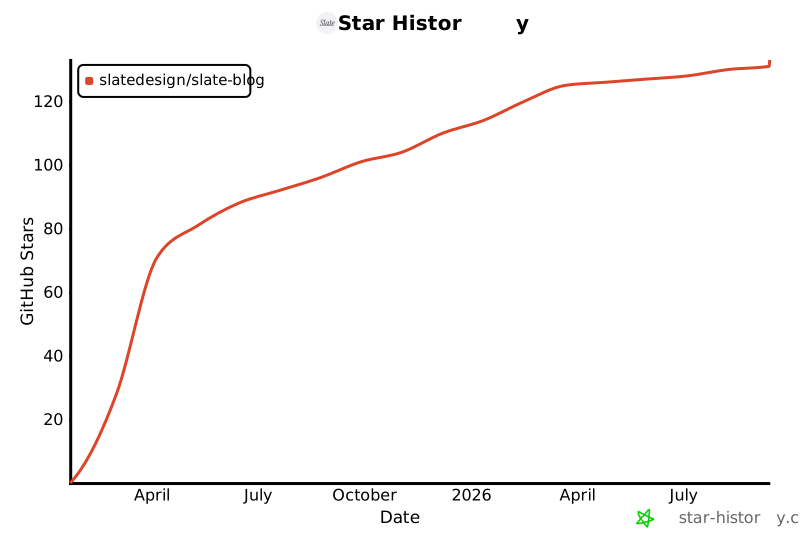
## Star History
[](https://www.star-history.com/#SlateDesign/slate-blog&Date)
Explore similar templates
Compare previews and descriptions within the same stack and category.

astrowind
AstroWind is a free, open-source Astro starter theme using Astro and Tailwind CSS, released under the MIT license.
Astro · Blog

astro-paper
AstroPaper is a minimal, responsive, accessible, and SEO-friendly Astro blog theme. Articles are stored as Markdown/MDX in src/content/posts/, with subdirectories affecting URLs.
Astro · Blog

fuwari
Fuwari is a static blog template built with Astro and Tailwind CSS for personal blogs. It manages posts as Markdown files in src/content/posts/, with frontmatter for title, date, description, cover, tags, categories, draft status, and language.
Astro · Blog

Firefly
Firefly is a clean personal blog theme forked from Astro and Fuwari, offering four background modes, single/double sidebar and list/grid layouts, Pagefind client-side full-text search, and a six-language UI.
Astro · Blog

astro-theme-cactus
Astro Cactus is an Astro-based blog and portfolio theme that uses Markdown/MDX content collections to manage posts, notes, and tags, with frontmatter type-checked by a schema.
Astro · Portfolio

astrofy
Astrofy is a free and open-source personal portfolio website template built with Astro and TailwindCSS, with built-in blog, CV timeline, project showcase, store, and RSS feed modules.
Astro · Portfolio